Sunday, June 23, 2013

Google Plus Photos NOT

Google is clearly pushing everybody to Google+ for everything and making things "pretty" in the move. The photo feature in Google+ was pretty awful at first. A recent change got the presentation much "prettier" but still there's a tremendous amount of function and information that is simply missing.

Start rant...

When you browse to http://picasaweb.google.com be certain that you don't end up here.


Notice that little yellow banner. "Click here to go back to Picasa Web Albums." I thought that that's where I told it to go.

Anyway...

Here's my Picasaweb landing page.


Three rows of data. Each album has its name, the date of the album and the number of photos in it. The right column is pretty well wasted. I have to click 'Show All Albums" to see the rest.

Here's my Google+ Photos landing page.


Sorry. No albums here. "Highlights" Not your highlights. Google's. Go figure. The first photo in my "Highlights" capture above is more than 6 years old. These "Highlights" change with your activity. After working on this blog post the first highlighted photo is from my blog. Almost 5 years old.

Click on "Albums."


There! But wait. Where are the album dates? And the loss of that information doesn't even give me another row of albums. There are more albums in each row without the wasted right column.

So let's go look at an album. Here's a Picasaweb album.


15 pictures on the page. 123 pixels of header. Lots of white space. You can see that I geotag my photos. Picasaweb collects this and gives me a nice map of the entire album.

Click on "View map" and ...


By the way, that URL is shareable. Nice.

Here's the Google+ album page.


12 full pictures and most of 4 more. 234 pixels of header; 100 pixels more than Picasaweb. No album map. I can't find one at all. And you can see that I requested to "Show location data" but there's none on this page. But it is pretty. The presentation of the panorama (automatically created by Google+) is much nicer than Picasaweb.

Why didn't they make the page of all the albums look like this and overlay the text on the album cover photos?

Now here's a photo in Picasaweb.


Wow! There's a map over there. The ">>" near the right column just collapses the right column and doesn't enlarge the photo.

Same photo in Google+.


Hmm. Wonder where that was taken? The photo is much bigger than in Picasaweb though. They put the caption over on the right to gain that space. But they sure left a lot of dead space below the caption. Maybe they needed the room for the +1 button.

Maybe if I click on "Photo details."


Finally. There's the geotag data. The map has a much more appropriate level of zoom than Picasaweb. And there is the exif data. But wait. That doesn't seem like all the exif data.

Back to Picasaweb and click on "full details page."


That's more like it.

I could go on but you get the picture.

I'm looking forward to Google fixing these and the rest before they "Spring Clean" Picasaweb.

I don't have the patience to even start on the topic of sharing these albums. Maybe next time.

Saturday, June 15, 2013

Google Docs Gadget

I'm a big user of Google Docs Drive. And a Google Apps customer. I've been using the Google Labs Google Docs Gadget in my e-mail instance for years.

The Google Docs Gadget is recognized across the web as a valuable Lab tool. For example, this article includes it in its list of "Recommended Gmail & Calendar Labs."


As described in this document the Labs gadget:
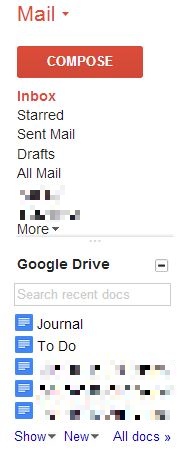
Adds a box in the left column which displays your Google Docs. Shows recent docs, starred docs, and has fast search.
Really nice functions. Saves you from having to open a new Drive window just to open, create, or search for a document.

Every now and then something went "bump" in the background and it wouldn't work for a while. Then without a word it'd start back working.

It was useful enough to put up with this level of support.

Until...

This spring the search function began getting errors. I looked at it and the problem was just that the syntax for the URL for Google Drive's search had changed. Looked like a trivial change so I thought I'd just wait and it'd be fixed when they got around to it.

Then last week the gadget disappeared from my e-mail. And from the Google Labs page. It looks like some of Google's "Spring Cleaning" had killed the Lab gadget.

A quick search of the Google Forums showed that I was not alone. One of the posts even had a quick work-around including how to implement it.

I copied his XML and made minor changes. Then I uploaded it to my web site and added it as a gadget via URL.

Here's what my version looks like:


Here's the xml:


Works perfectly, for now.

Sunday, June 09, 2013

You're Holding It Wrong

Remember back in 2010 when there was the big hoopla over the iPhone 4's antenna? And Jobs' infamous quote "Just avoid holding it in that way,"

While it was clearly an issue with the iPhone 4, the phenomenon affected other phones as well.

Recently I was playing with the GPS in my Skyrocket. I noticed that the accuracy varied significantly depending on where I held the phone.

In this screen capture I was holding the phone at the bottom. And, yes, I was on an airplane.


The accuracy is 10 feet. Pretty good at 40,000 ft. and 470 MPH.

Then I moved my hands to cup the phone at the top. Accuracy quickly dropped to several hundred feet.


The number of satellites in use didn't decrease and the signal to noise ratio didn't change dramatically.

I wouldn't jump to the conclusion that this change in hand position affects the cellular signal in the same way. Still it is interesting.

Sunday, May 19, 2013

Terms of Service Tracker

I'm not paranoid about Terms of Service but it is interesting to see what changes are happening in that area. I used to subscribe to the RSS feed for TOSBack but it dried up almost 2 years ago. I recently came across Docracy.

Here's an example of the documentation they provide:

Sunday, May 12, 2013

Don't You Love AT&T/Comcast/Verizon

One morning recently my wife was complaining (rightly) about technology. She uses a Jensen Docking Speaker System with her iPhone for music in the morning. It would stream an Internet radio station for a few minutes then quit for a few minutes. Of course I "worked" on it but I couldn't make it better so she just turned it off.

When I got to the den and started checking my e-mail and RSS feeds, I noticed that the Internet would run for a few minutes then quit for a few minutes. Even DNS lookups would fail. Seemed vaguely familiar.

This persisted throughout the day. The utility companies are in the process of relocating the utility poles on my street so I assumed that AT&T had rerouted my DSL through a congested switch point.

I prided myself in being unusually tolerant but my patience ran out mid-afternoon. I called AT&T's DSL Repair Service. Luckily I had their number in my address book since I couldn't look it up online.

The first customer service representative I spoke to was "Derek" in India. I simply hung up on him. When I called back I got Mario in California. I explained what I'd observed and asked him to check for problems in my area.

Yeah, you guessed it. There were no problems noted in my area. So off he went after my equipment. His eventual diagnosis was that my 9 year old Westell DSL modem was defective and he'd be glad to replace it for $90. I declined.

Amazingly the defective modem healed itself overnight and now my Internet access is fine.

But the point here is how much is such poor operational information costing the carriers in their customer service departments? Wait, though. You and I are paying for the cost of the poor operational information in our ever increasing rates. And since the carriers usually have a government granted monopoly they really don't care.

Sunday, May 05, 2013

YouTube’s HTML5 Player

I'd forgotten about YouTube’s HTML5 player until I came across this Lifehacker post. If you're using a "modern" browser this should work fine.

To turn it on, go to http://www.youtube.com/html5 and opt in.


That was easy.

Sunday, April 28, 2013

More Jelly Beans

Earlier this year I upgraded my Captivate to Jelly Bean  (4.2.1) using Cyanogen Mod 10.1. As expected with Cyanogen it has been rock solid. I even considered switching back to the Captivate for my every day phone. Lack of LTE and the inferior camera kept me on the Skyrocket.

AT&T finally announced the Skyrocket Jelly Bean upgrade (with Butter) on April 10, 2013. Samsung posted detailed instructions.

Similar to the Skyrocket upgrade from Gingerbread to Ice Cream Sandwich, the Jelly Bean upgrade was only available using Samsung's Kies.

As called for, I upgraded Kies. As I read and re-read the upgrade instructions the Jelly Bean update downloaded on its own. As this was the same laptop I used for Gingerbread to Ice Cream Sandwich all the necessary drivers loaded cleanly.

Unlike the Gingerbread to Ice Cream Sandwich upgrade I didn't remove the SIM card nor the microSD card. The FAQ specifically said that you could leave them in. I had no problems with either. I did not lose my internal SD storage either. I did not do a factory reset before nor after the upgrade although that is usually a good idea.

The upgrade went perfectly and took about 25 minutes. The laptop is an old IBM ThinkPad T43 and I could see the processor busy most of the time. I'd expect it to be quicker on a more powerful PC.

After the upgrade the first boot went through the normal "optimizing" phase and sometimes I'd see an app start slowly the first time. I presume that this is the Just In Time (JIT) compilation happening.

The Jelly Bean for the Skyrocket is 4.1.2 but I haven't noticed any of the differences between this and the Captivate's 4.2.1. As expected all of the Samsung customizations are carried forward, e.g. TouchWiz and the camera. And you lose a Jelly Bean feature here and there like the widgets on the lock screen. Maybe I just haven't figured that out.


You might want to screenshot your home screens before you start as the upgrade resets them. It also forgets ringtones, etc. Most apps kept their settings.

Jelly Bean is so nice. Here's a screen shot of the in call screen. iPhone users, eat your heart out.


And Google Now, just wow!


I had Googled "Happy Daze" on my laptop looking for the hours of a local hamburger joint. Look at what Google Now did with that signal.


Battery life? I don't know. It's so erratic. You can see my day by day usage here.

There's a lot of whining in the Android forums about the carriers not upgrading their older phones. While all of us geeks want the latest bits as soon as they are available, AT&T and Samsung have upgraded both the Captivate and Skyrocket twice in less than 2 years. I really can't complain about that.

Sunday, April 21, 2013

2013 Honda i-MID

I knew in-car technology was going to come to this.

FASTOY X came to a sudden end recently in a pile of shattered glass and airbag dust.

Since I didn't have the luxury of picking the timing, my shopping for a replacement was somewhat shortened. Buy as usual I headed to my faithful Honda dealer.

I came home with FASTOY XI, a 2013 Honda Accord EX-L coupe with six-speed manual transmission.

I could write a book about the new FASTOY but for the moment I want to focus on one feature, really on one part of one feature.

Several of the new Hondas have Intelligent Multi Information Display (i-MID).

The i-MID interfaces with many of the Accord's systems and communicates it all on one screen. It displays everything from your current MPG to what's on the radio to incoming text messages.

But this post is all about one other capability of the i-MID. Honda has externalized many of the car's settings to the i-MID so you can configure how things operate that have never before been accessible.

I downloaded the owner's manual and captured the i-MID settings screens. There are 10 of them!


The groups are: System Settings, Vehicle Settings, Audio Settings, Info Settings, Phone Settings, and Camera Settings.

Sunday, April 14, 2013

iPad vs. Data Center

Given that I call myself an IT architect, the headline caught my eye.
How the iPad ruined the lives of IT architects
The author describes how consumer technology has affected data center expectations.
In current times however, we’re being asked to regularly provide levels of solution availability that until recently were reserved for the largest of enterprises ...
This comes on continuing escalation of complexity in our solutions. I recall a discussion with the CFO of a Fortune 100 company about her expectations of IT. I related to her the increased complexity of an SAP TCP/IP solution compared to the previous CICS SNA solution. She was understanding of the challenges but that's where we had to go. And not just with the same availability but better.

What has caused this elevation of expectations?
Today ... the consumerisation of high quality IT has happened and is setting the standard for business IT. ... As a result of this turnaround, the role of an IT architect has got even harder, especially in the small- and mid-enterprise sectors where arguably the pace of IT change has never been faster and the lack of IT governance has never been lower.
I think the last point is also key. In my recent experience in medium enterprises (sub $1B) I've found that the lack of governance is a major problem.

Back to technology...
With their iPads always working and Facebook always being online, business users increasingly have the same expectation of the IT systems they use.
One of the business requirements I recently encountered was a CEO who wants to be able to walk into a customer's conference room and project that customer's business real-time. Stop for a minute and think of all the IT capabilities required to do that. Yet Facebook does it all the time.
Helping business users understand, justify, and quantify their requirements is the skill of a good architect, and is a process we can still use to define availability needs even if it’s to show that ultra-high availability needs bring ultra-high costs.
To the aforementioned CEO, it's just the cost of doing business. The challenge for the architect is "selling" that requirement through the organization.
(T)he problem architects now have is the delivery of infrastructures to support these expected levels of 24/7 availability. Quoting 99.5per cent availability SLAs these days suggests to me that we want the business to feel grateful for whenever the solution is available.
The CEO won't "feel grateful for whenever the solution is available."
(T)he answer ... seems to be for everyone but the richest organisations will almost certainly be the cloud. That brings a new and bigger challenge for the IT architect, how do we learn to trust a face-less cloud service provider?
This is why I think of myself a a Chief Worrier.

Sunday, April 07, 2013

Windows Phone 8 EOL

Recently Microsoft announced the end-of-life for Windows Phone 8 and established an 18 month life cycle for the platform's operating systems.
Microsoft will make updates available for the Operating System on your phone, including security updates, for a period of 18 months after the lifecycle start date. Distribution of the updates may be controlled by the mobile operator or the phone manufacturer from which you purchased your phone. Update availability will also vary by country, region, and hardware capabilities.
At first blush this is bad.

But it's not. It's great!

Mary Jo Foley's column assesses this. Her position is that what this means is that there is going to be a continuum of Windows Phone operating system versions.

She bases this on the Microsoft Windows Phone team's tweet:
As we’ve said, one benefit of moving to the Windows core is that Windows Phone 8 is upgradeable.
Mary Jo reads this as Microsoft will be providing in place upgrades to the Windows Phone operating system regularly, more frequently than 18 months.

Obviously some equipment may not be capable of newer versions but given that Windows 7 and Windows 8 lowered the minimum requirements even this may not be a problem. We still have to worry about the carriers.

Let's hope Mary Jo is right.

Sunday, March 31, 2013

Click to Play

With all the reports of vulnerabilities of various browser plugins, e.g. Java and Flash, my interest was piqued when I read Brian Krebs post on "Click to Play."

To turn it on in Chrome, go to Settings and click on "Show advanced settings..." at the bottom of the page. Scroll down to "Privacy" and click on the "Content settings..." In the pop-up window scroll down to "Plug-ins" and check "Click to play." Don't forget to click the "Done" at the bottom.


Seems like they could have made this easier.

When you browse to a site that has content blocked by "Click to Play," an icon will appear on the far right side of the address bar that allows you to add an exception for the current site.

Yeah, but...

Lots of web sites use Flash where you don't even know it.

Like this one.


Let's just say that's not "spouse friendly." I can put up with that but I don't think I'm going to roll it out to the rest of the house.

Sunday, March 24, 2013

To Be Fair

To be fair, Google's Drive service went down recently as did Microsoft's Azure storage service.

To be fair, this is what I got when I went to Microsoft's Dashboard:


To be fair, this is what I got when I went to Google's Dashboard:


To be fair, Microsoft's lasted 12 hours compared to Google's 2+ hours.

To be fair, both probably had lingering effects.

To be fair, this is what life in the cloud is going to be like for the foreseeable future.

Sunday, March 17, 2013

Web Collaboration

Recently one of my friends posted on Facebook:
Just as an FYI ... you can use Office Web Apps within the browser when logged in using your Microsoft ID. I use it to collaborate on true Office documents all the time - even machines that don't have Office installed. It's everywhere I might need it.
We have an ongoing discussion in our work group over whether to use Microsoft Office documents or Google Docs.

Maybe this was a godsend.

To test this I uploaded a .docx file to my Skydrive and edited it with Word Web App. I shared it with a co-worker. We were both able to get into edit mode on this document and the Word Web App told us that there were 2 concurrent editors.

But my co-worker couldn't see my changes until I saved it. Then since he had changed the same paragraph when he attempted to save it the save failed.

Why?

Here's the answer in an article from CBS News.
Co-authoring in Word is more or less the same as editing in Google Docs, but there are some key distinctions. Getting started is just as simple: Open the doc and start working. Word keeps you informed about who is also working on the document, and you can also check the Other Authors button in the ribbon's View tab to see who else is in the metaphorical editing room with you. Whatever paragraph you're actively working in is locked, so others can't accidentally create conflicts with what you're doing. 
One way that Word is different than Google Docs is seeing your co-author's edits. Rather than having their changes appear instantly (which I do find a bit disorienting), our co-author's changes are only incorporated into your document when he saves his work and then you save yours. When your co-author saves, you get a message telling you that you can save to see the latest updates, so you're never left wondering if there are new updates available.
Here's an article from Redmondmag with the same explanation.
The new document collaboration interface will indicate if someone is working on a document by popping up a screen note. It also marks the section that's being altered. Microsoft calls this approach "coauthoring," but it's not a real-time approach. Users can identify who is modifying which section of a document, but a refresh is required to actually show what was changed. 
If a user edits a document and saves the changes, all of the changes -- including those made by other collaborators -- will be shown at that time. The changes are highlighted in a green screen text.
Close but no cigar.

Sunday, March 10, 2013

Google Latitude

I just look for things to play with.

The Google Maps Android application has Google Latitude integrated in it. On the iPhone there's a separate Latitude app. Latitude is a lot like Find My iPhone but Latitude can keep location history.

On Android you control Latitude from Google Maps.


This takes you to the Latitude screen.


Chose "Location settings" to set it up.


Enable "Report from this device." If you enable "Enable location sharing" you can "Manage your friends" just below. Here you can specify who can see your current location. Your friends can not see your history.

You'll have to keep an eye on this screen. I've noticed that some times an upgrade of the Google Maps application will reset these options.

What do you get for this? Go to http://google.com/latitude to see.


This is 30 days of history. You can click through the timeline and see place by place.

Latitude is fun to play with but you need to carefully consider how much information you want to retain and share. By default Google will notify you of your Latitude settings once a month.

Sunday, March 03, 2013

Lessons from the Cloud

While researching the recent Microsoft Azure Storage outage I came across a presentation by Jason Chan of Netflix. While the topic was "Practical Cloud Security" there were a couple of slides that I thought applied to many organizations' situation.

We all remember how Netflix changed their business model several years ago going from mailing DVDs to streaming video online. This resulted in a 37 fold increase in API requests in one year.


Realistically most organizations don't experience that kind of growth but any organization that plans to grow should look for lessons learned.

Prior to the cloud migration Netflix was running their own data centers. Here's what they were doing in their data centers.


Sound familiar?

I especially like the "snowflake phenomenon" metaphor. That means that everything is a one-off. Nothing is reused.

Netflix's vision was to get out of the data center business and into the cloud.
We want to use clouds, not build them.
Their target patterns were much different.


Think about how this transition will reduce your costs and improve your delivery speed.

Maybe you can stream a movie in your spare time.

Sunday, February 24, 2013

When Clouds Go Thump

Almost a year ago Microsoft's Azure product had a global service failure.

It's happened again.

On the evening of February 22, 2013 Microsoft's Azure Service Dashboard had the following notice:
Storage is currently experiencing a worldwide outage impacting HTTPS operations (SSL traffic) due to an expired certificate. HTTP traffic is not impacted. We are validating the recovery options before implementing them. Further updates will be published to keep you apprised of the situation. We apologize for any inconvenience this causes our customers.
The color is Microsoft's.

Most of the time when I went to the Azure Service Dashboard this is what I got.


Here's what triggered it.


Source: Windows Azure Forum on MSDN

MJFara, one of the posters (identified as a "Partner"), hit the nail on the head.

This is unacceptable, I'm supposed to release an enterprise app on this platform?
Imagine how many phone calls I would have gotten by now from very angry customers.
Sad...
The Register's summary:
It is the opinion of The Register that to have a core service fail in every data center across the world simultaneously is an extremely bad thing to happen to a cloud provider.
From my posting last year:
What I want to highlight is that cloud providers are not immune from service failures. They are likely capable of providing more redundant and resilient services than many organizations can provide.
Unfortunately this failure demonstrates that Microsoft doesn't seem to be "capable of providing more redundant and resilient services."

Go back and reread MJFara's comments. Think about it.

Sunday, February 17, 2013

Powerline Ethernet Adapter II

Recently I mentioned that I was looking to upgrade my Powerline Ethernet Adapter from the Netgear XET1001 to something faster.

BestBuy had the Actiontec PWR500 for $50 so I bought 2 sets.


My installation experience was the same as with the Netgear. Just plug them in and they work. I didn't even have to do anything to the TiVo or router. And the one at the TiVo end is plugged into a power strip.

All 3 lights went instantly green. The Actiontec FAQ says that the "LK" light indicates the transmission speed. Green means "100Mbps+". Nice.

But...

The second set I bought was to replace the TiVo - Wireless-N Network Adapter used on the other TiVo.

In this location the "LK" light is orange. This indicates the network speed is "50-99Mbps". This is noticeably faster than the TiVo wireless adapter and very acceptable for streaming HD content within the house.

To be fair, I tried a Netgear XET1001 in this same location. I wouldn't even connect.

I also want to share the relative size of the Netgear and the Actiontec.

Tuesday, February 12, 2013

Sunday, February 10, 2013

Transcode Contest

After my discovery of Pavtube's HD Video Converter I wanted to compare the transcoding of HD Video Converter and Handbrake.

I took a ripped DVD and transcoded it to iPhone 4.

ProductTimeFile SizeFormatResolution
HD Video Converter9 mins.624,569KBmpeg4640x480
Handbrake46 min.689,317KBH.264720x480

There are a couple of other differences. Handbrake would use the ISO file as input. For HD Video Converter I had to mount the ISO (using Microsoft's Virtual CD-ROM Control Panel) and then navigate to the VIDEO_TS folder and select the VOB files.

Here's what the HD Video Converter output file looked like:


And here's what the Handbrake output file looked like:


Sunday, February 03, 2013

TV Wiring Diagram

I just realized that I hadn't documented my TV wiring in over 5 years.


I've become a big fan of TiVos. They really simplify my TV wiring. Now the cable input goes direct to the TiVo. HDMI means that I can avoid the clutter of S-video and audio cables. I use HDMI connections to the TiVo and the DVD (I still haven't jumped to Blu-Ray).

As discussed earlier I'm using a 85 Mbps Powerline ethernet adapter. It's still working fine but I am watching for a set of the 500 Mbps models.

After Christmas I picked up a 1 TB Western Digital My DVR Expander to add storage to the TiVo.

I've also put a TiVo in the master bedroom. Without a DVD the wiring is even simpler.

For network connectivity I use the TiVo Wireless N Adapter. That does fine for the TiVo electronic program guide but really doesn't have enough bandwidth for streaming to the den TiVo. As a work around I transfer programs and watch them when the transfer is done. A third 500 Mbps Powerline ethernet adapter will go here.