Tuesday, August 31, 2004

USB Flash Drive + CD-RW Functionality

While researching whether I could make a USB flash drive autorun, I came across this from Hagiwara Sys-Com.


Pretty neat! When you insert it, you get 2 drive letters. One looks like your typical USB flash drive but the other looks like a CD drive. That means that Windows will look for an autorun.inf file and execute it. Think about that for a second.

I found it at MobilePlanet for $49.95 + $6.95 shipping. I may have to try one of these.

Sunday, August 29, 2004

How To Safely Store And Manage Passwords

I heard a scary story last night about a guy who had had his eBay and yahoo e-mail userids and passwords cracked. This sent me back on an old quest for a password manager. I ran across this article from Fred Langa and started chasing these programs.

As always, I went to sourceforge.net first. Here I found keepass. I installed it and played with it. It is nice but... You have to copy and paste the userid and password into each field. So I kept on looking.

Looking for how to autorun a USB flash drive (more on this later), I stumbled across KeyPass. This looks so much like keepass but... It has a scripting capability where you can define a hot key (default is CTRL + right click) in the userid field and it will type the userid and password and hit ENTER.

KeyPass is free for up to 10 userid/password combinations and CompUSA has it for $25.93.

I'm almost there. Now if I could just get my USB flash drive to autorun.

Saturday, August 28, 2004

oldversion.com

Don't you wish you still had that old version of QuickTime that didn't have the nag screen? Now you can get it back. Just go to OldVersion.com and see if they have what you're looking for.

Friday, August 27, 2004

Maybe if I just keep my hands in my pockets...

...I won't be at risk for IE vulnerabilities like this. I wonder about something like SecuireIE (I know that's practically an oxymoron). I found this review. Kinda middle-of-the-road. Doesn't sound like $30 worth.

Internet Explorer has a number of security features that users can customize to protect themselves as they surf the Web. Unfortunately many, if not most, of these features are disabled by default and require the user to do some research and some clicking around to find what they need to configure them. Winferno SecureIE automates the default security settings and grants the user significantly easier access to customizing these features as they go. Blocking Pop-up ads, ActiveX scripts and such requires 5 to 10 different clicks in Internet Explorer. SecureIE lets you turn these functions on or off at the click of a button on the main screen. There are also other productivity features that make this a worthwhile product for many users.
Here's another review from PCWorld. Fairly positive. It mentions pluses like tabbed browsing and minuses like "browsing the Internet through a Word document."

I haven't taken this (right click and "Save Target as") apart but it seems to be some of what SecureIE has. The write-up is here. I don't know enough about the registry entries to comment. It has a lot of web sites hard-coded though.

PS. I went to look some more at www.secureie.com. You gotta wonder about an organization that has a link of "javascript:screenShot('secureie_shot_01.aspx', 'SecureIEShot1', 606, 781)." This gives you a window that is taller than a 1024x768 screen and doesn't have scroll bars. Use this link if you want to see the screen shot.

Friday, August 20, 2004

Infected in 20 minutes

The Register recently ran an article on how quickly a new PC will get infected when attached to the Internet. It's worth reading the whole thing but I'm going to excerpt some of it here.

Opinion What normally happens within twenty minutes? That's how long your average unprotected PC running Windows XP, fresh out of the box, will last once it's connected to the Internet.

Problems! Solutions?

The SANS Institute Internet Storm Center released those eye-opening numbers a few days ago. Go take a look at their graph, and you'll note that the current time of 20 minutes is half that of what it was a year ago, although, to be fair, the average has been both higher and lower - over an hour last Christmas and only about 15 minutes in the spring. That hour at Christmas seems like an aberration, and the overall trend has definitely been downward, towards far shorter times before your Windows box is not really yours any longer.

As the SANS Institute notes, 20 minutes is not long enough to update your Windows PC before it is too late. If you take a new PC out of the box, plug it in to the Internet, and power it on, most people (most people? OK - a lot of people. Uh, alright - some people. Erm ... *sigh*. A few people. Happy?) know enough to immediately hie thee over to Windows Update and get the latest patches from Microsoft. Then reboot. And get more patches. And reboot. Ad infinitum. Oh, and don't leave out the latest anti-virus updates either. Gotta have those. Oh oh oh - don't forget Windows XP Service Pack 2, the gotta-have update from Microsoft, which "may be as small as 70 megabytes (MB) or as large as 260 MB".

The SANS Institute tries to help by offering a free download of a great little 1.2 MB PDF wonderfully titled, "Windows XP: Surviving the First Day" (makes XP sound like a communicable disease, doesn't it?
Oh, if you run your PC behind a router/firewall, you've got until you open your first web page or html-enabled e-mail to get the patches on.

Tuesday, August 17, 2004

Go Phish!

Everytime I read something like this, I try to run Firefox again. That gives me fits. First, the google toolbar doesn't install. Yeah, Firefox has it's own version but it's pitiful compared to the real thing. blogger's wysiwyg editor doesn't work with Firefox. My company's Internet employee portal doesn't work. (This isn't really a problem with Firefox. The code just doesn't allow Firefox even though it works.) It goes without saying that Windows Update doesn't work. The web site I'm working on doesn't render the same with Firefox as IE. (Yes, I'm creating it with FrontPage.) The list goes on and on. Help, either in the product or on their web site, is non-existant. The forums are full of coders who wax on about coding but not about how to use the product.

Maybe someday...

Sunday, August 15, 2004

Wal-Mart - Your Technology Center?

Here's an interesting article: Technology Review: An Alternative to Windows (when you get the registration screen, revisit this).

It's fascinating. Not only is Linux competing for the consumer desktop but it's amazing how much technology is showing up in soccer mom kinds of places like Wal-Mart. Just yesterday, I needed (or thought I did) an S-video cable. So like I used to have to do, I went to Radio Shack. Their $20+ price for a Monster cable turned me off so I went literally next door to Wal-Mart. They had the same Monster brand (in less flashy packaging) for $12.

I thought Wal-Mart was going to take away the photo-finishing business from Walgreens but then Walgreens jumped ahead with the Fuji kiosk. This sweet little gadget is single-handedly going to kill film.

The ultimate proof of geekdom reaching the masses was a month or so ago when one of the consumer electronic stores (e.g. BestBuy, CompUSA) ran a NAS (Network Attached Storage) box in their weekly newspaper ad.

Thursday, August 12, 2004

Praying mantises kill their mates after screwing them. Gates keeps them alive.

This is a very interesting article from wired. Like one of my ex-Microsoft friends said, "They don't call us the Evil Empire for nothing."

Sunday, August 08, 2004

Techbargains.com

Techbargains.com - If you haven't found this place you should. I'm very frugal. Ok, I'm cheap. I shop all the Sunday morning newspaper flyers for bargains even when I don't need anything. Today I was looking for an 802.11b networking kit for one of Sha's friends. I found this on techbargains.com.


While it's not free, $20 ain't bad.

While building my HTPC, I used techbargains.com to locate a DVD burner for $49 and an 802.11b USB adapter for $0.

It looks like this guy makes his money by setting up referrer accounts with the retailers. The link above uses a "jump" from his site. I presume that this logs the referral from his site TO the retailer's site and he gets some kind of cut from them. Who cares? We get the low price without having to crawl all over the web or get our fingers black from flipping through all those newspaper flyers!

Monday, August 02, 2004

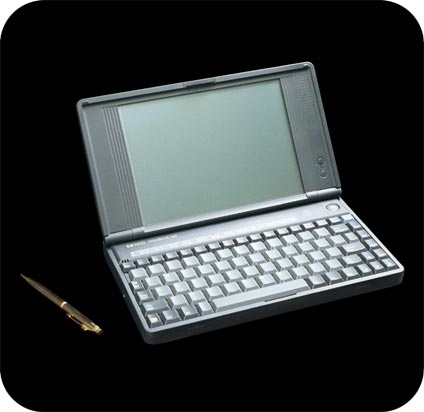
HP Omnibook 300


I've always been a fan of ultra lightweight laptops. This started back in the early 1990s when I bought an HP Omnibook 300. This puppy weighed 3 pounds and ran the new Windows 3.1 and Microsoft Office. It ran a 386SX in real mode, i.e. it didn't use a page file. Windows ran on top of a hacked version of MS-DOS 5 with an early copy of DriveSpace (from MS-DOS 6) which doubled the usable space of the 40 MB (yes, that's not a typo) hard drive. The good news was that none of that 40 MB was used for operating system or application. The operating system and Office were on a 10 MB execute-in-place flash card.

It used a 640x480 monochrome screen and had an open PCMCIA slot for a modem or NIC. It was "instant on" in that it worked much like Windows 2000/XP's hibernate/resume except it didn't dump to the hard drive. Click, it's on. Click, it's off. It had a cute little mouse that popped out on a stick from the side. The battery life was 5+ hours. I could run mine 2 days before charging.

HP's retrospective on it is here.

I went on to IBM ThinkPads including a 560, a 240, a 600, and most recently my beloved X20. My recent company issued laptop from Texas doesn't hold a candle to the ThinkPads. At home, I'm pure ThinkPads with an inventory of 2 760s, 3 600s, and a T20.

Friday, July 30, 2004

gaim


Ok, how many instant messaging ids do you have? I know it's more than one. More than 3? How many clients do you have running right now? I tried a couple of hacks for more than one AIM screen name (supported by AIM now). Then I had to run MSN Messenger (or was that Windows Messenger?). And yahoo? And every now and then, you want to connect to an irc channel?

Why don't you try gaim? It lets you connect to all of these messaging services at once, even with multiple ids on each service.

But wait, there's more!

You can make your buddy window always on top, even transparent if you want. There's even a docking buddy list "crawler." Then there's the concept of "buddy pounces." What these are are actions to take when a buddy changes state. Say you want to send your friend a message when he goes from idle to active but you may not be there. No problem. Just setup a buddy pounce and you're done. The action can be to send a message or to just play a sound on your end.

Chat windows can be tabbed like Mozilla. You can separate them and then put them back together.

The thing I like best is that you can set it up so that every conversation is logged. I can go back and search through my logs for URLs that I've exchanged with my friends.

Did I mention that there are no ads?

There are lots more features but those are the biggies. Go read up on it, download it, and play with it.

Whew!

From eweek.com: Microsoft Readies Next Round of IE Patches

Maybe this will fix this.

UPDATE: Here's the fix.

Sunday, July 25, 2004

Bayesian e-mail Filters

A couple of entries ago, I mentioned Bayesian e-mail filters. I guess I ought to explain that.

I get spam (who doesn't?). I use every trick I can to minimize it. I first send my e-mail through addr.com who run SpamAssassin. From there, I forward it to bellsouth.net who have their own spam filter. Unfortunately, even two spam filters don't eliminate all of it.

I wrote a bunch of rules in Outlook Express but I was always having to tweak them and watch carefully for false positives (good e-mail labeled as spam by my rules).

One day as I was surfing, I came across this concept of Bayesian filtering. There are a couple of good articles here and here.

Bayesian spam filters calculate the probability of a message being spam based on its contents. Unlike simple content-based filters, Bayesian spam filtering learns from spam and from good mail, resulting in a very robust, adapting and efficient anti-spam approach that, best of all, returns hardly any false positives.

The net of this is that Bayesian filtering programs parse each e-mail and score each string (word) as to whether it has appeared in spam before. Before is key as you have to "train" your filter initially by manually identifying e-mail as spam.

I'm running K9 as a e-mail proxy. It is small, only 77K to download. To install it, you have to change your e-mail account properties to point your incoming mail (POP3) server to 127.0.0.1 and make a slight adjustment of your account name. The result looks like this:
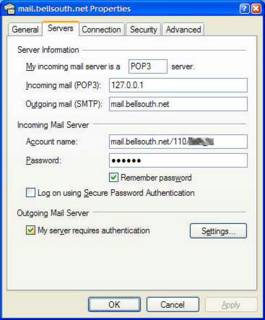

I won't cover all the steps to implement K9 but it isn't tricky. Obviously, it only works on local e-mail programs. It won't work on yahoo, hotmail, or juno for example.

When you're done, each time you check your e-mail, it will be pre-processed by K9 and flagged as spam or not. A simple rule will throw spam into a folder to be spot checked periodically and deleted.

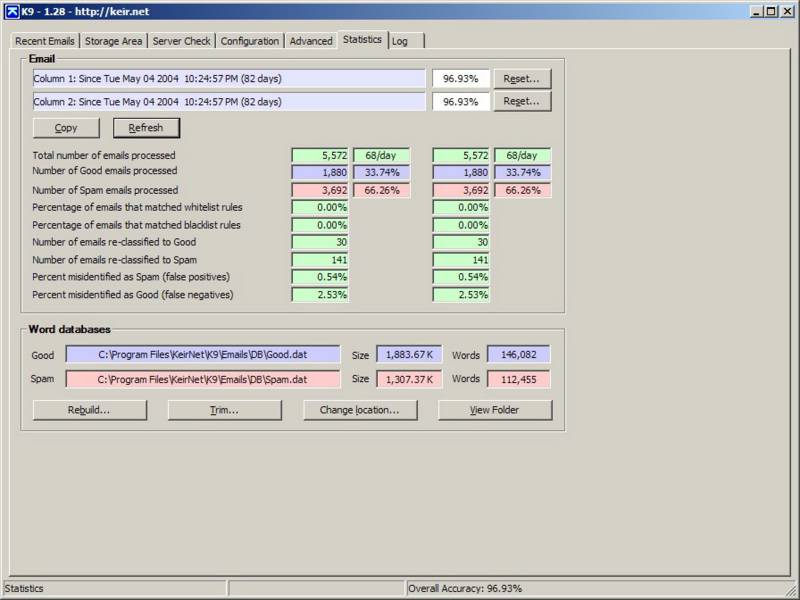
Here's what the results are:
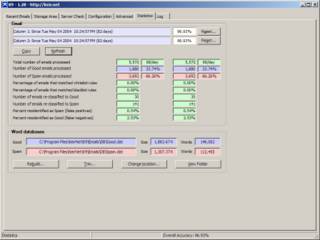

Even after 2 spam filters, 66% of what gets to me is still spam! The good news is that of that, almost 97% is caught by K9. Since these statistics have been running, .54% have been misidentified as spam. Don't depend on that. Always make a quick look-see through the spam folder before you delete it.

Wednesday, July 21, 2004

Lawnmower Game


Does anybody remember the movie "Drowning Mona?" It starred Jamie Lee Curtis, Bette Midler and Danny DeVito. The IMDB write-up for it is here.

In this movie, there's a minor story line about a dog getting run over by a lawnmower. When the movie was released, its web site had a Flash game on it where the objective was to run over the dog with the lawnmower. When you did, the dog yelped, spun around and blood flew all over the place. While driving the lawnmower, you had to avoid obstacles and make sure that you didn't run out of gas. It's funnier than it sounds.

When the movie came out of the theatres (which didn't take long, by the way), they pulled the web site and the game. I looked for it for years and finally found it. I squirreled it away here.

bugmenot

Are you tired of filling out those registration forms? Giving sites your e-mail address and then just waiting for the spam? Here's an answer: bugmenot.com. This is a site where others have logged user-ids and passwords for various web sites that are free but require registration (typically news sources). Be sure and check the "Remember me" box on the site requesting the registration so you won't have to go back to bugmenot.

An explanation of bugmenot is here and here. If you're a Firefox or Mozilla user, there's even an extension for you to use! As of tonight, it has been downloaded  62514 times!

Don't take the instructions too literally. I find that all you need for a URL is just the domain name, e.g. usatoday.com. Also, try it with other non-news sites that you run across that require registration. I've found some interesting ones out there.

Monday, July 19, 2004

2.2 GB Compact Flash Card


Can you believe this? A 2.2 GB Compact Flash card for $145 with free shipping. And to think, I paid almost this much for a 128 MB CF 2 years ago.

I guess you need cards this size with the new 5+ megapixel consumer cameras. 

While I'm aghast, here's one more.


It's a terabyte for $1,199. Just to give you an idea on how big this is, a terabyte will store up to one month of non-stop MPEG-2 video.

It comes with FireWire and USB 2.0 so you just plug it in. You better buy two so you can back one up to the other.

Sunday, July 18, 2004

BloggerBot and Hello

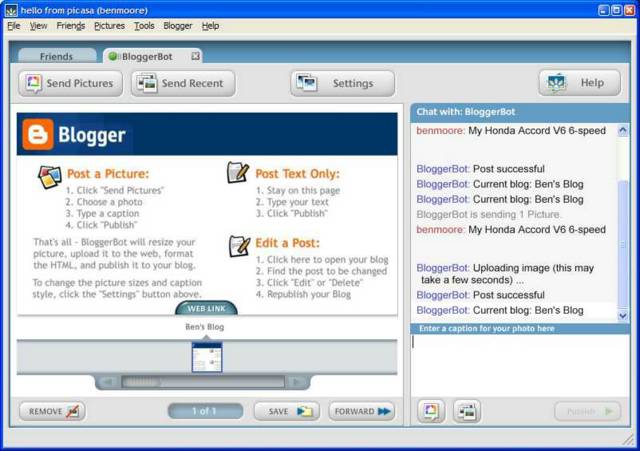
I kept seeing references in Blogger to BloggerBot and Hello. When I followed the links, it took me to a page about Picasa. Picasa is some kind of picture editor/manager that google has bought. I have enough of those hanging around already. What I was looking for is just the "bot" to let me upload/host pictures on Blogger. Today, I ran across this link. Eureka!  Skim over that page and go on to the Download link. You'll have to register and then Hello will download. Here's what Hello's window looks like:


You can pretty much run your blog from here. You can "Post a Picture," "Post Text Only," and "Edit a Post." I've never seen this last screen anywhere else. It pretty much lets you edit your blogs inline.
 
Notice that the images are hosted at blogger.com so you don't have to provide your own web space for images.
 
There's another subtlety that was hard to find. If you have Hello running and restart your browser, you'll get a new icon on your browser's "Standard Bar" toolbar entitled "Share in Hello." Click on that and you can send a screen shot of the current web page to Hello and then on to your blog.

My Honda Accord V6 6-speed


Well, mine looks like that!

I Wuz There!

Kanaan holds off Hornish for win

Friday, July 16, 2004

How Cool Is This?

I've been looking for some kind of Content Management System (CMS) for Dummies. What I'm up to is to give people the ability to update simple content on their web site without having to call or e-mail me. To me, FrontPage is easy to use but I've finally realized that there are one or two people out there that don't use PCs for 16-18 hours per day.
 
I'd searched SourceForge (my favorite place for software) and come up with Plone. This seemed like it would do what I wanted but it was bigger than a breadbox.
 
I kept on looking and stumbled across FlexWindow. All it takes to use this is to send an e-mail. The subject contains the reference to the page that you want to update. The body is the text that you want to put there. That's it.
 
You can make it fancier than that by using html formatting of the e-mail but you don't have to.
 
To see an example, go look at Southaven Elementary. The text between the picture and the horizontal line is the FlexWindow. Go look at the source code and you'll see how they do it. Pretty cool.
 
Now the best part. It's FREE! You can register for a personal account and setup 2 FlexWindows for free. Go try it.