Sunday, June 06, 2010

AT&T Data Plans

I certainly can't say anything that hasn't already been said about AT&T's new cellular data plans.

What I can do is show how it affects me and let you see how you can determine if it affects you.

I went back through my AT&T bills for the last year. Here's where the data usage shows up in my bill. Notice that mine is a BlackBerry feature code so yours may be different.

The simplest thing is to search for "kilobytes".

Here's my data usage month by month.

Clearly I'm way under 200MB per month. My BlackBerry data plan is $30 per month (actually $35 with 200 SMS messages) so it looks like I could change my plan to "DataPlus" for $15 and save $15 per month. Remember that you can't go back to the unlimited (actually 5GB) plan.

There are a couple of observations from looking at the data. My data usage didn't change when I went to 3G with the Bold. My conclusion from this is that the screen on the Bold is still so small that I'm not willing to surf very much on the phone. A second observation (really a question) is why are those two months (June and August) twice the rest?

Sunday, May 02, 2010

HTML5

I'm sure by now you've heard the buzz about Apple, Adobe Flash, and HTML5 video. If not you can find lots on it here.

If you want to see what all the hoopla is about, here's how to play with it yourself. Install the latest Google Chrome Portable. Then go here and opt-in to YouTube's HTML5 beta. Finally, go watch this.

Saturday, March 27, 2010

Encrypted Thumb Drive

I've been using TrueCrypt for a long time but I use it as an exception rather than the default on my thumb drive. What I was seeking was to setup a thumb drive so that it would always be encrypted yet be as simple to use as possible.

I think I ended up with a pretty good solution.

I used PStart that I had used earlier. This time though I used the startup and exit features.

To get PStart running, I created an autorun.inf file on the thumb drive.

[autorun]
open=PStart.exe -autorun
icon="PStart.exe"
action=Thumb Drive Menu
label=Your Name

This causes an entry to be presented at the top of the Autorun menu (unless it is disabled) asking if you want to start the "Thumb Drive Menu."

Within PStart, I setup an entry called "Mount My Documents." This entry invokes TrueCrypt with command line switches set to automatically mount the volume as drive T: and not display the TrueCrypt window. This was specified to run at PStart startup.

Another entry was created and called "Dismount My Documents." Similarly this entry invokes TrueCrypt with command line switches set to automatically dismount any volumes TrueCrypt has mounted and not display the TrueCrypt window. This was specified to run at PStart exit.

The above makes the whole thing work. When you insert the thumb drive, if you have Autoplay enabled, you get the Autoplay menu asking if you want to run "Thumb Drive Menu." You click on it and PStarts runs TrueCrypt. TrueCrypt prompts you for the password for the encrypted volume. You enter the password and the encrypted volume is mounted as T:. When you close the PStart menu, it runs TrueCrypt and dismounts the encrypted volume.

Now, what do you do with it?

In my case when at work, I wanted to replicate "My Documents" with the PC. Within PStart, I setup an entry called "At Work." This entry invokes Allway Sync 'n' Go to sync "My Documents."

When anywhere but at work, I wanted to just use the "My Documents" on the thumb drive. Within PStart, I setup an entry called "At Home." This entry invokes Windows Explorer to explore "My Documents" on T:.

Here's what PStart's menu looks like.

Here're a few of the PStart configuration screens that make it look like I wanted it.

Tuesday, March 16, 2010

Bluetooth Tethering via BlackBerry Bold

Ever since I've inherited the BlackBerry Bold, I've fancied tethering a laptop to its 3G connection via Bluetooth.

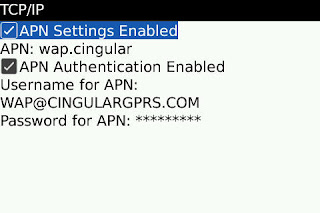
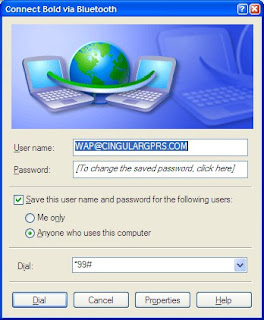
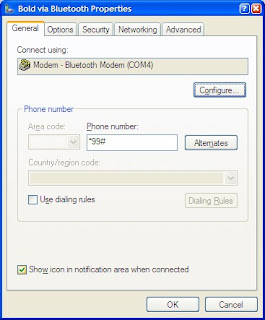
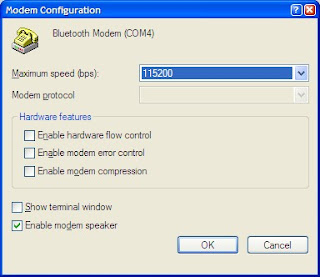
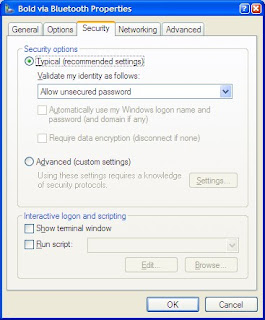
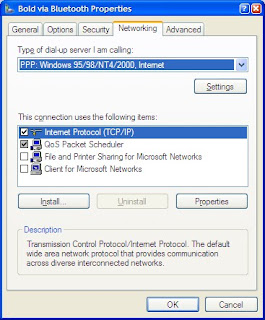
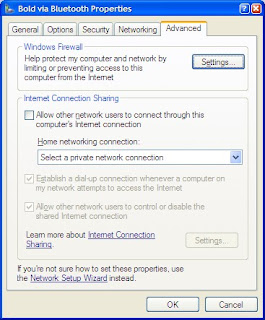
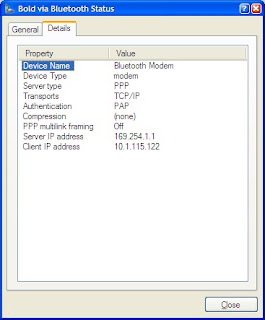
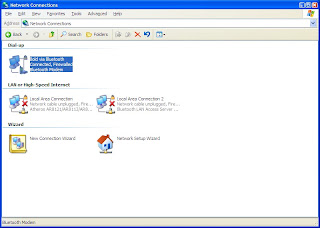
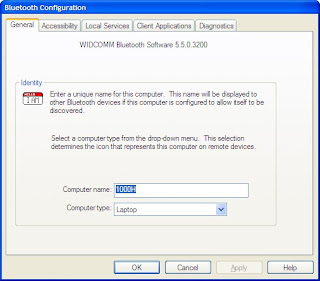
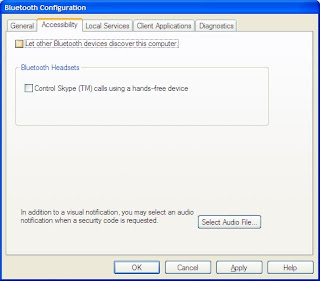
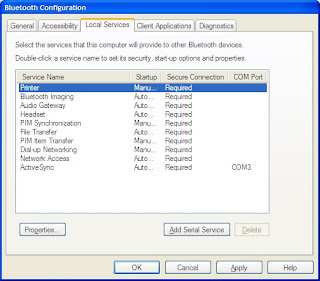
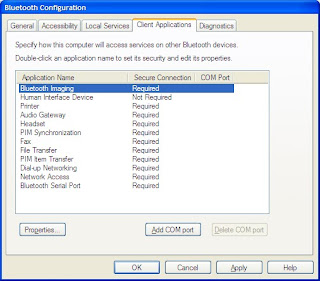
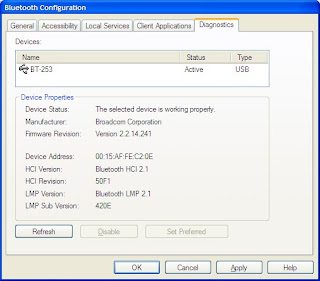
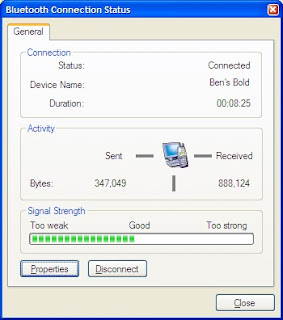
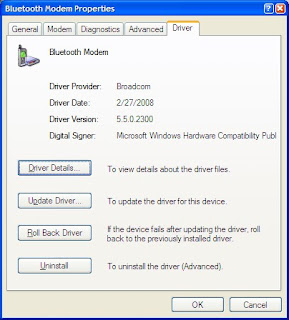
Recently I've tackled this and succeeded. To be honest, I hacked away at this off and on for months. I've referenced forum posts and blog entries all over that were very helpful. I can't give you a single step by step process to get there. What I can give you is a set of references and what my Bold and Asus Eee 1000H look like when I'm done and connected.

Pinstack Probably the most comprehensive
PortlandITGuy Good links to other sources
CrackBerry Not using Bluetooth

I didn't use the BlackBerry Desktop Manager nor the AT&T Communications Manager. While these may have made the process simpler, I didn't want the result to be dependent on another piece of software.

I also didn't add tethering to my AT&T plan. So far, I've only tethered to prove the concept. If I use this regularly I plan to add this $30/month feature.

This document doesn't cover pairing the 1000H and the Bold. That was routine and similar to pairing with a headset.

When I was done with the pairing here's what it looked like on the Bold.
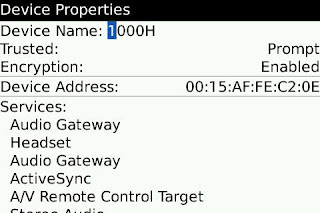

By the way, I captured these BlackBerry screens with CaptureIT.

I didn't have to tweak any settings on the Bold.

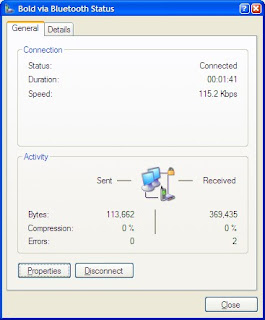
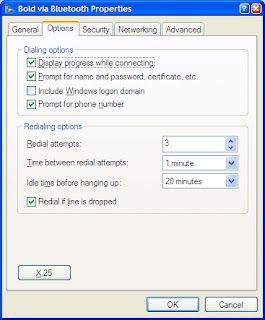
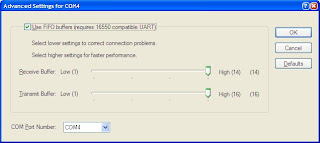
It's another story on the 1000H.
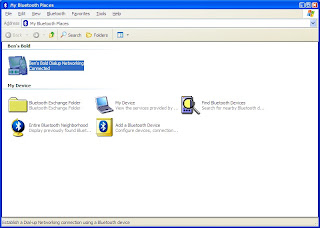

The password is CINGULAR1.


Uncheck all of these.


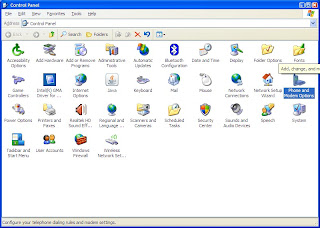
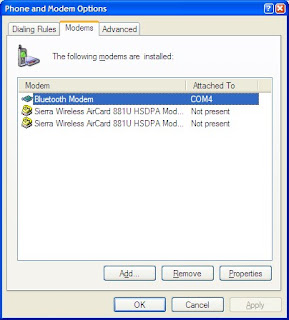
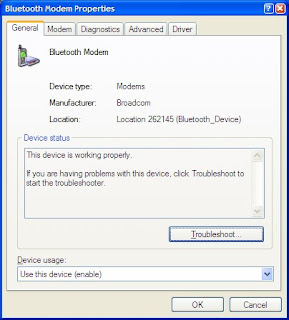
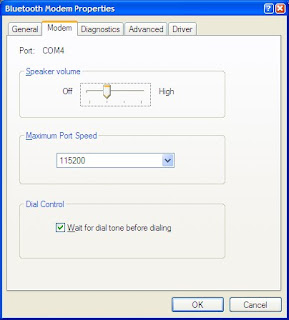
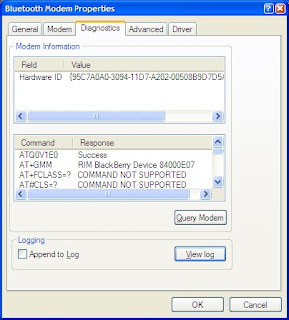
This is after I'd clicked on "Query Modem."
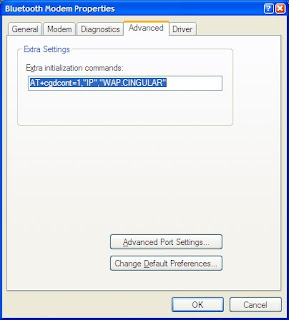
You have to set this!

Now that you've waded through all these screen captures, I'm sure you're dying to know "How's it work?"

Great!

I don't have Flash on the 1000H so I used InternetFrog's speed test.
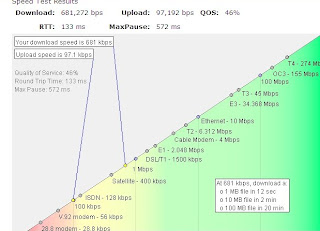
You can see that it showed almost 700kbps down and not quite 100kbps up. The QOS figure does NOT represent dropped packets but rather consistency of speed during the test.

Just to validate that test, I ran the same test on my ThinkPad connected via 802.11g to my (alleged) 3.0mbps AT&T DSL link. It tested at not quite 2.0mbps. I then retested the DSL using SpeedTest.net and got the expected 3.0mbps.

One way to read this is that InternetFrog is conservative or wrong. The other read is that SpeedTest is optimistic or wrong.

Regardless the Bluetooth tethering via the BlackBerry Bold ran somewhere between 700kbps and 1.0mbps down. That's very satisfactory to me. It feels quick.

If I left something out that you need, leave me a comment and I'll add it to the post.

Tuesday, March 09, 2010

VirtualBox

One of my goals for the Big Honker was to support virtual machines.

I had thought I would run VMware's ESX on the raw metal and then have everything virtualized under that. I found that this was very limiting, first in specific hardware support (after all it's really for servers) and second in support of USB devices being passed through to the virtual machines.

I compared VMware's Workstation to Sun's VirtualBox. Besides VirtualBox being free and VMware's Workstation costing $189, VirtualBox seemed to be more flexible and simpler, at least for what I needed/wanted.

VirtualBox's download and install was easy. It bounced the network (warning me first) to install its virtual network adapter in the TCP/IP stack. More on this a little later.

One of the first uses I tried was to install Windows 98 SE which is not officially supported. There is a good dialog on the VirtualBox forums about installing and running Windows 98. After holding my mouth just right, I got it to install but could never get it to access external data, e.g. CDs or USB drives. Perhaps I could have eventually overcome this.

But I moved on to just using Windows XP Pro. This is an officially supported environment. When I went to create the virtual machine, XP was on the menu. It gave me a recommended configuration and I was ready to go.

When I finished the normal XP install, there's a drop-down in the VirtualBox menu to install Guest Additions. These are software and device drivers that aware of the virtualization going on and enable some enhanced support, things like cursor focus being transparent.

With regard to getting access to external data, XP was much easier. I just set the network adapter to be bridged and the XP virtual machine appears to be on my local network. I can also assign any USB device to the virtual machine and it has complete access to it.

Access to the virtual machine is simple. VirtualBox has a built-in server for the Remote Desktop Protocol (RDP). This lets me invoke an RDP session from my laptop and go full-screen. It's like I'm there!

My next goal is to get my XP virtual machine where I want it relative to software, tools, and patches and then "clone" it. Then I can create cloned virtual machines from that base and play with them. There seem to be a couple of choices from simply duplicating the virtual hard drive to snapshotting and creating "differential" disks with just the changes from the snapshot.

This is fun!

Tuesday, March 02, 2010

Blackberry Remote Stereo Gateway

You know I'm an avid podcast listener.

A couple of posts ago I discussed my quest for a cable for my Bold. That has been working well but...

I wanted a less intrusive way to do this. I noticed that some Bluetooth hands-free units supported A2DP. That would let the Bold send the audio output to the hands-free which could then relay it to the car via an unused FM frequency. Interesting but complicated.

Then I came across the Blackberry Remote Stereo Gateway.
What this gadget does is provide a Bluetooth A2DP connection to the Bold and convert it into a 3.5mm jack that feeds the "Aux" jack on my car. All I have to do when I get in the car is press the "Pause" button on my Bold and the podcast starts playing through the car's speakers. I just leave the Blackberry Remote Stereo Gateway gadget in the console box where the "Aux" jack is.

The Blackberry Remote Stereo Gateway is powered by a mini-USB plug like almost all other Blackberry devices so I plug it into a cigarette lighter to USB converter in the console box. Incidentally, I have a cigarette lighter splitter in the console box! The cigarette lighter plug for the Asus Eee PC is in there too.

Tuesday, February 23, 2010

Cigarette Socket Power Splitter

As you can imagine, my car kinda looks like my desk at home - a real tangle of wires. When I got my new car I tried to clean it up a little.

What I needed was a cigarette lighter splitter for my console box. I found one at Meritline for $4.99 (now $3.99) with free standard shipping (from Hong Kong).
This has worked fine. Some plugs are a little loose in the sockets but I haven't found that to be a problem so far. Notice that it has a USB power socket too.

Tuesday, February 16, 2010

Windows 7 HP Printer Drivers

This is really more an HP issue that an Windows 7 issue but I ran into it because of Windows 7.

In my research for the Big Honker, I looked for drivers for all my peripherals. This resulted in having to buy a new scanner but my HP printers were good.

I have an HP DeskJet D4260 and an HP LaserJet 1020. Neither is brand new but not more than a couple of years old.

The HP support pages for each showed that there were Windows 7 64-bit drivers available so I downloaded and stashed them away for the install. I was a little cautious as the LaserJet 1020 driver was only released in November 2009.

When I actually did the install, I was surprised that the DeskJet D4260 driver was already loaded and it worked immediately. I loaded the LaserJet 1020 driver and both were working. They worked from my XP laptops using the existing drivers as well.

Or so it seemed.

My wife had a color page she needed to print from her laptop. When she did, the colors were off, blues were grey, yellow was pink, etc. Of course you immediately suspect that you're low on ink. I went to the Big Honker and printed a test page and it looked Ok but it really doesn't have much color.

Then I created an image in Paint on my laptop that had big blocks of primary colors. When I printed it, the colors were off there too so it was off to WalMart. $18 later for a color cartridge, I was back.

Same problem. Hmmm.

I recalled that the test page printed from the Big Honker was good. So I printed my wife's document from the Big Honker. Worked fine. So that meant the driver that came with Windows 7 Home Premium 64-bit wasn't compatible with the previous drivers.

I installed the new drivers that I had downloaded earlier on the XP laptops (they worked on XP also) and all was well. Why would HP change the color mapping of the drivers?

Tuesday, February 09, 2010

The Big Honker

My main desktop PC (which I call SERVER) is getting long in the tooth. It is a refurbished HP Pavilion 522c that I bought in 2003. It has an Athlon XP2000+ 1.67GHz processor. I'd upgraded it along the way with memory (256MB to 1GB), a DVD burner, 2 bigger hard drives, even a Firewire card.

I did my typical drop the partitions and install a clean version of XP Professional right out of the box. But I had never refreshed it. It was getting a little flaky.

When I started looking for replacements, I wanted to stay with HP since I've had such good luck with them. I wanted something that I could run Windows 7 64-bit since I think that's the new standard for home. I also wanted something that supported virtualization. That turned out to not be so easy.

Intel calls its virtualization VT-x. AMD calls theirs AMD-V. AMD's is pretty simple. Pretty much anything you can buy supports it. Intel's is another story. wikipedia says "Intel uses the feature to segment its market." I would add "and to confuse."

All the Core i3/5/7 processors support VT-x but systems with those processors are expensive and you know how I am. Core 2 Duo/Quad was more my price.

So go look at this page from Intel. Many of them don't support VT-x outright. The rest refer you to their SPEC details. That doesn't help either. I ended up with an E6300. Way too confusing.

I got the E6300 in (another) refurbished HP Pavilion p6112p from buy.com. It has a 2.8GHz Core 2 Duo, 8GB of RAM, a 1TB hard drive, a LightScribe DVD burner, gigabit Ethernet, and a bunch of other bells and whistles. It came with Windows Vista Home Premium 64-bit but was eligible for a free Windows 7 upgrade. The motherboard details are here.

On Christmas Eve buy.com had it for $399.99 with free shipping.

I did my normal process of dropping the partitions and doing a clean install of Windows 7 Home Premium 64-bit.

I put one of the leftover 400GB hard drives from my Drobo in it and added a second DVD burner.

It's up and running and doing fine. I haven't had the first problem with Windows 7 64-bit other than one program from the early '90s won't run. How I resolved that will be explained in a later post.

Tuesday, January 12, 2010

2010 Maxima RearView Monitor

My wife just bought a 2010 Maxima. It came with the monitor package which includes a "RearView Monitor." This consists of a 7" color screen in the dash and a camera just above the license tag.

From the owner's manual:
When the shift selector is shifted into the R (Reverse) position, the monitor display shows the view to the rear of the vehicle.

The system is designed as an aid to the driver in detecting large stationary objects to help avoid damaging the vehicle. The system will not detect small objects below the bumper and may not detect objects close to the bumper or on the ground.
This soooo understates what this thing does.

I took pictures tonight when I was backing into a parking spot. These pictures were taken with my Blackberry Bold so I apologize that they are not very well focused or framed but you'll get the idea. You'll need to click on the pictures to get the full-sized versions.

In this first picture, I'm just beginning to lineup. Notice that there are two separate boxes in the image. The multi-color box (green, yellow, and red) is where the car will go if you continue with the wheels straight. Green indicates that you have a safe clearance. Yellow indicates that you are getting close and red that you are really close.

The orange box is where the car will go if you continue with the wheels turned as they are now. See how the orange box is curved?


The second picture is as I'm entering the parking space. I'm not straight with the parking space as the orange box still crosses the stripe on the parking lot. The car already parked is still in the green area.


In the third picture I'm getting close to being parked. The parked car is in the yellow area approaching the red area. The orange box is now aligned with the multi-color box indicating my wheels are straight and not too far over the stripe.


Parked! The fourth picture is when I'm done. Look carefully near the crossed white stripes on the ground to the right and you'll see where the multi-color box transitions from yellow to red. There's a red indicator there that indicates that you should stop.


That's amazing. Every car should have this.

Now my wife wants one looking forward!

Tuesday, January 05, 2010

elog

I saw a link on a Wave blip that referred to elog.com.

I think they explain it better than I can.
elog.com is a public service that enables anybody to create and update their own web page just by sending an email with the content for the web page.
You do not have to formally register with elog.com, no password is necessary, there is no minimum age requirement, and you can create as many web pages as you want.

elog.com is ideal for quick updates to simple web pages. However, email applications have become very powerful - words can be bolded and colored; links, pictures, and videos can be included, etc. In other words, the email application that you use everyday is probably capable of building a very nice web page.

To create your own web page, just send an email to newpage@elog.com. Your email can have pretty much anything you want in it and your new web page will look just like the email you send. You will be issued a public web page, e.g. 1993.elog.com, that others can view immediately. To update your web page with new content, just send an email to it, e.g. 1993@elog.com.

elog.com is registered with Google and Yahoo, enabling them to regularly crawl and index any web page at elog.com (such as your web pages).
Pretty cool.

Tuesday, December 29, 2009

Odd Laptop Problem

Each week I volunteer at a mid-sized non-profit in Memphis. I basically do break/fix stuff. When I arrive, they have a pile of PCs for me to fix/reimage.

Two weeks ago, they had a Compaq 6510b laptop that had had a hard drive crash. They had sent it out to have the drive replaced and my job was to reimage and install the local applications, e.g. Acrobat, Java, Office 200x.

I dove right in but immediately notice that the system was slow, REALLY slow. It is a Core 2 Duo 2.20GHz with 2GB or RAM so it shouldn't be slow.

Since it had a new hard drive, I suspected that. I ran HD Tune's benchmark and as expected the HD was much slower than the other reference systems I had. The facility manager returned the system to the provider who had replaced the drive.

They replaced the drive and returned it. I retrieved it and the power supply and began working on it. It was still running extraordinarily slow. The hard drive benchmark showed that it was as slow as before. I checked all the Device Manager settings as well as the BIOS settings with no solutions.

Finally I Googled "compaq 6510b slow hard drive" and on the second page came across this link:
http://www.itwriting.com/blog/985-hp-laptop-go-slow-caused-by-power-supply.html
This describes a user who had a problem with the power supply giving an incorrect signal to the laptop making it think it was about to run out of power and hence "cutting back on CPU/mainboard frequency to conserve power."

It seemed too simple but I unplugged the power supply. The laptop was transformed. Opening a new tab in Internet Explorer was instant. Plug the power supply back in and it once again slowed to a crawl. On battery, the hard drive benchmark now reported more than 60MB/sec.

How odd.

Tuesday, December 22, 2009

Apple Tax

The hand-me-down Bold has a slightly recessed 3.5mm headphone jack. My old 3.5mm-to-3.5mm cable had fat plugs and won't work consistently.

One day I remembered that there had been a similar situation with the original iPhone. There's an Apple store nearby so I dropped in looking for a cable.

I found one.


$19.95! I left it in stock.

I did notice that it was made by Belkin. So when I got home, I went and looked at Belkin's site. This looked like the exact same item without the Apple brand.

$14.95. Headed in the right direction.

I finally bought it at Amazon.


$8.45.

Now that's an Apple tax.

Tuesday, December 15, 2009

TinyMailTo

Sometimes it's the simple things that make your day. Just go to TinyMailTo. You'll understand.

Tuesday, December 08, 2009

The Drobo Is Hungry

Two years ago, I got a Drobo for my birthday. It is still serving me well.

Initially I populated it with 2 400GB drives.

That gave me 371GB of protected storage.

Then I added a pair of 500GB drives.

Bingo! 1.2TB of protected storage.

Looking towards Santa's visit this year, I bought a 1TB drive on Black Friday. To install it, I just popped out one of the 400GB drives. The remaining 3 drives began blinking orange. I slid the 1TB drive into the now open slot. In a few seconds all 4 drives were blinking orange and green. After about 6 hours, they were all green again.

This only took me to 1.3TB of protected storage due to the asymmetry.

After Santa makes his visit, I'll replace the remaining 400 GB drive with a second 1TB drive.

Ah! 1.8TB protected storage.

That's nudging right up against the 2TB limit of USB 2.0. Although the Drobo will present 2 drives to the host if it goes over 2TB.

But wait, if I replace one of the 500GB drives with a 750GB drive I get 2TB protected storage.

Dear Santa,
...

PS. Here's the Drobo Capacity Calculator.