Sunday, December 10, 2017

Air Transfer

As I mentioned in my Back and Forth post I'm using an iOS app Air Transfer to copy photos from the iPhone to my Windows laptop.

Here's my workflow.

I launch Air Transfer.


On my laptop I browse to the URL that Air Transfer presents. It pretty much never changes.


On my laptop I click on the link to take me to the Camera Roll.


I select the photos that I want to transfer to my laptop. The free version of Air Transfer lets you select 10 photos at a time. The upgrade to the Pro version is $1.99.


I click on the Download link.


Air Transfer then creates a zip file and downloads it to my laptop.

When the download is complete I go back to the iPhone, double-click the home button and swipe away Air Transfer.

Then I launch Apple's Photo app and delete everything on the Camera Roll.

Done.

Why don't I use Google Photos? Actually I do. But Google Photos recompresses the photos so I don't use this copy for archive. I use the Google Photos copies for casual sharing.

Why don't I use Dropbox? Actually I do. But not for photo transfers. Dropbox renames the files. I prefer to maintain the original file name.

For a thorough comparison of Google Photos and Dropbox revisit my Dropbox vs Bluetooth vs Google Photos post. Think of Air Transfer as the iPhone equivalent of using Bluetooth on Android.

Here is one of the screen captures from the app store:


Here's what mine looks like:


Because there is no slider for WiFi Transfer you must swipe away the app. I asked the developer about his. He replied quickly.
I am currently overhauling the internals of the App.
The on/off switch was temporarily eliminated in current version.
To disconnect Air Transfer, you can either shutdown the WiFi of iOS or terminate Air Transfer.
The on/off function will be available in later updates.
A similar app is File Hub. It has a lot broader set of capabilities than Air Transfer but includes a Wi-Fi transfer service. I didn't stick with File Hub as it requires a web password on each execution. If you're using a public Wi-Fi this is absolutely necessary but on my home Wi-Fi this was just a nuisance.


Sunday, December 03, 2017

Contactless Payments

One day on my deals feed was this gadget:
The post said "We can all afford to be paranoid at this price."

Should we really be paranoid?

So I went to wikipedia.
The examples and perspective in this article may not represent a worldwide view of the subject. 
Contactless payment systems are credit cards and debit cards, key fobs, smart cards or other devices, including smartphones and other mobile devices, ...
Mobil was one of the most notable early adopters of this technology, and offered their "Speedpass" contactless payment system for participating Mobil gas stations as early as 1997.  

What does that really mean for you and me?

Not much.

Remember that opening statement from wikipedia: "The examples and perspective in this article may not represent a worldwide view of the subject."

Here are some valid concerns but it's from the UK.

Here is a North American-centric view of contactless payment systems.

"Nothing to see here, move along".

But remember that wikipedia also said: "...including smartphones and other mobile devices."

But smartphones and other mobile devices won't fit in the little case.

Not to worry.

Although these are "contactless" they are based on NFC. Although NFC is contactless there is always another layer of security, e.g. TouchID for Apple Pay.


Sunday, November 26, 2017

Neutrons

Every now and then my propeller beanie comes out.


Here I go again.

Last year during the week between Christmas and New Years, I had my annual lunch with two of my geekiest friends.

That was a time to be remembered.

I've already discussed one of the topics we covered.

One of the lunch mates is a long time employee of a global logistics firm that has multiple data centers, one at a high altitude, i.e. more than a mile high.

Somehow he got off onto failure rates related to altitude. He attributed these failures to neutrons.

I kid you not.

He had noticed that some equipment seemed to fail more often at the mile high data center. The vendors of the failing equipment didn't buy the idea of neutron density at altitude causing the failures.

The logistics company did a tightly controlled experiment at Memphis and at the mile high data center.

The results were convincing. Certain equipment from certain vendors failed way more often at the mile high data center.

While you may say "That doesn't apply to me. My data center is not a mile high."

Don't speak too fast.

When I worked for this global logistics firm we used to say that the problems we were encountering were going to be everybody else's problem in 5 years.

The same goes with neutrons.

Here's why: Ice Lake.

Read this from AnandTech.

A 10nm processor is coming your way and soon.

I won't miss this year's lunch for anything.

Here's a reading list on neutrons.

Cosmic rays creating energetic neutrons and protons

Cisco Blamed A Router Bug On 'Cosmic Radiation'
We did send a system to a POP in Denver (altitude 5000+ ft) and saw on this system a statistically significant increase in recoverable memory ECC errors.
When the affected board was returned to San Jose and retested (basically sea level) the errors could not be reproduced.
So we returned the hardware back to the Denver POP, and the recoverable ECC errors returned. No amount of swapping memory DIMMs (various vendors) made a difference.
Problem background
...research has shown that the majority of one-off soft errors in DRAM chips occur as a result of background radiation, chiefly neutrons from cosmic ray secondaries, which may change the contents of one or more memory cells or interfere with the circuitry used to read or write to them.[2] Hence, the error rates increase rapidly with rising altitude; for example, compared to the sea level, the rate of neutron flux is 3.5 times higher at 1.5 km and 300 times higher at 10–12 km (the cruising altitude of commercial airplanes)
How Cosmic Rays Cause Computer Downtime
Neutron intensity increases dramatically with altitude.

Sunday, November 19, 2017

PayPal Reminders

With the holiday season right upon us it seems time to share some PayPal reminders:

Am I the Last Person? - When you use PayPal on another site, it DOESN'T log you out.

PayPal Preapproved Payments - Many merchants send their request to PayPal asking for you to PREAPPROVE any payments to them that they want to make.

While these posts are from some time ago I confirmed today that they are still valid.

Sunday, November 12, 2017

Chip and PIN Cards

So do you have one of the new "Chip and PIN" cards? They are also known as "EMV" for Europay/MasterCard/Visa.

Instead of swiping you're supposed to "dip" them. Currently not all merchants have implemented the "dip" technology. There are fiscal liability implications related to that don't affect the consumer so I won't cover that here.

What I will try to explain is the part of the new EMV cards that is known as the Card Verification Method (CVM).

I have a USAA Visa card. In preparation for a trip to Ireland a couple of years ago I called USAA and asked for an EMV card which they supplied. When I received it I followed up with USAA and set a PIN for the chip.

I successfully used the USAA EMV card during my trip to Ireland. At most merchants I was asked to sign a receipt. This seemed to confuse most merchants but it never impacted the success of the transaction. No merchants' terminals challenged me for a PIN.

Subsequently US merchants have been replacing their credit card terminals with the new "dip" capable ones. These don't challenge me for a PIN and not always even for a signature.

This got more interesting recently at a self-service gas station in Quebec City, Canada.

The card reader on the pump was chip-enabled. It fussed at me in French for inserting and withdrawing my card like I would do in the US. Finally I understood enough French to leave the card in. Then it asked me how much to pre-authorize on the card. In the US this is just done silently. I wasn't ready to perform a quick calculation in a foreign currency so I just chose the largest amount 125$. Then it asked me for the PIN of the chip not the stripe. Thankfully I had activated a PIN on the chip in preparation for my trip to Ireland. It churned for a second and told me to remove the card and begin pumping.

That transaction got me interested in what the process was to determine whether an EMV card transaction will require a PIN or signature or nothing.

At a summary level, each EMV card has a prioritized list of verification methods (CVMs) that may vary with the value of the transaction. This list is processed by the terminal searching for a matching CVM from the card.

SpottersWiki has a database of EMV cards and associated CVM methods. When I searched it for my USAA Visa card it reported the CVM methods were:
1: Signature (paper)
2: Enciphered PIN verified online
3: Enciphered PIN verified by ICC (aka offline PIN)
4: Plaintext PIN verified by ICC (aka offline PIN)
5: No CVM required
There is another database here but it isn't being updated.

The kicker here is that gas pump in Quebec City obviously couldn't accept a signature as verification and therefore required a PIN. It is not clear to me that the chip PIN is necessarily the same as the magnetic stripe PIN. I suggest you contact your card issuer to make sure.

This process is due to be implemented in US gas pumps by October 2020.

A more in depth explanation is here.
Although EMV is often referred to as “Chip and PIN”, in fact EMV supports several different methods of verifying the identity of the cardholder, known as Cardholder Verification Methods (CVM). Every card contains a list of the CVM that it supports, and when they need to be applied (e.g. Use online PIN if the transaction is an ATM cash withdrawal, else use signature).
Whenever an EMV transaction is performed, the terminal’s EMV Level 2 Kernel processes the CVM list in order, until it finds a CVM that it supports and can process. In the event that no supported CVM is found or an error occurs during CVM processing (e.g. the PIN-Pad was malfunctioning), the EMV kernel will flag this in the Terminal Verification Results, which may cause the transaction to be declined or sent online for authorisation by the card issuer.
The CVM that EMV currently supports are Online PIN (required in certain countries for all transactions, and also for all ATM cash withdrawals), Offline PIN verified by the chip card (required in certain countries for all payment transactions), signature (for attended payment terminals in some countries), or a combination of both PIN and signature if additional verification is required.
Also, in some environments it is permissible to use no CVM for low-value transactions or for terminals that do not support any of the CVM on the cards.

Sunday, November 05, 2017

Windows Defender Doesn't Suck

While I realize that's a left-handed compliment there's some meat behind it.

I've mentioned Windows Defender a couple of times recently non-disparagingly. I still believe the best protection for your Windows system is discretion. Just don't go to stupid places.

However it still makes me feel better to have some kind of anti-virus tool lurking in the background just in case somebody tricks me.

The AV-TEST Institute runs a couple of anti-virus bake-offs each year. The most recent results are here.

Tom's Guide has a good summary of the AV-TEST comparison. I love their recap.
Microsoft’s [Windows Defender] Protection score was 5.5 out of 6. For a program that was bottom-of-the-barrel just last year - and comes free with Windows - that’s not bad at all.

Sunday, October 29, 2017

Controlled Folder Access

Windows 10 Fall Creators Update (aka 1709) was released October 17, 2017.
Windows 10 Fall Creators Update includes a number of new features, including a replacement for OneDrive Placeholders, support for Windows Mixed Reality, the ability to more seamlessly connect to Windows PCs from iOS and Android phones and an improved Photos app experience.
ZDNet
I've installed it on a couple of laptops with no issues. I haven't seen any problems with it nor really any new features.

Except...

Windows 1709 has a new Windows Defender capability called "Controlled Folder Access".
A below-the-radar security feature in the Windows 10 Fall Creators Update ... can stop ransomware and other file-scrambling nasties dead.
The controlled folder access mechanism within Windows Defender prevents suspicious applications from changing the contents of selected protected folders.
The Register
To turn it on, click on the Windows key and type "Windows Defender Security Center". Click it and then click on "Virus & threat protection".


Then click on "Virus & threat protection settings".


You're getting warm.

Under "Controlled folder access", slide it to "On" and click on "Protected folders".


You can also add programs to the whitelist.


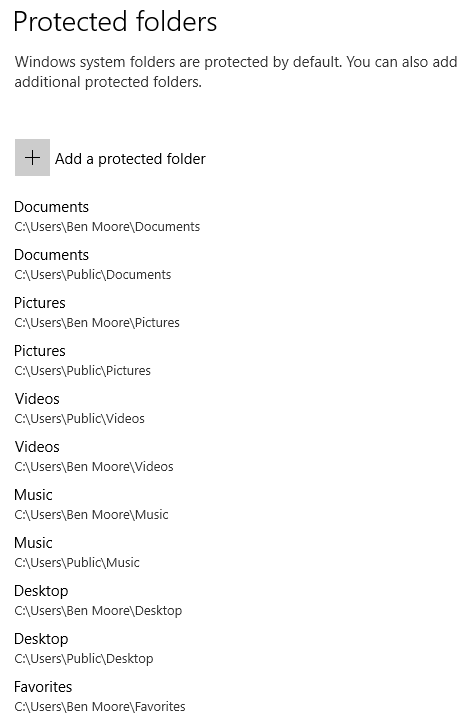
Here are the folders protected by default:


Add any that Windows didn't choose.

The best write-up I've found is here.

Here's what it looks like in action:


Sunday, October 22, 2017

Chrome Search Engines

I came across this article recently describing how to add a new search keyword to allow you to go directly to Google Maps with an address in the search bar. It's very easy but ...

As I followed the simple steps...
In Chrome, go to Settings, then select “Manage search engines.” Next to “Other search engines,” ...
Whoa!

Look at all the stuff that was already there!


Why would Google let bhphotovideo.com create an entry in my search engines?

Worse yet, the ones that are in the "Other search engines" are active.

The presentation infers that you have to use the Keyword to invoke them but there's a shortcut that lets them sneak in.

For example, the first entry in my "Other search engines" was "bhphotovideo.com" with a keyword of "bhphotovideo.com". But if I enter "bhp" in the address bar and press "Tab" guess where I go? To a Google search of bhphotovideo.com. There are hundreds of these entries in my Chrome "Other search engines". And there's no way to delete them en masse.

Stop that!

There seem to be at least 2 ways these get added. 1) Google will discern that there's a search box on a page and add an entry or 2) the site will use an API to add an entry.

There are discussions of this here and here. Oh, yes, the Chromium developers know about this and have marked it WontFix. See Comment 7.

There's even a Chrome extension that addresses this that I haven't tried.

Sunday, October 15, 2017

iOINK

If you remember my previous comments on iTunes, this post will come as no surprise.

I like to make my own ringtones. With Android, this is a piece of cake. Just find/create an mp3 file and e-mail it to yourself. Save it on the phone and then set it as a ringtone. Done.

As noted in the above referenced post, iTunes can accomplish this in 16 easy steps.

Ok, so I realize that I have to use iTunes with my iPhone 6s.

But I don't have to like it.

Recently I wanted to copy a couple of TV shows that I had recorded to my wife's iPhone SE. I converted them to M4V. Then I added them to my iTunes library.

But they didn't show up in the library. Consequently then they didn't sync to the iPhone.

Why on earth?

After a couple of hours of Google searches I finally came up on this forum post from 5 years ago:
I did believe that I have figured out what is going on though. In Itunes>Preferences>Store there is an option to keep playback synced between devices. I needed to uncheck that before the movies would show up in the itunes interface. Once that happened, I could go in and change the media type and organize it the way I wanted.
So if you want your home videos to sync in iTunes just uncheck the option to "keep playback synced between devices."

Why didn't I think of that?

Oh, now you want to WATCH these videos? Apple has removed the Videos app and put that function in the TV app.

Why didn't I think of that?

Sunday, October 08, 2017

iOS 11.Oh No!

Along with the iPhones 8 and X, on September 19, 2017 Apple released iOS 11. While it was full of new features it seems it is also full of bugs.

Apple quickly released 11.0.1 to fix a problem that Outlook/Exchange users couldn't send e-mail. It also contained other "bug fixes and improvements."

Apparently not enough.

On October 3, 2017 Apple released 11.0.2 to fix problems with iPhone 8 and iPhone 8 Plus users hearing a crackling sound during phone and FaceTime calls.

Now Apple has released a beta of iOS 11.1.

A word to the wise, avoid iOS 11.0.x like the plague.

If you're already getting nagged to upgrade here's some help.

Steve Jobs must be spinning in his grave.

Sunday, October 01, 2017

Firefox Send

I'm a regular listener to TWiT's Security Now podcast with Steve Gibson. On a recent podcast Steve mentioned Firefox Send, a new service from Firefox. ZDNet also covered it here (beware of auto-playing video with sound).

...you can securely send files to a contact using a link that only works once. The encrypted file, which is stored on Mozilla's server, is destroyed immediately after it has been downloaded once or after 24 hours have elapsed. 

This also works on Chrome and Edge and supports files up to 1GB. The files are encrypted before uploading, can only be downloaded once and deleted after 24 hours. Within the 24 hours you can revisit Firefox Send and you'll get a status page of the files you have uploaded that haven't been downloaded.


The page does say "Firefox Test Pilot, web experiment" so I wouldn't bet the farm on it for now.

If you're really geeky, look at the URL that Firefox Send gives you and then listen to Steve explain it.

Sunday, September 24, 2017

Microsoft's Resilient File System - Part 2

In a previous post I laid out the background for Microsoft's ReFS.

A recent article in How-To-Geek provides more details and compares ReFS to NTFS.

The points covered are:

  • What Is ReFS?
  • ReFS Protects Against Data Corruption
  • ReFS Drops Some Old NTFS Limitations
  • ReFS Can Be Faster, Sometimes
  • ReFS Can’t Replace NTFS (Yet)
  • How to Use ReFS

There's also a good video explaining ReFS.

And a series of really technical blog posts covering ReFS.

In a related event, Microsoft has "corrected" an error that allowed OneDrive to use ReFS. The same "error" impacted older file systems, such as FAT32 and exFAT, as well.

Winaero has reported that in Windows 10 Fall Creators Update Microsoft has "removed the ability to create ReFS partitions from regular retail editions of Windows 10. The updated list makes the ability to create new ReFS partitions exclusive to Windows 10 Pro for Workstations and Enterprise edition."

Hmmm.

Sunday, September 17, 2017

AT&T Messages

I didn't know you could do this!


Just go to https://messages.att.net.

It's a little bit clunky and AT&T seems to be deprecating some of it.

For example, you can click on the phone number in a message and a dialog box pops up offering to "Create New Contact" but that doesn't work.


And messages sent from this application don't get pushed back to the phone.

Still, pretty nice.

Sunday, September 10, 2017

LAN Diagram

I thought that I had posted about my LAN configuration before but I can't find it.

I'd been following Steve Gibson's Three Dumb Router solution to IOT insecurity. But I've also come across several discussions of using Ubiquiti's EdgeRouter X.

My equipment closet had become a rat's nest with long Ethernet cables wadded up behind all the equipment. Of course they were either not labeled or had the wrong labels on them.

So I redesigned my LAN segmenting it into a home (safe) network and Internet of Things (IoT) (unsafe) devices.

I bought color coded patch cables from Monoprice - red for Internet, green for home and blue for IoT.

To manage the connections to each segment I added a 8-port Gigabit switch to each segment.

I haven't implemented the EdgeRouter X yet so I'm actually not yet isolating the 2 segments. The dashed lines represent the current configuration.

Update: Did you find the problem in this configuration? Look again. Look closer. Then scroll down.


The NETGEAR ProSafe FS108NA is 10/100 mbps, not gigabit. I discovered this when I copied a large amount of data to the Drobo 5N. It was SLOW.

I have since replaced the NETGEAR with a D-Link GO-SW-8GE.


Sunday, September 03, 2017

AT&T Microcell

I upgraded my wife from an iPhone 5s to an iPhone SE over Christmas. Ever since she's been complaining about signal strength.

I called AT&T and they admitted that one of the towers near my house was down and had been down for a couple of weeks.

I whined at them for a while and finally convinced them to give me a free microcell.
The AT&T MicroCell acts like a mini cell tower in your home and connects to your existing broadband Internet service. You receive improved cell signal performance for voice calls, texts, and cellular data applications like picture messaging and Web surfing.
After a couple of odd interactions with AT&T a Cisco DPH154 arrived.
Activation was easy.

And it worked. Really well.

Before

After
An improvement of 45dB! Also, notice the difference of the indicator in the status bar, i.e. "Wi-Fi" vs. "M-Cell".

Sunday, August 27, 2017

Smartphone Battery

I've got a lot of experience with various smartphones. And I'm obsessive meticulous with tracking their battery usage.

I looked at 15 "typical" days for 3 different phones. I excluded days that I had tethered or been on calls an excessive amount. I can't say I used a rigorous scientific method but I believe that the sample is representative.

For this discussion I tracked 4 variables for each phone:
  • End of Day % - Percent of battery remaining at 10:00PM
  • OS Level - Operating system in use
  • Battery Capacity - in mAh (milliamp Hour)
  • mAh/hour - mAh consumed per hour

PhoneEnd of Day %OS LevelBattery CapacitymAh/hour
iPhone 6s55.5310.3.1171554.27
PRIV55.476.0.13410113.54
Nexus 542.536.0.12300104.48

At the end of the day, all 3 phones were generally in the same range of percent of battery left. The Nexus 5 was lower and that aligns with its reputation of poor battery life.

The PRIV has a big honker of a battery, almost twice the capacity of the iPhone 6s. And it needs it.

But the real finding for me was that the mAh/hour rate of the iPhone 6s was roughly half that of the Andoid phones. That's why the iPhone 6s' battery is so much smaller than the Android phones and why the iPhone 6s is so much thinner.

How does the iPhone keep the battery usage rate so low? Simple, it doesn't let apps run in the background.

Sunday, August 20, 2017

On the Way to VoIP - Follow-Up

I've been living with my Google Voice/OBi100 system (see 1, 2, 3, 4, 5, 6, 7, 8) for a couple of years and thought it was time for a follow-up.

Obihia and Google did a little dance a while back but finally kissed and made up. My service was never disrupted.

My OBi100 has gone end of life. The support was never outstanding nor really a problem. I bought a OBi200 to replace the OBi100 but haven't even bothered to install it. The transition was seamless.

The E911 support from Anveo has been fine I guess. Thankfully I've never used it. Their billing system is kinda wonky. The E911 service is $15 per year and you have to pay for it with a prepaid account. Then when the year lapsed and there wasn't sufficient balance to renew they Anveo just canceled the service and sent me an e-mail.
Customer,
We would like to inform you there was not enough funds in your account balance to extend your E911 coverage.
As of this moment the following E911 address is no longer covered and you can not make 911 calls:
<snip>
Your current account balance: $0
You may not be able to place outgoing calls without having at least one E911 address configured.
Please add funds and re-configure E911 coverage for the above mentioned address.
I deposited $15 and put a reminder on my calendar.

After a couple of months using Google Voice I went back and reviewed all the incoming calls. I added all the known callers to the Contacts on that Google account. Then I flipped the switch to screen callers that weren't in the address book. That only works so so since the OBi100 doesn't really support Google Voice's call screening in spite of them stating that it does.

What the OBi100 does is if Google Voice causes a prompt for screening, the caller hears the prompt and then gets transferred immediately on to the handset. The good news is that this pretty much causes the telemarketers to hang up. Good enough.

Either Google or Obihia fixed this and call screening now works perfectly.

Sunday, August 13, 2017

Cloud - Office 365

Sometimes it's just too easy to make fun of a company.

In May 2017 Microsoft had gathered their favorite developers in Redmond for the annual Build conference. The focus of that conference was Microsoft's offerings of Office and Azure.

Yeah, you guessed it. Office 365 went down in the middle of the conference as documented by the Register.

Outages happen to everybody.

What I thought interesting were the comments on the Register post:
Cloud just means somebody else's computer that you have NO control over, and can go down at any time leaving you helpless.
Herby
Cloud: A computing service that signifies you do not know where any outage is, who is responsible for it, who else but you or your organization accesses the data on it, but nobody wants to do without.
Jeroen Braamhaar
Having worked with Cloud products for near 10 years now, I can say that in general they are much more reliable and lower cost than an on prem equivalent. ... [Y]ou do get a much better infrastructure from a company that invests millions/billions and has SLA's around it all than the bit of tin you got from the reseller round the corner.
Babbit55
This situation is kinda like when I was on a conference call with my CIO and his boss the CFO. It wasn't a pleasant discussion. When the call was over my CIO turned to me and said "I don't ever want to have that discussion again."

Don't find yourself or your company in the situation that Microsoft was in. Consider and act on the points in those comments.


Sunday, August 06, 2017

Windows 10 Tweaks


I've been happy with Windows 10 AFTER I've thoroughly tweaked it. Here are some links to Windows 10 tweaks that I like. I will continue to update this post so check back from time to time.

My posts (some overlap with those below)

How to get past Windows Defender SmartScreen in Windows 10

Remove "Windows Defender Security Center" Icon from Taskbar Notification Area

How to disable touchscreen edge swipes in Windows 10

How to Remove the User Password in Windows 10

How to prevent Windows 10 from requiring a password when resuming from sleep

Bypass the Lock Screen in Windows 10

Sign-in Automatically to a User Account in Windows 10

Increase System Restore Point Frequency in Windows 10

Create Shortcut to Open Any Settings Page in Windows 10

Enable or Disable Network Discovery in Windows 10

Get Classic Windows Defender in Windows 10 Creators Update
I rename the shortcut to "Windows Defender" and pin it to the Start menu

How To Disable Ads in Windows 10 (All Of Them)

Move Apps to Another Drive in Windows 10

Convert MBR To GPT With MBR2GPT In Windows 10 Version 1703

Windows 10 Tip: Turn Off Lock Screen, Start and Action Center Advertising

Windows 10 Tip: Turn Off File Explorer Advertising

Windows 10 tip: Turn on File History for automatic backups

Windows Update Blocker disables OS updates on demand

20 ways to hate Windows 10 less

Windows Containers on Windows 10

Backup drivers before reinstalling Windows 10 using DISM

Windows 10 Tip: Remove the Built-in Apps

Disable This Animation to Make Windows 10's Start Menu Open Faster

How to add Recent items to left pane of File Explorer in Windows 10

Windows 10 Tip: Disable Automatic Default Printer Management

How to create a system image in Windows 10

How to Disable the “Get Office” Notifications on Windows 10

How to Get Rid of the OneDrive Icon in Windows 10's File Explorer

Open Control Panel Applets Directly in Windows 10

Sunday, July 30, 2017

System Image Backup

In a couple of my previous posts (SSD Migration and Backup, Restore, Test) I mentioned Windows System Image Backup tool. These posts were written when the Windows system was running Windows 7.

Now all my systems are running Windows 10. And a couple of my systems have updated to Windows Version 1703 Creators Update.

Microsoft is step by step migrating from the legacy Control Panel to the new Settings app. Even when the function isn't available in Settings.

For example in Windows 1607 Anniversary Update you could type "Backup and Restore..." and the legacy Control Panel dialog would be presented.


Now in Windows Version 1703 Creators Update the legacy Control Panel dialog is not presented.


Notice that "Reset this PC" is presented. There's a message in that result. That's where Microsoft is steering you, to reset rather than restore.

Here's how to get to Windows' System Image Backup tool.

Press the Windows key and type "control panel".


Click on "Control Panel".


Click on "Backup and Restore (Windows 7)".


Click on "Create a system image".


Select your backup target and click on "Next".


Confirm your backup settings and click on "Start backup". This make take a while, up to a couple of hours for a big drive.

I fully expect that Microsoft will completely remove this System Image Backup capability in future versions.

You HAVE to read my previous posts (SSD Migration and Backup, Restore, Test) before you strike out using this technique.