I still love my Treo 650 but my quest remains to get the capabilities that I had on my Sony Clie NX60 of Voice Recorder. The UI is much more complete than that of SoundRec.
I tried to move Voice Recorder to the Treo. I used FileZ and unlocked it on my Clie and beamed it off. Then beamed it to the Treo 650 and installed it. When I ran it, it just blinked the screen and went away.
I posted on TreoCentral and, as usual, got several "noise" responses but one person responded with a suggestion to look for "file(s) in your Clie label(ed) voice recorder en_us, or voice recorder." Why didn't I think of that?
So off I went back to the Clie and found 2 more files that began with "Voice Recorder..." When I went to transfer them to the Treo 650, I was lazy, so I just beamed them from the Clie to the Treo. Bad plan. The Treo immediately began rebooting over and over. A quick Google search turned up the technique of holding the Up button to get the Treo into the equivalent of Windows' Safe Mode. I thought I was home free.
This let me get to the phone screen but anytime I pressed Home, reboot. Finally, I added a Favorites button that would run FileZ and deleted the problem file. I think I'll leave well enough alone.
So I went back to SoundRec that I'd found before. SoundRec works fine but the files are much bigger than the Clie's Voice Recorder. I recorded a meeting with both SoundRec on my Treo 650 and with Voice Recorder on my Clie NX60. There was about a 4X difference in size with the SoundRec recording being larger. I moved both files to my Windows desktop and looked at them with Windows' Sound Recorder. Both were set to 8 KHz but the SoundRec file was 16 bits and the Voice Recorder file was 4 bits. Since I use the audio recording capability exclusively for voice, 4 bits is sufficient. However the difference in the size of resulting .wav makes moving them around much more difficult.
I've about given up in matching the size of the Voice Recorder files. I am still looking for improvements in UI and integration. SoundRec's UI is pretty rudimentary and it doesn't run in the background. This means that when OneBridge fires up to pull my e-mail, the recording stops. CallRec SAYS that it runs in the background. We'll see. I e-mailed the CallRec support about 4-bit vs. 16-bit recording and they said they only did 16-bit. Not a huge deal as I have a 1GB SD card.
CallRec is $20 and you know how I feel about paying for software so I'll have to think about this for a while.
Sunday, March 26, 2006


Friday, March 03, 2006
SD Card Speed
One of the things I miss going from my Clie to the Treo is the Voice Recorder application. Perusing the Treo web sites, I came across Sound Recorder from InfinityBall.com.
It did what it said but when I told it to record to the SD card, the recordings came out garbled. At first I attributed it to the program but then I realized that if I let it record to the Treo's memory, they sounded fine. The SD card was the culprit.
Another Google search ensued and found this thread that lists SD cards and their performance. I downloaded cardspeed.prc V1.2 and ran my own tests.
For my primary SD card, Toshiba 512MB
Anyway, looks like I need to look for faster (more expensive) SD cards.
Update:
On techbargains.com this week, I came across a PQI 1 GB 60X SD card for $19.99 after rebate from outpost.com and ordered it. When it came, I transfered my Treo files to it and tested it with CardSpeed. Here're the results:
It did what it said but when I told it to record to the SD card, the recordings came out garbled. At first I attributed it to the program but then I realized that if I let it record to the Treo's memory, they sounded fine. The SD card was the culprit.
Another Google search ensued and found this thread that lists SD cards and their performance. I downloaded cardspeed.prc V1.2 and ran my own tests.
For my primary SD card, Toshiba 512MB
Finished in 7.45 secondsFor my secondary SD card, PNY 512MB:
Wrt32bit: 22 bytes/second
Wrt8KB: 409600 bytes/second
Read8KB: 2621440 bytes/second
Card speed is OK
Avoid > 11KHz PCM
Finished in 6.70 secondsThere is a little variation from run to run. Notice that the Read8KB is exactly the same on both cards. Perhaps that is the limitation on the Treo bus?
Wrt32bit: 24 bytes/second
Wrt8KB: 429744 bytes/second
Read8KB: 2621440 bytes/second
Card speed is OK
Avoid > 11KHz PCM
Anyway, looks like I need to look for faster (more expensive) SD cards.
Update:
On techbargains.com this week, I came across a PQI 1 GB 60X SD card for $19.99 after rebate from outpost.com and ordered it. When it came, I transfered my Treo files to it and tested it with CardSpeed. Here're the results:
Finished in 8.64 secondsNow I'm confused. I guess I'll have to test it with Sound Recorder.
Wrt32bit: 40 bytes/second
Wrt8KB: 55188 bytes/second
Read8KB: 2383127 bytes/second
Card speed is OK
Avoid > 11KHz PCM
Tuesday, February 14, 2006
Where's My Boot Drive?
This is a sad story and I did it to myself. A couple of weeks ago, CompUSA had a 200 GB Maxtor hard drive for $50 after rebates and you know what a sucker I am for rebates. I wasn't sure where I was going to use it but I knew I'd find a good home for it.
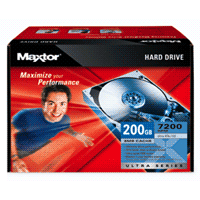
When I opened the Maxtor box, I found a MaxBlast CD. It has a capability of "Installing an Additional Storage Drive or Replacement Boot Drive" (emphasis mine). Well, duh, that's what I wanted to do.
There were a few more bumps along the way but in the end, off I went using MaxBlast to clone the boot drive on my SageTV box. I was using USB 1.1 so I knew it was going to be slow but I just hadn't imagined HOW slow. After 5-6 hours and the progress bar barely moving, I clicked on the Cancel button. Nothing. So I waited. And waited. And waited.
My patience wore out so I CTRL+ALT+DEL and terminated the application. I shut down the box and installed the USB 2.0 PCI card I had.
Button it all up and reboot. Remember that this is a headless box - no keyboard, no monitor, no mouse, no speakers. Just a network connection and TV wires.
It wouldn't boot.
I knew that was bad. I just had no idea how bad. I trucked it off upstairs and plugged it into a monitor and keyboard and rebooted. It hung at the Windows screen.
Ok. It could be worse (and in fact it was). I went and got the XP CD and did a Windows repair on it.
It wouldn't boot.
I told you it was worse. In the end, what had happened was that the MaxBlast program had changed the drive letter on the boot drive from C: to E: before it completed the copy. So when I terminated the copy, I was doomed. I no longer had a C: drive.
Rebooting like that got the Registry all twisted up in its shorts. I finally got it to boot by plugging in the USB drive.
To wrap up this story of woe, I finally just put the new 200 GB hard drive in the system unit and built it from scratch.
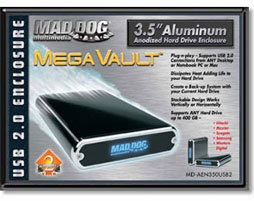
I used the USB 2.0 PCI card and the Mad Dog enclosure to copy the data from the 80 GB hard drive and reinstalled all the PVR software.
Now, what am I going to do with the left over 80 GB hard drive? Funny you should ask ...
When I opened the Maxtor box, I found a MaxBlast CD. It has a capability of "Installing an Additional Storage Drive or Replacement Boot Drive" (emphasis mine). Well, duh, that's what I wanted to do.
There were a few more bumps along the way but in the end, off I went using MaxBlast to clone the boot drive on my SageTV box. I was using USB 1.1 so I knew it was going to be slow but I just hadn't imagined HOW slow. After 5-6 hours and the progress bar barely moving, I clicked on the Cancel button. Nothing. So I waited. And waited. And waited.
My patience wore out so I CTRL+ALT+DEL and terminated the application. I shut down the box and installed the USB 2.0 PCI card I had.
Button it all up and reboot. Remember that this is a headless box - no keyboard, no monitor, no mouse, no speakers. Just a network connection and TV wires.
It wouldn't boot.
I knew that was bad. I just had no idea how bad. I trucked it off upstairs and plugged it into a monitor and keyboard and rebooted. It hung at the Windows screen.
Ok. It could be worse (and in fact it was). I went and got the XP CD and did a Windows repair on it.
It wouldn't boot.
I told you it was worse. In the end, what had happened was that the MaxBlast program had changed the drive letter on the boot drive from C: to E: before it completed the copy. So when I terminated the copy, I was doomed. I no longer had a C: drive.
Rebooting like that got the Registry all twisted up in its shorts. I finally got it to boot by plugging in the USB drive.
To wrap up this story of woe, I finally just put the new 200 GB hard drive in the system unit and built it from scratch.
I used the USB 2.0 PCI card and the Mad Dog enclosure to copy the data from the 80 GB hard drive and reinstalled all the PVR software.
Now, what am I going to do with the left over 80 GB hard drive? Funny you should ask ...
Saturday, February 04, 2006
How To Safely Store And Manage Passwords Part II
Sometimes I'm slow but I'll usually figure it out. Back in August 2004, I wrote about my search for a program to run from a USB key to store my passwords and automatically type them in. At that time, I looked at KeePass and KeyPass. KeePass is open source and KeyPass is free for up to 10 userid/password combinations.
I played with KeyPass some and it worked fine but I was still limited to 10 userid/password combinations and there was that problem with autorun on a USB key.
I had found the Hagiwara USB key that lies to Windows Plug-N-Play and presents 2 drives - a CD-ROM (there's the autorun) and a normal USB drive.
Since the autorun drive was a CD-ROM I couldn't just put the KeyPass program on that drive and it be able to write to it's database so the search continued.
In some of my surfing last week, I came across KeePass again. This time the authors had really improved it. Now it too, like KeyPass, will automatically type the userid/passwords and it supports way more than 10 userid/password combinations.
Now there was just that nagging problem of being able to write to the database. I posted my dilemma on the KeyPass forums and got a response back from one of the developers in less than 2 hours. Awesome! He wrote a small batch file that will run as part of the autorun.inf and search for the keepass.exe on other drives. When it is found, it starts it. Simple.
So, all that works great. I can just plug the Hagiwara USB drive into any Windows PC. It will autorun, start KeePass, ask me for my master password, and minimize to the system tray. Then when I need a userid/password entered, I just press CTRL and / and off it goes.
Unlike KeyPass, KeePass doesn't automatically backup the database but there's a plug-in available that does so I'm using that.
Now all that's left is to let KeePass start building me strong passwords and switch my habits to depending on KeePass. I'm still not that brave.
I played with KeyPass some and it worked fine but I was still limited to 10 userid/password combinations and there was that problem with autorun on a USB key.
I had found the Hagiwara USB key that lies to Windows Plug-N-Play and presents 2 drives - a CD-ROM (there's the autorun) and a normal USB drive.
Since the autorun drive was a CD-ROM I couldn't just put the KeyPass program on that drive and it be able to write to it's database so the search continued.
In some of my surfing last week, I came across KeePass again. This time the authors had really improved it. Now it too, like KeyPass, will automatically type the userid/passwords and it supports way more than 10 userid/password combinations.
Now there was just that nagging problem of being able to write to the database. I posted my dilemma on the KeyPass forums and got a response back from one of the developers in less than 2 hours. Awesome! He wrote a small batch file that will run as part of the autorun.inf and search for the keepass.exe on other drives. When it is found, it starts it. Simple.
So, all that works great. I can just plug the Hagiwara USB drive into any Windows PC. It will autorun, start KeePass, ask me for my master password, and minimize to the system tray. Then when I need a userid/password entered, I just press CTRL and / and off it goes.
Unlike KeyPass, KeePass doesn't automatically backup the database but there's a plug-in available that does so I'm using that.
Now all that's left is to let KeePass start building me strong passwords and switch my habits to depending on KeePass. I'm still not that brave.
Wednesday, January 18, 2006
SiteMeter Statistics
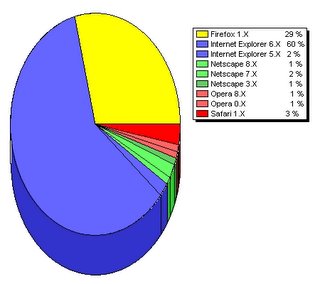
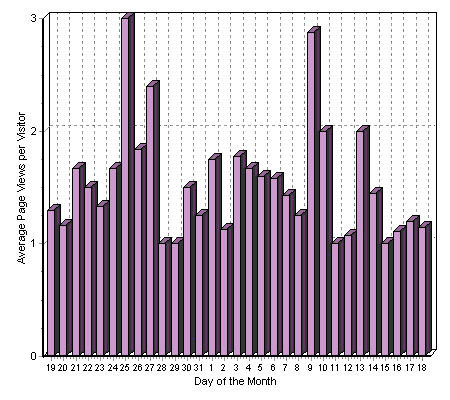
I use SiteMeter.com to get statistics on visits to this blog. I just use the free service. Every now and then, I go over there and look at the statistics. I'm almost always surprised by the results. Here're some of the charts from tonight:
 Daily Visits
 Operating System
 Browser Share
 Monitor Resolution
Look at the Operating System results. Where on earth are those Windows 2000 users coming from? There are more of them than all of the Macs!
And the Browser Share - Internet Explorer is getting killed.
On the Monitor Resolution, the 60% of 1024x768 isn't surprising but the 10% of 1280x1024 (19") surprised me and 800x600 being only 5% means you almost don't have to worry about that screen size any more.
 Daily Visits
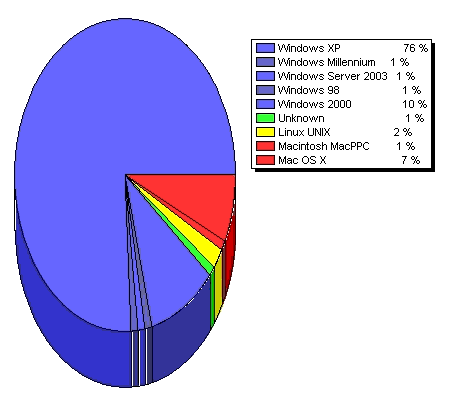 Operating System
 Browser Share
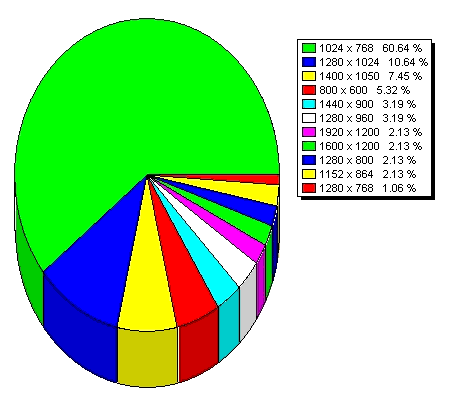 Monitor Resolution
Look at the Operating System results. Where on earth are those Windows 2000 users coming from? There are more of them than all of the Macs!
And the Browser Share - Internet Explorer is getting killed.
On the Monitor Resolution, the 60% of 1024x768 isn't surprising but the 10% of 1280x1024 (19") surprised me and 800x600 being only 5% means you almost don't have to worry about that screen size any more.
Thursday, January 12, 2006
Windows XP Installation Tasks
By request, here's my checklist for installing Windows XP on a clean system:
Good luck.Install Windows XP
Apply Windows Updates
Install WinZip8 and then Winzip90 from c:\download
Restore My Documents
Fix Sounds
o Windows Explorer/Start Navigation = (None)
o Windows/Start Windows = Dixie.wav
o Windows/New Mail Notification = (None)
Restore
o ACDSee
o QuickenB
o Download
o The HTML Reference Library
o Games
o UFT
o Address book
o Outlook Express folders
Setup Outlook Express with address book and folders
Install gaim and configure http://gaim.sourceforge.net
Install NAV and run Live Update from system tray
Setup Internet Explorer
Install Google toolbar http://toolbar.google.com
Install Maxthon http://www.maxthon.com/download.htm
Install Quicken 2003 Deluxe
Install Office 2000 http://download.microsoft.com/download/Word2002/wp6rtf/1/W98NT42KMe/EN-US/wp6rtf.exe (support for Works 6)
Set folder options
Update Start Menu
Install 123 Free Solitaire
Install PaintShop Pro 7
Install Acrobat
Install Automachron from achron4.zip in c:\download
Install FavoriteSyncInstall.exe from c:\download
Install Sun J2RE http://www.java.com
Install patch26.exe from c:\download for UFT
Install Roxio Easy CD and DVD Creator 6
Run xp_hide_messenger.vbs from c:\download
Get rid of welcome screen with autologon
1. click on "Start" - then click on "Run" - and type "control userpasswords2"
2. click OK
3. On the Users tab, clear the "Users must enter a user name and password to use this computer" check box and click "Apply".
4. Select the user you want to log on & click OK. A dialog will appear that asks you what user name and password should be used to logon automatically, just click "OK".
5. Then go to Control Panel / User Accounts, and click "Change the way users log on or off", and untick both "Use the Welcome Screen" and "Use Fast User Switching"
Tuesday, January 10, 2006
Video on the Go
One of the things that have fascinated me about the iPAQ and the Treo is the ability to play video on them. I didn't play with the iPAQ long enough to get around to it but I've had time to play with the Treo.
I read a lot of forum entries and blogs on how to get video (particularly movies) to a PDA. The issues are the same regardless of iPAQ or Treo.
The tricky part of the process is getting the video file size down to where it'll fit on a memory card. There are a couple of programs I've played with that do that.
The first one I tried was PocketDivXEncoder. It's very simple to use. Here's a forum post on how to use it. The downside to PocketDivXEncoder is that you have to decrypt the DVD first. I happened to have a decrypted copy of National Treasure so I attacked it. I'm sorry I didn't keep up with how long it took. PocketDivXEncoder worked great and the output file was 185 MB when formatted at 320x240 for the Treo.
The second movie I tried with PocketDivXEncoder was Love Actually. I hadn't decrypted that one first so I had to jump through hoops to create VOB files. I did that and then ran PocketDivXEncoder against it. It churned for a while then gave an error message in French and pretty much quit.
I tried everything to work around the mysterious error.
I finally gave up and went back to the forum entries. This time I found a reference to the FairUseWizard. This is a more general utility than PocketDivXEncoder. It's main purpose is to "create movies that will play on your standalone player with the DivX and XviD codecs." A PDA is just another case of this.
The big plus for FairUseWizard is that it will decrypt the DVD for you. The downside is that you control the encoding parameters primarily by setting the target file size. For Love Actually, I set the target file size to 250 MB but I wasn't able to satisfactorily set the resolution to the Treo's 320x240 (it said it wasn't a recommended resolution). I played with it a couple of times but finally just let the "wizard" run things and it worked perfectly. The output file was right at 250 MB.
Incidentally, both PocketDivXEncoder and FairUseWizard support XviD which is what I used.
I popped my 512 MB SD card into a card reader and copied both files over along with The Core Pocket Media Player (TCPMP). With the card back in the Treo, I used FileZ to install TCPMP and the appropriate codecs.
Voila! They work like a charm. TCPMP has all kind of settings and tweaks but all you really need to do is click on Play. The Treo's 5-way left and right let you skip backward and forward and the center button is Pause/Play. Stick your headset into the jack on the bottom and you're off in your own world.
Oh, by the way. All of the above programs are FREE!
I read a lot of forum entries and blogs on how to get video (particularly movies) to a PDA. The issues are the same regardless of iPAQ or Treo.
The tricky part of the process is getting the video file size down to where it'll fit on a memory card. There are a couple of programs I've played with that do that.
The first one I tried was PocketDivXEncoder. It's very simple to use. Here's a forum post on how to use it. The downside to PocketDivXEncoder is that you have to decrypt the DVD first. I happened to have a decrypted copy of National Treasure so I attacked it. I'm sorry I didn't keep up with how long it took. PocketDivXEncoder worked great and the output file was 185 MB when formatted at 320x240 for the Treo.
The second movie I tried with PocketDivXEncoder was Love Actually. I hadn't decrypted that one first so I had to jump through hoops to create VOB files. I did that and then ran PocketDivXEncoder against it. It churned for a while then gave an error message in French and pretty much quit.
I tried everything to work around the mysterious error.
I finally gave up and went back to the forum entries. This time I found a reference to the FairUseWizard. This is a more general utility than PocketDivXEncoder. It's main purpose is to "create movies that will play on your standalone player with the DivX and XviD codecs." A PDA is just another case of this.
The big plus for FairUseWizard is that it will decrypt the DVD for you. The downside is that you control the encoding parameters primarily by setting the target file size. For Love Actually, I set the target file size to 250 MB but I wasn't able to satisfactorily set the resolution to the Treo's 320x240 (it said it wasn't a recommended resolution). I played with it a couple of times but finally just let the "wizard" run things and it worked perfectly. The output file was right at 250 MB.
Incidentally, both PocketDivXEncoder and FairUseWizard support XviD which is what I used.
I popped my 512 MB SD card into a card reader and copied both files over along with The Core Pocket Media Player (TCPMP). With the card back in the Treo, I used FileZ to install TCPMP and the appropriate codecs.
Voila! They work like a charm. TCPMP has all kind of settings and tweaks but all you really need to do is click on Play. The Treo's 5-way left and right let you skip backward and forward and the center button is Pause/Play. Stick your headset into the jack on the bottom and you're off in your own world.
Oh, by the way. All of the above programs are FREE!
Friday, January 06, 2006
moblog.benmoore.biz
I'm having a blast with the Treo. One of the things I was interested in playing with was mobile blogging. I went to Blogger's mobile blog site and read up on it. It's simple to setup. Just e-mail a picture from your phone to go@blogger.com. Blogger sends you an e-mail reply with a URL and a claim code. You go to go.blogger.com, enter that claim code and "claim" that blog.
Then you can rename it to what you want and associate it with your Blogger account. After that, it just shows up in your list of blogs.
One little variant I ran into is that the first time I sent off a photo, I used MMS and the next time, I used e-mail. This turned out to actually be an advantage as I claimed both of those and pointed them to the same blog. That way, I can send photos either way and they end up at the same place.
There was one little bump in the way that Blogger builds the html for the posts. Blogger uses the following html:
I searched Blogger's help for how to change this limitation to no avail. Finally, I sent them a question but they responded that they were too busy to answer.
So I fell back on my favorite problem solver: Google. The first hit from a search for "css width" turned up this page. I took the template from the new blog and pasted it into a real-time html editor so I could play with it. I stuck the following into the <style> section:
Here's the resulting moblog.
Then you can rename it to what you want and associate it with your Blogger account. After that, it just shows up in your list of blogs.
One little variant I ran into is that the first time I sent off a photo, I used MMS and the next time, I used e-mail. This turned out to actually be an advantage as I claimed both of those and pointed them to the same blog. That way, I can send photos either way and they end up at the same place.
There was one little bump in the way that Blogger builds the html for the posts. Blogger uses the following html:
<p class="mobile-photo">The problem with this is that the photos are constrained at 320 pixels. Now for most phones, this may be Ok but the Treo takes photos that are 640x480.
<img width="320" src="http://photos1.blogger.com/ ... .jpg"/>
</p>
I searched Blogger's help for how to change this limitation to no avail. Finally, I sent them a question but they responded that they were too busy to answer.
So I fell back on my favorite problem solver: Google. The first hit from a search for "css width" turned up this page. I took the template from the new blog and pasted it into a real-time html editor so I could play with it. I stuck the following into the <style> section:
.Post img{width:640px}CSS attributes over-ride html attributes so the result was that the html acted like it had 'width="640".' I wish there was a more direct relationship between CSS attributes and html attributes but ...
Here's the resulting moblog.
Friday, December 30, 2005
Bye, Bye, iPAQ - Hello, Treo
You remember that I blogged about the iPAQ I won a while back. I noted that I occasionally fell back to my Sony Clie. I also kept resetting it, and resetting it.
I never got the Wi-Fi to work, mostly because it was 802.11b and I have "b" turned off in my router so as not to degrade my 108 Mbps. The Spectec Wi-Fi card, while the smallest available, stuck out 1/4" and the screen protector hit it when you opened it with the Wi-Fi card in place.
The Word Mobile didn't save changes as it went along so when (not if) you had to reset the iPAQ with a Word document open, you lost the changes. Ouch! Yeah, you could stop and navigate through the menus to save it but I couldn't find anything like Auto-Save.
If you follow this blog, you noticed that I had a Palm Treo 650 on my Christmas Wish List. If you're really awake, you noticed that it now as a check-mark next to it! I got one!
Everything has trade-offs. The Treo doesn't have Palm Graffiti. I'd kinda gotten to where I liked the Blackberry's QWERTY keyboard and its capability to generate a capital letter by simply holding the key down a little longer.
I got the Cingular $39.99 plan for unlimited data. The Treo has EDGE so it's relatively fast where EDGE is available. Having a Cingular repeater in our office doesn't hurt.
In the box with the Treo was Dataviz' Documents to Go that handles Word, Excel, and PowerPoint documents. There was a free dot-level upgrade available on the web.
I found freeware Graffiti Anywhere to get my Graffiti back. Seems there's some kind of beef between Xerox and Palm over the original Graffiti ("1") so this comes with Graffiti 2. A couple of the letters are different. There's a hack out there to replace Graffiti 2 with Graffiti 1 but it didn't work for me so I won't include the link. YMMV.
Freeware KeyCaps600 makes the Treo's keyboard work like the Blackberry.
The most awesome thing I found was Google maps for it. This is somewhat of a hack since Google doesn't have a specific version for the Treo so you have to use a "generic" version. As such, it's not as solid as the rest of the Treo. Reminds me of the iPAQ! Here're the best instructions I've found.
After a day or two, I discovered that I had a voicemail but didn't have an indicator on my phone. There are two issues here. First, the Treo only shows the voicemail icon on the phone menu. I don't completely understand that. You do get an alert when you receive a voicemail but there's no persistent indicator on the main menu. Second, the voicemail icon wasn't getting turned on nor was the alert being set. A call to Cingular revealed that they wanted to downgrade me to a 32K SIM. I challenged the representative (I'm sure you're surprised) in that the sales representative that delivered the Treo made a point of upgrading me to a 64K SIM.
To help me understand the situation, I Googled the problem. I turned up a number of forum threads talking about SIM problems with the Treo. In summary, it seems that if the model number on the SIM ends in "G," you need to replace it with one that ends with "A." 32K vs. 64K doesn't matter. I walked down to the lady at work that interacts with Cingular and whined. She pulled out a stack of blank SIMs and went through them until she found an "A." I took it with me to the nearby Cingular store. While there's enough of a story for a whole blog entry about that visit, suffice it to say that the "A" SIM fixed my problem.
I put in the SanDisk 512MB Secure Digital card that I got at OfficeMax on Black Friday for $19.99 after rebate. I'd had this in the iPAQ and had all my Word Mobile files on it. Documents to Go handled them without a peep.
I got a Bluetooth dongle for $19.99 at CompUSA. I have that plugged into my USB hub at work and with the Bluetooth on the Treo, I can readily move files between the Treo and the laptop. I didn't even need to reinstall my BeamIt that I had on the Clie.
Before I left the office for the holidays, I negotiated with the messaging manager to let me get on OneBridge for getting my Lotus Notes e-mail. Not everybody is back at work so I don't have that working yet. The Versamail that comes with the Treo is satisfactory for checking my POP e-mail.
I never got the Wi-Fi to work, mostly because it was 802.11b and I have "b" turned off in my router so as not to degrade my 108 Mbps. The Spectec Wi-Fi card, while the smallest available, stuck out 1/4" and the screen protector hit it when you opened it with the Wi-Fi card in place.
The Word Mobile didn't save changes as it went along so when (not if) you had to reset the iPAQ with a Word document open, you lost the changes. Ouch! Yeah, you could stop and navigate through the menus to save it but I couldn't find anything like Auto-Save.
If you follow this blog, you noticed that I had a Palm Treo 650 on my Christmas Wish List. If you're really awake, you noticed that it now as a check-mark next to it! I got one!
Everything has trade-offs. The Treo doesn't have Palm Graffiti. I'd kinda gotten to where I liked the Blackberry's QWERTY keyboard and its capability to generate a capital letter by simply holding the key down a little longer.
I got the Cingular $39.99 plan for unlimited data. The Treo has EDGE so it's relatively fast where EDGE is available. Having a Cingular repeater in our office doesn't hurt.
In the box with the Treo was Dataviz' Documents to Go that handles Word, Excel, and PowerPoint documents. There was a free dot-level upgrade available on the web.
I found freeware Graffiti Anywhere to get my Graffiti back. Seems there's some kind of beef between Xerox and Palm over the original Graffiti ("1") so this comes with Graffiti 2. A couple of the letters are different. There's a hack out there to replace Graffiti 2 with Graffiti 1 but it didn't work for me so I won't include the link. YMMV.
Freeware KeyCaps600 makes the Treo's keyboard work like the Blackberry.
The most awesome thing I found was Google maps for it. This is somewhat of a hack since Google doesn't have a specific version for the Treo so you have to use a "generic" version. As such, it's not as solid as the rest of the Treo. Reminds me of the iPAQ! Here're the best instructions I've found.
After a day or two, I discovered that I had a voicemail but didn't have an indicator on my phone. There are two issues here. First, the Treo only shows the voicemail icon on the phone menu. I don't completely understand that. You do get an alert when you receive a voicemail but there's no persistent indicator on the main menu. Second, the voicemail icon wasn't getting turned on nor was the alert being set. A call to Cingular revealed that they wanted to downgrade me to a 32K SIM. I challenged the representative (I'm sure you're surprised) in that the sales representative that delivered the Treo made a point of upgrading me to a 64K SIM.
To help me understand the situation, I Googled the problem. I turned up a number of forum threads talking about SIM problems with the Treo. In summary, it seems that if the model number on the SIM ends in "G," you need to replace it with one that ends with "A." 32K vs. 64K doesn't matter. I walked down to the lady at work that interacts with Cingular and whined. She pulled out a stack of blank SIMs and went through them until she found an "A." I took it with me to the nearby Cingular store. While there's enough of a story for a whole blog entry about that visit, suffice it to say that the "A" SIM fixed my problem.
I put in the SanDisk 512MB Secure Digital card that I got at OfficeMax on Black Friday for $19.99 after rebate. I'd had this in the iPAQ and had all my Word Mobile files on it. Documents to Go handled them without a peep.
I got a Bluetooth dongle for $19.99 at CompUSA. I have that plugged into my USB hub at work and with the Bluetooth on the Treo, I can readily move files between the Treo and the laptop. I didn't even need to reinstall my BeamIt that I had on the Clie.
Before I left the office for the holidays, I negotiated with the messaging manager to let me get on OneBridge for getting my Lotus Notes e-mail. Not everybody is back at work so I don't have that working yet. The Versamail that comes with the Treo is satisfactory for checking my POP e-mail.
Sunday, December 18, 2005
Recovering Data from an SD Card
I took a couple of family photos tonight with my trusty Casio Exilim. I ran over to my PC and put the card in a multi-format memory card reader and:
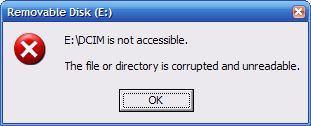
Yuk! Now what to do? I did the normal things. I tried it again. No luck. I tried it in an SD USB adapter. No luck. I tried hooking up the camera directly to USB. No luck. Drat!
I'll bet you can guess what I did next. I Googled the error message. To narrow the search, I added "digital camera."
The second hit took me to this page. He recaps his problems and the software he tried to address them "and finally my favorite, a FREEWARE program DIR (Digital Image Recovery) from http://home.arcor.de/.../dir/index.html. It is the freeware software which prompted me to write this brief article, to give credit where it is due." I munged this link because it is broken.
So I Googled the link and to make a short story really to the point, found the program on a couple of sites:
It's a quick download, 573K and has it's own setup (which is overkill).
It did exactly what it was advertised to do. It ran through my SD card (in a USB reader) and found 20 images. That was all of the images even including 3 that I had deleted in trying to correct the problem. The last one was really BIG. I presume that was the problem.
This is really a nice little program to have in your bag of tricks. You never know when you'll need something like this to rescue pictures.
Now I'll reformat the SD card and try to figure out how to certify it. I'll let you know what I find.
Yuk! Now what to do? I did the normal things. I tried it again. No luck. I tried it in an SD USB adapter. No luck. I tried hooking up the camera directly to USB. No luck. Drat!
I'll bet you can guess what I did next. I Googled the error message. To narrow the search, I added "digital camera."
The second hit took me to this page. He recaps his problems and the software he tried to address them "and finally my favorite, a FREEWARE program DIR (Digital Image Recovery) from http://home.arcor.de/.../dir/index.html. It is the freeware software which prompted me to write this brief article, to give credit where it is due." I munged this link because it is broken.
So I Googled the link and to make a short story really to the point, found the program on a couple of sites:
It's a quick download, 573K and has it's own setup (which is overkill).
It did exactly what it was advertised to do. It ran through my SD card (in a USB reader) and found 20 images. That was all of the images even including 3 that I had deleted in trying to correct the problem. The last one was really BIG. I presume that was the problem.
This is really a nice little program to have in your bag of tricks. You never know when you'll need something like this to rescue pictures.
Now I'll reformat the SD card and try to figure out how to certify it. I'll let you know what I find.
Friday, December 09, 2005
Christmas Wish List
I've been nagged at to make a Christmas list so here goes.
 USB SIM Card Reader/Writer
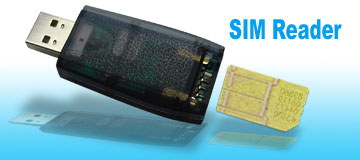
This will let me backup the SIM cards for our cell phones.
You can order it here.
4-Port USB 2.0 Hub
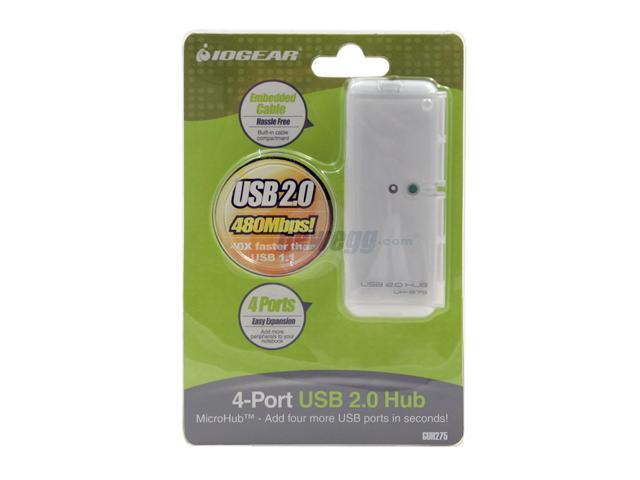
You can order it here.
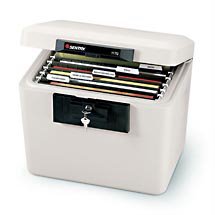
Sentry Fire-Safe Security File
VisiStop Intelligent Brake Lights Flasher
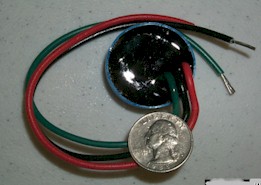
This will make my motorcycle's brake light when I stop.
You can order it here. Specify "IBF4."
Studio Plus Version 10
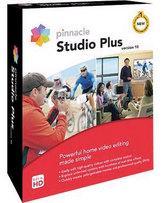
This will upgrade my video editing program. I already have Version 8.
You can order it here. Follow the "Upgrade to Studio 10" link on the left side. Then choose "Upgrade to Studio Plus version 10."
Palm Treo 650
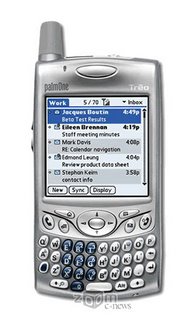
You can get this at Cingular. Talk to Debbie at 901-262-4891. Should get an IP discount.
Sony RM-VL710
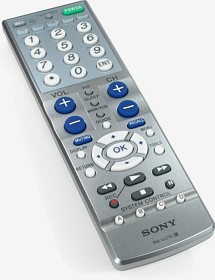
You can get this at CircuitCity.
Update 12/26/05: Thanks Santa!
 USB SIM Card Reader/Writer
This will let me backup the SIM cards for our cell phones.
You can order it here.
4-Port USB 2.0 Hub
You can order it here.
Sentry Fire-Safe Security File VisiStop Intelligent Brake Lights Flasher
This will make my motorcycle's brake light when I stop.
You can order it here. Specify "IBF4."
Studio Plus Version 10
This will upgrade my video editing program. I already have Version 8.
You can order it here. Follow the "Upgrade to Studio 10" link on the left side. Then choose "Upgrade to Studio Plus version 10."
Palm Treo 650
You can get this at Cingular. Talk to Debbie at 901-262-4891. Should get an IP discount.
Sony RM-VL710
You can get this at CircuitCity.
Update 12/26/05: Thanks Santa!
Sunday, November 27, 2005
iPAQ
Remember that I went to the HP Technology Forum in October? They had PCs around where, between sessions, you could stop and rework your schedule, check for e-mail from other attendees, and complete surveys on the sessions you had attended. I would stop at one a couple of times a day and do the surveys.
I didn't pay much attention but there was a drawing for those who completed the session surveys. The prizes were iPAQs. Believe it or not, I won one!
In a couple of weeks it arrived. It was an HP (natch) hx2115 iPAQ. Here's HP's overview. The hx2115 seems to be the retail version of the commercial model hx2110. I can't tell any difference. Here's what it looks like:
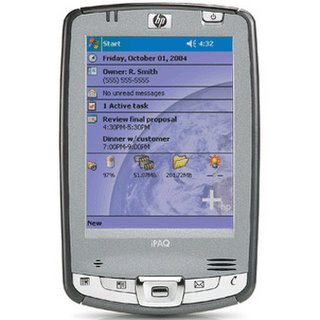
While I still occasionally fall back to my Sony Clie, there are so many pluses to the iPAQ. It interacts so much nicer with my Windows XP laptop. Just point the infrared ports toward each other and you can transparently move files back and forth. The iPAQ just shows up as a file system to the laptop.
The iPAQ comes with Word Mobile, Excel Mobile, and PowerPoint mobile. The ability to read and create Office documents is wonderful. I haven't explored the extremes of these applications but what I need them to do day in and day out is all there.
It has both SD and CF slots. I have a 256MB CF card that I've been using in the Clie for audio files. My Casio Exilim Z40 uses SD so I have some of them around also. I picked up a 512MB SD card at CircuitCity on Black Friday. I had a CF Wi-Fi card (Sony WL100) for the Clie but I can't find a driver for Windows Mobile 5. It's pretty clunky anyway. I found a Spectec SDW-820 on eBay. It's the shortest SDIO CF Wi-Fi card available.
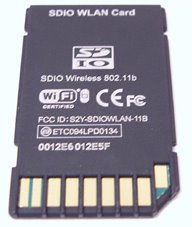
There's a lot more I want to play with on the iPAQ. I'll update you as I go along.
I didn't pay much attention but there was a drawing for those who completed the session surveys. The prizes were iPAQs. Believe it or not, I won one!
In a couple of weeks it arrived. It was an HP (natch) hx2115 iPAQ. Here's HP's overview. The hx2115 seems to be the retail version of the commercial model hx2110. I can't tell any difference. Here's what it looks like:
While I still occasionally fall back to my Sony Clie, there are so many pluses to the iPAQ. It interacts so much nicer with my Windows XP laptop. Just point the infrared ports toward each other and you can transparently move files back and forth. The iPAQ just shows up as a file system to the laptop.
The iPAQ comes with Word Mobile, Excel Mobile, and PowerPoint mobile. The ability to read and create Office documents is wonderful. I haven't explored the extremes of these applications but what I need them to do day in and day out is all there.
It has both SD and CF slots. I have a 256MB CF card that I've been using in the Clie for audio files. My Casio Exilim Z40 uses SD so I have some of them around also. I picked up a 512MB SD card at CircuitCity on Black Friday. I had a CF Wi-Fi card (Sony WL100) for the Clie but I can't find a driver for Windows Mobile 5. It's pretty clunky anyway. I found a Spectec SDW-820 on eBay. It's the shortest SDIO CF Wi-Fi card available.
There's a lot more I want to play with on the iPAQ. I'll update you as I go along.
Sunday, November 13, 2005
LogMeIn
Remember how I whined about MyWebExPC beginning to charge? I have completed the switch from MyWebExPC to LogMeIn. The process is straight-forward and I believe LogMeIn is faster. It's so fast that sometimes I use it to control my SageTV box instead of RealVNC. It also seems to reconnect automatically after the broadband connection fails, something that I had to create a work-around for with MyWebExPC.
Watch as you login and take control the first time. There are a couple of boxes that I check:
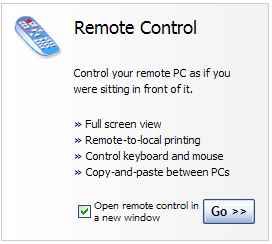
and
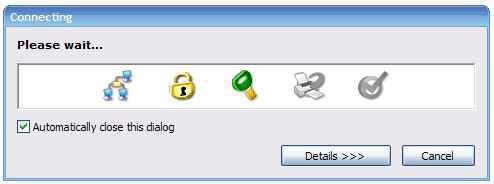
The only nuance I've found with LogMeIn is that the default action for timeout or disconnection of the controlling system is to lock the controlled system. That's easy to change by going to the Preferences screen as you initiate the login. Click on Remote Control Settings and uncheck all the boxes.
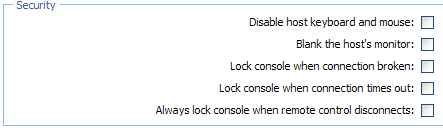
Watch as you login and take control the first time. There are a couple of boxes that I check:
and
The only nuance I've found with LogMeIn is that the default action for timeout or disconnection of the controlling system is to lock the controlled system. That's easy to change by going to the Preferences screen as you initiate the login. Click on Remote Control Settings and uncheck all the boxes.
Friday, November 11, 2005
Microsoft Briefing
Sorry I haven't posted in a while. Last week we went to Redmond for a briefing with Microsoft. Here's our agenda:
Here's the comments from one of my co-workers to the material:
Thursday, November 03, 2005A lot of the facts were under non-disclosure but I can talk about my thoughts after the briefing.
8:00AM - 8:30AM - Breakfast
8:15AM - 8:30AM - Welcome and Introductions
8:30AM - 9:30AM - Topic: Windows Client Operating System Roadmap and Strategy
9:30AM - 10:45AM - Topic: Creating Business Value Through Collaboration
10:45AM - 11:00AM - Break
11:00AM - 12:00PM - Topic: SharePoint Portal Server & Windows SharePoint Services: Enabling Information Worker Productivity
12:00PM - 1:00PM - Topic: Executive Discussion: Chris Liddell
12:00PM - 1:00PM - Lunch
1:00PM - 2:00PM - Topic: BizTalk Server
2:00PM - 2:30PM - Break
2:30PM - 4:15PM - Topic: Exchange Server 12 and Future Directions
4:15PM - 5:15PM - Topic: Licensing Strategy
5:15PM - 5:30PM - Shuttle to Company Store
5:30PM - 6:15PM - Company Store
6:15PM - 6:30PM - Shuttle to EBC
7:00PM - 9:00PM - Dinner
Friday, November 04, 2005
8:00AM - 8:45AM - Topic: Microsoft Office in the Enterprise: InfoPath
8:15AM - 8:45AM - Breakfast
8:45AM - 10:00AM - Topic: SAP Solutions
10:00AM - 10:15AM - Break
10:15AM - 10:45AM - Summary & Conclusion
Here's the comments from one of my co-workers to the material:
I was very interested in the SAP on SQL-Server 2005, Exchange 12 and Collaboration and Portal Presentations. If MS delivers all that stuff things will be tough for competitors in each space.Amen. Stay tuned.
Sunday, October 23, 2005
HP Tech Forum
Sorry I haven't posted lately. I've been in Orlando at the HP Technology Forum. It was supposed to have been in New Orleans in early September but...
I'll put together some of my notes later this week but for now here're the sessions I attended:
I'll put together some of my notes later this week but for now here're the sessions I attended:
- Case Studies: Server Virtualization and Consolidation Strategies
- Security Intelligence and the Business Process
- A Simple Approach to Managing the Linux Environment
- Implementing a High Availability Enterprise Resource Planning Solution with Microsoft Clustering
- Getting More From Less: How to Optimize Your Existing Server Operations
- Choosing the Right Architecture to Win
- Service Infrastructure: A Practical Approach to Service-oriented Architecture for an Enterprise
- Thin Clients: Technical Overview
- Understanding Current PC Technologies
- A Real-world Demonstration of Service-oriented Architecture Management
- Dual-core Architectures
- Best Practices for Reducing Total Cost of Ownership with IT Consolidation
- New Security Technology: Active Countermeasures: A Proactive Vaccine
- Linux in the Enterprise IT Strategy: Where, When, and How
- The Benefits of Itanium and Windows
- Evaluating Anti-spam Filtering Solutions
- WLAN Security: Threats and Countermeasures
Tuesday, October 11, 2005
MyWebExPC - NOT
Remember how I raved about MyWebExPC?
The best part was that you get unlimited access for up to 5 PCs. Here's what you get for free.
I even got quoted by a US News & World Report article by David Lagesse.
Ben Moore used to haul 30 miles from his home in Southaven, Miss., to help maintain his parents' PC. Now he does it through mywebexpc and sometimes, with their blessing, doesn't bother to tell them. "I just wait until after 9 at night, when they go to bed." So they all can sleep easy.
Just try clicking on that free link now! Here's what you'll get: What's happened is that WebEx pushed out a mandatory update this weekend that upgraded MyWebExPC to PCNow. PCNow is a for pay service that is $14.95 per month per PC.
Obviously, I'm not the only one who's run into this. Search technorati.com for mywebexpc. I love the first title of the first hit I got: "MyWebExPC My arse." I don't think he was happy either.
The suddenness of this is demonstrated by this article posted in the UK edition of PC Magazine.
Price: £0.00 (emphasis added)Now it's off to find an alternative. Don't change that channel.
Overall rating: **** (4 out of 5)
Manufacturer: WebExCommunication
Tim Smith, Computeract!ve 19 Sep 2005
Monday, October 10, 2005
I Pod
I finally bit the bullet. I got an iPod mini. Of course, I didn't do iTunes but EphPod. I learned the hard way that you have to use the Apple iPod Update to get your iPod up to speed.
I use it exclusively to listen to techie podcasts when driving back and forth to work. I used to download podcasts and burn them to CDs so I could listen in the car but that was using up a lot of my free CDs.
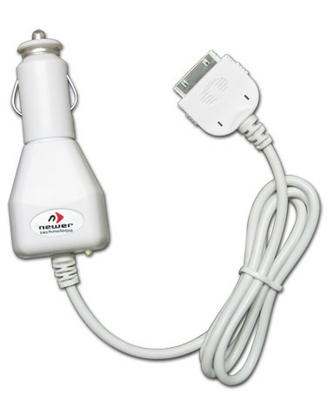
After I played with it a couple of weeks just using the ear buds, I found this at Other World Computing. It has a built-in FM transmitter (only 87.9) and charges your iPod while you listen. It's $27.95 with second day air shipping for $5.
Here's what it looks like:
It works great. So good, in fact, that the first one immediately left with my daughter. I ordered another and am back in business.
I use it exclusively to listen to techie podcasts when driving back and forth to work. I used to download podcasts and burn them to CDs so I could listen in the car but that was using up a lot of my free CDs.
After I played with it a couple of weeks just using the ear buds, I found this at Other World Computing. It has a built-in FM transmitter (only 87.9) and charges your iPod while you listen. It's $27.95 with second day air shipping for $5.
Here's what it looks like:

It works great. So good, in fact, that the first one immediately left with my daughter. I ordered another and am back in business.
How Low Can You Go?
I was reading my Bloglines feed from digg tonight and came across this article on 1 GB flash drives. I'm a sucker for big (capacity), small (physical size) drives. This article referred to Sandisk's Mini Cruzer drive. I have Sandisk's 512 MB Micro Cruzer drive and love it.
Another Bloglines feed I've just started watching is the TWiT podcast. Episode 25 referred to a 8 GB drive from LaCie. It's credit card sized and only 1/4 inch thick.
Here's what it looks like:

Another Bloglines feed I've just started watching is the TWiT podcast. Episode 25 referred to a 8 GB drive from LaCie. It's credit card sized and only 1/4 inch thick.
Here's what it looks like:

Thursday, October 06, 2005
It's Always Something
Remember in this post I realized that I needed a USB2 card to support the USB IDE adapter? I went back to PCMicroStore and found this:
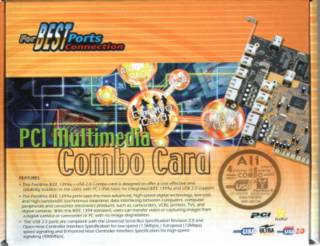
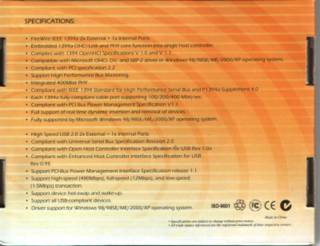
Just as before, they shipped the next day and it arrived in 2 days with their FREE shipping.
As I expected, that fixed the errors from the USB IDE adapter. Besides, it makes my USB drive and my iPod work better. Now, I need to update my USB hub to 2.0.
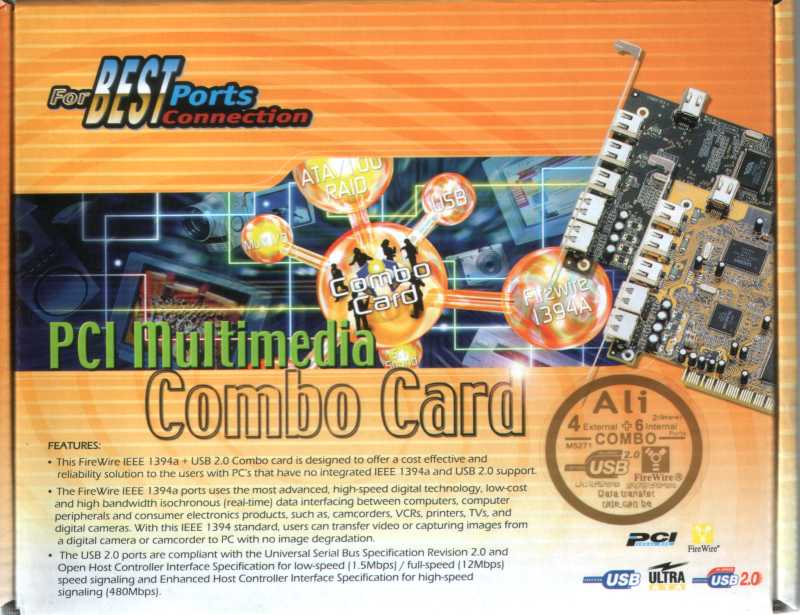

Just as before, they shipped the next day and it arrived in 2 days with their FREE shipping.
As I expected, that fixed the errors from the USB IDE adapter. Besides, it makes my USB drive and my iPod work better. Now, I need to update my USB hub to 2.0.
Tuesday, October 04, 2005
VitalFile Backup
At work last week we got to talking about backup. I'm still having trouble with my DVD burners. I even replaced my desktop's with a new Sony DL. I've about decided that the problem is the media but that's another topic.
Mike was saying that he wasn't using backup to optical media any more. That he just kept 2 copies at home and one on a removable hard drive that he kept away from the house.
This made me remember an article I had read recently on one of IBM's skunkworks backup products. I poked around for a little bit and found it again. Here's an introductory article on their VitalFile product.
Here's IBM's description of VitalFile product:
I've got 2 hard drives so I could use the second drive as the local copy. Now I need to get the file server copy off site. (Interesting to call my house the "site.") I went to Globat to see what their offering tonight is. They are offering 10GB for $1.99 per month for the first year. It goes up to $7.95 per month after that. Encryption is one thing that worries me about putting it on a web site. (If you sign up for a web site from Globat, use me as a referrer - desotonet.com. Be sure that you read my posts on Globat [one and two].)
I think I'll install VitalFile this weekend and play with it some. Trial is free. Purchase is $35.
Mike was saying that he wasn't using backup to optical media any more. That he just kept 2 copies at home and one on a removable hard drive that he kept away from the house.
This made me remember an article I had read recently on one of IBM's skunkworks backup products. I poked around for a little bit and found it again. Here's an introductory article on their VitalFile product.
Here's IBM's description of VitalFile product:
VitalFile for Real-Time Workstation Protection, which is built on top of the FilePath file system filter driver and makes three copies of any modified "user-created" file, storing one in the local system, another in a file server and a third in a Tivoli Storage Manager back-up server.Here's a blog entry from a satisfied user.
I've got 2 hard drives so I could use the second drive as the local copy. Now I need to get the file server copy off site. (Interesting to call my house the "site.") I went to Globat to see what their offering tonight is. They are offering 10GB for $1.99 per month for the first year. It goes up to $7.95 per month after that. Encryption is one thing that worries me about putting it on a web site. (If you sign up for a web site from Globat, use me as a referrer - desotonet.com. Be sure that you read my posts on Globat [one and two].)
I think I'll install VitalFile this weekend and play with it some. Trial is free. Purchase is $35.
Subscribe to:
Posts (Atom)