Sunday, November 29, 2015

Google Cloud Outages

I've written numerous times about cloud availability. Last year I posted about an outage in Microsoft's Azure service.

Some of my comments were:
Recently there was an 11 hour outage of Microsoft's Azure storage services.

Again users were hard pressed to get details on the outage as "the Service Health Dashboard and Azure Management Portal both rely on Azure."
Cloud outages don't have to be like that.

Here're the communications from Google on a pair of recent outages in their cloud services.

Gmail Outage

November 3, 2015 1:21:00 AM PST
We're investigating reports of an issue with Gmail. We will provide more information shortly.
November 3, 2015 1:38:00 AM PST
Our team is continuing to investigate this issue. We will provide an update by November 3, 2015 2:38:00 AM PST with more information about this problem. Thank you for your patience.

This issue is affecting IMAP and SMTP delivery
November 3, 2015 1:48:00 AM PST
Our team is continuing to investigate this issue. We will provide an update by November 3, 2015 2:48:00 AM PST with more information about this problem. Thank you for your patience.

This issue is affecting incoming POP, SMTP and IMAP connections.
November 3, 2015 2:25:00 AM PST
The problem with Gmail should be resolved. We apologize for the inconvenience and thank you for your patience and continued support. Please rest assured that system reliability is a top priority at Google, and we are making continuous improvements to make our systems better.
Four posts in just over one hour.

Google Calendar Outage

November 4, 2015 8:20:00 AM PST
We're investigating reports of an issue with Google Calendar. We will provide more information shortly.
November 4, 2015 9:25:00 AM PST
Google Calendar service has already been restored for some users, and we expect a resolution for all users within the next 1 hours. Please note this time frame is an estimate and may change.
November 4, 2015 10:25:00 AM PST
The problem with Google Calendar should be resolved. We apologize for the inconvenience and thank you for your patience and continued support. Please rest assured that system reliability is a top priority at Google, and we are making continuous improvements to make our systems better.
Three posts in just over two hours.

Everybody is going to have outages. But this is the way to handle them.

Sunday, November 22, 2015

LG Senior Phone

My 90-ish year old mother hit me up a couple of years ago as to why her cell phone didn't look like her friends'. She was using a Motorola Razr V3. I asked her what her friends' phones looked like. She said flat and black. They were using iPhones.

So off I went on a quest to upgrade her to an iPhone. I turned up an iPhone 4 that suited her just fine. She upgraded it on her own to iOS 7 (yikes!).

But she's continued to struggle with control actions on the iPhone. The main problem is that when she completes a phone call she taps the "home" button. This puts the display back on the home screen but doesn't terminate the call. If the other party doesn't disconnect my mother's phone is still on the call. Luckily I have unlimited minutes but it still means she can't place or receive another call.

She enjoys looking at and sharing photos on her camera roll and I like being able to use "Find My Friends" to locate her.

So I set off on a quest to find a more "senior friendly" phone.

They're not easy to find.

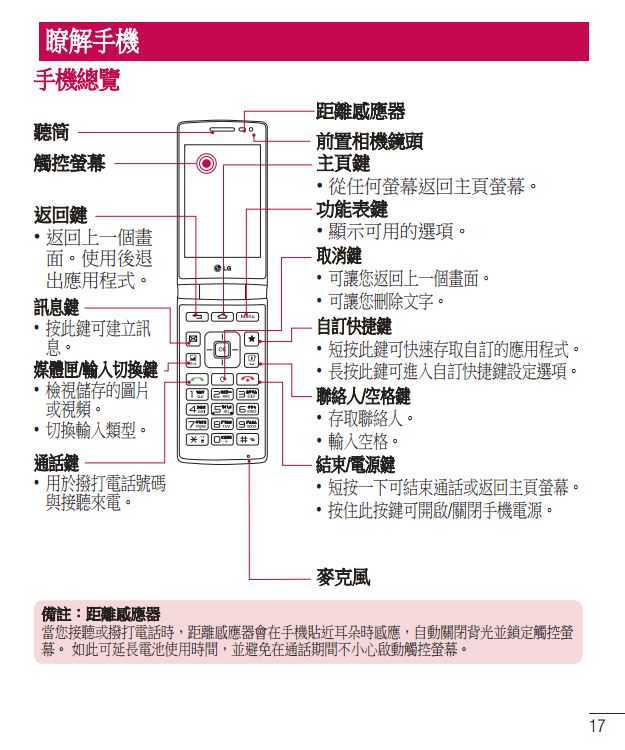
I ended up with an LG Wine Smart D486. It's a flip phone running Android. It's about the same size as an iPhone 4 but slightly thicker.


Here are the specifications. Notice that the keyboard pictured on that page is in Korean. Be sure that the one you get has English buttons.

I had some questions and wanted to read the User Manual. I contacted LG in Taiwan and they referred me to the support page. Although it was in Mandarin I could figure out the link to the PDF manual. It was in Mandarin also.


So I bit the bullet and just bought one. Unfortunately they're not sold in the US so I bought it from an organization in Taiwan. Shipment via DHL was quick. I bought it on eBay on 11/12/15. It shipped on 11/16/16 and arrived on 11/18/15.

So far the D486 is everything that I wanted and more.

Language hasn't been a problem (other than the manual) as it comes up in English on the initial power-up.

Generally it works like a traditional flip phone. It uses the 10-digit keyboard for input so you don't want to type much. The "C" key just above "2" is "Clear." You'll thank me for that.

It's running KitKat 4.4.2 so it's current enough.


The version of Android is slightly tweaked. For example it has an "EasyHome" option for the home screen. This gives a simpler homescreen with bigger icons.


I didn't use this option as I wanted an even simpler home screen.


The big weather and clock widget is an LG custom widget.

Like a traditional flip phone, it has several "hard" buttons. One of them is configurable so I set it to launch Google Photos.


In Settings I found how to set the phone to answer incoming calls by just flipping it open. Flipping it closed terminates the call.


And pressing and holding the green "Call" key will call 911.


But the feature that puts this over the top for me is what LG calls "Safety Care."


"Emergency notice" lets you specify who to automatically text message with the phone's location after an emergency call is placed from the phone.


"Phone non-usage notice" lets you specify who to automatically text message with the phone's location when either the phone hasn't been used for a specified time or when the battery is low.


"My location notice" lets you specify who to automatically text message with the phone's location when that contact is called or a call from that contact goes unanswered. I set the "Unanswered calls only" option so I get a text when I call my mother and she doesn't answer.


I tested this and here's what the text message looks like.


"Out of zone notice" lets you specify who to automatically text message with the phone's location when the phone enters or leaves a preset area. I'm not using this feature.


I enabled Google+'s location sharing to replace the "Find My Friends" function.

It doesn't have the proper LTE bands for AT&T but that's not really a problem for her.

It uses a microSIM so moving from the iPhone 4 to the LG was easy.

It came with a set of Google apps but they weren't automatically updating. I went to the Play Store and downloaded current copies. Now they are automatically updating. Don't forget to install and setup the Android Device Manager.

It's early yet but it seems perfect.

Sunday, November 15, 2015

Oracle and Secure Hardware

An article about Oracle being hacked popped up in my news feed recently.
Interns Hacked Oracle Software in under an Hour, Researcher Says 
Among the many ways in making its software more secure, Oracle, he (founder Larry Ellison) said, is looking at implementing security technology built right into the hardware or the chip. He says that the security feature will be switched on, by default and will have no way of turning it off once it is being used.
I'm not trying to be "Chicken Little" but we have to acknowledge that hackers will continue to dive deeper and deeper into our systems. Thinking that you can build secure technology into hardware or chips is shortsighted.

If you want to put your propeller hat on, here's why it will be hacked.


You'd think Ellison would realize that given his company's history with Java.

References:

https://www.schneier.com/blog/archives/2015/03/bios_hacking.html
https://blog.kaspersky.com/equation-hdd-malware/7623/
http://www.computerworld.com/article/2955641/cybercrime-hacking/macs-can-be-remotely-infected-with-firmware-malware-that-remains-after-reformatting.html
http://www.mcafee.com/us/resources/solution-briefs/sb-quarterly-threat-q1-2015-1.pdf
http://www.darkreading.com/vulnerabilities---threats/bios-bummer-new-malware-can-bypass-bios-security/d/d-id/1139823

Sunday, November 08, 2015

Android Pay vs. Google Wallet

About a year ago I posted about Google Wallet. Since then I've been using it where it was available. I still get questions of "What did you just do?" when I use it.

There was a transition time in NFC payment support when Apple introduced Apple Pay. Some businesses even withdrew their NFC payment support, e.g. CVS, over a squabble about fees.

NFC payment took a giant leap forward recently with the transition from Google Wallet to Android Pay.

Google let this transition appear confusing as they repurposed the Android Google Wallet app to a person-to-person payment system and introduced an Android Pay app to effect the NFC payments.

But there's more here than meets the eye.

In a recent post on an xda-developers.com forum triggered by a deep technical question about rooted devices a Google developer said:
That "ensuring" [that the security model of Android is intact] is done by Android Pay and even third-party applications through the SafetyNet API. As you all might imagine, when payment credentials and--by proxy--real money are involved, security people like me get extra nervous. I and my counterparts in the payments industry took a long, hard look at how to make sure that Android Pay is running on a device that has a well documented set of API’s and a well understood security model.
The above discussion was about rooting and explained why Android Pay was sensitive to that condition. This also explains why using Android Pay requires you to have a lock screen on your device.

Then the developer went on to describe the difference in the relationship of Android Pay to the payment networks.
The earlier Google Wallet tap-and-pay service was structured differently and gave Wallet the ability to independently evaluate the risk of every transaction before payment authorization. In contrast, in Android Pay, we work with payment networks and banks to tokenize your actual card information and only pass this token info to the merchant.
You can experience the difference yourself when you add a credit/debit card to Android Pay. If Google has negotiated with the payment network you will be asked to confirm the addition of that credit/debit card with the payment network. In my experience this is done with a live phone call with the payment network. When that is completed and you subsequently use that credit/debit card in an Android Pay transaction you will NOT be required to enter a PIN.

Alternatively if Google has NOT negotiated with the payment network you will NOT be asked to confirm the addition of that credit/debit card with the payment network. Then when you subsequently use that credit/debit card in an Android Pay transaction you WILL be requested to enter a PIN. This seems to be the same method used by the former Google Wallet app.

This difference in the transaction appears to be related to the tokenization of the credit/debit card information.

Transactions involving credit/debit cards where Google has negotiated with the payment network use a token. Google is not a direct participant in the transaction.

Transactions involving credit/debit cards where Google has NOT negotiated with the payment network use virtual account numbers generated by Google.


Subsequent to my initial experience with Android Pay my financial institution canceled my debit card and reissued it. I went to the Android Pay app, deleted my old card and tried to add the new one. It wouldn't add. It looks like Google is limiting addition of cards to those that they have negotiated with the payment network.

I don't consider myself an expert on this subject. This post is just describing my observations.

Sunday, November 01, 2015

OnePlus One - Three Strikes

I've had an ongoing flirtation with the OnePlus One. The first one I traded. The second one I sold. The third one I kept and used.

But...

It really is BIG.

And FLAKY!

I got used to the size but the niggling issues drove me crazy.

The compass didn't work after upgrading to Lollipop. Seems to be a common problem with Lollipop but my Moto X doesn't have the problem.

Cyanogen OS 12.1 replaced a couple of the AOSP applications. The most irritating one was the inclusion of TrueCaller. Let's just say the the OnePlus community didn't have the same perspective as OnePlus. You could opt out of the sharing capabilities of TrueCaller but my beef was that TrueCaller's incoming call screen had a small thumbnail of the caller while the AOSP had a full screen image.

The vibration of the OnePlus One was very weak. So much that I pretty much couldn't feel the vibrations with the OnePlus One in its holster on my hip. Subsequently I turned on audible notifications for everything which is irritating for everyone.

When I was talking on the phone people mentioned that they couldn't hear me clearly. Some Googling turned up that "Ok Google" detection causes problems with voice during calls. Turning off "Ok Google" detection "fixed" it.

The screen's brightness kept lowering resulting in the screen being pretty much dark when you received an incoming call. I tried several of the workarounds to no avail.

And the battery, while longer lasting than the Moto X, still wasn't as good as my wife's iPhone.

So I listed it on swappa and it sold the first day. Obviously I didn't ask enough for it.

What's next? RDF

Sunday, October 25, 2015

iPad Virtual Desktop

I had lunch with one of my former co-workers recently. We were chatting about virtual desktops (VDI) as that keeps coming up with my current clients.

We were deep diving into clients for virtual desktops. He related that one of their technical architects was working on iOS VDI clients. He was getting frustrated and asked the following question:
Why are we trying to make an iPad work like a Windows desktop?
Good question.

Sunday, October 18, 2015

PayPal Preapproved Payments

Recently we bought something from Sears and used PayPal to pay for it. We selected to use a debit card as payment to PayPal. We thought that was relatively safe as Sears wouldn't have access to the debit card and could only process that one transaction.

How wrong we were.

My wife was subsequently balancing her checking account and saw several charges and debits against her checking account using the debit card via PayPal.

That was odd.

While the charges were acceptable (Sears had miscalculated the shipping) giving Sears the ability to process charges and debits against her checking account without our approval is not what we had intended.

Looking back through the e-mail surrounding this transaction I found this e-mail from PayPal.


I don't remember that being obvious during the Sears/PayPal transaction.

And PayPal doesn't make it easy to find these agreements on their site.

Login to PayPal as normal.

Then up in the top right is a little gray gear. Click on that.


On the next screen scroll down to the bottom and find "Payment settings" and under that click on "Preapproved payments."


And there's Sears.


By the time I took the above screen capture I had canceled the agreement.

Click on the Merchant's name and you'll get this.


If the agreement is still active you'll be able to click on "Cancel" here.

I'm surprised at the merchants that do this. In my case I found payment agreements with Sears, TravelSmith, Orvis, eBay, Age of Learning, Office Depot, Zappos, iTunes, Ancestry.com, TigerDirect, GoDaddy, and Woot. Several on this list I used PayPal deliberately to deny the merchant unapproved access to my credit.

This verges on sneaky, both on the part of the merchant and PayPal.

And while I have your attention on PayPal, go read this.

Sunday, October 11, 2015

Cloud Security

I follow a number of CIO-orientated blogs and this article popped up recently:
Why promises about cloud security make me uneasy
I couldn't have said it better myself.

The entire article is worth reading but I'll try to pull out the highlights here.
Cloud companies will tell you that their products and services are secure and you can use security products to ensure that your data and applications are secure. I am a bit skeptical.
I can maintain and monitor use and access to my user base and interrogate logs of application use however I lack key visibility when in comes to the cloud...
While many organizations struggle to "maintain and monitor use and access" at least they control their own destiny. In a cloud environment you will "lack key visibility."

You'll recall my observations in a prior post.
...as a CIO are you comfortable with this level of opacity to service failures?
From the referenced article:
I lack control of the cloud and am dependent on a third party vendor for disclosure and transparency ...
Not a comfortable position for a CIO.

To raise both sides of this topic, if you or your organization are not able to "maintain and monitor use and access" maybe delegating that to a cloud provider is the prudent thing to do.

Just make sure your boss is on board with your decision. And that you've got the mobile number of your cloud salesperson.

Sunday, October 04, 2015

International Cellular Plans 2015

Back in 2011 I covered my international cellular usage for a trip to Italy. In 2015 we traveled to Ireland so I looked again.

As you would hope AT&T has simplified and lowered the prices on their international cellular plans. As of May 2015 here are their plans.


Unlike 2011 you can't pro-rate these plans when you get back. But there is still an angle. Keep on reading.

The cost per megabyte has dropped. In 2011, 125MB was $50. In 2015 120MB was $30. In 2011, texts were $.20 each. In 2015, texts sent are free. Texts received are charged at your domestic rate (free for me on Mobile Share Value Plan). Voice is the same as 2011 at the Passport level.

The unlimited texts were nice for us as we tended to text among the travel party.

Several of us had iPhones which iMessage uses data so we had to log them out of iMessage.

On an iPhone, a day before leaving you should turn off iMessage.


To confirm this send a couple of text messages. The bubbles should be green instead of blue. When the bubbles are green, even international texts are free with AT&T's Mobile Share Value Plan. The only downside is that text messages won't go to an iPad.

When you land overseas, you need to make the following changes.

First turn off "Background App Refresh". All the apps will still work but you'll just have to initiate their updates, e.g. e-mail.


Then turn on "Data Roaming".


At the bottom of this screen is a menu item to "Reset Statistics". If you tap this it'll reset your data usage tracking so you can see where you are against the AT&T international plan.

Then undo all this when you get back in the U.S.

Android is not so complicated. Just turn on "Data roaming" and turn off "Auto-sync data".


On my Moto X, the LTE bands on AT&T's Irish partner weren't supported so I expected to only get UMTS+. However in the areas where I was (really rural) I mostly got 3G and sometimes even EDGE.

When I returned I called AT&T and they could tell me the data usage and calling minutes. They then re-rated the plans to the most cost effective. This saved me $33.

Post script: Be careful not to read too much into the AT&T Passport pitch on "messaging" being "unlimited." Notice that doesn't say "free." It is true that there is no direct per message charge for messages sent. (Messages received are billed at the domestic rate.)

But let's think for a second about the two different types of "messages." First there's the traditional text only, single recipient message. That is called Short Message Service (SMS).

Second there's the message with a picture or multiple recipients. This is called Multimedia Messaging Service (MMS).

SMS messages don't require cellular data. MMS messages do require cellular data. And this cellular data will count against your allowance in the Passport offering.

Sunday, September 27, 2015

Update on Spam

It's been years since I've written about spam. That article was really focusing on the McColo shutdown.

Recently I came across a Quartz article that said that spam is at a 10-year low based on work by Symantec. This prompted me to revisit my spam tracking.

My numbers completely agree with Symantec's findings.


For background, the way I get my numbers is that every Monday I log into a Gmail account and note the number of e-mails in the Spam folder.

Sunday, September 20, 2015

OneDrive Critique

No, it's not my critique. Remember I tried several Microsoft file sync products and as Microsoft messed with them I dropped them one by one. I've stuck with Dropbox because it just works.

I've been watching SkyDrive OneDrive (don't even get me started) as it has the promise of unlimited free storage and deep integration into Microsoft products.

I should have known better.

Recently Paul Thurrott wrote one of his "What I Use" articles on cloud storage. Thurrott is the guy who started SuperSite for Windows and hosts Windows Weekly. For Pete's sake, this guy uses a Windows phone!

Here's what he said about OneDrive:
So why even bother with Dropbox? 
Simple. It works. It works really well. It works quickly. And it works reliably.
OneDrive, meanwhile, is a mess. It’s slow and its unreliable...
Admittedly I haven't given OneDrive a try. I have been a little gun shy given my experiences with other Microsoft file sync products.

I'll stick with Dropbox.

Sunday, September 13, 2015

Dashcam Wiring

When I wrote the post about my dashcam I hadn't hardwired it. I was collecting the parts and installed it recently.

My plan was to run a miniUSB cable from the windshield mounted dashcam, under the headliner, under the door trim and to a switched socket in the primary fuse block.

It worked perfectly.

I found a miniUSB cable that had the proper angle to fit flat against the windshield and leave the dashcam headed directly to the top of the windshield. The headliner was loose enough to slide the cable under it.


When I got the to driver's A pillar, I was able to slip the cable into the gap between the trim and the windshield. I snaked it down to the top of the dash and moved it over to the soft rubber door jamb trim. I slipped the cable under the trim and ran it down to the bottom of the dash.

I put an Add-A-Circuit in the rightmost middle fuse socket. In my 2013 Accord this socket is switched with the ignition. I put the 10A fuse displaced from the fuse socket into the primary socket of the Add-A-Circuit and put a 7.5A fuse (included with the Add-A-Circuit) in the additional fuse socket of the Add-A-Circuit.


I got a car outlet adapter splitter and cut off one leg near the plug end leaving about a foot of cable and a socket.


I attached one wire from the socket to the Add-A-Circuit with a wire nut and the other end to a convenient ground screw.

I grabbed a spare USB car outlet adapter from my junk drawer and inserted it into the car outlet adapter socket. Then I plugged the miniUSB cable into it.

I should have zip tied all this together and velcroed it under the dash. I didn't. There wasn't much spare cable left so I just slipped the car outlet adapter socket up under the edge of dash. It seemed secure and has been there every since.

Here's what it looks like.


I slipped this up under the edge of dash.


Sunday, September 06, 2015

Third Time Third Time is a Charm

My 2 previous installs/upgrades of Windows 10 went almost flawlessly. My time using them still is a good experience.

I knew that I was going to hit a bump in the road.

The third time was an old ThinkPad X100e running Windows 7 Pro and it was slooooooow. Maybe Windows 10 would freshen it up.

As previously I used this procedure.

It wasn't as smooth as before.

The first time the upgrade just hung and I had to hard power down the laptop.

The second time I got error "0xc1900101 - 0x2000c" and it rolled back to Windows 7. Windows 7 was not well at that point.

I restored the X100e from a previous system image and tried again.

This time I used a USB drive version of Windows 10 Pro that I had built using this Microsoft tool.

The third time worked.

The poor old X100e limped along until it ran Windows Update a couple of times and now it's fine.

It's too early to tell if it's faster but I think not.

Incidentally I have noticed on all 3 installs/upgrades of Windows 10 that System Recovery has been turned off. Be sure and check this on your system.

Sunday, August 30, 2015

Google Hangouts and VoIP

I've been using Google Voice since it was Grand Central. Initially I was using it to overcome the confusion that arose with my traveling from office to office. When I'd call someone they'd get the caller ID of the extension that I was using. Then when I'd call them again they wouldn't recognize the extension. Grand Central gave me the ability to always present a consistent caller ID.

Further it lets me keep a good log of calls and even block callers if necessary.

However as I have transitioned to almost exclusive use of a cell phone, originating calls from my Google Voice number is difficult.

I've discovered that the Android Hangouts app handles that nicely. There is also a Hangouts Dialer app but that function has been incorporated into the main Hangouts app.

Here's what you normally see in the Hangouts app.


But notice over to the right is an icon for a dial pad. Swipe from the right to the left and you'll get this.


It comes up with Recent Calls from your Google Voice number. Now it's not a pretty as the phone's Dialer app but it works fine.

Just start typing a contact's name and you'll get a list of matches.


Or from the Recent Calls screen tap on the dial pad icon at the bottom.


The call will be placed over cellular data or Wi-Fi and present the caller ID of your Google Voice number.

Here's what it looks like during a call.


Now if you want to really get out there, you can go to Hangouts / Settings and turn on "Ring Hangouts for incoming phone calls made to your Google Voice number".


Now you're not using any cellular minutes. And if you have persistent Wi-Fi you don't even need cellular service.

Pretty cool.

Sunday, August 23, 2015

OMG(oogle) Now

On a recent trip to the Gulf Coast we were driving through a heavy rain. I got an unusual alert tone on my OnePlus One. It was Google Now with the following alert.


And it really was a severe thunderstorm because soon I got another similar alert.


As we approached the location the information got more complete.


This accident was reported by a Waze user.


By now I was fascinated with the Google Now cards that were being presented to me. As I scrolled down I saw this one.


All this was completely passive on my part. I was not using Google to navigate nor had I searched for gas stations.

On Mondays, I visit my mother and take her to my brother's house. Here are the Google Now cards I had on a recent Monday morning.


Later that day Google Now reminded me of my frequent dinner destination on Mondays.


Some may call this creepy. I call it pretty useful.