Sunday, July 01, 2012

Nook Color Ice Cream Sandwich errata

I tried to keep my Nook Color Ice Cream Sandwich post concise but I actually have a lot more to talk about so here goes. Remember that I'm running CyanogenMod 9.

Where to start?

I guess the first thing is that by default the Nook Color runs Ice Cream Sandwich (ICS) in Tablet UI mode. What's that mean? Here's the best I can find:


I also found an article in Computerworld about the Tablet UI.

If you need to get some sleep you can go read the Android 4.0 SDK documentation. Start with the Action Bar.

Anyway here's what my homescreen looks like in portrait and then landscape:


I'm using the stock ICS launcher, Trebuchet.

The top left is obviously the "Search Bar." At the far right, the grid opens the App drawer. There's not an App dock at the bottom in the Tablet UI.

I can only get the grid to be 6 icons wide and 5 icons deep.

The "Notification Bar" is at the bottom. The icons from the left are Return, Home, and Recent Apps. The notification area is at the right. You didn't see a Menu icon did you?

Here's what "Recent Apps" looks like:


If you tap one of these thumbnails you are taken to that app. If you swipe it right or left the thumbnail disappears. I'm not positive whether the app is actually closed at that point or not. Notice that the Return icon changed to what I'll call a Dismiss icon. Tap it and the "Recent Apps" menu disappears.

Swiping up in the Notification Area gives you a "Quick Settings" menu:


Swiping one of the notifications, in this case "Snapshot captured." dismisses that notification. Tapping the icon that looks like 3 sliders opens a subset of the Settings menu.


Check the date and time to see how long it took me to get that screenshot. Tap the "Settings" choice and you get the full "Settings" menu (finally).


In the "Wi-Fi" settings you begin to see the tablet presentation. The action choices are in a column on the left and the details are in a column on the right.

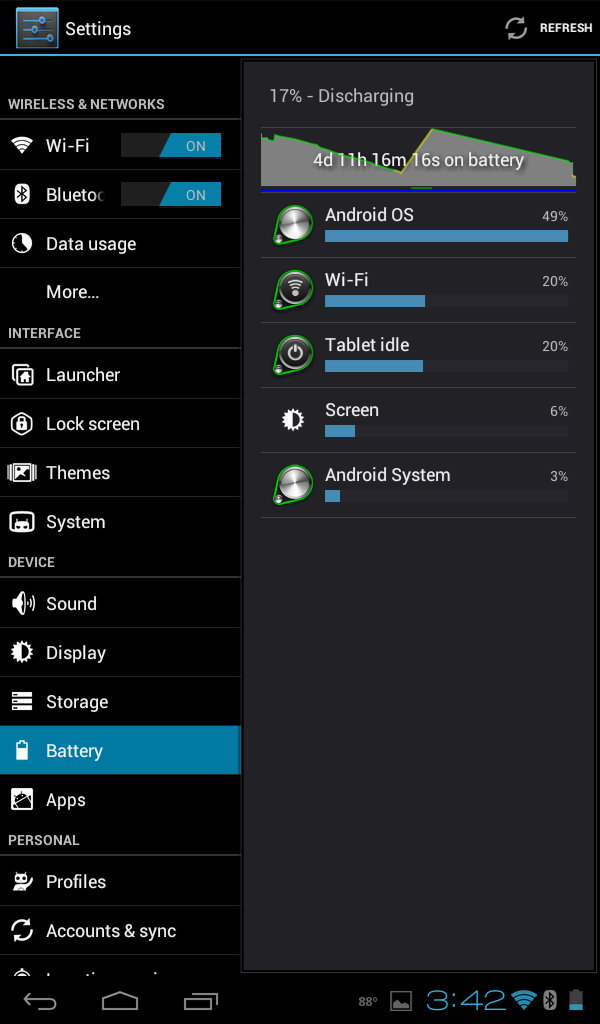
The "Battery" display shows which resources have consumed the battery.

In the "Apps" display you see how much memory each application is using.


If you tap on an app you get more details.


But notice that you can "Disable" an app from here. That is similar to "freezing" an app with Titanium Backup in prior versions of Android.

The "Performance" setting gives a strong warning when you tap it.


This is why.


You can tweak many parameters affecting performance and battery consumption. You can see that I'm overclocked to 1100 MHz. Also that I don't have "Set on boot" checked. This means that if the Nook reboots it defaults to stock clockings.

Here's the "About tablet" display showing the details of the ROM:


Here's the details on the "Homescreen" settings:


The "Storage" display shows internal and external SD storage.


The "Data usage" display shows 3G or Wi-Fi usage by app.


Tapping the "App drawer" icon at the top right of the homescreen brings up the App drawer.


If you scroll the App drawer to the right you are shown the Wizards drawer.


Here's a good example of how ICS apps adjust to the Tablet UI:


Notice the two column layout.

While we're looking at this notice the three dots icon at the top right. This is an ICS compatible app's Menu icon.

As a contrast here's a non-ICS compatible app, Car Cast:


Since the Car Cast doesn't present the ICS Menu icon ICS provides to the left of the Notification area.

I'm running Flipboard as well. It complained of the screen size when I installed it but it has run fine. I show it here to illustrate that it is not tablet aware.

This is Flipboard flipping pages:


You can tell it's flipping top to bottom like a phone rather than side to side like on the iPad.

I'm running the Swype Beta that was released 06/20/12. Prior to that it wouldn't even install,


There's the Dismiss icon in the lower left to dismiss the keyboard.

I worked for hours over days to get the wallpaper correct. I tried every size and every crop method I could find. Finally I came across a forum post referencing Wallpaper Wizardrii. Fixed it first time. Awesome.


I have an issue with the battery icon still showing charging status after I had unplugged the charger. leapinlar suggested that I try resetting the battery stats. Let me net it out.

CWM is the same thing as ClockworkMod is the same thing as ROM Manager.

ROM Manager comes pre-installed on CM9. I accidentally tapped the top menu item and flashed ClockworkMod Recovery onto the eMMC recovery. leapinlar has instructions on how to use a modified CWM recovery from a uSD in his tips thread.

By the way that didn't help my battery indicator. I think it's a physical problem with the microUSB jack on the Nook.

Since ICS isn't an "official" CyanogenMod release yet you'll probably want to flash a new "nightly" from time to time.

Here's how I do it:


Whew!

Sunday, June 24, 2012

This Is More Bad News

I quit installing Java JRE (Java Runtime Environment) on new computers some time ago but I still have a couple of older installs with Java running on them. Oracle recently started pushing Java 7 to them. With Java 7 these computers were SILENTLY installing something called JavaFX. I Googled it and found mostly developer-oriented discussions.

Long time readers of this blog know I'm a regular listener to Leo Laporte and Steve Gibson's Security Now. Alternate episodes are listeners' questions so I posed the JavaFX question to Steve. My question was chosen for Episode 358.


In short, Steve's answer was "This is more bad news."

Just uninstall Java and JavaFX. You really won't miss it.

Wednesday, June 20, 2012

Am I the Last Person?

Maybe I'm the last person to figure this out but really...

Have you ever bought anything using PayPal? Ever bought anything using Amazon checkout? Ever used Facebook social plugin?

Did you realize that after you finished the transaction with the store and looked around to make sure that you were logged out of the store that you still had an active authorized session with PayPal or Amazon? You can't imagine what information Facebook captures and shares if you're logged in!

Try this the next time you use PayPal. When you finish the transaction, look around to make sure that you are logged out of the store. Close the browser tab. Now open a new tab and browse to paypal.com. You're still logged in.

Now admittedly you're in your own house with your own browser but a malicious site with a click-jacking exploit could look around and see the still active session with PayPal and have fun with your credit. Amazon works the same way.

All you need to do to be safe is after a web transaction that uses a third party payment system, go to that third party site and logout. You'll sleep better.

Sunday, June 17, 2012

It's a DONGLE

I'm conflicted on Apple products. My wife loves her iPhone. My iPad is worlds better than my hacked Android Nook Color. But I recognize the Apple Tax. And the Reality Distortion Field is unbelievable.

The recent announcements are a case in point. While I'm not in the market for an Apple laptop I still follow the products. I was reading PCMag's review of the new MacBook Pro. Right at the top of the page were the Pros and Cons.


Doesn't that distortion hurt?

I couldn't believe that using Ethernet on a modern laptop requires a DONGLE. Please Apple, don't call it an ADAPTER. It's a DONGLE.

I went off to find what this gadget looks like. Amazon has them for pre-order.


I thought that looked familiar so I Googled some. Yep. I thought I'd seen that before.


Why couldn't Apple have used the elegance of XJACK?


They could have called it an iJACK and have said that "When not in use, the iJACK magically retracts into the MacBook for storage."

There's an alternative review on Wired.

Sunday, June 10, 2012

Tracking Cookies

Recently when I was browsing the Guardian I got this bar across the top of the page.


This must be from the EU's new cookie directive. From the Register:
The EU has put forward a directive that partly covers the use of cookies (Directive 2009/136/EC [PDF]) and set a timetable for this to be incorporated into the national law of member states by 25 May. The rules emphasise the need for clear consent from a user, underpinned by clear up-front explanations, before cookies are installed on a user's machine.
The link in the bar on the Guardian page took me here. That page is very thorough and further down the page was this section on "How do I turn cookies off?"


In that section was a link to the Network Advertising Initiative.

I went there and clicked on that big red button on the right.


That button took me here.


While I had all either "No Cookie" or null entries a friend had a lot of sites with "Active Cookie: You have not opted out and you have an active cookie from this network."

So you know what I did. Clicked on "Select All" and then "Submit."

Ooops!


Hmmm. Why didn't it take?

I tripped myself up. In Chrome I had third party cookies blocked. It seems that the opt-out cookies are technically third party cookies.

So I went to Chrome's Settings. In Settings I clicked on "Show advanced settings..." Next I went to Privacy / Content Settings.


I unchecked "Block third-party cookies and site data" and clicked "OK" way down at the bottom.


Then I tried the "Select All" and then "Submit."


Much better. A couple of them still didn't take but I made real progress. Then I re-checked "Block third-party cookies and site data" in Chrome's settings.


On this page the NAI says:
The NAI has adopted a policy that all NAI member companies set a minimum lifespan of five years for their opt out cookies.
So I should be done for a while.

For the truly paranoid, go run this test.

Wednesday, June 06, 2012

Nook Color Ice Cream Sandwich

Last summer I installed Android 2.3 (Gingerbread) on my Nook Color. I used a technique described on the XDS Developers forum that let the Nook boot Gingerbread from a microSD card. The developer (verygreen) of this technique has apparently moved on to new challenges.

In the meanwhile, Android 4.0 (Ice Cream Sandwich - ICS) has dropped and there are nightlies for the Nook Color but the installation techniques install ICS to the eMMC, the internal flash drive. I still like the simplicity of booting from a microSD card.

The thread above has continued to get comments and questions and leapinlar has been very helpful in fielding these.

So here's how to install CyanogenMod 9 (CM9) Ice Cream Sandwich on a microSD for a Nook Color.

Use a Sandisk Class 4 8GB microSD card as recommended here. Use a microSD USB adapter and inset the microSD and USB adapter into your computer.

leapinlar has updated verygreen's microSD image to support ICS. Download the latest generic-sdcard-v1.3-ICS-large-Rev[?].zip from here. Unzip and extract generic-sdcard-v1.3-ICS-large-Rev[?].img.

If you're running Windows, download win32diskimager-RELEASE-0.3-r27-binary.zip from here. Unzip and extract the folder win32diskimager-RELEASE-0.3-r27-binary. Run Win32DiskImager.exe and write leapinlar's image (generic-sdcard-v1.3-ICS-large-Rev[?].img) to the microSD card.

After Win32DiskImager is done with writing, eject the microSD and USB adapter and re-insert it into your computer.

Download a CM9 nightly build from here. Pick the newest that does not say opengl. Be sure to scroll down to the bottom of that page to get the newest build.

Download the Google apps for Ice Cream Sandwich (currently gapps-ics-20120429-signed.zip) from here.

With the newly imaged microSD and USB adapter back in your computer, copy the CM9 nightly build zip and Google apps zip into the root partition (the only one you can see) of the microSD card.

Eject the microSD and USB adapter from your computer.

Make sure that the Nook Color is powered down and insert the new microSD card into the Nook. Power it up.

If the Nook doesn't boot at this point, revisit the microSD and USB adapter and the downloaded .img file. Explore alternatives perhaps using a different microSD and/or USB adapter and redownloading the .img file.

Sit back and watch. It will take a few minutes and lots of messages will scroll by. Then the screen will go black. Power up the Nook.

Ice Cream Sandwich!

I still had to use the Google Play Store to install Gmail and youtube.

See also the errata.

Sunday, June 03, 2012

Microsoft Tags

Recently I had a meeting with a former CIO, now VP of sales with a large regional VAR. As we exchanged business cards I noticed that he had a symbol on his. It looked like a QR code but somewhat stylized, i.e. triangles instead of squares.

I immediately pulled out my Captivate and fired up Barcode Scanner and waited and waited. Barcode Scanner couldn't read it. The VP was confounded as to why nobody else in the room could read it.

Turns out it wasn't a QR code but a Microsoft Tag.

I was going to write a long blog post about QR codes and Microsoft Tags and the difference but who cares?

Suffice it to say that Microsoft took something that was simple and universal and added complexity and took away interoperability for a modest gain in functionality that won't matter because nobody will use it.

If you insist on reading more on Microsoft Tags, here's a good blog post.

Wednesday, May 30, 2012

Browser Share IV

Time to look at browser share again. It's been almost a year and a half since I examined this previously.


Ben's Blog

Where I've Ben

BenMoore.info

Safari 36.4%
Firefox 23.5%
Chrome 21.8%

Safari 44.0%
Chrome 21.4%
Firefox 9.5%

Safari 30.3%
IE 8 17.2%
IE 9 12.1%
Firefox 12.1%
IE 7 5.1%

Click on the charts to make them bigger and see the raw data.

I got this data from Site Meter. Here are the statistics for Ben's Blog, Where I've Ben, and BenMoore.info. Please weigh in on my assumptions and interpretations.

The page views on BenMoore.info are so low (less than 1 per day) that I'd discard it statistically . I show it only that Internet Explorer shows up overwhelmingly here. My reading of that is that BenMoore.info gets hit by more enterprise users than the other two.

Back to Ben's Blog and Where I've Ben. I think that the browser war is over. And the winner is not Internet Explorer. Not Firefox. Not Chrome. But Safari! Safari has a dominant share on both blogs.

Then the question came to mind, are these Mac users or iOS users? That's hard to tell from this chart but let's look at page views by operating system.


Ben's Blog

Where I've Ben

BenMoore.info

Win NT 29.8%
Unknown 29.5%
Win XP 13.7%
Mac OS X 12.8%

Unknown 44.4%
Mac OS X 19.8%
Win NT 12.3%
Win XP 11.1%
Linux UNIX 11.1%

Win NT 41.7%
Unknown 22.6%
Win XP 16.7%
Mac OS X 11.9%

Again, click on the charts to make them bigger and see the raw data.

Let's just concentrate on Ben's Blog and use the raw numbers.

Safari was 36.4% of the page views. Unfortunately iOS is not separated out in the Operating System numbers. And to confuse things, Android's browser calls itself "Safari."

Here's the signature from my iPad:


I know the Operating System says "Macintosh MacOSX" but I believe iOS is lumped into "Unknown."

Here's what a "real" Macintosh looks like. Notice the screen size.


And from my NOOK Color:


That really puts a kink in the numbers. But assuming that the usage of "Safari" is all on either Mac OS X, iOS, or Android we can back into it. Mac OS X was 12.8% of the page views. Linux UNIX was 8.0%. This leaves 23.6% of the page views from mobile devices with iOS leading with 15.6%. Mobile beats Firefox at 23.5% and we know that Firefox is floundering.

Ladies and gentlemen, we have a winner.

Sunday, May 27, 2012

Google Voice II

Almost 3 years ago I posted about how I used Google Voice. Lots has changed since then so it's time for an update.

Since then I've continued to use Google Voice and become more dependent on it. So much that my wife got frustrated with the incoming calls at our house that started off with Google Voice's call screening. To mitigate this I am using a RingMaster number as part of my AT&T Complete Choice Enhanced service. This RingMaster number has distinctive ring so she can tell that the incoming call is for me. As Complete Choice has multiple RingMaster numbers I have a second Google Voice number for my wife that has its own distinctive ring.


One of the issues I noted in my original post regarding cellular mobile to mobile was covered here as not being an issue but I'll repeat that here for completeness. Don't worry about it for incoming calls.

Google Voice is now incorporated in Google Hosted Apps so contacts are shared between Google Voice and your Google Hosted Apps e-mail. And obviously these contacts are presented on your Android phone so the contacts and their management is now seamless. Nice.

In my original post I called "voice mail transcription (cute but really pretty worthless)." I stand by that. I'm disappointed that Google hasn't made any progress in that area. The only thing remotely useful in the transcriptions is telephone numbers.

Previously I mentioned "service disruptions." These are almost non-existent now. Rarely I have a call where the sound is choppy and that is always with one of the parties being on a mobile phone.

The Google Voice exchanges are sometimes new to the local phone network and I've had occasional issues with private telephone switches not recognizing the Google Voice exchange. This is always on SMB phone systems so I think it is a local administrator issue.

One of the most useful features is the Google Voice logs. The "History" log is a comprehensive history of all calls, incoming and outgoing, and text traffic. In addition to the expected information, e.g. number, date, time, status, etc., there is a "note" field. I use this to annotate the calls including the name of the caller if not in my Contacts. As expected there is a powerful search capability.

International calling rates are still the most attractive I've found. Basically calling a landline in Western Europe is 2¢ per minute. I am not a big international caller so I'm actually still running off the startup $1.00 credit Google gave me.

Downsides?

Google Voice still doesn't support MMS text messages, i.e. SMS with media. There is a workaround for Sprint customers described here but I'd still call that a hack.

Google Voice doesn't support fax. Although this is getting less and less pertinent it's still an issue when dealing with many businesses.

Sunday, May 20, 2012

Messaging Clients

This is gonna take some noodling.

I've been using AIM for forever. I even played with MSN Messenger. Both of these clients got so heavily ad-based that they turned me off. And I had to have 2 clients installed and 2 different buddy lists.

Then I came across gaim. Don't go looking for it. It's gone. It has been replaced by pidgin. It's still client-based but consolidates the following protocols:

  • AIM
  • Bonjour
  • Gadu-Gadu
  • Google Talk
  • Groupwise
  • ICQ
  • IRC
  • MSN
  • MXit
  • MySpaceIM
  • SILC
  • SIMPLE
  • Sametime
  • XMPP
  • Yahoo!
  • Zephyr

    But it's still client-based so I have to install it everywhere (yes there's a portable variation) and the logs are local to the application instance.

    Then I found meebo. It's web-based so there's no install and it consolidates the following protocols:

  • AIM
  • Yahoo!
  • Facebook
  • Windows Live (formerly MSN)
  • MySpaceIM
  • Google Talk
  • ICQ
  • Jabber
  • myyearbook

    Closer. And meebo even supports iPhone, Android, BlackBerry and Symbian. But... MSN won't allow but a single logon per identity. This means that if I'm logged on to MSN at one computer using meebo and go to a second computer and logon to MSN using meebo, MSN force logs me off of the first computer. Then if I log off the second computer, I'm not logged on to MSN anywhere. I kept searching.

    I finally found imo.im. Yep, web-based and supports the following protocols:

  • MSN
  • Skype
  • Facebook
  • Google Talk
  • AIM
  • ICQ
  • Yahoo!
  • Steam
  • VKontakte
  • Hyves
  • MySpaceIM
  • Jabber

    And imo supports iPhone, iPad, Android, BlackBerry, and Symbian.

    Here's the twist. imo establishes the sessions with their server, not your computer. Let that soak in. Now your MSN session is with imo's server and you can have multiple concurrent sessions.

    You can even go from one computer to another computer and pick up the conversation in progress. Really nice.

    imo optionally will maintain centralized logs and even encrypt them. And you can link your identities. What this means is that when you login to imo with one of your identities all of the linked identities will be logged in as well.

    Easily the best I've found so far.
  • Thursday, May 17, 2012

    Dreaded e-mail

    I got one of those dreaded e-mails this afternoon:
    This is a courtesy notice to let you know that your eBay password has been changed. No response is needed!
    I think a response IS NEEDED!

    Here's a screen shot of the e-mail:


    Notice the little gold key at the top left. This is Gmail verifying that the e-mail did actually come from eBay. That's about the last good thing in the e-mail. The e-mail is html so the link for you to go to "if you did not make this change" isn't simple text so the underlying link could be anything. Thankfully it is consistent but why make me worry? Next there is no way to navigate to the eBay location without using that link. In other words, you can't just type ebay.com in the URL field and navigate independently of the e-mail. That is Rule One of links in e-mails: Ignore them and type them yourself. Remember the IP address in the e-mail. We'll look at that in a minute.

    So off I went.

    Look at the site information that Chrome presented from that link:

    The identity of this website has not been identified.

    Your connection to ocs.ebay.com is not encrypted.

    Site Information:
    You have never visited this site before today.
    None of that made me feel very good.

    For comparison here's what eBay looks like when I login:


    Much more comfortable. That's what I'd like to see when I think my password has been hacked.

    I followed the links and called eBay. I was on hold less than a minute. The agent e-mailed me a link to reset my password.


    That was a plain text e-mail. Much better.

    I did that and all was fine.

    Here's the e-mail I got from eBay that I'd changed my password:


    html again. Interesting how different that is than the fraudulent one. Why?

    Now let's step back some.

    That first e-mail had the IP address that changed my password: 68.160.170.79 WhatIsMyIPAddress.com does a good lookup on it. It was from a Verizon broadband customer in the Boston area. Nope, I haven't been to Boston lately.


    Interestingly when I did get logged in to eBay, I could tell that the hacker had actually used my account.


    Yeah, I know how to spell "Ford Explorer" and I'm not looking for a '79 Trans Am parts car. I did have a '79 Trans Am once and parts are all it's good for.

    Well, that was an exciting afternoon but seems that all is well.

    Sunday, May 13, 2012

    DSL Bandwidth

    I've blogged about DSL before and about bandwidth before but never about DSL bandwidth so here goes.

    There are always rumblings about bandwidth caps among the carriers, both landline and wireless. While I'm not a huge user of bandwidth that got me interested in what I was using.

    Fortunately I'm using dd-wrt in my home router. One of the administration screens shows you the WAN bandwidth over time. Here's what one month's looks like.


    I've been capturing this month by month and graphing this.


    So I'm just below 3 Gb down per month. That spike back in the summer of 2011 is the month before my TechNet subscription lapsed.

    I'm not sure that this is actionable right now but is interesting nevertheless.

    Sunday, May 06, 2012

    Another iSecret

    I talked about my descent into Appleland. I have to admit that I've continued that descent. A co-worker of mine just had to have a "new iPad." He had a practically new iPad 2 that I took off his hands. Do you think I might buy a Mac next?

    I did a factory reset on the iPad 2 and restored my wife's iPhone 4 from iTunes. That worked fine.

    One thing I can't figure out is how to synchronize the Camera Rolls between the iPhone and the iPad. I turned on iCloud for the Photo Stream but that didn't do it. I'll keep looking.

    I was looking for the Logitech Zagg case but started with an Acase. It works like Apple's Smart Cover.


    Then I found the Logitech case on 1SaleADay for $20 and jumped on it.


    I'm still searching for the Holy Grail of using a tablet to take notes in a business setting. I tried a Bluetooth keyboard on my TouchPad. Close but no cigar.

    I tried a Google search and turned up the MyScript Memo app.


    I had picked up a stylus on sale at BestBuy so I was ready.


    The ability of MyScript to recognize handwriting is amazing. Even my wife can't read my handwriting but MyScript does. The app as downloaded from iTunes is really just a demo app as you can't save the recognized text. There's an in-app purchase for $2.99 to enable all the features.

    Here's my handwriting.


    The gray area below the handwriting is a movable palm shield.

    Here's the recognized text.


    Then I selected to send the text via e-mail.


    There are a couple of issues. You only have that one screen to write on. Then you have to create another "note." Takes 2 taps. Also the formatting is severely limited which isn't a big deal except that you either can specify that there is a carriage return at the end of each line or there are no carriage returns.