Sunday, July 20, 2014

Panasonic Lumix DMC-ZS30

My old beloved Panasonic Lumix DMC-ZS7 died recently. No, I didn't drop it into soup. It stopped recognizing the SD card. It was more than 3 years old so I started looking for a replacement.

When I researched point and shoot cameras a couple kept coming up, the Panasonic Lumix DMC-ZS30 the successor the my ZS7 and the Canon PowerShot SX280 HS.


This comparison pretty well sums up what I found. It's a pretty close decision.

A couple of things pushed me to the ZS30.

The ZS30 has a touch screen. It's not as over the top as the my Samsung CL-65 was. The use case for the touch screen that made a difference to me is that while you are recording a video you can simply tap the screen to take a still photo. Now admittedly you have to configure that before you start recording but still...

The ZS30 charges its battery from a USB cable while the battery is still in the camera. Unfortunately the USB cable has a proprietary connector on the camera end. You can buy an external battery charger.

The Wi-Fi on the ZS30 supports the obligatory web services but what I've found more useful is that it natively supports Windows shares. Without any software installed on a PC the ZS30 can connect via Wi-Fi to a folder on the PC and copy selected images/videos to that folder. That's really nice.

The SX280 has a reputation for a battery problem that is either resolved or not depending on who you listen to. It seems to have to do with a low battery indicator that comes on while recording video. Some users report that this causes the camera to power down. Some users report that it is just a nuisance.

I used the same 8GB SD card that I had in the ZS7. I figured out how to make the file numbering on the ZS30 follow the ZS7.

You'll recall that I did a thorough test of the ZS7's GPS capabilities. That resulted in my falling back to a Blackberry to record GPS information. On my first outing I compared the geotags from the ZS30 to those from my Moto X. I got good clustering from the ZS30. Here's the map of the tags.

I flashed the firmware up to v1.3.

Image capture
Camera type
Point & Shoot, GPS Capable, Wi-Fi Capable
Resolution
18.1 effective megapixels
Image sizes
4:3 Aspect Ratio: 
4,896 x 3,672 pixels (18M), 
4,000 x 3,000 pixels (12M EZ),
3,264 x 2,448 (8M EZ),
2,560 x 1,920 pixels (5M EZ),
2,048 x 1,536 pixels (3M EZ),
640 x 480 pixels (0.3M EZ)
3:2 Aspect Ratio:
4,896 x 3,264 pixels (16M),
4,000 x 2,672 pixels (10.5M EZ),
3,264 x 2,176 pixels (7M EZ),
2,560 x 1,712 pixels (4.5M EZ),
2,048 x 1,360 pixels (2.5M EZ),
640 x 424 pixels (0.3M EZ)

16:9 Aspect Ratio: 

4,896 x 2,752 pixels (13.5M),
4,000 x 2,248 pixels (9M EZ),
3,264 x 1,840 pixels (6M EZ),
2,560 x 1,440 pixels (3.5M EZ),
1,920 x 1,080 pixels (2M EZ),
640 x 360 pixels (0.2M EZ)
1:1 Aspect Ratio:
3,664 x 3664 pixels (10.5M),
2,992 x 2,992 pixels (7.5M EZ),
2,448 x 2,448 pixels (6M EZ),
1,920 x 1,920 pixels (3.5M EZ),
1,536 x 1,536 pixels (2.5M EZ),
480 x 480 pixels (0.2M EZ)
File formats
DCF, JPEG (Exif 2.3), MPO : 3D Image
Image sensor type
1/2.33 inch MOS
Image processor type
not specified
Image stabilization technology
Optical Image Stabilization
Expendable recording media type
SD Card, SDHC Card, SDXC Card
Video capture
File format
AVCHD, MP4
Video size
1280 x 720 pixels, 640 x 480 pixels, 1920 x 1080 pixels
Lens and focus
Lens type
LEICA DC Vario-Elmarit
Lens construction
12 elements; 10 groups; others: 3 aspherical elements, 6 aspherical surfaces, 2 ED elements
Optical Zoom
20 x zoom
Digital zoom
4 x
Lens mount
Fixed
Filters
Not Available
Maximum aperture
F3.3 (W) - F6.4 (T)
Minimum aperture
f3.3 (w) - f6.4 (t) / mutistage Iris Diaphragm - f3.3 - f8 (w), f6.4 - 8 (t)
Focal length
4.3mm - 86.0mm (24 - 480mm in 35mm equiv.) / (28-560mm in 35mm equiv. in video recording)
Focusing area mode(s)
continuous AF, macro AF, Tracking AF, normal AF, Quick AF, Macro Zoom
Focusing distance
0.5m (w) - infinity / 2.0m (tele) - infinity , 0.03m (w) - infinity / 1.0m (t) - infinity
Exposure and imaging
Shooting / Drive modes
continuous, Movie, self-timer (2 and 10 sec delay), still
Exposure / Capture modes
aperture priority, manual, Program AE, shutter priority
Scene modes
3D mode, baby 1, baby 2, food, glass through, handheld night scene, HDR, high sensitivity, night portrait, night scenery, pet, portrait, scene (scenery), soft skin, sports, starry sky, sunset, underwater
Exposure Metering System
center-weighted, intelligent multiple, spot
Exposure compensation
±2 EV (1/3 EV steps)
Sensitivity
Auto / i.ISO / 100 / 200 / 400 / 800 / 1600
High Sensitivity Mode (1600 - 6400)
Shutter type
combined mechanical and electronic
Shutter speed
1/2000 sec to 4 sec
White balance mode
auto, cloudy, daylight, incandescent, shade, white balance adjustment, white set
Picture effects / Color modes
sepia, soft focus, retro, miniature effect, expressive, high dynamic, cross process, toy camera, dynamic monochrome, high key, low key, impressive art, star filter, one point color
Flash and lighting
Flash Type
built-in auto
Flash Mode
auto, auto with red-eye reduction, forced on/off, slow sync + red eye reduction
Flash effective range
0.6m - 6.4m (wide - ISO Auto), 1.0m - 3.3m (tele - ISO Auto)
Maximum flash synchronization speed
adjusted to camera's shutter speed
Physical characteristics
Dimensions
108.3mm x 58.9mm x 27.7mm / 4.26" x 2.32" x 1.09"
Weight
172 grams
Available color(s)
silver, black, white
Connectivity
Interface
USB 2.0 (high-speed), HDMI Mini connector, AV output (NTSC)
Microphone and Speaker
built-in stereo microphone, built-in monaural speaker
Flash connection
Not Available
Tripod socket
standard 1/4 inch
Remote control
Not Available
Cable release capability
Not Available
Viewing features
Display
3.0" / LCD / 460,000 dots
Viewfinder
Not Available
Menu language(s)
Arabic, Chinese (Simplified), Chinese (Traditional), Czech, Danish, Dutch, English, Finnish, French, German, Greek, Hungarian, Italian, Japanese, Korean, Persian, Polish, Portuguese, Russian, Swedish, Spanish, Thai, Turkish, Vietnamese
Power
Power source
Li-ion battery pack (3.6V, Minimum: 895mAh) (included)
Camera management
Additional features
Water Resistant Capabilities
Not Available
Underwater capabilities
no
Included "in the box"
Accessories
AC adapter/charger, hand strap, lithium ion battery, USB cable, ■ Supplied accessories may vary by region or country!, Lithium Ion Battery Charger
Software
Adobe Acrobat Reader, PHOTOfunSTUDIO 9.0 SE

Sunday, July 13, 2014

Ten Years Ago Today

Ten years ago today I began this blog. My first post was a very brief recap of a recent trip we had taken to Canada's Maritime Provinces.

The second post was a technical topic on gmail. I've focused subsequent travel posts here.

I'm now approaching 500 posts over those 10 years.

Thanks for reading.

Sunday, July 06, 2014

Here I Go Again

Be forewarned. Here I go again.


There were a couple of announcements at Google I/O 2014 that I think are more connected than they appear at first.

But to set them up, I've got to backtrack a little.

Remember my previous discussion about platforms?
I wonder if Chrome is the alternative. It's certainly a ways out in the future but it's cloud-based and hardware agnostic.
And then my speculation on removing NPAPI from Chrome?
I believe that this is a deliberate effort on Google's part to remove all the NPAPI extensions from Chrome. This goes beyond security though. This is a platform issue.
Now Google has said that Android apps will run on Chromebooks.
Google will soon allow users to install Android apps on their Chromebooks.
Gosh. How will they do that? They'd need a new runtime platform for their apps.

Bingo!
ART replaces Dalvik as the default compiler for the next Android release.
They'd need this compiler to create system-dependent code.
ART, on the other hand, compiles the intermediate language, Dalvik bytecode, into a system-dependent binary.
Do you see the handwriting on the wall? There are going to be 2 (or more) versions of ART. One that runs on ARM processors and one that runs on x86. Remember that Android and Chrome OS are both built on Linux.

This is the platform convergence that was speculated when Sundar Pichai took over Android.

You heard it here first.

Sunday, June 29, 2014

Plan B Isn't Good Enough

I subscribe to the Windows Secrets newsletter. Recently they had an article on TrueCrypt. I'm not ready to take a position on that fiasco but Susan Bradley had a quote that got me thinking.
The TrueCrypt saga highlights the importance of having a Plan B for all our important computing services.
This reminded me of a discussion at FedEx when we were moving our data center. As I was discussing this with our Vice President he asked about our "Plan B." I told him I had plans all the way down to "Plan Z."

An example was that when we backed up the systems for the move, we made 2 sets of backups. Then when we transported them across town we used 2 completely different routes.

At FedEx we learned to have primary, secondary, and tertiary plans. When loading an airplane 1) run weights and balances, 2) put ballast in the front of the plane, and 3) tie the nose wheel to the ground. And always have a backup plane, e.g. "Plan Z."


Recently a CIO of a local transportation company asked me:
...we have full replication between the two data centers at the disk array level, should we still be making tape backups for off-site storage?
What do you think my answer to him was?
We learned the answer at FedEx: primary, secondary, tertiary.
And remember my backup solutions?
Belt, suspenders, and raincoat.
Plan B isn't good enough.

Sunday, June 22, 2014

Battery Usage

I've admitted my OCD tendencies before. Here I go again.

I've been tracking the Android battery usage of my Skyrocket and Moto X. Every evening after 10:00 I navigate to Settings / Battery and screenshot the overall usage and the highest element.

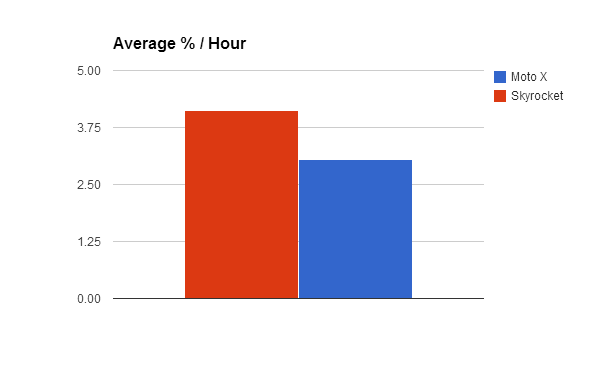
Now that I've got some time under my belt with the Moto X I had the feeling that its battery usage was much better than the Skyrocket. Since the time off battery will vary from day to day I calculated the % of battery usage per hour.

Just as background, the Skyrocket was running Ice Cream Sandwich and the Moto X was running KitKat. I upgraded from 4.4.2 to 4.4.3 in the middle of this period but I can't tell that it made any difference.

While the chart was interesting...


While the Moto X was clearly better than the Skyrocket it was all over the place.

I think the best way to look at it is a simple average.


The Skyrocket was 4.12 % per hour and the Moto X was 3.04 % per hour.

Sunday, June 15, 2014

Boundaries, Boundaries, Boundaries

You know the old saying in real estate, the most 3 important things in real estate are Location, Location, Location. Similarly in IT systems the 3 most important things are Boundaries, Boundaries, Boundaries.

Every boundary is an opportunity and not a good kind of opportunity.

This was brought home to me in Brian Krebs' recent post on Complexity as the Enemy of Security. Brian was discussing security and how complexity contributed to security exposures.

This maxim is true in many areas of IT. Recently I was discussing with a VP of a transportation firm on how to horizontally expand application servers for an existing application. He wanted to put an additional box in front of the application servers. I discouraged that because it added an additional boundary to the system. My suggestion was to do "outside in" routing at the remote clients and not introduce that additional boundary.

I used this methodology at a large forest products corporation to consolidate database and application server instances into a large server. While the instances still had their separate identities they were all contained in a single physical box. It made a tremendous improvement in availability.

I explored this phenomenon with the CFO relating how the old mainframe systems were easier to support because they used point-to-point circuits instead of TCP/IP networks. She hadn't considered this. It is incumbent on IT professionals to make sure that executives understand the downside of complexity.

At an international package delivery company we used this methodology to maintain extraordinary high availability. The mathematics of availability show that compounding 99% availability loses 1% for each additional boundary.

And boundaries aren't just physical. This maxim can be applied to changes in status of a system. Every time a system changes status there is an opportunity for it to fail. Simply put, if you don't reboot a server you won't suffer a restart problem.

While a single monolithic system won't meet today's demands, every boundary should be closely examined to determine if it can be eliminated.

Sunday, June 08, 2014

Internet Bandwidth

Ok, so I'm OCD. But still some of the details I keep up with are interesting (to me at least).

I've been tracking my Internet bandwidth since mid-2011.


The stacked bars are Comcast cable bandwidth. The yellow line is AT&T wireless bandwidth (scale is on right axis). The units are KB so 100,000 represents 100GB. The blue is the difference in what Comcast reports versus what my router reports.

I switched from AT&T DSL to Comcast in July 2013.

I started using CrashPlan for backups in January 2014.

I pretty much don't stream video other than an occasional YouTube. No Netflix or Hulu.

I attribute the change in May 2014 to uploading and downloading home videos. That's probably worth a post in itself. Stay tuned.

The jump in wireless bandwidth in March and April is tethering while I was traveling.

Conclusions?
  1. As expected my bandwidth usage (and yours) continues to climb at over 40% per year.
  2. Comcast does a pretty good job of measuring it.
  3. I can already see Comcast's bandwidth cap of 300GB looming in my future.
  4. I love my AT&T MobilShare Value 10GB plan with tethering.


Sunday, June 01, 2014

All I Want To Do

All I want to do is to be able to use Google Contacts groups in the Gmail app on my wife's iPhone. That seems so straightforward. But you gotta remember that Steve Jobs was involved.

I searched and researched. What I came up with was a couple of apps from Playa Apps - Contacts Sync for Google Gmail with Auto Sync and A2Z Contacts. They both have really good ratings and reviews and only cost 99¢ each.

I'm using the Google Gmail app on my iPad and have the contacts syncing with CardDAV. It all works perfectly. No thanks to Google for killing the Exchange ActiveSync interface. It wasn't obvious what I had to do to that configuration to coexist with Contacts Sync so I wrote an e-mail to Playa App's support.

Being anxious I just popped for the 99¢ and installed the app. It prompted me to read the user guide inside the app which explained to turn off CardDAV. That worked fine and the contacts synced perfectly

Then I tried to send an e-mail to one of those groups using the Gmail iOS app and couldn't find how to do that. I then came across "A2Z Contacts - Contact Manager." Again it wasn't obvious if it would let me send e-mail to groups using the Gmail iOS app or did it have its own mail interface?

99¢ later I had the installed A2Z Contacts and the user guide inside the app explained it allows you to send group emails from it's own interface and it also allows you to create "email lists" to send group emails directly from the Mail app or the Gmail app.

So off I went to exercise it.

Oh, well.

First, on the iTunes page for "Contacts Sync for Google Gmail with Auto Sync" it says "SYNCS AUTOMATICALLY!"


Nope. Not so much.

When you try to set it to sync automatically you get this:


Maybe I should have known this but the iTunes section on In-App purchases wasn't clear.


The user guide cautions to ensure that there aren't duplicate contacts in Google Contacts so I checked that.


But "Contacts Sync" thinks differently.


And the referenced log didn't help me resolve this.


But I proceeded and tried to use A2Z to create an "e-mail list" the process worked fine. Until I got this screen:


"Periodically update your e-mail lists in A2Z Contacts so that they match the latest data in your groups."

I'm trying to do this so my wife can send e-mails to a group that she maintains in web Gmail. There are just too many manual steps in this process.

I don't fault the developer of these apps at all. He has been prompt and helpful in his responses. I realize the limitations that Apple puts on developers.

The only alternative I see is for me to manually create the same type of "e-mail list" on the web Gmail and let her use it from her iPhone Gmail app.

Sunday, May 25, 2014

Simdevil


In my Moto X post, I mentioned that I had gotten a MediaDevil Simdevil 3-in-1 SIM card adapter kit.


I wasn't quite sure how it would work but I tried it the other day to put my nano-SIM in my Skyrocket after I flashed it with KitKat.

It worked perfectly. The Simdevil has a very thin film on the non-contact side of the nano-SIM.


The nano-SIM is a press fit in the Simdevil. I actually put the Simdevil and the nano-SIM on my granite kitchen counter and pressed them together.

MediaDevil is a British company and they included a couple of sticks of Maoam in the package. Nice!

Sunday, May 18, 2014

KitKat for Everyone

After I got the Moto X, I got brave about flashing the Skyrocket. As usual I went looking to CyanogenMod.

With my new bravado, I looked at the unofficial CyanogenMod Android 4.4 (CM 11). The TeamChopsticks group hasn't released an Alpha since December 2013 but they keep building nightlies so I went with the latest nightly (cm-11-20140514-NIGHTLY-skyrocket.zip). Why not?

The release notes are here. As is typical Step 1 is an understatement.
1. YOU MUST USE THIS RECOVERY OR YOU WILL SOFT BRICK: Install CWM >6.0.3.7for Skyrocket
Look carefully at that referenced file (recovery-skyrocket-6037.zip). ".zip" is the crucial part.

The reason is that the standard recovery won't let you flash a new recovery so you have to use ODIN. There's the catch. ODIN won't flash .zip files.

Here we go again. It would really be nice if Step 1 discussed the intricacies of that.

A little Google searching and I turned up this that describes how to install CWM (ClockWorkMod Recovery) on the Skyrocket. That works like a charm and it takes longer to read it twice as it demands than it does to perform the flashing of the recovery.

But there's a catch. The recoveries referenced in that post aren't the ones that are referenced in the Release Notes.

I wasn't the only one lost in the wilderness. I found this post that asked the question and got a good answer.
You can only flash the zip in a custom recovery. If you don't have a custom recovery you need to install it with Odin. You'll need a .tar.md5 recovery file to flash in Odin.
Nothing is ever simple. So I used ODIN to flash twrp_2.7.0.0_skyrocket_vincom.tar.md5. I used TWRP to take a nandroid backup of the Skyrocket's 4.1.2 and copied it to my laptop via USB. That was the longest step in the whole process, about 20 minutes. While connected I copied the recovery-skyrocket-6037.zip, the CM 11 ROM and the gapps package to the root of my internal SD card.

Then I used TWRP to flash recovery-skyrocket-6037.zip.

I already had the required radio so I restarted in CWM recovery did the wipe as instructed. Then I just flashed the the ROM and gapps in sequence and rebooted.

BINGO! KitKat. My boot only took a few seconds.

While this isn't hard, there has to be a more direct way to get there.

Anyway, now I'm off!

Since I use Google Backup and Restore, all my apps started downloading and installing. I sat back and watched them for an hour or so and began playing with it.

I have to say that it is awesome.


So now, Google Now Launcher, Google Camera, ...

Now all my Android devices are KitKat.


But what do I do with the Moto X?

Sunday, May 11, 2014

Moto X

My Skyrocket is getting long in the tooth. And slow. I think that the slowness is due to the lack of TRIM. And we know what the cure for that is don't we? Android 4.3. But wait, AT&T hasn't pushed 4.3 to the Skyrocket and never will. I can't complain. AT&T has upgraded the Skyrocket twice since I've had it.

So I turned to my favorite ROM, CyanogenMod. Hmmm, they haven't released Android 4.4 (KitKat) for the Skyrocket. There is a stable version of Android 4.3 (Jelly Bean) for the Skyrocket but it hasn't been updated since December 2013. I don't want to go to an old Android.

Sounds like a good enough reason to purchase a new phone!

You'll remember that I'm sensitive to size. That's why I chose the Skyrocket (Galaxy S2) over the Galaxy S3. So I went looking for a Galaxy S4 Mini. AT&T hasn't offered that yet so I was going to have to get it unlocked. That's already a generation back compared to the S5 and Samsung hasn't pushed KitKat to it. That didn't sound like a good place to land so I kept looking.

What I found was that newer phones than my Skyrocket have actually gotten smaller while increasing the screen size due to the smaller bezels. I could have my cake and eat it too!

I ended up with the Google Moto X.


Motorola was having a May Day sale for $325 for the unlocked GSM model with 32GB so I went for it. It's marginally smaller than the Skyrocket with higher resolution.

Do you think I have enough frequencies?


I used Moto Maker to build my own Moto X. I chose "Woven Black" (looks like carbon fiber) for the back, a black front, "Metallic Silver" for an accent color, and a personalized signature.


I found a carbon fiber wallpaper to match the back.


An amazingly quick trip to the local AT&T store got me a free nano-SIM with no activation charge and I was up and going.

Samsung Galaxy S II SkyrocketMotorola Moto X
DESIGN
Device typeSmart phoneSmart phone
OSAndroid (4.1.2, 2.3.6, 2.3.5) TouchWiz UIAndroid (4.4.2, 4.4, 4.3, 4.2.2)
Dimensions5.15 x 2.75 x 0.37 inches (131 x 70 x 9 mm)5.09 x 2.57 x 0.41 inches (129.3 x 65.3 x 10.4 mm)
Weight4.66 oz (132 g)4.59 oz (130 g)
DISPLAY
Physical size4.5 inches4.7 inches
Resolution480 x 800 pixels720 x 1280 pixels
Pixel density207 ppi316 ppi
TechnologySuper AMOLED PlusAMOLED
Colors16 777 21616 777 216
TouchscreenMulti-touchMulti-touch
FeaturesLight sensor, Proximity sensor, Scratch-resistant glassLight sensor, Proximity sensor, Scratch-resistant glass
CAMERA
Camera8 megapixels10 megapixels
   FlashLEDLED
   Aperture sizeF2.6F2.4
   Focal length (35mm equivalent)30 mm
   Camera sensor size1/3.2"1/2.6"
   FeaturesAutofocus, Smile detection, Geo tagging, PanoramaAutofocus, Touch to focus, Digital zoom, Geo tagging, High Dynamic Range mode (HDR), Panorama
Camcorder1920x1080 (1080p HD) (30 fps), 1280x720 (720p HD)1920x1080 (1080p HD) (60 fps)
   FeaturesVideo light, Video calling
Front-facing camera2 megapixels2 megapixels
HARDWARE
System chipMotorola X8 (Qualcomm Snapdragon S4 Pro MSM8960)
ProcessorDual core, 1500 MHzDual core, 1700 MHz, Krait
Graphics processorYesAdreno 320
System memory1024 MB RAM2048 MB RAM
Built-in storage16 GB32 GB
Maximum User Storage28 GB
Storage expansionmicroSD, microSDHC up to 32 GB
BATTERY
Talk time7.00 hours12.00 hours
Stand-by time10.4 days (250 hours)10.0 days (240 hours)
Capacity1850 mAh2200 mAh
Not user replaceableYes
MULTIMEDIA
Music player
   Filter byAlbum, Artist, PlaylistsAlbum, Artist, Playlists
   FeaturesAlbum art cover, Background playbackAlbum art cover, Background playback
SpeakersEarpiece, Loudspeaker
YouTube playerYesYes
INTERNET BROWSING
Built-in online services supportFacebook, Picasa/Google+, TwitterYouTube (upload), Picasa/Google+
TECHNOLOGY
GSM850, 900, 1800, 1900 MHz850, 900, 1800, 1900 MHz
UMTS850, 1900 MHz850, 900, 1700/2100, 1900, 2100 MHz
FDD LTE700 (band 17), 1700/2100 (band 4) MHz700 (band 13), 850 (band 5), 1700/2100 (band 4), 1900 (band 2) MHz
DataLTE, HSDPA+ (4G) 21.1 Mbit/s, HSUPA 5.76 Mbit/s, UMTS, EDGELTE, HSDPA+ (4G) 42.2 Mbit/s, HSUPA 5.76 Mbit/s, UMTS, EDGE, GPRS
nano-SIMYes
PositioningA-GPSGPS, A-GPS, S-GPS, Glonass
NavigationYesTurn-by-turn navigation
CONNECTIVITY
Bluetooth3.04.0 LE, EDR
Wi-Fi802.11 a, b, g, n802.11 a, b, g, n, n 5GHz, ac
   Mobile hotspotYesYes
USBUSB 2.0USB 2.0
   ConnectormicroUSBmicroUSB
   FeaturesMass storage device, USB chargingMass storage device, USB charging
HDMIvia microUSB
OtherNFC, DLNA, Computer sync, OTA sync, SyncMLNFC, Tethering, Computer sync, OTA sync
OTHER FEATURES
NotificationsHaptic feedback, Music ringtones (MP3), Polyphonic ringtones, Vibration, Flight mode, Silent mode, SpeakerphoneHaptic feedback, Music ringtones (MP3), Polyphonic ringtones, Vibration, Flight mode, Silent mode, Speakerphone
SensorsAccelerometer, Gyroscope, CompassAccelerometer, Compass
Hearing aid compatibilityM3M3, T3
OtherVoice dialing, Voice commands, Voice recordingVoice dialing, Voice commands, Voice recording
AVAILABILITY
Officially announced31 Oct 201101 Aug 2013
Source: phoneArena.com

According to Steve Jobs that would be a "retina" display.

The Moto X is smaller than the Skyrocket in every dimension other than thickness (0.04 inches). And it's lighter.

I got the Seidio Spring-Clip Holster (HLMTXPAS). I used to buy cheap holsters but then one broke and cost me a new screen on the Captivate.


And just in case I wanted to play with a different phone using that nano-SIM I got a MediaDevil Simdevil 3-in-1 SIM card adapter kit.


Now I'll go flash my Skyrocket anyway.

Sunday, May 04, 2014

21st Century Video - Part 2

I recently retired my SageTV box and moved to the 21st Century with my video recording. However there are still a lot of steps required so I kept looking for a modern replacement to the SageTV. (If you don't remember what happened to SageTV read this.)

Over the holidays I came across a Foxconn nettop box and a SiliconDust HDHomeRun Prime. That looked like the parts I needed to start with.


Since the Foxconn system was barebones I put 4GB of RAM and a 500GB HD in it and installed Windows 7 Professional expecting to run Windows Media Center (WMC).

I started with the HDHomeRun Prime setup. It references WMC so I just played along for now.

I may still get to WMC but it is so much bigger than I need and I keep bumping into problems (mostly of my own doing).

WMC is a tremendously rich solution but I just want to record TV video just like I did with the SageTV. WMC is expecting to be a complete media center and therefore is picky about its video capabilities. Even with the latest drivers for the Intel video in the Foxconn system it wouldn't pass WMC's tests. I found that I wasn't the only one with this problem and there's even a registry hack that overrides WMC's check. That got me to the next step but WMC still complained that there was a "serious problem." I expect that that is because I'm using a VGA monitor not an HDCP compliant HDMI monitor.

As I don't really want to watch video on this system I moved on.

I found NextPVR and that seemed to be a good fit. There is a good article on Lifehacker and a follow-up blog here. After you download and install NextPVR be sure to load the patches before you start NextPVR even for the first time. Otherwise you'll have to go into Windows TaskManager and kill off the NRecord process to get the patched DLLs to copy.

There was a saga with Comcast and the CableCARD but that's nothing new. This thread on SiliconDust's forum was a huge help. Read that closely as one of the contributors notes that CableCARDs don't "scan" for channels but rather get a "map" from the provider. If you want the clear QAM channels as well you will need to scan and I did that before I inserted the CableCARD.


Comcast seems to send all the video down in MPEG2 format with AC3 audio. I used the Microsoft DTV-DVD Video Decoder and installed the LAV Filters for audio decoders.


Getting a program guide working is my next challenge.

Sunday, April 27, 2014

What A Mess

Who hasn't heart about "Heartbleed?" But I like to put it in perspective.

Here's a click bait headline:
Tests confirm Heartbleed bug can expose server's private key
But go read it for yourself. The hacker was able to get the site's security certificate after "2.5 million requests" against a honeypot setup explicitly to be hacked. And keep reading. What did/could he do with that certificate? Signed an e-mail with it.

So if somebody hit your bank's site a couple of million times and got their security certificate they can't do ANYTHING with that without ANOTHER exploit that gives them a man-in-the-middle position.

Just a word to the wise: Don't do your online banking at Starbucks.

I'm not saying that "Heartbleed" isn't a real problem just keep it in perspective.

And about passwords "leaking" via "Heartbleed," any site worth it's salt (pardon the pun) is using good password management so the the passwords IN MEMORY should just be salted hashes.

Ok, sure. Go change your passwords if it makes you feel better.

And if you really want a placebo, go into your browser and enable the "Check for server certificate revocation."

Why is that a placebo? Read Steve Gibson's Certificate Revocation Pages:

  1. Introduction
  2. Commentary
  3. Chrome's CRLSets

Clearly these are one person's opinion and a work in progress. Still, that's a real problem.

What a mess...

Sunday, April 20, 2014

AutomateIT

Without airing all my dirty laundry I need to raise the level of security on my Android devices. At the same time I want to minimize the burden when I am in a "friendly" place like my home, car or office.

What I found was AutomateIT. It's free in the Play Store. There's also a Pro version. There was a good article on Lifehack that described how to use it.

AutomateIT comes with a starter set of rules. I just turned all of them off.

I created several pairs of rules. Each pair consisted of one rule that turned off the screen lock when I connected to a known network (Wi-Fi at home or office or BlueTooth in the car) and a complementary rule that turned the screen lock on when I disconnected from a known network.

Seemed easy.

Here's what my rules look like.


Editing the "When (car) is connected disable Lock Screen."


It is set to trigger when it connects to my car's BlueTooth. Then the action is to disable the screen lock.

Here's the detail.


Notice that the Action to "Enable/Disable Screen Lock" is the same and you specify whether to enable or disable with a check box. Odd but works fine.

So far, so good.

Now here's a log.


It reads bottom to top.

Let's start with the earliest full entry.

12:41:14 When (car) is connected disable Lock Screen - I started the car to drive to work.

So it unlocks the screen.

13:04:08 When (car) is disconnected enable Lock Screen - I get to work and turn off the car.

So it locks the screen.

13:04:16 When (work) is connected disable Lock Screen - I walked into the office.

So it unlocks the screen.

13:20:23 When (car) is connected disable Lock Screen - I started the car to leave work.

So it unlocks the screen. But wait. It was already unlocked.

13:20:36 When (work) is disconnected enable Lock Screen - I drove out of range of work's Wi-Fi.

So it locks the screen. But I'm in the car!

The next 2 entries are where I disabled the BlueTooth on the phone to try to get back in sync.

This really isn't a fault with AutomateIT. Perhaps AutomateIT Pro with composite triggers and composite actions can address this but it's going to get messy.

There's another situation that isn't the fault of AutomateIT. Often when AutomateIT toggles the screen lock, Android leaves the screen on. It locks it for touch but leaves the light on. To use the screen you have to tap the Power button to wake it up.

I'm undecided whether I'm going to stick with it.

Sunday, April 13, 2014

DIAL

I can't believe it. I have never posted about my TiVos. It's a long story. Too long to go into here. Just suffice it to borrow a quote from The Verge:
There is nothing more instantly dangerous to the average relationship than screwing up the TV.
Amen.

Recently I was playing a YouTube video on my TV using my Chromecast. But when I clicked on the "Cast" button on the YouTube player here's what I got:


"Play on TiVo in the Den"? And it did.

Ok, what's going on here?

It turns out that the "Winter" update to my TiVo Premiere introduced DIAL (DIscovery And Launch) support. There's a little more documentation here. Pretty low key of TiVo if you ask me.

This means that DIAL-enabled applications can "cast" directly to the TiVo. At this time this seems to be YouTube and Netflix. Still a good start. Means I don't have to switch inputs on my TV to watch YouTube videos.

Sunday, April 06, 2014

Lockscreen Shortcuts

I guess I've been asleep at the wheel. I was playing with Contacts+ and noticed that they had a widget. This led me to try to put something on my Skyrocket's lockscreen. Since the Skyrocket is still running Ice Cream Sandwich (4.1.2) I couldn't put a widget on my lockscreen but I was able to put a shortcut there.

Somehow I had missed that along the way but I apparently wasn't the only one. This thread tries to explain how to do it.

Here's what I did.

Go to "Settings" and then tap on "Lock screen."


Tap on "Lock screen options."


Make sure that the "Shortcuts" slider is "ON" and then (and here's the trick) tap on "Shortcuts."


Tap on the "+."


Now select an application to put on the lockscreen.


Ta da!


Sunday, March 30, 2014

Adblock Plus

If you're not using Adblock Plus, you should be.

Here's what a Google search looks like without Adblock Plus:


And the same search with Adblock Plus:


Now that you are using Adblock Plus, go here and add "Disable Tracking" and "Disable Malware Domains" features.

I also include "EasyList" from here and "Block all Facebook annoyances" from here.

Also on the Adblock options page uncheck "Allow some non-intrusive advertising."

My Adblock options page looks like this:


Update:

Adblock Filters - 07/23/15
  • Easylist https://easylist-downloads.adblockplus.org/easylist.txt
  • facebook annoyances blocker https://easylist-downloads.adblockplus.org/fb_annoyances_full.txt
  • Disable Malware https://easylist-downloads.adblockplus.org/malwaredomains_full.txt
  • EasyPrivacy https://easylist-downloads.adblockplus.org/easyprivacy.txt
  • Adblock Warning Removal List https://easylist-downloads.adblockplus.org/antiadblockfilters.txt
  • Message "seen" Remover for Facebook https://easylist-downloads.adblockplus.org/message_seen_remover_for_facebook.txt