One of the guys at work is a BIG soccer fan. Last week while the first round of the World Cup games were on, he was out of town and was worried that his TiVo might fill up. I told him I was recording several of the games for my son-in-law and that I'd be glad to record some for him using my SageTV system. As we talked, I remembered that Sage introduced a new feature in v5 called PlaceShifter.
PlaceShifter gives you the capability to remotely access your SageTV system. He downloaded the client and I began trying to set it up on my SageTV server. I followed all the directions carefully but it wouldn't work. You have to open a port in your router. I tried it with manual port forwarding and then with UPnP. Neither worked. I opened a support incident with Sage and sent them lots of screen captures. I exchanged e-mails with them for several days.
I finally noticed a thread on their forum on PlaceShifter and described my problem there. I got an answer back from a support person at Sage in 7 minutes! The key was "Oh -- have you restarted SageTV?" The Sage manual kinda talks about this but it's in a different section than where you have to go to setup PlaceShifter.
Anyway, that fixed it and now it works great! I found that you can buy the license for PlaceShifter for $25 from pcalchemy.com. To install the license, there is a link in the SageTV Start menu. You need to have the SageTV server stopped when you do this. You can create as many users as you want but each license gives you 1 concurrent user.
Sage has a server where your SageTV server registers its key and IP address. Then you give the PlaceShifter client that key and it uses the server to get the address of your server. From that point, you pretty much get the same experience as being in your easy chair.
Thursday, June 29, 2006


Wednesday, June 21, 2006
Browser Share
Remember back in January when I wrote an entry on SiteMeter Statistics on this blog?
I looked again this week at the browser share numbers. Here are the 2 charts side by side:
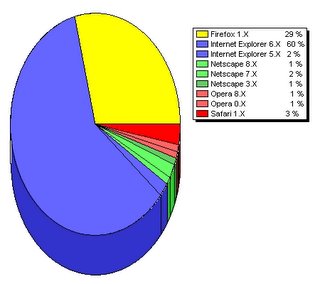
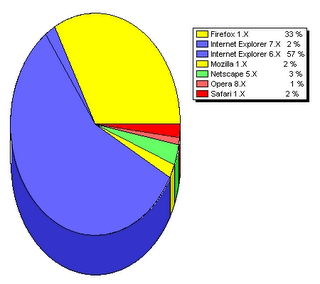
Firefox has grown about 10% from 29% to 33%. Surprise! Surprise! IE has dropped almost the same amount that Firefox has grown. One interesting thing is that IE 7 is starting to show up.
Then I went over and looked at one of my other sites, desotonet.com. It has a different mix of browsers. Here's a table of its statistics:
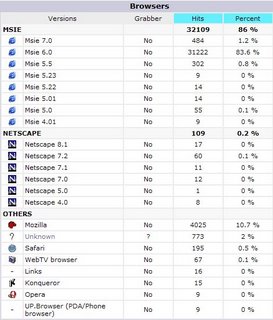 Firefox only has 10.6% while IE has 86%. IE 7 shows up here too but with only about half the usage.
I looked again this week at the browser share numbers. Here are the 2 charts side by side:

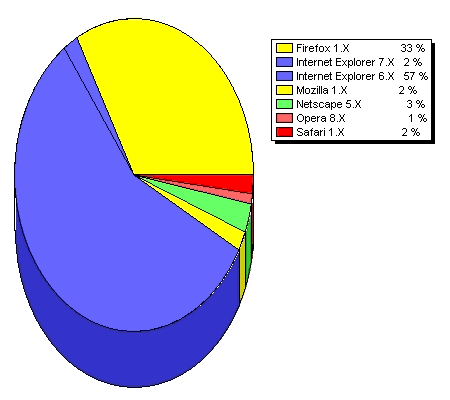
Firefox has grown about 10% from 29% to 33%. Surprise! Surprise! IE has dropped almost the same amount that Firefox has grown. One interesting thing is that IE 7 is starting to show up.
Then I went over and looked at one of my other sites, desotonet.com. It has a different mix of browsers. Here's a table of its statistics:
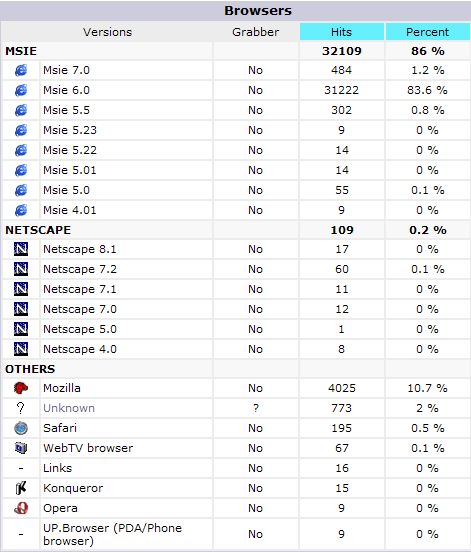 Firefox only has 10.6% while IE has 86%. IE 7 shows up here too but with only about half the usage.
 Kinda interesting the difference between this blog with a techie audience and desotonet.com with a more mainstream audience.
Sunday, June 11, 2006
BACKUP Rises Again
As you can see in my previous post, I have a box named BACKUP in my home network. Originally it was an old HP mini-tower. It was so old that it was a hand-me-down from my mother! I loaded Windows XP Pro on it and put a 250 GB Western Digital in it. I mounted it as \\BACKUP\FILES.
The problem was that \\BACKUP\FILES kept disappearing. When it did, even restarting the box didn't remedy it. I'd have to drag the box out of the closet (remember how I like to run systems headless) and open the case and wiggle all the cables. Then it'd go through this "No operating system found" routine until it'd all work again. I'd button it up and back to the closet it'd go.
This got old after the second time so I looked for alternatives. I figured it had something to do with the IDE controllers on the old HP. I had an old ThinkPad 600E and a USB/IDE enclosure but the ThinkPad didn't support USB 2.0. I found this on BuyExtras.com for $12.95 and I had a port replicator for the 600E that had an Ethernet port.
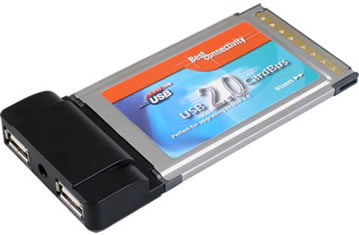 Now the 600E is BACKUP. Unfortunately, I'm still having problems with the Western Digital. I wonder if it is the way I have it jumpered. I hope that's it. It'll run for a day or two and then just disappear.
The problem was that \\BACKUP\FILES kept disappearing. When it did, even restarting the box didn't remedy it. I'd have to drag the box out of the closet (remember how I like to run systems headless) and open the case and wiggle all the cables. Then it'd go through this "No operating system found" routine until it'd all work again. I'd button it up and back to the closet it'd go.
This got old after the second time so I looked for alternatives. I figured it had something to do with the IDE controllers on the old HP. I had an old ThinkPad 600E and a USB/IDE enclosure but the ThinkPad didn't support USB 2.0. I found this on BuyExtras.com for $12.95 and I had a port replicator for the 600E that had an Ethernet port.
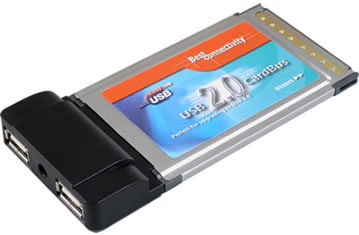 Now the 600E is BACKUP. Unfortunately, I'm still having problems with the Western Digital. I wonder if it is the way I have it jumpered. I hope that's it. It'll run for a day or two and then just disappear.
Wednesday, June 07, 2006

Tuesday, June 06, 2006
How To Mount ISOs
The other day when I was working on UN-Authoring DVDs, I needed to see what files were in ISO images I had saved of video DVDs. I could have burned them to DVDs but I knew I really didn't want/need the DVD disks at that time, only the files within them.
So off I went Googling and came across Microsoft's Virtual CD-ROM Control Panel. Besides the unwieldy name, it's "unsupported" (more on that in a minute).
You can download it from Microsoft here. There's a good write-up on it here including the following readme file.
Regarding support, just to show you how deeply it's embedded in Microsoft, look at this Knowledge Base article.
So off I went Googling and came across Microsoft's Virtual CD-ROM Control Panel. Besides the unwieldy name, it's "unsupported" (more on that in a minute).
You can download it from Microsoft here. There's a good write-up on it here including the following readme file.
Readme for Virtual CD-ROM Control Panel v2.0.1.1It may not be the friendliest thing I've found but it works great.
THIS TOOL IS UNSUPPORT BY MICROSOFT PRODUCT SUPPORT SERVICES
System Requirements
===================
- Windows XP Home or Windows XP Professional
Installation instructions
=========================
1. Copy VCdRom.sys to your %systemroot%\system32\drivers folder.
2. Execute VCdControlTool.exe
3. Click "Driver control"
4. If the "Install Driver" button is available, click it. Navigate to the %systemroot%\system32\drivers folder, select VCdRom.sys, and click Open.
5. Click "Start"
6. Click OK
7. Click "Add Drive" to add a drive to the drive list. Ensure that the drive added is not a local drive. If it is, continue to click "Add Drive" until an unused drive letter is available.
8. Select an unused drive letter from the drive list and click "Mount".
9. Navigate to the image file, select it, and click "OK". UNC naming conventions should not be used, however mapped network drives should be OK.
You may now use the drive letter as if it were a local CD-ROM device. When you are finished you may unmount, stop, and remove the driver from memory using the driver control.
Regarding support, just to show you how deeply it's embedded in Microsoft, look at this Knowledge Base article.
Friday, June 02, 2006
PowerPod
While I learned a lot at ASUG, I didn't really get packed very well for that trip. As I sat in the Memphis airport leaving that Sunday, I realized that I didn't bring the charger for my Treo. When we landed in Orlando, I made a mad dash to a gadget store and picked up a PowerPod from EarHugger.
Here's what it looks like:
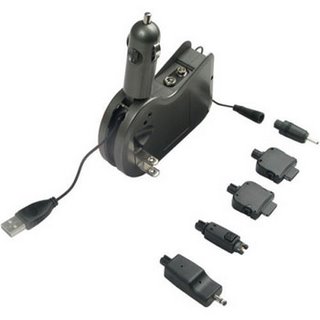 Interestingly, EarHugger doesn't say much about it. I found this description at 21st-century-goods.com:
The PowerPod features:
You can buy one here .
.
Here's what it looks like:
 Interestingly, EarHugger doesn't say much about it. I found this description at 21st-century-goods.com:
The PowerPod features:
- Cord retracts into charger for easy storage
- LED shows connection made to phone
- Charge phone while talking
- Charges cell phones from 4 different power sources
- Standard wall plug, computer USB Port, 9-Volt battery and car cigarette lighter
- Comes with 5 adapters
- Most Nokia, Motorola, palmOne Treo, BlackBerry and Kyocera phones
- Folded size approximately 4" x 3" x 1"
You can buy one here
.
Thursday, June 01, 2006
Father's Day Wish List 2006
 Seidio Stereo Adapter
 This will let me use iPod stereo headsets to listen to movies on my Treo.
You can order it here.
Travel Sentry Certified Luggage Lock
 This will let us lock our luggage and still let the TSA check it.
You can order it here or just drive to Target. We probably need 4 (2 sets of 2).
Kingston Technologies 512MB DDR SDRAM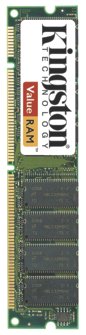
Hopefully, this will speed up our desktop PC.
You can order it here or drive to CircuitCity. I need 2 of them!
I'm Just Not Sure
When I went to ASUG a couple of weeks ago, I took 2 SD cards - a 1GB in the Treo to use for audio recording and note taking and a 512MB full of movies and podcasts. I took a wired headset for the Treo to use to listen with but with my luck it was bad. So I wanted to use my laptop to watch the movies on the airplane. But I didn't take my USB SD reader!
When I got back, I got to looking for a USB SD reader to keep on my keyring. There were several choices that called themselves "keyrings" but they didn't have a loop on them or the loop was on the removable top (don't get me started on that!).
I finally found the I-Rock IR8200 at Newegg.com for $12.99 and $4.99 shipping. Here's what it looks like:
When I got back, I got to looking for a USB SD reader to keep on my keyring. There were several choices that called themselves "keyrings" but they didn't have a loop on them or the loop was on the removable top (don't get me started on that!).
I finally found the I-Rock IR8200 at Newegg.com for $12.99 and $4.99 shipping. Here's what it looks like:

You can't tell from this picture but mentioned in one of the comments was that there was a loop on the swivel cover for the USB plug. I could use that to put it on my keyring.
So I ordered one and it came in today.
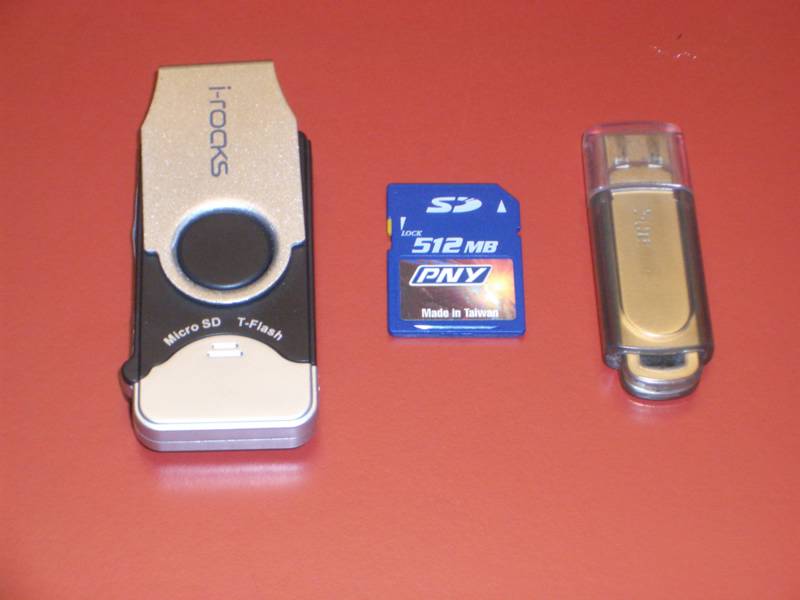
It's larger than I hoped (but honestly not larger than I expected). Here's how it compares to my Sandisk Micro USB drive and an SD card:
Tuesday, May 30, 2006
90 Seconds
That's how long it took. To backup a week's work of changes with Tivoli Continuous Data Protection. In my last post on Tivoli CDP, I hadn't configured a remote backup.
I configured one using an old 30GB IDE hard drive with a USB 2.0 adapter. It took a couple of hours to synchronize the first time and then I removed it. I threw it in my trunk to keep it separate from the PC.
Each weekend, I bring it in the house and plug it in. This week (a typical week), it took 90 seconds after Windows recognized it to completely synchronize with Tivoli CDP.
Awesome.
I configured one using an old 30GB IDE hard drive with a USB 2.0 adapter. It took a couple of hours to synchronize the first time and then I removed it. I threw it in my trunk to keep it separate from the PC.
Each weekend, I bring it in the house and plug it in. This week (a typical week), it took 90 seconds after Windows recognized it to completely synchronize with Tivoli CDP.
Awesome.
Sunday, May 28, 2006
Wedding Slide Show
My daughter got married in early May. In the tradition of Ole Miss sorority girls, they had to have a video at the rehearsal dinner. While a friend at work does this for weddings and church events, I figured that doing it myself would give me more time to get ready.
With all the video software that I have, I thought that I must have something that will do that. My first attempt was with Pinnacle Studio 10. It seemed easy to put together but when I rotated the pictures, the aspect ratio got all messed up. And Studio 10 is SO slow on my Athlon XP 2000. Studio 8 is faster but it wouldn't rotate the pictures.
So I went off to try other programs I had. I tried them all. Ulead DVD MovieFactory is my favorite DVD authoring program and it has a slide show feature. Most of them are more capable with photo management than Studio but they all seemed to have a problem when I played their discs in my DVD player.
The timing of the stills was inconsistent and the music would jump every now and then. I tried burning SVCDs and DVDs with the same results. Finally, I took one of the CDs and looked at the files. To my surprise, even with 15 minutes of slides and music, the CD was relatively empty.
What was happening was that DVDs and (S)VCDs have an alternative format for slide shows that has the DVD player play the still photos subject to the timing that is specified and, at the same time, play the music.
The closest thing I found to documentation of this is the VCD File/Folder Structure on VideoHelp.com. This shows that on (S)VCDs, the folder SEGMENT can contain up to 999 stills in resolution 704x576 or 352x288. Folder CDDA contains the CD audio files.
What I think was happening with the timing was that the DVD player isn't as consistent as I wanted it to be. So what to do?
I went BACK to Studio 8. But beforehand, I used Picasa to select the pictures and to do the necessary rotation and cropping. Then I exported them from Picasa to a folder on my desktop. Then I imported them into Studio. Worked like a charm except that I lost the sequence so I had to rejuggle them in Studio. Not a big deal.
To avoid the timing problems with the DVD player, I had Studio render the slide show as a video, not a collection of stills. This made the DVD player think that it was just playing a normal video. Of course, the files were much larger but that had never been a problem anyway. Also, as a work-in-progress, I had Studio render it as a Windows Media file that was 5-6MB and posted it on the web for the bride and groom to preview.
In the end, I created 2 SVCDs, one for the rehearsal dinner with about 15 minutes of slides and music and another for the reception with more than 30 minutes of slides and music. If I'd needed more time, I could have used Studio to create DVDs rather than SVCDs.
Oh, one other thing. I wanted the reception video to play continuously. Studio didn't do that. I un-authored the SVCD and used Ulead DVD MovieFactory to author another SVCD with the option to play continuously!
With all the video software that I have, I thought that I must have something that will do that. My first attempt was with Pinnacle Studio 10. It seemed easy to put together but when I rotated the pictures, the aspect ratio got all messed up. And Studio 10 is SO slow on my Athlon XP 2000. Studio 8 is faster but it wouldn't rotate the pictures.
So I went off to try other programs I had. I tried them all. Ulead DVD MovieFactory is my favorite DVD authoring program and it has a slide show feature. Most of them are more capable with photo management than Studio but they all seemed to have a problem when I played their discs in my DVD player.
The timing of the stills was inconsistent and the music would jump every now and then. I tried burning SVCDs and DVDs with the same results. Finally, I took one of the CDs and looked at the files. To my surprise, even with 15 minutes of slides and music, the CD was relatively empty.
What was happening was that DVDs and (S)VCDs have an alternative format for slide shows that has the DVD player play the still photos subject to the timing that is specified and, at the same time, play the music.
The closest thing I found to documentation of this is the VCD File/Folder Structure on VideoHelp.com. This shows that on (S)VCDs, the folder SEGMENT can contain up to 999 stills in resolution 704x576 or 352x288. Folder CDDA contains the CD audio files.
What I think was happening with the timing was that the DVD player isn't as consistent as I wanted it to be. So what to do?
I went BACK to Studio 8. But beforehand, I used Picasa to select the pictures and to do the necessary rotation and cropping. Then I exported them from Picasa to a folder on my desktop. Then I imported them into Studio. Worked like a charm except that I lost the sequence so I had to rejuggle them in Studio. Not a big deal.
To avoid the timing problems with the DVD player, I had Studio render the slide show as a video, not a collection of stills. This made the DVD player think that it was just playing a normal video. Of course, the files were much larger but that had never been a problem anyway. Also, as a work-in-progress, I had Studio render it as a Windows Media file that was 5-6MB and posted it on the web for the bride and groom to preview.
In the end, I created 2 SVCDs, one for the rehearsal dinner with about 15 minutes of slides and music and another for the reception with more than 30 minutes of slides and music. If I'd needed more time, I could have used Studio to create DVDs rather than SVCDs.
Oh, one other thing. I wanted the reception video to play continuously. Studio didn't do that. I un-authored the SVCD and used Ulead DVD MovieFactory to author another SVCD with the option to play continuously!
UN-Authoring DVDs
A friend of mine at work is going to Italy this summer. I have been squirreling away travelogue shows for the last couple of years. I have my SageTV box setup to record anything by Rick Steves, Rudy Maxa, Samantha Brown or several other travel shows.
I wait until I have enough shows in a series to fill up a DVD, generally 6 for a 1/2 hour show or 4 for a 1 hour show, and then burn a DVD for that series. In 2 years, I have more than a dozen DVDs full of travel shows.
As you'd expect, there were a lot of shows on Italy but scattered over 6-7 DVDs. I didn't want to copy all those DVDs so I went looking for a way to consolidate the shows on Italy onto a minimum number of DVDs.
I'd played with Ulead DVD MovieFactory 3.0 SE (DVD MF) and remembered that it has a feature that will allow you to import video from a DVD (unencrypted). I played with this some and found that it puts the video in ...\Ulead DVD MovieFactory\3.0\Import_DVD as plain MPEG2s.
This seemed like just what I wanted but... As you know, for me, nothing is simple. There were more files in this folder than segments I had imported!
It turns out that DVDs have a folder VIDEO_TS that contains the .VOB files. However, .VOB files don't exceed 1GB. When the segment that I had imported crossed into 2 of these .VOB files, DVD MF created 2 MPEG2 files.
How to get them back together? I remembered that VideoReDo has some kind of capability to consolidate files and went looking. It will join multiple video segments into a single file and does it quick! VideoReDo is still one of my favorite programs.
So with this, I combined the files as needed and used DVD MF to author DVDs with just the Italy shows on them.
Bon journo!
I wait until I have enough shows in a series to fill up a DVD, generally 6 for a 1/2 hour show or 4 for a 1 hour show, and then burn a DVD for that series. In 2 years, I have more than a dozen DVDs full of travel shows.
As you'd expect, there were a lot of shows on Italy but scattered over 6-7 DVDs. I didn't want to copy all those DVDs so I went looking for a way to consolidate the shows on Italy onto a minimum number of DVDs.
I'd played with Ulead DVD MovieFactory 3.0 SE (DVD MF) and remembered that it has a feature that will allow you to import video from a DVD (unencrypted). I played with this some and found that it puts the video in ...\Ulead DVD MovieFactory\3.0\Import_DVD as plain MPEG2s.
This seemed like just what I wanted but... As you know, for me, nothing is simple. There were more files in this folder than segments I had imported!
It turns out that DVDs have a folder VIDEO_TS that contains the .VOB files. However, .VOB files don't exceed 1GB. When the segment that I had imported crossed into 2 of these .VOB files, DVD MF created 2 MPEG2 files.
How to get them back together? I remembered that VideoReDo has some kind of capability to consolidate files and went looking. It will join multiple video segments into a single file and does it quick! VideoReDo is still one of my favorite programs.
So with this, I combined the files as needed and used DVD MF to author DVDs with just the Italy shows on them.
Bon journo!
Sunday, May 21, 2006
Treo 650 Recap - Part II
I remembered that I had omitted a couple of things in my Treo 650 Recap so here goes.
I searched high and low for a holster for the 650. I like simplicity so I was picky. Then I ran across a blog entry (which I can't find again) where the guy had used a iPod case! My daughter had an iPod and hadn't ever used the case. This was right before Christmas so I bought her a "cool" iPod case with a hole in it for the spin wheel and a transparent window for the display. She was thrilled and I took her Apple case.
I searched high and low for a holster for the 650. I like simplicity so I was picky. Then I ran across a blog entry (which I can't find again) where the guy had used a iPod case! My daughter had an iPod and hadn't ever used the case. This was right before Christmas so I bought her a "cool" iPod case with a hole in it for the spin wheel and a transparent window for the display. She was thrilled and I took her Apple case.
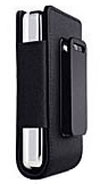
The case has worked great. It probably isn't as sturdy as some made-for-phone cases but it has been fine. I broke off the belt clip when I got in the car with it on my left hip rather than my right hip. The Apple store was on my way back to work so I just replaced it. Of course, it was pricey there but convenient.
My other challenge has been a Bluetooth headset. Frugal that I am, I jumped on an IOGear headset from buy.com for $29.95 (no longer on sale). The first one I got rattled! There was something loose in it. I exchanged it but the second one sounded like crap. I bought a Motorola H500 from the local Cingular store. I never could get the volume to be loud enough. I'd have to actually press my hand against the headset to be able to hear. So back to Cingular it went. This time I got a Plantronics Discovery 640. It is the in-ear style and it works fine.
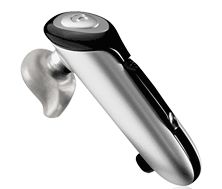
I read somewhere later that the Treo 650 doesn't have a strong outbound signal on the Bluetooth so you need a headset that has plenty of amplification. Seems that the Motorola H50 doesn't have much amplification. I'm sure the in-ear fitting of the Plantronics 640 helps as well.
Tuesday, May 16, 2006
GoogleSightseeing
I made it on GoogleSightseeing! My submission on Avebury is here. You can see my pictures starting here.
Saturday, May 13, 2006
Tivoli Continuous Data Protection
I had lunch with Mark Lewis of EMC this week. Well, me and about 20 other people did. Over lunch, we talked about lots of things but especially backup.
Maybe you'll remember back in October when I whined about my backups. It hasn't gotten any better. I did find out what was wrong with my DVD burners. They had dropped out of DMA mode from getting so many errors on my cheap media. I guess you get what you pay for.
Anyway, I am still tired of backing up EVERYTHING each month. And then I don't have a backup in between.
In the October post, I talked about IBM's VitalFile Backup. It has now come out of their skunkworks and is called Tivoli Continuous Data Protection - same function, just a new name.
I had some time this weekend so I installed it on my "server." So far it looks pretty good. It runs as a Java application and you interact with it through the browser.
When you start it up, it walks you through a wizard. I didn't screen shot that but here's a screen that shows you the choices you make about their "Continuous" backup:
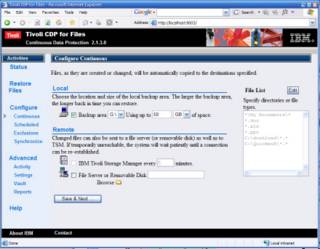
I pointed it at my second internal hard drive and told it to use up to 50 GBs. It didn't use nearly that much (more later) but seemed to stop and start unless I gave it a really BIG number here.
Notice off to the right there's a list of inclusions. I generally took their defaults but probably should have thought more about all the Office extensions. I was amazed how much of those there were outside of My Documents that I didn't really care about. Oh, I deleted their "*.123" entry!
You go through pages setting up schedules (for remote backups) and exclusions. I left remote backups disabled for now and again pretty much took their defaults on exclusions.
Then you get the following "Backup everything now" screen. This takes a loooooong time. I ended up with about 12 GB backed up and it took 3-4 hours.
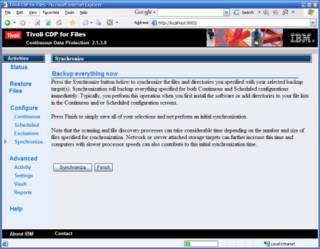
The remote backup they're talking about is a network or removable drive. Here's the configuration for it. As I mentioned, I have it disabled for now.
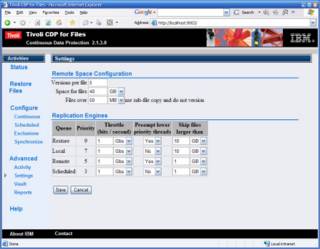
Finally, here's the startup screen when you hit it as http://localhost:9003/
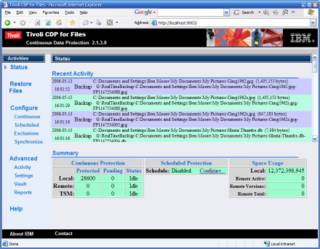
You can see I have almost 29000 files protected by Tivoli CDP for almost 12 GB. My next challenge is to enable remote backup to a USB drive and keep it off site.
Maybe you'll remember back in October when I whined about my backups. It hasn't gotten any better. I did find out what was wrong with my DVD burners. They had dropped out of DMA mode from getting so many errors on my cheap media. I guess you get what you pay for.
Anyway, I am still tired of backing up EVERYTHING each month. And then I don't have a backup in between.
In the October post, I talked about IBM's VitalFile Backup. It has now come out of their skunkworks and is called Tivoli Continuous Data Protection - same function, just a new name.
I had some time this weekend so I installed it on my "server." So far it looks pretty good. It runs as a Java application and you interact with it through the browser.
When you start it up, it walks you through a wizard. I didn't screen shot that but here's a screen that shows you the choices you make about their "Continuous" backup:
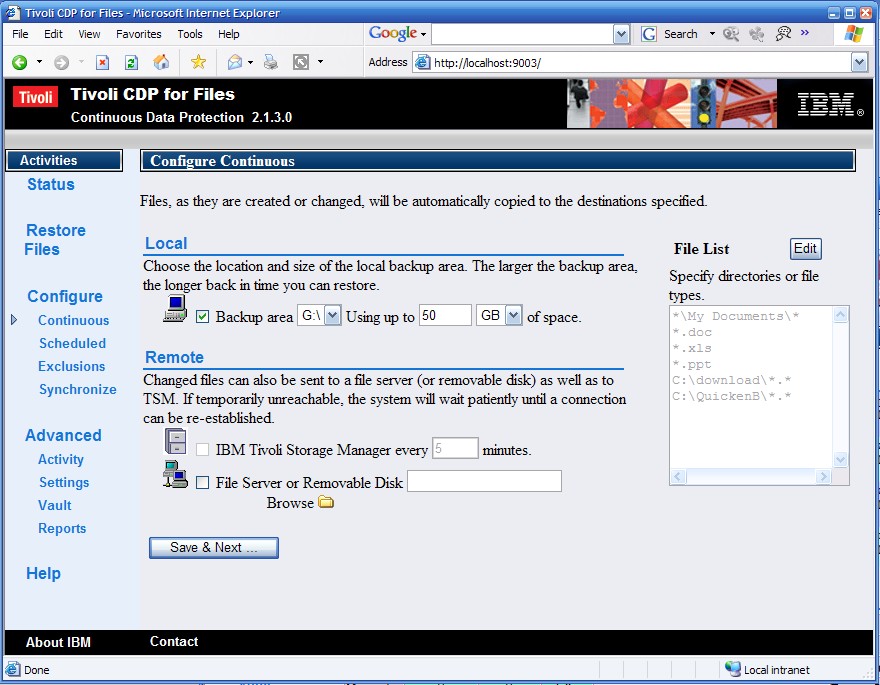
I pointed it at my second internal hard drive and told it to use up to 50 GBs. It didn't use nearly that much (more later) but seemed to stop and start unless I gave it a really BIG number here.
Notice off to the right there's a list of inclusions. I generally took their defaults but probably should have thought more about all the Office extensions. I was amazed how much of those there were outside of My Documents that I didn't really care about. Oh, I deleted their "*.123" entry!
You go through pages setting up schedules (for remote backups) and exclusions. I left remote backups disabled for now and again pretty much took their defaults on exclusions.
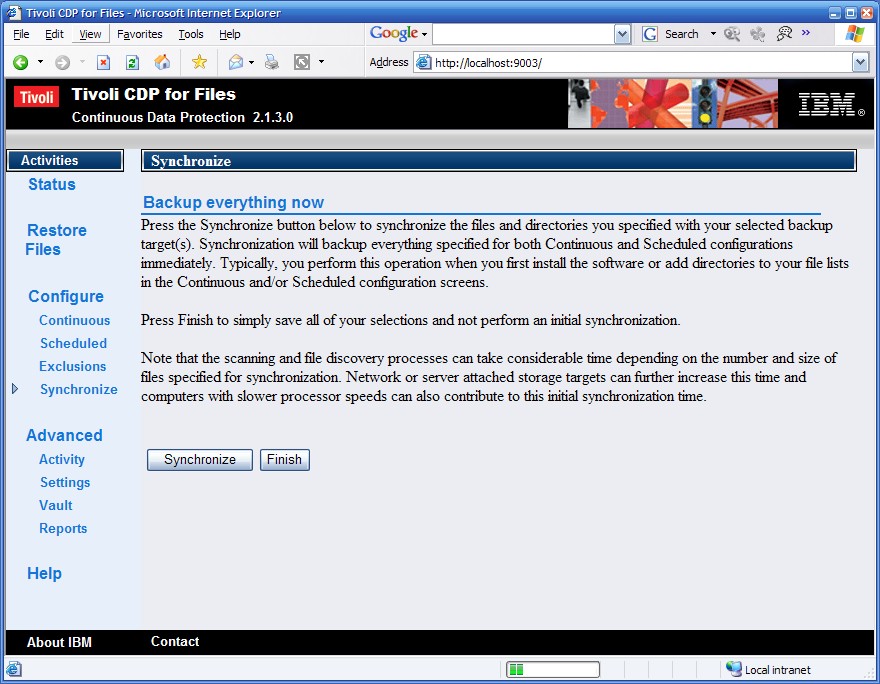
Then you get the following "Backup everything now" screen. This takes a loooooong time. I ended up with about 12 GB backed up and it took 3-4 hours.
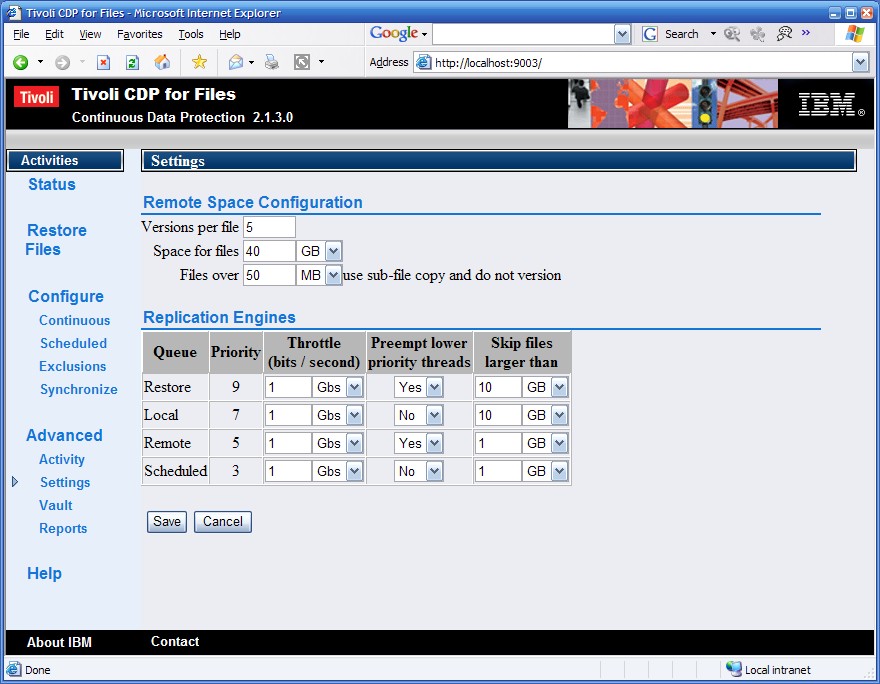
The remote backup they're talking about is a network or removable drive. Here's the configuration for it. As I mentioned, I have it disabled for now.
Finally, here's the startup screen when you hit it as http://localhost:9003/
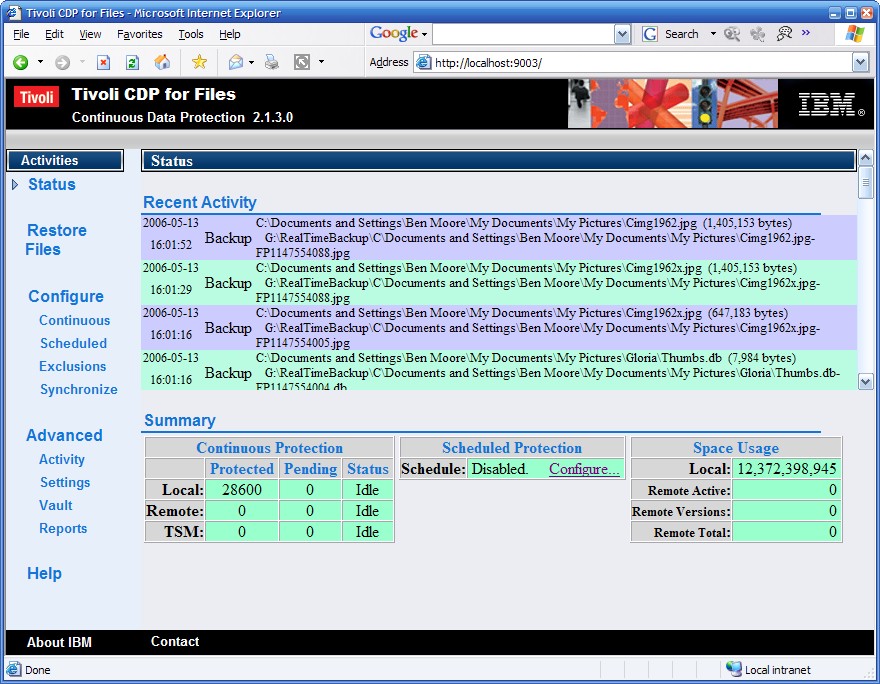
You can see I have almost 29000 files protected by Tivoli CDP for almost 12 GB. My next challenge is to enable remote backup to a USB drive and keep it off site.
Wednesday, April 26, 2006
Treo 650 Recap
I just realized that I had never recapped what I did with my Treo 650 so here goes.
I got it just before Christmas. My objective was to consolidate my gadgets. My boss walked into a conference room where I had spread out in front of me my SonyEricsson T616, my Sony Clie NX50, and my BlackBerry 7290! He said he had never seen anyone with so many gadgets. The phone was on a personal account which is why I didn't use the phone on the BlackBerry. I used the BlackBerry for work e-mail and calendaring. I used the Clie as a PDA, note taking and audio recording. I had tried to use the BlackBerry for note taking but I couldn't get the data from the BlackBerry to my laptop. It doesn't support the file transfer protocol. I've been told that later models do support this.
One thing I loved on the BlackBerry was the way it capitalized letters. If you hold a key down for a little longer, it capitalizes the letter. The Treo didn't do that which made typing harder - 2 strokes for each capital letter. The Treo does some "smart" typing, e.g. it capitalizes the next letter after a period and a space and it inserts an apostrophe in contractions like "didnt." KeyCaps600 fixed this right away. Makes the Treo work just like the BlackBerry.
Next was a capability I loved on the Clie - Graffiti. Now the Treo as it comes from PalmOne inexplicably doesn't support Graffiti. Almost as easy as KeyCaps600 fixed the capitalization, GraffitiAnywhere gave me Graffiti. But, it was Graffiti 2. The Clie had Graffiti 1. Besides the couple of letters different between 1 and 2, some of the letters and control strokes seemed to be problematic, e.g. a "l" followed by a space would never come out right. The Graffiti 2 "i" is a downward stroke with a dot over it. Using GraffitiAnywhere, you had to use a upward right to left stroke to create a dot. I never could get it right.
I found a Graffiti 1 library for GraffitiAnywhere. That got back all the Graffiti 1 strokes but I can't make any punctuation work. So I compromised. For me, the speed and accuracy of Graffiti 1 was worth not being able to make punctuation. I just use the Treo keyboard for punctuation. When I'm taking notes in a hurry, I just skip punctuation and insert them afterwards.
One of the other things I used on the Clie was the Voice Recorder application. I played with a lot of applications and ended up with SoundRec. Here's the whole story.
The Treo doesn't have much memory but most programs will run off of an SD card and most will let you direct their output to an SD card, e.g. the camera. Not all SD cards are created equally and the story is here.
The Treo had a good File Manager application and I found FileZ with equivalent (and more) function. I don't think I could get along without it. Oh, so you don't find yourself in the same situation that I did, add a Favorites button that runs FileZ before you need it.
Life isn't all work so I added a Tetris knock-off blocks133.
My other entertainment is watching videos. The way to do this is described here.
Whew! That's enough for tonight. Leave me a comment if you have any questions.
I got it just before Christmas. My objective was to consolidate my gadgets. My boss walked into a conference room where I had spread out in front of me my SonyEricsson T616, my Sony Clie NX50, and my BlackBerry 7290! He said he had never seen anyone with so many gadgets. The phone was on a personal account which is why I didn't use the phone on the BlackBerry. I used the BlackBerry for work e-mail and calendaring. I used the Clie as a PDA, note taking and audio recording. I had tried to use the BlackBerry for note taking but I couldn't get the data from the BlackBerry to my laptop. It doesn't support the file transfer protocol. I've been told that later models do support this.
One thing I loved on the BlackBerry was the way it capitalized letters. If you hold a key down for a little longer, it capitalizes the letter. The Treo didn't do that which made typing harder - 2 strokes for each capital letter. The Treo does some "smart" typing, e.g. it capitalizes the next letter after a period and a space and it inserts an apostrophe in contractions like "didnt." KeyCaps600 fixed this right away. Makes the Treo work just like the BlackBerry.
Next was a capability I loved on the Clie - Graffiti. Now the Treo as it comes from PalmOne inexplicably doesn't support Graffiti. Almost as easy as KeyCaps600 fixed the capitalization, GraffitiAnywhere gave me Graffiti. But, it was Graffiti 2. The Clie had Graffiti 1. Besides the couple of letters different between 1 and 2, some of the letters and control strokes seemed to be problematic, e.g. a "l" followed by a space would never come out right. The Graffiti 2 "i" is a downward stroke with a dot over it. Using GraffitiAnywhere, you had to use a upward right to left stroke to create a dot. I never could get it right.
I found a Graffiti 1 library for GraffitiAnywhere. That got back all the Graffiti 1 strokes but I can't make any punctuation work. So I compromised. For me, the speed and accuracy of Graffiti 1 was worth not being able to make punctuation. I just use the Treo keyboard for punctuation. When I'm taking notes in a hurry, I just skip punctuation and insert them afterwards.
One of the other things I used on the Clie was the Voice Recorder application. I played with a lot of applications and ended up with SoundRec. Here's the whole story.
The Treo doesn't have much memory but most programs will run off of an SD card and most will let you direct their output to an SD card, e.g. the camera. Not all SD cards are created equally and the story is here.
The Treo had a good File Manager application and I found FileZ with equivalent (and more) function. I don't think I could get along without it. Oh, so you don't find yourself in the same situation that I did, add a Favorites button that runs FileZ before you need it.
Life isn't all work so I added a Tetris knock-off blocks133.
My other entertainment is watching videos. The way to do this is described here.
Whew! That's enough for tonight. Leave me a comment if you have any questions.
Tuesday, April 04, 2006
Interesting Gadget

Mediagate Portable MPEG4 Player USB 2.0 External Drive Case Enclosure
- Portable MPEG4 Player is a perfect portable entertainment box with MPEG4 playback and comes with an internal 2.5" HDD (Optional)
- Download any music, movie or photo to Portable MPEG4 Player through the supplied USB cable from your computer and bring it over wherever
- Just connect by Audio-Video cable to a monitor in a car or a TV at home and operate it by the supplied remote control
- It is also an external USB HDD (2.5 inch) which is more durable compared to 3.5 inch and it looks very slim and compact with aluminum cover
Sunday, March 26, 2006
SoundRec, Voice Recorder, Whatever
I still love my Treo 650 but my quest remains to get the capabilities that I had on my Sony Clie NX60 of Voice Recorder. The UI is much more complete than that of SoundRec.
I tried to move Voice Recorder to the Treo. I used FileZ and unlocked it on my Clie and beamed it off. Then beamed it to the Treo 650 and installed it. When I ran it, it just blinked the screen and went away.
I posted on TreoCentral and, as usual, got several "noise" responses but one person responded with a suggestion to look for "file(s) in your Clie label(ed) voice recorder en_us, or voice recorder." Why didn't I think of that?
So off I went back to the Clie and found 2 more files that began with "Voice Recorder..." When I went to transfer them to the Treo 650, I was lazy, so I just beamed them from the Clie to the Treo. Bad plan. The Treo immediately began rebooting over and over. A quick Google search turned up the technique of holding the Up button to get the Treo into the equivalent of Windows' Safe Mode. I thought I was home free.
This let me get to the phone screen but anytime I pressed Home, reboot. Finally, I added a Favorites button that would run FileZ and deleted the problem file. I think I'll leave well enough alone.
So I went back to SoundRec that I'd found before. SoundRec works fine but the files are much bigger than the Clie's Voice Recorder. I recorded a meeting with both SoundRec on my Treo 650 and with Voice Recorder on my Clie NX60. There was about a 4X difference in size with the SoundRec recording being larger. I moved both files to my Windows desktop and looked at them with Windows' Sound Recorder. Both were set to 8 KHz but the SoundRec file was 16 bits and the Voice Recorder file was 4 bits. Since I use the audio recording capability exclusively for voice, 4 bits is sufficient. However the difference in the size of resulting .wav makes moving them around much more difficult.
I've about given up in matching the size of the Voice Recorder files. I am still looking for improvements in UI and integration. SoundRec's UI is pretty rudimentary and it doesn't run in the background. This means that when OneBridge fires up to pull my e-mail, the recording stops. CallRec SAYS that it runs in the background. We'll see. I e-mailed the CallRec support about 4-bit vs. 16-bit recording and they said they only did 16-bit. Not a huge deal as I have a 1GB SD card.
CallRec is $20 and you know how I feel about paying for software so I'll have to think about this for a while.
I tried to move Voice Recorder to the Treo. I used FileZ and unlocked it on my Clie and beamed it off. Then beamed it to the Treo 650 and installed it. When I ran it, it just blinked the screen and went away.
I posted on TreoCentral and, as usual, got several "noise" responses but one person responded with a suggestion to look for "file(s) in your Clie label(ed) voice recorder en_us, or voice recorder." Why didn't I think of that?
So off I went back to the Clie and found 2 more files that began with "Voice Recorder..." When I went to transfer them to the Treo 650, I was lazy, so I just beamed them from the Clie to the Treo. Bad plan. The Treo immediately began rebooting over and over. A quick Google search turned up the technique of holding the Up button to get the Treo into the equivalent of Windows' Safe Mode. I thought I was home free.
This let me get to the phone screen but anytime I pressed Home, reboot. Finally, I added a Favorites button that would run FileZ and deleted the problem file. I think I'll leave well enough alone.
So I went back to SoundRec that I'd found before. SoundRec works fine but the files are much bigger than the Clie's Voice Recorder. I recorded a meeting with both SoundRec on my Treo 650 and with Voice Recorder on my Clie NX60. There was about a 4X difference in size with the SoundRec recording being larger. I moved both files to my Windows desktop and looked at them with Windows' Sound Recorder. Both were set to 8 KHz but the SoundRec file was 16 bits and the Voice Recorder file was 4 bits. Since I use the audio recording capability exclusively for voice, 4 bits is sufficient. However the difference in the size of resulting .wav makes moving them around much more difficult.
I've about given up in matching the size of the Voice Recorder files. I am still looking for improvements in UI and integration. SoundRec's UI is pretty rudimentary and it doesn't run in the background. This means that when OneBridge fires up to pull my e-mail, the recording stops. CallRec SAYS that it runs in the background. We'll see. I e-mailed the CallRec support about 4-bit vs. 16-bit recording and they said they only did 16-bit. Not a huge deal as I have a 1GB SD card.
CallRec is $20 and you know how I feel about paying for software so I'll have to think about this for a while.
Friday, March 03, 2006
SD Card Speed
One of the things I miss going from my Clie to the Treo is the Voice Recorder application. Perusing the Treo web sites, I came across Sound Recorder from InfinityBall.com.
It did what it said but when I told it to record to the SD card, the recordings came out garbled. At first I attributed it to the program but then I realized that if I let it record to the Treo's memory, they sounded fine. The SD card was the culprit.
Another Google search ensued and found this thread that lists SD cards and their performance. I downloaded cardspeed.prc V1.2 and ran my own tests.
For my primary SD card, Toshiba 512MB
Anyway, looks like I need to look for faster (more expensive) SD cards.
Update:
On techbargains.com this week, I came across a PQI 1 GB 60X SD card for $19.99 after rebate from outpost.com and ordered it. When it came, I transfered my Treo files to it and tested it with CardSpeed. Here're the results:
It did what it said but when I told it to record to the SD card, the recordings came out garbled. At first I attributed it to the program but then I realized that if I let it record to the Treo's memory, they sounded fine. The SD card was the culprit.
Another Google search ensued and found this thread that lists SD cards and their performance. I downloaded cardspeed.prc V1.2 and ran my own tests.
For my primary SD card, Toshiba 512MB
Finished in 7.45 secondsFor my secondary SD card, PNY 512MB:
Wrt32bit: 22 bytes/second
Wrt8KB: 409600 bytes/second
Read8KB: 2621440 bytes/second
Card speed is OK
Avoid > 11KHz PCM
Finished in 6.70 secondsThere is a little variation from run to run. Notice that the Read8KB is exactly the same on both cards. Perhaps that is the limitation on the Treo bus?
Wrt32bit: 24 bytes/second
Wrt8KB: 429744 bytes/second
Read8KB: 2621440 bytes/second
Card speed is OK
Avoid > 11KHz PCM
Anyway, looks like I need to look for faster (more expensive) SD cards.
Update:
On techbargains.com this week, I came across a PQI 1 GB 60X SD card for $19.99 after rebate from outpost.com and ordered it. When it came, I transfered my Treo files to it and tested it with CardSpeed. Here're the results:
Finished in 8.64 secondsNow I'm confused. I guess I'll have to test it with Sound Recorder.
Wrt32bit: 40 bytes/second
Wrt8KB: 55188 bytes/second
Read8KB: 2383127 bytes/second
Card speed is OK
Avoid > 11KHz PCM
Tuesday, February 14, 2006
Where's My Boot Drive?
This is a sad story and I did it to myself. A couple of weeks ago, CompUSA had a 200 GB Maxtor hard drive for $50 after rebates and you know what a sucker I am for rebates. I wasn't sure where I was going to use it but I knew I'd find a good home for it.
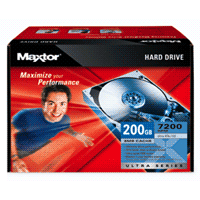
When I opened the Maxtor box, I found a MaxBlast CD. It has a capability of "Installing an Additional Storage Drive or Replacement Boot Drive" (emphasis mine). Well, duh, that's what I wanted to do.
There were a few more bumps along the way but in the end, off I went using MaxBlast to clone the boot drive on my SageTV box. I was using USB 1.1 so I knew it was going to be slow but I just hadn't imagined HOW slow. After 5-6 hours and the progress bar barely moving, I clicked on the Cancel button. Nothing. So I waited. And waited. And waited.
My patience wore out so I CTRL+ALT+DEL and terminated the application. I shut down the box and installed the USB 2.0 PCI card I had.
Button it all up and reboot. Remember that this is a headless box - no keyboard, no monitor, no mouse, no speakers. Just a network connection and TV wires.
It wouldn't boot.
I knew that was bad. I just had no idea how bad. I trucked it off upstairs and plugged it into a monitor and keyboard and rebooted. It hung at the Windows screen.
Ok. It could be worse (and in fact it was). I went and got the XP CD and did a Windows repair on it.
It wouldn't boot.
I told you it was worse. In the end, what had happened was that the MaxBlast program had changed the drive letter on the boot drive from C: to E: before it completed the copy. So when I terminated the copy, I was doomed. I no longer had a C: drive.
Rebooting like that got the Registry all twisted up in its shorts. I finally got it to boot by plugging in the USB drive.
To wrap up this story of woe, I finally just put the new 200 GB hard drive in the system unit and built it from scratch.
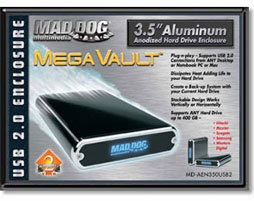
I used the USB 2.0 PCI card and the Mad Dog enclosure to copy the data from the 80 GB hard drive and reinstalled all the PVR software.
Now, what am I going to do with the left over 80 GB hard drive? Funny you should ask ...
When I opened the Maxtor box, I found a MaxBlast CD. It has a capability of "Installing an Additional Storage Drive or Replacement Boot Drive" (emphasis mine). Well, duh, that's what I wanted to do.
There were a few more bumps along the way but in the end, off I went using MaxBlast to clone the boot drive on my SageTV box. I was using USB 1.1 so I knew it was going to be slow but I just hadn't imagined HOW slow. After 5-6 hours and the progress bar barely moving, I clicked on the Cancel button. Nothing. So I waited. And waited. And waited.
My patience wore out so I CTRL+ALT+DEL and terminated the application. I shut down the box and installed the USB 2.0 PCI card I had.
Button it all up and reboot. Remember that this is a headless box - no keyboard, no monitor, no mouse, no speakers. Just a network connection and TV wires.
It wouldn't boot.
I knew that was bad. I just had no idea how bad. I trucked it off upstairs and plugged it into a monitor and keyboard and rebooted. It hung at the Windows screen.
Ok. It could be worse (and in fact it was). I went and got the XP CD and did a Windows repair on it.
It wouldn't boot.
I told you it was worse. In the end, what had happened was that the MaxBlast program had changed the drive letter on the boot drive from C: to E: before it completed the copy. So when I terminated the copy, I was doomed. I no longer had a C: drive.
Rebooting like that got the Registry all twisted up in its shorts. I finally got it to boot by plugging in the USB drive.
To wrap up this story of woe, I finally just put the new 200 GB hard drive in the system unit and built it from scratch.
I used the USB 2.0 PCI card and the Mad Dog enclosure to copy the data from the 80 GB hard drive and reinstalled all the PVR software.
Now, what am I going to do with the left over 80 GB hard drive? Funny you should ask ...
Saturday, February 04, 2006
How To Safely Store And Manage Passwords Part II
Sometimes I'm slow but I'll usually figure it out. Back in August 2004, I wrote about my search for a program to run from a USB key to store my passwords and automatically type them in. At that time, I looked at KeePass and KeyPass. KeePass is open source and KeyPass is free for up to 10 userid/password combinations.
I played with KeyPass some and it worked fine but I was still limited to 10 userid/password combinations and there was that problem with autorun on a USB key.
I had found the Hagiwara USB key that lies to Windows Plug-N-Play and presents 2 drives - a CD-ROM (there's the autorun) and a normal USB drive.
Since the autorun drive was a CD-ROM I couldn't just put the KeyPass program on that drive and it be able to write to it's database so the search continued.
In some of my surfing last week, I came across KeePass again. This time the authors had really improved it. Now it too, like KeyPass, will automatically type the userid/passwords and it supports way more than 10 userid/password combinations.
Now there was just that nagging problem of being able to write to the database. I posted my dilemma on the KeyPass forums and got a response back from one of the developers in less than 2 hours. Awesome! He wrote a small batch file that will run as part of the autorun.inf and search for the keepass.exe on other drives. When it is found, it starts it. Simple.
So, all that works great. I can just plug the Hagiwara USB drive into any Windows PC. It will autorun, start KeePass, ask me for my master password, and minimize to the system tray. Then when I need a userid/password entered, I just press CTRL and / and off it goes.
Unlike KeyPass, KeePass doesn't automatically backup the database but there's a plug-in available that does so I'm using that.
Now all that's left is to let KeePass start building me strong passwords and switch my habits to depending on KeePass. I'm still not that brave.
I played with KeyPass some and it worked fine but I was still limited to 10 userid/password combinations and there was that problem with autorun on a USB key.
I had found the Hagiwara USB key that lies to Windows Plug-N-Play and presents 2 drives - a CD-ROM (there's the autorun) and a normal USB drive.
Since the autorun drive was a CD-ROM I couldn't just put the KeyPass program on that drive and it be able to write to it's database so the search continued.
In some of my surfing last week, I came across KeePass again. This time the authors had really improved it. Now it too, like KeyPass, will automatically type the userid/passwords and it supports way more than 10 userid/password combinations.
Now there was just that nagging problem of being able to write to the database. I posted my dilemma on the KeyPass forums and got a response back from one of the developers in less than 2 hours. Awesome! He wrote a small batch file that will run as part of the autorun.inf and search for the keepass.exe on other drives. When it is found, it starts it. Simple.
So, all that works great. I can just plug the Hagiwara USB drive into any Windows PC. It will autorun, start KeePass, ask me for my master password, and minimize to the system tray. Then when I need a userid/password entered, I just press CTRL and / and off it goes.
Unlike KeyPass, KeePass doesn't automatically backup the database but there's a plug-in available that does so I'm using that.
Now all that's left is to let KeePass start building me strong passwords and switch my habits to depending on KeePass. I'm still not that brave.
Subscribe to:
Posts (Atom)