A couple of weeks ago, a thunderstorm went through and made the lights blink at my house. I've got UPSs on almost everything except my SageTV box. Yep, it wouldn't come back up. 2 beeps at power on and then nothing.
Now this box run headless, no keyboard or display. So I headed upstairs to my parts stash and returned with a display and keyboard.
What I found was that the CPU fan had died. I took it to PC Doctor in Memphis and they diagnosed and replaced the fan for just under $50 in 3 days. Not bad.
But it was a real hassle to drag it out of the desk and hook up the keyboard and display.
I found a D-Link KVM-121 at buy.com for $20 after rebate with free shipping.
It supports not only the keyboard and display but sound.
So now I can readily toggle between SERVER and SageTV. Hopefully I won't ever have to but I can.
Saturday, September 20, 2008


Saturday, September 13, 2008
T61
My wife's old ThinkPad T23 is getting long in the tooth. The wireless continues to loose NetBIOS so from time to time she can't get to the shared My Documents nor print. And the DVD drive keeps disappearing and reappearing. She's been exceptionally tolerant of it (more than I would have been).
So when her birthday came around this year, I found her a Lenovo ThinkPad T61. Don't worry. I also got her some Irish pottery.
It came with Vista Business and 1GB of RAM. I added a second GB.
The OEM Vista was pretty clean as it was a business load.
All seemed well until I started using it. I started having flashbacks of my previous Vista experience.
I had the same problem installing the printers. At least I knew how to fix it but that shouldn't be a problem.
I also have a problem connecting consistently to my WPA network although I'm not convinced that's not a Lenovo issue.
Then when I got it all hooked up, I ran into of all things performance problems! It was taking 5+ seconds to open a new tab. Most of that time, IE7 sat with "Connecting..." in the tab name. All it was trying to open was about:blank.
My friend Google finally turned up this forum post at Microsoft. The gist of it is that the slowdown was due to a BHO (CPwmIEBrowserHelperObject) that Lenovo had installed.
I aggressively disabled (Tools/Internet Options/Programs/Manage add-ons) any add-on that I didn't know that I wanted and now the T61 runs great.
So when her birthday came around this year, I found her a Lenovo ThinkPad T61. Don't worry. I also got her some Irish pottery.
It came with Vista Business and 1GB of RAM. I added a second GB.
The OEM Vista was pretty clean as it was a business load.
All seemed well until I started using it. I started having flashbacks of my previous Vista experience.
I had the same problem installing the printers. At least I knew how to fix it but that shouldn't be a problem.
I also have a problem connecting consistently to my WPA network although I'm not convinced that's not a Lenovo issue.
Then when I got it all hooked up, I ran into of all things performance problems! It was taking 5+ seconds to open a new tab. Most of that time, IE7 sat with "Connecting..." in the tab name. All it was trying to open was about:blank.
My friend Google finally turned up this forum post at Microsoft. The gist of it is that the slowdown was due to a BHO (CPwmIEBrowserHelperObject) that Lenovo had installed.
I aggressively disabled (Tools/Internet Options/Programs/Manage add-ons) any add-on that I didn't know that I wanted and now the T61 runs great.
Tuesday, September 09, 2008
Thank You, Google, I Think
I admit I'm a Google fan-boy. And I'm apparently one of the last to still be running Internet Explorer 6.
But in the same week that Google released Chrome, they updated (?) Gmail for IE6.
Thank you, Google, I think. What's next? Netscape?
But in the same week that Google released Chrome, they updated (?) Gmail for IE6.
Thank you, Google, I think. What's next? Netscape?
Tuesday, September 02, 2008
Google Chrome
This is not the definitive post on Google's new browser, Chrome. (I kinda like that name.)
You know I'm a sucker for all things Google so I downloaded it and began playing with it.
This post just has the first couple of things that caught my eye and interest.
First, they lie to the web site. They probably have to or all the web sites would give them junk html.
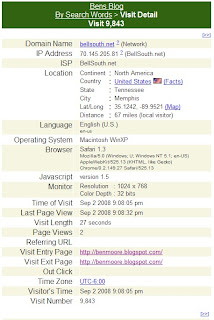
They tell the web site that they are Safari on Macintosh WinXP. That's a new operating system to me. Apparently the code base is Apple's WebKit.
The rendering looks pretty much like Firefox as they both use the Gecko engine.
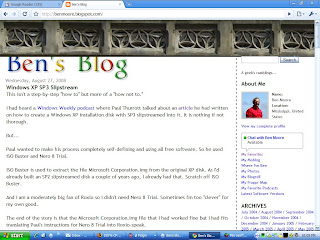
As you would expect from Google (particularly in a 0.2 release), this thing is pretty minimalist but it is elegant. Look at the Find bar.
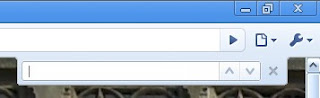
And yeah, the up and down arrows are "previous" and "next." So subtle.
IE 7 and Firefox 3 have gotten this thing about combining the history in "Back" and "Forwards" buttons. Chrome leaves the history on the appropriate button but adds a new user interface of clicking and holding to display it.
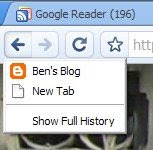
Time will tell on this one.
I've really gotten where I like the color coding of the address bar for SSL and EV certificates. Chrome has half of it.
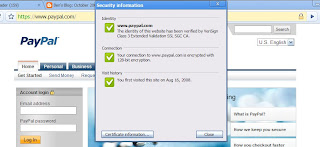
To show the EV certificate, you have to click on the lock in the address bar.
If you right click on the tab bar, one of the choices is "Task manager." I had to click that.
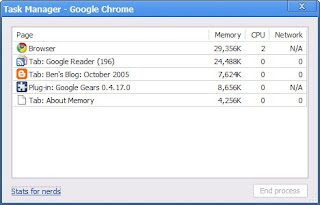
Interesting but I couldn't resist the "Stats for nerds."
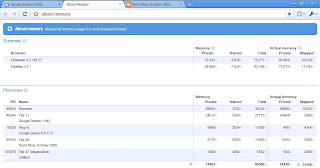
Wow!
Remember the controversy over Firefox 3's address bar pulling up history? Google just went way beyond that. They use the address bar field for a search field also.
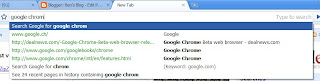
Go play with it. Just remember that it's a 0.2 release!
You know I'm a sucker for all things Google so I downloaded it and began playing with it.
This post just has the first couple of things that caught my eye and interest.
First, they lie to the web site. They probably have to or all the web sites would give them junk html.

They tell the web site that they are Safari on Macintosh WinXP. That's a new operating system to me. Apparently the code base is Apple's WebKit.
The rendering looks pretty much like Firefox as they both use the Gecko engine.

As you would expect from Google (particularly in a 0.2 release), this thing is pretty minimalist but it is elegant. Look at the Find bar.

And yeah, the up and down arrows are "previous" and "next." So subtle.
IE 7 and Firefox 3 have gotten this thing about combining the history in "Back" and "Forwards" buttons. Chrome leaves the history on the appropriate button but adds a new user interface of clicking and holding to display it.

Time will tell on this one.
I've really gotten where I like the color coding of the address bar for SSL and EV certificates. Chrome has half of it.

To show the EV certificate, you have to click on the lock in the address bar.
If you right click on the tab bar, one of the choices is "Task manager." I had to click that.

Interesting but I couldn't resist the "Stats for nerds."

Wow!
Remember the controversy over Firefox 3's address bar pulling up history? Google just went way beyond that. They use the address bar field for a search field also.

Go play with it. Just remember that it's a 0.2 release!
Wednesday, August 27, 2008
Windows XP SP3 Slipstream
This isn't a step-by-step "how to" but more of a "how not to."
I had heard a Windows Weekly podcast where Paul Thurrott talked about an article he had written on how to create a Windows XP installation disk with SP3 slipstreamed into it. It is nothing if not thorough.
But...
Paul wanted to make his process completely self-defining and using all free software. So he used ISO Buster and Nero 8 Trial.
ISO Buster is used to extract the file Microsoft Corporation.img from the original XP disk. As I'd already built an SP2 slipstreamed disk a couple of years ago, I already had that. Scratch off ISO Buster.
And I am a moderately big fan of Roxio so I didn't need Nero 8 Trial. Sometimes I'm too "clever" for my own good.
The end of the story is that the Microsoft Corporation.img file that I had worked fine but I had fits translating Paul's instructions for Nero 8 Trial into Roxio-speak.
I googled "make a bootable cd with roxio." On the first page was a link to "The Elder Geek's" post on how to slipstream SP1.
But at the bottom was a link to how to burn the CD using "Roxio Easy CD and DVD Creator 6."
Bingo. That worked.
I had heard a Windows Weekly podcast where Paul Thurrott talked about an article he had written on how to create a Windows XP installation disk with SP3 slipstreamed into it. It is nothing if not thorough.
But...
Paul wanted to make his process completely self-defining and using all free software. So he used ISO Buster and Nero 8 Trial.
ISO Buster is used to extract the file Microsoft Corporation.img from the original XP disk. As I'd already built an SP2 slipstreamed disk a couple of years ago, I already had that. Scratch off ISO Buster.
And I am a moderately big fan of Roxio so I didn't need Nero 8 Trial. Sometimes I'm too "clever" for my own good.
The end of the story is that the Microsoft Corporation.img file that I had worked fine but I had fits translating Paul's instructions for Nero 8 Trial into Roxio-speak.
I googled "make a bootable cd with roxio." On the first page was a link to "The Elder Geek's" post on how to slipstream SP1.
But at the bottom was a link to how to burn the CD using "Roxio Easy CD and DVD Creator 6."
Bingo. That worked.
Friday, August 15, 2008
DNS Security, Part 3
Is there no end to the DNS security flaw? I've written about it here and here.
We all hoped that the technique that Dan Kaminsky described would put this to rest.
Apparently we were wrong.
The Register reported that a Russian researcher had demonstrated DNS cache poisoning on a freshly patched DNS server. It did take him 10 hours with a dedicated gigabit connection to the server but he did poison it.
Even Dan had to respond.
I read that when he posted it but I kinda glazed over after a while.
Then Steve Gibson revisited the DNS vulnerability in his last podcast. (I gotta quit listening to Steve.) You can read it here.
Steve refers to the "0x20 hack." If you hadn't falling asleep reading Dan's post, you would have seen that he did too.
I found the ITEF RFC that describes this technique. Sure cure for insomnia. Suffice it to say it has to do with using mixed case in the domain name being queried.
Let me net it out for me and you both.
Prior to this summer's patches, DNS had as low as 1 in 32,769 possibilities to be compromised. After the patches, the odds were 1 in 4,294,967,296 (according to Dan).
The 0x20 hack makes this 1 in billions and billions. Yeah, there are some edge cases that Dan covers but it's way better.
And this seems relatively easy to implement. I expect it'll slip in in a future round of patches and we'll be done with this until ... DNSSEC.
Stay tuned.
We all hoped that the technique that Dan Kaminsky described would put this to rest.
Apparently we were wrong.
The Register reported that a Russian researcher had demonstrated DNS cache poisoning on a freshly patched DNS server. It did take him 10 hours with a dedicated gigabit connection to the server but he did poison it.
Even Dan had to respond.
I read that when he posted it but I kinda glazed over after a while.
Then Steve Gibson revisited the DNS vulnerability in his last podcast. (I gotta quit listening to Steve.) You can read it here.
Steve refers to the "0x20 hack." If you hadn't falling asleep reading Dan's post, you would have seen that he did too.
I found the ITEF RFC that describes this technique. Sure cure for insomnia. Suffice it to say it has to do with using mixed case in the domain name being queried.
Let me net it out for me and you both.
Prior to this summer's patches, DNS had as low as 1 in 32,769 possibilities to be compromised. After the patches, the odds were 1 in 4,294,967,296 (according to Dan).
The 0x20 hack makes this 1 in billions and billions. Yeah, there are some edge cases that Dan covers but it's way better.
And this seems relatively easy to implement. I expect it'll slip in in a future round of patches and we'll be done with this until ... DNSSEC.
Stay tuned.
Saturday, August 09, 2008
DNS Security Flaw Explanation
Early last month, Dan Kaminsky announced that he had found a serious security flaw in the DNS code. My blog entry on it is here. Dan had promised that he'd explain it at Black Hat on August 6, 2008.
Here are his slides.
My take of it is that the bloggers had the vulnerability pretty much right but Dan explained how it could be so much easier exploited.
I welcome your comments with more insight.
Here are his slides.
My take of it is that the bloggers had the vulnerability pretty much right but Dan explained how it could be so much easier exploited.
I welcome your comments with more insight.
Wednesday, July 23, 2008
Windows Product Key Update Tool
If you've been reading this blog for long, you know what a sucker I am for ThinkPads. I buy them off lease from RetroBox. If you watch them closely (think every day), you can really find some good deals.
They come from RetroBox wiped clean; no OS. That always gets me to scrambling even though they all have a Certificate of Authenticity (COA) for Windows XP Pro on the bottom with a key. You'd need the IBM OEM XP Pro recovery CDs to use this key. Or so I thought.
Tonight I found the way to activate using this key. I have a consumer media for Windows XP Pro with a key. Use this and do a normal install even including entering this key. Don't sweat it if it has already been activated.
Then after the install is complete and before activating, go to Microsoft and download the Windows Product Key Update Tool. Run it and follow the instructions using the key on the COA on the bottom of the ThinkPad. One reboot later, you're done. It's even authenticated!
I don't see why this wouldn't work on any PC with an OEM COA. Let me know your experience.
I found this technique here on My Digital Life.
They come from RetroBox wiped clean; no OS. That always gets me to scrambling even though they all have a Certificate of Authenticity (COA) for Windows XP Pro on the bottom with a key. You'd need the IBM OEM XP Pro recovery CDs to use this key. Or so I thought.
Tonight I found the way to activate using this key. I have a consumer media for Windows XP Pro with a key. Use this and do a normal install even including entering this key. Don't sweat it if it has already been activated.
Then after the install is complete and before activating, go to Microsoft and download the Windows Product Key Update Tool. Run it and follow the instructions using the key on the COA on the bottom of the ThinkPad. One reboot later, you're done. It's even authenticated!
I don't see why this wouldn't work on any PC with an OEM COA. Let me know your experience.
I found this technique here on My Digital Life.
Wednesday, July 16, 2008
Allway Sync
Remember when I talked about using FolderShare to help my wife work back and forth between home and her office?
Her work system administrators have gotten increasingly thorough. In the end, they've blocked FolderShare. I completely understand why they're doing that.
But...
If I was ever going to see my wife, I had to restore her ability to work from home. I talked around at work and found robocopy and SyncToy. robocopy comes in the Windows Server 2003 Resource Kit Tools. It's a command line utility but there's a GUI to "help." While it's very capable, it's pretty awkward.
Then there's SyncToy v2.0 Beta. It's bigger than a breadbox. For example, it requires the .NET Framework v2.0.
I kept looking.
Somewhere I came across Allway Sync. It's free but limited to "synchronize no more than 20,000 files per 30-day period." I can live with that. They have a portable install made especially for installation on USB drives.
I found her a 512MB USB drive and copied her work My Documents to it. Then installed Allway Sync and created an automatic synchronization job.
On her PC at work, I created an icon on her desktop that will launch Allway Sync and run that synchronization job. And I got her a USB extension cord so she had a place to plug her USB drive in right on her desktop.
When she gets to work, she plugs in the USB drive and clicks the icon. It syncs automatically. She removes the USB drive and works normally throughout the day. When she is ready to leave, she repeats the process. Now the USB drive has a copy of her work My Documents.
At home, she plugs the USB drive into her ThinkPad and works from there. An unexpected benefit is that since she keeps the USB drive on her key chain, she can actually work on any PC by just plugging in the USB drive.
Still not as nice as FolderShare but works good enough within the restrictions of her work.
Her work system administrators have gotten increasingly thorough. In the end, they've blocked FolderShare. I completely understand why they're doing that.
But...
If I was ever going to see my wife, I had to restore her ability to work from home. I talked around at work and found robocopy and SyncToy. robocopy comes in the Windows Server 2003 Resource Kit Tools. It's a command line utility but there's a GUI to "help." While it's very capable, it's pretty awkward.
Then there's SyncToy v2.0 Beta. It's bigger than a breadbox. For example, it requires the .NET Framework v2.0.
I kept looking.
Somewhere I came across Allway Sync. It's free but limited to "synchronize no more than 20,000 files per 30-day period." I can live with that. They have a portable install made especially for installation on USB drives.
I found her a 512MB USB drive and copied her work My Documents to it. Then installed Allway Sync and created an automatic synchronization job.
On her PC at work, I created an icon on her desktop that will launch Allway Sync and run that synchronization job. And I got her a USB extension cord so she had a place to plug her USB drive in right on her desktop.
When she gets to work, she plugs in the USB drive and clicks the icon. It syncs automatically. She removes the USB drive and works normally throughout the day. When she is ready to leave, she repeats the process. Now the USB drive has a copy of her work My Documents.
At home, she plugs the USB drive into her ThinkPad and works from there. An unexpected benefit is that since she keeps the USB drive on her key chain, she can actually work on any PC by just plugging in the USB drive.
Still not as nice as FolderShare but works good enough within the restrictions of her work.
Wednesday, July 09, 2008
OpenDNS and the DNS Security Flaw
I found another reason to run OpenDNS. Brian Krebs of the Washington Post recently posted about a newly revealed security problem in the design of DNS.
Brian linked to Dan Kaminsky's blog. Dan has a gadget on his page that will check YOUR DNS server. You know me. Like the bank robber in "Dirty Harry," "I gots to know."
Here's what the test reported for OpenDNS:
 Then I went to another PC that is using BellSouth's DNS servers:
 You be the judge.
Brian linked to Dan Kaminsky's blog. Dan has a gadget on his page that will check YOUR DNS server. You know me. Like the bank robber in "Dirty Harry," "I gots to know."
Here's what the test reported for OpenDNS:
 Then I went to another PC that is using BellSouth's DNS servers:
 You be the judge.
Saturday, June 28, 2008
Firefox 3
Here I go again.
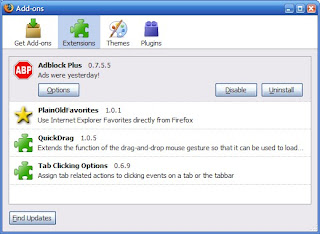
I'm using pretty much the same Add-ons I used before:
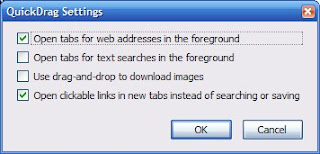
Here're the options for QuickDrag:
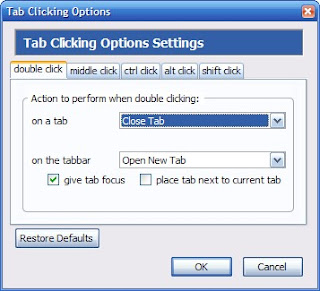
And here're the options for Tab Clicking:
I changed a couple of things in about:config:
Maxthon lets you search from the address bar and I'm already missing that in Firefox. I think I've found something even better though. John Bokma wrote about how to add "smart keywords" to Firefox. These work just like Maxthon's search shortcuts except you use them in Firefox's location bar. I've added the obligatory ones for Google and wikipedia.
Can't be any worse than Maxthon 2.
I'm using pretty much the same Add-ons I used before:

Here're the options for QuickDrag:

And here're the options for Tab Clicking:

I changed a couple of things in about:config:
browser.tabs.autoHide - falseThe location bar has a star at the right end for Firefox bookmarks, clear if the site isn't bookmarked and gold if it is. Since I don't use Firefox bookmarks, I just wanted that real estate back. This tips list tells you how to do it.
browser.tabs.closeButtons - 2
browser.tabs.tabMaxWidth - 100
browser.tabs.tabMinWidth - 10
Hide the star button if you prefer to use the Bookmarks menu or a keyboard shortcut (Ctrl + D)What they don't tell you is how to get the userChrome.css because it doesn't exist. In your C:\Documents and Settings\<username>\Application Data\Mozilla\Firefox\Profiles\im0vt1ea.default\chrome there is a file userChrome-example.css. Copy that in place and rename it to userChrome.css. Oh, they also don't tell you that you need to edit this with WordPad. Restart Firefox and then all is fine.
* Open your userChrome.css file located in your profile folder.
* Add this line to the end of the file:
#star-button {display: none !important;}
* Restart Firefox for the change to take effect.
Maxthon lets you search from the address bar and I'm already missing that in Firefox. I think I've found something even better though. John Bokma wrote about how to add "smart keywords" to Firefox. These work just like Maxthon's search shortcuts except you use them in Firefox's location bar. I've added the obligatory ones for Google and wikipedia.
Can't be any worse than Maxthon 2.
Sunday, June 22, 2008
OpenDNS
You'll remember back in February 2008 that I highlighted the IT Conversations podcast with David Ulevitch, founder and CEO of OpenDNS.com. I suggested then that I'd be playing with OpenDNS and I have.
Initially, I just switched my DNS to point to OpenDNS' servers. This gets you a couple of features. Things like if you misspell .com by typing .cm instead. OpenDNS will automatically change this to .com and send you on your way. If OpenDNS can't figure out what you want, it'll perform a search for you and give you an error page with the search results.
Nice, even cute, but not a big deal.
Then my mom started getting e-mail from phishing sites.
So I set up a free account at OpenDNS and registered my static IP address with them. Then I added a second "network" with OpenDNS for my mom's IP address. Unfortunately, she has a dynamic IP address.
OpenDNS has a client that you install that will track your IP address and update OpenDNS when it changes, just like DynDNS.
You have to enable that "network" within OpenDNS for dynamic IP address tracking and then you're good.
With all that in place, you can then set domain filtering for each "network" within your account. You can even specify text for the error messages and put your own logo on the messages.
 Of course there are statistics and reports galore.
Pretty cool.
Initially, I just switched my DNS to point to OpenDNS' servers. This gets you a couple of features. Things like if you misspell .com by typing .cm instead. OpenDNS will automatically change this to .com and send you on your way. If OpenDNS can't figure out what you want, it'll perform a search for you and give you an error page with the search results.
Nice, even cute, but not a big deal.
Then my mom started getting e-mail from phishing sites.
So I set up a free account at OpenDNS and registered my static IP address with them. Then I added a second "network" with OpenDNS for my mom's IP address. Unfortunately, she has a dynamic IP address.
OpenDNS has a client that you install that will track your IP address and update OpenDNS when it changes, just like DynDNS.
You have to enable that "network" within OpenDNS for dynamic IP address tracking and then you're good.
With all that in place, you can then set domain filtering for each "network" within your account. You can even specify text for the error messages and put your own logo on the messages.
 Of course there are statistics and reports galore.
Pretty cool.
Wednesday, June 11, 2008
HD UPS Problems
I've been fighting a problem with my APC UPS that I have in front of my HD setup. It's a BE350R.
When I went HD, I bought a new BE350R just for it. It ran fine for several months then one night the lights blinked and the whole HD setup dropped power. Bummer.
I reset it and it did it again. I just plugged everything into a power strip and went on.
Today I had time to work on it so I went on the APC site and they had a nice real-time chat feature. They walked me through testing the battery and it was fine. As I replayed the symptoms to the agent, he said that they indicated that the UPS was overloaded. The BE350R supports 200W. Actually the agent, Arun, was very good.
Plugged into it I had the Sony KDL52W3000, the Scientific Atlanta 8300HD DVR, the Hauppauge MediaMVP 01000, and the Vantec enclosure with the 750GB drive from the Seagate FreeAgent Pro.
Remember, I'm a mechanical engineer, not an electrical engineer!
So tonight I struck out finding the power requirements of this equipment. It didn't take long to discover my problem. The Sony draws 295W!
I'll just plug the Sony into the surge suppressor side of the BE350R and I should be fine.
When I went HD, I bought a new BE350R just for it. It ran fine for several months then one night the lights blinked and the whole HD setup dropped power. Bummer.
I reset it and it did it again. I just plugged everything into a power strip and went on.
Today I had time to work on it so I went on the APC site and they had a nice real-time chat feature. They walked me through testing the battery and it was fine. As I replayed the symptoms to the agent, he said that they indicated that the UPS was overloaded. The BE350R supports 200W. Actually the agent, Arun, was very good.
Plugged into it I had the Sony KDL52W3000, the Scientific Atlanta 8300HD DVR, the Hauppauge MediaMVP 01000, and the Vantec enclosure with the 750GB drive from the Seagate FreeAgent Pro.
Remember, I'm a mechanical engineer, not an electrical engineer!
So tonight I struck out finding the power requirements of this equipment. It didn't take long to discover my problem. The Sony draws 295W!
I'll just plug the Sony into the surge suppressor side of the BE350R and I should be fine.
Friday, June 06, 2008
Excel 2007 Slow Launching From Notes
A couple of us at work were early adapters of Office 2007.
As we installed it so early, we left Office 2003 installed as well. We've run into some interesting problems that I believe are as a result of that.
The most irritating example is that when you open an Excel file attachment from within Lotus Notes, Notes hangs, Excel opens but without a file. Then after what seems an eternity (really less than a minute), it breaks loose and all is fine. My friend even discovered that if he clicked on the Open icon in Excel and then canceled the dialog box that Excel would take off. The same thing happens when you double click on an Excel file in Windows Explorer. I haven't noticed it for Word files.
I Googled this and found this blog entry.
That fixed it. Interestingly, we both noticed that the text in our entry read
As we installed it so early, we left Office 2003 installed as well. We've run into some interesting problems that I believe are as a result of that.
The most irritating example is that when you open an Excel file attachment from within Lotus Notes, Notes hangs, Excel opens but without a file. Then after what seems an eternity (really less than a minute), it breaks loose and all is fine. My friend even discovered that if he clicked on the Open icon in Excel and then canceled the dialog box that Excel would take off. The same thing happens when you double click on an Excel file in Windows Explorer. I haven't noticed it for Word files.
I Googled this and found this blog entry.
That fixed it. Interestingly, we both noticed that the text in our entry read
"C:\Program Files\Microsoft Office\Office11\EXCEL.EXE" /eYou can just click on Browse in that dialog box and navigate to the Office12 folder.
Friday, May 23, 2008
FairUse Wizard
In this post over 2 years ago, I mentioned FairUse Wizard.
At that time, I was using it to transcode movies for my Treo. I still use it for that and it works fine.
However, I've found a new use for it. Remember that for Christmas I got the Philips DVP5982 DVD player.
The DVP5982 plays DivX/XviD videos from USB drives. I've been taking DVDs and ripping them with FairUse Wizard to 700MB XviDs. I copy these to a 2GB thumb drive and watch them from there.
At that time, I was using it to transcode movies for my Treo. I still use it for that and it works fine.
However, I've found a new use for it. Remember that for Christmas I got the Philips DVP5982 DVD player.
The DVP5982 plays DivX/XviD videos from USB drives. I've been taking DVDs and ripping them with FairUse Wizard to 700MB XviDs. I copy these to a 2GB thumb drive and watch them from there.
Saturday, May 17, 2008
Windows Desktop Search, Part 2
Last year I wrote about Windows Desktop Search. I've been using it since then. I've been through a couple of versions and am now using Windows Desktop Search 4.0 Preview. The previous version's add-in for Lotus Notes still works.
The Preview version seems to be less aggressive than the previous versions. But I noticed the folder C:\Documents and Settings\<username>\Local Settings\Application Data\Microsoft\Desktop Search\Logs was full of log files indicating errors in the Notes add-in.
Seems I wasn't the only one. Read this.
The Preview version seems to be less aggressive than the previous versions. But I noticed the folder C:\Documents and Settings\<username>\Local Settings\Application Data\Microsoft\Desktop Search\Logs was full of log files indicating errors in the Notes add-in.
Seems I wasn't the only one. Read this.
- From the Start menu, click Run, type regedit.exe and press Enter
- In the registry editor, navigate to HKLM\Software\Microsoft, right click and create a new WindowsSearchPreview key.
- Right-click HKLM\Software\Microsoft\ WindowsSearchPreview, add a new REG_DWORD value LogLevel.NotesPHLog, and set it to 4
- Open a Command Window (Start->Run->cmd.exe, ENTER)
- In the command window, type: net stop wsearch
- Press Enter, then type: net start wsearch and press Enter again.
- Remove the logs from C:\Documents and Settings\<username>\Local Settings\Application Data\Microsoft\Desktop Search\Logs.
Saturday, May 10, 2008
Latest Software Versions
| Updated 02/13/13 | |
 | Flash version checker Flash Player for Firefox Flash Player for IE |
 | Adobe Reader 10.0 |
 | Not recommended |
Friday, May 09, 2008
Notes Address Book to Outlook
In Notes, open your address book. Go to "File" and choose "Export." Chose a place to save it in "Save in:" Then specify a name in "File name:" and change the "Save as type:" to "vCard 3.0." Click on "Export."
In the resulting dialog box, click the "All documents" and "All fields" radio buttons and click on "OK."
Now go to Windows' "Start" menu, "Accessories" and select "Address Book." Go to "File" and choose "Import" and then "Business Card (vCard)." Point to the file you created above and click on "Open." You'll get a "Properties" dialog box for each entry. Just click on "Ok" each time, or keep banging on Enter.
You may want to take a second here and make a copy of the Windows Address Book. To do this, in the Address Book application, go to "File" and choose "Export." Pick a type and location.
Lastly, go to Outlook. Select "Contacts" then "File" and choose "Import and Export." Select "Import from another program or file." Select "Outlook Express 4.x, 5.x, 6.x or Windows Mail." In the dialog box titled "Would you like to import e-mail messages and addresses from Microsoft Outlook Express or Windows Mail?" answer "Yes." Note these instructions are for Outlook 2007. Yours may differ.
Or you could buy this or this or this or ...
In the resulting dialog box, click the "All documents" and "All fields" radio buttons and click on "OK."
Now go to Windows' "Start" menu, "Accessories" and select "Address Book." Go to "File" and choose "Import" and then "Business Card (vCard)." Point to the file you created above and click on "Open." You'll get a "Properties" dialog box for each entry. Just click on "Ok" each time, or keep banging on Enter.
You may want to take a second here and make a copy of the Windows Address Book. To do this, in the Address Book application, go to "File" and choose "Export." Pick a type and location.
Lastly, go to Outlook. Select "Contacts" then "File" and choose "Import and Export." Select "Import from another program or file." Select "Outlook Express 4.x, 5.x, 6.x or Windows Mail." In the dialog box titled "Would you like to import e-mail messages and addresses from Microsoft Outlook Express or Windows Mail?" answer "Yes." Note these instructions are for Outlook 2007. Yours may differ.
Or you could buy this or this or this or ...
Thursday, May 01, 2008
FilesBeforeVersion
I know that's an odd title but you'll see its importance in a minute. Remember last year when I whined about Word 2007 not supporting some early Word file formats?
Well, I got to share the misery with everyone who put Service Pack 3 on Word 2003. Microsoft imposed the same restrictions on those users.
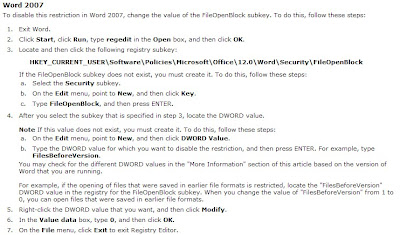
I've just about learned to screen capture pages from Microsoft. KB928850 now explains how to unblock the older file formats in all the Office 2007 programs. KB922849 has the details for Word 2007.
 That fixes it.
Well, I got to share the misery with everyone who put Service Pack 3 on Word 2003. Microsoft imposed the same restrictions on those users.
I've just about learned to screen capture pages from Microsoft. KB928850 now explains how to unblock the older file formats in all the Office 2007 programs. KB922849 has the details for Word 2007.
 That fixes it.
Sunday, April 13, 2008
ThinkPad Scrolling
When I was playing with the Windows Live applications, Windows Live Mail and Windows Live Writer, I noticed that the center button on my ThinkPad T42 didn't scroll the windows like a scroll wheel should. If I plugged in a real mouse with a scroll wheel, that worked so it was something with the ThinkPad's center button.
I Googled this for a while and found this post:
Problem fixed.
I Googled this for a while and found this post:
Well this seems to work:I tried it and rebooted.
Open c:\Program Files\Synaptics\SynTP\TP4table.dat
Add this just before the "Pass 1" block:
; Set WheelStd as default
*,*,*,*,*,*,WheelStd,0,9
Problem fixed.
Subscribe to:
Posts (Atom)