Showing posts sorted by date for query essential. Sort by relevance Show all posts

Sunday, January 09, 2022

USB-C vs Lightning

My last Android phone, the Essential PH-1, used USB-C. Obviously, my iPhone uses Lightning.

For my usage, they're pretty much the same. I just use the cable for charging. And I charge overnight.

But a couple of articles have raised my interest.

This comment triggered my research:
USB C sucks, Apple lighting is the best even tho I’m not a fan of apple, it’s so much more durable
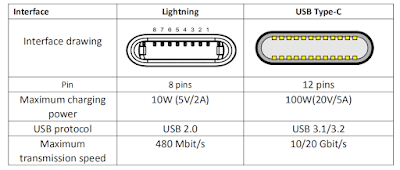
USB C wins hands down on technology. This article (archive.is) does a good job of summarizing the technology.

But, look closely at the chart they used.


Vention doesn't mention that the representations of the "Interface drawing" are fundamentally different.

That "Interface" for the Lightning is inside the device. That "Interface" for the USB-C is dangling at the end of a cable.

Here's a real world example of the difference from reddit:
The apple phone charger chips or breaks and you get a new charging cable, the design is reversed for USB-C, so if the reciever [sic] in a device chips or breaks you now need to replace the reciever [sic] for a phone or other gadget instead of getting a new cable...
Pocketnow has some similar comments:
USB C's design protects the pins and connectors on cables, but there might be some durability concerns over the tab inside a device.
from Pocketnow.com

I think it's clear which will win in the long run but it's going to be like Beta vs VHS without the porn.


Sunday, March 07, 2021

Chillin' With an iPhone - Part 6

So I'm a year into using an iPhone X coming from an Essential PH-1. I've posted several times about my experiences - 1, 2, 3, 4, 5.

I still have a few items to close the loop on.

Battery Life - My iPhone's battery life is really incredible. I tend to check the battery at 10PM. Most days the % of battery remaining is around 60%. If I've taken a lot of video or listened to a lot of podcasts, it will dip down into the 50% range. I checked the battery capacity recently and it is still 86%.


Face ID - I mentioned that the face unlock of my Lenovo Tab M8 inspired me to look at the iPhone X's Face ID. That was before the COVID-19 pandemic drove facemask usage. Now I miss the Touch ID of the iPhone 6.

Gboard - I am a huge user of Google services. Consequently, I tend to use the Gboard keyboard. But Apple has crippled Gboard. I like to use handsfree voice to text while I'm driving. When using Gboard's voice to text, Gboard has to launch what looks like a separate app. The delay is unacceptable. And the Apple keyboard's voice to text is really good.

Wireless Charging - I've had a couple of Android phones that used wireless charging but the Essential PH-1 didn't. It was nice to return to wireless charging. This is the wireless charger I use. I use this for my wife's iPhone SE (2020).

Old Stuff - I still wish iOS would give me more control over sounds, e.g. Google Hangouts ringtone and texttone, the camera shutter sound, the iMessage sent sound, etc. I do really like the intensity of the vibration. The Essential PH-1 struggled with being too subtle.

But I do still have an Essential PH-1 completely up to speed on Lineage OS.

Sunday, August 02, 2020

Essential Lineage

Previously I shared that Essential had shut down effective February 2020. And that I was using an iPhone X. I don't give up that easily.

Finally, Lineage has published an Android 10 release of their ROM for the Essential PH-1. They are dropping nightlies that are stable enough for a daily driver.


I followed the Lineage instructions for Essential (mata) here. The phone I was using already had an unlocked bootloader and an old system image, i.e. before February 2020.

The whole process went well but there are a couple of tips I want to share.

While the instructions are accurate, there are subtleties here and there that even a non-noobie like me needs help on.

For example, there are a couple of times where the instructions say to hold down a specific key combination. Then the next step is "Once the device is in..."

Uh, when do I release the keys and in what sequence? How do I know that the device is in the desired mode?

Here's the detail for Fastboot from Essential Support:
  1. Press and hold the Power and Volume-Down buttons.
  2. When you see the Essential logo on the screen, or you feel the phone vibrate, release the Power button (but keep holding the Volume-Down button).
  3. Release the Volume-Down button when Fastboot Mode appears.
Another place is "Once the device is in fastboot mode, verify your PC finds it by typing: fastboot devices".

And THEN what should I see?

Well, I didn't get ANY response from adb which I figured wasn't good.

It turns out that I had to update the Essential device drivers AGAIN while the phone was in Fastboot mode. The instructions are here.
  • Open device manager
  • Find Unknown "Android" device (likely listed under Other devices with an exclamation mark)
  • Update driver
  • Browse my computer for driver software
  • Let me pick from a list of devices, select List All Devices
  • Under "Android device" or "Google Inc", you will find "Android Bootloader Interface"
  • Choose "Android Bootloader Interface"
  • Click "yes" when it says that driver might not be compatible
After flashing the Lineage ROM, I flashed Open GApps micro for ARM64. As it was flashing I got messages on the phone about "zip signature verification failed".

What did that mean? Was it bad?

The answer to that is here.

TWRP (LOS recovery in my case) would need to incorporate a copy of LineageOS's public keys in order for its signature verification feature to work properly.

So, not to worry.

Whew! I'm glad I had done this before so when I stumbled I at least knew to go looking for answers.

Sunday, May 17, 2020

Chillin' With an iPhone - Part 3

In my earlier post about MapMyWalk on my iPhone, I mentioned that I would revisit why the "red line is so crooked."

It's related to the observation I made in my post about managing photos on my iPhone. In that post I said that non-Apple apps tend to not run passively in the background even if you enable Background App Refresh.

Here is a recent result from MapMyWalk on my iPhone.


I think that's what happening with MapMyWalk. It looks like iOS isn't letting MapMyWalk access the GPS for location continuously. This results in the waypoints appearing irregular and the red line being crooked.

For comparison, here's the display from MayMyWalk on an Android device.


There is significantly less deviation on Android. The little discontinuity in the middle is where I crossed the street for an oncoming car.

This also has the effect that MapMyWalk's statistics are reported incorrectly on iOS. The distance and pace will be slightly off.

Generally this isn't really a problem with MapMyWalk.

But the same phenomenon can be observed with Google Maps. Often when you open Google Maps on an iPhone, the location will show as the last location where you used Google Maps. Then in a couple of seconds, the location will be updated to the current location.

I use Google Maps Timeline feature. Overall Google Maps Timeline on iOS has a lot less granularity than on Android and often will completely miss segments of travel. Even when it does record the travel the resolution isn't sufficient to identify the business visited. Google Maps Timeline on Android does an incredible job of this.

Neither of these examples disqualify location services on iOS. The upside is that the iOS battery usage is significantly lower than Android.

In an admittedly unscientific attempt to compare, I went back to the last 30 days of my iPhone 6S compared to the next 30 days of my Essential PH-1. The iPhone 6S milliamps/hour averaged 55.63 compared to 69.03 on the Essential PH-1.

It's a trade-off. 

Sunday, April 19, 2020

Chillin' With an iPhone - Part 2

On my Essential PH-1, I used a combination of apps to track my daily walks. I used Runkeeper to get a nice map of my route and Pedometer to count steps.

This time, I looked harder for an app that consolidated those functions. I came across MapMyWalk from Under Armour.

Here's its output at the end of a walk.

Pretty good.

I wish it would audibly give 2 decimals of the distance as you're walking. It only gives tenths of a mile. And give complete step counts. It only gives hundreds of steps.

I'll talk about why that red line is so crooked later.

MapMyWalk is also available on Android.

Sunday, March 22, 2020

iPhone X - Essential PH-1 Comparison


Here's how the iPhone X compares to my Essential PH-1.

Apple iPhone XEssential PH-1
DESIGN
Device typeSmart phoneSmart phone
OSiOS (13.x, 12.x, 11.x)Android (10, 9.0 Pie, 8.1 Oreo, 7.1 Nougat)
Dimensions5.65 x 2.79 x 0.30 inches (143.6 x 70.9 x 7.7 mm)5.57 x 2.80 x 0.31 inches (141.5 x 71.1 x 7.8 mm)
Weight6.14 oz (174 g)6.53 oz (185 g)
MaterialsBack: Glass; Frame: Stainless steelBack: Ceramic; Frame: Titanium
Biometrics3D Face unlockFingerprint (touch)
DISPLAY
Physical size5.8 inches5.7 inches
Resolution2436 x 1125 pixels, 19.5:9 ratio1312 x 2560 pixels
Pixel density459 ppi504 ppi
TechnologyOLEDIPS LCD
Screen-to-body ratio82.35 %84.85 %
Colors16 777 21616 777 216
TouchscreenMulti-touchMulti-touch
FeaturesHDR video support, Pressure-sensitive, Oleophobic coating, Scratch-resistant glass, Ambient light sensor, Proximity sensorScratch-resistant glass (Corning Gorilla Glass 5), Ambient light sensor, Proximity sensor
CAMERA
RearDual cameraDual camera
Main camera12 MP13 MP
   FeaturesSapphire crystal lens cover, OIS, PDAF, CMOS image sensor, BSI sensorBlack and White, Laser and PDAF
Second camera12 MP13 MP
   FeaturesTelephoto, Sapphire crystal lens cover, OIS, PDAF, CMOS image sensor, BSI sensorBlack and White, Laser and PDAF
Video recording3840x2160 (4K UHD) (60 fps), 1920x1080 (Full HD) (240 fps), 1280x720 (HD) (30 fps)3840x2160 (4K UHD) (30 fps), 1920x1080 (Full HD) (60 fps), 1280x720 (HD) (120 fps)
   FeaturesOIS, Time-lapse video, Continuous autofocus, Video light, Video calling, Video sharingVideo calling, Video sharing
Front-facing camera7 MP8 MP
   FeaturesHDR
HARDWARE
System chipApple A11 Bionic APL1W72Qualcomm Snapdragon 835 MSM8998
ProcessorHexa-core, 2390 MHz, Monsoon and Mistral, 64-bit, 10 nmOcta-core, 2450 MHz, Kryo 280, 64-bit, 10 nm
GPUApple 3-core GPUAdreno 540
RAM3GB4GB
Built-in storage64 GB128 GB
BATTERY
Capacity2716 mAh3040 mAh
TypeLi - Ion, Not user replaceableLi - Ion, Not user replaceable
ChargingUSB Power Delivery, Qi wireless chargingUSB Power Delivery
CELLULAR
LTE (FDD)Bands 1(2100), 2(1900), 3(1800), 4(AWS-1), 5(850), 7(2600), 8(900), 12(700 a), 13(700 c), 17(700 b), 18(800 Lower), 19(800 Upper), 20(800 DD), 25(1900+), 26(850+), 28(700 APT), 29(700 d), 30(2300 WCS), 66(AWS-3)Bands 1(2100), 2(1900), 3(1800), 4(AWS-1), 5(850), 7(2600), 8(900), 12(700 a), 13(700 c), 17(700 b), 20(800 DD), 21(1500 Upper), 25(1900+), 26(850+), 28(700 APT), 29(700 d), 30(2300 WCS)
LTE (TDD)Bands 38(2600), 39(1900+), 40(2300), 41(2600+)Bands 38(2600), 39(1900+), 40(2300), 41(2600+)
UMTS850, 900, 1700/2100, 1900, 2100 MHz850, 900, 1700/2100, 1900, 2100 MHz
Data SpeedLTE-A Cat 12/13 (600/150 Mbit/s), HSDPA+ (4G) 42.2 Mbit/s, HSUPA 5.76 Mbit/s, UMTSLTE-A Pro Cat 16 (1000/150 Mbit/s)
SIM typenano-SIMnano-SIM
CONNECTIVITY
Bluetooth5.05.0
Wi-Fi802.11 a, b, g, n, ac, dual-band; MIMO, Wi-Fi Direct, Hotspot802.11 a, b, g, n, ac, dual-band; MIMO, Wi-Fi Direct, Hotspot
USBLightningUSB Type-C (reversible)
   FeaturesCharging, Headphones portMass storage device, Video out, Charging, Headphones port
HDMI

OtherNFC, Tethering, Computer sync, OTA syncNFC, Tethering, Computer sync, OTA sync
OTHER FEATURES
SensorsAccelerometer, Gyroscope, Compass, BarometerAccelerometer, Gyroscope, Compass, Barometer
Source: phoneArena.com


Sunday, March 01, 2020

Steve Jobs Sent Me a Message

I change phones like most people change underwear. I've stuck with the Essential PH-1 longer than usual - 2 years.

But the good ride had to come to an end. Essential announced it was shutting down February 12, 2020.

I started considering what was going to be my next phone.

I've liked the face unlock of the Lenovo Tab M8. I started watching for iPhone Xs on Gazelle. After Valentine's Day, Gazelle had a 20% off sale on iPhone Xs and I went for it.

But even when I had it in hand, I was still reticent to switch. Then on one of my morning walks, I dropped the Essential and cracked the screen around the edge in 2 places.

I tried to convince myself that it wasn't too bad. I took my thumb and rubbed the cracked screen.

That's when I got the message from Steve.


So I moved my SIM to the iPhone X.

Sunday, July 07, 2019

Android Q Beta 4

Somebody's gotta test this stuff. Might as well be me.

My Essential PH-1 has gotten a little banged up. I don't use a case and it shows. 2 corners are scratched up and there's a little crack of the screen on one of those corners.

I still love the PH-1 so I shopped for a replacement. I found one on swappa.com and got it.

As long as I'm going to reload everything why not just put a beta operating system on it? What could go wrong?


Pretty much nothing.

I haven't found much different in Android Q. The biggest change I've seen is the gesture navigation. This is a lot like the iPhone X's interface. Swipe up from the bottom to go home. Swipe in from the left or right to go back.

But...

Swiping in from the left is normally how you activate the "hamburger" menu. So I just don't do that.

Alternatively you can go back by swiping in from the right. That doesn't activate the "hamburger" menu but you have to be very deliberate to avoid the active app from sending a swipe on a menu item, e.g. delete a podcast in Pocket Casts.

The other gesture I've struggled with is to get the app list. The story is that you swipe up from the bottom part of the way and then stop. The app list will slide in from the left.

That has been difficult to execute dependably. Maybe Google will change that before the final release of Android Q.

Sunday, May 12, 2019

AT&T Does It Again

On May 3, 2019 at 5:15AM I was at the Memphis Airport. My daughter took a picture on her iPhone XS and added it to a long running iMessage thread (using MMS, not iMessage service, i.e. green bubbles).

I didn't get the text. That began a problematic weekend of missing some texts from that thread and, actually, any MMS thread. Sometimes I would get the message. Sometimes not. Sometimes I would get one of several pictures in a message. Sometimes none.

I spoke to a relatively knowledgeable rep at AT&T. He gave me the standard, and probably usually correct, advice of deleting that thread on an iPhone and rebuilding it. That wasn't going to happen. That thread has YEARS of pictures in it.

That was the response I got from Apple several years ago when I couldn't get my number disassociated from iMessage. Eventually something happened at Apple and I started getting messages.

So I was just going to ride it out and hope it fixed itself.

Then during the day on Monday, I got a notification from Essential that the May 2019 update was available. I went to the reddit subreddit to see the comments. Everything seemed good so I planned to apply it that evening.

While I perused that subreddit I came across this thread.


Turns out I wasn't the only one having this problem and it wasn't specific to Essential phones. Here and here are threads on the AT&T forums.

I applied the workaround suggested and all is well.

Obviously this was something that AT&T did in their network, apparently with no regard for non-iPhone users.

This reminded me of the situation back in August 2016. We were in Bar Harbor and Campobello Island and there were plenty of places that didn't have any AT&T coverage. Every time I would enter one of those areas, my BlackBerry PRIV would lose cellular connectivity and then not reconnect until I rebooted. Similar to this week's issue, there was a workaround to change the cellular connection.

BlackBerry finally pushed out a fix for it but AT&T never owned up to what they did.

Then in September 2016 Apple announced the iPhone 7 with an Intel modem.

BINGO!

I suspect that the iPhone 11 is going to only have a Qualcomm modem. Although iPhones have had Qualcomm modems before, since the iPhone 7 Apple has deliberately slowed the Qualcomm modem to be the same speed as the Intel modem.

I'm wondering if since Intel is pulling out of the cellular modem market that Apple is going to let the Qualcomm modem run at native speed in the iPhone 11. And if this is causing AT&T to adjust their network accordingly.

We'll find out in September.
Sunday, December 09, 2018

Night Sight

The camera on Google's latest Pixel 3 smartphone introduced "Night Sight" capability in the Camera app. Initially it was available on only Pixel 3s but has trickled down to all Pixels with varying capabilities.

But Android is a community of hackers. Almost immediately this new Camera app was cross-ported to several other Android phones.

Of course my current Essential PH-1 was one of the ports.

I've installed a couple of the ports. Here's a comparison of a photo taken with the OEM Essential camera app and a port (AeroZero_P3_GC_6.1.013_ABC_2.apk) of the Night Sight camera:


Why have I installed a couple of the ports?

Well, honestly they're still a little rough around the edges.

For example, the Essential PH-1 lets you set an app to launch on a double-press of the power button. Typically that is set to the camera app. On the first port of the Night Sight camera that I tried would prompt for additional permissions when invoked with the double-press of the power button.

The second port I tried consumed a lot of battery and wouldn't take photos back to back while is was doing HDR+ processing. The delay due to HDR+ processing may be normal but I hadn't run into it before.

Current status is that I have a Night Sight camera app (GoogleCamera_6.1.013.216795316-debug.apk) installed but it is not my default camera.

Sunday, August 26, 2018

Pie Pill

I'm still enjoying my Essential PH-1. It's really nice to be back on Android.

Essential pushed Android 9.0 Pie on the day of release. I was traveling so I deferred the upgrade for a couple of days.

Now I've been running Pie almost a week. I haven't had any problems.

One new feature I wasn't sure about was Pie's gesture navigation.

Turns out I like it and find it useful.

The "Home" button is replaced with a "Pill." The "Back" button only appears when it is useful. The "Recent apps" button is GONE.

I haven't tacked all the functions but I have found a couple that are very useful.

To get the recent applications, just swipe the "Pill" about halfway up the screen. The recent apps show up in an almost full screen presentation. Swipe left or right to pick one. Tap to go there. Swipe up to close the app. Shades of webOS!

I used to use the double tap on the "Recent apps" button to directly go to the most recent app. This would let you swap between 2 apps easily. In Pie, just swipe the "Pill" to the right. There's the most recent app. Keep on swiping to the right and you can go back further!

There's lots more function there.

Sunday, July 29, 2018

AirPods

I have an unusual use case for ear bud(s). I am a voracious consumer of podcasts. I hate wires hanging on me so I lean to Bluetooth devices.

You know I'm cheap frugal so I go for inexpensive ear buds. The relatively poor sound quality doesn't bother me with my podcasts.

My walking regimen is about 30 minutes per day so battery life isn't critical.

I have been using ear buds like this and this.

My wife bought me the original Bragi Dash. I struggled with them. Seems like I wasn't the only one. My deal breaker problem was that the Bluetooth connection wouldn't work unless I held the phone near my chest. If I put it in my pocket or in my belt holster it kept dropping out.

The new version is supposed to fix all this. But they don't get a second chance with me.

Then I stumbled across this GRDE Mini Wireless Earbud. The mono is fine for listening to my podcasts. And I liked the price. I don't like the proprietary charging cable.

My daughter bought me Apple's AirPods. As expected they work great with an iPhone once I figured out how to get them out of the case. But they work just as well with my Essential PH-1.

Conclusion: The GRDE Mini Wireless Earbud's proprietary charging cable is a bummer. The controls on it is a physical switch, not a capacitive switch like the AirPods. The capacitive switch means that you have to double tap to take an action. So double tapping on the right AirPod is play/pause and double tapping on the left AirPod is skip. On the GRDE single click is play/pause and double click is skip.

I use them both.

Sunday, June 24, 2018

Sweech

When I was using the iPhone 6s I used Air Transfer to move files from the phone to my PC.

That worked as well as anything can with an iOS device.

When I moved to the Essential I resumed using Bluetooth to move files from the phone to the PC. But Bluetooth isn't as fast as Wi-Fi.

I liked the way that Air Transfer set up a web server on the phone that you browsed to from your PC. I searched the Google Play Store for something similar.

I ended up with Sweech. The free version works fine.


It works similar to Air Transfer but transfers in BOTH directions.

When you browse to the Sweech web server you can drag and drop files from your PC onto the web page and Sweech will transfer the files to the phone.


Nice.

Sunday, June 17, 2018

Essential Portrait Mode

The Essential PH-1 has gotten a lot of bad press about its camera. Most of it was well deserved, especially early on.

But Essential has been working hard to improve the experience. They updated the camera app 11 times in the first 5 months.

It will take new hardware in the (not going to happen) PH-2 to resolve completely but the current software has smoothed out the rough edges.

The release at the end of November 2017 added a portrait mode.

I noticed the setting recently and have played with it.


I took these photos without playing with any of the adjustments.


Click on either photo to see higher resolution versions.

It worked just as well on an actual portrait photo.

Sunday, June 10, 2018

Again, Again, and Again

When I last blogged about my Essential Phone experience I didn't really tell the whole story.

I bought a Sprint version of the Essential on Swappa for $250. I worked some magic and got it carrier unlocked. It worked fine for about 24 hours and then the cellular radio died.

I worked with Essential and they replaced the Sprint version with an refurbished unlocked version. That one worked fine but...

I put it back on Swappa and it sold for $350. Unbelievably I made $100 on my experiment.

Then...

Amazon put them on sale for $399.99. Amazon has an exclusive color of Halo Gray. It has a dark gray ceramic back and polished titanium frame.


So I bought my 3rd Essential Phone.

And I found a spring-clip belt holster by Encased.

I like the look of carbon fiber and the back of an Essential Phone is as slick as ... So I added a carbon fiber skin on the back.

I found a set of various length USB A to USB C cables.

I came across an Android app similar to the iOS app Air Transfer with the unusual name of Sweech. In a later post I'll describe how I use it.

Battery life has been excellent. My battery remaining at 10:00 PM has been 68%. A similar period on the iPhone 6s was 51%, Obviously the iPhone had a smaller, older battery though.

The vibration is still just so so.

My Bluetooth headphones still occasionally (but rarely) seem to switch from ear to ear. I found a reddit post that speculated that this is due to the Wi-Fi radio connecting to a new access point. There seems to be some merit to that as mine exhibits this switching in the same place on my morning walk, perhaps where there is a strong access point.

The Essential Phone's camera has gotten some really bad press but my experience shows that this is mostly resolved. Again a later post will discuss this.

Sunday, April 15, 2018

Google Maps Timeline

I use Google Location Services to create a timeline of my travels.

Since I've been using the iPhone 6s I've noticed that the resolution of the tracks has been pretty coarse.


When I switched to the Essential Phone there was a significant improvement in resolution.


Undoubtedly at the expense of battery life.

Sunday, March 25, 2018

Change is Essential

I seem to really have a soft spot for niche phones. I've had a Moto X , a Nexus 5, and a BlackBerry PRIV just to name a few.

I've done it again. I just bought an Essential PH-1. In late 2017 it was estimated that only about 50,000 had been sold. That makes the BlackBerry PRIV look like a runaway success at about 600,000 sold.

Essential was founded by Andy Rubin, the inventor of Android.

It's a gorgeous phone closely resembling the iPhone X in appearance and size.


Here's how it compares to my iPhone 6s.

Apple iPhone 6sEssential iPhone
DESIGN
Device typeSmart phoneSmart phone
OSiOS (10.x, 9.x)Android (7.1)
Dimensions5.44 x 2.64 x 0.28 inches (138.3 x 67.1 x 7.1 mm)5.57 x 2.80 x 0.31 inches (141.5 x 71.1 x 7.8 mm)
Weight5.04 oz (143 g)6.53 oz (185 g)
MaterialsMain body: AluminumMain body: Ceramic; Accents: Titanium
FeaturesFingerprint (touch)Fingerprint (touch)
DISPLAY
Physical size4.7 inches5.7 inches
Resolution750 x 1334 pixels1312 x 2560 pixels
Pixel density326 ppi504 ppi
TechnologyIPS LCDIPS LCD
Screen-to-body ratio65.71 %84.85 %
Colors16 777 21616 777 216
TouchscreenMulti-touchMulti-touch
FeaturesPressure-sensitive, Oleophobic coating, Scratch-resistant glass, Light sensor, Proximity sensorScratch-resistant glass (Corning Gorilla Glass 5), Ambient light sensor, Proximity sensor
CAMERA
Camera12 megapixels13 megapixels
   Aperture sizeF2.2F1.9
   Focal length (35mm equivalent)29 mm
   Camera sensor size1/3"
   Hardware
   Features
Sapphire crystal lens cover, Autofocus, Back-illuminated sensor (BSI)Dual-camera (13-megapixel), Autofocus (Laser, Phase detection)
   Software
   Features
Touch to focus, Face detection, Self-timer, Geo taggingTouch to focus, Face detection, Self-timer, Digital zoom, Geo tagging
Camcorder3840x2160 (4K) (30 fps), 1920x1080 (1080p HD) (120 fps), 1280x720 (720p HD) (240 fps)3840x2160 (4K) (30 fps), 1920x1080 (1080p HD) (60 fps), 1280x720 (720p HD) (120 fps)
   FeaturesTime-lapse video, Continuous autofocus, Digital image stabilization, Video calling, Video sharingVideo calling, Video sharing
Front-facing camera5 megapixels8 megapixels
HARDWARE
System chipApple A9 APL0898Qualcomm Snapdragon 835 MSM8998
ProcessorDual-core, 1840 MHz, Twister, 64-bitOcta-core, 2450 MHz, Kryo 280, 64-bit, 10 nm
Graphics processorPowerVR GT7600Adreno 540
System memory2048 MB RAM4096 MB RAM
Built-in storage64 GB128 GB
Maximum User Storage

Storage expansion

BATTERY
Talk time14.00 hours
Stand-by time10.0 days (240 hours)
Capacity1715 mAh3040 mAh
Not user replaceableYesYes
Wireless charging

MULTIMEDIA
Music player
   Filter byAlbum, Artist, Genre, PlaylistsAlbum, Artist, Genre, Playlists
   FeaturesAlbum art cover, Background playbackAlbum art cover, Background playback
SpeakersEarpiece, LoudspeakerEarpiece, Loudspeaker
YouTube playerYesYes
INTERNET BROWSING
Built-in online services supportYouTube (upload), Picasa/Google+YouTube (upload), Picasa/Google+
TECHNOLOGY
CDMA800, 1700/2100, 1900 MHz800, 1900 MH
GSM850, 900, 1800, 1900 MHz850, 900, 1800, 1900 MHz
UMTS850, 900, 1700/2100, 1900, 2100 MHz850, 900, 1700/2100, 1900, 2100 MHz
FDD LTEBands 1, 2, 3, 4, 5, 7, 8, 12, 13, 17, 18, 19, 20, 25, 26, 28, 29Bands 1, 2, 3, 4, 5, 7, 8, 12, 13, 17, 20, 21, 25, 26, 28, 29, 30
DataLTE-A Cat 6 (300/50 Mbit/s), HSPA, HSUPALTE-A Pro Cat 16 (1000/150 Mbit/s)
micro-SIM

nano-SIMYesYes
PositioningGPS, A-GPS, Glonass, Galileo, Cell ID, Wi-Fi positioningGPS, A-GPS, Glonass
NavigationTurn-by-turn navigation, Voice navigationTurn-by-turn navigation, Voice navigation
CONNECTIVITY
Bluetooth4.25.0
Wi-Fi802.11 a, b, g, n, ac, dual-band802.11 a, b, g, n, ac, dual-band
   Mobile hotspotYesYes
USBYesYes
   ConnectorProprietaryUSB Type-C (reversible)
   FeaturesUSB chargingUSB charging
HDMI

OtherNFC, Tethering, Computer sync, OTA syncNFC, Tethering, Computer sync, OTA sync
OTHER FEATURES
NotificationsService lights, Haptic feedback, Music ringtones (MP3), Polyphonic ringtones, Vibration, Flight mode, Silent mode, SpeakerphoneService lights, Haptic feedback
SensorsAccelerometer, Gyroscope, CompassAccelerometer, Compass, Gesture
Hearing aid compatibilityM3, T4
OtherVoice dialing, Voice commands, Voice recording, TTY/TDDVoice dialing, Voice commands, Voice recording
AVAILABILITY
Officially announced09 Sep 201530 May 2017
FCC Approval09 Sep 201526 Jun 2017
Source: phoneArena.com


The day after I got it it updated to Oreo 8.1.

Then I sold it within a week.

Why?

I searched for a spring-clip belt holster without finding one. I know that is only slightly less geeky than a pocket protector but it is what I'm used to.

My bank's debit card doesn't support Google Pay. Apple Pay is supported.

The PH-1 has a weak vibration motor like the OnePlus One.

I tried to use Dropbox to move pictures from the PH-1 to my PC. Most of the pictures I was saving were being texted to me so they were in Android Messages. Messages saves them in Photos / Messages and Dropbox wouldn't look there for the Camera Uploads process.

I like the physical muting switch on the iPhone. Android has a complicated "Do not disturb" process that involves stared contacts, downtime and priorities. I just want it to not make any sounds but to still vibrate.

The fingerprint reader on the Essential is so much better than the iPhone 6s. It's in a natural place and reads quick.

Both of my Bluetooth ear buds misbehaved on the PH-1. They tended to switch the audio between ears occasionally and then switch right back. It wasn't continuous and wasn't very frequent.

The PH-1 uses USB C for charging and earphones. I had to buy USB A to USB C cables. While this was a short term hassle, long term it is clearly the direction.

Android is not nearly as aggressive as iOS at throttling apps running in the background. Even after Oreo 8.1 GasBuddy used 10% of my battery capacity on the PH-1 and I had NEVER launched it. The flip side of this is that iOS doesn't give Google Maps' location services frequent GPS updates. This makes my Google Maps Timeline have poor resolution (more on this later). Similarly Google Maps often opens with the wrong location on the iPhone.

Android Oreo 8.1 is really improving battery life (after I uninstalled GasBuddy). Admittedly my sample is very small but the mAh/hour for the PH-1 on Oreo 8.1 was 68.5 compared to 52.8 for the iPhone 6s for the last 5 weekdays I tracked. There are more details here.

I can't believe I gave up a flagship Android for a 2 year old iPhone but I did.

Saturday, August 25, 2007

Western Digital My Book 500GB

I've been using IDE drives in USB/Firewire enclosures for add-on storage, a 200GB and a 250 GB. I had filled up the 250GB and switched to the 200GB. But I didn't want to eat up all my UPS power with both of them running so I turned off the 250GB. The downside is that then I couldn't tell what I had on the 250GB. Duh!

One of my RSS feeds came up with "Western Digital 500GB 7200 RPM USB 2.0 External Hard Drive - My Book Essential Edition for a low $114.75 - 10% off using Paypal = $103.27 free shipping."

Not bad. And it's quiet as a mouse.