I went to a VMware seminar last month. I was interested in their Virtual Desktop Infrastructure (VDI). I felt kinda out of place there in my sport coat and button down shirt. There were a lot of pony tails and jeans!
One of the related products they pitched was Thinstall. You can read about it for yourself here. Microsoft has a similar product in Softricity.
While I was researching it, I came across Thindownload.
This guy takes free software and packages it with Thinstall.
I've downloaded a couple of them and they work fine.
The kind of things I've done with them is that one PC I use occasionally runs in user mode and has USB devices blocked so I can't run my Portable Firefox. So I just go to Thindownload and get Firefox. Or you can play with applications without doing a full install, e.g. Google Earth.
Saturday, April 05, 2008


Tuesday, April 01, 2008
Sitemeter, Again
I've written about Sitemeter a couple of times, here and here.
I'm still finding nice things in the "Plus" service. Look at the pathing that they report on this one visit:
 Isn't that amazing?
The detail page is here.
The visitor had googled "wiring diagram for hd dvr." He entered on "TV Wiring Diagram, Post HD."
I'm not going to relive the whole visit for you. You can read it for yourself but look at the detail Sitemeter Plus gives you. He came in on one page. Read it for 11 seconds. Clicked on another link. Read it for 40 seconds. Looked at a picture. Back to the second page. Back to the first page. Another picture. Then outta there!
Whew! Makes me dizzy.
I'm still finding nice things in the "Plus" service. Look at the pathing that they report on this one visit:
 Isn't that amazing?
The detail page is here.
The visitor had googled "wiring diagram for hd dvr." He entered on "TV Wiring Diagram, Post HD."
I'm not going to relive the whole visit for you. You can read it for yourself but look at the detail Sitemeter Plus gives you. He came in on one page. Read it for 11 seconds. Clicked on another link. Read it for 40 seconds. Looked at a picture. Back to the second page. Back to the first page. Another picture. Then outta there!
Whew! Makes me dizzy.
Sunday, March 30, 2008
MagnoliaWave
The City of Southaven has been developing a metropolitan wireless Internet Service Provider. The first areas were serviced by some kind of microwave service (more later). You had to be near one of the city's water towers. Then you had to have a special antenna and modem. A friend of ours had it and its bandwidth was around 512 Kbps. Pretty pitiful.
As I rode through my neighborhood recently, I saw this on a street light pole.
 When I got home, I grabbed my laptop and went looking for new wireless networks. Nothing there.
Then last night, I tried again and there it was:
 So you know what I did. Yep, connected to it. Don't worry. That laptop is running a firewall.
But I immediately got this:
 I guessed that they were intercepting http and forcing some kind of logon so I went to my browser and got this:
 It looks like they're using "NetNearU."
The homepage for MagnoliaWave says their price is $30/month and run at 1 Mbps. They also have daily access at $6.95 per day. They referred to their roaming partners so I hoped they had partnered with AT&T but no luck.
From the logos on the homepage it seems like the earlier solution was WaveRider from Vecima.
As I rode through my neighborhood recently, I saw this on a street light pole.
 When I got home, I grabbed my laptop and went looking for new wireless networks. Nothing there.
Then last night, I tried again and there it was:
 So you know what I did. Yep, connected to it. Don't worry. That laptop is running a firewall.
But I immediately got this:
 I guessed that they were intercepting http and forcing some kind of logon so I went to my browser and got this:
 It looks like they're using "NetNearU."
The homepage for MagnoliaWave says their price is $30/month and run at 1 Mbps. They also have daily access at $6.95 per day. They referred to their roaming partners so I hoped they had partnered with AT&T but no luck.
From the logos on the homepage it seems like the earlier solution was WaveRider from Vecima.
Friday, March 21, 2008
Where's Vista
On the way home today I was listening to Security Now. Leo and Steve were answering a question about Windows 2000 and it wandered off to Vista adoption.
Here's what I got from sitemeter.com for benmoore.blogspot.com:
 whereiveben.blogspot.com was practically the same distribution.
Where are the Windows 2000 users coming from? There are almost as many as Vista users. Are there still that many businesses running Windows 2000? All their employees must be reading my blogs!
It's kinda surprising that after more than a year, the adoption of Vista is still single digits percentage and less than 1/10th of XP.
I blogged about this 2 years ago. Go here and see what it looked like then.
Steve: ...are we over 50 percent adoption?That sent me off to go look at my blogs to see what they were seeing.
Leo: I think it's well less than half.
Here's what I got from sitemeter.com for benmoore.blogspot.com:
 whereiveben.blogspot.com was practically the same distribution.
Where are the Windows 2000 users coming from? There are almost as many as Vista users. Are there still that many businesses running Windows 2000? All their employees must be reading my blogs!
It's kinda surprising that after more than a year, the adoption of Vista is still single digits percentage and less than 1/10th of XP.
I blogged about this 2 years ago. Go here and see what it looked like then.
Saturday, March 15, 2008
DVR External Storage
I've written a couple of posts on my switch to HD. They are here, here, here, and here.
So far, so good. Except...
The Scientific Atlanta 8300HD DVR doesn't really have much recording capacity. But it does have an eSATA port where you can attach an external drive.
I found a Seagate FreeAgent Pro with 750GB and eSATA attachment for $129.99 at ZipZoomfly.com. Sorry but it's gone back up now.
But don't be disappointed. It didn't work with the 8300HD.
I found this the hard way but that wasn't really necessary. I could have gone here and found a table of what works and what doesn't.
A quick scan of that showed that my FreeAgent Pro was never going to work. Equally as obvious was that the Vantec enclosures worked well.
newegg.com had the Vantec NST-360SU-BK for $29.99 + $7.15 shipping. Sorry but it's gone back up now too. It was delivered the next day.
My plan was to put the 750GB drive from the FreeAgent Pro in the Vantec enclosure. That wasn't as easy as it seemed but Google came to the rescue. I Googled "how to open a seagate freeagent pro" and got this as the first hit:
I put the drive in the Vantec case and plugged it into the 8300HD. My "Recording Space Used" went from 40% to 8%.
So far, so good. Except...
The Scientific Atlanta 8300HD DVR doesn't really have much recording capacity. But it does have an eSATA port where you can attach an external drive.
I found a Seagate FreeAgent Pro with 750GB and eSATA attachment for $129.99 at ZipZoomfly.com. Sorry but it's gone back up now.
But don't be disappointed. It didn't work with the 8300HD.
I found this the hard way but that wasn't really necessary. I could have gone here and found a table of what works and what doesn't.
A quick scan of that showed that my FreeAgent Pro was never going to work. Equally as obvious was that the Vantec enclosures worked well.
newegg.com had the Vantec NST-360SU-BK for $29.99 + $7.15 shipping. Sorry but it's gone back up now too. It was delivered the next day.
My plan was to put the 750GB drive from the FreeAgent Pro in the Vantec enclosure. That wasn't as easy as it seemed but Google came to the rescue. I Googled "how to open a seagate freeagent pro" and got this as the first hit:
- Remove the rubber feet
- remove the screws from where the rubber feet were.
- Remove the esata/usb base
- remove the lower plastic cover
- remove the tiny screws
- remove the metal shield
- remove the 3 base screws.
- stick a standard screw driver into the lower holes and twist. One side panel will move, one will not. The removeable panel is the one with the logo that lights up. If you are looking at the drive from the back where the ports are, the panel is on the left.
- Stick the screwdriver between the plastic of the panel that moves. this panel has 4 clips holding it on very tightly but it can be pryed off.
- Once the panel is open, unplug the drive and remove it. It is in a metal free floating cage. Remove the rubber covers to reveal the screws.
- Pry the two cage panels apart and the drive is free. There is no permanent damage to the case, so you should be able to mount another drive in it.
I put the drive in the Vantec case and plugged it into the 8300HD. My "Recording Space Used" went from 40% to 8%.
Saturday, March 08, 2008
Window Live Writer
As I mentioned in my previous post about Windows Live Mail, Microsoft's suite of "Windows Live" products includes two that I've played with: Mail and Writer.
Windows Live Writer is a blog authoring tool that I really wanted to work. I want to go further with my posts than I can with blogger's capability. Oh, well.
Here's an excerpt of what I created for my post on Windows Live Mail.
Looks pretty good doesn't it?
Writer give you the ability to do things that blogger won't. For example, you can create tables and wrap text around images.
But...
The pictures don't work! Try one. Here's what I get.
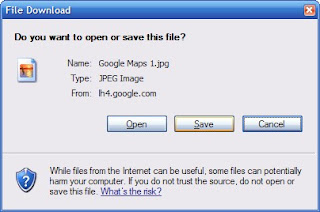 And I'm not the only one. Here are a couple of links to others having the same problem.
Windows Live Writer is a blog authoring tool that I really wanted to work. I want to go further with my posts than I can with blogger's capability. Oh, well.
Here's an excerpt of what I created for my post on Windows Live Mail.
Click on the "My Maps" tab and then "Create new map." You'll get the following screen:
Now, enter a title and description and click the radio button for Public or Unlisted. This doesn't matter for this project.
Back up above "Title" is a link for "Import." Click that.
Browse to your kml file for iGO POI Explorer and click on "Upload from File."
There it is!
To get fancy, click on "Link to this page" at the top right of the map.
Copy and paste that HTML to embed in your web page.
Ta da!
Looks pretty good doesn't it?
Writer give you the ability to do things that blogger won't. For example, you can create tables and wrap text around images.
But...
The pictures don't work! Try one. Here's what I get.
 And I'm not the only one. Here are a couple of links to others having the same problem.
http://groups.msn.com/windowslivewriter/generaltopics.msnw?action=get_message&mview=0&ID_Message=5348Seems to be a problem with the way Writer saves the pictures for the blog. Hope they get it fixed or worked out with Google.
http://ktcatspost.blogspot.com/2008/01/creating-posts-with-windows-live.html
http://groups.msn.com/windowslivewriter/generaltopics.msnw?action=get_message&mview=0&ID_Message=5865&LastModified=4675647355351184717
Thursday, March 06, 2008
Maxthon 2
Maxthon has been my browser of choice for a couple of years. Recently I saw someone at work using Maxthon 2 so I thought I'd try it.
It had a couple of things that I wanted. The Address bar field has a yellow background when you're running SSL and a green background when the site has a valid EV certificate.
F10 will give you a side-by-side presentation. That's cool.
But ...
The Back and Forward buttons no longer have a drop-down menu. They've added a new History Track button that "combines" this function. That's a great alternative but don't take away my drop-downs! There is a post in the Maxthon 2 forums about this.
In Maxthon 1, I had the options set so that if you double-clicked on a blank space on the tab bar, it had a mini-script of "File -> New Tab -> Home" and left the Address Bar field with focus. You could just start typing! In Maxthon 2, "Double Click on Tab Bar" can give you "Homepage." The Address Bar field doesn't have focus. A moderator of the Maxthon 2 forums said "The 'new tab' is not configurable at the moment." That was in September 2007. Apparently there hasn't been much progress since then.
There are other differences with tabs. One user asked "Is there a way to make the tabs use in ver 2.x behave like ver 1.x in Maxthon...?" When the moderator responded with some threads that stated "it's not implemented" the poster noted that those posts didn't resolve the issue but thanked the moderator. A "Core User" flamed the poster and suggested that the poster "ought to apologize."
The search capability in Maxthon 2 is just different enough to be annoying. One poster asked how to get a similar search to Maxthon 1. A moderator responded:
One poster asked:
little lot more time.
It had a couple of things that I wanted. The Address bar field has a yellow background when you're running SSL and a green background when the site has a valid EV certificate.
F10 will give you a side-by-side presentation. That's cool.
But ...
The Back and Forward buttons no longer have a drop-down menu. They've added a new History Track button that "combines" this function. That's a great alternative but don't take away my drop-downs! There is a post in the Maxthon 2 forums about this.
I was wondering if it is possible yet to use the original back and forward buttons. I really dislike the catch all button that was implemented in M2 and would like to have the drop down list integrated with the button as before. It's cleaner and faster.The moderator responded:
It's not possibleMaxthon has a nice feature similar to Windows Explorer in that you can "go up" one level in the current URL. In Maxthon 2, this button has the words "Go Up" next to it and can't be configured. Gimme a break. I know what that icon represents. I want my real estate back.
In Maxthon 1, I had the options set so that if you double-clicked on a blank space on the tab bar, it had a mini-script of "File -> New Tab -> Home" and left the Address Bar field with focus. You could just start typing! In Maxthon 2, "Double Click on Tab Bar" can give you "Homepage." The Address Bar field doesn't have focus. A moderator of the Maxthon 2 forums said "The 'new tab' is not configurable at the moment." That was in September 2007. Apparently there hasn't been much progress since then.
There are other differences with tabs. One user asked "Is there a way to make the tabs use in ver 2.x behave like ver 1.x in Maxthon...?" When the moderator responded with some threads that stated "it's not implemented" the poster noted that those posts didn't resolve the issue but thanked the moderator. A "Core User" flamed the poster and suggested that the poster "ought to apologize."
The search capability in Maxthon 2 is just different enough to be annoying. One poster asked how to get a similar search to Maxthon 1. A moderator responded:
This information was also already available on the forum, so I suggest reading through the FAQ's and make searches for further questions.To which the poster responded:
...if you are going to further admonish me I don't need the answer.Ouch.
One poster asked:
I just updated to Maxthon 2 and generally speaking am very happy. The only problem is ... you seem to have dismantled the quick search options. ... am I missing something?The moderator's response:
Nope...Maxthon 2 (2.0.8.1720 UNICODE) has crashed twice while I've been researching this post. I think we ought to give Maxthon 2 a
Saturday, March 01, 2008
Windows Live Mail
Microsoft has a suite of "Windows Live" products. I've been playing with two of them: Mail and Writer. (Look at those links! http://get.live.com/ID0EDMAC for Writer. What gives?)
Mail replaces Outlook Express and Vista's Windows Mail. Wait, that's the same name. Well, almost. The new product is Windows Live Mail. There, that clears that up.
Mail has that Vista look. But look closely at that screen capture. I used Alt+PrtSc to capture that so I would just get the application in focus. Then why do you see my desktop behind it? Mail cheats. To get that Vista look, they apparently make the top menu transparent. If you look closely, it goes all the way around the window as well.
 This little "beauty" trick is not benign. You can't put the application window up against the top of the screen. It'll jump back down a little due to the hidden area. And the menu items that you need are hidden and have to be unhidden to do routine activities, e.g. manage accounts.
 The most aggravating part of Mail is the little nuances that just don't work "right." Things like Ctrl+C. This doesn't always copy the selected text. Seems simple enough to get right.
Another is that it doesn't scroll with the center button on my ThinkPads. It does work with a regular mouse's roller wheel.
The Options setting for "Send and receive messages at startup" works some of the time. C'mon Microsoft! See if this thread frustrates you as much as me.
And the toolbar reserves a significant part of real estate for the Windows Live Account id even if you aren't using one.
On the positive side, it integrates seamlessly with Hotmail orLive Mail (wait, this application is called Live Mail) live.com's mail.
Mail replaces Outlook Express and Vista's Windows Mail. Wait, that's the same name. Well, almost. The new product is Windows Live Mail. There, that clears that up.
Mail has that Vista look. But look closely at that screen capture. I used Alt+PrtSc to capture that so I would just get the application in focus. Then why do you see my desktop behind it? Mail cheats. To get that Vista look, they apparently make the top menu transparent. If you look closely, it goes all the way around the window as well.
 This little "beauty" trick is not benign. You can't put the application window up against the top of the screen. It'll jump back down a little due to the hidden area. And the menu items that you need are hidden and have to be unhidden to do routine activities, e.g. manage accounts.
 The most aggravating part of Mail is the little nuances that just don't work "right." Things like Ctrl+C. This doesn't always copy the selected text. Seems simple enough to get right.
Another is that it doesn't scroll with the center button on my ThinkPads. It does work with a regular mouse's roller wheel.
The Options setting for "Send and receive messages at startup" works some of the time. C'mon Microsoft! See if this thread frustrates you as much as me.
And the toolbar reserves a significant part of real estate for the Windows Live Account id even if you aren't using one.
On the positive side, it integrates seamlessly with Hotmail or
Saturday, February 23, 2008
MediaMVP
When I finished setting up the new HD TV and furniture, the old Dell GX270 for SageTV seemed out of place. It wouldn't fit in it, under it, or behind it.
So what to do? I moved the SageTV system into the "computer room."
I went back to the SageTV web site and looked around. I found they had a Hauppauge Media Extender. This is similar to the Microsoft Media Center Extender.
While Sage sells it, it is really just Hauppauge's MediaMVP 01000. Sage's is bundled with a license but I had a license that I could reuse for PlaceShifter (more later).
It comes in wired and wireless but wired was all I needed as I already had Cat5 at the TV.
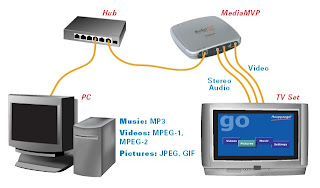 I bought it from amazon.com. The first one was DOA so I went back to Amazon's site. They had a button to return it and even provided a pre-paid mailing label. Without me asking they cross-shipped a replacement. I had to scramble to get the defective one to the post office before the replacement arrived!
The second one worked perfect. I just hooked up the wires and turned it on. It immediately came up and asked if I wanted to connect to the SageTV. I replied that I did and I was done. Even the remote I used with the SageTV worked.
Oh, the PlaceShifter license - I had bought this some time ago. The media extender capability of SageTV uses this same license. It is a concurrent use license so I can use both PlaceShifter and the media extender, just not at the same time. The only "gotcha" to this is that the MediaMVP turns itself on (activitating the license) when it is powered up. So I just plugged it into my UPS to minimize this problem.
So what to do? I moved the SageTV system into the "computer room."
I went back to the SageTV web site and looked around. I found they had a Hauppauge Media Extender. This is similar to the Microsoft Media Center Extender.
While Sage sells it, it is really just Hauppauge's MediaMVP 01000. Sage's is bundled with a license but I had a license that I could reuse for PlaceShifter (more later).
It comes in wired and wireless but wired was all I needed as I already had Cat5 at the TV.
 I bought it from amazon.com. The first one was DOA so I went back to Amazon's site. They had a button to return it and even provided a pre-paid mailing label. Without me asking they cross-shipped a replacement. I had to scramble to get the defective one to the post office before the replacement arrived!
The second one worked perfect. I just hooked up the wires and turned it on. It immediately came up and asked if I wanted to connect to the SageTV. I replied that I did and I was done. Even the remote I used with the SageTV worked.
Oh, the PlaceShifter license - I had bought this some time ago. The media extender capability of SageTV uses this same license. It is a concurrent use license so I can use both PlaceShifter and the media extender, just not at the same time. The only "gotcha" to this is that the MediaMVP turns itself on (activitating the license) when it is powered up. So I just plugged it into my UPS to minimize this problem.
Monday, February 18, 2008
TV Wiring Diagram, Post HD
The movement to HD not only improved my picture but really cleared up the clutter behind my entertainment center. Here's my old configuration. And here's the new:
 Input from the cable goes directly into the Scientific Atlanta 8300HD DVR. It feeds HDMI into the Sony KDL52W3000.
The Philips DVP5982 DVD player also feeds HDMI into the Sony.
Finally, I added a Haupagge MediaMVP 01000 to get the SageTV PC out of the living room. This feeds S-video into the Sony. More on that later.
 Input from the cable goes directly into the Scientific Atlanta 8300HD DVR. It feeds HDMI into the Sony KDL52W3000.
The Philips DVP5982 DVD player also feeds HDMI into the Sony.
Finally, I added a Haupagge MediaMVP 01000 to get the SageTV PC out of the living room. This feeds S-video into the Sony. More on that later.
Wednesday, February 13, 2008
GPS and Google Maps - Part II
Last time I related how I had been able to get my POIs off of my Mio C320 and into a format (kml) that I could post to a Google Map. In this post, I'll cover how I got the kml into Google Maps. That's a lot easier.
First, you have to be logged into Google. Then go to Google Maps.
Click on the "My Maps" tab and then "Create new map." You'll get the following screen:
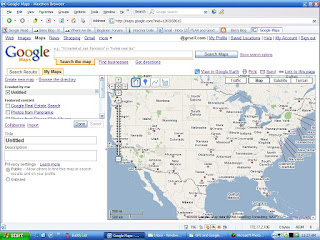
Now, enter a title and description and click the radio button for Public or Unlisted. This doesn't matter for this project.
Back up above "Title" is a link for "Import." Click that.
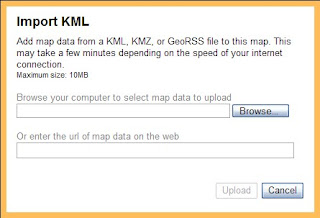 Browse to your kml file for iGO POI Explorer and click on "Upload from File."
There it is!
To get fancy, click on "Link to this page" at the top right of the map.
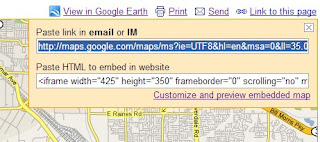 Copy and paste that HTML to embed in your web page.
Ta da!
First, you have to be logged into Google. Then go to Google Maps.
Click on the "My Maps" tab and then "Create new map." You'll get the following screen:

Now, enter a title and description and click the radio button for Public or Unlisted. This doesn't matter for this project.
Back up above "Title" is a link for "Import." Click that.
 Browse to your kml file for iGO POI Explorer and click on "Upload from File."
There it is!
To get fancy, click on "Link to this page" at the top right of the map.
 Copy and paste that HTML to embed in your web page.
Ta da!
Sunday, February 10, 2008
Mark Russinovich to the Rescue
My wife's laptop has been acting flakey lately. It gets where it won't print to the shared printer or save to our shared folder. To "fix" this, she has to right click on the Wi-Fi icon in the system tray and select "Repair." In a few seconds, all will be well. Well, almost.
She is also complaining about it being slow. I went and looked over her shoulder the other night. No wonder it was slow. The CPU was 100%. Hmmm.
Firing up Task Manager showed that the system was mostly in System Idle Process but the CPU in the status bar was hovering around 100%. What was using the rest of the CPU? Cooties? My paranoia led me to imagine all kinds of terrible things.
I remembered Sysinternals' RootkitRevealer. Microsoft bought Sysinternals in July, 2006 but hasn't spoiled them.
RootkitRevealer ran in a few minutes but didn't show anything. Back to square one.
Back to Sysinternals to pickup Process Explorer. Bingo. Look at this screen.
 Now what hardware was causing those interrupts?
I had a hunch given the network problems so I popped out the Wi-Fi card. That was it. The CPU dropped to the single digits.
I moved it to the other PCMCIA slot with the same results. Guess I'll have to try another Wi-Fi card.
She is also complaining about it being slow. I went and looked over her shoulder the other night. No wonder it was slow. The CPU was 100%. Hmmm.
Firing up Task Manager showed that the system was mostly in System Idle Process but the CPU in the status bar was hovering around 100%. What was using the rest of the CPU? Cooties? My paranoia led me to imagine all kinds of terrible things.
I remembered Sysinternals' RootkitRevealer. Microsoft bought Sysinternals in July, 2006 but hasn't spoiled them.
RootkitRevealer ran in a few minutes but didn't show anything. Back to square one.
Back to Sysinternals to pickup Process Explorer. Bingo. Look at this screen.
 Now what hardware was causing those interrupts?
I had a hunch given the network problems so I popped out the Wi-Fi card. That was it. The CPU dropped to the single digits.
I moved it to the other PCMCIA slot with the same results. Guess I'll have to try another Wi-Fi card.
Friday, February 08, 2008
Finally, HD - Part II
Sometimes there are happy endings. In my previous post, I was waiting on the Philips DVP5982 DVD player to come back from the service center.
10 working days and it is back and it works! The first one not only had the "DISPLAY CONNECTED NON-HDCP COMPLIANT" problem but it was very sluggish as well.
The replacement is quick to respond to the remote and the upconverting looks great.
10 working days and it is back and it works! The first one not only had the "DISPLAY CONNECTED NON-HDCP COMPLIANT" problem but it was very sluggish as well.
The replacement is quick to respond to the remote and the upconverting looks great.
Saturday, February 02, 2008
GPS and Google Maps
I was playing with my Mio C320 and got to wondering how I could log locations and then put them on a online map. That seemed like something that ought to be easy to do and it was but it was a long way to get there.
The Mio has a button to add POIs. But then I couldn't find where they were on the device. The short answer is that they are in the file iGO.db that's in the flash drive (not the SD card) on the Mio.
Then I needed to convert them to a format that I could import into something like Google Maps.
To do this I Googled and Googled and finally found iGO POI Explorer. There's a pretty good discussion of it in the GpsPasSion forums. A Google search works pretty well also.
I connected the Mio to my laptop with a USB cable. Then I could see the iGO.db file in \MIOMAP\MIOMAP. Remember that the Mio C320 runs Mio Map v3.3.
I copied iGO.db to my laptop and opened it with iGO POI Explorer.
 This is what the POIs look like in iGO POI Explorer.
 Then you need to export them to a kml file that Google Maps can import.
 From there, it's just playing with Google Maps. I'll make that another post. Maybe you can figure it out before then.
Here's the result.
View Larger Map
The Mio has a button to add POIs. But then I couldn't find where they were on the device. The short answer is that they are in the file iGO.db that's in the flash drive (not the SD card) on the Mio.
Then I needed to convert them to a format that I could import into something like Google Maps.
To do this I Googled and Googled and finally found iGO POI Explorer. There's a pretty good discussion of it in the GpsPasSion forums. A Google search works pretty well also.
I connected the Mio to my laptop with a USB cable. Then I could see the iGO.db file in \MIOMAP\MIOMAP. Remember that the Mio C320 runs Mio Map v3.3.
I copied iGO.db to my laptop and opened it with iGO POI Explorer.
 This is what the POIs look like in iGO POI Explorer.
 Then you need to export them to a kml file that Google Maps can import.
 From there, it's just playing with Google Maps. I'll make that another post. Maybe you can figure it out before then.
Here's the result.
View Larger Map
Saturday, January 19, 2008
Finally, HD
Remember back last year when I made a foray into HD? Let's just say it didn't go well.
Well, I got brave again. This time I wanted to make sure I got WOW. 52" seems to do that.
I went for the Sony KDL52W3000. It's an 1080p LCD with 3 HDMI inputs. Berclair Television gave me a great price. My wife found a nice stand for it and we coordinated the deliveries.
 It seemed like it was going to work out fine until I visited Comcast. "Sorry, we have no HD boxes. We'll take your name and call you." That was a week ago. My phone hasn't rung.
You may recall that I'm kinda persistent so I didn't accept that answer. The third Comcast store I visited had plenty of the Scientific Atlanta 8300HD DVRs.
Delivery and installation went well. Berclair Television did all the setup. I used HDMI connections for the cable box and the Philips DVP5982 DVD player.
That was until I tried playing a DVD.
"DISPLAY CONNECTED NON-HDCP COMPLIANT" and then snow. The first call was to Berclair. "Must be a problem with your player." I should not have let Berclair leave until I played a DVD.
The next call was to Philips. "Must be a problem with your TV." Would you have expected anything else?
So, I chilled for a day or so and called Philips back. This representative walked me through a reset procedure and it still failed. He gave me an RMA and it's on its way back to Philips.
Well, I got brave again. This time I wanted to make sure I got WOW. 52" seems to do that.
I went for the Sony KDL52W3000. It's an 1080p LCD with 3 HDMI inputs. Berclair Television gave me a great price. My wife found a nice stand for it and we coordinated the deliveries.
 It seemed like it was going to work out fine until I visited Comcast. "Sorry, we have no HD boxes. We'll take your name and call you." That was a week ago. My phone hasn't rung.
You may recall that I'm kinda persistent so I didn't accept that answer. The third Comcast store I visited had plenty of the Scientific Atlanta 8300HD DVRs.
Delivery and installation went well. Berclair Television did all the setup. I used HDMI connections for the cable box and the Philips DVP5982 DVD player.
That was until I tried playing a DVD.
"DISPLAY CONNECTED NON-HDCP COMPLIANT" and then snow. The first call was to Berclair. "Must be a problem with your player." I should not have let Berclair leave until I played a DVD.
The next call was to Philips. "Must be a problem with your TV." Would you have expected anything else?
So, I chilled for a day or so and called Philips back. This representative walked me through a reset procedure and it still failed. He gave me an RMA and it's on its way back to Philips.
Monday, January 14, 2008
Embedded Google Maps
I have another blog where I chronicle various places where I've been. I created this blog after I gave up trying to get these added to googlesightseeing.com.
On "Where I've Been" I create links to Google Maps or Windows Live Local maps. Similar to googlesightseeing.com, I had been using small images (172x135) cropped from screen shots of the maps. Then I hyperlinked these to the Google Maps or Windows Live Local maps.
This weekend, as I was creating an entry on Cremieu, France, I noticed that Google Maps gave you a link to embed the map with the option to "Customize and preview embedded map."
Off I went. What I found was a page that would let you specify a custom size.
It works pretty well. You can see the result on my page on La Halle, Cremieu, France.
On "Where I've Been" I create links to Google Maps or Windows Live Local maps. Similar to googlesightseeing.com, I had been using small images (172x135) cropped from screen shots of the maps. Then I hyperlinked these to the Google Maps or Windows Live Local maps.
This weekend, as I was creating an entry on Cremieu, France, I noticed that Google Maps gave you a link to embed the map with the option to "Customize and preview embedded map."
Off I went. What I found was a page that would let you specify a custom size.
It works pretty well. You can see the result on my page on La Halle, Cremieu, France.
Friday, January 04, 2008
Office 2003 SP3 and File Formats
Remember back in March 2007 when I wrote about Office 2007 not supporting some old Word file formats?
Microsoft seems to think that this was such a good idea that they included this (and more) in Office 2003 SP3.
This Knowledgebase article entitled "Information about certain file types that are blocked after you install Office 2003 Service Pack 3" explains why this is such a "good" thing for you.
Here's a screen capture of the table of file types that are blocked from opening by default.

Microsoft seems to think that this was such a good idea that they included this (and more) in Office 2003 SP3.
This Knowledgebase article entitled "Information about certain file types that are blocked after you install Office 2003 Service Pack 3" explains why this is such a "good" thing for you.
Here's a screen capture of the table of file types that are blocked from opening by default.

Friday, December 21, 2007
Favorite Podcasts
Monday, December 14, 2009
IT Conversations carried a recent panel discussion with Stephanie Hannon and Lars Rasmussen of the Google Wave development team.
This provides an interesting insight into where Wave is in its life cycle and contains a very candid response from Lars to a question from the floor about search capabilities.
Download
Tuesday, June 30, 2009
IT Conversations carried a recent interview with Sachin Agarwal and Garry Tan of Posterous.
Posterous is a very simple but powerful blogging platform. To get started, just e-mail anything to post@posterous.com and it's posted. They even clean it up for you. For example, if there are multiple pictures, they setup a picture gallery!
Download
Sunday, March 15, 2009
A recent edition of Leo Leporte's FLOSS (Free Libre Open Source Software) podcast featured Aaron Newcomb and David Brittle of Sun Microsystem's ZFS team.
ZFS is available in Solaris 10 and reportedly will be in Apple's OS X server edition.
According to the ZFS web page:
Sunday, July 27, 2008
At the Emerging Communications Conference 2008, Jonathan Christensen, General Manager of audio and video at Skype, speaks about the development of IP communications over the past 10 years, giving a brief history of VoIP. He talks about its evolution from being a technology for geeks only, to a mainstream application, and concludes the talk by discussing the threats and opportunities for the IP communications industry.
Download
Friday, April 25, 2008
History lessons from the master of the browser
Marc Andreessen, co-founder of Netscape and co-author of Mosaic, sits down with John Battelle, founder and chairman of Federated Media publishing at the Web 2.0 Expo in San Francisco. Andreessen talks about his current social-networking site Ning, and the impact of Facebook apps and Google’s OpenSocial.
Friday, April 25, 2008
I always listen to Leo Laporte's podcast Security Now with Steve Gibson. The current edition covers the 2008 RSA Conference. The keynotes were recorded and are available as webcasts.
This one is John W. Thompson, Chairman of the Board and CEO of Symantec Corporation.
Link
Thursday, March 6, 2008
This is a little different. This is the worst podcast I've ever listened to.
This is from IT Conversations. The speaker is Moshe Yudkowsky, President, Disaggregate.
His web page is here but you'll run away screaming before you get there.
Download
Don't feel bad. It won't play for me either. Maybe IT Conversations has put it out of its misery.
Thursday, February 21, 2008
This is from IT Conversations. The speaker is David Ulevitch, founder and CEO of OpenDNS.com. OpenDNS.com is a free DNS alternative that claims better performance and phishing protection. We'll see.
His web page is here and his wikipedia page is here.
Download
Friday, December 21, 2007
This is from The Register Semi-Coherent Computing. The speaker is Jim Barksdale. In the IT community, Jim is remembered as the CEO of Netscape during its wild ride. However, that was just one of his chapters.
I've known Jim since the early '60s. He was my older brother's big brother in Sigma Chi at Ole Miss. I worked for him at Federal Express in the '80s. The first time I was in a meeting with him, he stopped, looked at me and said "What are you doing here?" Obviously, I didn't use my connections to get that job!
His wikipedia page is here.
Download
Tuesday, November 27, 2007
This is from TWiT. The speaker is Harrison 'Jack' Schmitt, the lunar module pilot on Apollo 17. Harrison Schmitt was the last man out of the lunar module and as such the last man to set his foot down on the surface of the moon. He took the picture known as "Blue Marble."
His wikipedia page is here.
Download
Monday, October 29, 2007
This is from The Register. The speaker is Dave Patterson, Professor in Computer Science at UC Berkeley. He is one of the pioneers of both RISC and RAID. He was instrumental in the development of Sun's SPARC. The talk is not just retrospective but discusses the problems he sees in the future of computing.
His wikipedia page is here.
Download
Sunday, October 7, 2007
This is from IT Conservations. The speaker is Guy Kawasaki, Managing Director, Garage Technology Ventures speaking at the 2007 MySQL conference. His wikipedia page is here.
Download
Friday, August 4, 2007
This is from TWiT.TV's series Security Now. The guest is Michael Vergara, Director of Account Protections at PayPal. He is speaking about PayPal's product PayPal Security Key. In it he refers to VeriSign's Identity Protection product (VIP).
Download
Friday, August 3, 2007
This is from IT Conversations' series Tech Nation. Dr. Moira Gunn speaks with Greg Papadopolous, the Chief Technology Officer of Sun Microsystems. Sun is celebrating 25 years in the computer industry, and he describes the ups and downs.
Download
Monday, June 25, 2007
This is Steve Wozniak speaking at Google. It's an hour long so get in a comfortable chair. A lot of this is from his book iWoz.
Thursday, May 24, 2007
This is from TWiT.TV's series Security Now. The guest is Marc Maiffret of eEye Digital Security. He is speaking about eEye's product Blink Personal Edition.
Download
Monday, April 30, 2007
This is from IT Conversations' series Tech Nation. The speaker is Christopher Jones, Director for Solar System Exploration, NASA. He is speaking about the astronauts stuck on the Space Station after the shuttle Columbia crashed on re-entry.
Download
Friday, April 27, 2007
This is from IT Conversations' series Technometria: Virtualization. The speaker is Bogomil Balkansky, Director of Product Marketing, VMware. I thought it was interesting as he spoke about the penetration of virtualization into data centers and particularly the emergence of virtual appliances.
Download
My intent is to make this a collection of podcasts that interest me (and hopefully you). I have put a link in the column to the right for easy access.
IT Conversations carried a recent panel discussion with Stephanie Hannon and Lars Rasmussen of the Google Wave development team.
This provides an interesting insight into where Wave is in its life cycle and contains a very candid response from Lars to a question from the floor about search capabilities.
Download
Tuesday, June 30, 2009
IT Conversations carried a recent interview with Sachin Agarwal and Garry Tan of Posterous.
Posterous is a very simple but powerful blogging platform. To get started, just e-mail anything to post@posterous.com and it's posted. They even clean it up for you. For example, if there are multiple pictures, they setup a picture gallery!
Download
Sunday, March 15, 2009
A recent edition of Leo Leporte's FLOSS (Free Libre Open Source Software) podcast featured Aaron Newcomb and David Brittle of Sun Microsystem's ZFS team.
ZFS is available in Solaris 10 and reportedly will be in Apple's OS X server edition.
According to the ZFS web page:
ZFS is a new kind of file system that provides simple administration, transactional semantics, end-to-end data integrity, and immense scalability. ZFS is not an incremental improvement to existing technology; it is a fundamentally new approach to data management. We've blown away 20 years of obsolete assumptions, eliminated complexity at the source, and created a storage system that's actually a pleasure to use.Download
Sunday, July 27, 2008
At the Emerging Communications Conference 2008, Jonathan Christensen, General Manager of audio and video at Skype, speaks about the development of IP communications over the past 10 years, giving a brief history of VoIP. He talks about its evolution from being a technology for geeks only, to a mainstream application, and concludes the talk by discussing the threats and opportunities for the IP communications industry.
Download
Friday, April 25, 2008
History lessons from the master of the browser
Marc Andreessen, co-founder of Netscape and co-author of Mosaic, sits down with John Battelle, founder and chairman of Federated Media publishing at the Web 2.0 Expo in San Francisco. Andreessen talks about his current social-networking site Ning, and the impact of Facebook apps and Google’s OpenSocial.
Friday, April 25, 2008
I always listen to Leo Laporte's podcast Security Now with Steve Gibson. The current edition covers the 2008 RSA Conference. The keynotes were recorded and are available as webcasts.
This one is John W. Thompson, Chairman of the Board and CEO of Symantec Corporation.
Link
Thursday, March 6, 2008
This is a little different. This is the worst podcast I've ever listened to.
This is from IT Conversations. The speaker is Moshe Yudkowsky, President, Disaggregate.
His web page is here but you'll run away screaming before you get there.
Download
Don't feel bad. It won't play for me either. Maybe IT Conversations has put it out of its misery.
Thursday, February 21, 2008
This is from IT Conversations. The speaker is David Ulevitch, founder and CEO of OpenDNS.com. OpenDNS.com is a free DNS alternative that claims better performance and phishing protection. We'll see.
His web page is here and his wikipedia page is here.
Download
Friday, December 21, 2007
This is from The Register Semi-Coherent Computing. The speaker is Jim Barksdale. In the IT community, Jim is remembered as the CEO of Netscape during its wild ride. However, that was just one of his chapters.
I've known Jim since the early '60s. He was my older brother's big brother in Sigma Chi at Ole Miss. I worked for him at Federal Express in the '80s. The first time I was in a meeting with him, he stopped, looked at me and said "What are you doing here?" Obviously, I didn't use my connections to get that job!
His wikipedia page is here.
Download
Tuesday, November 27, 2007
This is from TWiT. The speaker is Harrison 'Jack' Schmitt, the lunar module pilot on Apollo 17. Harrison Schmitt was the last man out of the lunar module and as such the last man to set his foot down on the surface of the moon. He took the picture known as "Blue Marble."

His wikipedia page is here.
Download
Monday, October 29, 2007
This is from The Register. The speaker is Dave Patterson, Professor in Computer Science at UC Berkeley. He is one of the pioneers of both RISC and RAID. He was instrumental in the development of Sun's SPARC. The talk is not just retrospective but discusses the problems he sees in the future of computing.
His wikipedia page is here.
Download
Sunday, October 7, 2007
This is from IT Conservations. The speaker is Guy Kawasaki, Managing Director, Garage Technology Ventures speaking at the 2007 MySQL conference. His wikipedia page is here.
Download
Friday, August 4, 2007
This is from TWiT.TV's series Security Now. The guest is Michael Vergara, Director of Account Protections at PayPal. He is speaking about PayPal's product PayPal Security Key. In it he refers to VeriSign's Identity Protection product (VIP).
VIP Authentication Service allows a business to easily issue and/or accept multiple credentials from each user. ... VIP Authentication Service includes a number of options for supplemental factors, including stand alone hardware devices such as One Time Password (OTP) tokens ...Translated, this means that an RSA token can be used to authenticate with multiple organizations.
Download
Friday, August 3, 2007
This is from IT Conversations' series Tech Nation. Dr. Moira Gunn speaks with Greg Papadopolous, the Chief Technology Officer of Sun Microsystems. Sun is celebrating 25 years in the computer industry, and he describes the ups and downs.
Download
Monday, June 25, 2007
This is Steve Wozniak speaking at Google. It's an hour long so get in a comfortable chair. A lot of this is from his book iWoz.
Thursday, May 24, 2007
This is from TWiT.TV's series Security Now. The guest is Marc Maiffret of eEye Digital Security. He is speaking about eEye's product Blink Personal Edition.
Download
Monday, April 30, 2007
This is from IT Conversations' series Tech Nation. The speaker is Christopher Jones, Director for Solar System Exploration, NASA. He is speaking about the astronauts stuck on the Space Station after the shuttle Columbia crashed on re-entry.
Download
Friday, April 27, 2007
This is from IT Conversations' series Technometria: Virtualization. The speaker is Bogomil Balkansky, Director of Product Marketing, VMware. I thought it was interesting as he spoke about the penetration of virtualization into data centers and particularly the emergence of virtual appliances.
Download
My intent is to make this a collection of podcasts that interest me (and hopefully you). I have put a link in the column to the right for easy access.
Thursday, December 20, 2007
slide.com
I was in a meeting at work this week and one of my co-workers complained that our company had blocked blogspot.com. She said she had a blog there.
I googled her name and found her blog. She's artsy and on it she had a little Flash app from slide.com.
I went there and got to playing with it.
Here's what it does.


Isn't that cool! Play with it some. Click the buttons. See what it does.
Of course, it's FREE!
I googled her name and found her blog. She's artsy and on it she had a little Flash app from slide.com.
I went there and got to playing with it.
Here's what it does.
Isn't that cool! Play with it some. Click the buttons. See what it does.
Of course, it's FREE!
Tuesday, December 18, 2007
Skinning My Mio C320
As I wrote about earlier, I got a Mio DigiWalker C320 GPS at RadioShack on Black Friday.
It's worked real well but I always like to play with things.
The Mio forums are full of threads on skinning various Mios.
I tried to talk myself out of it for a while but I finally found a "must have" feature only available by skinning. Mio normally offers 3 routing options, Fastest, Economical, and Shortest. Most of the skins offer a 4th option of Easy. I wasn't sure what that meant but I had to have it.
The GpsPasSion forums are rich with help on Mios but they are impossible to navigate. I had found a skin submitted by user phi38. Here's a link to it.
Unfortunately, many of the skins are built on top of a Belgian update. When you start MioMap with this skin, you'll get the following error:
Extract the .zip file into a folder. Go to \mio\480_272\ui\default_setup.ui and open it with Notepad. Find the line "HAS_AUS_MAP vIsAUSSKU" and comment it by putting a semicolon in the first column. Save it back and rezip this folder.
To change the skin on a Mio, all you have to do is connect it to your PC via a standard USB cable. It will then appear as a USB drive to Windows. By the way, if you have an SD card in the Mio, you'll also see that as a separate drive.
After you can see the flash drive, rename \miomap\miomap\data.zip to something else, e.g. OEM_data.zip. Then just copy the skin .zip file to the \miomap\miomap\ on the flash drive and rename it to data.zip.
That's it. Restart MioMap and you'll have your new skin.
It's worked real well but I always like to play with things.
The Mio forums are full of threads on skinning various Mios.
I tried to talk myself out of it for a while but I finally found a "must have" feature only available by skinning. Mio normally offers 3 routing options, Fastest, Economical, and Shortest. Most of the skins offer a 4th option of Easy. I wasn't sure what that meant but I had to have it.
The GpsPasSion forums are rich with help on Mios but they are impossible to navigate. I had found a skin submitted by user phi38. Here's a link to it.
Unfortunately, many of the skins are built on top of a Belgian update. When you start MioMap with this skin, you'll get the following error:
FFUIERROR: Unknown commandTo correct this is tricky.
Name=[HAS_AUS_MAP]
Script [sc_detectSKU] at tick 0
Extract the .zip file into a folder. Go to \mio\480_272\ui\default_setup.ui and open it with Notepad. Find the line "HAS_AUS_MAP vIsAUSSKU" and comment it by putting a semicolon in the first column. Save it back and rezip this folder.
To change the skin on a Mio, all you have to do is connect it to your PC via a standard USB cable. It will then appear as a USB drive to Windows. By the way, if you have an SD card in the Mio, you'll also see that as a separate drive.
After you can see the flash drive, rename \miomap\miomap\data.zip to something else, e.g. OEM_data.zip. Then just copy the skin .zip file to the \miomap\miomap\ on the flash drive and rename it to data.zip.
That's it. Restart MioMap and you'll have your new skin.
Monday, December 17, 2007
Office 2007 File Sizes
My company is planning to implement Office 2007 soon. One of the things I wonder about is the sizes of the various file formats. PowerPoint 2007 will create the legacy .ppt file format as well as the new .pptx file format.
I also get a lot of questions about PDF tools and have performed some PDF file size tests at home.
Today I had a moderate sized PowerPoint deck. It had some graphics in the template and lots of text boxes and maybe a table or two but no SmartArt or animation. It was less than 10 slides.
I had created it as a .pptx file. As I prepared to share it, I saved it as a PDF using Adobe Acrobat 6.0 (I know that's old but it still works). Then getting a wild hair, I also saved it as .ppt and Microsoft's .mdi and .xps formats.
.mdi is a "high resolution, tag-based graphics format. .MDI files are only supported by the Microsoft Office 2003 version."
.xps is Microsoft's new "XML Paper Specification." The wikipedia explanation is here.
Here're the results:

I also get a lot of questions about PDF tools and have performed some PDF file size tests at home.
Today I had a moderate sized PowerPoint deck. It had some graphics in the template and lots of text boxes and maybe a table or two but no SmartArt or animation. It was less than 10 slides.
I had created it as a .pptx file. As I prepared to share it, I saved it as a PDF using Adobe Acrobat 6.0 (I know that's old but it still works). Then getting a wild hair, I also saved it as .ppt and Microsoft's .mdi and .xps formats.
.mdi is a "high resolution, tag-based graphics format. .MDI files are only supported by the Microsoft Office 2003 version."
.xps is Microsoft's new "XML Paper Specification." The wikipedia explanation is here.
Here're the results:
Sunday, December 16, 2007
Linux Desktop - Part 2
More than a year ago, I tried to build a Linux ThinkPad 600E without much luck. Here I go again.
I used a 366MHz ThinkPad 600E with 288MB of memory and a 10GB hard drive.
Since I planned to give this to an elementary student, I started with gOS thinking that it would be simple for him to use. It wouldn't boot at all. Eventually, I pressed ESC and got into the line mode and entered some cryptic commands about ACPI. It set at "Loading /casper/vmlinuz..." for over an hour and then hung on the next line. Can't remember what it was and don't want to wait an hour to recreate!
I found this blog entry that promised to walk you through the install of ubuntu on a 600E.
I picked xubuntu and downloaded and burned another CD.
It booted as a live CD and I went through the install. So far so good! Maybe I'd turned the corner.
Then I tried to enable the wireless card to connect to my WPA network. This forum post pretty well describes my next disaster. It's still dead.
I had less problems with Vista.
I used a 366MHz ThinkPad 600E with 288MB of memory and a 10GB hard drive.
Since I planned to give this to an elementary student, I started with gOS thinking that it would be simple for him to use. It wouldn't boot at all. Eventually, I pressed ESC and got into the line mode and entered some cryptic commands about ACPI. It set at "Loading /casper/vmlinuz..." for over an hour and then hung on the next line. Can't remember what it was and don't want to wait an hour to recreate!
I found this blog entry that promised to walk you through the install of ubuntu on a 600E.
I picked xubuntu and downloaded and burned another CD.
It booted as a live CD and I went through the install. So far so good! Maybe I'd turned the corner.
Then I tried to enable the wireless card to connect to my WPA network. This forum post pretty well describes my next disaster. It's still dead.
I had less problems with Vista.
Saturday, December 15, 2007
Thanks, Microsoft
The December Microsoft patches held a special surprise for Windows XP SP2 users of Internet Explorer 6.
One of the Critical fixes was KB942615. It appears that this was packaged without the registry addition added in KB942367. Here's a thread from Microsoft's Internet Explorer newsgroup describing it. Here's a Microsoft engineer's comments.
Without this, IE6 crashes sporadically, especially when opening gmail. One comment suggested that it was triggered by pages which validate their login with https:// before the page proceeds to load normally with http://.
Here's a link to a zip file that contains the registry hack from KB942367.
You don't even have to restart your PC. Just close all the copies of IE6 before you apply the registry hack.
One of the Critical fixes was KB942615. It appears that this was packaged without the registry addition added in KB942367. Here's a thread from Microsoft's Internet Explorer newsgroup describing it. Here's a Microsoft engineer's comments.
Without this, IE6 crashes sporadically, especially when opening gmail. One comment suggested that it was triggered by pages which validate their login with https:// before the page proceeds to load normally with http://.
Here's a link to a zip file that contains the registry hack from KB942367.
You don't even have to restart your PC. Just close all the copies of IE6 before you apply the registry hack.
Sunday, November 25, 2007
SimpleCopier
I had to fax something this week. It was 2 printed pages and I wanted to add a cover page. I don't have a multi-function device so I use my scanner and printer.
For single pages, Photocopier from Nico Cuppen is simple and fool proof. But it will only do single pages and you have to change your default printer to your fax beforehand and remember to change it back.
I found SimpleCopier from Neogie Software. It is a comprehensive solution including OCR and PDF creation. The current release is 6.05. It is shareware and costs 29.90€.
But all I wanted to do is scan a couple of pages to fax. I have SimpleCopier 2.20 and that's pretty much all it does.
There is no help file for Release 2.20 so I'll put a couple of screen shots here with my understanding of what they mean and do.
Here's the first screen. "Photocopy" seems to be a one page to the printer much like Photocopier. "Scan" will scan and put the image in a queue.
 Here's what the result of "Scan" looks like. Notice the button at the bottom to "Add to queue." That is where you can collect images to fax multiple pages.
 Here's what the queue display looks like.
 When you're done, click on the cryptic "Print -> n*1" (printer) or "Print -> n*2" (fax). "Send by Email" gives me an odd error that there's not enough disk space available.
Here's the "Advanced" tab where you set most of the options including what "Print -> n*1" means!
 I couldn't find a copy of SimpleCopier Release 2.20 on the web so I have uploaded simplecopier_setup.exe to localhostr.com. If you're nervous about downloading from there, add a comment and ask me to e-mail you a copy.
For single pages, Photocopier from Nico Cuppen is simple and fool proof. But it will only do single pages and you have to change your default printer to your fax beforehand and remember to change it back.
I found SimpleCopier from Neogie Software. It is a comprehensive solution including OCR and PDF creation. The current release is 6.05. It is shareware and costs 29.90€.
But all I wanted to do is scan a couple of pages to fax. I have SimpleCopier 2.20 and that's pretty much all it does.
There is no help file for Release 2.20 so I'll put a couple of screen shots here with my understanding of what they mean and do.
Here's the first screen. "Photocopy" seems to be a one page to the printer much like Photocopier. "Scan" will scan and put the image in a queue.
 Here's what the result of "Scan" looks like. Notice the button at the bottom to "Add to queue." That is where you can collect images to fax multiple pages.
 Here's what the queue display looks like.
 When you're done, click on the cryptic "Print -> n*1" (printer) or "Print -> n*2" (fax). "Send by Email" gives me an odd error that there's not enough disk space available.
Here's the "Advanced" tab where you set most of the options including what "Print -> n*1" means!
 I couldn't find a copy of SimpleCopier Release 2.20 on the web so I have uploaded simplecopier_setup.exe to localhostr.com. If you're nervous about downloading from there, add a comment and ask me to e-mail you a copy.
Mio DigiWalker C320 GPS
Just after Christmas last year, I wrote about my Mio C310x. I was remiss in not following up. As I mentioned, my primary objective was to have a GPS for my upcoming (now completed) trip to Ireland. I never found European maps for the C310x so I returned it.
Subsequently, I came across a Mio H610 but I didn't read the specifications closely enough. The "H" stands for handheld and it was tiny! Smaller than a deck of cards. Too small for these old eyes to see while driving.
While watching the Black Friday ads, I saw that RadioShack had the Mio C320 on Doorbuster for $149.99. Well, there I was Friday morning at 5:15AM in line at the local Radio Shack. I got a C320 and was out of there by 6:10AM.
Friday afternoon I played with mounting it in my 2007 Toyota Camry SE. I discovered that the supplied bracket had a tab on the back that would fit into the CD slot on my dashboard. I put a couple of layers of black duct tape on the tab to make it a snug fit and it was perfect! So I thought.
Off I went riding around to play with my new toy. But it wouldn't sync with the GPS satellites. That was odd. It had worked inside my house. It would work when I held it in my hand but not when it was on the dash.
After about half an hour of playing, I realized that the dashboard was causing electronic interference with the GPS receiver. If I would turn the car off, the C320 would work fine. That made it less than useful however.
Back to the box and I got the windshield suction cup mount. I mounted it next to the A-pillar. I like it up there because it's pretty much in your line of sight but it is low enough that it doesn't block your visibility.

Subsequently, I came across a Mio H610 but I didn't read the specifications closely enough. The "H" stands for handheld and it was tiny! Smaller than a deck of cards. Too small for these old eyes to see while driving.
While watching the Black Friday ads, I saw that RadioShack had the Mio C320 on Doorbuster for $149.99.
 Well, there I was Friday morning at 5:15AM in line at the local Radio Shack. I got a C320 and was out of there by 6:10AM.
Friday afternoon I played with mounting it in my 2007 Toyota Camry SE. I discovered that the supplied bracket had a tab on the back that would fit into the CD slot on my dashboard. I put a couple of layers of black duct tape on the tab to make it a snug fit and it was perfect! So I thought.
Off I went riding around to play with my new toy. But it wouldn't sync with the GPS satellites. That was odd. It had worked inside my house. It would work when I held it in my hand but not when it was on the dash.
After about half an hour of playing, I realized that the dashboard was causing electronic interference with the GPS receiver. If I would turn the car off, the C320 would work fine. That made it less than useful however.
Back to the box and I got the windshield suction cup mount. I mounted it next to the A-pillar. I like it up there because it's pretty much in your line of sight but it is low enough that it doesn't block your visibility.

Subscribe to:
Posts (Atom)