Sunday, August 21, 2016

Carrier IQ

One day shortly after I started using the PRIV I decided I should try the AT&T DriveMode app. Let's just say it was aggressive. For example, I couldn't change the volume on Pocket Casts using the steering wheel controls while I was driving. I disabled it after my first drive. And then I noticed a new consumer of the battery that hadn't been present before.

Here's what the battery usage looked like before DriveMode:


Here's what the battery usage looked like after DriveMode:


Notice the battery usage by "Device Health Application" and the GPS activity.

So what is this "Device Health Application?"

This CrackBerry forum post answered that - Carrier IQ.

From my experience it seems that DriveMode triggered something in Carrier IQ that caused the GPS to run almost constantly.

A factory reset helped that but it took the Marshmallow upgrade to completely resolve this.

Here's what the battery usage looked like after Marshmallow:


Battery usage has been fine ever since and I haven't tried DriveMode again!

Sunday, August 14, 2016

SSD Migration

My X201 is getting slow with its 1TB Toshiba HDD. I installed that big drive for photo storage on my trip to Ireland. When I returned, I copied the photos to my primary storage so I haven't been using most of that 1TB.

Monthly I use Windows' "Create a system Image" tool to take an image backup of each of my PCs boot drive.

When I used this on the 1TB drive in the X201 I only selected the C: partition. I had resized this partition to less than 250GB so it would fit comfortably onto an SSD when I was ready to move that way.

2 months ago the monthly backup failed with drive errors on the C: partition of the 1TB HDD.


I pulled out my copy of SpinRite and let it run on Level 2. It confirmed that there were unrecoverable errors on it.

Not expecting much I tried Windows' chkdsk. My expectations were met. It would reboot to a command prompt and then run to 13% and sit there. While you weren't looking it would do something and reboot to Windows.

Windows kept on running fine but I knew it was a ticking time bomb.

I bought a Samsung EVO 500GB SSD and set out to move to it.

I had a Windows system image backup from 2 months ago. I installed the SSD and I booted from my Windows 10 installation USB drive. I went to "Troubleshooting" and chose "System Image Recovery."

I selected the backup image and began the restore.

But...

I got a message that "The disk that is set as active in BIOS is too small to recover the original system disk" with error 0x80042407.


The problem is that Windows system image backup requires a target drive that is as large as the sum of the partitions defined on the drive when the backup was made. This means that even though the partition I backed up was less than 250GB I needed a 1TB drive to restore to.

A word to the wise, test your backups.

As luck would have it I had a 1TB drive sitting around so I restored to it and then used the Samsung Data Migration tool to copy the partition to it.

In retrospect, after I had resized that system partition to 250GB I should have dropped the partition that was just holding a place on the drive before I took the Windows system image backup.

Sunday, August 07, 2016

Windows 10 Network Usage

A recent post on Winaero sent me looking at my Windows 10 network usage.

  1. Open the Settings app in Windows 10.
  2. Go to Network & Internet -> Data usage.
  3. On the right, click the link "Usage details".
  4. The next page will show you the data usage collected for last 30 days.


Nice.

But scroll down.


The second highest data usage is "System" and is out of sequence at the bottom. Microsoft, why put this at the bottom?

Sunday, July 24, 2016

The Trump Backups

When I built "The Trump" I used Windows Storage Spaces to create a mirrored data drive.

On the Storage Spaces I used Microsoft's Resilient File System (ReFS). The 2 TB drives I used had 4096 byte hardware sectors.

While I still believe that this was a solid technical decision it has caused me difficulties in backing up my data drive.

My "go to" backup solution Drive SnapShot didn't support 4096 byte sectors and couldn't give me a date for adding that support.


This sent me on a quest for alternatives.

For AOMEI Backupper Standard:


In summary I didn't find ANY personal backup (read that "free") tools that supported 4096 byte sectors and ReFS.

The best I could find was Macrium Reflect Free.


It supports 4096 byte sectors but treats the ReFS like a fully used GPT volume. With Reflect's compression and differential backups this has been acceptable.


I'm looking forward to the personal backup tools stepping up to these new technologies.

Sunday, July 17, 2016

OTG

OTG stands for "USB On-The-Go."

OTG is a "specification that allows USB devices ... to act as a host, allowing other USB devices ... to be attached to them. ... For instance, a mobile phone may read from removable media as the host device, but present itself as a USB Mass Storage Device when connected to a host computer."

Translation: An OTG drive can be plugged into a PC and then into a phone.

I had never played with these until I came across this one.


Then I couldn't find anything to do with it!

But recently I found a good use case for it.

I had ripped Flash Boys: A Wall Street Revolt to mp3s and wanted to move it to my Nexus 5.

I put the USB A end into Trump and dragged the mp3s to it. I ejected it and took it over to the phone.

When I plugged it in I got this in the Notification area.


I tapped on "PNY USB drive" and got this.


I long tapped on "Michael Lewis" and then pulled down "...".


I tapped on "Copy to ...".


And I was able to copy the folder to the phone.

To eject it, I pulled down the notification shade again, opened the Settings and ejected it.


If it would just fit on my key chain I'd use it a lot more. By the way, it did get hot while plugged into the phone.

Oh, there's one for the iPhone too with a slight Apple tax.

Sunday, July 10, 2016

Comcast Atta Boys

My EMCO Ping Monitor had been complaining about brief Internet outages for a couple of weeks. I almost never noticed them. When I did the Internet recovered before I could do much problem determination.

One day the blip lasted 10 minutes so I called Comcast.

After a few minutes of fruitless discussions with the Philippines I was transferred to to Lisa in Denver (888-824-8988). She said that my signal levels were low and scheduled an appointment for 2 days later between 10:00 and noon. They had offered to come the next day but I was not available.

The evening of the next day Comcast called me and said that they had made repairs in my neighborhood and wanted to know if my problem was resolved. As it was so intermittent I couldn't say either way so we let the appointment stand.

At 9:00 on the morning of the appointment I got an e-mail that the technician was at my house. I looked out the window and there he was an hour early.

Then my phone rang and he announced himself.

He was a Comcast employee, not a contractor, and was very capable. Before he called me he had checked that my signal levels were good. He was aware of what they had done on the previous day and said that that repair was what had corrected my signal levels.

I haven't had the problem since.

Good job Comcast!

Then on Memorial Day, both the Internet and cable TV went down.


When I called Comcast I was greeted with a message that there was a problem in my area and they were working on it. I found this just down the street.


The service was restored before the time they had promised.

Good job Comcast!

And finally, the speed.


Good job Comcast!


Sunday, July 03, 2016

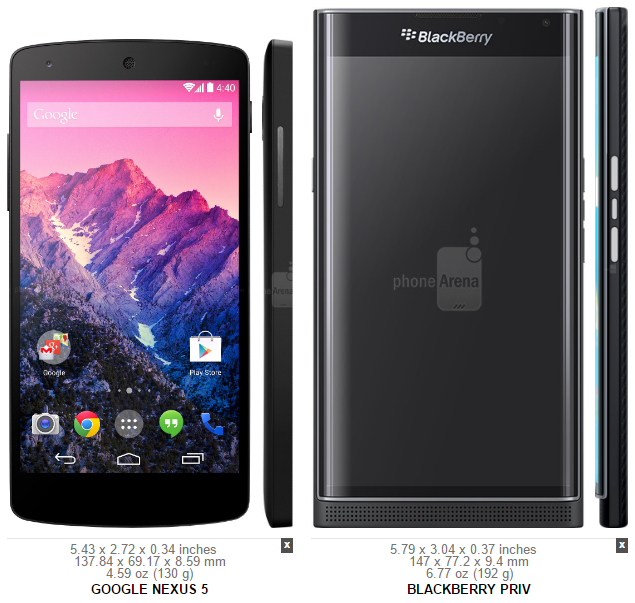
You Won't Believe What My Next Phone Is!

I have a pattern of buying old, cheap, niche mobile phones: Samsung Captivate, Samsung Skyrocket, Moto X, OnePlus One, and Google Nexus 5.

I've loved my Nexus 5 but the battery life is erratic.

So I found something new.

Google Nexus 5New Phone
DESIGN
Device typeSmart phoneSmart phone
OSAndroid (6.0, 5.1, 5.0, 4.4.4, 4.4.2, 4.4)Android (6.0, 5.1)
Dimensions5.43 x 2.72 x 0.34 inches (137.84 x 69.17 x 8.59 mm)5.79 x 3.04 x 0.37 inches (147 x 77.2 x 9.4 mm)
Weight4.59 oz (130 g)6.77 oz (192 g)
DISPLAY
Physical size5.0 inches5.4 inches
Resolution1080 x 1920 pixels1440 x 2560 pixels
Pixel density445 ppi541 ppi
TechnologyIPS LCDAMOLED
Colors16 777 21616 777 216
TouchscreenMulti-touchMulti-touch
FeaturesLight sensor, Proximity sensor, Scratch-resistant glass (Corning Gorilla Glass 3)Scratch-resistant glass (Corning Gorilla Glass 4), Light sensor, Proximity sensor
CAMERA
Camera8 megapixels18 megapixels
   FlashDual LEDDual LED
   Aperture sizeF2.4F2.2
   Focal length (35mm equivalent)30.4 mm
   Camera sensor size1/3.2"
   FeaturesOptical image stabilization, Face detection, Digital zoom, Self-timer, Back-illuminated sensor (BSI), Autofocus, Touch to focus, Geo taggingOptical image stabilization, Autofocus (Phase detection), Touch to focus, Face detection, Digital zoom, Geo tagging
Camcorder1920x1080 (1080p HD) (30 fps)3840x2160 (4K) (30 fps), 1920x1080 (1080p HD) (60 fps)
   Features
Front-facing camera1.3 megapixels2 megapixels
HARDWARE
System chipQualcomm Snapdragon 800 MSM8974Qualcomm Snapdragon 808 MSM8992
ProcessorQuad-core, 2260 MHz, Krait 400Hexa-core, 1800 MHz, ARM Cortex-A57 and ARM Cortex-A53, 64-bit
Graphics processorAdreno 330Adreno 418
System memory2048 MB RAM3072 MB RAM
Built-in storage32 GB32 GB
Maximum User Storage

Storage expansion
microSD, microSDHC, microSDXC up to 2000 GB
BATTERY
Talk time17.00 hours
Stand-by time12.5 days (300 hours)
Capacity2300 mAh3410 mAh
Not user replaceableYesYes
Wireless chargingBuilt-in (Qi)Built-in (Qi, Powermat)
MULTIMEDIA
Music player
   Filter byAlbum, Artist, PlaylistsAlbum, Artist, Genre, Playlists
   FeaturesAlbum art cover, Background playbackAlbum art cover, Background playback
SpeakersEarpiece, LoudspeakerEarpiece, Loudspeaker
YouTube playerYesYes
INTERNET BROWSING
Built-in online services supportYouTube (upload), Picasa/Google+YouTube (upload), Picasa/Google+
TECHNOLOGY
CDMA800, 1900 MHz
GSM850, 900, 1800, 1900 MHz850, 900, 1800, 1900 MHz
UMTS800, 850, 900, 1700/2100, 1900, 2100 MHz800, 850, 900, 1700/2100, 1900, 2100 MHz
FDD LTE800 (band 20), 850 (band 5), 900 (band 8), 1800 (band 3), 2100 (band 1), 2600 (band 7) MHz700 (band 12), 700 (band 17), 700 (band 29), 800 (band 20), 850 (band 5), 1700/2100 (band 4), 1800 (band 3), 1900 (band 2), 2100 (band 1), 2300 WCS (band 30), 2600 (band 7) MHz
DataLTE Cat 4 (150/50 Mbit/s), HSDPA+ (4G) 42.2 Mbit/s, HSUPA 5.76 Mbit/s, UMTS, EDGE, GPRSLTE-A, HSPA (unspecified), HSUPA
micro-SIMYes
nano-SIM
Yes
PositioningGPS, A-GPS, GlonassGPS, A-GPS
NavigationTurn-by-turn navigationTurn-by-turn navigation, Voice navigation
CONNECTIVITY
Bluetooth4.04.1
Wi-Fi802.11 a, b, g, n, n 5GHz, ac802.11 a, b, g, n, n 5GHz, ac
   Mobile hotspotYesYes
USBUSB 2.0USB 2.0
   ConnectormicroUSBmicroUSB
   FeaturesUSB chargingUSB charging
HDMIvia microUSB
OtherNFC, DLNA, Miracast, ANT+, SlimPort, TV-Out, Tethering, Computer sync, OTA syncNFC, Tethering, Computer sync, OTA sync
OTHER FEATURES
NotificationsHaptic feedback, Music ringtones (MP3), Polyphonic ringtones, Vibration, Flight mode, Silent mode, SpeakerphoneService lights, Haptic feedback, Music ringtones (MP3), Polyphonic ringtones, Vibration, Flight mode, Silent mode, Speakerphone
SensorsAccelerometer, Gyroscope, Compass, Barometer, Step detector, Step counterAccelerometer, Compass, Gesture
Hearing aid compatibility
M3, T4
OtherVoice dialing, Voice commands, Voice recordingVoice dialing, Voice commands, Voice recording
AVAILABILITY
Officially announced31 Sep 201325 Sep 2015
FCC Approval04 Nov 201322 Oct 2015
Source: phoneArena.com

It's a Blackberry PRIV.


So while it's relatively new, I can't get away from cheap and niche.

Source: phoneArena.com

I found the PRIV on a fire sale on eBay for $299.99. As usual I added a Seidio holster.


Sunday, June 26, 2016

3,278,983 Nissans Recalled

This post is outside of my normal topics but I believe that it is important to share.

In July 2013 we traded our 2009 Maxima for a 2013 Nissan Pathfinder. The 2013 Pathfinder was the first year of a new generation of Pathfinders and is built on the Maxima platform. Mechanically and trim-wise it was very similar to the Maxima.

We get lots of compliments on the ride of the Pathfinder, especially from backseat passengers.

But...

Early on we noticed that occasionally when I was driving and my wife was in the passenger seat that the "Front passenger air bag status light" was indicating "OFF." The owners manual says "The front passenger air bag will not inflate if the passenger air bag status light is lit or if the front passenger seat is unoccupied." The problem happened with other passengers as well.

Several times while this was happening I drove to the nearby Nissan dealership and pulled into the service bay. A few seconds after I came to a stop and before a service representative could come over the light went off.

I eventually took it in to let them look at that problem. Of course, they didn't find a problem. And the problem persisted.

I took it back in and they found a water bottle under the seat and attributed the problem to that. And the problem persisted.

Then I read about a related recall. I took the Pathfinder back in and they applied the recall update. And the problem persisted.

I took the Pathfinder back in and they reapplied the recall update. And the problem persisted.

The service manager asked me to video the problem. I did and submitted 3 YouTube videos. After a week or so, one had been viewed 6 times and one twice (one was probably me) and the third one only once (probably me).

I finally made an appointment to have a Dealer Technical Specialist (DTS) look at the car. The DTS said that when the vehicle is started the sensors (There are two sensors on the left seat rail of the passenger's seat - forward and aft.) determine if there is a child in the seat and "classifies" this to the air bag control module. There are 3 conditions that can be "classified" - empty, child, and adult. When the gear shift lever is moved from Park the status ("classification") at that instant is retained. Subsequently if the vehicle comes to a complete stop (regardless of gear selection) for several seconds then this "classification" is repeated.

The DTS and the service manager were able to "manipulate" the car to leave the air bag status light displaying OFF by putting a partial load in the passenger seat and then moving the gear shift from Park to Reverse and subsequently to Drive. The light would continue to display OFF until they let the car come to a complete stop for several seconds.

They concluded that this "manipulation" was what was happening when my wife and other passengers were in the passenger seat. This is a characteristic of the algorithm of the air bag control module. It is related to the changes made by the recall but not the specific situation.

The DTS then said that this was "normal" and couldn't be repaired.

I disagreed with this and the DTS suggested that I call Nissan Consumer Affairs (800-NISSAN1) about the Pathfinder. They were recording it so I began recording as well. The representative terminated the call because I wouldn't stop recording. On a second call the representative said it was a "user problem." When I asked him to repeat that while I was recording he terminated the call.

I filed a complaint with the National Highway Traffic Safety Administration (NHTSA) in June 2014. There were hundreds of related complaints.

The issue went through years of NHTSA bureaucracy and Nissan's pushback. All the while I had to adopt a deliberate startup process to ensure that the passenger airbag was engaged.

Finally in January 2016 Nissan notified NHTSA that there had been 3 injury accidents attributed to this situation and that Nissan was going to address it.

The recall was issued in May 2016. It affects 3,278,983 vehicles. For reference the top 10 all time recall was 3.7 million.

When I visited the dealership on June 22, 2016 I was told that parts wouldn't be available until August.

Sunday, June 19, 2016

Windows 10 Default Browser

On "The Trump" I clicked on an html link and got the pop-up asking which browser I wanted to use. I chose Chrome. Then Chrome asked if I wanted to make it the default. I clicked that I did and went on about my business.

But I'm curious so when I finished, I clicked on that html link again.

Uh,oh. Same thing.

No problem. I'll just go to "Choose a default web browser" and set it there. I chose Chrome and checked "Make it the default".

Still curious so when I finished, I clicked on that html link again.

Uh,oh. Same thing.

A little Googleing turned up this forum post on a Dell site.
Open Control Panel, Search for Default and change it there.
Odd but it worked.

Sunday, June 12, 2016

Retired Software

It may be hard to believe but I'm a technical minimalist. I'll go out of my way NOT to install software.

I've been using Virtual CloneDrive for several years.
Virtual CloneDrive works and behaves just like a physical CD, DVD, or Blu-ray drive, although it only exists virtually. Image files can be "inserted" into the virtual drive from your harddisk or from a network drive by just a double-click, and thus be used like a normal CD, DVD, or Blu-ray
And I've been using DVD Decrypter for even longer. I primarily use it to burn DVDs from ISOs.

So when I built "The Trump" I installed them both as usual.

But I didn't need to.

Right clicking on an ISO gives a menu that includes "Mount".


So I don't need Virtual CloneDrive.

And the next entry in that menu is "Burn disc image".


While there are probably some features of those programs that you don't get with native Windows 10, it certainly meets all my routine needs.

2 pieces of software scratched off my list.

Sunday, June 05, 2016

Clash of the Titans

Two recent stories have more connection that seems obvious at first.
  1. iOS 9 enables ad blockers
    "There is also clearly the potential for Safari ad blockers to hurt Google"
  2. Google demotes sites that promote apps
    "it will demote websites (that) encourage visitors to download an app"
Do you see the connection/conflict?

Jeff Jarvis said "Google is the anti-Apple."

Just remember that all of their revenue comes from you one way or another.

Sunday, May 29, 2016

CrashPlan Adoption

I've been using CrashPlan for more than 2 years and it's doing great. When I migrated to "The Trump" I planned to discontinue using Tivoli CDP.  Although I had been successfully using it for 10 years I knew I would have to upgrade it for Windows 10.

But when I moved my data to "The Trump" I used the Windows 10 directory names for Documents and Pictures which are different than the corresponding Windows 7 directory names.

With CrashPlan you define the backup sets using directory names so I was worried that CrashPlan would think that those were different files and back them up all over again.

I shouldn't have worried.

CrashPlan has an excellent guide on changing computers. Basically you keep the directory names and paths the same between the computers if you can but if you can't don't worry about it.

As I'd observed before CrashPlan dedups backups resulting is a much smaller bandwidth usage than you'd expect. Similarly CrashPlan scans a new computer's backup set matching the files with the files it has previously backed up regardless of location.

When I started CrashPlan on "The Trump" the estimate to complete the backup was in DAYS. I almost panicked. Then the estimate started to drop precipitously as it determined that it already had backups of those files. It finished the 300+ GB backup in a couple of hours.

Nice.

Sunday, May 22, 2016

TiVo Features

In late 2015 TiVo pushed out the Winter 2015 release of their TiVo software. It took a while to get to all devices. My TiVo Minis didn't get it until early 2016.

This release had several new features;
  • HD Channel Notification
  • QuickMode
  • SkipMode

HD Channel Notification - With this feature if you are viewing a standard definition channel that is also available in high definition, pressing the"D" key will switch you to the HD channel. I understand that as an option Xfinity's X1 system will do this automatically.


QuickMode - This feature allows you to watch a recorded or time-shifted program at 130% speed without distorting the sound.


SkipMode - For recorded programs, this feature allows you to automatically skip to the start of the new program segment skipping the commercials. Previous to this feature you had to repeatedly press the "Jump" key to skip 30 seconds at a time. You could queue these up, e.g. 10 times for 5 minutes, and the TiVo would fast forward over the commercials. If you overshot the start of the program, pressing "Play" would back up a few seconds and usually put you close to where you wanted to be.
The SkipMode feature is available on the top 20 most-watched networks and more channels will be added in the future. The shows that will be SkipMode-enabled are those that appear during the most common recording hours: seven days a week, between the hours of 4:00 pm and midnight (12:30 am for late night talk shows airing on ABC, NBC and CBS). Recorded shows with the SkipMode feature appear in your MyShows lists with a SKIP icon.
Here's how this worked previously.


And now with SkipMode.


Love my TiVos!

Sunday, May 15, 2016

Storage Spaces

When I was building "The Trump" I wanted to RAID-1 my internal data drive. I was hoping that the Asus motherboard supported RAID but that was not to be. As I Googled around looking for that answer though I came upon lots of discussions of "Fake RAID". This (archive.org) is one example:
Fake RAID is essentially software RAID provided by the BIOS on the motherboard, however, it has none of the benefits of Software RAID and none of the benefits of Hardware RAID...
And it went on:
[I]f your motherboard dies, your data is probably lost unless you can find another identical motherboard.
So I guess it was good that my motherboard didn't support RAID. But what to do?

What I found was Windows' Storage Spaces. Windows Central has a really good article (archive.org) on it.

I used 2 2TB drives and created a mirrored Storage Space as drive D:. To prepare the drives I used diskpart and cleaned the drives.

Storage Spaces can use Microsoft's Resilient File System (ReFS).

The features compared to NTFS are:
  • Improved reliability for on-disk structures
  • Built-in resilience
  • Compatibility with existing APIs and technologies
In this BetaNews article (archive.org), the author performed the ultimate test.
I shut my Dell 840 server down, pulled out the drive caddy, and connected one of the mirrored drives into my Thinkpad X230 laptop for some spot checks on my data.

What did I see when I plugged it in? Exactly what I wanted to see.
Nice. But keeping my fingers crossed.

By the way, to migrate the data from "Big Honker" to "The Trump" I used Drive Snapshot. I think that I have mentioned that you ought to TEST restoring your backups. I practice what I preach.

Sunday, May 08, 2016

The Trump

No, this isn't a political post. It's about the successor to "The Big Honker" purchased on Christmas Eve 2009.  I'm calling the new tower PC "The Trump" because it's HUGE!

Newegg had an Asus M32BC-B01 for $400 (incidentally the same price as "The Big Honker"). It came with an 8-core AMD processor, 8GB of RAM and a 2TB HDD. I wanted something that would go up to 32GB, hold an SSD to boot from and a second 2TB HDD for mirroring.

I researched the Asus as much as I could but couldn't find the answers to the RAM and disk bays. I finally signed up for a free trial of Newegg's Premier to get no restocking fee returns and ordered it.

I wasn't disappointed. There were 4 DIMM slots with one populated with an 8GB DIMM so it would hold my desired 32GB. There was an internal 3 1/2" bay and one external facing 5 1/4" bay. I added 8GB of memory, found a 250GB SSD and had a spare 2TB HDD sitting around so I was ready.

The Asus came with Windows 8.1 Home. I upgraded it to Windows 10 Home but wanted to go on to Windows 10 Pro. I had a Windows 7 Pro key that had not been used.

This post explains how to do that but it starting with "All you need to do is swap your current Windows 10 Home product key for the default Windows 10 Pro one..." is a little misleading. Who has ever heard of "the default Windows 10 Pro key?" That's just the start of it. The upgrade process took about 15 minutes, most of that after the screen said "100% complete." But it worked and I was on the way. When it finished it complained that it wasn't activated and asked for a Windows 10 Pro key. I input the Windows 7 Pro key and it worked.

Working with the UEFI firmware was new to me. After I had upgraded to Windows 10 I used diskpart to "clean" all the drives (knowingly wiping all the data) and converted the SSD to GPT. (The "clean" drives will come up again in a later post.) Then I installed Windows 10 on the SSD from a USB drive created from Microsoft's Media Creation Tool. Windows 10 retained its activation and Pro upgrade.

Sunday, May 01, 2016

ClipConverter

Now and then I need/want to download a YouTube video, especially when I've used the YouTube Editor to crop/combine videos.

The best tool I've found is ClipConverter.cc.

Go to ClipConverter.cc and enter the viewing URL for the YouTube video. Click on "Continue".


On the next screen, chose what resolution you want and click on "Start".


When the conversion has completed, click on "Download".


Realize that downloading from YouTube is just a little bit shady. Beware of unwanted pop-ups/-unders.

Sunday, April 24, 2016

Windows 10 Metered Connection

We all know how aggressive Windows 10 is on applying updates. One of the tips is to set your network connection to "metered."


That works.

But...

This disables all updates including Windows Defender's signature updates.


So if you use this tip, don't forget to force Windows Defender to update every day or two to get fresh signatures.

Sunday, April 17, 2016

Google Street View

Have you been wondering where all the Google Street View car goes? Normally you can only see whether they drove down the street you're interested in by dragging the little man over the street.

But I wanted to see its route through an entire neighborhood or shopping center.

Here's how.

In Google Maps, position the map to where you want to start. Drag the little man onto the map. Notice that the routes the Google Street View car has mapped are highlighted with blue lines. But these lines are not persistent. They're only presented while you are dragging the little man.

Now drop the little man anywhere you want. That takes you into Google Street View.

Here's the fun part.

Now click the "-" in the lower right corner. This takes you out of Google Street View but leaves the routes highlighted in blue.

Some of these routes are interesting. Look at the outlots of Wolfchase Mall.


The Google Street View car drove through ALL the aisles of the Bed Bath & Beyond parking lot. Was he looking for his girlfriend's car or what?

I'm Not Strange (I'm Just Like You)

Sunday, April 10, 2016

Sigcheck

If you don't know what your Windows "certificate store" is just quit reading and go back to Facebook.

Now since you know what your certificate store is, I'm sure that you've had a couple of sleepless nights over it.

Here's how to get back to those restful nights.

Or you might not close your eyes until you've reformatted and reinstalled Windows.

Go to Microsoft's Sigcheck page and download sigcheck.zip.

Extract sigcheck.exe somewhere convenient like your desktop.

Run the command prompt. Navigate to where you saved sigcheck.exe. Run "sigcheck -tv".


It'll take a couple of minutes.

The results will determine how (or whether) you sleep tonight.

Note: This doesn't check Firefox's certificate store.

Sunday, April 03, 2016

Never Leave Home Without It

So when you are in the gate area at the airport, do you plug your phone into one of those courtesy USB charging ports? Please say NO.

If you have to make sure you have one of these in your bag.
Think of this as a USB condom.
Your device will not enter 'data transfer' mode so there is no risk of data hacking / viruses when charging from an unknown USB socket.

Sunday, March 27, 2016

There Was a Problem

I continue coming up to speed on Windows 10. Overall it is still going well. There are just bumps in the road here and there.

I'm working toward upgrading my wife's ThinkPad T420s. I want it to go smoothly (which I fully expect) and quickly (the subject of this post).

To make it go quickly my idea was to have the latest Windows 10 bits downloaded. To do this I ran the Windows 10 Media Creation Tool.

I had used the Media Creation Tool before. But this time it was different.

I tried it on a new PC. One where I had taken my own advice and made the default user NOT an administrator.

The tool downloaded successfully and ran through its first couple of screens asking for the administrator's password. I'm not sure why it needs administrator rights but anyway...

Then I gave it access to the USB drive I wanted to use for my fresh media.
There was a problem running this tool. We're not sure what happened, but we're unable to run this tool on your PC. If you continue experiencing problems, reference the error code when contacting customer support. Error code: 0x800704DD - 0x90016.

"We're not sure what happened?" C'mon Microsoft. Nobody but you can know what happened.

So I started searching Google for this and came across this.

The net of this is that to create a USB drive you have to run the Media Creation Tool while logged in as an administrator.


Sunday, March 20, 2016

Recover Google Photos Storage

So Google Photos has free unlimited storage. Not. That's a whole another discussion. This post is to cover what to do when you discover that you are using too much of your free 15GB of Google storage for photos.

Here's where to look for the problem.


Now I'm not really having a problem but my daughter did.

I believe there's an underlying problem with Google wrongly counting older photos against your storage even if they are under the 16 megapixel size.

This post from the Nexus 5 subreddit gave me the solution.

WARNING: The following procedure will resample your full resolution photos down to 16 megapixels.

Go to Google Photos Setting screen.


Click on "RECOVER STORAGE".


And click on "COMPRESS".

You're welcome.

Sunday, March 13, 2016

TiVo Resale

If you've been following my TiVo migration you probably noticed that I had a lot of equipment that I took out of service: 2 TiVo Premieres, a Western Digital 1TB My Book AV DVR Expander, and a Linksys WES610N.

When I called TiVo to ask them to discontinue service on the 2 Premieres they told me that they were eligible for lifetime service for a one-time fee of $99 each. So I suspended the service on the 2 Premieres and went to eBay to see what a Premiere was worth with lifetime service.

Let's just say I was inspired.

In the end I sold the 2 TiVo Premieres upgraded to lifetime service, the Western Digital 1TB My Book AV DVR Expander, and a Linksys WES610N (new in the box) and netted over $500 after all charges and fees.

This improves the business case on my Roamio upgrade to being in the black from the start with a long term savings of more than $37/month ($50/month for the the first year). And I doubled my recording capacity and added TiVo capability in the kitchen.

That was fun!

Sunday, March 06, 2016

MoCA

I didn't mean to start down this road but it just happened.

We had a 9 year old Astar MP-32HB TV in our bedroom. It was 32" but had the speakers on the sides so it was huge. Just before Black Friday Best Buy had a 40" Insignia NS-40D420NA16 on sale for $180. Why not?

Then the 8 year old 52" Sony KDL52W3000 in the den had a stripe near the left side. Sure it went away in 15 minutes or so but I knew it was going to get bigger and more persistent. Again Best Buy had a 55" Toshiba 55L310U on sale for $350. That was easy.

The TiVo Mini in the bedroom worked so well that I wanted to put one in the kitchen. I had been using a Comcast Digital Transport Adapter (SD only and no premium channels) and they were going up to $4 per month. I found Amazon had TiVo Minis on sale and bought a second one for the kitchen. By the way, the sale price was less than what I had paid for the first one so Amazon gave me a credit for the difference. Nice!

But wait, I don't have Ethernet in the kitchen. I thought about using a Linksys WES610N like I was using in the bedroom but that requires more wires.

Hmmm.

Then I noticed that the Minis supported MoCA. And the TiVo Roamio functions as a bridge between Ethernet and MoCA.

I configured the Roamio to support MoCA and put a MoCA Point of Entry Filter in front of the Comcast amplifier/splitter.

It worked so well in the kitchen that I converted the bedroom to MoCA and retired the Linksys WES610N.

Here's my current TV configuration.


Sunday, February 28, 2016

Nexus 7 and Lollipop

I've had a 2012 Nexus 7 Wi-Fi since early 2013. It came with 4.1.2 JZO54K Jellybean. I've loved the size and the access to the latest version of Android. I dropped it late in 2013 and replaced the screen myself.

The Android journey has been long. Along he way I upgraded it from 4.1.2 to 4.2.2, 4.3, 4.4, 4.4.2, 4.4.3, 4.4.4, 5.0 5.0.2, 5.1.0, and 5.1.1.

This was hard on the Nexus 7. The Internet is full of bad experiences of updating the 2012 Nexus 7 to Lollipop. My experience was pretty much aligned with these.

The Nexus 7 would just crawl. It especially seemed to be slow if you tried to do anything while you were letting the Google Play Store update apps. Once it got slow there was no fixing it. Rebooting didn't help.

But after my experience with adb on my Nexus 5 I got brave enough to reflash the Nexus 7 with 5.1.1 LMY47V.

That process was similarly complicated as the Nexus 5 process. At one point the screen displayed "REBOOT FAILURE." And when it finally came up it was sluggish for several hours.

But the result was well worth it. The Nexus 7 is working fine. Sure it's not as fast as a new Android tablet but its performance is consistently Ok. Not bad for an almost 4 year old tablet.

I left the bootloader unlocked so I'm watching for CyanogenMod to drop Marshmallow.

Sunday, February 21, 2016

Google Photos Public Gallery

So there isn't a Google Photos Public Gallery, you say? Well, there is, Kinda. But you have to access it via Picasaweb.

This continues my rant about apparently deprecated functions from Picasaweb to Google Photos.

When you first login to Picasaweb you have to create your Google Profile. You used to have to do this to use much of Google but that has generally been eliminated. However this seems to be the key to having a public gallery of photos.


Once you create your Google Profile you are able to go to Picasaweb. You probably want to click on "View All" to see all your albums (collections?).


Now you can see all of your Google Photos albums.

To put one of these in a public gallery click on the album thumbnail and then choose "Album properties" from the "Actions" dropdown.


Under "Visibility" choose "Public on the web" and click on "Save". Realize that you just put all your photos "Public on the web."


You're halfway there.

Go back to Picasaweb and click on "My Photos" and then click on "Public Gallery".


Now copy that URL.


That's the URL of your public gallery.

You're done.

Unfortunately that doesn't present in the Google Photos UI. Honestly that's a mixed blessing.

Update: If you're interested in this you'd better hurry.

Sunday, February 14, 2016

I Don't Understand

I just upgraded my everyday laptop to Windows 10 version 1511. It went well but I still don't understand why Windows Update is so non-transparent.


I don't ask for much. Just to not get "This page doesn't exist."

Sunday, February 07, 2016

Dropbox vs Bluetooth vs Google Photos

There are so many good choices for automatically storing images from your smartphone. I've been using a couple of them and wanted to review the resulting images and metadata.

On my Nexus I have Dropbox and Google Photos both set to automatically upload images when I'm on Wi-Fi. When I want to "archive" a photo, I transfer it from my smartphone to my laptop using Bluetooth.

Here are the actual images:

Dropbox

Bluetooth

Google Photos

To my untrained eye, the images are visually indistinguishable.

But the files are different. Here're the details as I observed. (complete data at the end of the post)

File Names
Dropbox: 2015-12-16 16.12.47.jpg
Bluetooth: IMG_20151216_161246.jpg
Google Photos: IMG_20151216_161246.jpg

Notice that not only does Dropbox rename the file but the implied date/time is different than the other methods.

File Size:
Dropbox: 2,623,643
Bluetooth: 2,623,643
Google Photos: 1,557,928

This is using Google Photos "Upload size" set to "High quality", not "Original". In this test Google further compressed the image by 40%.

The other characteristics and metadata are all the same as far as I can tell.

So what am I going to change?

Nothing, yet.

For me each of these tools have different use cases.

For Dropbox, I really like having my images automatically stored in a Windows file system. There's probably some method to accomplish this with Google Photos but it doesn't just jump out at me. I really don't like that Dropbox renames the files.

Bluetooth is clearly the geek's solution. I only use this method when I want to preserve a high quality image. The file system target for the Bluetooth upload varies by whether the file is an image or a video. I probably could change that.

Google Photos is the slickest tool. It's fast and easy to manage. Using "High quality" (which really isn't high quality) is free. I wish that Google wouldn't recompress the images when they fall below 16 megapixels. Since my camera is 8 megapixels I tried changing the "Upload size" to "Original" and sending the image again. I had the same result of additional compression. There are still some outstanding questions to me about this. How long does it take to Google Photos to recognize and act on this Settings change? Does this Settings change on the phone propagate to the web uploading? I'll keep playing with this.

Have fun!

Image properties
Image name : 2015-12-16 16.12.47 (Dropbox upload).jpg
Folder : C:\Users\Ben Moore\Desktop\Uploads\
Size : 3200 x 2368 pixels ==> 44.44 x 32.89 inches (72.00 dpi)
Color count : 518272
File size : 2.50 Mb
Date : 12/16/2015 4:12 PM

EXIF
Date Time=2015:12:16 16:12:47
GPSDate Stamp=2015:12:16
GPSLongitude Ref=W
GPSLongitude=89 Degrees 33 Minutes 49 Seconds
GPSImage Direction=297/1
GPSLatitude Ref=N
GPSTime Stamp=22:12:34
GPSImage Direction Ref=M
GPSLatitude=34 Degrees 49 Minutes 55 Seconds
GPSInfo=692
Model=Nexus 5
Image Width=3200
Resolution Unit=Inch
YCb Cr Positioning=Centered
Image Length=2368
YResolution=72.00
Orientation=Normal
Software=HDR+ 1.0.106412213y
Color Space=sRGB
FNumber=F2.4
Date Time Digitized=2015:12:16 16:12:47
Subject Distance Range=Unknown
Focal Length=3.97 mm
Aperture Value=F2.5
Exposure Mode=Auto
Exif Image Length=2368
Custom Rendered=Custom process
Max Aperture Value=F2.5
Scene Capture Type=Standard
Scene Type=Directly Photographed
Digital Zoom Ratio=1/1
Saturation=Normal
Exposure Program=Normal
Sharpness=Normal
Exif Image Width=3200
Shutter Speed Value=0.0487 sec (1/21)
Metering Mode=Center
Date Time Original=2015:12:16 16:12:47
Components Configuration=YCbCr
Subject Distance=0/1
Flash=Off, surpressed
Exif Version=0210
Contrast=Normal
ISOSpeed Ratings=587
Sensing Method=OneChipColorArea
Flash Pix Version=0100
Exposure Time=48861/1000000 sec
Exif Offset=234
XResolution=72.00
Make=LGE

Comment
Dropbox

Image properties
Image name : IMG_20151216_161246 (Bluetooth transfer).jpg
Folder : C:\Users\Ben Moore\Desktop\Uploads\
Size : 3200 x 2368 pixels ==> 44.44 x 32.89 inches (72.00 dpi)
Color count : 518272
File size : 2.50 Mb
Date : 12/16/2015 10:03 PM

EXIF
Date Time=2015:12:16 16:12:47
GPSDate Stamp=2015:12:16
GPSLongitude Ref=W
GPSLongitude=89 Degrees 33 Minutes 49 Seconds
GPSImage Direction=297/1
GPSLatitude Ref=N
GPSTime Stamp=22:12:34
GPSImage Direction Ref=M
GPSLatitude=34 Degrees 49 Minutes 55 Seconds
GPSInfo=692
Model=Nexus 5
Image Width=3200
Resolution Unit=Inch
YCb Cr Positioning=Centered
Image Length=2368
YResolution=72.00
Orientation=Normal
Software=HDR+ 1.0.106412213y
Color Space=sRGB
FNumber=F2.4
Date Time Digitized=2015:12:16 16:12:47
Subject Distance Range=Unknown
Focal Length=3.97 mm
Aperture Value=F2.5
Exposure Mode=Auto
Exif Image Length=2368
Custom Rendered=Custom process
Max Aperture Value=F2.5
Scene Capture Type=Standard
Scene Type=Directly Photographed
Digital Zoom Ratio=1/1
Saturation=Normal
Exposure Program=Normal
Sharpness=Normal
Exif Image Width=3200
Shutter Speed Value=0.0487 sec (1/21)
Metering Mode=Center
Date Time Original=2015:12:16 16:12:47
Components Configuration=YCbCr
Subject Distance=0/1
Flash=Off, surpressed
Exif Version=0210
Contrast=Normal
ISOSpeed Ratings=587
Sensing Method=OneChipColorArea
Flash Pix Version=0100
Exposure Time=48861/1000000 sec
Exif Offset=234
XResolution=72.00
Make=LGE

Comment
Bluetooth

Image properties
Image name : IMG_20151216_161246 (Google Photos download).jpg
Folder : C:\Users\Ben Moore\Desktop\Uploads\
Size : 3200 x 2368 pixels ==> 44.44 x 32.89 inches (72.00 dpi)
Color count : 515986
File size : 1.49 Mb
Date : 12/16/2015 10:19 PM

EXIF
Image Width=3200
Image Length=2368
Make=LGE
Model=Nexus 5
Orientation=Normal
XResolution=72.00
YResolution=72.00
Resolution Unit=Inch
Software=HDR+ 1.0.106412213y
Date Time=2015:12:16 16:12:47
YCb Cr Positioning=Centered
Exposure Time=48861/1000000 sec
FNumber=F2.4
Exposure Program=Normal
ISOSpeed Ratings=587
Exif Version=0210
Date Time Original=2015:12:16 16:12:47
Date Time Digitized=2015:12:16 16:12:47
Components Configuration=YCbCr
Shutter Speed Value=0.0487 sec (1/21)
Aperture Value=F2.5
Max Aperture Value=F2.5
Subject Distance=0/1
Metering Mode=Center
Flash=Off, surpressed
Focal Length=3.97 mm
Flash Pix Version=0100
Color Space=sRGB
Exif Image Width=3200
Exif Image Length=2368
Sensing Method=OneChipColorArea
Scene Type=Directly Photographed
Custom Rendered=Custom process
Exposure Mode=Auto
Digital Zoom Ratio=1/1
Scene Capture Type=Standard
Contrast=Normal
Saturation=Normal
Sharpness=Normal
Subject Distance Range=Unknown
Image Unique ID=07daf91361effb820000000000000000
Exif Offset=234
GPSLatitude Ref=N
GPSLatitude=34 Degrees 49 Minutes 55 Seconds
GPSLongitude Ref=W
GPSLongitude=89 Degrees 33 Minutes 49 Seconds
GPSAltitude Ref=Sealevel
GPSTime Stamp=22:12:34
GPSImage Direction Ref=M
GPSImage Direction=297/1
GPSDate Stamp=2015:12:16
GPSInfo=738

Comment
Google Photos