I'm still enjoying my Essential PH-1. It's really nice to be back on Android.
Essential pushed Android 9.0 Pie on the day of release. I was traveling so I deferred the upgrade for a couple of days.
Now I've been running Pie almost a week. I haven't had any problems.
One new feature I wasn't sure about was Pie's gesture navigation.
Turns out I like it and find it useful.
The "Home" button is replaced with a "Pill." The "Back" button only appears when it is useful. The "Recent apps" button is GONE.
I haven't tacked all the functions but I have found a couple that are very useful.
To get the recent applications, just swipe the "Pill" about halfway up the screen. The recent apps show up in an almost full screen presentation. Swipe left or right to pick one. Tap to go there. Swipe up to close the app. Shades of webOS!
I used to use the double tap on the "Recent apps" button to directly go to the most recent app. This would let you swap between 2 apps easily. In Pie, just swipe the "Pill" to the right. There's the most recent app. Keep on swiping to the right and you can go back further!
There's lots more function there.
Sunday, August 26, 2018


Sunday, August 19, 2018
How I Do E-mail
I was helping a friend setup their e-mail recently and thought it would be worthwhile to share how I do e-mail.
I use Google's Gmail to manage all my e-mail. But it's not quite that simple.
I use Google's Gmail web client and Google's Gmail smartphone app (Android and iOS).
I've changed the domain names in a feeble attempt at privacy.
benmoore@mydomain.com
My primary e-mail account is benmoore@mydomain.com which is a Google G Suite. So that is the identity that I use to log into Gmail. And I recently added Google 2-Step Verification.
benmoore@mydomain.com arrives in the Gmail app. I have labels/folders that I sort correspondence into.
ben.moore@throwaway.com
This is what I use for throwaway e-mails, e.g. when I sign up for a newsletter or something.
ben.moore@throwaway.com is more complicated. throwaway.com has a free offering that I use. With the free offering you can't forward the e-mail to another address. So I have configured the Gmail app to pull my throwaway.com e-mail with a POP3 interface.
To do this, I went to Settings / Accounts and find "Check mail from other accounts:" I specified the credentials for throwaway.com. I made sure to check "Leave a copy of retrieved message on the server". This took a little playing around to get this correct. The Gmail app will retrieve new e-mail from this server every 60 minutes. That's good enough to me.
When e-mail arrives to ben.moore@throwaway.com I have a filter that assigns a label of "Throwaway". Then to separate this e-mail I went to Settings / Accounts / Multiple Inboxes and setup a pane for the label of "Throwaway". This results in a separation of benmoore@mydomain.com e-mail and ben.moore@throwaway.com e-mail.
I use the throwaway.com SMTP servers to send ben.moore@throwaway.com so the headers look right. You specify this in Settings / Accounts / Send mail as:. This also takes a little playing around to get this correct.
ben.moore@mywork.com
This is my work e-mail. I just have it forwarded to benmoore@mydomain.com. Like ben.moore@throwaway.com I use mywork.com's SMTP servers to send ben.moore@mywork.com so the headers look right.
anything@tracking.biz
I use this when I'm suspicious of how someone might use my e-mail address. This e-mail domain is set so that any name you put in front of @tracking.biz comes to benmoore@mydomain.com. But I use the same technique as throwaway.com to segregate the incoming e-mails into a separate area in my inbox.
The way I use this is to use a name that identifies to whom I gave that e-mail. For example I created an identity at Computerworld as computerworld@tracking.biz. Let's just say that Computerworld must make a lot of money from selling their mailing list.
Overall
With all these e-mail identities I get to choose which one to use when I compose a new e-mail. In the Compose dialog there is a drop-down box next to the "From" field where I can choose.
Under Settings / General I specify:
The Android and iOS apps honor all these settings so your experience is consistent across all platforms.
I'm sure I haven't covered everything. Leave me a comment if you have a question.
I use Google's Gmail to manage all my e-mail. But it's not quite that simple.
I use Google's Gmail web client and Google's Gmail smartphone app (Android and iOS).
I've changed the domain names in a feeble attempt at privacy.
benmoore@mydomain.com
My primary e-mail account is benmoore@mydomain.com which is a Google G Suite. So that is the identity that I use to log into Gmail. And I recently added Google 2-Step Verification.
benmoore@mydomain.com arrives in the Gmail app. I have labels/folders that I sort correspondence into.
ben.moore@throwaway.com
This is what I use for throwaway e-mails, e.g. when I sign up for a newsletter or something.
ben.moore@throwaway.com is more complicated. throwaway.com has a free offering that I use. With the free offering you can't forward the e-mail to another address. So I have configured the Gmail app to pull my throwaway.com e-mail with a POP3 interface.
To do this, I went to Settings / Accounts and find "Check mail from other accounts:" I specified the credentials for throwaway.com. I made sure to check "Leave a copy of retrieved message on the server". This took a little playing around to get this correct. The Gmail app will retrieve new e-mail from this server every 60 minutes. That's good enough to me.
When e-mail arrives to ben.moore@throwaway.com I have a filter that assigns a label of "Throwaway". Then to separate this e-mail I went to Settings / Accounts / Multiple Inboxes and setup a pane for the label of "Throwaway". This results in a separation of benmoore@mydomain.com e-mail and ben.moore@throwaway.com e-mail.
I use the throwaway.com SMTP servers to send ben.moore@throwaway.com so the headers look right. You specify this in Settings / Accounts / Send mail as:. This also takes a little playing around to get this correct.
ben.moore@mywork.com
This is my work e-mail. I just have it forwarded to benmoore@mydomain.com. Like ben.moore@throwaway.com I use mywork.com's SMTP servers to send ben.moore@mywork.com so the headers look right.
anything@tracking.biz
I use this when I'm suspicious of how someone might use my e-mail address. This e-mail domain is set so that any name you put in front of @tracking.biz comes to benmoore@mydomain.com. But I use the same technique as throwaway.com to segregate the incoming e-mails into a separate area in my inbox.
The way I use this is to use a name that identifies to whom I gave that e-mail. For example I created an identity at Computerworld as computerworld@tracking.biz. Let's just say that Computerworld must make a lot of money from selling their mailing list.
Overall
With all these e-mail identities I get to choose which one to use when I compose a new e-mail. In the Compose dialog there is a drop-down box next to the "From" field where I can choose.
Under Settings / General I specify:
- Ask before displaying external images
- Send cancellation period: 30 seconds
- Keyboard shortcuts on
- Button labels: Text
- I'll add contacts myself
The Android and iOS apps honor all these settings so your experience is consistent across all platforms.
I'm sure I haven't covered everything. Leave me a comment if you have a question.
Sunday, August 12, 2018
Google Voice Call Screening
I've been living with my Google Voice/Obihai system (see 1, 2, 3, 4, 5, 6, 7, 8, 9), for a couple of years and it continues to work great and for free!
Obihai sunset the OBi100 a while back and I upgraded to an OBi200. It took at least 2 minutes to make the transition.
Then in early 2018 Obihai was acquired by Polycom. Remember the old Polycom "Star" speaker phone?
There was one feature of Google Voice that wasn't supported by Obihai.
Google Voice has a call screening feature that will let you challenge a caller to identify themselves then ring your phone and announce the caller. At that point you can accept the call or send it to voice mail. While the caller is leaving a message, you can listen and pick up if you want to.
The Obihai system would challenge a caller to identify themselves but then immediately ring your phone without announcing the caller.
In practice that challenge caused most telemarketers to just hang up.
Then Google made a seemingly unrelated change to Google Voice. The result of that change is that now the screening works!
Obihai sunset the OBi100 a while back and I upgraded to an OBi200. It took at least 2 minutes to make the transition.
Then in early 2018 Obihai was acquired by Polycom. Remember the old Polycom "Star" speaker phone?
There was one feature of Google Voice that wasn't supported by Obihai.
Google Voice has a call screening feature that will let you challenge a caller to identify themselves then ring your phone and announce the caller. At that point you can accept the call or send it to voice mail. While the caller is leaving a message, you can listen and pick up if you want to.
The Obihai system would challenge a caller to identify themselves but then immediately ring your phone without announcing the caller.
In practice that challenge caused most telemarketers to just hang up.
Then Google made a seemingly unrelated change to Google Voice. The result of that change is that now the screening works!
Sunday, August 05, 2018
Reducing Spam Calls
If you're not interested in reducing spam calls to your mobile number, just go back to Facebook. If you're using an iPhone, just go back to Facebook.
Now that we've got the crowd thinned out, go to the Google Play Store and download the latest Phone app.
Open the Phone app and tap the hamburger menu in the top right corner.
Tap on "Caller ID and spam".

Then slide "Filter spam calls" to the right.

Lifehacker has an article here.
Now that we've got the crowd thinned out, go to the Google Play Store and download the latest Phone app.
Open the Phone app and tap the hamburger menu in the top right corner.
Tap on "Caller ID and spam".

Then slide "Filter spam calls" to the right.

Lifehacker has an article here.
Sunday, July 29, 2018
AirPods
I have an unusual use case for ear bud(s). I am a voracious consumer of podcasts. I hate wires hanging on me so I lean to Bluetooth devices.
You know I'mcheap frugal so I go for inexpensive ear buds. The relatively poor sound quality doesn't bother me with my podcasts.
My walking regimen is about 30 minutes per day so battery life isn't critical.
I have been using ear buds like this and this.
My wife bought me the original Bragi Dash. I struggled with them. Seems like I wasn't the only one. My deal breaker problem was that the Bluetooth connection wouldn't work unless I held the phone near my chest. If I put it in my pocket or in my belt holster it kept dropping out.
The new version is supposed to fix all this. But they don't get a second chance with me.
Then I stumbled across this GRDE Mini Wireless Earbud. The mono is fine for listening to my podcasts. And I liked the price. I don't like the proprietary charging cable.
My daughter bought me Apple's AirPods. As expected they work great with an iPhone once I figured out how to get them out of the case. But they work just as well with my Essential PH-1.
Conclusion: The GRDE Mini Wireless Earbud's proprietary charging cable is a bummer. The controls on it is a physical switch, not a capacitive switch like the AirPods. The capacitive switch means that you have to double tap to take an action. So double tapping on the right AirPod is play/pause and double tapping on the left AirPod is skip. On the GRDE single click is play/pause and double click is skip.
I use them both.
You know I'm
My walking regimen is about 30 minutes per day so battery life isn't critical.
I have been using ear buds like this and this.
My wife bought me the original Bragi Dash. I struggled with them. Seems like I wasn't the only one. My deal breaker problem was that the Bluetooth connection wouldn't work unless I held the phone near my chest. If I put it in my pocket or in my belt holster it kept dropping out.
The new version is supposed to fix all this. But they don't get a second chance with me.
Then I stumbled across this GRDE Mini Wireless Earbud. The mono is fine for listening to my podcasts. And I liked the price. I don't like the proprietary charging cable.
My daughter bought me Apple's AirPods. As expected they work great with an iPhone once I figured out how to get them out of the case. But they work just as well with my Essential PH-1.
Conclusion: The GRDE Mini Wireless Earbud's proprietary charging cable is a bummer. The controls on it is a physical switch, not a capacitive switch like the AirPods. The capacitive switch means that you have to double tap to take an action. So double tapping on the right AirPod is play/pause and double tapping on the left AirPod is skip. On the GRDE single click is play/pause and double click is skip.
I use them both.
Sunday, July 22, 2018
Gmail Shared Contacts Revisited
Years ago I posted about how I was sharing selected contacts between Google accounts.
The solution I discussed at that time has gone paid only so I went looking for alternatives.
I found CoContacts that works great for me.
CoContacts has a free offering that supports 3 users with 3 shared groups with 100 shared contacts that sync daily. If you need more than that you should be paying for it.

I'm using it on G Suite accounts but it will also work with regular Gmail accounts.
It works so elegantly that I couldn't remember what I was using for contact syncing!
The solution I discussed at that time has gone paid only so I went looking for alternatives.
I found CoContacts that works great for me.
CoContacts has a free offering that supports 3 users with 3 shared groups with 100 shared contacts that sync daily. If you need more than that you should be paying for it.

I'm using it on G Suite accounts but it will also work with regular Gmail accounts.
It works so elegantly that I couldn't remember what I was using for contact syncing!
Sunday, July 15, 2018
Delivery Optimization
After my installation of Windows 10 April 2018 Update I went to Settings / Storage just looking for how much space was used by the backup copy of Windows.
But I got distracted...

I clicked on "Free up space now".
As it was scanning the entry for "Delivery Optimization Files" caught my attention with over 2 GB.

What are "Delivery Optimization Files"?
From Microsoft (archive.is)
I always set it to "Allow downloads from other PCs" but only check "PCs on my local network".
Then click on "Activity monitor" to see what it's doing.

While I started on this journey on a PC that had just updated to Windows 10 April 2018 Update, I went over to a PC that hadn't updated to get representative numbers.

This PC is the only one Ethernet connected to the Internet. 2/3s of the Windows Update data came from Microsoft and 1/3 came from other PCs on the local network.
But further, this PC provided over 1 GB of Windows Update data to other PCs on the local network.
Interesting.
But I got distracted...

I clicked on "Free up space now".
As it was scanning the entry for "Delivery Optimization Files" caught my attention with over 2 GB.

What are "Delivery Optimization Files"?
From Microsoft (archive.is)
Windows Update Delivery Optimization works by letting you get Windows updates and Microsoft Store apps from sources in addition to Microsoft, like other PCs on your local network, or PCs on the Internet that are downloading the same files.So, how well is it working? Go to Settings / Delivery Optimization.
I always set it to "Allow downloads from other PCs" but only check "PCs on my local network".
Then click on "Activity monitor" to see what it's doing.

While I started on this journey on a PC that had just updated to Windows 10 April 2018 Update, I went over to a PC that hadn't updated to get representative numbers.

This PC is the only one Ethernet connected to the Internet. 2/3s of the Windows Update data came from Microsoft and 1/3 came from other PCs on the local network.
But further, this PC provided over 1 GB of Windows Update data to other PCs on the local network.
Interesting.
Sunday, July 08, 2018
Android Messaging, Part 2
I hadn't even gotten my Android Messaging post published before everything changed.
Inexplicably, AT&T Messages had started working again. Pulse was working great.
Then Google changed the world.
There's really lots more in this latest update of Messages. Read it all here.
Now I just wonder when Google will kill this.
PS. I'm not sure about Android Messages for Web. Since I've purchased the lifetime subscription for Pulse ($10.99) I've gone back to Pulse until I can sort out Android Messages for Web.
Inexplicably, AT&T Messages had started working again. Pulse was working great.
Then Google changed the world.
Google launches Android Messages on PC so you can text from your computer - as it looks to take on WhatsApp
This has 90+% of the function of Pulse for free and delivered by Google, not a third party.
The web presentation is way more Material Design than Pulse but I thought Pulse was fine.
Messages for Web doesn't have scheduled messages and I've used them a couple of times. I'll miss them but will trade them for an integrated solution.
I had trouble getting the Android Notifications working like I wanted but that may just be my unfamiliarity with Android 8.1 Oreo notifications.
The web presentation is a little more chatty than Pulse in that it asks you if you want to run Messages for Web if you have it open in more than one place.
If you have an active web presentation you don't get the notification on the phone. That's problematic when you have been using the web presentation and then walk away from the PC. It seems to take a couple of minutes (5?) before it will resume sending notifications to the phone. The messages get delivered to the phone just without notification.
If you have an active web presentation you don't get the notification on the phone. That's problematic when you have been using the web presentation and then walk away from the PC. It seems to take a couple of minutes (5?) before it will resume sending notifications to the phone. The messages get delivered to the phone just without notification.
The Android Messages client generates battery warning messages now and then that you can turn off and the web presentation reminds you that the phone is not on Wi-Fi. That's easy to turn off as well.
How to set up Android Messages on PC
https://www.mirror.co.uk/tech/google-launches-android-messages-pc-12757484
- Go to the Google Play Store and update or install Android Messages to the latest version
- Head over to messages.android.com on whichever PC or laptop you want to text from. You'll be greeted with a massive QR code.
- Open up the Android Messages app on your phone.
- Tap the three vertical dots on the right hand side and find the "Messages for web" option
- Tap the "Scan QR code" option and point your phone's camera at the QR code in the browser window.
- Your phone will buzz with a vibration and you'll be all set up and ready to go. Your conversations will show up on the left hand side of the browser window.
Now I just wonder when Google will kill this.
PS. I'm not sure about Android Messages for Web. Since I've purchased the lifetime subscription for Pulse ($10.99) I've gone back to Pulse until I can sort out Android Messages for Web.
Sunday, July 01, 2018
Android Messaging, Part 1
I have been using AT&T's messages.att.net for months. It worked well.
But then in January 2018 I got the following text message:

I called AT&T and they said to ignore it. That was wrong.
I started getting this response to https://messages.att.net:

After literally months of calls to AT&T their story was that they have discontinued this service except for non-phone devices, e.g. tablets and watches. Another story was that it only ever worked for AT&T branded phones. But we know different, don't we?
So I went off on a quest for alternatives.
I first tried Join. Here's a brief write-up on it.
I thought it was an interesting implementation. It uses your Google Drive as a place to store the text messages. It runs an app on the phone that watches the Google Messages app and sends the data to your Google Drive. Then I used Join's web version to view the text messages. In addition to the web presentation Join offers a Chrome extension and a Windows 10 app (paid).
The web version has a 60 second timer between updates and often paints the messages out of sequence and omits messages. The web version doesn't support displaying MMS pictures yet. The author said he will have to add that in the future. In a group thread you can't tell who the author of an individual message is.
The other presentation methods may address these issues but I wasn't impressed.
The next app I found was Pulse. Pulse is simple and fast. Here's a good write-up on it.
Pulse installs a replacement app on your phone for Google Messages. I wasn't wild about that but it really works nice. By being the default SMS app the Pulse app gets instant visibility of text messages. The Google Messages app still sees all the messages so apps like SMS Backup & Restore still work.
The web version requires you to create an account with Pulse and login to it. For that you get instant visibility to your phone's text messages. All of the issues I had with Join were solved with Pulse.
Both Join and Pulse are paid apps. Both also require that your phone is turned on and connected to data and cellular networks.
Post script: Just for giggles I tried messages.att.net again. It worked fine. My history was empty (it only goes back 90 days) but otherwise it worked.
Nah, not going back.
PS. Don't do anything until you read Part 2 next week.
But then in January 2018 I got the following text message:

I called AT&T and they said to ignore it. That was wrong.
I started getting this response to https://messages.att.net:

After literally months of calls to AT&T their story was that they have discontinued this service except for non-phone devices, e.g. tablets and watches. Another story was that it only ever worked for AT&T branded phones. But we know different, don't we?
So I went off on a quest for alternatives.
I first tried Join. Here's a brief write-up on it.
I thought it was an interesting implementation. It uses your Google Drive as a place to store the text messages. It runs an app on the phone that watches the Google Messages app and sends the data to your Google Drive. Then I used Join's web version to view the text messages. In addition to the web presentation Join offers a Chrome extension and a Windows 10 app (paid).
The web version has a 60 second timer between updates and often paints the messages out of sequence and omits messages. The web version doesn't support displaying MMS pictures yet. The author said he will have to add that in the future. In a group thread you can't tell who the author of an individual message is.
The other presentation methods may address these issues but I wasn't impressed.
The next app I found was Pulse. Pulse is simple and fast. Here's a good write-up on it.
Pulse installs a replacement app on your phone for Google Messages. I wasn't wild about that but it really works nice. By being the default SMS app the Pulse app gets instant visibility of text messages. The Google Messages app still sees all the messages so apps like SMS Backup & Restore still work.
The web version requires you to create an account with Pulse and login to it. For that you get instant visibility to your phone's text messages. All of the issues I had with Join were solved with Pulse.
Both Join and Pulse are paid apps. Both also require that your phone is turned on and connected to data and cellular networks.
Post script: Just for giggles I tried messages.att.net again. It worked fine. My history was empty (it only goes back 90 days) but otherwise it worked.
Nah, not going back.
PS. Don't do anything until you read Part 2 next week.
Sunday, June 24, 2018
Sweech
When I was using the iPhone 6s I used Air Transfer to move files from the phone to my PC.
That worked as well as anything can with an iOS device.
When I moved to the Essential I resumed using Bluetooth to move files from the phone to the PC. But Bluetooth isn't as fast as Wi-Fi.
I liked the way that Air Transfer set up a web server on the phone that you browsed to from your PC. I searched the Google Play Store for something similar.
I ended up with Sweech. The free version works fine.

It works similar to Air Transfer but transfers in BOTH directions.
When you browse to the Sweech web server you can drag and drop files from your PC onto the web page and Sweech will transfer the files to the phone.


Nice.
That worked as well as anything can with an iOS device.
When I moved to the Essential I resumed using Bluetooth to move files from the phone to the PC. But Bluetooth isn't as fast as Wi-Fi.
I liked the way that Air Transfer set up a web server on the phone that you browsed to from your PC. I searched the Google Play Store for something similar.
I ended up with Sweech. The free version works fine.

It works similar to Air Transfer but transfers in BOTH directions.
When you browse to the Sweech web server you can drag and drop files from your PC onto the web page and Sweech will transfer the files to the phone.


Nice.
Sunday, June 17, 2018
Essential Portrait Mode
The Essential PH-1 has gotten a lot of bad press about its camera. Most of it was well deserved, especially early on.
But Essential has been working hard to improve the experience. They updated the camera app 11 times in the first 5 months.
It will take new hardware in the (not going to happen) PH-2 to resolve completely but the current software has smoothed out the rough edges.
The release at the end of November 2017 added a portrait mode.
I noticed the setting recently and have played with it.

I took these photos without playing with any of the adjustments.


Click on either photo to see higher resolution versions.
It worked just as well on an actual portrait photo.
But Essential has been working hard to improve the experience. They updated the camera app 11 times in the first 5 months.
It will take new hardware in the (not going to happen) PH-2 to resolve completely but the current software has smoothed out the rough edges.
The release at the end of November 2017 added a portrait mode.
I noticed the setting recently and have played with it.

I took these photos without playing with any of the adjustments.
Click on either photo to see higher resolution versions.
It worked just as well on an actual portrait photo.
Sunday, June 10, 2018
Again, Again, and Again
When I last blogged about my Essential Phone experience I didn't really tell the whole story.
I bought a Sprint version of the Essential on Swappa for $250. I worked some magic and got it carrier unlocked. It worked fine for about 24 hours and then the cellular radio died.
I worked with Essential and they replaced the Sprint version with an refurbished unlocked version. That one worked fine but...
I put it back on Swappa and it sold for $350. Unbelievably I made $100 on my experiment.
Then...
Amazon put them on sale for $399.99. Amazon has an exclusive color of Halo Gray. It has a dark gray ceramic back and polished titanium frame.

So I bought my 3rd Essential Phone.
And I found a spring-clip belt holster by Encased.
I like the look of carbon fiber and the back of an Essential Phone is as slick as ... So I added a carbon fiber skin on the back.
I found a set of various length USB A to USB C cables.
I came across an Android app similar to the iOS app Air Transfer with the unusual name of Sweech. In a later post I'll describe how I use it.
Battery life has been excellent. My battery remaining at 10:00 PM has been 68%. A similar period on the iPhone 6s was 51%, Obviously the iPhone had a smaller, older battery though.
The vibration is still just so so.
My Bluetooth headphones still occasionally (but rarely) seem to switch from ear to ear. I found a reddit post that speculated that this is due to the Wi-Fi radio connecting to a new access point. There seems to be some merit to that as mine exhibits this switching in the same place on my morning walk, perhaps where there is a strong access point.
The Essential Phone's camera has gotten some really bad press but my experience shows that this is mostly resolved. Again a later post will discuss this.
I bought a Sprint version of the Essential on Swappa for $250. I worked some magic and got it carrier unlocked. It worked fine for about 24 hours and then the cellular radio died.
I worked with Essential and they replaced the Sprint version with an refurbished unlocked version. That one worked fine but...
I put it back on Swappa and it sold for $350. Unbelievably I made $100 on my experiment.
Then...
Amazon put them on sale for $399.99. Amazon has an exclusive color of Halo Gray. It has a dark gray ceramic back and polished titanium frame.

So I bought my 3rd Essential Phone.
And I found a spring-clip belt holster by Encased.
I like the look of carbon fiber and the back of an Essential Phone is as slick as ... So I added a carbon fiber skin on the back.
I found a set of various length USB A to USB C cables.
I came across an Android app similar to the iOS app Air Transfer with the unusual name of Sweech. In a later post I'll describe how I use it.
Battery life has been excellent. My battery remaining at 10:00 PM has been 68%. A similar period on the iPhone 6s was 51%, Obviously the iPhone had a smaller, older battery though.
The vibration is still just so so.
My Bluetooth headphones still occasionally (but rarely) seem to switch from ear to ear. I found a reddit post that speculated that this is due to the Wi-Fi radio connecting to a new access point. There seems to be some merit to that as mine exhibits this switching in the same place on my morning walk, perhaps where there is a strong access point.
The Essential Phone's camera has gotten some really bad press but my experience shows that this is mostly resolved. Again a later post will discuss this.
Sunday, June 03, 2018
iOS 11 Keeps on Giving
Apple introduced iOS 11 along with iPhones 8 and X back on September 26, 2017. On October 8, 2017 I posted that iOS 11 had already been updated twice.
I couldn't have imagined that that rate would have been sustained.
iOS 11.4 was released on May 29, 2018, the 15th variant of iOS 11.
And you thought Windows 10 was updating too often.
I couldn't have imagined that that rate would have been sustained.
iOS 11.4 was released on May 29, 2018, the 15th variant of iOS 11.
- 11.0
- 11.0.1
- 11.0.2
- 11.0.3
- 11.1
- 11.1.1
- 11.1.2
- 11.2
- 11.2.1
- 11.2.2
- 11.2.5
- 11.2.6
- 11.3
- 11.3.1
- 11.4
This is an average of a new version every 2 1/2 weeks.
And you thought Windows 10 was updating too often.
Sunday, May 27, 2018
Windows 10 April 2018 Update
At least it wasn't called Windows 10 Spring Creators Update.
Anyway...
Woody Leonhard of Computerworld is kind of a "Chicken Little" of Windows 10. To him, the Windows sky is always falling. I guess it gets him clicks.
My experience doesn't align with his and his readers. I've had nothing but success with Windows 10 April 2018 Update. I have it installed on 5 laptop systems of various vendors and 1 Dell desktop.
The only problem I had was that I built a USB drive from the Microsoft Insiders resources and installed the April 2018 Update from that hand-built USB drive. This triggered Controlled Folder Access and the update failed. Subsequently I've been turning off Controlled Folder Access before I update. Probably not necessary if you're using Windows Update.

But still you need to consider what Woody Leonhard observes and act prudently.
He recently posted that many people running Avast antivirus are having blue screens after the upgrade.
Reason enough to just run Windows Defender.
Anyway...
Woody Leonhard of Computerworld is kind of a "Chicken Little" of Windows 10. To him, the Windows sky is always falling. I guess it gets him clicks.
My experience doesn't align with his and his readers. I've had nothing but success with Windows 10 April 2018 Update. I have it installed on 5 laptop systems of various vendors and 1 Dell desktop.
The only problem I had was that I built a USB drive from the Microsoft Insiders resources and installed the April 2018 Update from that hand-built USB drive. This triggered Controlled Folder Access and the update failed. Subsequently I've been turning off Controlled Folder Access before I update. Probably not necessary if you're using Windows Update.

But still you need to consider what Woody Leonhard observes and act prudently.
He recently posted that many people running Avast antivirus are having blue screens after the upgrade.
Reason enough to just run Windows Defender.
Sunday, May 20, 2018
Zoolz
That title is not a typo. When CrashPlan withdrew home support I investigated a number of alternatives.
You know I'mcheap frugal.
Zoolz for $40 for life was on my short list so I installed it and started backing up the files/folders I had targeted with CrashPlan.
The first set was about 40,000 files and just over 300 GB. I set the upload speed to 256 Kbps.
The upload went smoothly taking just over 4 months. I suspended it a couple of times and rebooted several times. Zoolz never complained.
I have tested restoring from Zoolz's Cold Storage and that went fine. It took about 2 hours as expected.
I haven't tried the Instant Vault storage yet and don't know if I will.
You know I'm
Zoolz for $40 for life was on my short list so I installed it and started backing up the files/folders I had targeted with CrashPlan.
The first set was about 40,000 files and just over 300 GB. I set the upload speed to 256 Kbps.
The upload went smoothly taking just over 4 months. I suspended it a couple of times and rebooted several times. Zoolz never complained.
I have tested restoring from Zoolz's Cold Storage and that went fine. It took about 2 hours as expected.
I haven't tried the Instant Vault storage yet and don't know if I will.
Sunday, May 13, 2018
Macrium Reflect
I've been using Macrium Reflect for almost 2 years since I built Trump.
Recently LifeHacker ran an article on it and I thought I should talk about how it's been working for me.
Great.
It treats the Resilient File System (ReFS) like a fully used GPT volume. With Reflect's compression and differential backups this has been acceptable.
I've been taking a full backup once a year and then differentials about monthly.
I have a 5 TB external drive. I created a TruCrypt volume for almost the entire drive and backup to that volume.
I have a Reflect "schedule" that takes a differential so I just run that manually.
It takes 3-4 hours to create the differential for my 2 TB data drives.
You can mount the differential backup as a virtual drive and drag and drop files for restoring.
Nice. And the price is right. Free.
Recently LifeHacker ran an article on it and I thought I should talk about how it's been working for me.
Great.
It treats the Resilient File System (ReFS) like a fully used GPT volume. With Reflect's compression and differential backups this has been acceptable.
I've been taking a full backup once a year and then differentials about monthly.
I have a 5 TB external drive. I created a TruCrypt volume for almost the entire drive and backup to that volume.
I have a Reflect "schedule" that takes a differential so I just run that manually.
It takes 3-4 hours to create the differential for my 2 TB data drives.
You can mount the differential backup as a virtual drive and drag and drop files for restoring.
Nice. And the price is right. Free.
Sunday, May 06, 2018
Windows Defender Browser Protection
I'm a fan of Windows Defender. I've written about it several times.
In April 2018 Microsoft introduced Windows Defender Browser Protection for Chrome.
Yeah, you read that right: For Chrome
It's a Chrome extension. In less than a month it had more than 64,000 users and a 4 1/2 star rating in the Chrome store.
Here's (archive.is) Microsoft's product page.
Here's the description from the Chrome store:

Why not?
Oh, don't look for their privacy policy. But you're running Windows 10, aren't you?
In April 2018 Microsoft introduced Windows Defender Browser Protection for Chrome.
Yeah, you read that right: For Chrome
It's a Chrome extension. In less than a month it had more than 64,000 users and a 4 1/2 star rating in the Chrome store.
Here's (archive.is) Microsoft's product page.
Here's the description from the Chrome store:
The Windows Defender Browser Protection extension helps protect you against online threats, such as links in phishing emails and websites designed to trick you into downloading and installing malicious software that can harm your computer.It doesn't seem to take up much memory.
If you click a malicious link in an email or navigate to a site designed to trick you into disclosing financial, personal or other sensitive information, or a website that hosts malware, Windows Defender Browser Protection will check it against a constantly updated list of malicious URLs known to Microsoft.
If the malicious link matches one on the list, Windows Defender Browser Protection will show a red warning screen letting you know that the web page you are about to visit is known to be harmful, giving you a clear path back to safety with one click.

Why not?
Oh, don't look for their privacy policy. But you're running Windows 10, aren't you?
Sunday, April 29, 2018
Windows 10 Photos App
I'm not a big video editor but from time to time I need/want to trim/combine videos.
I've been using YouTube's Video Editor. It wasn't pretty but it did the job.
Up until September 20, 2017 when YouTube killed it with no explanation.
I needed something else simple.
Windows 10 Fall Creators Update (1709) included a new Photos store app.

It doesn't have the most intuitive interface but it's way better than YouTube's Video Editor.
Here's an example of a video I made with it.
Windows Central has a nice article on it.
I've been using YouTube's Video Editor. It wasn't pretty but it did the job.
Up until September 20, 2017 when YouTube killed it with no explanation.
I needed something else simple.
Windows 10 Fall Creators Update (1709) included a new Photos store app.

It doesn't have the most intuitive interface but it's way better than YouTube's Video Editor.
Here's an example of a video I made with it.
Windows Central has a nice article on it.
Sunday, April 22, 2018
iOS Battery Usage
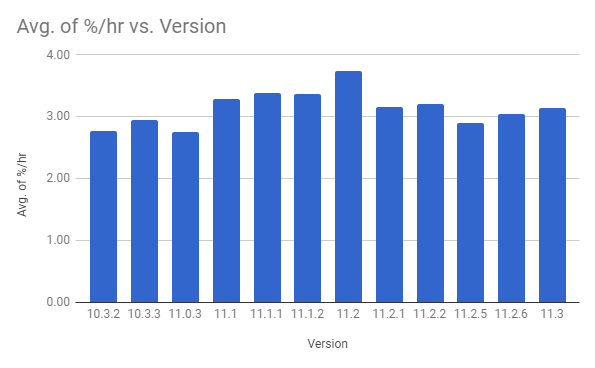
I check and log my smartphone battery reading at 10:00 each night and calculate % of battery consumed per hour.
Here's a chart of my findings on my iPhone 6.

I don't claim this to be scientific, just interesting.
iOS 11 introduced a significant increase in battery consumption then something was changed in iOS 11.2.1 that noticeably reduced battery consumption.
As the phone ages, the battery capacity reduces thus increasing the % per hour due to a smaller base. I didn't include this in my logging as until iOS 11.3 Apple didn't expose the battery capacity.
Incidentally, my battery capacity was 87% on the first of February and 86% on the first of April.
Here's a chart of my findings on my iPhone 6.
I don't claim this to be scientific, just interesting.
iOS 11 introduced a significant increase in battery consumption then something was changed in iOS 11.2.1 that noticeably reduced battery consumption.
As the phone ages, the battery capacity reduces thus increasing the % per hour due to a smaller base. I didn't include this in my logging as until iOS 11.3 Apple didn't expose the battery capacity.
Incidentally, my battery capacity was 87% on the first of February and 86% on the first of April.
Sunday, April 15, 2018
Google Maps Timeline
I use Google Location Services to create a timeline of my travels.
Since I've been using the iPhone 6s I've noticed that the resolution of the tracks has been pretty coarse.

When I switched to the Essential Phone there was a significant improvement in resolution.

Undoubtedly at the expense of battery life.
Since I've been using the iPhone 6s I've noticed that the resolution of the tracks has been pretty coarse.

When I switched to the Essential Phone there was a significant improvement in resolution.

Undoubtedly at the expense of battery life.
Subscribe to:
Posts (Atom)