Showing posts sorted by date for query cloud. Sort by relevance Show all posts

Sunday, September 06, 2026

3-2-1 Backup

I'm always beating the drum on backups. My last post was 2 years ago but it's still pertinent.

It seems like not everybody is following the 3-2-1 backup strategy (archive.org).

It's personally traumatic when it's YOUR data that is lost but when it's an enterprise's data, it's even a bigger problem.


Let's start with the headline:
PBS broadcaster loses access to 50TB of data comprising 70 years of TV history after contracted cloud storage vendor goes defunct
The whole ugly story is here (archive.org).

It seems like Nine PBS skipped right down to the "Cloud Storage" section of 3-2-1. If they had paused for a little bit on the "External hard drives" section they might not have had this problem.

"Might" is the operative word here because they still should have tested their backups.

Sunday, August 16, 2026

Cloud Single Points of Failure

Probably one of my most frequent blog topics is "cloud". I'm sure that you've all read and incorporated my suggestions in your solutions. You're welcome.


Recently, a twist arose that I hadn't considered.

You've certainly taken advantage of your cloud providers geographic separation. But did you ask the really tacky questions?

In July, Google Cloud had an "incident" that took down customer workloads that were spread across multiple geographic "zones."

It turns out that some of Google Cloud services are tied to a single datacenter.

But YOU certainly inquired about that when you contracted to place your workload across different zones and regions to ensure resilience. And a requirement that all of the cloud's services you require were redundant in your contract with service level commitments.

Didn't you?

Now you know.

The details are here (archive.org) and here (archive.org).

Sunday, August 02, 2026

When You Roll Things Out, Stress Test Them

One of my favorite podcasts is Security Weekly News hosted by Doug White.


In a recent episode, Doug got off on testing. Here's a link to that section of the podcast.

So when you roll things out, stress test them. Not just "Oh, yeah, it works. I'm connected."

You know? And the other part of this is, for you, is how reliant are you on things like Wi-Fi?

I mean, which components of your enterprise will no longer function if they just aren't connected?

Say, something goes down. Can you even open a file? Can you even run Word or check your email? Are all your files on the cloud somewhere? Can you no longer communicate with the world  and you're standing in an office window in Manhattan trying to use semaphore flags to contact the Port Authority?

I mean, I don't know but what's your plan? And you know, what are you going to do? Just tell all your customers to come back in a couple of months when we figure it out and hope it works then? Beats me.

Think about it...

Sunday, December 21, 2025

What to Do if Your Phone Is Lost or Stolen

One of my regular podcasts is Security Weekly News. A recent episode covered "Dealing with loss, phone loss." It's almost 42 minutes long and very detailed. I'm just going to share one of the items by one of the hosts. Take a deep breath and dive in.


What to do if your phone is lost or stolen: practical steps to restore peace of mind
  • “IMEI now. *#06#—write it down off device.” 
  • “Find My ON – iPhone and Android. Test it at icloud.com/find or android.com/find.” 
  • “Strong passcode + biometrics. Avoid birthdays.” 
  • “Lock the lock screen controls.” 
  • “2FA everywhere.” 
  • “SIM PIN – physical SIM and eSIM.” 
  • “Backups on.” 
  • “iPhone: Stolen Device Protection ON; know Lost Mode.” 
  • “Android: Find My Device Network; Secure Folder/App Lock.” 
  • “Emergency: Lock & locate; carrier kill SIM; IMEI blacklist; change passwords; police report; don’t chase.” 
  • “Scams: Fake ‘Find My’, extortion texts. Don’t click, don’t reply. Forward spam (7726; KSA 330330). Keep Lost Mode ON.”
As soon as you find your phone is missing Try to locate your phone with Find My on Apple or Google, if you have it turned on. You can use a browser on a computer, tablet or even a friend’s phone.

Remotely lock your phone using Find My and mark it as lost, which helps protect your data, blocks the use of Apple or Google Pay and can leave a message on the screen for anyone who finds it. You can also remotely erase your phone from here too.

Contact your network provider and block your sim to stop thieves running up bills. Also ask it to check for any new “charge to bill” activity and to disable the feature.

Contact your credit card company for any cards you have stored on your phone and disable Apple or Google Pay.

Report the theft to the police and give them your phone’s IMEI number, which may be on the box, in your Apple or Google account or their Find My services.

Contact your insurance company if you have phone cover.

Change your passwords for important accounts. Start with your email account so that thieves can’t gain access to your other accounts through password resets.

Remove your phone from your accounts and services, which will log it out and stop thieves accessing saved details.

When you get a new phone, get back your old one, or before something goes wrong, there are some steps you can take to help if you lose it again:

Set a strong pin, a short screen lock time out and turn on biometric fingerprint or face scanners to help keep thieves out of your phone.

Turn on Find My on your phone in settings, which allows you to locate it, lock it or erase it remotely via a web browser or another device.

Turn on Stolen Device Protection in settings on an iPhone, which blocks access to passwords, pins and credit cards without your face or fingerprint.

Turn on Theft Protection in Google settings on Android, which locks your phone when it detects it has been snatched, enables remote locking, locks the phone if it goes offline and prevents access to passwords, pins and other settings without your face or fingerprint.

Set a sim pin in your phone’s settings, which stops thieves being able to use your phone account by transferring the sim or esim to another phone.

Take note of your phone’s IMEI (serial) number – dial *#06# to see it.

Use biometrics for any and all banking and other sensitive apps that support them to block access for anyone other than you.

Disable access to quick settings, Siri or Google Assistant/Gemini and notifications when your phone is locked. This prevents thieves reading two-step codes, turning off internet access, making calls or accessing data.

Back up your phone’s data and settings using iCloud on an iPhone or Google Drive on an Android phone.

Back up your photos to the cloud using iCloud Photos, Google Photos, Amazon Photos or other service.

Sunday, October 06, 2024

Broadband Data Usage

I last shared by broadband data usage in 2020. Here's my latest chart.
The bump in 3Q2021 and the spike in 3Q2024 are both upload of pictures and data to various clouds as I have transitioned my backup strategies.

When the blue stack is below the y-axis that indicates that Comcast didn't report as much WAN data as my router did. The occasional blue is usually an issue with my router collecting data.

Since my 2020 post, Comcast has reinstated their data caps but raised it to 1.2TB. Steady state, I'm still below .5TB. I can throttle my cloud uploads as necessary.

Sunday, September 22, 2024

Backup 2024

I've been riding the Drobo train a long time. It has served me well. But in early 2023, Drobo closed their doors. My Drobo kept working but reports began of failing units and subsequent problems replacing the hardware. Eventually, my son-in-law's Drobo suffered a hardware failure. He purchased a used replacement but never could get the drives to be recognized. Luckily, he used the Drobo as a backup and the primary copy was still good.

Anyway, this sent me on a quest for a path forward for myself.

My immediate solution was to buy a 4 TB SSD and copy the sensitive contents off the Drobo to that which I did.


I remembered that when I built The Next Decade, I included 2 4TB drives in a Storage Spaces mirror. The Drobo utilization was less than 2TB so that would easily be contained in the Storage Spaces mirror. And even then, probably 1/2 of the Drobo was old DVD rips that I could easily live without.

But then, I wouldn't have an off-site backup. I actually had never had an off-site backup of the Drobo.

As I studied the move from Trump to The Next Decade, I had to research how to switch my CrashPlan definitions to the new server. In that process, I found that I had UNLIMITED storage with CrashPlan.

So I copied the sensitive data (less than 1TB) from the Drobo to the Storage Spaces mirror and included that data in the CrashPlan backup. It took about 3 weeks for CrashPlan to upload that.

I'm sure you all use the 3-2-1 Backup Strategy (archive.org).

So now I had the data mirrored (1), backed up to the cloud (2), but not yet offsite (3).

I have been using Macrium Reflect for several years with good success. I was backing up to a 5TB USB drive that I kept offsite (3). But it bothered me that I had to install Macrium Reflect on each system. Subsequently, I only ran it on Trump.

You'll recall that I had experimented with Drive Snapshot. Due to complications of my own doing, it wasn't satisfactory for me at that time.

So I looked at it again.

This time it did exactly what I needed. It runs as a portable application. I just put the executable on the target drive. It does it's own compression and encryption.

I bought a new 5TB USB drive and am backing up not only The Next Decade but a collection of my laptops. I did a full backup initially and am doing differentials each month. As these backups are encrypted, I keep this drive offsite (3).

For those laptops, I had been using Windows System Image Backup. I still like that as that you can restore from a Windows Recovery Environment but it's all or nothing.

I have created a bootable WinPE disk to use to restore from Drive Snapshot.

Now, I'm looking at taking that interim 4TB SSD and mounting it as a NAS drive (4). You can't have too many backups.

To move data around, I used FreeFileSync.

It's been a journey.

Sunday, June 25, 2023

The Cloud and High Availability

One of my new favorite podcasts is RunAsRadio with Richard Campbell. The June 14, 2023 edition was "High Availability in 2023 with Allan Hirt".


You can see Allan Hirt's credentials on LinkedIn.

Here's the synopsis of the podcast:
What does high availability look like in 2023? Richard chats with Allan Hirt about his work with high-availability solutions today - not just on-premises but also in the cloud. Allan talks about the frustration folks had with moving workloads in the cloud during the pandemic panic, lift-and-shifting workloads focusing on getting things working quickly rather than cost-effectively. The results can be costly, to the point where some folks considering moving back off the cloud again - but does that make sense? Allan talks about creating high availability efficiently wherever you want to run your workloads!
Richard and Allan covered availability as manifested in the cloud. Allan is a SQL Server guru who works for Pure Storage.

Here are some excerpts.
And cloud isn't a silver bullet for availability.
And the cloud doesn't eliminate traditional availability issues.
And the cloud introduces new issues.
And old issues don't go away.
And monitoring gets even more important.
But cloud providers likely provide higher availability than you could.
But just moving to the cloud doesn't guarantee more benefits.
If you're not good at on premises, you won't be any better on the cloud.
AWS - Amazon Web Services
GCP - Google Cloud Platform
IaaS - Infrastructure as a Service
PaaS - Platform as a Service
SCOM - Microsoft System Center Operations Manager
NOC - Network Operations Center

Sunday, April 24, 2022

Between a Rock and a Hard Place

That's where ALL Insteon users find themselves.

I've had a good ride with Insteon. Until April 15, 2022.

I'll let you read Stacey on IoT's coverage. And even SmartLabs' feeble and belated attempt at explaining.


Where that leaves me and 1000s of other Insteon users is that their in-house equipment is fine but crippled due to https://connect.insteon.com being down for the count.


So, where do I go from here? There are several organizations out there trying to help.

But let's think about those solutions. They all cost a couple of $100s. And when you're done, you still have the Insteon switches and plugs which you can no longer buy and the Insteon hub which you can no longer buy. And the solutions put a server in your house that you have to support and maintain.

That's the Rock.

Then there are the alternatives. These mostly consist of Wi-Fi switches and plugs but depend on a cloud service.

What do you do if/when the cloud service goes away like Insteon did?

That's the Hard Place.

My decision is "Less is More." I'm going with Wi-Fi switches and plugs with no hub and server in the house. At least there are less moving parts.

And I plan to use Amazon Echo to create the automation schedules and routines. That gives me one degree of separation from the Wi-Fi switch and plug vendor's cloud service.


Sunday, November 21, 2021

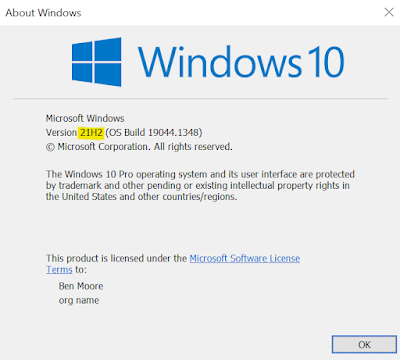
Windows 10 21H2 Enablement Package

Windows 10 November 2021 Update, a.k.a. 21H2, doesn't have many new features, especially for the home user.
  • Adding WPA3 H2E standards support for enhanced Wi-Fi security
  • Windows Hello for Business introduces a new deployment method called cloud trust to support simplified passwordless deployments and achieve a deploy-to-run state within a few minutes
  • GPU compute support in the Windows Subsystem for Linux (WSL) and Azure IoT Edge for Linux on Windows (EFLOW) deployments for machine learning and other compute intensive workflows

It hasn't shown up on ANY of my PCs so far. I always try to test new things so you don't have to. 21H2 is no exception.

Like 21H1, I found a link to download the enablement package. And like 21H1, when I clicked on that link, nothing happened. I had to right click and choose "Copy link address" and then paste that link into another browser tab.

Worked fine.

Sunday, August 22, 2021

If You’re Going to Use the Cloud

... for Pete's sake, please use its strengths.

You know I have mixed opinions on the "cloud" depending on the size and capability of your organization.

An example of leveraging the cloud's strengths is in a recent article I saw from KnowBe4 entitled "Can the Microsoft 365 Platform Be Trusted to Stop Security Breaches?"

KnowBe4 referenced an article from Hornetsecurity entitled "1 of every 4 companies suffered at least one email security breach, Hornetsecurity survey finds." (Don't click on that just yet.)


Realizing that everybody has an agenda, let's look at these articles.

KnowBe4 calls out the following findings:
  • 33% of organizations are not using Microsoft’s multi-factor authentication (MFA)
  • Of those using MFA, 55% of organizations are not using Conditional Access which scrutinizes connection requests beyond just providing credentials and additional authentication factors
  • Only 43% leverage Microsoft’s data loss prevention policies to keep data from leaving the organization
  • 68% of organizations expect Microsoft to keep email safe from threats
This is my point. If you're going to use a cloud solution such as Microsoft 365, leverage its capabilities. Even if they are premium services, they're probably NOT services you could deliver yourself.

KnowBe4's recommendation: Have your "Users ... undergo continual Security Awareness Training."

By the way, that's KnowBe4's business model - training users. And that's a good thing.

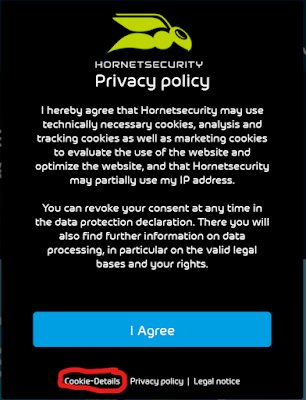
Now, before you click on Hornetsecurity's link, get ready for a pretty aggressive privacy policy.


That almost scared me off. But just click on "Cookie-Details" and slide everything to "Off".

In addition to the points that KnowBe4 raised from Hornetsecurity's study, Hornetsecurity has one more finding: "An impressive 82% of all our respondents who use third-party email security solutions reported no breaches."

I'll bet you can guess what Hornetsecurity sells.

Regardless of the various agendas, the Hornetsecurity study is solid and the findings valuable. Take them into consideration for your Microsoft 365 implementation.

And consider the value-add capabilities of any cloud solution you implement.

Sunday, July 25, 2021

There Is No Cloud

I post fairly regularly about the "cloud." I have mixed opinions depending on the size and capability of your organization.

But recently I was following a story of Google changing their desktop Drive solution, AGAIN.

As frustrating as that will be to Google Drive users, that's not the story I want to tell.

Often the comments on a tech story are as interesting and valuable as the story itself and this was no exception.

It's just another reminder that The Cloud is just someone else's computer. And if they decide to change the rules around using their computer, then you either have to suck it up and accept it, or to try and pull back in all your data yourself. Neither of which is usually an easy or pleasant experience...
Good advice.

Turns out, there's even a t-shirt for this!


Get yours now!

Sunday, May 23, 2021

Saleforce's Circular Dependency

I follow cloud vendors' outages. Broadly, I believe that cloud vendors can deliver higher availability than most SMBs can do themselves. Enterprises are a different discussion.

But I always get a kick of looking at various cloud vendors post mortem reports (archive.is).

Recently Salesforce had a DNS outage. Like other vendors, e.g. Microsoft, the Salesforce outage even took down their status page!
And look at the spin they tried to put on it.
"We're not blaming one employee," said Chief Availability Officer Darryn Dieken.
And then they threw him under the bus.
"For whatever reason that we don't understand, the employee decided to do a global deployment," Dieken went on.
They don't understand?

But wait, there's more...
"In this case," he went on, "we found a circular dependency where the tool that we use to get into production had a dependency on the DNS servers being active."
 
If you're going to run a cloud service, you've GOT to design to avoid these kinds of problems.

Sunday, October 25, 2020

Remote File Manager for iOS

I still wrestle with how to backup photos from my iOS devices. In a recent post, I discussed how I use OneDrive for daily backup.

But sometimes you want to backup photos en masse.

The best thing I've found is Remote File Manager from Jane Zhang.


While Remote File Manager is not for the novice, it is an extraordinarily capable app.

I use it to copy photos from my iOS devices to my NAS storage, e.g. Drobo.

Click on the +.


And chose to create a new network connection.


Notice you can also specify various cloud services.

Select the NAS device.


Navigate to the destination folder you want.


Click on "Edit" then "Upload".


Pick the Photo Library on the iOS device and then the album you want.


Select the pictures you want and then click on "Save".


Sit back and watch.


Sunday, December 01, 2019

A Fool and His Data Are Soon Parted

Azure just keeps having problems. And a recent incident happened while their CEO was speaking at a conference in Sydney "focused on showing off how Microsoft's cloud technology can have a transformative impact on businesses."

While it's easy to pile on with Azure, the situation is endemic to the cloud environment. Not withstanding my recent post, cloud implementations still carry significant risks. The news.com.au article states:
While cloud technology can have a massive impact on the way businesses run, as we are currently witnessing, it can also create new headaches when things don’t work how they’re supposed to.
And this was the second Microsoft cloud outage in 24 hours.

Really worrisome to me is that the Microsoft Office portal wasn't responsive.


As usual the comments are the most interesting. Clearly some are trolls but some are really to the point.
captain goodvibes
Anyone who trusts cloud technology to store data risks it disappearing into thin air. The only way to safely store data is on a hard drive. To paraphrase an old adage, a fool and his data are soon parted.
Anthony
The problem is for a lot of organisations is that they are too small to safely and economically run their ICT. Large vendors can provide resilience, security, and responsive services easier. And no, I don’t work for Microsoft, but I have worked in outsourcing :-) so I know the numbers
HG
If your business model is a monopoly, make sure your cr*p works.
Gordon
I spent most of my career in IT, I just do not understand why anyone would trust another company to manage all of their business critical data off site....
Yeah, worry about your business critical data.

Sunday, November 24, 2019

But Can You Do Better Than This

If you've been reading this blog, you know that I worry about cloud availability.

However, most of the time the big cloud providers have more availability and redundancy capability than almost any enterprise can provide.

For an example, Microsoft recently had an outage of its Multifactor Authentication (MFA) for Azure and Office 365 users in North America,

There's a report on it here. And here's Microsoft's Root Cause Analysis.


Go read the Next Steps. Here's #1:
  1. Fine-grained fault domain isolation work has been accelerated. This work builds on the previous fault domain isolation work which limited this incident to North American tenants. This includes:
  • Additional physical partitioning within each Azure region.
  • Logical partitioning between authentication types.
  • Improved partitioning between service tiers.
Do you think your enterprise could add "Additional physical partitioning," "Logical partitioning between authentication types," and "Improved partitioning between service tiers?"

If you could, you must be in the Fortune 100. And that's just the first bullet of actions.

These outages from the cloud providers get a lot of publicity but unless you're a mega-scale enterprise any of them are way more capable than you'll ever hope to be.


Sunday, November 17, 2019

The Cloud is Full

Recently ZDNet's  All About Microsoft reported that Microsoft Azure customers had reported hitting virtual machine limits in U.S. East regions.
This is scary.

There were a small number of comments (7) that related that they had had the same experience. Here is a typical comment.
GetNrDone
Happened to me. I tried to deploy a new SQL database in eastus2 2 weeks ago only to be greeted by an error. Opened a tickets and was basically told there was nothing they could do. Escalated the issue with our TAM which also could not get approval for 1 database to deploy. I was asking for the smallest database they offer (s0) and was told we couldn't have it. No communication before, no warning emails, no blog posts, nothing in the service dashboards, even our account team didn't know anything about it. Completely blindsided me and delayed development on an app for a week while i could move resources to another region. Unacceptable and definitely does not live up to promises made!
There's a reddit thread on this here.
dops0
We've faced this issue in North Europe, East US and West US 2. This has just started happening over the last couple of weeks and what's even more frustrating is, we already have sufficient quota allocated to us, but, our users haven't been able to deploy their machines even when within this quota.
This issue hasn't blown up so either it has been resolved or customers were able to work around it as GetNrDone did.

Regardless this is another consideration for using anyone's cloud services. I'd even suggest trying to putting a clause in your contract that guaranteed x% of available capacity on the vendor's part. I'd bet that none of the vendors would accept that but that would at least make the vendor play their cards.

Sunday, November 10, 2019

Cloud Management Skills

Recently McAfee published a report on cloud adoption and risk. The Register did a review of the McAfee study.

The Register concluded:
The ongoing rash of data leaks caused by misconfigured clouds is the result of companies having virtually no visibility into how their cloud instances are configured, and very little ability to audit and manage them.
That's really scary. But it supports my concerns that moving workload to the cloud doesn't eliminate work/effort, i.e. manpower, but rather changes the skills required.

An organization should thoroughly understand the skills change that moving to the cloud brings.

These changes may be addressed with training but may require changing personnel to acquire the appropriate skills. These changes and the change management time and effort should be incorporated in the project timeline and budget for cloud implementation.

McAfee observed:
It’s possible the speed of cloud adoption is putting some practitioners behind.
The number 1 cause of cloud security issues noted by McAfee was "Lack of staff with the skills to secure cloud infrastructure."


That entire list is a good reference when considering moving workload to the cloud.

Sunday, April 14, 2019

Outage Communication

This post isn't bashing cloud providers, although that's an easy target.

What this is about is to give some examples of outage communication from various providers. And yes, Google and Facebook are in different sectors but the wide differences in their outage communications are still interesting.

On March 12, 2019, Google suffered an outage that impacted Gmail and a variety of their services that depended on their file system. Over the next several hours they posted 3 updates on their G Suite Status Dashboard. The first noted that they were having an outage. The second update was posted in under 2 hours and stated that they were continuing to investigate. It also enumerated the services that were impacted. The final update was 2 and 1/2 hours later and said that the issue was resolved.


But Google didn't stop there. 2 days later they posted a thorough postmortem (archive.is) that identified a root cause and remediation and prevention.

That's the way to communicate.

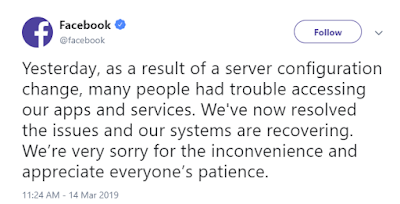
On March 13, 2019 Facebook had a 14-hour outage which took down the Facebook social media service, its Messenger and WhatsApp apps, Instagram, and Oculus.

Here's Facebook's communication on that outage.


Yes, that's it.

Which of these would you prefer from your services provider? Ask about that before you sign a contract and consider putting a requirement for communication and follow-up in the contract.


Sunday, March 03, 2019

Zoolz Update 2

I continue to be impressed by Zools as a backup tool. You can get Lifetime of 1TB Instant Vault and 1TB of Cold Backup Storage here for $45.

Since my last post I have tried the Instant Vault storage. Think of it as 1TB of shared storage like Dropbox shared files. But you have to login to the Zoolz web interface and drag and drop files/folders onto a web page.


Then you can request shared links to the files/folders. Those files/folders are NOT automatically updated. This is a separate terabyte of storage from the Cold Backup Storage.

But what really got me looking back at Zoolz was that my CrashPlan for Small Business at 75% discount for a year expired and my monthly charge went to $10. Not a big deal but $10 more than I used to pay.

In revisiting Zoolz I came across a feature that I hadn't noticed before - Hybrid+ backup.
Zoolz Hybrid+ doubles your backup protection by creating a copy of every backed up file to a local server, external or network drive; ensuring faster recovery when needed. Zoolz restore is intelligent enough to minimize recovery time by checking your local Hybrid storage for the file before restoring it from the web, reducing time and bandwidth resources.
And it's included with the regular Zoolz offering.

So I bought a 2TB Western Digital USB 3 drive and plugged it into the back of "The Trump".

Here's how you turn it on.


It took about 4 hours to sync the 400+ GB that I have selected to backup with Zoolz.

Zoolz support was excellent in helping me understand how Hybrid+ worked, even doing some experiments to answer some of my questions.

So now I have cloud backup with Zoolz Cold Backup Storage, local backup with Zoolz Hybrid+, and offline backup with Macrium Reflect.

Sunday, February 03, 2019

Friends Don't Let Friends

Microsoft Azure has had another round of problems.

Microsoft Office 365 users in Europe unable to access mailboxes for a full day

Microsoft cloud services see global authentication outage

Microsoft threw Level 3 under the bus on the second outage.
On the Azure status page, Microsoft indicated that the source of the problem is with Level 3, an US-based ISP that provides connectivity and various other services to Microsoft data centers.
At least customers could get to the Azure status page this time.

So I went of to downdetector.com. Here's what they showed several hours after the problem seemed to be resolved.


1600 incidents reported to downdetector.com at the peak.


And impacting several continents.

But Level 3 (CenturyLink) is a backbone provider. Shouldn't a Level 3 problem have affected many service providers?

So back to downdetector.com. Here's what they reported for Amazon Web Services (AWS).


No apparent correlation to the time of the Azure outage and less than 10 incidents reported in the worst hour.

So it must not be a backbone issue impacting multiple service providers?

Not so quick.


AWS' incidents were from the same geography as Azure's.

My assessment:

  • Level 3 (or some backbone provider) probably had an incident that affected all its customers.
  • AWS was able to tolerate the backbone outage better than Azure.

YOU get to decide where you want to put YOUR data.

Sunday, October 07, 2018

Windows 10 October 2018 NOT

Microsoft seems to have made a mess of their latest rollout of Windows 10.

Windows 10 October 2018 (1809) dropped on 10/02/18.

Here's a list of the new features in 1809:
  • File Explorer now features a dark theme when Dark Mode is enabled in Settings.
  • You can now name live folders in Start.
  • A new "safe removal" feature has been added that lists open applications that might be using an external GPU connected via Thunderbolt 3.
  • Notifications in the Action Center now feature a fade-in effect when the Action Center is opened.
  • A redesigned snipping experience is present and can be accessed via WIN + SHIFT + S.
  • Snips will now present a notification that will open up into Screen Sketch, which is now a dedicated app.
  • You can now configure pen peripherals to take a snip when pressing a button.
  • The Print Screen button can now be configured to open Screen Sketch.
  • A new "Screen snip" action has been added to quick actions in the Action Center.
  • Copied content can now be seen in a new clipboard experience, accessed with WIN+V, that can also sync to the cloud and across devices.
  • There are now three different modes you can select when wirelessly projecting your screen, and these modes are game, productivity, and video modes.
  • Users upgrading to this release for the first time will be welcomed with a post-OOBE UI that walks the user through setting up new features added in this release.
  • Game Bar has been redesigned with new features including an overview of system performance and more.
  • Search will now provide a download link for programs searched online.
  • You can now use Windows Mixed Reality without a monitor.
  • Storage Sense can now switch files to "online-only" if they haven't been accessed after a certain number of days, saving space on your local disk.
  • Pen users can now ink directly into text boxes by default.
  • Users can now view the real world when using Windows Mixed Reality using a headsets built-in camera.
  • Emoji 11 is now available.
  • Game bar is now accessible via the Apps List in Start.

While it's a long list, there's not really much new in there.

It turns out that many users are complaining that the upgrade process DELETED their personal files, Documents, Pictures, Music, Videos, etc.

This problem with the 1809 upgrade had been reported by the Windows Insiders (testers) but Microsoft still released 1809 to the public.


Windows users who clicked "Check for updates" got it instantly.

On 10/05/18 Microsoft stopped the rollout.and advised:
We have paused the rollout of the Windows 10 October 2018 Update (version 1809) for all users as we investigate isolated reports of users missing some files after updating.
If you have manually checked for updates and believe you have an issue with missing files after an update, please minimize your use of the affected device and contact us directly at +1-800-MICROSOFT, or find a local number in your area .
If you have access to a different PC, please contact us at https://support.microsoft.com/en-us/contactus/ (link will vary according to country of origin).
If you have manually downloaded the Windows 10 October 2018 Update installation media, please don’t install it and wait until new media is available.
We will provide an update when we resume rolling out the Windows 10 October 2018 Update to customers.

Wow! "[P]ease minimize your use of the affected device" and "please don’t install it."

Take their advice.

And while you've got a little time, now is a good opportunity to practice your backup AND restore.

Incidentally, I've updated my sacrificial laptop to 1809 with no problems.