Sunday, October 11, 2009

Office Web Apps

Heard about Microsoft's Office Web Apps? Didn't get in the Beta? Want to? Here's how.

Go to SkyDrive. Login. See here for how to get a Windows Live ID.

Now just go to any folder. I chose Documents. Click on "Add Files" and upload a Word document. You'll get this screen when it's done.

Look at that cute little line!
Join our preview program to create, edit, view, and share Office documents! Learn more
Don't just sit there. Do what it says. Click on "Join our preview program" and you're on your way.

Click on "Accept" and then click on "Documents" up at the top.

Hey! There's something new there - New. Pull it down and click on Microsoft Word document.

Sorry. That's not ready.

Click on "Microsoft Excel workbook" and that'll work.

Click on "Create" and you're on your way.

Pretty cool, huh?

Sunday, October 04, 2009

Live Mesh

You'll recall I was a BIG fan of Microsoft's FolderShare. I used it until my wife's work blocked it.

Then Microsoft changed FolderShare to Sync. But wait, that's what Microsoft calls the gadget that Ford puts in its cars. I'm confused. I think I'm not alone.

Anyway, to get back on track, I wanted to find something to synchronize photos between my house and my daughter's house. I looked at a lot of alternatives including Dropbox and Hamachi. Close but no cigar.

Then I stumbled across Microsoft's Live Mesh. Its web site doesn't do a good job of explaining but just go with it for a minute. You need to have a Windows Live ID. Don't sweat that even with the footnote:
If you have a Passport Network, Hotmail, or Windows Live Messenger account, you can use it as your Windows Live ID.
Just click on the "Need a Windows Live ID?" and create one using your favorite e-mail address.

Login and you'll get this screen.
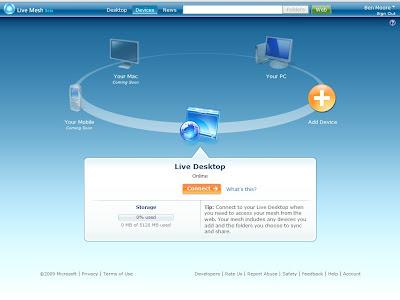
Click on "Connect" and you'll get this screen.
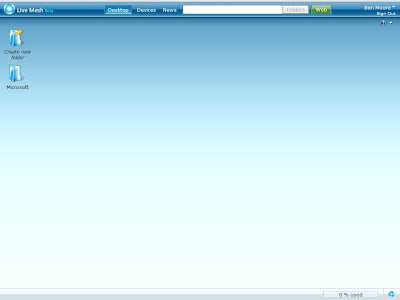
From here you can create a folder and upload (using the ugly web interface) just like SkyDrive. Microsoft seems to have at least two of everything.

This folder on your Live Mesh Desktop is a little different than SkyDrive though as you'll see in a minute.

Back up at the top of the screen, click on "Devices" and click on "Add Device."
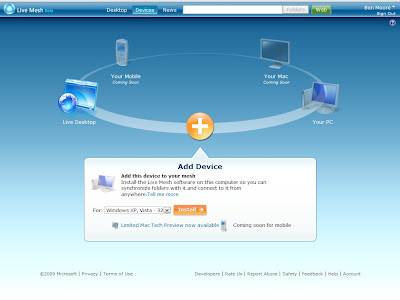
Pick your OS and click on "Install."

Unlike most Microsoft products, this is a light client.

Now, the folder you created above can by synchronized with your PC, i.e. Device. Then you can update it on your PC and the changes will be replicated to the folder on the Live Mesh Desktop. And you can invite other Live Mesh users to share it.

But the real trick is that now you can create a folder on your PC and enable Live Mesh for it and then invite other Live Mesh users to share it. BINGO!

It works like a charm. I have created two folders and enabled Live Mesh for them and shared them with my son-in-law. One folder is for us to send to them and the other for them to send to us. One would suffice but separating is easier to think about.

Think of all the things you can do with this. You can share like we have. You can use a remote PC (think your mother's) as a backup! And if you place this folder on your Live Mesh Desktop you can access if from the web. By the way, this all works fine with Firefox!

Oh, did I mention it is free?

Tuesday, September 29, 2009

aviary.com

Recently I was reviewing a web site that was still evolving and wanted to mark it up and feed my comments back to the creator. (He is a friend of mine so I wasn't just taking pot shots at him!)

I wanted something to capture the entire page (most required you to scroll to see it all) and then be able to annotate it.

I found nirsoft.net's SiteShoter but that was really too simplistic and didn't allow me to annotate.

Then I found aviary.com.

In some aspects it is simplistic as well. For example, to capture a page, just put "aviary.com/" in front of the URL, e.g. "aviary.com/http://google.com"

Then you get a Flash page up with the target web page captured. There are some simple editing/annotating tools there and the option to save it to your desktop or to their site.

The editing capabilities here are simple (that's what I was looking for) to the point of being rudimentary. But be careful of clicking on any of the more advanced options. Let's just say they go to the other end of the scale. They were way more complicated than I needed.

Play with it some before you're trying to use it for real. Find your own sweet spot for the level of complexity you need and can handle.

Tuesday, September 22, 2009

Link to Link to Link to...

I realize this is petty but it frustrates me. I hate it when one news feed just references another that references another that references another ...

Today on my engadget feed was an article on a robot that was being developed to draw blood. I clicked on the link. Here is the string of links I had to follow to get to the original post.

engadget
Switched
OhGizmo
BotJunkie
Wired

Tuesday, September 15, 2009

Google Maps Traffic

I have Google Maps on my BlackBerry Curve. One morning on my way to a meeting I ran into a traffic jam on I-240 Eastbound.

As I sat there, I had time to play with Google Maps. Tennessee's SmartWay has started publishing traffic reports. Google picks them up and overlays them on their maps.

Google also "crowd sources" traffic information from the My Location feature of Google Maps. This is enabled by default but you can turn it off.

When I first looked, it seemed that the information was incomplete. I saw green on the Westbound lanes but the green stopped just behind me.

It turns out that there is a yellow line indicating slow traffic on top of the yellow line for Eastbound I-240. Look closely and you can tell the the slow traffic line is more golden than the road line. That's hard to tell on the low contrast BlackBerry screen.

This became obvious as I traveled further Eastbound. A red line started indicating stopped traffic!

In a later trip I was able to take advantage of this information.

I was Eastbound on I-240 approaching Millbranch and the traffic slowed to a crawl. I dived off on Millbranch.

Once on Millbranch I fired up Google Maps and this is what I saw.

What that told me was that I could hop back on I-240 at Airways since the green started back up between Millbranch and Airways.

How cool is that?

Tuesday, September 08, 2009

Podshifter

If you listen to a lot of podcasts like I do, a way to speed up the replay speed without distorting the sound would be a great find.

Well, then go to podshifter.com. Paste the URL of the RSS feed into the page and select how fast you want to go. I use 1.4. Click on "shift it" and you'll get a page back with a new URL that you can put into your podcast catcher. (I just use Google Reader.)

This reduced Windows Weekly 118 from 105:31 to 75:23. That'll give you half an hour of your life back!

There's one nuance that took me a while to figure out. PodShifter doesn't compress the podcast until someone requests it. How that affects me is when the RSS feed shows up in Google Reader and I click on it to download, I only get a 1K file. This means that PodShifter needs to go copy that file and compress it. Just delete that small file and wait an hour or so. The next time you try to download you'll get the compressed file.

I listen on my BlackBerry and the name that presents in the Media Player looks garbled. Interestingly, the album art is fine.

Tuesday, September 01, 2009

BBWeather

One of my favorite BlackBerry applications is BBWeather. You can get the over the air (OTA) download here.

Here's what your home page will look like when the BBWeather icon is not selected:

Here's what your home page will look like when the BBWeather icon is selected:

The options you select affect this. We'll look at mine in a little bit.

Click the icon and you'll get the Current Conditions:

Press Menu and select Daily Forecast:

Here's the Daily Forecast:

Press Menu and select Hourly Forecast:

To set it up, go to the main menu and select Options and then Add.

Enter the ZIP Code and press the menu key.

Select Lookup Location ID. It will fill in the name of the location. Select Ok.

There are several settings to consider in the Options menu. Here's how I have mine set.

Oh, BBWeather is free.

Tuesday, August 25, 2009

Google Voice

There can't be much new to be written about Google Voice. Everybody has covered it. Here's the wikipedia article on it and here's the NY Times article on it.

I've been using what is now Google Voice since it was GrandCentral. Google bought GrandCentral and seemed to let it lie dormant for a long time. In the Spring of 2009 Google renamed it to Google Voice and began ever so slowly handing out new invitations. Google killed off a couple of GrandCentral capabilities (being able to make your ring-in sound like a European phone) but added many more such as voice mail transcription (cute but really pretty worthless).

I use it for 2 purposes. First, I have it ring my home phone and my cell phone simultaneously so I can always be found. I can even add locations when I'm going to be somewhere else, e.g. my mother's, for a while. That's so easy to do.

Second, I use Google Voice to present a consistent caller ID. The free long distance is nice but I use Google Voice to make even local calls so that people I call always see the call coming from the same number.

There are some other considerations. If you receive a call on your cell phone through your Google Voice number you don't get the benefit of mobile-to-mobile. Also, Google Voice is subject to service disruptions like Google is. Occasionally, you'll notice things like incoming calls going straight to voice mail or even that the call can't be connected.

Google Voice is not a part of Google Hosted Apps. What this means is that if you have a Google Hosted Apps e-mail (like I do) that your contacts are not shared between your Google Hosted Apps e-mail and your Google Voice. Maybe someday.

I'm sure that Google is going to continue to develop Google Voice. This service will redefine what voice service delivers.

Tuesday, August 18, 2009

Crapware

I can't tell you how many PCs I've come across that have all kind of toolbars and crap installed on them. You wonder why people install all of them. They're such a drag on the PC's performance.

Here're a couple of blog posts that explain what's going on. First there's Windows Secrets' article on the latest Java update. Next there's Lifehacker's post on the Digsby instant messaging client.

I won't rehash these stories. Just go read them yourself. And when you install any update or new program, READ EVERY SCREEN and uncheck freely.

Tuesday, August 11, 2009

New Google Search

Mashable has a post about a test version of Google Search. Google talks about it here.

Here's a post that tells you how to add it to your Firefox search bar.

It's too early to tell how different it is.

Wednesday, August 05, 2009

Ultra Capacitor Screwdriver

My wish lists for gifts are always made up of URLs. For Fathers' Day, the URL was this. My wife was a little suspicious of that web site but she went with it. You can also get it at Amazon.

What this gadget is is a Coleman 5.4V Flashcell Cordless Screwdriver. That's a mouthful. What it means is that it doesn't have a conventional battery. Instead it uses an ultra capacitor.

The effect of this is that it charges in 90 seconds. It does have a downside. It has about half the capacity of a traditional rechargeable screwdrive. This isn't much of a downside when the charge time is less that the time it takes you to go to the bathroom.

Popular Mechanics has a good write-up here.

Here's a YouTube video on it.

Monday, July 27, 2009

ThinkPad X40

If you've been reading my posts for a while, you know I'm a big fan of ThinkPads. I've written about my history of ThinkPads, my current T42, and my wife's current T61.

For my birthday last year, I got an Asus Eee PC 1000H. I love the physical dimensions of the Eee PC and the battery life. The battery lasts hours and I've never had it run out on me. As an aside, I have begun to notice that it drains slightly faster but I'm talking about 4 hours vs. 6 hours. The right shift key took some getting used to but I'm pretty good with that now. The 1024x600 screen takes a little adjusting to.

The 1000H weighs about 3.3 lbs. While the dimensions always impress onlookers, the weight surprises them. The weight is in the battery which is at the back of the unit so it makes it off balance when the screen is tilted back. It wants to tip over if it's on a soft surface, e.g. your lap.

The ongoing irritant is the touchpad mouse. I like that it is multi-touch but for those of us with that little dent on the tip of their right index finger from the ThinkPad's TrackPoint, nothing will take its place.

So I kept lusting after ThinkPad X-series. More so the slightly older ones with the 4x3 screens rather than the latest with wide-screens (I call them short-screens). In one of my previous posts I even said "I can't imagine what a new X40 would be like."

Now I can.

On my favorite used PC site (Intechra), I came across an off-lease ThinkPad X40. I held my breath until I had it in my shopping cart and checked out. The cost with shipping was just over $200.

It is a 2371-G4U with a Pentium M 1.4GHz, 1 GB of RAM, and a 40 GB HD. As expected, the battery isn't "fresh" but it will run for an hour or so. It came with 802.11A/B/G and an SD card slot (the X20 had a CF slot).

The appearance looks like somebody had it in a docking station for 3 years. Barely a mark on it anywhere.

I used my procedure to reuse the Windows XP Pro COA.

It is practically the same size as the 1000H but amazingly it is lighter! 2.7 lbs. And it's thinner. Overall it clearly feels smaller than the 1000H. Even more people "oh and ah" over it than the 1000H and it's 4 years old!

I need to replace the battery (about $40 on eBay) and am looking at doing some sort of solid state drive.

Tuesday, July 14, 2009

Browser Vulnerabilities

It's been a while since I've talked about vulnerabilities. This time it seems like there's been a flurry in both Internet Explorer and Firefox.

Last week, SANS reported a 0-day exploit in Microsoft's DirectShow ActiveX control that can be exploited in IE. This ActiveX control is not intended to run in IE. Microsoft's advisory is here. Microsoft created a "Fix it" article that turns on its kill bit. Though unaffected by this vulnerability, Microsoft is recommending that Windows Vista and Windows Server 2008 customers apply the "Fix it."

Then this week, SANS reported a 0-day exploit in Microsoft's Office Web Components ActiveX control that can be exploited in IE. This ActiveX control is not intended to run in IE. Microsoft's advisory is here. Microsoft created a "Fix it" article that turns on its kill bit. (Is there an echo in here?) Microsoft's Security Response Center says it doesn't affect Vista. Read the details for yourself.

Then today, Brian Krebs reported a "highly critical" vulnerability in FireFox 3.5. He describes the "about:config" as a work-around:

To disable the vulnerable component, open up a new Firefox window and type "about:config" (without the quotes) in the browser's address bar. In the "filter" box, type "jit" and you should see a setting called "javascript.options.jit.content". You should notice that beside that setting it reads "true," meaning the setting is enabled. If you just double-click on that setting, it should disable it, changing the option to "false." That's it.
The bad news is that this slows Firefox's Javascript back down to 3.0 levels.

Sunday, July 12, 2009

Creative Labs Vado HD

As a going-away present, my former co-workers gave me a gift certificate at amazon.com, one of my favorite stores. The timing (of the gift certificate) couldn't have been better.

My daughter was expecting our first grand-baby so I was in the market for a grand-parent's camcorder.

I had already been shopping for a camcorder. I wanted something with a USB connector. Not only did the Vado have that but it had a built-in HDMI connector. It uses its own 8 GB internal storage so I didn't have to buy a separate SDHC memory card.

I'd read a lot about problems with low light recording and shaking but I haven't seen problems with either of these.

The size is amazing. It is only slightly larger than my wife's Blackberry Pearl. It charges from the USB connector so you don't have to fool with a power adapter.

It wasn't obvious from the advertising but the USB presents a drive to Windows that has Autoplay. If you let the autorun.inf run, it installs a codec for the Vado and then launches a limited version of muvee's Reveal. It is pretty crippled, e.g. it won't convert to DVD, but it does Ok.

It even has a button that directly uploads to youtube. I've also used its capability to consolidate a couple of clips and output a .wmv.

The codec that is used by the Vado is a proprietary h.264. Even with the Vado codec installed, I've not been able to process the files directly using uLead DVD Movie Factory or Pinnacle Studio.

Tuesday, July 07, 2009

Posterous

My wife has 2 shelves in our kitchen full of recipes. They're in boxes, magazines, books, and scraps of paper.

I've been wondering how I could help her keep up with them and find just the one she wants. Of course the first thing that came to mind for me was technology, perhaps a data base?

Then I came to my senses. I played around a little with Google Docs but that seemed awkward.

One day, I came across posterous.com. All you have to do is to e-mail something to post@posterous.com and it's posted. They even clean it up for you. For example, if there are multiple pictures, they setup a picture gallery!

You can see her recipes here.

There's a great podcast about it here.

Sunday, June 28, 2009

Geotagging

After our trip to Long Island last summer, I laboriously went through all my pictures on Picasaweb and geotagged them. I liked the result but not the effort!

So I've been investigating how to do this automatically. I searched high and low for GPS loggers. I looked at ATP PhotoFinder (original and mini), Sony GPS CS1KA, Qstarz BT-Q1000P, Canmore GT-730F(L), i-gotU GT-100, AMOD AGL3080, and more.

My key criteria were that I wanted it to be rechargeable via USB and to not require Windows drivers to get the data off the device.

The closest I came was the Columbus V-900. It recharged via USB and wrote KML files to a micro-SD card. That way all I needed was a micro-SD to SD USB adapter. Close enough so I clicked on "Submit" on Amazon.

Then I remembered my Blackberry Curve has GPS. Duh! I googled "Blackberry geotagging" and eventually found GPSLogger on some of the Blackberry forums.

It met both my criteria. Obviously the Blackberry is rechargeable via USB and GPSLogger creates standard format files on the Blackberry's micro-SD card.

The short version is that it just works. Surprisingly, it runs in the background. I've run it for 12 hours and it drew down about 1/2 the Blackberry's battery.

Here's the track in GeoLogger:

Here's the altitude:

And the speed:

Here's what I have for Options:

When you want to export the track, go to the path manager and "Export Path to Filesystem":

To apply the GPS data to the photos, I'm using GeoSetter. It's real simple but very capable.


Here's the result in Picasaweb.

Now I'm set for our next vacation. And I have to return the Columbus V-900.

Sunday, June 21, 2009

KWORLD SA290-Q LE

I've been trying to find a use for the Astar MP-32HB HD TV that I got a couple of years ago. When I got the Sony KDL52W3000, I moved the Astar to my bedroom. I ran it on cable-ready for a while but that was all SD. Then I got a second HD DVR for it.

That had a couple of problems. First was the cost, about $30 per month to Comcast. Second was the noise. The hard drive kept spinning up and down. I replaced the DVR once but the second did the same thing.

Really, all I watch back there is the 10 o'clock news and the late night talk shows. It seemed silly to spend that much money for that but I had gotten where I liked the HD quality.

That's where I was when the digital TV transition happened. What that brought was that Comcast started carrying the local stations in digital format and in HD resolution. Unfortunately the Astar doesn't have a QAM tuner.

What I did is got a KWORLD SA290-Q LE from newegg.com.


Notice that it will also do VGA out so you could drive just an old PC monitor.

Read the reviews on newegg.com. Lots of people complain about it. The setup instructions are non-existent but the comment thread helps a lot. I bought a cheap programmable remote (GE 24950) and replaced the terrible remote that comes with it.


It has a bright blue light indicating power. That wouldn't do in the bedroom. I covered it with a 1/2 inch square of black duct tape. Perfect.

I feed the Comcast cable directly into it and get around 30 digital channels, no cable-ready although I had expected them also. Most of the digital channels that I've checked are HD, some 720p, some 1080i. I use component video to drive the Astar.

It'll pay for itself in 2 months.

Wednesday, May 20, 2009

Firefox Again, Again

This time I think I've found a keeper. I've been really leveraging Google's Hosted Apps for my domain using e-mail, Docs, Calendar, Tasks, Voice, etc. What I've run into is that IE7 (with IE7Pro) suffers seriously from memory creep. And no, I haven't tried IE8. IE7Pro reportedly doesn't work consistently with IE8.

The symptom I observed was that my real memory used crept up over 1GB after a couple of hours of usage. My T42 only has 1GB of RAM so that's bad. I could see this by firing up Windows Task Manager and looking at the Commit Charge at the bottom right. The Mem Usage of iexplore.exe would be a couple of hundred MB. When I'd stop IE7 the Commit Charge would drop lots more than what was attributed to iexplore.exe. Something was leaking somewhere! I suspect Javascript.

I thought I'd try Firefox again, again. Wanting to get as current as possible, I downloaded Firefox 3.5 beta 4. I haven't had a bit of trouble from the beta.

Most of the Add-ons I'd used before are still valid with Firefox 3.5 beta 4. Only Tab Clicking Options wouldn't work with it. This was easily replaced with Close Tab by Double Click. You don't even have to set any options. On QuickDrag I also checked "Open tabs for text searches in the foreground."

Besides the previous tweaks, I also found one to make search results open in a new tab.

howtogeek.com says:
Type about:config into the address bar, and then put the following into the filter box:

     browser.search.openintab

Double-click the value to change it to true.
This time, I also turned off third party cookies.

So far, so good.

Wednesday, May 13, 2009

Atlantis Takes Off

This week I flew down to Orlando to see Atlantis take off. As this was the last mission to the Hubble the area was packed. I watched from a location on the Cocoa Beach Causeway (SR 520).

The last mission to the Hubble was in 2002. This mission was scheduled for 2004 but scrubbed as too dangerous after the Columbia disaster in 2003. Post-Columbia, the plan in case of orbiter damage has been to keep the astronauts at the ISS until they could be rescued. This isn't possible when going to the Hubble. Hence, the Endeavour shuttle was on the other launch pad in case a rescue mission was required.

What sounds like wind noise starting at about 1 minute into it is the noise from the launch finally reaching our location. That says we were about 8-10 miles away. It gets louder as the shuttle gets higher then dies down.

Click on the HD in the bottom right corner of the picture. Depending on your Internet speed, you may want to then click on pause and let it load before playing.

This was shot with my Creative Labs Vado HD using a tripod (at first).

Oh, I haven't told you about the Vado HD have I? Later...


View Larger Video

Friday, May 01, 2009

IE8 Blocker

I'm really pretty neutral on Internet Explorer 8 right now. I haven't played with it yet. Microsoft just moved IE8 over to "Critical" status so it'll get pushed to a PC near you soon. I'm pretty conservative on letting things get pushed to my PCs.

With IE7 I used the IE7 blocking tool from IntelliAdmin.com. It worked great.

With IE8 Microsoft came out with their own blocking toolkit. Needless to say, it's bigger than a breadbox! It ends up creating a script that you have to run from a command line and set switches. Yuk.

In the end, it simply creates a single registry key. I created a pair of .reg files that do the same thing.

Just download this zip file. In it are 2 files, one to block IE8 and one to unblock IE8. Just open the zip file and double-click on whichever you want to do. Click on "Yes" in the dialog box that comes up and you're done. Look at them pretty closely. Use at your own risk.

As I was preparing this post, I went back to IntelliAdmin.com to see if they had done something for IE8. Needless to say they have. They have added IE8 blocking to their Network Administrator tool. Their article is here.

It's not quite as trivial as my .reg files (it requires an install) but I'm sure it's very good.