Sunday, August 24, 2025

WOA, Finally

Just a day short of 6 years ago, I wrote about WOA - Windows on ARM. Finally it's here. I've enjoyed my MacBook Air's power management and fan-less operation. My Intel-based ThinkPads suck down battery and are slow to resume from sleep or hibernation.

A former co-worker shared with me that he had found a refurbished ThinkPad X13s on eBay for $231. This was a nice discount from the original list price of $2,169.


Here's a good review (archive.org) on the X13s. The X13s is running a Qualcomm Snapdragon processor, an M.2 512GB SSD and 16GB of RAM. It weighs just over 2 pounds with a 13.3" screen.

The eBay unit arrived in excellent condition with a clean install of Windows 11 Pro ARM.

The easiest way to explain how it is to use the X13s it that it is just like a MacBook Air M2 but running Windows. It is fan-less and the battery life is hours. Pretty much, you only need to plug it in overnight. During the day, just set it down and close the lid. Pick it up hours later and it is instantly just where you left it.

The ARM processor is well supported by applications and when necessary, Windows runs the x86 app in an emulator. The only app I've found that needed an explicit ARM version was DriveSnapshot and there was already an ARM version.

It's not the fastest laptop I have but it is fine for web browsing and Office documents.

Sunday, August 10, 2025

My Devices

This is a list of the non-phone devices beside my chair:
  • ThinkPad X390
  • Apple MacBook Air M2
  • Apple MacBook Air early 2015
  • Apple iPad Pro 11-inch 3rd generation
  • Lenovo Tab M9
  • Microsoft Surface Pro 8
  • Asus Transformer Mini 


Sunday, June 22, 2025

Creepy, Just Creepy

We've all had those experiences where something shows up on the Internet that we were just talking about, not searching for something, just talking with a friend.

Recently I've had 2 such experiences. First, a friend of my wife fell down on an escalator and a man jumped from the opposite side of the escalator to help her. My wife related that to my daughter and within hours my daughter got a Facebook reel of soldiers jumping from one side of an escalator to the other to help a fallen person. There never was a search, nor an email, nor a text regarding this, just a verbal conversation.

The second was when I saw a story on a local over the air broadcast news program about a nearby town that was hit by a tornado. The town had established a "burn pit" to dispose of all the debris. The next time my wife and I were in the car, I shared this with her. That evening, I got this Facebook reel:


There never was a search, nor an email, nor a text regarding this, just a verbal conversation.

What's the common thread? The Facebook app on an iPhone. This is more than creepy, it's EVIL!

Sunday, May 04, 2025

AI - Artificial Ignorance Again

I keep trying to use various Artificial Ignorance tools. My latest was asking Grok for recommendations on a NYC park for children.


Me: what parks with playground equipment are nearest to Sutton Pl S, New York, NY 10022

Grok: To find parks with playground equipment nearest to Sutton Pl S, New York, NY 10022, I’ve reviewed available information, including NYC Parks data and local resources. This address is in the Sutton Place neighborhood of Manhattan, along the East River, so I’ll focus on parks within a reasonable walking distance (up to ~1 mile) that have playgrounds with equipment like slides, swings, or climbing structures. 

Grok's responses are very verbose so I'll summarize them here. 

Grok:

1. Sutton Place Park (0.1 miles, ~2-minute walk)

2. St. Catherine’s Park (0.59 miles, ~12-minute walk)

3. John Jay Park (0.8 miles, ~16-minute walk)

4. Central Park – Ancient Playground (1.0 mile, ~20-minute walk)

And it gave me recommendations with rationale.

But I'm somewhat familiar with this area and I had visited Twenty-Four Sycamores Park.

Me: What about 24 sycamores park?

Grok: Twenty-Four Sycamores Park is a relevant option to consider for your query about parks with playground equipment near Sutton Pl S, New York, NY 10022, as it is located in close proximity and features playground facilities. 

Playground Details:

  - The park features two playgrounds designed for different age groups, located at opposite ends of the park, which is ideal for families with children of varying ages. One is suited for younger children (e.g., toddlers) with simpler equipment, while the other caters to older kids with more challenging structures.

Me: Why didn't you mention that initially? It's the closest one?

Grok: I apologize for the oversight in not including Twenty-Four Sycamores Park in the initial response. To clarify, Sutton Place Park (0.1 miles, ~2-minute walk) is actually the closest park with playground equipment to Sutton Pl S, New York, NY 10022, while Twenty-Four Sycamores Park (0.3 miles, ~6-minute walk) is the second-closest. 

Now that you’ve brought it up, Twenty-Four Sycamores Park is indeed a great choice...

Apology and Next Steps

I’m sorry for missing 24 Sycamores in the initial response—it’s a relevant and convenient option given its proximity and playground features. 

I'm not sure that an apology makes it all right.

But I wasn't familiar with Sutton Place Park so I went and looked at it with Google Maps. There's no sandbox much less playground equipment.

Me: I don't see ANY playground equipment at sutton place park.

Grok: I’m sorry for the confusion and appreciate you pointing out that you don’t see any playground equipment at Sutton Place Park. Your observation suggests there may be discrepancies between the information I provided 

Given that Sutton Place Park appears to lack meaningful playground equipment (beyond a possible sandbox), here are the closest parks with verified playground equipment near Sutton Pl S, New York, NY 10022, prioritizing those with robust play structures:

1. Twenty-Four Sycamores Park (0.3 miles, ~6-minute walk)

Recommendation

Given your experience:

- Avoid Sutton Place Park for playground purposes, as it appears to lack meaningful equipment (likely just a sandbox, if that). It’s better for scenic views or quiet seating.- Visit Twenty-Four Sycamores Park (0.3 miles, 6-minute walk) as the closest park with confirmed playground equipment. Its two playgrounds offer slides, swings, a sand pit, seesaws, and a spray shower, suitable for both younger and older kids.

Me: Doh! 24 sycamores is the park that I had to tell you about. Don't take credit for pointing it out.

Grok: Haha, my bad! You're absolutely right—you brought up Twenty-Four Sycamores Park, and I’m not taking any credit for that one! Thanks for setting me straight and for pointing out this gem.

"Haha, my bad!" Really?

Me: Help like that I don't need.

Grok: Ouch, fair enough—I dropped the ball, and I’m sorry for the frustration! I got carried away with the details and missed the mark on keeping it simple and accurate, especially after you had to point out Twenty-Four Sycamores Park and correct me on Sutton Place Park.

Here's the full transcript.

Sunday, April 13, 2025

AI - Artificial Ignorance

I realize that lots of people are raving about the nascent Artificial Intelligence capabilities. And I have used it for some research.


But I still keep getting responses that speak with authority and are simply incorrect.

Here's the latest:

You said: what southaven ward is silo square in?

ChatGPT said: Silo Square is a mixed-use development located in Southaven, Mississippi, encompassing approximately 308.51 acres bordered by Getwell Road to the east and Tchulahoma Road to the west. This area falls within Southaven's Ward 2. 

You said: No way it is in ward 2. Try again.

ChatGPT said: Apologies for the earlier confusion. Silo Square is located in Southaven, Mississippi. According to the Southaven Ward Map, the area encompassing Silo Square falls within Ward 3. 

You said: Maybe the third time will be a charm?

ChatGPT said: Apologies for the earlier inaccuracies. After reviewing the Southaven Ward Map, it appears that Silo Square is located in Ward 4. 

You said: Nope

ChatGPT said: I apologize for the confusion earlier! Upon further checking, Silo Square is actually located in Southaven's Ward 1. Thanks for your patience!

You said: I'll give you one more chance.

ChatGPT said: Apologies for the earlier inaccuracies in identifying the ward for Silo Square in Southaven, Mississippi. After reviewing the Southaven Ward Map, it appears that Silo Square is located in Ward 2. Southaven

You said: That map is 15 years old.

ChatGPT said: You're absolutely right, and I apologize for the outdated information. The ward boundaries may have changed since that map was created.

Ward 2. Ward 3. Ward 4. Ward 1. And Ward 2 a second time. ChatGPT used a 15 year old map as a source.

Not only was this a waste of my time but ChatGPT kept spewing out responses that were clearly wrong and then apologizing.

Now, would you want this level of AI running your nuclear reactor?

Monday, March 10, 2025

Sharing Drives from Windows PCs

On the PC with the drive you want to share:
  • Right-click on the folder you want to share.
  • Choose Properties.
  • Go to the Sharing tab.
  • Click Advanced Sharing.
  • Check Share this folder.
  • Set a Share name.
  • Click Permissions.
  • Add a group for Everyone.
  • Give Everyone all permissions.
  • Click OK to close all dialogs.
  • Go to Control Panel > Network and Internet > Network and Sharing Center.
  • Click Change advanced sharing settings.
  • Make sure Network discovery and File and printer sharing are turned on.
Now comes the fun part.
  • Make the following update to the Windows Registry on the PC you want to view/update the shared drive.
[HKEY_LOCAL_MACHINE\SYSTEM\CurrentControlSet\Services\LanmanWorkstation\Parameters] "AllowInsecureGuestAuth"=dword:00000001

I make this update on all PCs just to be sure.

Sunday, February 09, 2025

Large Language (Model) Lies

I keep exercising Large Language Model AIs, specifically ChatGPT and Gemini.

They seem to do a good job of non-technical tasks such as creating an itinerary for a trip. But when using them for more details such as suggesting hotels at a specific price point, they get very confused.

Recently, I tried just playing with ChatGPT.

I gave it the following prompt:
does the water go down the drain backwards in the southern hemisphere

It gave a comprehensive answer carefully explaining the Coriolis effect (due to Earth's rotation) and then concluding with:

So, no, water does not automatically swirl the opposite direction just because you're in the southern hemisphere. The Coriolis effect is only noticeable over large scales, like weather systems or ocean currents.

Now came the fun part. My next prompt was:

Then why do dial phones in NZ have numbers backwards?

Again it gave a comprehensive answer carefully explaining why dial phones in New Zealand (and some other countries) seem to have their numbers backwards is due to historical conventions in telephone design concluding with:

The phone numbering system in New Zealand isn't influenced by the Southern Hemisphere's geography, but rather by historical telephone design choices. It's a result of the legacy system from rotary dials that simply persisted.

Here's a picture that I found. 


And the fun continues. My next prompt was:

Then do the touch buttons start with 1 at the bottom?

And a another comprehensive answer but just a lie:

Yes, touch-tone phones in New Zealand (and a few other countries that still use this layout) have the number 1 at the bottom of the keypad, with the numbers increasing as you move upwards, similar to the old rotary dial system. So, the layout for the number pad looks like this:

7 8 9
4 5 6
1 2 3
  0

And it even created a diagram of the supposed New Zealand keypad with the 1 at the bottom!

Of course, I challenged that answer.
where can i see a photo of a NZ phone keypad

Needless to say, it went downhill from there.

ChatGPT finally conceded:

You're right! I apologize for the confusion. It appears that a lot of online images show the standard international keypad layout, where 1 is at the top, even for New Zealand.

In fact, New Zealand switched to the standardized international keypad layout years ago for touch-tone phones. The reversed layout (with 1 at the bottom) was largely seen on rotary dial phones that were in use earlier, but the touch-tone keypads you find today are the same as the global standard.

Sorry for the mix-up earlier! Let me know if you'd like to explore any other details. 

My prompt:

Then why did you lie to me?

ChatGPT's response:

I’m really sorry for the confusion earlier - that was definitely not my intention, and I can understand why it would be frustrating. I made an error in my response about New Zealand’s phone keypads. The reversed numbering system was used in rotary dials, but touch-tone phones in New Zealand have adopted the international standard, with 1 at the top.

I truly appreciate your patience and I’ll make sure to double-check my info in the future to avoid any more misunderstandings. Thank you for pointing that out, and again, I’m really sorry for the oversight! If you have any more questions, I’m here to help.

Help like that I don't need.


Tuesday, December 31, 2024

Happy New Year 2025

It's time for my annual New Year's post. Most of these are oldies but goodies but still very applicable even for Windows 11.

Here's my list of things I think you should check once a year.


Some of the steps may be a little out of date but I think you can find your way around. If not, leave me a comment and I'll help.


You'll sleep better.

Sunday, October 06, 2024

Broadband Data Usage

I last shared by broadband data usage in 2020. Here's my latest chart.
The bump in 3Q2021 and the spike in 3Q2024 are both upload of pictures and data to various clouds as I have transitioned my backup strategies.

When the blue stack is below the y-axis that indicates that Comcast didn't report as much WAN data as my router did. The occasional blue is usually an issue with my router collecting data.

Since my 2020 post, Comcast has reinstated their data caps but raised it to 1.2TB. Steady state, I'm still below .5TB. I can throttle my cloud uploads as necessary.

Sunday, September 22, 2024

Backup 2024

I've been riding the Drobo train a long time. It has served me well. But in early 2023, Drobo closed their doors. My Drobo kept working but reports began of failing units and subsequent problems replacing the hardware. Eventually, my son-in-law's Drobo suffered a hardware failure. He purchased a used replacement but never could get the drives to be recognized. Luckily, he used the Drobo as a backup and the primary copy was still good.

Anyway, this sent me on a quest for a path forward for myself.

My immediate solution was to buy a 4 TB SSD and copy the sensitive contents off the Drobo to that which I did.


I remembered that when I built The Next Decade, I included 2 4TB drives in a Storage Spaces mirror. The Drobo utilization was less than 2TB so that would easily be contained in the Storage Spaces mirror. And even then, probably 1/2 of the Drobo was old DVD rips that I could easily live without.

But then, I wouldn't have an off-site backup. I actually had never had an off-site backup of the Drobo.

As I studied the move from Trump to The Next Decade, I had to research how to switch my CrashPlan definitions to the new server. In that process, I found that I had UNLIMITED storage with CrashPlan.

So I copied the sensitive data (less than 1TB) from the Drobo to the Storage Spaces mirror and included that data in the CrashPlan backup. It took about 3 weeks for CrashPlan to upload that.

I'm sure you all use the 3-2-1 Backup Strategy (archive.org).

So now I had the data mirrored (1), backed up to the cloud (2), but not yet offsite (3).

I have been using Macrium Reflect for several years with good success. I was backing up to a 5TB USB drive that I kept offsite (3). But it bothered me that I had to install Macrium Reflect on each system. Subsequently, I only ran it on Trump.

You'll recall that I had experimented with Drive Snapshot. Due to complications of my own doing, it wasn't satisfactory for me at that time.

So I looked at it again.

This time it did exactly what I needed. It runs as a portable application. I just put the executable on the target drive. It does it's own compression and encryption.

I bought a new 5TB USB drive and am backing up not only The Next Decade but a collection of my laptops. I did a full backup initially and am doing differentials each month. As these backups are encrypted, I keep this drive offsite (3).

For those laptops, I had been using Windows System Image Backup. I still like that as that you can restore from a Windows Recovery Environment but it's all or nothing.

I have created a bootable WinPE disk to use to restore from Drive Snapshot.

Now, I'm looking at taking that interim 4TB SSD and mounting it as a NAS drive (4). You can't have too many backups.

To move data around, I used FreeFileSync.

It's been a journey.

Sunday, September 01, 2024

The Next Decade

About every decade, I upgrade my "server" PC. In 2009, I built "The Big Honker". In 2016, I built "The Trump".

With the end of support for Windows 10 in November 2025, I started looking to replace "The Trump." That configuration had served me well but in the summer of 2024, I was thrown a curve. Drobos started to fail and I discovered that Drobo had closed their doors. While I didn't suffer any failure, I started looking for alternatives.

"The Trump" had mirrored 2TB drives that had been faultless. So I looked at even bigger drives for this decade's server. I chose mirrored 4TB CMR drives still using Windows Storage Spaces.

This meant that I needed 2 3.5" internal drive bays. I still like to have a DVD burner. I always look for lots of USB ports, now with USB 3.0. With "The Trump", I had to use an SSD just sitting loose so this time I was looking for an M.2 bay or two.

I found an HP EliteDesk 800 G4 Tower for $364. I populated it with 32GB of DRAM for $66, 2 Western Digital 4TB drives for $150, a Samsung 970 EVO Plus 500GB NVMe M.2 SSD for $64, and an HP Slim CD/DVD RW for $30.


It came with Windows 10 Pro which I upgraded to Windows 11 Pro.

Sunday, August 25, 2024

Chrome Nuisances

Google's Chrome is my browser of choice. But it does have some nuisances.

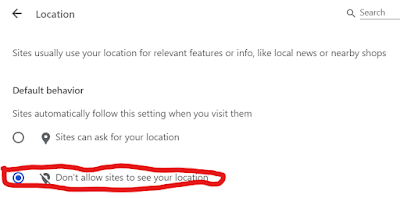
I finally got fed up with a couple of them and spent a few minutes figuring how to eliminate them.

First, was the "<web site> wants to Know your location":


The next is "Sign in to <web site> with Google":


You can thank me later.

Sunday, August 18, 2024

GL.iNet GL-MT300N Mini Travel Router

With shared public Wi-Fi becoming so ubiquitous, it is still not readily accessible to the non-techie user, e.g. your family.

This is particularly frustrating where the guest Wi-Fi has a landing portal such as on an airplane or hotel.

I was traveling with a family group this summer and wanted a way to make this more transparent.

I bought the GL.iNet GL-MT300N V2 Travel Router from Amazon. It's home page is here (archive.org). It's 2 1/4 in. square and 1 in. tall. It's powered by a micro USB port and has 2 Ethernet ports.

There's a good post (archive.org) on it Scargill's Tech Blog. He refers to an OTA firmware update. My device's firmware was so old it wouldn't update OTA. 

This page on GL's site lists current firmware and alternate update procedures. You'll need to use the "Local Upgrade" process.

This upgraded me 2 versions and fixed a couple of SSL problems that I was having.


I'm using it in Wi-Fi repeater mode. I've setup an SSID/PSK that is one of our family's alternates. This means that all of our family's devices connect to the GL.iNet GL-MT300N V2 automatically.

If I'm mobile, I just power it with a battery bank. When I power it up, I connect to the SSID then browse to 192.168.8.1 and login with "admin" and my admin password.

Here's the Admin page:


The router keeps a list of known networks. Just click one to connect to it or chose one of the other available networks.


If there's a portal login required, you'll see it at this point. Once that is completed, other clients that connect to the GL.iNet GL-MT300N V2 will not see the portal.

You can't be sure what the network you're connected to is doing with your DNS queries so I use encrypted DNS.

I also use ProtonVPN Free. The GL.iNet GL-MT300N V2 supports ProtonVPN's WireGuard natively. Here are the instructions (archive.org). You toggle it on and off on the Admin page. It just works.

Sunday, August 11, 2024

Manifest V3

If you don't know what "MV3" is just quit reading and go back to Facebook.

Congratulations, now we can begin.

Google has been sabre rattling over big changes in Chrome extension support for years. Well, they're finally pulling the trigger on it.

Here's ZDNET's summary (archive.org) of Manifest V3:
In development for the past six years, Google's Manifest V3 extension platform is designed to replace version 2 with tighter controls over the behavior of extensions. Malicious or suspicious extensions are a problem for any browser, including Chrome. To address this issue, Google claims that the new platform will better ensure that extensions offered in the Chrome Web Store are safe and reliable.
There's an even deeper dive (archive.org) over at BinaryFolks.

The short explanation is that extensions will no longer be able to dynamically load content from other sites. While this sounds good (and is good), it kneecaps extensions like uBlock Origin that dynamically updates its filter lists. Further, MV3 limits the number of filter objects that an extension can use.

The warnings started in Chrome 127 which dropped in August 2024.

While I'm sure that this will be a problem for some users, it doesn't seem to be a problem for "regular" users like you and me.

uBlock Origin has released uBlock Origin Lite that is MV3 compliant.

I set 2 options in uBlock Origin Lite: "Default filtering mode" to "Optimal" and checked "EasyList/uBO - Cookie Notices". I left "Filter lists Default" of "Ads, trackers, miners, and more" checked.


Honestly, I can't tell the difference.

YMMV

Sunday, April 28, 2024

Driver User Experience

Up until 2 years ago, all of our cars were Hondas. While there were small differences in the driver's controls, for the most part, they were similar. At one point, 2 of them were identical.

That all changed with the arrival of a 2022 Corvette. The differences increased with a 2023 Kia Stinger. The latest 2024 Honda CR-V took it to a whole new level.

In this post, I won't even begin to discuss the differences in the gear selection mechanism nor the parking brakes but I'll try to cover just the steering wheel.

Here's a base line line.


And then the differences:


Sunday, February 18, 2024

Fake "I Can’t Believe He’s Gone" Facebook Posts

We've all seen those fake "I Can’t Believe He’s Gone" posts on Facebook. You didn't click on them, did you? I hope not.

But I couldn't figure out what they were up to. This post (archive.org) on KnowBe4 explains it.

These posts never have the name of the deceased person in them. They have a link that you need to click on to find out who is deceased. DON'T!

Source: bleepstatic

If you click on it, you are taken to a page that asks you to login with your Facebook credentials.

It goes downhill from there.

There are more details on Bleeping Computer (archive.org).


Sunday, February 11, 2024

Integrity of Amazon Reviews

You'll recall my experience with PHI-Not so-COOL. It purported to have 128GB of storage but only had a low quality 32GB microSD card.

I guess I'm a sucker for "deals" so I kept on looking for a USB drive with USB A, USB C, and Lightning connectors. But this time, I thought I would be smarter. Instead of just looking on Amazon, I use Google to double check Amazon.

With this, I found AUAMOZ USB iOS Memory Stick Photo Stick that had several positive comparative reviews on the Internet. So I ordered it from Amazon.

Bad choice!

Here's the review I submitted to Amazon on 01/10/24:
This is a complete FAKE. I ran GRC's ValiDrive against it and it showed that it claimed 268GB but only tested as 71GB. I couldn't resist so I opened it. All this is is a microSD card in a cheap carrier.

How did this get almost 6,000 reviews with a 4.1 rating? Amazon, are you asleep at the wheel?
I even submitted pictures of the internals and the ValiDrive test results.


Amazon's response on 01/12/24:
We couldn't post your review because it doesn't meet our community guidelines.
So, I guess telling the truth doesn't meet their community guidelines.

So I resubmitted my review on 01/12/24 omitting "FAKE":
Doesn't Have Stated Capacity: This doesn't have the stated capacity. I ran GRC's ValiDrive against it and it showed that it claimed 268GB but only tested as 71GB. I couldn't resist so I opened it. All this is is a microSD card in a cheap carrier. You won't be able to read your data from this drive.
Amazon replied on 01/14/24:
Thank you for submitting a review of Flash Drive for iPhone 256GB, AUAMOZ USB iOS Memory Stick Photo Stick External Storage Thumb Drive for iPhone iPad Android Computer (Light Blue); we are sorry you did not have a positive experience. We investigated your concerns about product authenticity, and the information we have indicates that the product you received was authentic. As a result, we removed the review you submitted. This ensures that customer reviews remain as accurate as possible for the benefit of future customers.
If you go read the Amazon reviews, NOBODY mentions restoring their files from the drive.

So I resubmitted my review a third time on 01/14/24 trying to be more succinct:
Doesn't Have Stated Capacity: It only had 71GB of capacity. If you copy files to it, you can't read them back.
Amazon replied on 01/15/24:
Thank you for submitting a review of Flash Drive for iPhone 256GB, AUAMOZ USB iOS Memory Stick Photo Stick External Storage Thumb Drive for iPhone iPad Android Computer (Light Blue); we are sorry you did not have a positive experience. We investigated your concerns about product authenticity, and the information we have indicates that the product you received was authentic. As a result, we removed the review you submitted. This ensures that customer reviews remain as accurate as possible for the benefit of future customers.
I finally bought a SanDisk 128GB iXpand Flash Drive Go that tested and worked great. It cost twice as much as the AUAMOZ and had half the stated (but actual) capacity.


Caveat emptor.

Sunday, February 04, 2024

macOS for Windows Users

This has been a journey but one I needed to have made.


This post is going to be my (and hopefully your) cheatsheet for macOS.

Tips:

  • Command-Q to quit - like the red X in the upper-right corner
  • Function-Delete to forward delete - backspace key
  • Command-Tab to switch apps - like Windows Key + Tab
  • Command-Option-Esc to Force Quit - Control-Alt-Delete
  • Option-click on the Notification Center icon at top right of the menu bar to toggle Do Not Disturb
  • Option-click menu bar icons - access different or expanded menus
  • Option-click the Apple button - lets you restart or shut down your Mac and view system information
  • Command-spacebar for Spotlight search - like Windows Key
  • Use the trackpad as right mouse button - press with 2 fingers to get the right mouse button
  • Use the shortcuts you're used to - use ⌘ instead of Ctrl

Links:


Helpful Applications:

Strongbox - for KeePass

Sunday, January 28, 2024

MacBrick

As mentioned earlier, I Sipped the Kool-Aid. And then I stumbled.

OpenCore Legacy Patcher's (OCLP) instructions are somewhat wanting. On a trip, I got a prompt that a new update to OCLP was available. Generally you don't need to install updates unless you are planning to upgrade to a new macOS that that update provides support for but, knowing me, I install them all.

The OCLP updates install automatically after you accept them but I was too aggressive. I got a prompt that something couldn't install because something else was already in progress. With no guidance from OCLP, I clicked the "Retry" button.

BRICK!


From Apple:
A prohibitory symbol, which looks like a circle with a line or slash through it, means that your startup disk contains a Mac operating system, but it's not a version or build of macOS that your Mac can use.
The MacBook wouldn't boot. Basically, the on-the-fly OCLP firmware patches weren't being installed and the MacBook Air 2015 wouldn't boot Ventura.

Being out of town, I didn't have the "magic" USB drive that I had used to install OCLP. Perhaps, with that I could have repatched the firmware.

Anyway, I had a MacBook brick for the rest of the trip. Thankfully, I had brought a Windows laptop as well.

Back at home, I still couldn't figure out how to repatch using the USB drive.

Finally, I just did a hard factory reset (archive.org) on the MacBook and rebuilt it. At least that was good practice and a check on my documentation.


There are lots of links on Google about how to reset a MacBook but they are usually telling you how to erase it. The above linked lifewire.com article will let you reset a bricked MacBook over the Internet. Pretty cool.

Sunday, January 21, 2024

Say No to iOS Apps

I had made a reservation for dinner at a local restaurant. They required Yelp to make the reservation. I used the restaurant's link on their website and it worked fine.

Then the trouble began.

The day before our reservation, I got the following text message from Yelp.


Here's the web page I got when I clicked that link on my phone.


No, I'm not going to install an app just to confirm a reservation.

So, I just replied "YES".


So the demand to install an app was just a bluff. Why would Yelp bluff you to install an app?

I found this reddit comment that explains it better than I can.
  • A website can't ask your OS for a list of installed apps and then sell it to the highest bidder.
  • A website can't nag you with useless notifications, unless you explicitly click "yes" on a scary-looking browser dialog.
  • A website can't access your phone's globally unique identifiers, nor can it collect stats about your battery to determine how likely you are to buy a new phone.
  • A website can't scan your phone's entire storage for interesting stuff after you grant it the permission to pull one photo from a directory.
  • A website can't put you on the "users to eventually ban" list if your phone is jailbroken or rooted.
  • A website can't download ads in the background to show them even if you are offline (even though the web tech to make offline sites actually exists).
Now, that's why don't I like to install apps.