I know that Android tablets aren't really a thing but I use one every day. I've been through 2 Nexus 7s. My first was a Nexus 7 2012 and then a Nexus 7 2013.
I liked the size of the 2012 but it was soooo slow, even after I upgraded it to Nougat. It stays in my car now.
The 2013 was fast enough but the battery has just played out. It will indicate 100% battery available and then just cut off.
Then I came across an Amazon Fire HD 8 (2017) without special offers for $50. I didn't know much about Fire tablets but for $50 it was worth playing with.
Maybe...
The Amazon Fire HD 8 (2017) is a favorite with hackers. There are instructions on how to install the Google Play Store on it. That was easy.
But then Google Contacts didn't work. There's a fix for that.
And the Amazon launcher was odd. There's a fix for that.
But...
The launcher "fix" is still flaky. Amazon blacklisted the apk and it quit working. The creator rebuilt it with a different name. That's working for now.
Kinda...
Recently Amazon pushed an OS update. Suddenly the navigation buttons and the notification bar disappeared. You could navigate to an app but couldn't get out of it. Reboot and you still didn't get the navigation buttons and notification bar.
I suspected the launcher "fix" app. So after a hard reboot I uninstalled it and rebooted. That took me back to the Amazon launcher and the navigation buttons and notification bar were back.
Then the rest of the OS update kicked in. Afterwards I reinstalled the launcher "fix" and it worked this time.
That's pretty much the story of the Amazon Fire HD. It always seems to need something fixed.
That would be tolerable if it was blazingly fast but it's not.
It only has 1.5 GB of RAM so apps are constantly restarting. The launcher "fix" works by letting the Amazon launcher run then running the alternate launcher so you get a noticeable flash every time you press the Home button.
I'm just not sure.
Sunday, May 19, 2019
Sunday, May 12, 2019
AT&T Does It Again
On May 3, 2019 at 5:15AM I was at the Memphis Airport. My daughter took a picture on her iPhone XS and added it to a long running iMessage thread (using MMS, not iMessage service, i.e. green bubbles).
I didn't get the text. That began a problematic weekend of missing some texts from that thread and, actually, any MMS thread. Sometimes I would get the message. Sometimes not. Sometimes I would get one of several pictures in a message. Sometimes none.
I spoke to a relatively knowledgeable rep at AT&T. He gave me the standard, and probably usually correct, advice of deleting that thread on an iPhone and rebuilding it. That wasn't going to happen. That thread has YEARS of pictures in it.
That was the response I got from Apple several years ago when I couldn't get my number disassociated from iMessage. Eventually something happened at Apple and I started getting messages.
So I was just going to ride it out and hope it fixed itself.
Then during the day on Monday, I got a notification from Essential that the May 2019 update was available. I went to the reddit subreddit to see the comments. Everything seemed good so I planned to apply it that evening.
While I perused that subreddit I came across this thread.
Turns out I wasn't the only one having this problem and it wasn't specific to Essential phones. Here and here are threads on the AT&T forums.
I applied the workaround suggested and all is well.
Obviously this was something that AT&T did in their network, apparently with no regard for non-iPhone users.
This reminded me of the situation back in August 2016. We were in Bar Harbor and Campobello Island and there were plenty of places that didn't have any AT&T coverage. Every time I would enter one of those areas, my BlackBerry PRIV would lose cellular connectivity and then not reconnect until I rebooted. Similar to this week's issue, there was a workaround to change the cellular connection.
BlackBerry finally pushed out a fix for it but AT&T never owned up to what they did.
Then in September 2016 Apple announced the iPhone 7 with an Intel modem.
BINGO!
I suspect that the iPhone 11 is going to only have a Qualcomm modem. Although iPhones have had Qualcomm modems before, since the iPhone 7 Apple has deliberately slowed the Qualcomm modem to be the same speed as the Intel modem.
I'm wondering if since Intel is pulling out of the cellular modem market that Apple is going to let the Qualcomm modem run at native speed in the iPhone 11. And if this is causing AT&T to adjust their network accordingly.
We'll find out in September.
I didn't get the text. That began a problematic weekend of missing some texts from that thread and, actually, any MMS thread. Sometimes I would get the message. Sometimes not. Sometimes I would get one of several pictures in a message. Sometimes none.
I spoke to a relatively knowledgeable rep at AT&T. He gave me the standard, and probably usually correct, advice of deleting that thread on an iPhone and rebuilding it. That wasn't going to happen. That thread has YEARS of pictures in it.
That was the response I got from Apple several years ago when I couldn't get my number disassociated from iMessage. Eventually something happened at Apple and I started getting messages.
So I was just going to ride it out and hope it fixed itself.
Then during the day on Monday, I got a notification from Essential that the May 2019 update was available. I went to the reddit subreddit to see the comments. Everything seemed good so I planned to apply it that evening.
While I perused that subreddit I came across this thread.
Turns out I wasn't the only one having this problem and it wasn't specific to Essential phones. Here and here are threads on the AT&T forums.
I applied the workaround suggested and all is well.
Obviously this was something that AT&T did in their network, apparently with no regard for non-iPhone users.
This reminded me of the situation back in August 2016. We were in Bar Harbor and Campobello Island and there were plenty of places that didn't have any AT&T coverage. Every time I would enter one of those areas, my BlackBerry PRIV would lose cellular connectivity and then not reconnect until I rebooted. Similar to this week's issue, there was a workaround to change the cellular connection.
BlackBerry finally pushed out a fix for it but AT&T never owned up to what they did.
Then in September 2016 Apple announced the iPhone 7 with an Intel modem.
BINGO!
I suspect that the iPhone 11 is going to only have a Qualcomm modem. Although iPhones have had Qualcomm modems before, since the iPhone 7 Apple has deliberately slowed the Qualcomm modem to be the same speed as the Intel modem.
I'm wondering if since Intel is pulling out of the cellular modem market that Apple is going to let the Qualcomm modem run at native speed in the iPhone 11. And if this is causing AT&T to adjust their network accordingly.
We'll find out in September.
Sunday, May 05, 2019
R.I.P. Dropbox
I have a long and varied history of file sharing tools. I've used FolderShare, Allway Sync, Live Mesh, and most recently Dropbox.
The Dropbox ride was a good one. I used referrals and got over 20GB of Dropbox space. I shared folders with my daughter and my mother. I even put my laptop's Desktop folder into Dropbox.
Then on March 1, 2019, without forewarning, Dropbox limited the number of devices for basic (free) users to 3. There was an uproar but Dropbox hasn't blinked.
I have over 20 devices linked. Most of these are obsolete entries but 1) 3 is way too few, and 2) reconciling the active vs. inactive devices is a big task. To relieve this restriction Dropbox wants you to upgrade to Dropbox Plus for $10 per month. Not gonna happen.
So I'm outta here.
I looked around at Box and OneDrive. Due to the kindness of a co-worker I have a free 50GB Box account. With OneDrive I exercised several promotions and have 40GB.
Given my experiences with a number of Microsoft syncing offerings I was reluctant to look at OneDrive.
But Box still requires a client on each device. And OneDrive's client is just built into Windows.
So I'm taking a run at OneDrive. I'm moving slowly though. As I touch a file/folder in Dropbox I'm moving that to OneDrive.
So far, so good.
The Dropbox ride was a good one. I used referrals and got over 20GB of Dropbox space. I shared folders with my daughter and my mother. I even put my laptop's Desktop folder into Dropbox.
Then on March 1, 2019, without forewarning, Dropbox limited the number of devices for basic (free) users to 3. There was an uproar but Dropbox hasn't blinked.
I have over 20 devices linked. Most of these are obsolete entries but 1) 3 is way too few, and 2) reconciling the active vs. inactive devices is a big task. To relieve this restriction Dropbox wants you to upgrade to Dropbox Plus for $10 per month. Not gonna happen.
So I'm outta here.
I looked around at Box and OneDrive. Due to the kindness of a co-worker I have a free 50GB Box account. With OneDrive I exercised several promotions and have 40GB.
Given my experiences with a number of Microsoft syncing offerings I was reluctant to look at OneDrive.
But Box still requires a client on each device. And OneDrive's client is just built into Windows.
So I'm taking a run at OneDrive. I'm moving slowly though. As I touch a file/folder in Dropbox I'm moving that to OneDrive.
So far, so good.
Sunday, April 28, 2019
Primary, Secondary, Tertiary
I've been following the situation with Boeing's 737 MAX airliners. I came across an article (archive.is / image) on USA Today that was a pretty good summary.
In that article they mentioned that Boeing's 777 airliner's flight computers were not only triple redundant but from different manufacturers.
This reminded me of an old post of mine on redundancy.
And an older post on "Belt, suspenders, and raincoat."
I've been known to carry an umbrella as well.
In that article they mentioned that Boeing's 777 airliner's flight computers were not only triple redundant but from different manufacturers.
For the 777, Boeing's twin-aisle intercontinental jet, engineers created triple redundancy for its computers, hydraulics, communications and electrical power. Perhaps the best illustration of the lengths the company was willing to go on backups was found in the plane's primary flight computer. It was built with three microprocessors instead of one, and each came from a different manufacturer: Intel, AMD and Motorola, according to an account by a Boeing engineer.I like their thinking. One of our clients was doing a backup solution consisting of external USB drives that he was going to alternate weekly and take home. For his needs that was good but I encouraged him to buy two different brands of external USB drives. Just in case.
This reminded me of an old post of mine on redundancy.
At FedEx we learned to have primary, secondary, and tertiary plans. When loading an airplane 1) run weights and balances, 2) put ballast in the front of the plane, and 3) tie the nose wheel to the ground. And always have a backup plane, e.g. "Plan Z."
And an older post on "Belt, suspenders, and raincoat."
I've been known to carry an umbrella as well.
Sunday, April 21, 2019
Wyze Cam
I'm not big into surveillance cameras but a while back I thought I had deer playing in my back yard. I wanted to capture them jumping the fence.
I came across the Wyze Cam. It is a cube about 2" on each side. It takes 1080p video and automatically records a 10-15 second video when it detects motion or sound. These are encrypted and uploaded to Amazon AWS where they are available for 14 days with no subscription plan required. These snippets are also stored on the microSD card if available and the last 32GB are retained. That's a lot of 15 second videos.
.
While the Wyze Cam is intended for indoor usage, it is pretty tolerable of outdoors. I have mine on a screened in porch.
Watch the cat walk around!
Notice how it highlights motion.
It has infrared LEDs so you get black and white video at night. Initially I placed mine on the porch table near the screen. The infrared LEDs produced a glare from the screen so I taped over them. I still got good video with the ambient lighting. I could have just turned them off with the app.
It connects to your Wi-Fi and there are apps for Android and iOS. It will connect to Amazon's Echo if you have one with a screen.
You can set it to send you an e-mail when it detects an event, motion and/or sound. I haven't used that.
It comes with a variety of mounting bases but I have mine just sitting on a table.
Its power is USB and it comes with an AC adapter. I've thought about putting it away from the house and running it off of a battery pack.
The Wyze Cam costs $39 with shipping and a 32GB microSD it needs card to allow local recording. If you have a spare microSD card laying around you can get the camera and shipping only for $26.
There's even an open source project to let you connect the Wyze Cam to an existing security system. And of course there's a subreddit.
Here's some screenshots from the Android app.
The intruder in my back yard wasn't a deer but a raccoon.
I came across the Wyze Cam. It is a cube about 2" on each side. It takes 1080p video and automatically records a 10-15 second video when it detects motion or sound. These are encrypted and uploaded to Amazon AWS where they are available for 14 days with no subscription plan required. These snippets are also stored on the microSD card if available and the last 32GB are retained. That's a lot of 15 second videos.
.
While the Wyze Cam is intended for indoor usage, it is pretty tolerable of outdoors. I have mine on a screened in porch.
Watch the cat walk around!
Notice how it highlights motion.
It has infrared LEDs so you get black and white video at night. Initially I placed mine on the porch table near the screen. The infrared LEDs produced a glare from the screen so I taped over them. I still got good video with the ambient lighting. I could have just turned them off with the app.
It connects to your Wi-Fi and there are apps for Android and iOS. It will connect to Amazon's Echo if you have one with a screen.
You can set it to send you an e-mail when it detects an event, motion and/or sound. I haven't used that.
It comes with a variety of mounting bases but I have mine just sitting on a table.
Its power is USB and it comes with an AC adapter. I've thought about putting it away from the house and running it off of a battery pack.
The Wyze Cam costs $39 with shipping and a 32GB microSD it needs card to allow local recording. If you have a spare microSD card laying around you can get the camera and shipping only for $26.
There's even an open source project to let you connect the Wyze Cam to an existing security system. And of course there's a subreddit.
Here's some screenshots from the Android app.
The intruder in my back yard wasn't a deer but a raccoon.
Sunday, April 14, 2019
Outage Communication
This post isn't bashing cloud providers, although that's an easy target.
What this is about is to give some examples of outage communication from various providers. And yes, Google and Facebook are in different sectors but the wide differences in their outage communications are still interesting.
On March 12, 2019, Google suffered an outage that impacted Gmail and a variety of their services that depended on their file system. Over the next several hours they posted 3 updates on their G Suite Status Dashboard. The first noted that they were having an outage. The second update was posted in under 2 hours and stated that they were continuing to investigate. It also enumerated the services that were impacted. The final update was 2 and 1/2 hours later and said that the issue was resolved.
But Google didn't stop there. 2 days later they posted a thorough postmortem (archive.is) that identified a root cause and remediation and prevention.
That's the way to communicate.
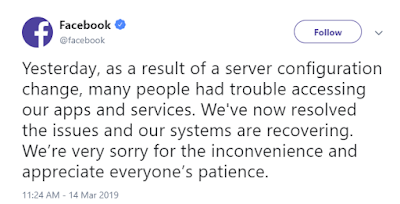
On March 13, 2019 Facebook had a 14-hour outage which took down the Facebook social media service, its Messenger and WhatsApp apps, Instagram, and Oculus.
Here's Facebook's communication on that outage.
Yes, that's it.
Which of these would you prefer from your services provider? Ask about that before you sign a contract and consider putting a requirement for communication and follow-up in the contract.
What this is about is to give some examples of outage communication from various providers. And yes, Google and Facebook are in different sectors but the wide differences in their outage communications are still interesting.
On March 12, 2019, Google suffered an outage that impacted Gmail and a variety of their services that depended on their file system. Over the next several hours they posted 3 updates on their G Suite Status Dashboard. The first noted that they were having an outage. The second update was posted in under 2 hours and stated that they were continuing to investigate. It also enumerated the services that were impacted. The final update was 2 and 1/2 hours later and said that the issue was resolved.
But Google didn't stop there. 2 days later they posted a thorough postmortem (archive.is) that identified a root cause and remediation and prevention.
That's the way to communicate.
On March 13, 2019 Facebook had a 14-hour outage which took down the Facebook social media service, its Messenger and WhatsApp apps, Instagram, and Oculus.
Here's Facebook's communication on that outage.
Yes, that's it.
Which of these would you prefer from your services provider? Ask about that before you sign a contract and consider putting a requirement for communication and follow-up in the contract.
Sunday, April 07, 2019
Just Don't Play Facebook Games
If you're my friend on Facebook, please don't play games on Facebook. When you do, you authorize Facebook to share your profile information with the game company. This often includes details such as the Facebook user ID, a list of Facebook friends (that's where I come in), likes, photos, groups, checkins, and user preferences like movies, music, books, interests, and other.
Once the game company has your data (and mine) Facebook has no control over what the game company does with it or who it shares it with.
Oh, I'm sure they have policies about what can be done with the data but there really is no way to enforce it.
As an example, the company that operated the "At the Pool" Facebook game, left all their Facebook user profiles, etc, on a publicly accessible Amazon Web Services (AWS) server for anybody to access.
Here's an excerpt from an article on ZDNet on this Facebook data leakage:
Once the game company has your data (and mine) Facebook has no control over what the game company does with it or who it shares it with.
Oh, I'm sure they have policies about what can be done with the data but there really is no way to enforce it.
As an example, the company that operated the "At the Pool" Facebook game, left all their Facebook user profiles, etc, on a publicly accessible Amazon Web Services (AWS) server for anybody to access.
Here's an excerpt from an article on ZDNet on this Facebook data leakage:
[T]he company has lost control over its most important asset - its users' data - which is now leaking left and right from all the no-name companies and mom-and-pop developer firms who've collected it over the past few years.
Sunday, March 31, 2019
Global Entry Follow-Up
We've been using Global Entry for a couple of years and I wanted to share how it works at various ports of entry.
Dublin
When we departed from Dublin, Customs and Border Protection (CBP) did the U.S. entry processing in Dublin.
First we checked our bags with the airline. Then we went to the Global Entry kiosks. We placed our passport on the reader, smiled for the camera, put our hand on the sensor and answered a few questions. They showed us pictures of our bags and we had to acknowledge that they were ours. We took the receipt that the kiosk printed and headed for the exit. We waved the receipt politely to the Immigration agents and kept going. We didn't see a Customs agent. Then we went to Starbucks and waited on the rest of our party.
Chicago
When we returned from Quebec through Chicago, the CBP did the U.S. entry processing in Chicago.
On the flight into Chicago, when the flight attendant passed out Form 6059B we didn't have to complete it. Then when we deplaned and went to the Immigration area (huge and packed), we went to the Global Entry kiosks. They were marked with bright yellow signs at the far end of the hall. Again we placed our passport on the reader, smiled for the camera, put our hand on the sensor and answered a few questions. The kiosk printed a receipt. We waved the receipt politely to the Immigration agents and kept going to baggage claim. We took our bags and found the Global Entry Customs agent. He was the one without a line. He waved us through and we were done in 5 minutes.
Nassau
Then there was Nassau. Somewhat similar to Dublin, the CBP did the U.S. entry processing in Nassau.
First we checked our bags with the airline. Then we went to the Global Entry kiosks. We placed our passport on the reader, smiled for the camera, put our hand on the sensor and answered a few questions. The kiosk printed a receipt. But then we had to queue up for an CBP agent. They asked for our passports and the receipts from the kiosk. The agent showed us pictures of our bags and we had to acknowledge that they were ours. They asked us a lot of the same questions that we had answered on the kiosk. I couldn't really tell much of a difference in processing us as Global Entry travelers from non-Global Entry travelers.
Campobello Island
We used the Global Entry Cards for our land entry and exit to and from Canada at Campobello Island. They worked just like a passport.
In summary, I still feel that Global Entry is worthwhile even for a casual international traveler. Obviously (and surprisingly) the benefit and process varies significantly by location.
Dublin
When we departed from Dublin, Customs and Border Protection (CBP) did the U.S. entry processing in Dublin.
First we checked our bags with the airline. Then we went to the Global Entry kiosks. We placed our passport on the reader, smiled for the camera, put our hand on the sensor and answered a few questions. They showed us pictures of our bags and we had to acknowledge that they were ours. We took the receipt that the kiosk printed and headed for the exit. We waved the receipt politely to the Immigration agents and kept going. We didn't see a Customs agent. Then we went to Starbucks and waited on the rest of our party.
Chicago
When we returned from Quebec through Chicago, the CBP did the U.S. entry processing in Chicago.
On the flight into Chicago, when the flight attendant passed out Form 6059B we didn't have to complete it. Then when we deplaned and went to the Immigration area (huge and packed), we went to the Global Entry kiosks. They were marked with bright yellow signs at the far end of the hall. Again we placed our passport on the reader, smiled for the camera, put our hand on the sensor and answered a few questions. The kiosk printed a receipt. We waved the receipt politely to the Immigration agents and kept going to baggage claim. We took our bags and found the Global Entry Customs agent. He was the one without a line. He waved us through and we were done in 5 minutes.
Nassau
Then there was Nassau. Somewhat similar to Dublin, the CBP did the U.S. entry processing in Nassau.
First we checked our bags with the airline. Then we went to the Global Entry kiosks. We placed our passport on the reader, smiled for the camera, put our hand on the sensor and answered a few questions. The kiosk printed a receipt. But then we had to queue up for an CBP agent. They asked for our passports and the receipts from the kiosk. The agent showed us pictures of our bags and we had to acknowledge that they were ours. They asked us a lot of the same questions that we had answered on the kiosk. I couldn't really tell much of a difference in processing us as Global Entry travelers from non-Global Entry travelers.
Campobello Island
We used the Global Entry Cards for our land entry and exit to and from Canada at Campobello Island. They worked just like a passport.
In summary, I still feel that Global Entry is worthwhile even for a casual international traveler. Obviously (and surprisingly) the benefit and process varies significantly by location.
Sunday, March 24, 2019
remove.bg
Every now and then I take a "great" photo of my family but the background is distracting. I've worked hours with editing programs to select the background and then paint it out. Often it works okay but takes a lot of effort.
Then I came across remove.bg. Here's how they describe themselves:
Remove.bg is a free service to remove the background of any photo. It works 100% automatically: You don't have to manually select the background/foreground layers to separate them - just select your image and instantly download the result image with the background removed! ...it only works if there is at least one person in the image.Here's a before and after:
But wait, there's more.
After you have removed the background, you can replace it with another photo.
Wow!
Sunday, March 17, 2019
Facebook Tracking - Part 2
Go read this first.
Now go try this. Login to Facebook. You can even try my sandbox technique if you like.
Logout.
Leave that alone and go away for a while. Wait until you should have gotten some kind of Facebook notification.
Now go back to the tab where you were logged out.
You just thought you were logged out. Facebook was still tracking you and even updated your profile picture to show the number of notifications you've gotten while you thought you were logged out.
Evil.
Now go try this. Login to Facebook. You can even try my sandbox technique if you like.
Logout.
Leave that alone and go away for a while. Wait until you should have gotten some kind of Facebook notification.
Now go back to the tab where you were logged out.
You just thought you were logged out. Facebook was still tracking you and even updated your profile picture to show the number of notifications you've gotten while you thought you were logged out.
Evil.
Sunday, March 10, 2019
Facebook Tracking
I realize there's lots of noise on the Internet about Facebook tracking you but I just wanted to show you what it really looks like.
I've posted before about how I try to sandbox Facebook. I'm not naive enough to think that's bulletproof but at least I'm trying.
Similarly, I NEVER click on a link in Facebook. As I suggested in the previous post, I right click and copy the link. Then I go over to another tab and paste the link.Then I go and delete all the characters starting with "?fbclid=".
Here's a recent example:
Once you eliminate all the tracking information, here's what you get:
I've posted before about how I try to sandbox Facebook. I'm not naive enough to think that's bulletproof but at least I'm trying.
Similarly, I NEVER click on a link in Facebook. As I suggested in the previous post, I right click and copy the link. Then I go over to another tab and paste the link.Then I go and delete all the characters starting with "?fbclid=".
Here's a recent example:
https://l.facebook.com/l.php?u=https%3A%2F%2Fgoo.gl%2FHoh4V9%3Ffbclid%3DIwAR1yCKf6gTjPq_YDl4Y-J37BZ7TIJZGXMvZvH8T9_Zn6OQf_gN0HMHp4kRM&h=AT1dP9OuIl5M0f_qB4pUFO3gx7feNV6B1whGiQYsb2QXb98_FfInyZf_H1u2BzGd15g61SR90EDeuHuljeRyLvmk6JyH_B4eVfEN30qN6ZO8d7o_uAZUyKqX4vqHE775UyKArv4Js_gcGEkBTU1p8gL84__GHE6Zv9zjA885LeHRoXSHCjvZ2SsPPRbmEjuWgkLFhmv_RNxkIW2iCoVIXjq_91x3aGNuRg5Cv26oCgHk0Jx6VYgFpGuhVWAhu22pYgHzvqFEej0iyjbvdJx3qNDxBXU9c57ggOrLcYf5rBp9zaW-RP5rxpZcmnC6RS5SRNbsVhCs1fjhGyI2ZVYfZJnR_WgeT_VgzuatreZLYzKMv9s2gajAttWgnM79qg28QFnADkQYaExt5CA1MotGiR1jCjgQP9nL1ImgQ3zTmNrlojfuzfHMzY9y7SExcHk8bMqvOU7KML1p--ds09Dbfi482AudxWzehwUdEYMUTWhQANMlLIDWBFbEzgeTyZqDD5HblobEqjYorDFd7aawWeIQhiQPIzWFarWKxXJrILwR6g4vhkP2WR_vpQ5P40IIxYmWF5zFrKdwcJpi4OaP4jkoErnnqUaeZrg4EOpho3tTJzu3Jb0xOzsX76SmgyCmMhym9o7bnKF5z7NIw2HLMIGHljlHThis URL is even encoded that further obfuscates what it's doing. I use a URL Decoder/Encoder to make it somewhat readable.
https://l.facebook.com/l.php?u=https://goo.gl/Hoh4V9?fbclid=IwAR1yCKf6gTjPq_YDl4Y-J37BZ7TIJZGXMvZvH8T9_Zn6OQf_gN0HMHp4kRM&h=AT1dP9OuIl5M0f_qB4pUFO3gx7feNV6B1whGiQYsb2QXb98_FfInyZf_H1u2BzGd15g61SR90EDeuHuljeRyLvmk6JyH_B4eVfEN30qN6ZO8d7o_uAZUyKqX4vqHE775UyKArv4Js_gcGEkBTU1p8gL84__GHE6Zv9zjA885LeHRoXSHCjvZ2SsPPRbmEjuWgkLFhmv_RNxkIW2iCoVIXjq_91x3aGNuRg5Cv26oCgHk0Jx6VYgFpGuhVWAhu22pYgHzvqFEej0iyjbvdJx3qNDxBXU9c57ggOrLcYf5rBp9zaW-RP5rxpZcmnC6RS5SRNbsVhCs1fjhGyI2ZVYfZJnR_WgeT_VgzuatreZLYzKMv9s2gajAttWgnM79qg28QFnADkQYaExt5CA1MotGiR1jCjgQP9nL1ImgQ3zTmNrlojfuzfHMzY9y7SExcHk8bMqvOU7KML1p--ds09Dbfi482AudxWzehwUdEYMUTWhQANMlLIDWBFbEzgeTyZqDD5HblobEqjYorDFd7aawWeIQhiQPIzWFarWKxXJrILwR6g4vhkP2WR_vpQ5P40IIxYmWF5zFrKdwcJpi4OaP4jkoErnnqUaeZrg4EOpho3tTJzu3Jb0xOzsX76SmgyCmMhym9o7bnKF5z7NIw2HLMIGHljlHAnd notice that Facebook is not only passing a tracking ID along to the target site but using a redirect service (https://l.facebook.com) to launch it.
Once you eliminate all the tracking information, here's what you get:
https://goo.gl/Hoh4V9Facebook is just evil.
Sunday, March 03, 2019
Zoolz Update 2
I continue to be impressed by Zools as a backup tool. You can get Lifetime of 1TB Instant Vault and 1TB of Cold Backup Storage here for $45.
Since my last post I have tried the Instant Vault storage. Think of it as 1TB of shared storage like Dropbox shared files. But you have to login to the Zoolz web interface and drag and drop files/folders onto a web page.
Then you can request shared links to the files/folders. Those files/folders are NOT automatically updated. This is a separate terabyte of storage from the Cold Backup Storage.
But what really got me looking back at Zoolz was that my CrashPlan for Small Business at 75% discount for a year expired and my monthly charge went to $10. Not a big deal but $10 more than I used to pay.
In revisiting Zoolz I came across a feature that I hadn't noticed before - Hybrid+ backup.
So I bought a 2TB Western Digital USB 3 drive and plugged it into the back of "The Trump".
Here's how you turn it on.
It took about 4 hours to sync the 400+ GB that I have selected to backup with Zoolz.
Zoolz support was excellent in helping me understand how Hybrid+ worked, even doing some experiments to answer some of my questions.
So now I have cloud backup with Zoolz Cold Backup Storage, local backup with Zoolz Hybrid+, and offline backup with Macrium Reflect.
Since my last post I have tried the Instant Vault storage. Think of it as 1TB of shared storage like Dropbox shared files. But you have to login to the Zoolz web interface and drag and drop files/folders onto a web page.
Then you can request shared links to the files/folders. Those files/folders are NOT automatically updated. This is a separate terabyte of storage from the Cold Backup Storage.
But what really got me looking back at Zoolz was that my CrashPlan for Small Business at 75% discount for a year expired and my monthly charge went to $10. Not a big deal but $10 more than I used to pay.
In revisiting Zoolz I came across a feature that I hadn't noticed before - Hybrid+ backup.
Zoolz Hybrid+ doubles your backup protection by creating a copy of every backed up file to a local server, external or network drive; ensuring faster recovery when needed. Zoolz restore is intelligent enough to minimize recovery time by checking your local Hybrid storage for the file before restoring it from the web, reducing time and bandwidth resources.And it's included with the regular Zoolz offering.
So I bought a 2TB Western Digital USB 3 drive and plugged it into the back of "The Trump".
Here's how you turn it on.
It took about 4 hours to sync the 400+ GB that I have selected to backup with Zoolz.
Zoolz support was excellent in helping me understand how Hybrid+ worked, even doing some experiments to answer some of my questions.
So now I have cloud backup with Zoolz Cold Backup Storage, local backup with Zoolz Hybrid+, and offline backup with Macrium Reflect.
Sunday, February 24, 2019
PrtScn
If you liked my earlier post about Snip and Sketch I've come across another feature of this. Remember that this capability was introduced in Windows 10 1809.
Go to Settings and search for Print Screen.
Click on "Use the Print Screen key to launch screen snipping".
Slice this button to "On".
Now when you press the PrtScn key the new Snip and Sketch control will be presented.
Clicking on the screen icon will capture the entire screen.
Don't forget the old capability of holding the Alt key when you press the PrtScn to capture just the active window. This still works with the PrtScn key remapped. As well, if you press the PrtScn key first and then hold the Alt key while you click on the screen icon you'll only capture the active window.
Try it.
Go to Settings and search for Print Screen.
Click on "Use the Print Screen key to launch screen snipping".
Slice this button to "On".
Now when you press the PrtScn key the new Snip and Sketch control will be presented.
Clicking on the screen icon will capture the entire screen.
Don't forget the old capability of holding the Alt key when you press the PrtScn to capture just the active window. This still works with the PrtScn key remapped. As well, if you press the PrtScn key first and then hold the Alt key while you click on the screen icon you'll only capture the active window.
Try it.
Sunday, February 17, 2019
VPNs
Recently one of my co-workers sent me this article (archive.is). He asked:
What do you think of his assessment that VPNs are worthless and you are better off with HTTP Anywhere, etc?That's not going to be a quick answer.
Just before a promotion for a commercial VPN service, the author says:
VPN services don’t make you more secure on the internet. Install HTTPS Everywhere, install an ad blocker and change your DNS settings to Quad9 or Cloudflare’s 1.1.1.1.There are 3 points in there:
- Install HTTPS Everywhere
- Install an ad blocker
- Change your DNS settings to Quad9 or Cloudflare’s 1.1.1.1
Oh, HTTPS can be spoofed. If someone has put a root certificate authority (CA) certificate on your device it could self-sign an HTTPS certificate and take a man-in-the-middle position decrypting your supposedly HTTPS traffic. At that point they could send it as HTTP or just scrape off your confidential information. This has happened more than once.
At one time, Google's Chrome validated the HTTPS certificate in use for Google sites to the one that they had issued and complained it there wasn't a match. I've heard that that is no longer happening.
To mitigate this risk, run sigcheck.exe (my blog) regularly.
And to ad-blockers.
I use uBlock Origin. Here's a comparison of cnet.com without and with uBlock Origin active.
Without
With
Not only does a good ad-blocker block the presentation of ads but it blocks any malware that potentially goes along with it. And it significantly reduces the bandwidth required.
Now to DNS.
While changing your DNS to or 1.1.1.1 or 9.9.9.9 seems like a good idea, it's not that simple.
If your scope of control DOESN'T include the Internet facing router, e.g. in a network that's not YOURS, then you really don't have ANY control over what server resolves your DNS queries. Even if your device sends a DNS request to 1.1.1.1, a malicious router can map that to a malicious DNS server and you'll get the response back from it. It can even NAT the responding IP address back to 1.1.1.1 so you'll never know.
If your scope of control DOES include the Internet facing router, e.g. in a network that is YOURS, then set the DNS server in your router to 1.1.1.1, 8.8.8.8, or 9.9.9.9. I don't really distrust Comcast's DNS servers but why not use one whose goal is to be secure and fast?
But back to the non-owned environment. Since you really can't trust legacy DNS resolution you have a couple of choices.
First, you could use a VPN provider that you trust. You do need to make sure that the VPN sends DNS requests through the tunnel and not just lets the local network (malicious?) resolve them. I'm not sure how to determine that but there's probably a way.
Second, you could use a client app that implements DNS over HTTPS (DoH) or DNS over TLS (DoT). Both of these protocols send DNS requests through an encrypted session so it can't be intercepted in flight. Even then you have to trust the DNS server that is at the end of the encrypted tunnel. There's a deep dive on this here (archive.is). There's a cryptic article from Google here (archive.is).
This is not a simple discussion.
Sunday, February 10, 2019
Chrome Password Checker
If you're not using Google's Chrome browser you should be.
Now that you are using Chrome, install the Password Checker extension.
This new extension will automatically check whether your user id / password has been exposed in a data breach. If it finds a match it will warn you.
Now that you are using Chrome, install the Password Checker extension.
This new extension will automatically check whether your user id / password has been exposed in a data breach. If it finds a match it will warn you.
Sunday, February 03, 2019
Friends Don't Let Friends
Microsoft Azure has had another round of problems.
Microsoft Office 365 users in Europe unable to access mailboxes for a full day
Microsoft cloud services see global authentication outage
Microsoft threw Level 3 under the bus on the second outage.
So I went of to downdetector.com. Here's what they showed several hours after the problem seemed to be resolved.
And impacting several continents.
But Level 3 (CenturyLink) is a backbone provider. Shouldn't a Level 3 problem have affected many service providers?
No apparent correlation to the time of the Azure outage and less than 10 incidents reported in the worst hour.
So it must not be a backbone issue impacting multiple service providers?
Not so quick.
AWS' incidents were from the same geography as Azure's.
My assessment:
YOU get to decide where you want to put YOUR data.
Microsoft Office 365 users in Europe unable to access mailboxes for a full day
Microsoft cloud services see global authentication outage
Microsoft threw Level 3 under the bus on the second outage.
On the Azure status page, Microsoft indicated that the source of the problem is with Level 3, an US-based ISP that provides connectivity and various other services to Microsoft data centers.At least customers could get to the Azure status page this time.
So I went of to downdetector.com. Here's what they showed several hours after the problem seemed to be resolved.
1600 incidents reported to downdetector.com at the peak.
And impacting several continents.
But Level 3 (CenturyLink) is a backbone provider. Shouldn't a Level 3 problem have affected many service providers?
So back to downdetector.com. Here's what they reported for Amazon Web Services (AWS).
No apparent correlation to the time of the Azure outage and less than 10 incidents reported in the worst hour.
So it must not be a backbone issue impacting multiple service providers?
Not so quick.
AWS' incidents were from the same geography as Azure's.
My assessment:
- Level 3 (or some backbone provider) probably had an incident that affected all its customers.
- AWS was able to tolerate the backbone outage better than Azure.
YOU get to decide where you want to put YOUR data.
Sunday, January 27, 2019
Controlled Folder Access - Windows 10 1809
I've been a big fan of Windows' Controlled Folder Access. Some of my coworkers have been "surprised" when it was enabled without their knowledge but I haven't experienced that. In fact I turn it on immediately when I build a new Windows system.
Over a recent long weekend I got on a tear upgrading 4 systems, desktops and laptops, to Windows 10 1809. I still haven't experienced any problems.
I've been posting about several new features in Windows 10 1809 that I think haven't gotten much press here, here, and here.
After my mass upgrade I've run into another unannounced feature that is valuable in relation to Controlled Folder Access.
In Windows 10 if a program violates the Controlled Folder Access you have established you get an ambiguous notification without enough information to act.
I Googled this and found that there is an event in the Event Viewer that has more information (archive.is). Here's how to get to it:
Or you could just upgrade to Windows 10 1809.
Here's what the Controlled Folder Access Settings screen shows after an exception in 1803:
Not much help.
In 1809 here's what you get:
When you click on "Recently blocked apps" you get:
Nice.
Over a recent long weekend I got on a tear upgrading 4 systems, desktops and laptops, to Windows 10 1809. I still haven't experienced any problems.
I've been posting about several new features in Windows 10 1809 that I think haven't gotten much press here, here, and here.
After my mass upgrade I've run into another unannounced feature that is valuable in relation to Controlled Folder Access.
In Windows 10 if a program violates the Controlled Folder Access you have established you get an ambiguous notification without enough information to act.
I Googled this and found that there is an event in the Event Viewer that has more information (archive.is). Here's how to get to it:
- Right-click on the Start button and select Event Viewer.
- Navigate to Applications and Services > Microsoft > Windows > Windows Defender > Operational
- Filter for (or just look for): Event ID 1123
Or you could just upgrade to Windows 10 1809.
Here's what the Controlled Folder Access Settings screen shows after an exception in 1803:
Not much help.
In 1809 here's what you get:
When you click on "Recently blocked apps" you get:
Nice.
Sunday, January 20, 2019
Viewing HEIC Pictures on Windows 10
Your new iPhones may be taking HEIC pictures. If you can't see them on Windows 10, install these 2 Microsoft Store apps.
HEIF Image Extensions
HEVC Video Extensions from Device Manufacturer
You will get prompted to login to Microsoft. I don't do that and choose to just install on this PC.
That was easy.
HEIF Image Extensions
HEVC Video Extensions from Device Manufacturer
You will get prompted to login to Microsoft. I don't do that and choose to just install on this PC.
That was easy.
Sunday, January 13, 2019
Nexus 7 and Nougat
I've been playing with my Nexus 7 2012 for a long time. For me it's the perfect size.
When I last posted about it 2 1/2 years ago, I had updated it to Android 5.1.1 Lollipop.
Rereading that post this is what jumped out at me:
Recently I decided I wanted a cheap tablet to keep in the car. I looked at Amazon Fire Tablets but then came across my old Nexus 7 2012 in my junk pile.
I spent some time Googling for ROMs for it and found a couple of Android 7.1 Nougat ROMs.
The people who had flashed Nougat had good things to say.
Now it's on Android 7.1.2 with the September 2018 security patches.
Yeah, It's slow but usable and not bad for a 6+ year old device.
When I last posted about it 2 1/2 years ago, I had updated it to Android 5.1.1 Lollipop.
Rereading that post this is what jumped out at me:
[I]ts performance is consistently Ok.That was generous. It was so slow that I eventually set it aside and bought a Nexus 7 2013.
Recently I decided I wanted a cheap tablet to keep in the car. I looked at Amazon Fire Tablets but then came across my old Nexus 7 2012 in my junk pile.
I spent some time Googling for ROMs for it and found a couple of Android 7.1 Nougat ROMs.
The people who had flashed Nougat had good things to say.
Still have plenty of memory space. It all runs nice & smooth. Very well done guys!Everything works great with the latest version of the rom. Thank you for your work !Thank you very much for this rom. It's very smooth and fast.
So I dug out my old ThinkPad with adb and the Nexus drivers and got to work. adb is always a little bit of magic and the busted screen on the ThinkPad didn't help any.
First I had to install twrp. As usual this was the hardest part.
Then I flashed the ROM and pico Gapps.
After a couple of hours the Nexus 7 2012 was booted on Nougat.
Now it's on Android 7.1.2 with the September 2018 security patches.
Yeah, It's slow but usable and not bad for a 6+ year old device.
Sunday, January 06, 2019
Squoosh
I guess all the good domain names are gone. I've recently posted about Sweech and Zoolz.
Now there's Squoosh.
Squoosh is a web app from Google that will optimize image sizes to reduce page load time.
I would have thought that web image optimization has already jumped the shark what with 100+ Mbps home broadband but what do I know? I realize that not everyone has that bandwidth. My mother only has 10Mbps.
Squoosh runs all in the browser and after you load it the first time you can run it offline. Again, not sure WHY you'd need to do that but it does work.
Anyway, on to what it does.
I sent a 1.44MB jpeg to Squoosh and it optimized it to 521KB, a savings of 66%. There was no discernible difference in the image.
That's nice.
Now there's Squoosh.
Squoosh is a web app from Google that will optimize image sizes to reduce page load time.
I would have thought that web image optimization has already jumped the shark what with 100+ Mbps home broadband but what do I know? I realize that not everyone has that bandwidth. My mother only has 10Mbps.
Squoosh runs all in the browser and after you load it the first time you can run it offline. Again, not sure WHY you'd need to do that but it does work.
Anyway, on to what it does.
I sent a 1.44MB jpeg to Squoosh and it optimized it to 521KB, a savings of 66%. There was no discernible difference in the image.
Original
Squoosh
That's nice.
Sunday, December 30, 2018
Google Location History Heat Map
I came across an article on lifehacker that explained how to create a heat map from your Google Location History.
I can't add much to the article but I'll try.
When I went to Google Takeout I requested my "Location History" to be archived and to e-mail me a link. I never got the e-mail. I went back to Google Takeout and to "Manage Archives" and downloaded the archive from there.
Then when I went to Location History Visualizer, it took me a while to find where to create the heat map. This is the direct link.
Here's my result.
Interesting.
I can't add much to the article but I'll try.
When I went to Google Takeout I requested my "Location History" to be archived and to e-mail me a link. I never got the e-mail. I went back to Google Takeout and to "Manage Archives" and downloaded the archive from there.
Then when I went to Location History Visualizer, it took me a while to find where to create the heat map. This is the direct link.
Here's my result.
Interesting.
Sunday, December 23, 2018
Canada Roaming Bonus
When I started my planning for our trip to Quebec City I researched what I needed to do with our AT&T phones.
I realize now that it was silly but the first thing I did was to call AT&T and ask them.
Their recommendation was to upgrade to their unlimited everything plan and almost double my plan cost.
When I asked them about the $10 per day choice they said the I could do that if I really wanted to but I should upgrade to their unlimited everything plan.
I politely hung up on him and continued my own research.
What I found is an unadvertised offering called Canada Roaming Bonus.
While you're talking to the Retentions representative, ask them if they can bump up your data. They bumped my plan by 5GB for free.
Here's what shows up on my bill:
I realize now that it was silly but the first thing I did was to call AT&T and ask them.
Their recommendation was to upgrade to their unlimited everything plan and almost double my plan cost.
When I asked them about the $10 per day choice they said the I could do that if I really wanted to but I should upgrade to their unlimited everything plan.
I politely hung up on him and continued my own research.
What I found is an unadvertised offering called Canada Roaming Bonus.
AT&T is now offering a Canada Roaming Bonus much like the Mexico Roaming Bonus. It offers, like the Mexico package, unlimited voice/text while in Canada and 1 GB of data per month. The kicker is it you have to call the AT&T Rententions department to have it added to each line. The regular first line Customer Service Reps can not add it to your line(s). I know its available to Mobile Share Value Plan members. Not sure about other customers.Oh, and it's FREE. Wonder why the representative didn't offer me that?
Make sure to add the $0 cost International Roaming to your plan at the same time.
While you're talking to the Retentions representative, ask them if they can bump up your data. They bumped my plan by 5GB for free.
Here's what shows up on my bill:
Canada Roaming Bonus - Includes 1 gigabyte of data in Canada; data overage is $20 each additional 1GB. Unlimited text sent from Canada and unlimited talk from Canada to the U.S. and Canada. Talk from Canada to other international destinations will be billed at standard international long distance rates. Pay-per-use rates apply for all services in all other international countries. For more details, visit att.com/global.
And this is full speed LTE, not 2G like some other carriers.
The Canada Roaming Bonus worked perfectly for me in Canada. I did have to enable data roaming once I got to Canada. Don't forget to turn it off when you return.
Sunday, December 16, 2018
Clipboard
Do you remember how Microsoft Office has a clipboard manager that stores a history of your copied strings?
Well, now Windows 10 1809 has pretty much the same thing.
You do have to turn it on by going to Settings / System / Clipboard. In the "Clipboard history" section, move the slider from "Off" to "On".
Then select and copy as usual.
Then if you want to paste from your copy history, press Windows key + V. Find the clip you want to paste and just click on it.
If you want to paste the last clip you took, just press Ctrl + V as you're used to.
Well, now Windows 10 1809 has pretty much the same thing.
You do have to turn it on by going to Settings / System / Clipboard. In the "Clipboard history" section, move the slider from "Off" to "On".
Then select and copy as usual.
Then if you want to paste from your copy history, press Windows key + V. Find the clip you want to paste and just click on it.
If you want to paste the last clip you took, just press Ctrl + V as you're used to.
Sunday, December 09, 2018
Night Sight
The camera on Google's latest Pixel 3 smartphone introduced "Night Sight" capability in the Camera app. Initially it was available on only Pixel 3s but has trickled down to all Pixels with varying capabilities.
But Android is a community of hackers. Almost immediately this new Camera app was cross-ported to several other Android phones.
Of course my current Essential PH-1 was one of the ports.
I've installed a couple of the ports. Here's a comparison of a photo taken with the OEM Essential camera app and a port (AeroZero_P3_GC_6.1.013_ABC_2.apk) of the Night Sight camera:
Why have I installed a couple of the ports?
Well, honestly they're still a little rough around the edges.
For example, the Essential PH-1 lets you set an app to launch on a double-press of the power button. Typically that is set to the camera app. On the first port of the Night Sight camera that I tried would prompt for additional permissions when invoked with the double-press of the power button.
The second port I tried consumed a lot of battery and wouldn't take photos back to back while is was doing HDR+ processing. The delay due to HDR+ processing may be normal but I hadn't run into it before.
Current status is that I have a Night Sight camera app (GoogleCamera_6.1.013.216795316-debug.apk) installed but it is not my default camera.
But Android is a community of hackers. Almost immediately this new Camera app was cross-ported to several other Android phones.
Of course my current Essential PH-1 was one of the ports.
I've installed a couple of the ports. Here's a comparison of a photo taken with the OEM Essential camera app and a port (AeroZero_P3_GC_6.1.013_ABC_2.apk) of the Night Sight camera:
Why have I installed a couple of the ports?
Well, honestly they're still a little rough around the edges.
For example, the Essential PH-1 lets you set an app to launch on a double-press of the power button. Typically that is set to the camera app. On the first port of the Night Sight camera that I tried would prompt for additional permissions when invoked with the double-press of the power button.
The second port I tried consumed a lot of battery and wouldn't take photos back to back while is was doing HDR+ processing. The delay due to HDR+ processing may be normal but I hadn't run into it before.
Current status is that I have a Night Sight camera app (GoogleCamera_6.1.013.216795316-debug.apk) installed but it is not my default camera.
Sunday, December 02, 2018
PayPal Preapproved Payments - Update
This is an update to an old post of mine but it is worth repeating from time to time, especially in this season of online shopping.
Recently we bought something from Wayfair and used PayPal to pay for it. We selected to use a debit card as payment to PayPal. We thought that was relatively safe as Wayfair wouldn't have access to the debit card and could only process that one transaction.
How wrong we were.
My wife was subsequently buying something else from Wayfair and chose to pay with PayPal. The checkout went smoothly. Too smoothly.
She noticed that even though she had chosen to pay with PayPal she had not been prompted by PayPal to approve the charges.
That was odd.
While the charges were acceptable giving Wayfair the ability to process charges and debits against her checking account without our approval is not what we had intended.
It turns out that a during the previous purchase from Wayfair that was paid for with PayPal, Wayfair categorized the PayPal transaction as requesting an agreement for automatic payment approval.
This wasn't obvious as we approved the PayPal transaction at the time.
And PayPal doesn't make it easy to find these agreements on their site.
Here's how to find them.
Login to PayPal as normal.
Then up in the top right is a little gray gear (1). Click on that.
On the next screen scroll find "PAYMENTS" (2). Click on that.
There will be a section of "Automatic payments". Look down and find "Manage automatic payments" (3). Click on that.
You'll get a list of "Automatic payments". Click on "Show active". You may need to click on "See more" to get the entire list.
Click on each merchant in the list. On the next screen click on "Cancel" if you want to cancel this payment agreement.
A little bit of advice, don't cancel "iTunes and App Store".
This verges on sneaky, both on the part of the merchant and PayPal.
And while I have your attention on PayPal, go read this.
Recently we bought something from Wayfair and used PayPal to pay for it. We selected to use a debit card as payment to PayPal. We thought that was relatively safe as Wayfair wouldn't have access to the debit card and could only process that one transaction.
How wrong we were.
My wife was subsequently buying something else from Wayfair and chose to pay with PayPal. The checkout went smoothly. Too smoothly.
She noticed that even though she had chosen to pay with PayPal she had not been prompted by PayPal to approve the charges.
That was odd.
While the charges were acceptable giving Wayfair the ability to process charges and debits against her checking account without our approval is not what we had intended.
It turns out that a during the previous purchase from Wayfair that was paid for with PayPal, Wayfair categorized the PayPal transaction as requesting an agreement for automatic payment approval.
This wasn't obvious as we approved the PayPal transaction at the time.
And PayPal doesn't make it easy to find these agreements on their site.
Here's how to find them.
Login to PayPal as normal.
Then up in the top right is a little gray gear (1). Click on that.
On the next screen scroll find "PAYMENTS" (2). Click on that.
There will be a section of "Automatic payments". Look down and find "Manage automatic payments" (3). Click on that.
You'll get a list of "Automatic payments". Click on "Show active". You may need to click on "See more" to get the entire list.
Click on each merchant in the list. On the next screen click on "Cancel" if you want to cancel this payment agreement.
A little bit of advice, don't cancel "iTunes and App Store".
This verges on sneaky, both on the part of the merchant and PayPal.
And while I have your attention on PayPal, go read this.
Sunday, November 25, 2018
Start Menu
There are several changes to the Start menu in Windows 10 1809 but this one I haven't seen mentioned.
In Windows 10 1803 if you click on the Start icon and type an application name, it'll pop up. Click on it and it launches.
But in Windows 10 1809 it's all different.
Yeah, it'll still pop up the application name but look at the other information that's presented.
You can directly click on one of the recent files that have been used with that application.
Nice.
In Windows 10 1803 if you click on the Start icon and type an application name, it'll pop up. Click on it and it launches.
But in Windows 10 1809 it's all different.
Yeah, it'll still pop up the application name but look at the other information that's presented.
You can directly click on one of the recent files that have been used with that application.
Nice.
Sunday, November 18, 2018
Snip and Sketch
Since at least Windows 7, Windows has had a Snipping Tool. I've always accessed it by pressing the Windows key and typing "snipping". Or you can press Windows key + Shift + S, then drag your cursor over a portion of the screen to capture it. The Snipping Tool had some simple mark-up tools.
In Windows 10 1809 the Snipping Tool is still there but there's a new Snip & Sketch UWP app. Pressing Windows key + Shift + S brings up a small toolbar with icons let you capture a rectangular portion of the screen, the entire screen, or a freehand-drawn portion of the screen.
If you click on the notification you'll see the UWP app with the editing tools.
These are much more capable than those in the pre-1809 Snipping Tool.
It's simple but certainly a nice improvement.
In Windows 10 1809 the Snipping Tool is still there but there's a new Snip & Sketch UWP app. Pressing Windows key + Shift + S brings up a small toolbar with icons let you capture a rectangular portion of the screen, the entire screen, or a freehand-drawn portion of the screen.
If you click on the notification you'll see the UWP app with the editing tools.
These are much more capable than those in the pre-1809 Snipping Tool.
It's simple but certainly a nice improvement.
Sunday, November 11, 2018
Windows 10 October 2018 Anyway
As I wrote back in October, I had hastily installed Windows 10 1809 just before Microsoft pulled it. I still haven't had any problems with it.
However I came across this post that pointed out that those PCs that had installed Windows 10 1809 hadn't gotten ANY updates since the October Cumulative Update.
This is significant as Microsoft has merrily been fixing the numerous problems discovered in Windows 10 1809 and pushing out new builds to Windows 10 19H1 through the Windows Insider Program.
So I wanted to get updated. But not jump into the fire with Windows 10 19H1.
In the above mentioned howtogeek.com post, a thread in the comments pointed me to a windowsupdate.com URL that contained the CAB file for Windows 10 1809 build 17763.107. Search the comment thread for KB4464455v2.
Microsoft has apparently had problems even with that as there are 2 versions of KB4464455.
To save you some trouble, here's the URL:
As has become typical with Windows 101809, nothing is easy. You have to use Microsoft's DISM to install the CAB. Here are the instructions.
It took a while and then I had to reboot.
However I came across this post that pointed out that those PCs that had installed Windows 10 1809 hadn't gotten ANY updates since the October Cumulative Update.
This is significant as Microsoft has merrily been fixing the numerous problems discovered in Windows 10 1809 and pushing out new builds to Windows 10 19H1 through the Windows Insider Program.
So I wanted to get updated. But not jump into the fire with Windows 10 19H1.
In the above mentioned howtogeek.com post, a thread in the comments pointed me to a windowsupdate.com URL that contained the CAB file for Windows 10 1809 build 17763.107. Search the comment thread for KB4464455v2.
Microsoft has apparently had problems even with that as there are 2 versions of KB4464455.
To save you some trouble, here's the URL:
download.windowsupdate.com/c/msdownload/update/software/updt/2018/11/windows10.0-kb4464455-x64_de985f6d38215b316470dbecabb453c762a217af.cabNow, what to do with a CAB file?
As has become typical with Windows 10
It took a while and then I had to reboot.
Sunday, November 04, 2018
Windows Defender Sandbox
You're going to have to think about this one some.
Think about how any anti-virus program has to parse all the files on a system. A parser could inadvertently enable arbitrary code execution if that parser has any vulnerabilities.
So what to do?
Run the parser in a sandboxed environment where malicious actions are limited to the sandbox thereby protecting the rest of the system.
Microsoft's Windows Defender does this.
To enable this feature click on the Start button, type "CMD", right click on "Command Prompt", and select "Run as administrator". Enter the following command:
Think about how any anti-virus program has to parse all the files on a system. A parser could inadvertently enable arbitrary code execution if that parser has any vulnerabilities.
So what to do?
Run the parser in a sandboxed environment where malicious actions are limited to the sandbox thereby protecting the rest of the system.
Microsoft's Windows Defender does this.
In other words, the Windows Defender antivirus process that analyzes downloaded files and other content will run with very few permissions.But it's not turned on by default.
How-To Geek
To enable this feature click on the Start button, type "CMD", right click on "Command Prompt", and select "Run as administrator". Enter the following command:
setx /M MP_FORCE_USE_SANDBOX 1Then restart your PC by holding SHIFT while you select Shutdown or Restart on the Start menu.
Sunday, October 28, 2018
Anti-Virus Comparison
I'm a regular listener to TWiT's Security Now podcast with Steve Gibson. On a recent podcast Steve mentioned AV-Comparatives' anti-virus testing.
If you're a regular reader of this blog you also know I'm a fan of Windows Defender.
AV-Comparatives' September 2018 test (PDF) showed that Windows Defender was in the very top performers.
Steve's assessment was:
If you're a regular reader of this blog you also know I'm a fan of Windows Defender.
AV-Comparatives' September 2018 test (PDF) showed that Windows Defender was in the very top performers.
Steve's assessment was:
Given that Microsoft is one of the 6 AVs with a perfect score, maybe just using the system built into Windows is sufficient protection.That's what I use.
Sunday, October 21, 2018
Microsoft, Get Your Act Together
tl;dr What should you do?
First, I'm moderately aggressive in applying updates across a variety of systems and I've not had any problems.
Second, look at Woody Leonard's post on ComputerWorld. There's some hyperbole there but overall not bad advice.
So here's the background...
Microsoft has had a bad month with Windows 10. They've had problems with Display Audio issues (jpeg), file deletions (archive.is), HP keyboard (archive.is), and most recently audio problems (archive.is).
I'm not going to rehash all these problems but Microsoft has to step up to the situation that they have 700,000,000 Windows 10 users. That's a lot of zeroes!
One of the response to the above problems was that it only affected "one one-hundredth of one percent of version 1809 installs." If that had rolled out to the entire population that would have been 70,000 users.
When I was at FedEx, I heard Fred Smith speak a number of times. One time he talked about the "Golden Package." His point was that we (the FedEx employees) couldn't let the numbers mask the impact of every service failure.
Fred instituted a Service Quality Indicator (SQI) system where service failures were measured not by percentages but by the count of failures. It didn't matter that a given failure was a minuscule percent of service. Each service failure got reported, researched and counted against our performance objectives.
That made a difference as the number of nightly packages skyrocketed.
Maybe Microsoft needs to take a similar tact.
First, I'm moderately aggressive in applying updates across a variety of systems and I've not had any problems.
Second, look at Woody Leonard's post on ComputerWorld. There's some hyperbole there but overall not bad advice.
So here's the background...
Microsoft has had a bad month with Windows 10. They've had problems with Display Audio issues (jpeg), file deletions (archive.is), HP keyboard (archive.is), and most recently audio problems (archive.is).
I'm not going to rehash all these problems but Microsoft has to step up to the situation that they have 700,000,000 Windows 10 users. That's a lot of zeroes!
One of the response to the above problems was that it only affected "one one-hundredth of one percent of version 1809 installs." If that had rolled out to the entire population that would have been 70,000 users.
When I was at FedEx, I heard Fred Smith speak a number of times. One time he talked about the "Golden Package." His point was that we (the FedEx employees) couldn't let the numbers mask the impact of every service failure.
Fred instituted a Service Quality Indicator (SQI) system where service failures were measured not by percentages but by the count of failures. It didn't matter that a given failure was a minuscule percent of service. Each service failure got reported, researched and counted against our performance objectives.
That made a difference as the number of nightly packages skyrocketed.
Maybe Microsoft needs to take a similar tact.
Sunday, October 14, 2018
Chrome 69 - Part III
This isn't specifically MY rant although I've stubbed my toe on it.
If you haven't already go back and read Part I and Part II.
Chrome 69 logs the user in to Google automatically when they sign in to any Google service.
Adrienne Porter Felt of Google's Chrome development team posted a series of tweets "clarifying" this.
They just made me more confused.
Her "/4" tweet is where I stubbed my toe.
For the time being you can go to chrome://flags//#account-consistency and change this behavior but these workarounds tend to not live long. The flag appears to be broken in Chrome 71 and above.
Here's a post (archive.is) from someone who's really upset with the change.
Here's a post (archive.is) that's a little bit more middle of the road.
If you haven't already go back and read Part I and Part II.
Chrome 69 logs the user in to Google automatically when they sign in to any Google service.
Adrienne Porter Felt of Google's Chrome development team posted a series of tweets "clarifying" this.
They just made me more confused.
Her "/4" tweet is where I stubbed my toe.
Plus, you now only need to sign out in one place before you share your computer with someone else.When my wife signed out of Gmail, it signed her out of Chrome and complained loudly about it (post) (archive.is).
For the time being you can go to chrome://flags//#account-consistency and change this behavior but these workarounds tend to not live long. The flag appears to be broken in Chrome 71 and above.
Here's a post (archive.is) from someone who's really upset with the change.
Here's a post (archive.is) that's a little bit more middle of the road.
Quietly inserting a forced browser sign-in into Chrome, even though possibly done for good reasons, doesn't add any trust points for Google in an increasingly privacy-driven environment. - engadget.comAmen.
Sunday, October 07, 2018
Windows 10 October 2018 NOT
Microsoft seems to have made a mess of their latest rollout of Windows 10.
Windows 10 October 2018 (1809) dropped on 10/02/18.
Here's a list of the new features in 1809:
While it's a long list, there's not really much new in there.
It turns out that many users are complaining that the upgrade process DELETED their personal files, Documents, Pictures, Music, Videos, etc.
This problem with the 1809 upgrade had been reported by the Windows Insiders (testers) but Microsoft still released 1809 to the public.
Windows users who clicked "Check for updates" got it instantly.
On 10/05/18 Microsoft stopped the rollout.and advised:
Wow! "[P]ease minimize your use of the affected device" and "please don’t install it."
Take their advice.
And while you've got a little time, now is a good opportunity to practice your backup AND restore.
Incidentally, I've updated my sacrificial laptop to 1809 with no problems.
Windows 10 October 2018 (1809) dropped on 10/02/18.
Here's a list of the new features in 1809:
- File Explorer now features a dark theme when Dark Mode is enabled in Settings.
- You can now name live folders in Start.
- A new "safe removal" feature has been added that lists open applications that might be using an external GPU connected via Thunderbolt 3.
- Notifications in the Action Center now feature a fade-in effect when the Action Center is opened.
- A redesigned snipping experience is present and can be accessed via WIN + SHIFT + S.
- Snips will now present a notification that will open up into Screen Sketch, which is now a dedicated app.
- You can now configure pen peripherals to take a snip when pressing a button.
- The Print Screen button can now be configured to open Screen Sketch.
- A new "Screen snip" action has been added to quick actions in the Action Center.
- Copied content can now be seen in a new clipboard experience, accessed with WIN+V, that can also sync to the cloud and across devices.
- There are now three different modes you can select when wirelessly projecting your screen, and these modes are game, productivity, and video modes.
- Users upgrading to this release for the first time will be welcomed with a post-OOBE UI that walks the user through setting up new features added in this release.
- Game Bar has been redesigned with new features including an overview of system performance and more.
- Search will now provide a download link for programs searched online.
- You can now use Windows Mixed Reality without a monitor.
- Storage Sense can now switch files to "online-only" if they haven't been accessed after a certain number of days, saving space on your local disk.
- Pen users can now ink directly into text boxes by default.
- Users can now view the real world when using Windows Mixed Reality using a headsets built-in camera.
- Emoji 11 is now available.
- Game bar is now accessible via the Apps List in Start.
While it's a long list, there's not really much new in there.
It turns out that many users are complaining that the upgrade process DELETED their personal files, Documents, Pictures, Music, Videos, etc.
This problem with the 1809 upgrade had been reported by the Windows Insiders (testers) but Microsoft still released 1809 to the public.
Windows users who clicked "Check for updates" got it instantly.
On 10/05/18 Microsoft stopped the rollout.and advised:
We have paused the rollout of the Windows 10 October 2018 Update (version 1809) for all users as we investigate isolated reports of users missing some files after updating.
If you have manually checked for updates and believe you have an issue with missing files after an update, please minimize your use of the affected device and contact us directly at +1-800-MICROSOFT, or find a local number in your area .
If you have access to a different PC, please contact us at https://support.microsoft.com/en-us/contactus/ (link will vary according to country of origin).
If you have manually downloaded the Windows 10 October 2018 Update installation media, please don’t install it and wait until new media is available.
We will provide an update when we resume rolling out the Windows 10 October 2018 Update to customers.
Wow! "[P]ease minimize your use of the affected device" and "please don’t install it."
Take their advice.
And while you've got a little time, now is a good opportunity to practice your backup AND restore.
Incidentally, I've updated my sacrificial laptop to 1809 with no problems.
Subscribe to:
Posts (Atom)