I'm really pretty neutral on Internet Explorer 8 right now. I haven't played with it yet. Microsoft just moved IE8 over to "Critical" status so it'll get pushed to a PC near you soon. I'm pretty conservative on letting things get pushed to my PCs.
With IE7 I used the IE7 blocking tool from IntelliAdmin.com. It worked great.
With IE8 Microsoft came out with their own blocking toolkit. Needless to say, it's bigger than a breadbox! It ends up creating a script that you have to run from a command line and set switches. Yuk.
In the end, it simply creates a single registry key. I created a pair of .reg files that do the same thing.
Just download this zip file. In it are 2 files, one to block IE8 and one to unblock IE8. Just open the zip file and double-click on whichever you want to do. Click on "Yes" in the dialog box that comes up and you're done. Look at them pretty closely. Use at your own risk.
As I was preparing this post, I went back to IntelliAdmin.com to see if they had done something for IE8. Needless to say they have. They have added IE8 blocking to their Network Administrator tool. Their article is here.
It's not quite as trivial as my .reg files (it requires an install) but I'm sure it's very good.
Friday, May 01, 2009


Friday, April 24, 2009
contxts.com
Sometimes I run across something that seems SO neat. So I go setup an account and play with it.
Then, I start wondering what I'm going to use it for.
I had that experience with contxts.com.
contxts.com is harder to explain than twitter.
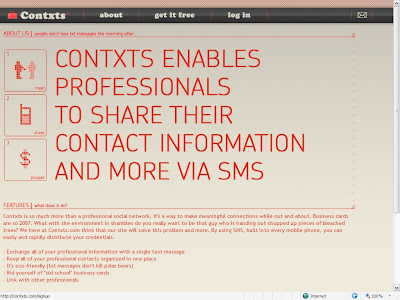
Go to contxts.com and click on "get it free."
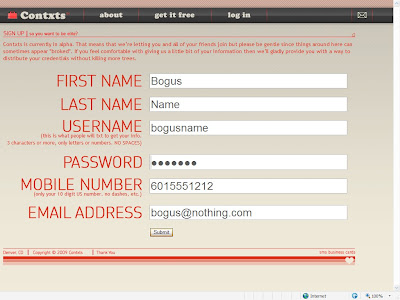
Fill in the form. Here's my sample.
And the result.
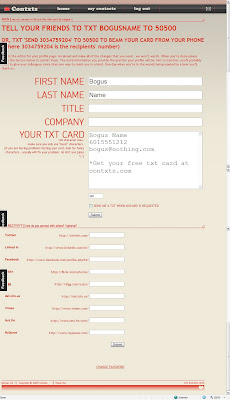
You can edit the field that is labeled "YOUR TXT CARD." You want to make this look kinda like a business card. Note that this field is simple text and is limited to 140 characters. Does this sound familiar?
I can't tell that the fields below with Twitter, LinkedIn, etc. do anything. I probably just haven't figured it out yet.
Ok. As one of my old bosses used to ask "So what?"
Here's how you use it. Say you want to share your contact information with a new acquaintance. Get their cell number (we'll use 601-444-2323 in this example) and send a text message from your phone (601-555-1212 in this example) with "send 6014442323" to 50500.
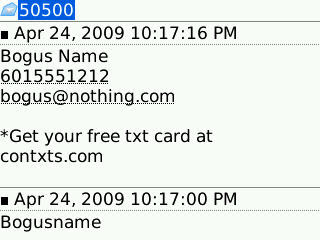
contxts.com will send a text message to 601-444-2323 with the text you put in the field of "YOUR TXT CARD."
An alternate method is to tell your acquaintance your "USERNAME" ("bogusname" in this example) and tell them to text that to 50500. They will receive a text message with the text you put in the field of "YOUR TXT CARD."
Here's what it looks like on my BlackBerry Curve.
Neat! Definitely. Useful? I dunno.
PS. Now that you understand this completely, go read foursquare's overview. Notice what shortcode they use. Huh?
Then, I start wondering what I'm going to use it for.
I had that experience with contxts.com.
contxts.com is harder to explain than twitter.
Go to contxts.com and click on "get it free."

Fill in the form. Here's my sample.

And the result.

You can edit the field that is labeled "YOUR TXT CARD." You want to make this look kinda like a business card. Note that this field is simple text and is limited to 140 characters. Does this sound familiar?
I can't tell that the fields below with Twitter, LinkedIn, etc. do anything. I probably just haven't figured it out yet.
Ok. As one of my old bosses used to ask "So what?"
Here's how you use it. Say you want to share your contact information with a new acquaintance. Get their cell number (we'll use 601-444-2323 in this example) and send a text message from your phone (601-555-1212 in this example) with "send 6014442323" to 50500.
contxts.com will send a text message to 601-444-2323 with the text you put in the field of "YOUR TXT CARD."
An alternate method is to tell your acquaintance your "USERNAME" ("bogusname" in this example) and tell them to text that to 50500. They will receive a text message with the text you put in the field of "YOUR TXT CARD."
Here's what it looks like on my BlackBerry Curve.

Neat! Definitely. Useful? I dunno.
PS. Now that you understand this completely, go read foursquare's overview. Notice what shortcode they use. Huh?
Saturday, April 18, 2009
Flash Players Settings
Did you realize that there are tons of settings available to you for Adobe Flash? Did you know that one of them will let Flash applications turn on your web cam? If not, then you should go look at them.
Don't think that you can just fire up Flash and navigate to Tools/Settings or something like that. Not that easy. Instead surf to Flash Player Help - Settings Manager.
Once you get here, you have access to these settings:
Global Privacy Settings Panel Global Storage Settings Panel Global Security Settings Panel Global Notifications Settings Panel Website Privacy Settings Panel Website Storage Settings Panel
Here's what the Global Privacy Settings Panel looks like:
 Read that second paragraph and then go check it out!
Don't think that you can just fire up Flash and navigate to Tools/Settings or something like that. Not that easy. Instead surf to Flash Player Help - Settings Manager.
Once you get here, you have access to these settings:
Here's what the Global Privacy Settings Panel looks like:
 Read that second paragraph and then go check it out!
Friday, April 03, 2009
CaptureIt
One of the things I never got around to on my Treo 650 was finding a way to do screen captures. I Googled around looking for a BlackBerry tool and came across this article.
You know I like cheap and simple ("cheerful" for my Kiwi friends) so I naturally went for the free over the air (OTA) downloadable one. This was CaptureIt from TheTechMogul. His mobile site with the OTA download is here.
It's pretty simple. Just download it and let it install. It adds an icon to the home screen but it also adds a "CaptureIt" entry to the Menu. You can also go to Options, Screen/Keyboard, and set a Convenience Key (Right or Left) to invoke it. I haven't done that but it may come in handy from time to time. There are a few places that you don't get the Menu entry of "CaptureIt" so you can't get a screen capture there except by using the Convenience Key.
After CaptureIt captures a screen, it vibrates. This was put in recently as people who were using the Convenience Key were taking captures and didn't realize it.
CaptureIt stores the images in the Blackberry/Pictures folder (on the memory card if you have one) as CaptureHH_MM_SS.jpg. Then I just e-mail them to myself.
Here're a couple of screen captures just to show you what it looks like.


You know I like cheap and simple ("cheerful" for my Kiwi friends) so I naturally went for the free over the air (OTA) downloadable one. This was CaptureIt from TheTechMogul. His mobile site with the OTA download is here.
It's pretty simple. Just download it and let it install. It adds an icon to the home screen but it also adds a "CaptureIt" entry to the Menu. You can also go to Options, Screen/Keyboard, and set a Convenience Key (Right or Left) to invoke it. I haven't done that but it may come in handy from time to time. There are a few places that you don't get the Menu entry of "CaptureIt" so you can't get a screen capture there except by using the Convenience Key.
After CaptureIt captures a screen, it vibrates. This was put in recently as people who were using the Convenience Key were taking captures and didn't realize it.
CaptureIt stores the images in the Blackberry/Pictures folder (on the memory card if you have one) as CaptureHH_MM_SS.jpg. Then I just e-mail them to myself.
Here're a couple of screen captures just to show you what it looks like.


Saturday, March 21, 2009
Hasta La Vista, Baby
I put up with Vista as long as I could. Or rather, I put up with my wife's complaining as long as I could.
I got her a ThinkPad T61 for her birthday. (A bit of advice. Don't get birthday presents with power cords.)
As I mentioned previously, it came with Vista Business and relatively little crapware. I put Office 2007 on it.
It seemed like it was going to do fine.
Then it started hanging up. Sometimes it was the whole thing and it took a hard power down to fix. Other times, it was just Internet Explorer that froze. Printers seemed to come and go randomly. Wireless was never certain.
I must admit, she was way more tolerant than I expected.
The last straw was when I picked it up last week to put the latest patches on it. It took me hours. It hung up, crashed, complained about processes that weren't visible, you name it.
A call to Lenovo to inquire about XP downgrade disks turned up that they wanted to charge $45 plus shipping! Then the confusion started about how to activate using the downgrade rights. I'll explain that in a minute.
I went to the Lenovo site and downloaded all the drivers and software for XP.
I Ghosted off the Vista partition. To do this I had to go into the T61's BIOS and set the SATA drive from ACHI to Compatible. Without this, Ghost 8 couldn't see the SATA drive.
I installed Windows XP Pro from a SP3 slipstreamed consumer CD that I had. With SP3 you can defer entering the key so I did. Then after it came up, I clicked on the Activate Windows link and chose telephone activation. To shorten the story, I had to enter the key (that was previously activated on another machine) and give the Microsoft representative the loooooooooooong installation ID. I told him I was downgrading Vista Business to XP Pro and he gave me a new key. I never had to give him the Vista key. Very odd.
The coup de grâce was installing Office 2003.
It's so nice to get back to the familiar and stable Windows XP. Call me a Luddite if you must.
I got her a ThinkPad T61 for her birthday. (A bit of advice. Don't get birthday presents with power cords.)
As I mentioned previously, it came with Vista Business and relatively little crapware. I put Office 2007 on it.
It seemed like it was going to do fine.
Then it started hanging up. Sometimes it was the whole thing and it took a hard power down to fix. Other times, it was just Internet Explorer that froze. Printers seemed to come and go randomly. Wireless was never certain.
I must admit, she was way more tolerant than I expected.
The last straw was when I picked it up last week to put the latest patches on it. It took me hours. It hung up, crashed, complained about processes that weren't visible, you name it.
A call to Lenovo to inquire about XP downgrade disks turned up that they wanted to charge $45 plus shipping! Then the confusion started about how to activate using the downgrade rights. I'll explain that in a minute.
I went to the Lenovo site and downloaded all the drivers and software for XP.
I Ghosted off the Vista partition. To do this I had to go into the T61's BIOS and set the SATA drive from ACHI to Compatible. Without this, Ghost 8 couldn't see the SATA drive.
I installed Windows XP Pro from a SP3 slipstreamed consumer CD that I had. With SP3 you can defer entering the key so I did. Then after it came up, I clicked on the Activate Windows link and chose telephone activation. To shorten the story, I had to enter the key (that was previously activated on another machine) and give the Microsoft representative the loooooooooooong installation ID. I told him I was downgrading Vista Business to XP Pro and he gave me a new key. I never had to give him the Vista key. Very odd.
The coup de grâce was installing Office 2003.
It's so nice to get back to the familiar and stable Windows XP. Call me a Luddite if you must.
Monday, March 09, 2009
Blogger and AT&T Curve
Recently I saw that I had a visitor to this blog who had Googled for "how to link my blog to att curve." I wish I could get back in touch with them. I know exactly what they were having problems with.
I have a blog that I use to post photos taken from my smartphones. I started it with my Treo 650, used it a little from my Motorola Q9h, and now post to it from my AT&T Blackberry Curve 8310.
But when I post using the Blackberry e-mail application, I get a reply back from postgateway@blogger.com:
There's the rub. That doesn't seem to work from the Curve like it did from the Treo. I presume that it has to do with using Blackberry e-mail on the Curve.
But that can be easily fixed.
Go to your Blogger Dashboard and click on the Settings tab then the Email tab. On this page there is an input field labeled "Email Posting Address." In this field, put a code word that will specify an e-mail address in the format yourname.codeword@blogger.com.
Then mail away to yourname.codeword@blogger.com. By default, those e-mails will automatically be posted to your blog.
I have a blog that I use to post photos taken from my smartphones. I started it with my Treo 650, used it a little from my Motorola Q9h, and now post to it from my AT&T Blackberry Curve 8310.
But when I post using the Blackberry e-mail application, I get a reply back from postgateway@blogger.com:
Your carrier is not supported by Blogger Mobile.When you go to Blogger Help, this page tries to get you started. But here's the key paragraph:
We support most popular mobile carriers in the US and worldwide. If Blogger Mobile is unavailable from your provider, you can still send posts to your blog using Mail-to-Blogger.If you go into the Dashboard of your Blogger account, down at the very bottom (pay no attention to the Blogger help that says it's in the sidebar) is a list of mobile devices or e-mail addresses and which blogs they will post to.
There's the rub. That doesn't seem to work from the Curve like it did from the Treo. I presume that it has to do with using Blackberry e-mail on the Curve.
But that can be easily fixed.
Go to your Blogger Dashboard and click on the Settings tab then the Email tab. On this page there is an input field labeled "Email Posting Address." In this field, put a code word that will specify an e-mail address in the format yourname.codeword@blogger.com.
Then mail away to yourname.codeword@blogger.com. By default, those e-mails will automatically be posted to your blog.
Monday, March 02, 2009
DMA vs PIO
I think that title is probably the geekiest title I've used. I represents one of the trickiest and most persistent problems I've encountered.
First some background. My DVD burner is an old Sony DW-Q28A. It's a dual-layer +/- burner but old is the operative word. It is pretty picky about the media you use. It likes +Rs more than -Rs.
What I keep running into is write errors. Pitching the coaster disk and just trying the next one from the same cake box usually fixes it.
However, every now and then, it gets where it won't burn at all. I got so frustrated that I went looking for new firmware. I found some but never felt good about the process to reflash it. So I finally just bought a new burner.
But before I got around to installing it, I ran across some information about DMA vs PIO mode. Here's what makeuseof.com said:
So how to correct this? Best to just read the entire post from makeuseof.com.
UPDATE
I had this problem again today. I used the procedure described above and it DIDN'T correct it.
So I invented my own solution.
From the desktop, right click on My Computer and select Properties. Click on the Hardware tab and click on the Device Manager button. Find the line that says "IDE ATA/ATAPI Controllers" and expand by clicking on the "+." On my system, the "Secondary IDE Channel" has the DVD drives. Double click on the appropriate channel and click on Advanced Settings. Look for the PIO value under "Current Transfer Mode" to make sure you have the right IDE channel.
When you're sure you have the right IDE channel, back up to the main Device Manager panel and (here comes the fun part) right click on the IDE channel and select "Uninstall." Click Ok. Now go up to the top and click on Actions and select "Scan for hardware changes." This will find the IDE channel and all the devices on it and reinstall them fresh. You shouldn't even have to reboot.
This fixed it for me today.
My experience shows that this fixes the problem, but YMMV. If this doesn't work for you, here's a lot more information. Be warned, it's not for the faint of heart.
By the way, DVDFab HD Decrypter checks this before it runs and offers to fix it. Oh, it's FREE!
First some background. My DVD burner is an old Sony DW-Q28A. It's a dual-layer +/- burner but old is the operative word. It is pretty picky about the media you use. It likes +Rs more than -Rs.
What I keep running into is write errors. Pitching the coaster disk and just trying the next one from the same cake box usually fixes it.
However, every now and then, it gets where it won't burn at all. I got so frustrated that I went looking for new firmware. I found some but never felt good about the process to reflash it. So I finally just bought a new burner.
But before I got around to installing it, I ran across some information about DMA vs PIO mode. Here's what makeuseof.com said:
... if Windows encounters six or more CRC or timeout errors, it will ... slow the Secondary IDE settings to PIO mode.Trust me, that makes your DVD burner pretty worthless.
So how to correct this? Best to just read the entire post from makeuseof.com.
UPDATE
I had this problem again today. I used the procedure described above and it DIDN'T correct it.
So I invented my own solution.
From the desktop, right click on My Computer and select Properties. Click on the Hardware tab and click on the Device Manager button. Find the line that says "IDE ATA/ATAPI Controllers" and expand by clicking on the "+." On my system, the "Secondary IDE Channel" has the DVD drives. Double click on the appropriate channel and click on Advanced Settings. Look for the PIO value under "Current Transfer Mode" to make sure you have the right IDE channel.
When you're sure you have the right IDE channel, back up to the main Device Manager panel and (here comes the fun part) right click on the IDE channel and select "Uninstall." Click Ok. Now go up to the top and click on Actions and select "Scan for hardware changes." This will find the IDE channel and all the devices on it and reinstall them fresh. You shouldn't even have to reboot.
This fixed it for me today.
Saturday, February 21, 2009
Geotagging Pictures on a Blackberry
I'm still a relative amateur on my Blackberry but I just cracked the code on how to geotag pictures taken on my AT&T Curve 8310 running OS 4.5.
I'd Googled this and never got a concise explanation. Here's how to do it.
When you go to the Camera on the Blackberry, hit Menu and then Options. Set Geotagging to Enabled. Go back to the camera. In the lower left corner is an icon that you can't figure what it is. It is a satellite representing GPS. A red X over it means no GPS signal. No red X means you've got the satellites. Now take a picture. Save it and press Menu and View Pictures. Use the trackball to select the picture you just took. Don't click on it. Look at the bottom left corner of the screen. I don't know what the green icon means but the white dot between that and the file name means it has location data. How obscure can they make this?
When you finish with the camera, I suggest hitting Menu and then Close to ensure that the GPS is turned off.
I use Picasaweb to share my pictures. You have to go into Settings and check "Show my photo locations to others" and "Use Exif location data." Now go upload the Blackberry pictures to Picasaweb and voila!
I'd Googled this and never got a concise explanation. Here's how to do it.
When you go to the Camera on the Blackberry, hit Menu and then Options. Set Geotagging to Enabled. Go back to the camera. In the lower left corner is an icon that you can't figure what it is. It is a satellite representing GPS. A red X over it means no GPS signal. No red X means you've got the satellites. Now take a picture. Save it and press Menu and View Pictures. Use the trackball to select the picture you just took. Don't click on it. Look at the bottom left corner of the screen. I don't know what the green icon means but the white dot between that and the file name means it has location data. How obscure can they make this?
When you finish with the camera, I suggest hitting Menu and then Close to ensure that the GPS is turned off.
I use Picasaweb to share my pictures. You have to go into Settings and check "Show my photo locations to others" and "Use Exif location data." Now go upload the Blackberry pictures to Picasaweb and voila!
Saturday, February 14, 2009
And The Answer Is...
...Blackberry Curve 8310.

I gave in. It really shows how far the Blackberry has progressed to being a true smartphone since my 7290.
One of my overriding criteria is portability of data between the smartphone and PCs. The SanDisk Plus USB/SD card and Documents to Go solved that for the Treo 650.
The Motorola Q9h had Documents to Go as well but the media was a micro-SD card. Without carrying the micro-SD to regular SD adapter and a SD to USB adapter with you at all times you were fairly limited in connectivity. And the cable connectivity was a micro-USB. Whens the last time you've run across a micro-USB cable? Did you trip over a mini-USB cable (like the Curve uses) between your desk and the parking lot?
Both the Motorola Q9h and the Curve have good Bluetooth capabilities and I used them extensively on the Q to transfer files (remember the micro-USB). With the Curve I've mostly been using the mini-USB cable.
The Q used the same micro-USB cable for the external speaker connection. I use this extensively as I listen to podcasts to and from work. Whens the last time you've run across a micro-USB cable? (Is there an echo in here?) Needless to say, the Curve uses a standard 3.5mm connector. The Treo used a 2.5mm connector like a cell phone headset. I had to use a 2.5mm to 3.5mm adapter with it.
I immediately upgraded the Curve from OS 4.3 to OS 4.5. That gives you better applications, e.g. Voice Memo, Media Player, Camera (now supports video and geotagging), etc.
I've only added a few applications to the Curve. I added BB Notepad to read and create .txt files. I also added BuzzMe to make it ring and vibrate at the same time. Without this if you have it set to Vibrate+Tone, it will vibrate first then ring. Odd. I also loaded the obligatory Google Maps. Did I mention that these are all free?
All of these loaded over the air (OTA). I haven't really missed the 3G network of the Q.
I'll post more on the Curve later.

I gave in. It really shows how far the Blackberry has progressed to being a true smartphone since my 7290.
One of my overriding criteria is portability of data between the smartphone and PCs. The SanDisk Plus USB/SD card and Documents to Go solved that for the Treo 650.
The Motorola Q9h had Documents to Go as well but the media was a micro-SD card. Without carrying the micro-SD to regular SD adapter and a SD to USB adapter with you at all times you were fairly limited in connectivity. And the cable connectivity was a micro-USB. Whens the last time you've run across a micro-USB cable? Did you trip over a mini-USB cable (like the Curve uses) between your desk and the parking lot?
Both the Motorola Q9h and the Curve have good Bluetooth capabilities and I used them extensively on the Q to transfer files (remember the micro-USB). With the Curve I've mostly been using the mini-USB cable.
The Q used the same micro-USB cable for the external speaker connection. I use this extensively as I listen to podcasts to and from work. Whens the last time you've run across a micro-USB cable? (Is there an echo in here?) Needless to say, the Curve uses a standard 3.5mm connector. The Treo used a 2.5mm connector like a cell phone headset. I had to use a 2.5mm to 3.5mm adapter with it.
I immediately upgraded the Curve from OS 4.3 to OS 4.5. That gives you better applications, e.g. Voice Memo, Media Player, Camera (now supports video and geotagging), etc.
I've only added a few applications to the Curve. I added BB Notepad to read and create .txt files. I also added BuzzMe to make it ring and vibrate at the same time. Without this if you have it set to Vibrate+Tone, it will vibrate first then ring. Odd. I also loaded the obligatory Google Maps. Did I mention that these are all free?
All of these loaded over the air (OTA). I haven't really missed the 3G network of the Q.
I'll post more on the Curve later.
Sunday, February 08, 2009
(Not So) Smartphone
My trusty Treo 650 is getting long in the tooth.
Over the holidays, I was googling around and found that RIM supported Blackberry Connect on the Motorola Q9h by AT&T. Then a little research on the AT&T site and I was off to the nearest corporate AT&T store.

The sales representative there was good. She didn't know everything but what she didn't know, she knew who did and got in touch with them.
I left there with a shiny new Motorola Q9h. The BlackBerry Connect loaded over the air (OTA) and pretty quick with the 3G network! The BlackBerry Connect did an enterprise activation OTA and even supported my company's BES policies.
Windows Mobile 6.1 was much nicer than Windows Mobile 5 on the iPaq hx2115. Turns out it was lipstick on the pig though.
The Moto Q9h was fun to play with. Until...
When I was showing it off to my co-workers, it started locking up. The keys wouldn't respond to anything and you had to pop the battery out to restart it.
After 3 or 4 times in the first 2 weeks, I posted on the great forums at everythingq.com. I got a sinking feeling in my stomach when one of the "gurus" responded "it just sounds like you're trying to do too many things at once."
The next post suggested a master reset which was a good idea. I got my act together and did this the next weekend.
It was rock solid for a week. But by the next weekend, it locked up 3 times in 3 days.
On the 29th day, the Moto Q9h went back to AT&T for ... (stay tuned).
Over the holidays, I was googling around and found that RIM supported Blackberry Connect on the Motorola Q9h by AT&T. Then a little research on the AT&T site and I was off to the nearest corporate AT&T store.

The sales representative there was good. She didn't know everything but what she didn't know, she knew who did and got in touch with them.
I left there with a shiny new Motorola Q9h. The BlackBerry Connect loaded over the air (OTA) and pretty quick with the 3G network! The BlackBerry Connect did an enterprise activation OTA and even supported my company's BES policies.
Windows Mobile 6.1 was much nicer than Windows Mobile 5 on the iPaq hx2115. Turns out it was lipstick on the pig though.
The Moto Q9h was fun to play with. Until...
When I was showing it off to my co-workers, it started locking up. The keys wouldn't respond to anything and you had to pop the battery out to restart it.
After 3 or 4 times in the first 2 weeks, I posted on the great forums at everythingq.com. I got a sinking feeling in my stomach when one of the "gurus" responded "it just sounds like you're trying to do too many things at once."
The next post suggested a master reset which was a good idea. I got my act together and did this the next weekend.
It was rock solid for a week. But by the next weekend, it locked up 3 times in 3 days.
On the 29th day, the Moto Q9h went back to AT&T for ... (stay tuned).
Monday, January 26, 2009
TwitterGadget
I'm not (yet) a big Twitter.
The Twitter web interface is pretty simple to say the least. To use it, you have to keep hitting Refresh on your browser. Before you flame me, wait a second.
There are plenty of capable desktop and mobile applications that are much more capable clients than Twitter.com itself. I find that kinda odd but ...
Anyway, as you probably have figured out, I'm a big "cloud" proponent, e.g. Bloglines and Gmail.
While personalizing Gmail, I came across TwitterGadget. The Gmail gadget required 3rd party cookies be enabled which I didn't want to do so I kept looking.
What I found was that TwitterGadget's web interface is good alternative to a fat client for Twitter. That link is at the VERY bottom of the TwitterGadget home page.
The Twitter web interface is pretty simple to say the least. To use it, you have to keep hitting Refresh on your browser. Before you flame me, wait a second.
There are plenty of capable desktop and mobile applications that are much more capable clients than Twitter.com itself. I find that kinda odd but ...
Anyway, as you probably have figured out, I'm a big "cloud" proponent, e.g. Bloglines and Gmail.
While personalizing Gmail, I came across TwitterGadget. The Gmail gadget required 3rd party cookies be enabled which I didn't want to do so I kept looking.
What I found was that TwitterGadget's web interface is good alternative to a fat client for Twitter. That link is at the VERY bottom of the TwitterGadget home page.
Monday, January 19, 2009
Java Version Checker

Sunday, December 28, 2008
The Fall and Rise of Spam
You'll remember how I track spam. Back in October 2008, I observed a precipitous drop. Remember that my numbers lag about 30 days as that's how long Google leaves spam before they delete it. I continued to watch this drop rapidly until it bottomed out in early December 2008. Now it's clearly headed back up.

While you have to look pretty closely at this chart, it represents a drop of almost 50%, 1500 to just over 800.
The story behind this is what's interesting.
Start with Brian Krebs' article from the Washington Post. It seems that the Internet backbone providers got together and took McColo off the air. McColo was a web hosting service that was accused of hosting 75% of spam. That's amazing.
Shortly after Krebs' article went up, FireEye began a series of blog posts about "the rest of the story." The links are here:
But then the story took a twist. The spam had been emanating from a huge botnet known as Srizbi.
It seems that this botnet had a plan to reestablish their command and control center in the event that they lost their host.
The good guys at FireEye even began buying up the domain names generated by the Sirzbi algorithm but to no avail. By late November, Krebs called it a "resurrection." He recapped it in this blog entry.
Andre' M. Di Mino of The Shadowserver Foundation discusses this in his podcast.
Monday, December 15, 2008
Good Job, Canon
My wife's work has a Canon PowerShot A95. It's a couple of years old but still a nice camera.
She came home one day and mentioned that there was something wrong with it. It wasn't taking pictures.
The next time I was by there I picked it up and played with it. When you viewed the pictures, it seemed to not display anything.
I kept playing with it and realized that if I continued to scroll backwards, I eventually got to old pictures.
Hmmm.
Then I took some pictures and they too were black. You could see all the menus though.
Seemed like the capture thingy was busted. (Don't you love it when I talk techie?)
I fell back to my faithful Google search for "Canon PowerShot A95 black LCD." Wouldn't you know that the first hit told me about the problem?
Eventually I got to this page at Canon.
The bad news is there is something fundamentally wrong with the CCD Image Sensors on a number of Canon cameras in this era.
The good news is that Canon is doing the right thing. A quick call to Canon and they e-mailed us a pre-paid UPS label to return the A95 to them. Within 10 days it was back repaired for no charge.
Nobody likes it when a product they buy fails but the way Canon is handling this is exemplary.
published with Windows Live Writer
Monday, December 08, 2008
BartPE on SD Card
The Asus Eee PC 1000H has an SD card reader. I read on the eeeuser.com forums that you could boot from that device.
That got me to thinking about booting BartPE from that.
I already had a BartPE CD so I just wanted to copy that to an SD card. I Googled "copy bartpe cd to usb drive" and got some pretty good hits. I chose this link.
Worked like a charm. Now I can boot BartPE from the SD card and use an external USB drive to Ghost to.
That got me to thinking about booting BartPE from that.
I already had a BartPE CD so I just wanted to copy that to an SD card. I Googled "copy bartpe cd to usb drive" and got some pretty good hits. I chose this link.
Worked like a charm. Now I can boot BartPE from the SD card and use an external USB drive to Ghost to.
Tuesday, December 02, 2008
What's Google Up To?
I'm obviously a big Sitemeter fan. When I was looking at my report the other day, I noticed something odd. There were several entries from an ISP called Google! Look at this list.
| Date/Time | Entry Page | Comments |
| 10/05/08 5:21:20 pm | testblog/2007_12_01_archive.html | XP IE6 |
| 10/12/08 5:44:41 pm | testblog/ | XP IE6 |
| 10/12/08 10:00:55 pm | 2008/09/thank-you-google-i-think.html | From Google in NY OS X Firefox |
| 10/12/08 10:52:20 pm | testblog/2007/12/test-2.html | XP IE6 |
| 10/13/08 2:35:03 am | testblog/2007/12/test.html | XP IE6 |
| 10/18/08 1:41:10 am | testblog/2007/12/test-2.html | XP IE6 |
| 10/18/08 4:48:18 am | testblog/ | XP IE6 |
| 10/18/08 11:21:47 am | testblog/2007/12/test.html | XP IE6 |
| 10/19/08 7:47:43 pm | 2008/10/thinkpad-xp-sp3-wi-fi.html | XP IE6 |
| 10/20/08 5:53:27 am | 2007_12_01_archive.html | XP IE6 |
| 10/23/08 2:51:24 pm | 2008/10/thinkpad-xp-sp3-wi-fi.html | XP IE6 |
| 10/26/08 3:12:51 pm | 2008/02/gps-and-google-maps.html | WinNT IE7 "can i imports maps to mio c320" |
| 11/09/08 6:43:04 pm | Javascript disabled | Win2000 IE6 |
What on earth is going on with Google?
Why do they keep visiting my test blog? And those entries aren't even active. They're test entries when I was experimenting with using Blogspot's ftp method of publishing.
Someone from Google's New York office even visited.
I think it's interesting to notice that most visits were from Windows XP, IE6, and 1024x768 display. Probably the same PC.
Every now and then, you'll see an outlier, like the WinNT IE7 visit on 10/26/08. It looks like that visit was personal as it was the result of a Google search for "can i imports maps to mio c320." And the security conscious visitor on 11/09/09 who had his Javascript disabled.
Google, what are you up to?
published with Windows Live Writer
Wednesday, November 26, 2008
Javascript or Not
Remember way back in 2006, I wrote a blog entry on Javascript. That was about my experiment with Steve Gibson's recommendation of blocking Javascript except on Trusted Sites in Internet Explorer. His idea was to put known sites in the Trusted Sites list. Boy, was that a pain! It was a noble experiment but I gave it up.
Well, now Steve is a Firefox user and and has embraced the NoScript add-on.
He went on and on about NoScript in Security Now 168 where he talked about clickjacking. If you don't know what that is, go listen but don't loose any sleep about it.
Then in Security Now 169 Steve confessed:
No doubt turning off Javascript is the safest thing to do but it's pretty much impractical.
So that got me to wondering how many people actually TRY to surf this way.
Here's what my blog readers look like. This blog is on the left. WhereIveBen is on the right.
 3.5% of the geeks have Javascript turned off and 1% of the normal people.
Well, now Steve is a Firefox user and and has embraced the NoScript add-on.
He went on and on about NoScript in Security Now 168 where he talked about clickjacking. If you don't know what that is, go listen but don't loose any sleep about it.
Then in Security Now 169 Steve confessed:
Steve: The reason I didn't want to skip this question was this was when I planned to confess.Even Steve Gibson runs with Javascript enabled!
Leo: You turn it off.
Steve: I've turned it off, too.
No doubt turning off Javascript is the safest thing to do but it's pretty much impractical.
So that got me to wondering how many people actually TRY to surf this way.
Here's what my blog readers look like. This blog is on the left. WhereIveBen is on the right.
 3.5% of the geeks have Javascript turned off and 1% of the normal people.
Wednesday, November 19, 2008
Secunia Online Software Inspector
Recently, I mentioned the Secunia Online Software Inspector. I played with it some. It worked pretty well.
It's a Java applet so there's nothing to install. It "only" checks about 100 programs but they're the key ones.
The OSI page says it takes "5-40 seconds." I saw this all over the place, as high as 4 minutes. Most runs were in the sub-20 second range though.
The first run showed up vulnerabilities in several Adobe products. I'm fanatical about patching Adobe products so that was a surprise.

I finally had to download and save the Flash Player uninstaller. Then closed my browser(s) and ran the uninstaller. When it was done, clicked on the "Show Details" button and looked for "Delete on Reboot..." I found one so I needed to reboot.
After the reboot, I went back to Adobe and installed the current Flash Player.
After that, the OSI ran clean.
Maybe I'll go play with the Secunia Personal Software Inspector (PSI) next.
It's a Java applet so there's nothing to install. It "only" checks about 100 programs but they're the key ones.
The OSI page says it takes "5-40 seconds." I saw this all over the place, as high as 4 minutes. Most runs were in the sub-20 second range though.
The first run showed up vulnerabilities in several Adobe products. I'm fanatical about patching Adobe products so that was a surprise.

I finally had to download and save the Flash Player uninstaller. Then closed my browser(s) and ran the uninstaller. When it was done, clicked on the "Show Details" button and looked for "Delete on Reboot..." I found one so I needed to reboot.
After the reboot, I went back to Adobe and installed the current Flash Player.
After that, the OSI ran clean.
Maybe I'll go play with the Secunia Personal Software Inspector (PSI) next.
Friday, November 14, 2008
Asus Eee PC 1000H
My birthday was back in September. My birthday list was short - the brand new Asus Eee PC 1000H. The price had just dropped from $650 to $499 so I jumped on it. The price immediately fell to $410 and has now reached $399. Oh, well.
But it's a sweet system. The 1000H version comes with a 10" screen, 1GB of RAM, 80GB SATA hard drive, a 1.6GHz Atom processor and weighs just over 3 lbs.
It comes with XP Home pre-loaded. I'd never used XP Home before but it does everything I need so far. It's pretty clean of bloatware. What extra software that is loaded is pretty much just the utilities to support the Asus.
The screen is only 1024x600 but is crystal clear. With a hardware button, you can change the resolution to 800x600, 1024x768 (compressed into 1024x600) and finally 1024x768 that scrolls.
The Atom has been pretty zippy. The latest BIOS (which came already loaded) even enables hyperthreading.
Unfortunately it doesn't have my beloved TrackPoint but it has a multi-touch touchpad similar to the iPhone. It shipped without the latest drivers but I downloaded them from ElanTech and they're wonderful. There's a clip on youtube.com demonstrating it. You'll also notice that they have Vista running on the 1000H!
I upgraded the memory to 2GB for $12.99. I'm not sure that it made much difference but for the price ...
Asus suggests the battery life is up to 7 hours. I can't vouch for that yet but it has run for hours even with the WiFi running. Speaking of WiFi, it supports B, G, and draft-N. Oh, and Bluetooth. And has an SDHC slot. And 3 USB 2.0 ports. And a VGA port.
There's a very active and supportive community around the 1000H here.
Here're some comparison photos of the 1000H, my beloved ThinkPad X20, and my work Dell D410.
But it's a sweet system. The 1000H version comes with a 10" screen, 1GB of RAM, 80GB SATA hard drive, a 1.6GHz Atom processor and weighs just over 3 lbs.
It comes with XP Home pre-loaded. I'd never used XP Home before but it does everything I need so far. It's pretty clean of bloatware. What extra software that is loaded is pretty much just the utilities to support the Asus.
The screen is only 1024x600 but is crystal clear. With a hardware button, you can change the resolution to 800x600, 1024x768 (compressed into 1024x600) and finally 1024x768 that scrolls.
The Atom has been pretty zippy. The latest BIOS (which came already loaded) even enables hyperthreading.
Unfortunately it doesn't have my beloved TrackPoint but it has a multi-touch touchpad similar to the iPhone. It shipped without the latest drivers but I downloaded them from ElanTech and they're wonderful. There's a clip on youtube.com demonstrating it. You'll also notice that they have Vista running on the 1000H!
I upgraded the memory to 2GB for $12.99. I'm not sure that it made much difference but for the price ...
Asus suggests the battery life is up to 7 hours. I can't vouch for that yet but it has run for hours even with the WiFi running. Speaking of WiFi, it supports B, G, and draft-N. Oh, and Bluetooth. And has an SDHC slot. And 3 USB 2.0 ports. And a VGA port.
There's a very active and supportive community around the 1000H here.
Here're some comparison photos of the 1000H, my beloved ThinkPad X20, and my work Dell D410.
Sunday, November 09, 2008
JRE Vulnerability
I was listening to Windows Weekly last week and Paul Thurrott mentioned Microsoft's Baseline Security Analyzer. Leo Laporte then mentioned Secunia's PSI (Personal Software Inspector). I had heard about it before but it was a long time ago.
Secunia's PSI has a much broader scope than Microsoft's so I went poking around looking at it. Leo had also mentioned that Secunia had a similar Online Software Inspector. This doesn't require an install as it's a Java applet (here's where the good stuff starts) but only scans less than 100 programs. Even so, that list is a pretty good start.
So I read on. There was a bright red link in the right column that caught my eye.

It's pretty geeky reading and has a link to CERT's blog post on it (interestingly entitled "Signed Java Applet Security: Worse than ActiveX?").
Go read it for yourself and then either take the steps in the CERT blog article or just run the Secunia OSI and it'll do it for you.
Secunia's PSI has a much broader scope than Microsoft's so I went poking around looking at it. Leo had also mentioned that Secunia had a similar Online Software Inspector. This doesn't require an install as it's a Java applet (here's where the good stuff starts) but only scans less than 100 programs. Even so, that list is a pretty good start.
So I read on. There was a bright red link in the right column that caught my eye.
It's pretty geeky reading and has a link to CERT's blog post on it (interestingly entitled "Signed Java Applet Security: Worse than ActiveX?").
Go read it for yourself and then either take the steps in the CERT blog article or just run the Secunia OSI and it'll do it for you.
Friday, November 07, 2008
USB Drive autorun.inf
So I had my menu working great on my new USB drive.
What I wanted it to do was to give me an choice to run PStart when I plugged in the USB drive.
I had noticed that my wife's USB drive that she runs Allway Sync from gave her that choice so I went looking there.
All I could see different on it was an autorun.inf. There had to be something in there.
It looked pretty normal but it had an entry I wasn't familiar with: action.
Go try and find some documentation on autorun.inf. After many searches, I came across this. It said:
So I copied the autorun.inf from my wife's USB drive and made the following changes:

Just hit Enter and you're off!
What I wanted it to do was to give me an choice to run PStart when I plugged in the USB drive.
I had noticed that my wife's USB drive that she runs Allway Sync from gave her that choice so I went looking there.
All I could see different on it was an autorun.inf. There had to be something in there.
It looked pretty normal but it had an entry I wasn't familiar with: action.
Go try and find some documentation on autorun.inf. After many searches, I came across this. It said:
ACTION is a relative new command that was introduced in Windows XP SP2. It is not supported in earlier Windows. This command specifies a text that should be shown as the first option in the Windows Autoplay dialog, together with the icon specified by the ICON. This option is always selected by default and if the user accepts the option, the application specified by the OPEN or SHELLEXECUTE entry in the media's Autorun.inf file is launched.There also was a link to an MSDN page.
So I copied the autorun.inf from my wife's USB drive and made the following changes:
[autorun]Here's what it looks like when I plug it in.
open=PStart.exe -autorun
icon="PStart.exe"
action=Launch PStart Menu
label=Ben's 8GB USB

Just hit Enter and you're off!
Monday, November 03, 2008
Green
A guy at work has been working on a green project involving putting PCs into reduced power states. He had a Kill-A-Watt so I borrowed it and brought it home.
My tests were clearly unscientific but I tried to be consistent.
I tested 4 laptops: a ThinkPad T42, a Dell D410, an Asus Eee PC 1000H, and a ThinkPad T61.
I ran each through 4 scenarios. First was a Steady state. XP was booted and "idle" as I wasn't intentionally running anything. I made no attempt to stop background tasks. Next, I started a search of the hard drive for a character string in a file name that would be unlikely to be found. During this I subjectively recorded the Search value and the Peak value. Lastly, I put each system in Standby.
The LCD was powered on and the battery was fully charged in all tests.
The Kill-A-Watt only recorded whole Watts so there is probably an issue with resolution in the Standby readings. It read 1 Watt when nothing was plugged into it.
Nevertheless, there are some pretty interesting results:
The Asus Standby effectively read no power draw but that can't be accurate. This is likely an issue with the resolution mentioned earlier.
My tests were clearly unscientific but I tried to be consistent.
I tested 4 laptops: a ThinkPad T42, a Dell D410, an Asus Eee PC 1000H, and a ThinkPad T61.
I ran each through 4 scenarios. First was a Steady state. XP was booted and "idle" as I wasn't intentionally running anything. I made no attempt to stop background tasks. Next, I started a search of the hard drive for a character string in a file name that would be unlikely to be found. During this I subjectively recorded the Search value and the Peak value. Lastly, I put each system in Standby.
The LCD was powered on and the battery was fully charged in all tests.
The Kill-A-Watt only recorded whole Watts so there is probably an issue with resolution in the Standby readings. It read 1 Watt when nothing was plugged into it.
Nevertheless, there are some pretty interesting results:
The Asus Standby effectively read no power draw but that can't be accurate. This is likely an issue with the resolution mentioned earlier.
Saturday, November 01, 2008
Bye, Bye U3
I was enamored with my U3 USB drive. It really did work well for me but my primary use was for KeePass. KeePass doesn't directly support U3. There are a couple of independently done U3 packages but I couldn't figure out how to incorporate my backup plugin. I had created my own package but it didn't use the U3 wrapper to shut down KeePass when I used the U3 launchpad to eject the drive.
And then when I handed my drive to somebody to share a file with them, I had to tell them to hold down the shift key while they inserted it so the U3 launchpad wouldn't run. They'd always look at me like I was from Mars.
Then my wife lost (and then found) the cap to her USB drive she runs Allway Sync from. So I started searching for her a USB drive that didn't need a cap.
I came across Super Talent's Pico-C.
I got her one at SuperMediaStore. Believe it or not, they're cooler than they look.
 I had to have one myself.
So I got an 8GB from SuperMediaStore and moved my content over to it.
But wait, now I needed a menu!
I've used a couple of PortableApps but while they worked great, I didn't like the branding. I thought maybe I could use their menu system and delete all the branded stuff. Then I stumbled across PStart.
Perfect. The menu starts empty and you can just right click and add items. There's lots of flexibility to tailor the menu. There are just 2 files involved: PStart.exe and PStart.xml.
It's so clean. It puts an icon in the system tray (I'll get to how in another post.) A single left click brings up this menu.
 A left double-click brings up the "panel."
 Hitting Esc even dismisses this panel!
And then when I handed my drive to somebody to share a file with them, I had to tell them to hold down the shift key while they inserted it so the U3 launchpad wouldn't run. They'd always look at me like I was from Mars.
Then my wife lost (and then found) the cap to her USB drive she runs Allway Sync from. So I started searching for her a USB drive that didn't need a cap.
I came across Super Talent's Pico-C.
I got her one at SuperMediaStore. Believe it or not, they're cooler than they look.
 I had to have one myself.
So I got an 8GB from SuperMediaStore and moved my content over to it.
But wait, now I needed a menu!
I've used a couple of PortableApps but while they worked great, I didn't like the branding. I thought maybe I could use their menu system and delete all the branded stuff. Then I stumbled across PStart.
Perfect. The menu starts empty and you can just right click and add items. There's lots of flexibility to tailor the menu. There are just 2 files involved: PStart.exe and PStart.xml.
It's so clean. It puts an icon in the system tray (I'll get to how in another post.) A single left click brings up this menu.
 A left double-click brings up the "panel."
 Hitting Esc even dismisses this panel!
Thursday, October 16, 2008
ThinkPad XP SP3 Wi-Fi
Remember the ThinkPad T42 I bought last year? It's still running XP and doing fine, thank you.
I run 802.11g throughout the house and the T42 came with a 802.11b mini-PCI card. I found a P/N 91p7301 on eBay for less than $5. Swapping it out wasn't trivial but I did it and it works fine.
I had installed Windows XP SP3 on a number of systems and had had NO problems.
Until...
After I finished the SP3 install and rebooted, the network wouldn't connect. It just sat there saying it was trying to get an IP address. Of course I tried "Repair" but no change.
Interestingly, if I left the wireless NIC trying to connect and connected the wired NIC to the router, the wireless NIC got an IP address and all was well.
I got another laptop and began Googling it. I found a couple of hits here and here. I wasn't alone.
It seems to be pretty specific to the particular chip set that's in that Wi-Fi card. The suggestions were to set the services "Extensible Authentication Protocol Service" and "Network Access Protection Agent" to "Automatic" and reboot.
That worked.
Oh, I don't use ThinkPad's "Access Connection" nor nLite.
I run 802.11g throughout the house and the T42 came with a 802.11b mini-PCI card. I found a P/N 91p7301 on eBay for less than $5. Swapping it out wasn't trivial but I did it and it works fine.
I had installed Windows XP SP3 on a number of systems and had had NO problems.
Until...
After I finished the SP3 install and rebooted, the network wouldn't connect. It just sat there saying it was trying to get an IP address. Of course I tried "Repair" but no change.
Interestingly, if I left the wireless NIC trying to connect and connected the wired NIC to the router, the wireless NIC got an IP address and all was well.
I got another laptop and began Googling it. I found a couple of hits here and here. I wasn't alone.
It seems to be pretty specific to the particular chip set that's in that Wi-Fi card. The suggestions were to set the services "Extensible Authentication Protocol Service" and "Network Access Protection Agent" to "Automatic" and reboot.
That worked.
Oh, I don't use ThinkPad's "Access Connection" nor nLite.
Saturday, October 04, 2008
Disappearing Task Manager
Have you had the problem I've had where Windows' Task Manager "disappears" when you minimize to the system tray. Yeah, I've got all the items checked under Options but it just disappears when you minimize it.
The only way I'd found to make it work as it should has been to reboot. I don't like to reboot so that wasn't acceptable to me.
The other day I Googled it one more time.
I found it. A couple of screens down in the Google results was this forum post.
f0dder's answer was so simple. I should have thought of this myself.
The only way I'd found to make it work as it should has been to reboot. I don't like to reboot so that wasn't acceptable to me.
The other day I Googled it one more time.
I found it. A couple of screens down in the Google results was this forum post.
f0dder's answer was so simple. I should have thought of this myself.
To solve it, bring up the task manager, *exit* it instead of minimizing, and re-start... at least that works for me.
Saturday, September 20, 2008
KVM Switch
A couple of weeks ago, a thunderstorm went through and made the lights blink at my house. I've got UPSs on almost everything except my SageTV box. Yep, it wouldn't come back up. 2 beeps at power on and then nothing.
Now this box run headless, no keyboard or display. So I headed upstairs to my parts stash and returned with a display and keyboard.
What I found was that the CPU fan had died. I took it to PC Doctor in Memphis and they diagnosed and replaced the fan for just under $50 in 3 days. Not bad.
But it was a real hassle to drag it out of the desk and hook up the keyboard and display.
I found a D-Link KVM-121 at buy.com for $20 after rebate with free shipping.
It supports not only the keyboard and display but sound.
So now I can readily toggle between SERVER and SageTV. Hopefully I won't ever have to but I can.
Now this box run headless, no keyboard or display. So I headed upstairs to my parts stash and returned with a display and keyboard.
What I found was that the CPU fan had died. I took it to PC Doctor in Memphis and they diagnosed and replaced the fan for just under $50 in 3 days. Not bad.
But it was a real hassle to drag it out of the desk and hook up the keyboard and display.
I found a D-Link KVM-121 at buy.com for $20 after rebate with free shipping.
It supports not only the keyboard and display but sound.
So now I can readily toggle between SERVER and SageTV. Hopefully I won't ever have to but I can.
Saturday, September 13, 2008
T61
My wife's old ThinkPad T23 is getting long in the tooth. The wireless continues to loose NetBIOS so from time to time she can't get to the shared My Documents nor print. And the DVD drive keeps disappearing and reappearing. She's been exceptionally tolerant of it (more than I would have been).
So when her birthday came around this year, I found her a Lenovo ThinkPad T61. Don't worry. I also got her some Irish pottery.
It came with Vista Business and 1GB of RAM. I added a second GB.
The OEM Vista was pretty clean as it was a business load.
All seemed well until I started using it. I started having flashbacks of my previous Vista experience.
I had the same problem installing the printers. At least I knew how to fix it but that shouldn't be a problem.
I also have a problem connecting consistently to my WPA network although I'm not convinced that's not a Lenovo issue.
Then when I got it all hooked up, I ran into of all things performance problems! It was taking 5+ seconds to open a new tab. Most of that time, IE7 sat with "Connecting..." in the tab name. All it was trying to open was about:blank.
My friend Google finally turned up this forum post at Microsoft. The gist of it is that the slowdown was due to a BHO (CPwmIEBrowserHelperObject) that Lenovo had installed.
I aggressively disabled (Tools/Internet Options/Programs/Manage add-ons) any add-on that I didn't know that I wanted and now the T61 runs great.
So when her birthday came around this year, I found her a Lenovo ThinkPad T61. Don't worry. I also got her some Irish pottery.
It came with Vista Business and 1GB of RAM. I added a second GB.
The OEM Vista was pretty clean as it was a business load.
All seemed well until I started using it. I started having flashbacks of my previous Vista experience.
I had the same problem installing the printers. At least I knew how to fix it but that shouldn't be a problem.
I also have a problem connecting consistently to my WPA network although I'm not convinced that's not a Lenovo issue.
Then when I got it all hooked up, I ran into of all things performance problems! It was taking 5+ seconds to open a new tab. Most of that time, IE7 sat with "Connecting..." in the tab name. All it was trying to open was about:blank.
My friend Google finally turned up this forum post at Microsoft. The gist of it is that the slowdown was due to a BHO (CPwmIEBrowserHelperObject) that Lenovo had installed.
I aggressively disabled (Tools/Internet Options/Programs/Manage add-ons) any add-on that I didn't know that I wanted and now the T61 runs great.
Tuesday, September 09, 2008
Thank You, Google, I Think
I admit I'm a Google fan-boy. And I'm apparently one of the last to still be running Internet Explorer 6.
But in the same week that Google released Chrome, they updated (?) Gmail for IE6.
Thank you, Google, I think. What's next? Netscape?
But in the same week that Google released Chrome, they updated (?) Gmail for IE6.
Thank you, Google, I think. What's next? Netscape?
Tuesday, September 02, 2008
Google Chrome
This is not the definitive post on Google's new browser, Chrome. (I kinda like that name.)
You know I'm a sucker for all things Google so I downloaded it and began playing with it.
This post just has the first couple of things that caught my eye and interest.
First, they lie to the web site. They probably have to or all the web sites would give them junk html.
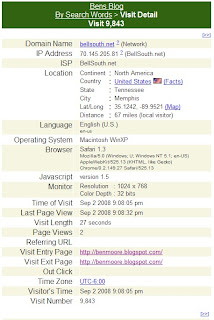
They tell the web site that they are Safari on Macintosh WinXP. That's a new operating system to me. Apparently the code base is Apple's WebKit.
The rendering looks pretty much like Firefox as they both use the Gecko engine.
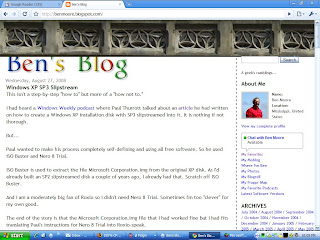
As you would expect from Google (particularly in a 0.2 release), this thing is pretty minimalist but it is elegant. Look at the Find bar.
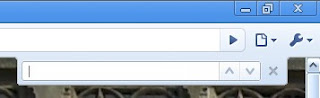
And yeah, the up and down arrows are "previous" and "next." So subtle.
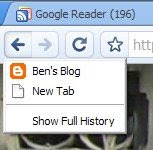
IE 7 and Firefox 3 have gotten this thing about combining the history in "Back" and "Forwards" buttons. Chrome leaves the history on the appropriate button but adds a new user interface of clicking and holding to display it.
Time will tell on this one.
I've really gotten where I like the color coding of the address bar for SSL and EV certificates. Chrome has half of it.
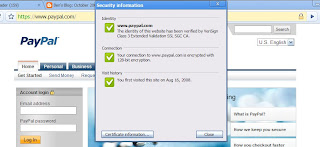
To show the EV certificate, you have to click on the lock in the address bar.
If you right click on the tab bar, one of the choices is "Task manager." I had to click that.
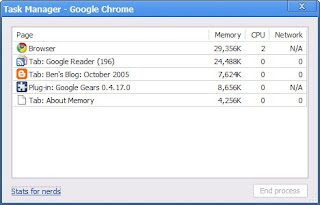
Interesting but I couldn't resist the "Stats for nerds."
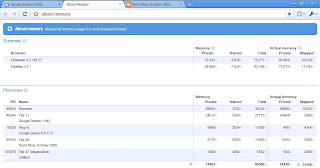
Wow!
Remember the controversy over Firefox 3's address bar pulling up history? Google just went way beyond that. They use the address bar field for a search field also.
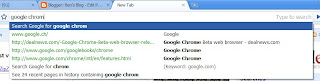
Go play with it. Just remember that it's a 0.2 release!
You know I'm a sucker for all things Google so I downloaded it and began playing with it.
This post just has the first couple of things that caught my eye and interest.
First, they lie to the web site. They probably have to or all the web sites would give them junk html.

They tell the web site that they are Safari on Macintosh WinXP. That's a new operating system to me. Apparently the code base is Apple's WebKit.
The rendering looks pretty much like Firefox as they both use the Gecko engine.

As you would expect from Google (particularly in a 0.2 release), this thing is pretty minimalist but it is elegant. Look at the Find bar.

And yeah, the up and down arrows are "previous" and "next." So subtle.
IE 7 and Firefox 3 have gotten this thing about combining the history in "Back" and "Forwards" buttons. Chrome leaves the history on the appropriate button but adds a new user interface of clicking and holding to display it.

Time will tell on this one.
I've really gotten where I like the color coding of the address bar for SSL and EV certificates. Chrome has half of it.

To show the EV certificate, you have to click on the lock in the address bar.
If you right click on the tab bar, one of the choices is "Task manager." I had to click that.

Interesting but I couldn't resist the "Stats for nerds."

Wow!
Remember the controversy over Firefox 3's address bar pulling up history? Google just went way beyond that. They use the address bar field for a search field also.

Go play with it. Just remember that it's a 0.2 release!
Wednesday, August 27, 2008
Windows XP SP3 Slipstream
This isn't a step-by-step "how to" but more of a "how not to."
I had heard a Windows Weekly podcast where Paul Thurrott talked about an article he had written on how to create a Windows XP installation disk with SP3 slipstreamed into it. It is nothing if not thorough.
But...
Paul wanted to make his process completely self-defining and using all free software. So he used ISO Buster and Nero 8 Trial.
ISO Buster is used to extract the file Microsoft Corporation.img from the original XP disk. As I'd already built an SP2 slipstreamed disk a couple of years ago, I already had that. Scratch off ISO Buster.
And I am a moderately big fan of Roxio so I didn't need Nero 8 Trial. Sometimes I'm too "clever" for my own good.
The end of the story is that the Microsoft Corporation.img file that I had worked fine but I had fits translating Paul's instructions for Nero 8 Trial into Roxio-speak.
I googled "make a bootable cd with roxio." On the first page was a link to "The Elder Geek's" post on how to slipstream SP1.
But at the bottom was a link to how to burn the CD using "Roxio Easy CD and DVD Creator 6."
Bingo. That worked.
I had heard a Windows Weekly podcast where Paul Thurrott talked about an article he had written on how to create a Windows XP installation disk with SP3 slipstreamed into it. It is nothing if not thorough.
But...
Paul wanted to make his process completely self-defining and using all free software. So he used ISO Buster and Nero 8 Trial.
ISO Buster is used to extract the file Microsoft Corporation.img from the original XP disk. As I'd already built an SP2 slipstreamed disk a couple of years ago, I already had that. Scratch off ISO Buster.
And I am a moderately big fan of Roxio so I didn't need Nero 8 Trial. Sometimes I'm too "clever" for my own good.
The end of the story is that the Microsoft Corporation.img file that I had worked fine but I had fits translating Paul's instructions for Nero 8 Trial into Roxio-speak.
I googled "make a bootable cd with roxio." On the first page was a link to "The Elder Geek's" post on how to slipstream SP1.
But at the bottom was a link to how to burn the CD using "Roxio Easy CD and DVD Creator 6."
Bingo. That worked.
Friday, August 15, 2008
DNS Security, Part 3
Is there no end to the DNS security flaw? I've written about it here and here.
We all hoped that the technique that Dan Kaminsky described would put this to rest.
Apparently we were wrong.
The Register reported that a Russian researcher had demonstrated DNS cache poisoning on a freshly patched DNS server. It did take him 10 hours with a dedicated gigabit connection to the server but he did poison it.
Even Dan had to respond.
I read that when he posted it but I kinda glazed over after a while.
Then Steve Gibson revisited the DNS vulnerability in his last podcast. (I gotta quit listening to Steve.) You can read it here.
Steve refers to the "0x20 hack." If you hadn't falling asleep reading Dan's post, you would have seen that he did too.
I found the ITEF RFC that describes this technique. Sure cure for insomnia. Suffice it to say it has to do with using mixed case in the domain name being queried.
Let me net it out for me and you both.
Prior to this summer's patches, DNS had as low as 1 in 32,769 possibilities to be compromised. After the patches, the odds were 1 in 4,294,967,296 (according to Dan).
The 0x20 hack makes this 1 in billions and billions. Yeah, there are some edge cases that Dan covers but it's way better.
And this seems relatively easy to implement. I expect it'll slip in in a future round of patches and we'll be done with this until ... DNSSEC.
Stay tuned.
We all hoped that the technique that Dan Kaminsky described would put this to rest.
Apparently we were wrong.
The Register reported that a Russian researcher had demonstrated DNS cache poisoning on a freshly patched DNS server. It did take him 10 hours with a dedicated gigabit connection to the server but he did poison it.
Even Dan had to respond.
I read that when he posted it but I kinda glazed over after a while.
Then Steve Gibson revisited the DNS vulnerability in his last podcast. (I gotta quit listening to Steve.) You can read it here.
Steve refers to the "0x20 hack." If you hadn't falling asleep reading Dan's post, you would have seen that he did too.
I found the ITEF RFC that describes this technique. Sure cure for insomnia. Suffice it to say it has to do with using mixed case in the domain name being queried.
Let me net it out for me and you both.
Prior to this summer's patches, DNS had as low as 1 in 32,769 possibilities to be compromised. After the patches, the odds were 1 in 4,294,967,296 (according to Dan).
The 0x20 hack makes this 1 in billions and billions. Yeah, there are some edge cases that Dan covers but it's way better.
And this seems relatively easy to implement. I expect it'll slip in in a future round of patches and we'll be done with this until ... DNSSEC.
Stay tuned.
Saturday, August 09, 2008
DNS Security Flaw Explanation
Early last month, Dan Kaminsky announced that he had found a serious security flaw in the DNS code. My blog entry on it is here. Dan had promised that he'd explain it at Black Hat on August 6, 2008.
Here are his slides.
My take of it is that the bloggers had the vulnerability pretty much right but Dan explained how it could be so much easier exploited.
I welcome your comments with more insight.
Here are his slides.
My take of it is that the bloggers had the vulnerability pretty much right but Dan explained how it could be so much easier exploited.
I welcome your comments with more insight.
Wednesday, July 23, 2008
Windows Product Key Update Tool
If you've been reading this blog for long, you know what a sucker I am for ThinkPads. I buy them off lease from RetroBox. If you watch them closely (think every day), you can really find some good deals.
They come from RetroBox wiped clean; no OS. That always gets me to scrambling even though they all have a Certificate of Authenticity (COA) for Windows XP Pro on the bottom with a key. You'd need the IBM OEM XP Pro recovery CDs to use this key. Or so I thought.
Tonight I found the way to activate using this key. I have a consumer media for Windows XP Pro with a key. Use this and do a normal install even including entering this key. Don't sweat it if it has already been activated.
Then after the install is complete and before activating, go to Microsoft and download the Windows Product Key Update Tool. Run it and follow the instructions using the key on the COA on the bottom of the ThinkPad. One reboot later, you're done. It's even authenticated!
I don't see why this wouldn't work on any PC with an OEM COA. Let me know your experience.
I found this technique here on My Digital Life.
They come from RetroBox wiped clean; no OS. That always gets me to scrambling even though they all have a Certificate of Authenticity (COA) for Windows XP Pro on the bottom with a key. You'd need the IBM OEM XP Pro recovery CDs to use this key. Or so I thought.
Tonight I found the way to activate using this key. I have a consumer media for Windows XP Pro with a key. Use this and do a normal install even including entering this key. Don't sweat it if it has already been activated.
Then after the install is complete and before activating, go to Microsoft and download the Windows Product Key Update Tool. Run it and follow the instructions using the key on the COA on the bottom of the ThinkPad. One reboot later, you're done. It's even authenticated!
I don't see why this wouldn't work on any PC with an OEM COA. Let me know your experience.
I found this technique here on My Digital Life.
Wednesday, July 16, 2008
Allway Sync
Remember when I talked about using FolderShare to help my wife work back and forth between home and her office?
Her work system administrators have gotten increasingly thorough. In the end, they've blocked FolderShare. I completely understand why they're doing that.
But...
If I was ever going to see my wife, I had to restore her ability to work from home. I talked around at work and found robocopy and SyncToy. robocopy comes in the Windows Server 2003 Resource Kit Tools. It's a command line utility but there's a GUI to "help." While it's very capable, it's pretty awkward.
Then there's SyncToy v2.0 Beta. It's bigger than a breadbox. For example, it requires the .NET Framework v2.0.
I kept looking.
Somewhere I came across Allway Sync. It's free but limited to "synchronize no more than 20,000 files per 30-day period." I can live with that. They have a portable install made especially for installation on USB drives.
I found her a 512MB USB drive and copied her work My Documents to it. Then installed Allway Sync and created an automatic synchronization job.
On her PC at work, I created an icon on her desktop that will launch Allway Sync and run that synchronization job. And I got her a USB extension cord so she had a place to plug her USB drive in right on her desktop.
When she gets to work, she plugs in the USB drive and clicks the icon. It syncs automatically. She removes the USB drive and works normally throughout the day. When she is ready to leave, she repeats the process. Now the USB drive has a copy of her work My Documents.
At home, she plugs the USB drive into her ThinkPad and works from there. An unexpected benefit is that since she keeps the USB drive on her key chain, she can actually work on any PC by just plugging in the USB drive.
Still not as nice as FolderShare but works good enough within the restrictions of her work.
Her work system administrators have gotten increasingly thorough. In the end, they've blocked FolderShare. I completely understand why they're doing that.
But...
If I was ever going to see my wife, I had to restore her ability to work from home. I talked around at work and found robocopy and SyncToy. robocopy comes in the Windows Server 2003 Resource Kit Tools. It's a command line utility but there's a GUI to "help." While it's very capable, it's pretty awkward.
Then there's SyncToy v2.0 Beta. It's bigger than a breadbox. For example, it requires the .NET Framework v2.0.
I kept looking.
Somewhere I came across Allway Sync. It's free but limited to "synchronize no more than 20,000 files per 30-day period." I can live with that. They have a portable install made especially for installation on USB drives.
I found her a 512MB USB drive and copied her work My Documents to it. Then installed Allway Sync and created an automatic synchronization job.
On her PC at work, I created an icon on her desktop that will launch Allway Sync and run that synchronization job. And I got her a USB extension cord so she had a place to plug her USB drive in right on her desktop.
When she gets to work, she plugs in the USB drive and clicks the icon. It syncs automatically. She removes the USB drive and works normally throughout the day. When she is ready to leave, she repeats the process. Now the USB drive has a copy of her work My Documents.
At home, she plugs the USB drive into her ThinkPad and works from there. An unexpected benefit is that since she keeps the USB drive on her key chain, she can actually work on any PC by just plugging in the USB drive.
Still not as nice as FolderShare but works good enough within the restrictions of her work.
Wednesday, July 09, 2008
OpenDNS and the DNS Security Flaw
I found another reason to run OpenDNS. Brian Krebs of the Washington Post recently posted about a newly revealed security problem in the design of DNS.
Brian linked to Dan Kaminsky's blog. Dan has a gadget on his page that will check YOUR DNS server. You know me. Like the bank robber in "Dirty Harry," "I gots to know."
Here's what the test reported for OpenDNS:
 Then I went to another PC that is using BellSouth's DNS servers:
 You be the judge.
Brian linked to Dan Kaminsky's blog. Dan has a gadget on his page that will check YOUR DNS server. You know me. Like the bank robber in "Dirty Harry," "I gots to know."
Here's what the test reported for OpenDNS:
 Then I went to another PC that is using BellSouth's DNS servers:
 You be the judge.
Saturday, June 28, 2008
Firefox 3
Here I go again.
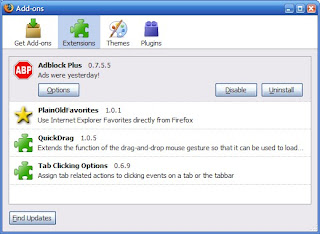
I'm using pretty much the same Add-ons I used before:
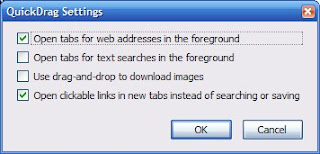
Here're the options for QuickDrag:
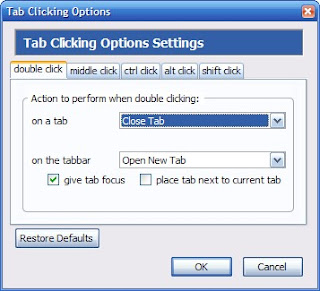
And here're the options for Tab Clicking:
I changed a couple of things in about:config:
Maxthon lets you search from the address bar and I'm already missing that in Firefox. I think I've found something even better though. John Bokma wrote about how to add "smart keywords" to Firefox. These work just like Maxthon's search shortcuts except you use them in Firefox's location bar. I've added the obligatory ones for Google and wikipedia.
Can't be any worse than Maxthon 2.
I'm using pretty much the same Add-ons I used before:

Here're the options for QuickDrag:

And here're the options for Tab Clicking:

I changed a couple of things in about:config:
browser.tabs.autoHide - falseThe location bar has a star at the right end for Firefox bookmarks, clear if the site isn't bookmarked and gold if it is. Since I don't use Firefox bookmarks, I just wanted that real estate back. This tips list tells you how to do it.
browser.tabs.closeButtons - 2
browser.tabs.tabMaxWidth - 100
browser.tabs.tabMinWidth - 10
Hide the star button if you prefer to use the Bookmarks menu or a keyboard shortcut (Ctrl + D)What they don't tell you is how to get the userChrome.css because it doesn't exist. In your C:\Documents and Settings\<username>\Application Data\Mozilla\Firefox\Profiles\im0vt1ea.default\chrome there is a file userChrome-example.css. Copy that in place and rename it to userChrome.css. Oh, they also don't tell you that you need to edit this with WordPad. Restart Firefox and then all is fine.
* Open your userChrome.css file located in your profile folder.
* Add this line to the end of the file:
#star-button {display: none !important;}
* Restart Firefox for the change to take effect.
Maxthon lets you search from the address bar and I'm already missing that in Firefox. I think I've found something even better though. John Bokma wrote about how to add "smart keywords" to Firefox. These work just like Maxthon's search shortcuts except you use them in Firefox's location bar. I've added the obligatory ones for Google and wikipedia.
Can't be any worse than Maxthon 2.
Sunday, June 22, 2008
OpenDNS
You'll remember back in February 2008 that I highlighted the IT Conversations podcast with David Ulevitch, founder and CEO of OpenDNS.com. I suggested then that I'd be playing with OpenDNS and I have.
Initially, I just switched my DNS to point to OpenDNS' servers. This gets you a couple of features. Things like if you misspell .com by typing .cm instead. OpenDNS will automatically change this to .com and send you on your way. If OpenDNS can't figure out what you want, it'll perform a search for you and give you an error page with the search results.
Nice, even cute, but not a big deal.
Then my mom started getting e-mail from phishing sites.
So I set up a free account at OpenDNS and registered my static IP address with them. Then I added a second "network" with OpenDNS for my mom's IP address. Unfortunately, she has a dynamic IP address.
OpenDNS has a client that you install that will track your IP address and update OpenDNS when it changes, just like DynDNS.
You have to enable that "network" within OpenDNS for dynamic IP address tracking and then you're good.
With all that in place, you can then set domain filtering for each "network" within your account. You can even specify text for the error messages and put your own logo on the messages.
 Of course there are statistics and reports galore.
Pretty cool.
Initially, I just switched my DNS to point to OpenDNS' servers. This gets you a couple of features. Things like if you misspell .com by typing .cm instead. OpenDNS will automatically change this to .com and send you on your way. If OpenDNS can't figure out what you want, it'll perform a search for you and give you an error page with the search results.
Nice, even cute, but not a big deal.
Then my mom started getting e-mail from phishing sites.
So I set up a free account at OpenDNS and registered my static IP address with them. Then I added a second "network" with OpenDNS for my mom's IP address. Unfortunately, she has a dynamic IP address.
OpenDNS has a client that you install that will track your IP address and update OpenDNS when it changes, just like DynDNS.
You have to enable that "network" within OpenDNS for dynamic IP address tracking and then you're good.
With all that in place, you can then set domain filtering for each "network" within your account. You can even specify text for the error messages and put your own logo on the messages.
 Of course there are statistics and reports galore.
Pretty cool.
Wednesday, June 11, 2008
HD UPS Problems
I've been fighting a problem with my APC UPS that I have in front of my HD setup. It's a BE350R.
When I went HD, I bought a new BE350R just for it. It ran fine for several months then one night the lights blinked and the whole HD setup dropped power. Bummer.
I reset it and it did it again. I just plugged everything into a power strip and went on.
Today I had time to work on it so I went on the APC site and they had a nice real-time chat feature. They walked me through testing the battery and it was fine. As I replayed the symptoms to the agent, he said that they indicated that the UPS was overloaded. The BE350R supports 200W. Actually the agent, Arun, was very good.
Plugged into it I had the Sony KDL52W3000, the Scientific Atlanta 8300HD DVR, the Hauppauge MediaMVP 01000, and the Vantec enclosure with the 750GB drive from the Seagate FreeAgent Pro.
Remember, I'm a mechanical engineer, not an electrical engineer!
So tonight I struck out finding the power requirements of this equipment. It didn't take long to discover my problem. The Sony draws 295W!
I'll just plug the Sony into the surge suppressor side of the BE350R and I should be fine.
When I went HD, I bought a new BE350R just for it. It ran fine for several months then one night the lights blinked and the whole HD setup dropped power. Bummer.
I reset it and it did it again. I just plugged everything into a power strip and went on.
Today I had time to work on it so I went on the APC site and they had a nice real-time chat feature. They walked me through testing the battery and it was fine. As I replayed the symptoms to the agent, he said that they indicated that the UPS was overloaded. The BE350R supports 200W. Actually the agent, Arun, was very good.
Plugged into it I had the Sony KDL52W3000, the Scientific Atlanta 8300HD DVR, the Hauppauge MediaMVP 01000, and the Vantec enclosure with the 750GB drive from the Seagate FreeAgent Pro.
Remember, I'm a mechanical engineer, not an electrical engineer!
So tonight I struck out finding the power requirements of this equipment. It didn't take long to discover my problem. The Sony draws 295W!
I'll just plug the Sony into the surge suppressor side of the BE350R and I should be fine.
Friday, June 06, 2008
Excel 2007 Slow Launching From Notes
A couple of us at work were early adapters of Office 2007.
As we installed it so early, we left Office 2003 installed as well. We've run into some interesting problems that I believe are as a result of that.
The most irritating example is that when you open an Excel file attachment from within Lotus Notes, Notes hangs, Excel opens but without a file. Then after what seems an eternity (really less than a minute), it breaks loose and all is fine. My friend even discovered that if he clicked on the Open icon in Excel and then canceled the dialog box that Excel would take off. The same thing happens when you double click on an Excel file in Windows Explorer. I haven't noticed it for Word files.
I Googled this and found this blog entry.
That fixed it. Interestingly, we both noticed that the text in our entry read
As we installed it so early, we left Office 2003 installed as well. We've run into some interesting problems that I believe are as a result of that.
The most irritating example is that when you open an Excel file attachment from within Lotus Notes, Notes hangs, Excel opens but without a file. Then after what seems an eternity (really less than a minute), it breaks loose and all is fine. My friend even discovered that if he clicked on the Open icon in Excel and then canceled the dialog box that Excel would take off. The same thing happens when you double click on an Excel file in Windows Explorer. I haven't noticed it for Word files.
I Googled this and found this blog entry.
That fixed it. Interestingly, we both noticed that the text in our entry read
"C:\Program Files\Microsoft Office\Office11\EXCEL.EXE" /eYou can just click on Browse in that dialog box and navigate to the Office12 folder.
Friday, May 23, 2008
FairUse Wizard
In this post over 2 years ago, I mentioned FairUse Wizard.
At that time, I was using it to transcode movies for my Treo. I still use it for that and it works fine.
However, I've found a new use for it. Remember that for Christmas I got the Philips DVP5982 DVD player.
The DVP5982 plays DivX/XviD videos from USB drives. I've been taking DVDs and ripping them with FairUse Wizard to 700MB XviDs. I copy these to a 2GB thumb drive and watch them from there.
At that time, I was using it to transcode movies for my Treo. I still use it for that and it works fine.
However, I've found a new use for it. Remember that for Christmas I got the Philips DVP5982 DVD player.
The DVP5982 plays DivX/XviD videos from USB drives. I've been taking DVDs and ripping them with FairUse Wizard to 700MB XviDs. I copy these to a 2GB thumb drive and watch them from there.
Saturday, May 17, 2008
Windows Desktop Search, Part 2
Last year I wrote about Windows Desktop Search. I've been using it since then. I've been through a couple of versions and am now using Windows Desktop Search 4.0 Preview. The previous version's add-in for Lotus Notes still works.
The Preview version seems to be less aggressive than the previous versions. But I noticed the folder C:\Documents and Settings\<username>\Local Settings\Application Data\Microsoft\Desktop Search\Logs was full of log files indicating errors in the Notes add-in.
Seems I wasn't the only one. Read this.
The Preview version seems to be less aggressive than the previous versions. But I noticed the folder C:\Documents and Settings\<username>\Local Settings\Application Data\Microsoft\Desktop Search\Logs was full of log files indicating errors in the Notes add-in.
Seems I wasn't the only one. Read this.
- From the Start menu, click Run, type regedit.exe and press Enter
- In the registry editor, navigate to HKLM\Software\Microsoft, right click and create a new WindowsSearchPreview key.
- Right-click HKLM\Software\Microsoft\ WindowsSearchPreview, add a new REG_DWORD value LogLevel.NotesPHLog, and set it to 4
- Open a Command Window (Start->Run->cmd.exe, ENTER)
- In the command window, type: net stop wsearch
- Press Enter, then type: net start wsearch and press Enter again.
- Remove the logs from C:\Documents and Settings\<username>\Local Settings\Application Data\Microsoft\Desktop Search\Logs.
Saturday, May 10, 2008
Latest Software Versions
| Updated 02/13/13 | |
 | Flash version checker Flash Player for Firefox Flash Player for IE |
 | Adobe Reader 10.0 |
 | Not recommended |
Friday, May 09, 2008
Notes Address Book to Outlook
In Notes, open your address book. Go to "File" and choose "Export." Chose a place to save it in "Save in:" Then specify a name in "File name:" and change the "Save as type:" to "vCard 3.0." Click on "Export."
In the resulting dialog box, click the "All documents" and "All fields" radio buttons and click on "OK."
Now go to Windows' "Start" menu, "Accessories" and select "Address Book." Go to "File" and choose "Import" and then "Business Card (vCard)." Point to the file you created above and click on "Open." You'll get a "Properties" dialog box for each entry. Just click on "Ok" each time, or keep banging on Enter.
You may want to take a second here and make a copy of the Windows Address Book. To do this, in the Address Book application, go to "File" and choose "Export." Pick a type and location.
Lastly, go to Outlook. Select "Contacts" then "File" and choose "Import and Export." Select "Import from another program or file." Select "Outlook Express 4.x, 5.x, 6.x or Windows Mail." In the dialog box titled "Would you like to import e-mail messages and addresses from Microsoft Outlook Express or Windows Mail?" answer "Yes." Note these instructions are for Outlook 2007. Yours may differ.
Or you could buy this or this or this or ...
In the resulting dialog box, click the "All documents" and "All fields" radio buttons and click on "OK."
Now go to Windows' "Start" menu, "Accessories" and select "Address Book." Go to "File" and choose "Import" and then "Business Card (vCard)." Point to the file you created above and click on "Open." You'll get a "Properties" dialog box for each entry. Just click on "Ok" each time, or keep banging on Enter.
You may want to take a second here and make a copy of the Windows Address Book. To do this, in the Address Book application, go to "File" and choose "Export." Pick a type and location.
Lastly, go to Outlook. Select "Contacts" then "File" and choose "Import and Export." Select "Import from another program or file." Select "Outlook Express 4.x, 5.x, 6.x or Windows Mail." In the dialog box titled "Would you like to import e-mail messages and addresses from Microsoft Outlook Express or Windows Mail?" answer "Yes." Note these instructions are for Outlook 2007. Yours may differ.
Or you could buy this or this or this or ...
Thursday, May 01, 2008
FilesBeforeVersion
I know that's an odd title but you'll see its importance in a minute. Remember last year when I whined about Word 2007 not supporting some early Word file formats?
Well, I got to share the misery with everyone who put Service Pack 3 on Word 2003. Microsoft imposed the same restrictions on those users.
I've just about learned to screen capture pages from Microsoft. KB928850 now explains how to unblock the older file formats in all the Office 2007 programs. KB922849 has the details for Word 2007.
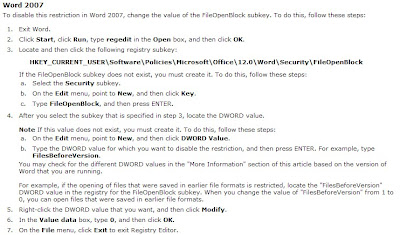 That fixes it.
Well, I got to share the misery with everyone who put Service Pack 3 on Word 2003. Microsoft imposed the same restrictions on those users.
I've just about learned to screen capture pages from Microsoft. KB928850 now explains how to unblock the older file formats in all the Office 2007 programs. KB922849 has the details for Word 2007.
 That fixes it.
Sunday, April 13, 2008
ThinkPad Scrolling
When I was playing with the Windows Live applications, Windows Live Mail and Windows Live Writer, I noticed that the center button on my ThinkPad T42 didn't scroll the windows like a scroll wheel should. If I plugged in a real mouse with a scroll wheel, that worked so it was something with the ThinkPad's center button.
I Googled this for a while and found this post:
Problem fixed.
I Googled this for a while and found this post:
Well this seems to work:I tried it and rebooted.
Open c:\Program Files\Synaptics\SynTP\TP4table.dat
Add this just before the "Pass 1" block:
; Set WheelStd as default
*,*,*,*,*,*,WheelStd,0,9
Problem fixed.
Subscribe to:
Posts (Atom)