Sunday, April 24, 2022

Between a Rock and a Hard Place

That's where ALL Insteon users find themselves.

I've had a good ride with Insteon. Until April 15, 2022.

I'll let you read Stacey on IoT's coverage. And even SmartLabs' feeble and belated attempt at explaining.


Where that leaves me and 1000s of other Insteon users is that their in-house equipment is fine but crippled due to https://connect.insteon.com being down for the count.


So, where do I go from here? There are several organizations out there trying to help.

But let's think about those solutions. They all cost a couple of $100s. And when you're done, you still have the Insteon switches and plugs which you can no longer buy and the Insteon hub which you can no longer buy. And the solutions put a server in your house that you have to support and maintain.

That's the Rock.

Then there are the alternatives. These mostly consist of Wi-Fi switches and plugs but depend on a cloud service.

What do you do if/when the cloud service goes away like Insteon did?

That's the Hard Place.

My decision is "Less is More." I'm going with Wi-Fi switches and plugs with no hub and server in the house. At least there are less moving parts.

And I plan to use Amazon Echo to create the automation schedules and routines. That gives me one degree of separation from the Wi-Fi switch and plug vendor's cloud service.


Sunday, April 10, 2022

Don't Believe Everything You Read on the Internet

I guess the title of this post is obvious but from time to time I just have to repeat it.

You'll remember that I'm a big fan of Wyze. But that doesn't lower my expectation of them.

The Verge did a "The Sky is Falling" story on Wyze's v1 camera. Incidentally, Wyze stopped selling them in 2018. They continued supporting it until January 2022.

The security research firm Bitdefender discovered a vulnerability in the v1 camera in March 2019. For some unclear reason, Bitdefinder didn't go public with this after a responsible time. Nor did Wyze share the vulnerability with it's customers.

Then the media started piling on. Read some here.

Even my favorite security podcast featured the vulnerability as "Not So Wyze."

Squarely in the doghouse this week is WYZE whose super-popular webcams have problems which are just as serious as those of the company itself... and, oh!, the authentication bypass details, which I'll share, are SO wonderful!

But don't stop listening there. Listen on to 1:31:12. Someone in the chat room asked "Would it be safe to use a Wyze cam v1 behind a firewall?" Steve answered "I think so. ... The threat model is that you might have mapped a port through it so that you had access to the camera directly, remotely ..."

Listen folks, if you have mapped a port through your firewall to your security camera, you get what you deserve.

Sunday, March 20, 2022

Guest Network for IoT

Several years ago I posted a diagram of my home LAN. It's still very much the same.

While that diagram covered the wired network, I didn't mention the wireless network. That diagram showed 3 wired IoT devices: the Insteon Hub, the Obihai terminal, and the Cisco femtocell.

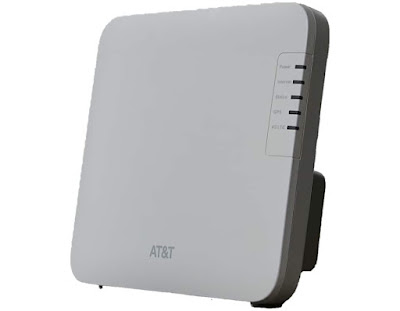
I have replaced the Insteon Hub due to failure, upgraded the Obihai to OBi200, and replaced the Cisco with a new AT&T Cell Booster.

For the wireless IoT devices, I've created a "guest" network using my Asus RT-AC68R.


All of my IoT wireless devices use 2.4GHz so I didn't even enable the 5GHz band.

Notice that the Asus screen says:
The Guest Network provides Internet connection for guests but restricts access to your local network.
What it doesn't say is that the guest network as implemented by the Asus allows access FROM the local network TO the guest network.

So I can view and control my IoT devices from my local network.

I was inspired to write this post by a recent article on Android Central. In that article, they say:
Your home router's guest network is wholly separate from the one you connect your smartphone or computer to. [emphasis mine]
Don't believe everything you read on the Internet.

Sunday, February 27, 2022

AT&T Cell Booster and Wyze Cams

02/22/22 was the day that AT&T turned off their 3G network. I had been using an AT&T microcell (Cisco DPH154). That afternoon I replaced it with a new AT&T Cell Booster (Nokia SS2FII) provided by AT&T. The installation went well (considering that AT&T was involved).


Until…

That evening, I opened the Wyze app on my iPad and NONE of my cameras (v2 and v3) could connect. My first suspicion was Wyze firmware as I had done a mass firmware update the previous night at bedtime. Uncharacteristically, I didn’t check that they worked after the update.

First I power cycled all the cameras. No improvement.

Then I backleveled the firmware on one of the v2 cameras that I could reach. No improvement.

Then I stopped and restarted my 2.4GHz IoT network. No improvement.

Then I rebooted my router. No improvement.

The rest of my 2.4GHz network seemed to be working fine but I didn’t comprehensively test it. I have Ring Doorbells and Amazon Alexas on it as well.

Hmmm. What else had changed since last night? Ah, ha! The AT&T Cell Booster.

Then I unplugged the power to the AT&T Cell Booster.

All is well. Except my cell coverage.

Does anyone else even have one of these AT&T Cell Boosters? Has anyone else experienced this? Anyone have an idea for a workaround?

Sunday, January 16, 2022

If It Breaks Then You Get To Keep Both Pieces

Back when I was young, I worked in the mainframe arena. There was lots of free software available. The saying that went along with that free software was:
If it breaks then you get to keep both pieces.
https://english.stackexchange.com/a/250982
Years later, I worked in the open systems arena as the Internet was emerging. And along with that revolution came "open source" software.

Our strategy group wouldn't let us use "open source" software.

With the recent log4j and NPM issues, finally I understand why.


Thank you, John O.

Sunday, January 09, 2022

USB-C vs Lightning

My last Android phone, the Essential PH-1, used USB-C. Obviously, my iPhone uses Lightning.

For my usage, they're pretty much the same. I just use the cable for charging. And I charge overnight.

But a couple of articles have raised my interest.

This comment triggered my research:
USB C sucks, Apple lighting is the best even tho I’m not a fan of apple, it’s so much more durable
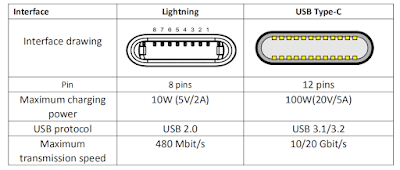
USB C wins hands down on technology. This article (archive.is) does a good job of summarizing the technology.

But, look closely at the chart they used.


Vention doesn't mention that the representations of the "Interface drawing" are fundamentally different.

That "Interface" for the Lightning is inside the device. That "Interface" for the USB-C is dangling at the end of a cable.

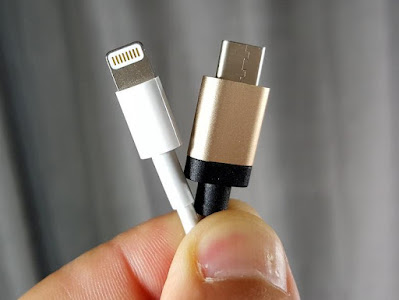
Here's a real world example of the difference from reddit:
The apple phone charger chips or breaks and you get a new charging cable, the design is reversed for USB-C, so if the reciever [sic] in a device chips or breaks you now need to replace the reciever [sic] for a phone or other gadget instead of getting a new cable...
Pocketnow has some similar comments:
USB C's design protects the pins and connectors on cables, but there might be some durability concerns over the tab inside a device.
from Pocketnow.com

I think it's clear which will win in the long run but it's going to be like Beta vs VHS without the porn.


Sunday, December 26, 2021

Asus and Log4j

Surely you've heard of the Log4j vulnerability by now.

A recent podcast led me to investigate whether my Asus RT-AC68R was vulnerable. I've got a lot of Asus equipment.

I went to Asus' site and found their summary of "Affected Products & Services".


Nice.

Sunday, December 19, 2021

Keepass Revisited

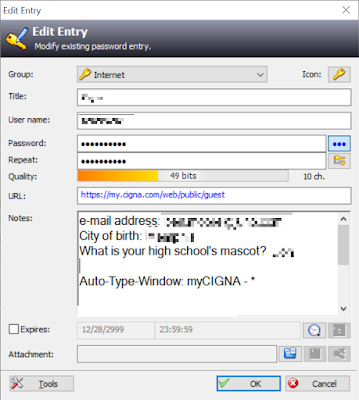
The end of the year gets me to reminiscing. One issue that came to mind recently is Keepass. These posts cover all the mechanics. I have migrated from Dropbox to OneDrive for storage. While I casually use Google Chrome's password store, my serious encrypted store is Keepass.

It's flexibility lets me store notes.


I also use Keepass to save names and addresses.

I had been using a 16GB Transcend thumb drive for the last several years. Last week, when I tried to update Keepass, I got a message that the drive was write-protected. I could still read it. After an hour or so of playing with it I realized it was just worn out.

As I keep it on my keyring, I needed a small but sturdy replacement. I found this 32GB Kingston DataTraveler.


It works great for Keepass.

Sunday, December 05, 2021

Happy New Year 2022

The start of a new year is a good time to review a few things and make sure everything is right. Here's my list of things I think you should check once a year.


Some of the steps may be a little out of date but I think you can find your way around. If not, leave me a comment and I'll help.

PayPal Preapproved Payments
Offline Backup
Certificate Store
Router Configuration
Windows Defender and Windows Defender Offline
Controlled Folder Access
System Restore

You'll sleep better.

Sunday, November 28, 2021

Wyze Cam Plus Person Detection

As I've mentioned previously, I'm a big fan of Wyze products.

Initially, the Wyze cameras had on-camera person detection but a dispute with Xnor.ai forced Wyze to remove this.

This seemed like a bad thing but it has been good.

Wyze introduced a paid service called Cam Plus. It's cheap ($1.25 per month per camera) and from time to time, they offer deals. I got an annual package for 5 cameras for $49.99.

In addition to person detection, Cam Plus offers package detection, vehicle detection, and pet detection. It also removes the 5 minute "cool down" period and has unlimited video length.

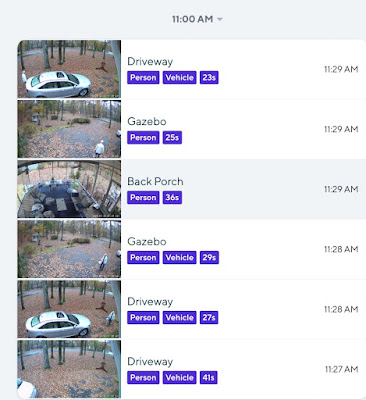
You can see how this looks in the following event log.


From the bottom to the top, you can see my neighbor pull into my driveway, walk to the front door, carry the package around to the back porch, return to his car, and drive off.

Just FYI, for my last purchase, I got the Wyze Cam v3 ($33.59) and a Samsung 32GB MicroSD card ($8.55).

Sunday, November 21, 2021

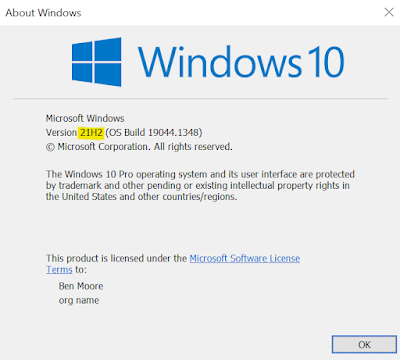
Windows 10 21H2 Enablement Package

Windows 10 November 2021 Update, a.k.a. 21H2, doesn't have many new features, especially for the home user.
  • Adding WPA3 H2E standards support for enhanced Wi-Fi security
  • Windows Hello for Business introduces a new deployment method called cloud trust to support simplified passwordless deployments and achieve a deploy-to-run state within a few minutes
  • GPU compute support in the Windows Subsystem for Linux (WSL) and Azure IoT Edge for Linux on Windows (EFLOW) deployments for machine learning and other compute intensive workflows

It hasn't shown up on ANY of my PCs so far. I always try to test new things so you don't have to. 21H2 is no exception.

Like 21H1, I found a link to download the enablement package. And like 21H1, when I clicked on that link, nothing happened. I had to right click and choose "Copy link address" and then paste that link into another browser tab.

Worked fine.

Sunday, November 14, 2021

I Can Print Again

This story starts with PrintNightmare. That's a long and arduous journey that isn't over.


But one of the side effects is that Microsoft's attempts to fix PrintNightmare has impacted Windows printing for months.

Printing to a direct connected printer hasn't been a problem (yet) but printing to a "server" connected printer has been impacted.

At my house, I have a Windows 10 Pro computer with a USB attached color laser printer. Each of my other PCs have this printer mapped across the network.

This has worked perfectly for YEARS - until August 2021's Patch Tuesday.

Then my PCs couldn't print to the shared printer.

But Microsoft couldn't let this situation persist, could they?

I waited until September's Patch Tuesday but I still couldn't print.

I took to Google and found a Registry hack that got me printing again.

Then after October's Patch Tuesday I couldn't print again.

But Microsoft couldn't let this situation persist, could they?

I waited until November's Patch Tuesday but I still couldn't print.

Again, I took to Google and found a Registry hack that got me printing again.

This time the workaround was in Bleeping Computer. grumpyoldadmin posted the following Registry hack from Microsoft for the November Patch Tuesday "fix."

Windows Registry Editor Version 5.00

[HKEY_LOCAL_MACHINE\SYSTEM\CurrentControlSet\Policies\Microsoft\FeatureManagement\Overrides] "713073804"=dword:00000000 

And that worked. There're specific hacks for the various versions of Windows 10. But if you read grumpyoldadmin's post, he notes that Microsoft also informed him that this change will need to be backed out once the December "fix" is released.

At this point, I'll take what I can get.

PS. Phil_Psdp commented:
For M$ to come up with entries to disable specific "features" in these updates certainly implies a deeper knowledge of the consequences than they are admitting
Aaarg!

Sunday, November 07, 2021

Unbelievable

I've published previously about Microsoft letting certificates expire on Teams and Exchange. I even offered Microsoft some advice:
Maybe they should have put a reminder on their Outlook calendar.
I guess, like Facebook, Microsoft doesn't read my blog.

It happened again.


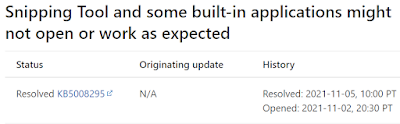
Microsoft has started warning Windows 11 users that certain features in the operating system are failing to load due to an expired certificate. The certificate expired on October 31st, and Microsoft warns that some Windows 11 users aren’t able to open apps like the Snipping Tool, touch keyboard, or emoji panel.
Besides being unbelievable that this keeps happening is that "certain features" of Windows 11 are dependent on Internet-based certificates.

Why in the world would tools like the Snipping Tool and touch keyboard depend on Internet certificates?

And I love their mitigation advice (archive.is):
To mitigate the issue with Snipping Tool, use the Print Screen key on your keyboard and paste the screenshot into your document. You can also paste it into Paint to select and copy the section you want.
Doh.


Sunday, October 31, 2021

Nuclear Ransomware 3.0

I follow a lot of material from KnowBe4. They provide really good training for enterprises covering social engineering attacks.
Hopefully, I'm personally beyond that risk. At least I passed all the KnowBe4 classes I just took.

Recently KnowBe4's Roger Grimes posted an article on "Nuclear Ransomware 3.0."

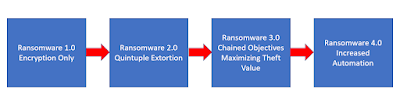
We all know what ransomware started out doing.

He described Nuclear Ransomware 2.0 as "Quintuple Extortion."

The five elements were:
  • Stealing Intellectual Property/Data
  • Stealing Every Credential It Can - Business, Employee, Personal, Customer
  • Threatening Victim’s Employees and Customers
  • Using Stolen Data to Spear Phish Partners and Customers
  • Publicly Shaming Victims
Those are bad enough.

Then he went on to suggest what Nuclear Ransomware 3.0 would consist of:
  • Selling exfiltrated data
  • Selling exfiltrated stolen credentials
  • Selling initial access
  • Stealing money from bank and stock accounts
  • Personal extortion against individuals
  • Hacking for hire
  • Selling lead lists from stolen customer data
  • Business email compromise scams
  • Installing adware
  • Launching DDoS attacks
  • Crypto mining
  • Creating rentable botnets
  • Sending spam emails
  • Resource renting
  • Acting as proxy sites for other attacks
  • Anything else they can think of to generate revenue
Yikes!

And some of these are already emerging. If you haven't heard of Initial Access Brokers (IABs), read this.


Sunday, October 24, 2021

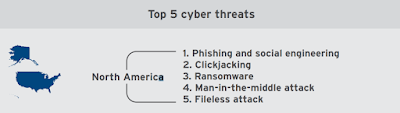
Top 5 Cyber Threats

Trend Micro shared a study in July 2021 on Cyber Risk Index.


There's a lot of comparison of risks across geographic regions, e.g. North America, Latin/South Americas, Europe, Asia-Pacific.

North America had the highest risk when Trend Micro compared regions' preparedness to the threat index.

While there's a lot to worry about there, to me the actionable topics are what Trend Micro called the "Top 5 Cyber Threats".

North America
  1. Phishing and social engineering
  2. Clickjacking
  3. Ransomware
  4. Man-in-the-middle attack
  5. Fileless attack
Make that your "to do" list.

Sunday, October 17, 2021

8 Inches vs 12 Inches

Ok, get your minds out of the gutter. I'm talking about silicon wafers.

We've all heard about car and truck production being impacted by chip shortages.


Why? I could have never guessed.

It turns out that automotive chips are fabricated on 200mm (8 in.) silicon wafers. Current wafer technology is 300mm (12 in.).

The use of chips in automobiles is booming so demand for 200mm wafers is increasing.

But the manufacturers of the wafer production technology are focusing on 300mm wafers.

This has caused a crunch in manufacturing of 200mm wafers.
As one headline from December (2020) read, "8-inch wafer capacity is in short supply to unimaginable levels", with the article stating "wafer production capacity is so tight that customers' demand for production capacity has reached a panic level." And that from mid 2021 "to the second half of 2022, the logic and DRAM markets will be out of stock."
ExtremeTech reported:
200mm was supposed to fade away as 300mm came online, and that worked from 2007 - 2014, ... 200mm capacity has gotten difficult to book. Large foundries like TSMC have been slow to add new 200mm capacity ...
Even the IEEE weighed in:
Despite the auto industry's desperation, there's no great rush to build new 200-mm fabs.
So, maybe the automotive industry could just move to 300mm wafers.
For automotive products from specification to PPAP would be more like 24 to 36 months, again depending on the complexity.
There's not going to be a quick fix.

Here's the only good news I've found around this:
Stop-start technology will be gone for now from non-diesel versions of Cadillac Escalade; Chevy Tahoe, Suburban, and Silverado; plus GMC Sierra and Yukon.

Sunday, October 10, 2021

Plan Z

Facebook had a bad day recently. And the next day wasn't too good either.


I've posted a couple of times (here and here) about my "Plan Z."

I've also posted several times (here, here, and here) about WFH risks.

Apparently Facebook doesn't read my blog.

Somebody at Facebook made a mistake. People make mistakes. That will happen.

What happened (or rather what didn't happen) next is the issue.

The Daily Mail had a good recap of the series of problems.
But the repair was delayed, according a purported insider, because of 'lower staffing in data centers due to pandemic measures', ...
There's the "WFH risk." And no Plan A.
Kieron Harding, an IT Infrastructure Engineer at GRC International Group, told DailyMail.com: 'The nature of the problem meant Facebook would have needed network engineers to physically access their BGP routers - and due to the pandemic, some of the data centers quite possibly don't have an engineer based on site, or someone who could have immediately started to work on the problem.'
"Facebook would have needed network engineers to physically access their BGP routers," Facebook didn't have a Plan B.
... the misconfiguration of the BGP also affected Facebook's physical door access systems
Facebook didn't have a Plan C.

You have to have a plan all the way down to Plan Z.

Be prepared.

Sunday, October 03, 2021

Microsegmentation Discovery

In my previous post on Microsegmentation, my closing comment was:
Labeling of assets is critical along with a comprehensive understanding of the applications relationships and dependencies.

In HP Enterprise's article on microsegmentation they said:
The smaller the segments, the more likely that security policies and controls can break normal interactions. So it's crucial to first get a lay of the land through a robust discovery process that uncovers what devices and applications are running on the network and then maps their data and traffic flows.
At a recent lunch with a network architect, he related how they had bought and implemented all the hardware for microsegmentation. But nobody would step up to the "robust discovery process" necessary. The microsegmentation capabilities of the equipment were never implemented. Eventually their hardware's capacity was exceeded and they were replaced.

What a shame.

Make sure that your microsegmentation project has not only the financial capital but the political capital to succeed.

Sunday, September 26, 2021

Everyone Gets a Rootkit

Now that I have your attention with that clickbait headline ...


There's been a recent flurry of articles about a longstanding Microsoft Windows capability called "Windows Platform Binary Table" (WPBT).

Introduced with Windows 8, here's an excerpt of Microsoft's description (docx):
This paper describes a mechanism for a platform, via the boot firmware, to publish a binary to Windows for execution.  The mechanism leverages a boot firmware component to publish a binary in physical memory described to Windows using a fixed ACPI table.
"via the boot firmware" is the significant part.

Microsoft goes on:
The primary purpose of WPBT is to allow critical software to persist even when the operating system has changed or been reinstalled in a "clean" configuration. WPBT allows the Windows image on disk to be modified at boot time.
Yikes!

Remember my advice to "Reload Windows on Your New PCs?" That might not be enough.

Principally, WPBT is there for hardware manufacturers to install their own firmware drivers before Windows loads.

But remember Murphy's Law: If anything can go wrong, it will.

As far back as 2015 there have been vulnerabilities related to WPBT. Here's (archive.is) Lenovo's story.

This popped up again this week in a report (archive.is) from eclypsium.

How-To Geek has the process (archive.is) on how to check your PC:
... open the C:\Windows\system32 directory and look for a file named wpbbin.exe. ... If it’s not present, your PC manufacturer hasn’t used WPBT to automatically run software on your PC.
My ThinkPad and Asus desktop were clean.

YMMV

Sunday, September 19, 2021

WFH Issues

WFH is a new acronym  for "Work From Home." I've blogged about my concerns before here and here.

Recently I came across a white paper from HP's Wolf Security group. Remember that they sell "endpoint security."

According to our HP Wolf Security Blurred Lines and Blindspots report, 23% of office workers globally expect to predominantly work from home post-pandemic, with an additional 16% expecting to split their time equally between home and the office. This will have far-reaching consequences for organizations across all economies.
This change is here to stay. That's really scary from a security perspective.

Here is a summary of their findings.

OFFICE WORKER REBELLIONS

Apathy
  • 39% of office workers surveyed aged 18-24 were unsure of the existing data security policies in place at their work
  • 36% of office workers surveyed had been given training on how to protect their home network
  • 54% of office workers surveyed aged 18-24 were more worried about deadlines than exposing the business to a data breach
Frustration
  • 48% of office workers surveyed aged 18-24 thought security policies are a hindrance
  • 37% of office workers surveyed said security policies and technologies are too restrictive
  • 48% of office workers surveyed said security measures result in a lot of wasted time
Circumvention
  • 31% of office workers surveyed aged 18-24 had tried to circumvent security
We have a lot of work to do.

There's another section on IT Team Rejections. I'll let you read that at your leisure.