Sunday, August 16, 2020

Microsoft Editor for Chrome

Have you ever used Grammarly for Chrome? Me neither. Grammarly has a free offering but the meat of their product is $23.96 per month. Microsoft Editor's premium features are included in Microsoft's Office 365 offering for $7 per month.

You can get Microsoft Editor in the Chrome Web Store for free. It does require you to login to the extension with a Microsoft account (MSA). After that it doesn't nag you anymore.

You get a couple of choices of what you want to enable and whether it is active on a particular web page.

Then as you're creating text, it watches your input and makes suggestions with a blue underlining.


Hover over the underlined word and you'll get a pop-up with hints. Click on the pop-up to accept the suggestion.

Just incidentally, that example was of capitalization in the subject of an e-mail. Microsoft Editor treated it like a title. I have a favorite tool for checking capitalization of titles. It looks like the New York Times could use that tool.

And while I'm off topic into writing tools, check out the Hemingway Editor.

Sunday, August 09, 2020

Nothing Is Simple

Why do developers make things so hard? Do you remember the good old days when the browser's address bar simply showed the URL?

Not so much any more. I wrote about Google removing "trivial" sub-domains here and the problems that caused with a Delta Vacations representative.

Now Google is removing even more of the URL.

So let's imagine that you are really pedantic and want to see the whole URL. With Chrome 83 and later you can!

All you have to do is browse to chrome://flags and search for "Context menu show full URLs". Set this to "Enabled" and restart Chrome.


You can just ignore the big red warning "WARNING: EXPERIMENTAL FEATURES AHEAD".

But wait, the full URL doesn't show even then.


You still have to right-click in the address bar and choose "Always Show Full URLs".


Finally!


That was easy, wasn't it?

Sunday, August 02, 2020

Essential Lineage

Previously I shared that Essential had shut down effective February 2020. And that I was using an iPhone X. I don't give up that easily.

Finally, Lineage has published an Android 10 release of their ROM for the Essential PH-1. They are dropping nightlies that are stable enough for a daily driver.


I followed the Lineage instructions for Essential (mata) here. The phone I was using already had an unlocked bootloader and an old system image, i.e. before February 2020.

The whole process went well but there are a couple of tips I want to share.

While the instructions are accurate, there are subtleties here and there that even a non-noobie like me needs help on.

For example, there are a couple of times where the instructions say to hold down a specific key combination. Then the next step is "Once the device is in..."

Uh, when do I release the keys and in what sequence? How do I know that the device is in the desired mode?

Here's the detail for Fastboot from Essential Support:
  1. Press and hold the Power and Volume-Down buttons.
  2. When you see the Essential logo on the screen, or you feel the phone vibrate, release the Power button (but keep holding the Volume-Down button).
  3. Release the Volume-Down button when Fastboot Mode appears.
Another place is "Once the device is in fastboot mode, verify your PC finds it by typing: fastboot devices".

And THEN what should I see?

Well, I didn't get ANY response from adb which I figured wasn't good.

It turns out that I had to update the Essential device drivers AGAIN while the phone was in Fastboot mode. The instructions are here.
  • Open device manager
  • Find Unknown "Android" device (likely listed under Other devices with an exclamation mark)
  • Update driver
  • Browse my computer for driver software
  • Let me pick from a list of devices, select List All Devices
  • Under "Android device" or "Google Inc", you will find "Android Bootloader Interface"
  • Choose "Android Bootloader Interface"
  • Click "yes" when it says that driver might not be compatible
After flashing the Lineage ROM, I flashed Open GApps micro for ARM64. As it was flashing I got messages on the phone about "zip signature verification failed".

What did that mean? Was it bad?

The answer to that is here.

TWRP (LOS recovery in my case) would need to incorporate a copy of LineageOS's public keys in order for its signature verification feature to work properly.

So, not to worry.

Whew! I'm glad I had done this before so when I stumbled I at least knew to go looking for answers.

Sunday, July 26, 2020

Chillin' With an iPhone - Part 4

I started to entitle this post "Don't Save in My Photo Stream" but I figured I'd get hate comments on that. Recently I posted on Photo Storage/Backup but this isn't about that.

Currently I'm using an iPhone X. Apple make it so easy to share photos using "My Photo Stream." But I discovered that Apple significantly reduced the resolution of photos stored in "My Photo Stream." While I didn't test iCloud sharing I expect that the same reduction is true of that as well.

To test this I took a photo with the iPhone X.


I looked at it in the iPhone X's "Recents" and "My Photo Stream." Then I let Google Photos and OneDrive upload it and looked at the pixels, resolution, and size on disk.


There were 2 surprises and one thing I can't explain.

First, "My Photo Scream" pretty well destroyed the photo. It reduced the resolution 50% which consequently reduced the number of pixels by 75%. The size on disk was reduced by almost 95%. This indicates that the JPEG compression was increased significantly creating more JPEG artifacts.

Second, Google Photos didn't resize the photo at all. In the Google Photos app on the iPhone X, I had set "High quality (free unlimited storage)" which in my earlier experiments had "significantly resized, around 40%." I can only speculate that Google has reduced or eliminated their resizing at this image size, i.e. 12.2MP.

The thing I can't explain is why the OneDrive backup doubled the size on disk. I wonder if that is some metadata they've added but that seems like a lot.

These results also make me wonder if now is the time to switch to using Google Photos as the source for my backup process. What I would do is to omit the OneDrive backup and then download photos from Google Photos into my archive process.

One downside is that Google Photos keeps the filename from iOS which tends to create duplicates over time. OneDrive creates unique filenames from the exif data for each photo.

I'll keep an eye on this and let you know if I make a change.

Sunday, July 19, 2020

Windows 10 2004 and OneDrive - Again


With my new iPad and Nebo, I've kinda parked my Asus Transformer Mini.

I pulled it out recently and ran Windows Check for updates. Surprisingly it didn't offer Windows 10 2004. It doesn't run Storage Spaces so I thought it would be ready to upgrade.

So I took a backup, went to Microsoft's Download Center and clicked on "Update now".

The Asus isn't very fast so it chugged away for a while. Then it suddenly finished with a cryptic error: "Windows Update will offer this version of Windows 10 automatically when these settings are supported."


WTF?

I put this string into Google and came across this article on Winaero.

There is a problem determination step and then a workaround.

Look in  C:\$WINDOWS~BT\Sources\Panther folder for the a file that whose name ends with HumanReadable.xml. See if it calls out OneDrive. (What the hell is the "Panther" folder? and "HumanReadable" as a file name? Come on, Microsoft!)

If it does, then:
  1. Uninstall OneDrive. Open Settings > Apps > Apps and features.
  2. Find Microsoft OneDrive in the list of the installed apps on the right.
  3. Click on the Uninstall button.
  4. This will remove OneDrive from your current Windows version.
  5. Upgrade your Windows to Windows 10 version 2004.
  6. Install OneDrive. You can download the official client software from Microsoft.
Done. Upgraded. Frustrated.

I don't recommend rushing into Windows 10 2004.

I stub my toe so you don't have to.

Sunday, July 12, 2020

Windows Explorer Search

Do you remember the good old days of Windows XP where Windows Explorer had a drop-down box in the search dialog where the keywords you could use were listed?


Well, that drop-down box has been gone for a decade.

BUT, the keywords are still available but not discoverable as far as I can tell.

Recently I was trying to find all the photos I had taken with my iPhone X. I could see that the detail information was there.

In a list of files in Windows Explorer, right click on a file and choose "Properties" all the way at the bottom.

In the pop-up window, click on the "Details" tab. There's a ton of information there. If you could only search on it!

Well, you can.

I found this on the Wayback Machine.

It's 10 years old but still works fine.

In my case, I put
cameramodel:"iPhone X"
in the search field of Windows Explorer and got just what I wanted.

Search around in that Wayback Machine article and see what you can find.

Sunday, July 05, 2020

The Crow Needs a Little Salt

I have to eat some crow. Do you remember my recent advice on Windows 10 Updates?
Take a system image backup. Cross your fingers. Apply them.
Yeah, I got bitten. Not once, but twice by Windows 10 2004.

My big desktop is running Storage Spaces.


I guess Microsoft forgot to test Storage Spaces.

I saw that my desktop system was offering Windows 10 2004 but I was going through my normal sequence of applying the update to my less critical systems first.

Then I came across Woody Leonhard's article on Storage Spaces. When I went back to my desktop, the update was blocked. And it still is.

You can see Microsoft's support page here.

One of my less critical systems was my former desktop system. It doesn't run Storage Spaces so the update to Windows 10 2004 was offered and I installed it.

When I revisited it a day or two later, I noticed a pop-up complaining about OneDrive.


I didn't think much about it and chose to download files like it prompted me to. OneDrive started copying ALL my files to that system. I didn't think that that was the setting I had so I started un-syncing most of the directories and went on about my business.

A day or two later, I checked back in. None of the files had actually synced and the transfer rate was 0.0.

HotHardware has a good article on it here but there hasn't been much coverage of this. I followed the OneDrive reset (archive.is) process and that seems to have resolved it.

I'm not in much of a hurry to install Windows 10 2004 on my remaining systems.

Sunday, June 28, 2020

The (Intel) Sky Is Falling

Clickbait drives me crazy. So much of the press grabs a quote and makes a story out of it where there really isn't any meat to it.

A recent example is a WIRED story with the headline:
Security News This Week: An Unfixable Flaw Threatens 5 Years of Intel Chips

Doesn't that scare you? 5 YEARS OF INTEL CHIPS ARE THREATENED!

WIRED refers to a blog post that says:
The problem is not only that it is impossible to fix firmware errors that are hard-coded in the Mask ROM of microprocessors and chipsets. The larger worry is that, because this vulnerability allows a compromise at the hardware level, it destroys the chain of trust for the platform as a whole.
OMG! The world is ending. The "chain of trust" is DESTROYED!

In a headline ArsTechnica called this flaw:
...a concerning flaw that’s unfixable
Finally (and ironically) The Register brings some sanity to this discussion.
Although exploitation is like shooting a lone fish in a tiny barrel 1,000 miles away
Whew! I think we're safe.

Intel said that "an attack would require local access, specialized gear, and a high level of skill, making it relatively impractical in the real world."

reddit posted a link to the WIRED article and one of the comments gave some really good advice.
Guess I'll stop inviting Russians over for dinner.
Yeah, me too.

Sunday, June 21, 2020

GroupMe

GroupMe is a free group messaging service offered by Microsoft. It supports groups of up to 500 users across iOS, Android, Windows 10, the web and SMS. Microsoft's introductory page is here.


It’s simple to add anyone to a group using their phone number or their email address. If they're new to GroupMe, there’s no need to download an app right away. They can start messaging over SMS immediately.

You can even use GroupMe to hold a conference call or conduct polls.

Many organizations such as schools and churches have used GroupMe for communication.

For myself, I use the SMS delivery so the messages show up in my phone's text messaging app. I change the text tone to differentiate GroupMe messages from other text messages.

Under the covers, GroupMe is pretty clever. Each GroupMe group is assigned a phone #. This is how the SMS and conference call features work.

Sunday, June 14, 2020

Chrome Scroll to Text Fragment

Google's Chrome 80 introduced a new deep linking feature called "Scroll To Text Fragment." That description struggles to describe what it does.

Basically, it lets you specify a link that will position a web page at a string that you choose.

Here's a screen shot that doesn't use it.


Here's a screen shot that scrolls to "Beat".


Notice that the requested string is highlighted.

Now for the bad news. It's really hard to use.

Here's the URL that I used in the above example.
https://techcrunch.com/2020/03/20/psa-yes-you-can-join-a-zoom-meeting-in-the-browser/#:~:text=Beat
And I can't find a tool that lets you easily construct that URL. I use Notepad.

How-To Geek has an article on it.

Sunday, June 07, 2020

So You Think Your Backups Are Safe

I always beat the drum about making (and testing) backups.

But there's a story that goes back to the 70's. One of my former co-workers used to talk about the best way to damage an enterprise. He said to cause the organization's backups to be corrupted. Then when all their backups had been corrupted, delete the live versions and they wouldn't be able to restore.

He was way ahead of his time.

ZDNet had an article about ransomware attacks corrupting/encrypting backups because they were online when the attack occurred.


Don't forget my admonition.
Backup, Restore, Test
Do it. Do it again. Worry about it.

Now I'm going to add one.
Take the backup copies offline
Do it. Do it again. Worry about it.

I use Macrium Reflect and then keep the USB drive in my trunk.

And as usual I use belt, suspenders, and raincoat. Both Crashplan and Zoolz have built-in ransomeware protection.

I still worry.

Sunday, May 31, 2020

Video Conferencing Testing

CIO Services Group (CIOSG) has continually leveraged a variety of collaborative technologies. In the realm of video conferencing, we have been using Microsoft's Skype on many platforms. Skype has been effective and dependable with exceptional audio and video. We have exercised Skype with a variety of Windows browsers and clients and smartphone clients.


Most of the Skype usage has been with a host-initiated call. This requires all participants to be logged into a Microsoft account (MSA). We also tested the technique that doesn't need an MSA. That technique was as satisfactory as using an MSA.

There are a confusing number of Skype clients between Skype and Skype for Business as well as Windows browser clients.

CIOSG next tested 8x8. This is a commercialization of Jitsi. The audio and video were good. The controls were not up to the level of Skype. The testing was done with Windows browser clients with Firefox being "Limited Support." We didn't get Firefox to work.

Google Meet was next on our assessment. CIOSG is a GSuite customer so we have had access to Google Meet Essentials. This is now available to all users with a Google account. The audio and video were exceptional. The controls were complete and full function. The testing was done with a variety of Windows browsers and smartphone clients.

Our Webex testing was less than satisfactory. The audio and video were the lowest quality of all the clients tested. Webex was the only test where we abandoned the platform and went back to Skype. The testing was done with a variety of Windows browsers and clients and smartphone clients.

Our testing of Zoom showed that its reputation was well deserved. The presentation was well organized and functional. The audio and video were exceptional. The testing was done with a variety of Windows browsers and clients and smartphone clients.

While CIOSG tended to focus on Windows browser clients, several of the platforms were insistent on downloading and installing Windows clients. Often the "run in browser" link was actually delayed in presenting. Other than Google Meet, the other platforms presented limited capabilities when using the Windows browser clients. Examples of limited capabilities are no grid view, reduced host controls, lack of background features.

A detailed assessment of the various platforms is available here.

Sunday, May 24, 2020

Wyze Band

My son-in-law gave me a Fitbit Versa for Christmas last year. I've used it to document my walking and sleeping. The Versa gives me heart rate and pace and sleep periods.


I've been a big Wyze Cam fan so I jumped on the Wyze Band when it was announced.


It arrived recently and I've done a quick comparison to the Fitbit. As you read this you need to remember that the Fitbit Versa is ~$170 and the Wyze Band is $25.

Here's the walking report from the Fitbit Versa.


And for the same walk, here's the report from the Wyze Band.


Here's the comparison of the walking reports.


The Wyze distance is a little high and the Fitbit distance is a little low. The GPS measured distance is about 1.88 miles.

Still, the Wyze is close enough for 1/6 the price.

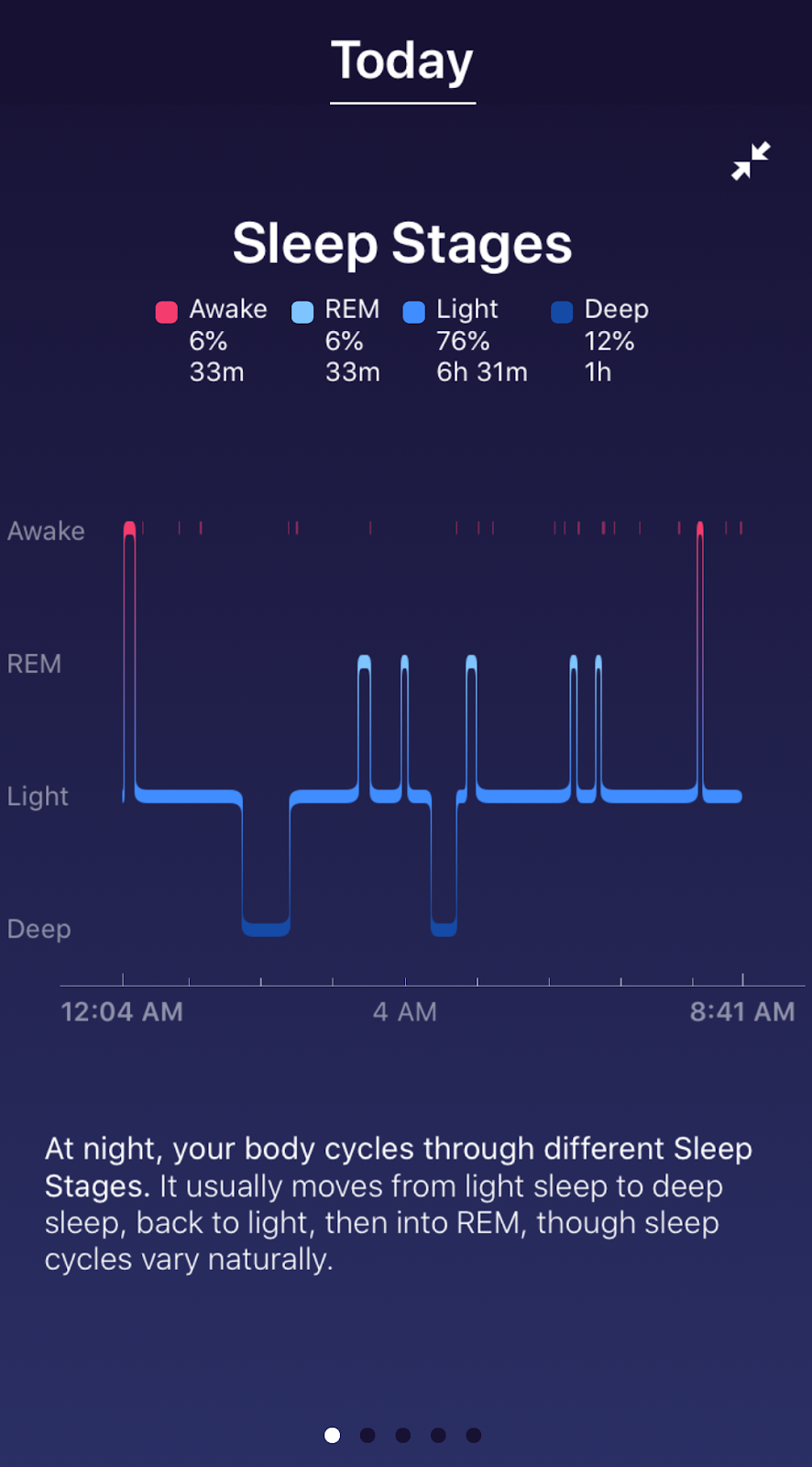
Here's the sleeping report from the Fitbit Versa.


And for the same night, here's the report from the Wyze Band.


Here's the comparison of the sleeping reports.


The Wyze Band doesn't fare as well on sleeping as on walking.

Sunday, May 17, 2020

Chillin' With an iPhone - Part 3

In my earlier post about MapMyWalk on my iPhone, I mentioned that I would revisit why the "red line is so crooked."

It's related to the observation I made in my post about managing photos on my iPhone. In that post I said that non-Apple apps tend to not run passively in the background even if you enable Background App Refresh.

Here is a recent result from MapMyWalk on my iPhone.


I think that's what happening with MapMyWalk. It looks like iOS isn't letting MapMyWalk access the GPS for location continuously. This results in the waypoints appearing irregular and the red line being crooked.

For comparison, here's the display from MayMyWalk on an Android device.


There is significantly less deviation on Android. The little discontinuity in the middle is where I crossed the street for an oncoming car.

This also has the effect that MapMyWalk's statistics are reported incorrectly on iOS. The distance and pace will be slightly off.

Generally this isn't really a problem with MapMyWalk.

But the same phenomenon can be observed with Google Maps. Often when you open Google Maps on an iPhone, the location will show as the last location where you used Google Maps. Then in a couple of seconds, the location will be updated to the current location.

I use Google Maps Timeline feature. Overall Google Maps Timeline on iOS has a lot less granularity than on Android and often will completely miss segments of travel. Even when it does record the travel the resolution isn't sufficient to identify the business visited. Google Maps Timeline on Android does an incredible job of this.

Neither of these examples disqualify location services on iOS. The upside is that the iOS battery usage is significantly lower than Android.

In an admittedly unscientific attempt to compare, I went back to the last 30 days of my iPhone 6S compared to the next 30 days of my Essential PH-1. The iPhone 6S milliamps/hour averaged 55.63 compared to 69.03 on the Essential PH-1.

It's a trade-off. 

Sunday, May 10, 2020

Quiet, Listen

That's the sound of Intel going down the drain. My previous post in August 2019 discussed Samsung's Galaxy Book S running Windows 10 with Qualcomm's Snapdragon 7nm chip.

But hey, Intel has announced new systems as well in May 2020.
Intel’s 10th generation desktop CPUs have arrived - still on 14nm
Sad. I really can't think of anything positive to say about that.

Maybe other chip manufacturers have not progressed either.

Nope, not so much.
Early TSMC 5nm Test Chip Yields 80%, HVM Coming in H1 2020
(HVM stands for High Volume Manufacturing.)

Well, maybe they don't have any customers lined up.

Wrong!
TSMC already sampling Apple's 5 nm A14 Bionic SoCs for 2020 iPhones

It's a death watch now.

Sunday, May 03, 2020

Don't Read Forbes

At least not for your Windows news!


There seems to be a sector of the news media coming up with bad news about Windows Updates. See my earlier article on Windows 10 Updates.

My Google News feed came up with the following article:
Google Just Gave Millions Of Users A Reason To Quit Windows 10 (archive.is)
Note that while it was updated on 04/26/20, it was originally published on 04/23/20.

It rambles around talking about a Chromium sandbox feature that even Firefox uses.

Then it buries the lead with:
The good news is [Google's Project Zero] alerted Microsoft to the problem and the company issued a patch (CVE-2020-0981) to fix it. 
It fails to note that the patches (archive.is) were issued 9 days before the article was written!

Get your Windows news elsewhere.

Addendum: Don't read Express.co.uk either. They posted a similar article on May 3, 2020 with the headline "Windows 10 users face nightmare choice between losing their files or breaking Google Chrome".

Perhaps fortunately this story will no longer load. You can see it at the Way Back Machine or archive.is.

Sunday, April 26, 2020

Contactless Payments Revisited

Do you see this symbol at check-outs?


Do you know what it means? Does it work all the time?

It means that the check-out terminal hardware supports contactless payments. It doesn't mean that the merchant supports contactless payments.

I covered contactless payments a couple of years ago but there has been a lot of progress since then.

Contactless payments come in two main forms - a smartphone app or contactless technology embedded directly into the card.

The smartphone technology is known as Apple Pay, Google Pay or Samsung Pay (not covered by this article). Of course, Apple can't make it simple. On an iPhone the app that manages it is Wallet. Here is how to do it on your iPhone and here is how to do it on your Android phone.

All platforms will walk you through adding your credit cards to their app. But you may find that not all of your cards are supported on all platforms. For example, my primary credit card is supported by both Apple and Google. However, my bank's debit card is supported only by Apple.

After you add your card to the app, you'll probably have to interact with the issuer to confirm that you really want to add the card to the smartphone. Generally, that's an easy text message or automated phone call.

To use your iPhone with Face ID, double-click the side button, glance at your iPhone to unlock it, then hold the top of your iPhone close to the check-out terminal for a few seconds. When you’re done paying, a blue check mark will appear on the screen.

To use your iPhone with Touch ID, rest (don't press) your finger on Touch ID to unlock your phone, then hold the top of your iPhone close to the check-out terminal for a few seconds. When you’re done paying, a blue check mark will appear on the screen.

To use your Android phone to pay, unlock your phone, then hold the back of your phone close to the check-out terminal for a few seconds. When you’re done paying, a blue check mark will appear on the screen.

Recently, U.S. card issuers have begun offering contactless cards. If your card is capable, it will have this symbol on it.

If your card is equipped with contactless technology simply hold it near the card reader to complete your transaction. However, my experience is that 100% of the check-out terminals that have this symbol DON'T actually support contactless cards. That should change over time.

Contactless cards are sill rolling out in the U.S. Only 1 of the 3 cards that I primarily use support contactless.

There are reference articles here (archive.is) and here (archive.is).
Sunday, April 19, 2020

Chillin' With an iPhone - Part 2

On my Essential PH-1, I used a combination of apps to track my daily walks. I used Runkeeper to get a nice map of my route and Pedometer to count steps.

This time, I looked harder for an app that consolidated those functions. I came across MapMyWalk from Under Armour.

Here's its output at the end of a walk.

Pretty good.

I wish it would audibly give 2 decimals of the distance as you're walking. It only gives tenths of a mile. And give complete step counts. It only gives hundreds of steps.

I'll talk about why that red line is so crooked later.

MapMyWalk is also available on Android.

Sunday, April 12, 2020

Chillin' With an iPhone - Part 1

I've recently moved from Android to iOS, again. I wanted to share my current experiences.

Over the years I've posted several times about managing photos from a smartphone. The last time I was using iOS, I used Air Transfer to move photos from the iPhone. I fully expected to use it again this time but I haven't.

First I'm going to share my workflow and then speak to the nuances.

At the end of each day, I launch Google Photos and wait until the icon at the top right has a green check-mark.
That means all of my photos are backed up to Google Photos. I can easily triage them there.

Then I visit my iOS Camera Roll. I select and delete all the photos that I don't want to archive, e.g. screenshots, receipts, etc. Remember that they really aren't deleted, just moved to the Trash folder for 30 days.

Then I launch the OneDrive app and wait until it says "Up to date". Here (archive.is) is Microsoft's instructions on how to setup OneDrive for Camera Roll. Make sure to turn on "Include Videos".

This puts the photos my OneDrive Camera Roll in full resolution. This is where OneDrive is smoother than Air Transfer. I don't have to open a web page on a browser to make this happen. Even better, the files created have the timestamp of when the photo was saved in the filename. The downside is that this timestamp is relative to UTC. Still that is better than using a timestamp of when the file was transferred.

Two side issues: 1) You may want to turn off auto-replication of OneDrive's Camera Roll folder. Otherwise all the pictures will get copied to all of your instances of OneDrive. 2) You also may want to turn off HEIF so you get only JPG. You can do this on the iPhone by going to Settings / Camera / Formats / Most Compatible. Or you could add HEIF support to Windows.
From the OneDrive Camera Roll, I move the photos to my archive location.

Then I go back to the iOS Camera Roll and select and delete all the photos. You may not want to do this.

The non-Apple apps tend to not run passively in the background even if you enable Background App Refresh.
Sometimes they do, sometimes they don't.

I've got a couple of more topics to cover: MapMyWalk, Maps, and battery usage.

Sunday, April 05, 2020

Broadband Data Usage

I've been tracking my broadband data usage for years. Here's my chart.


While there are several stories/posts in this chart, the last entry (March 2020) is today's focus.

The blue stack represents the difference between my router's reported WAN data and Comcast's reported WAN data. When the blue stack is below the y-axis that indicates that Comcast didn't report as much WAN data as my router did. The long period with significant differences was a problem in my router's firmware (now fixed). Since then my router and Comcast have tracked pretty well.

Until last month (March 2020).

When I went to check my data usage on my Comcast account page, this is what I saw.


Not only was March 2020 significantly low, the first couple of days in April 2020 were zero.

And it stayed that way for several days. Then I figured it out.

With so many people working from home due to the COVID-19 situation, several ISPs have suspended their broadband data caps.

Here's Comcast's statement (archive.is) on March 13, 2020:
Pausing Our Data Plan: With so many people working and educating from home, we want our customers to access the internet without thinking about data plans. While the vast majority of our customers do not come close to using 1TB of data in a month, we are pausing our data plans for 60 days giving all customers Unlimited data for no additional charge.
It looks like what Comcast has done is to simply stop collecting broadband data usage.

This lets Comcast "pause" their data caps day by day without having to play with the billing system on the back end. Maybe they'll leave the cap off.

Monday, March 23, 2020

Clientless Skype Conference Call

In this time of "Shelter in Place" video conferencing has become a hot commodity. FaceTime is always an easy solution but for PC users that's not always available.

I came across this article that covers clientless Skype and have exercised it successfully.

Here's how it works.

Go to https://www.skype.com/en/free-conference-call/ and click on "Create a free meeting".


Keep clicking until you get a response.

Then click on the little "copy" icon at the end of the URL.


Save that URL. It can be used over and over.

Share it with the people you want to participate.

It works on Windows 10 with Chrome and Edge (not Firefox) and on a smartphone with an installed Skype app.

The following is for Windows 10 with Chrome.

Click on the link you just created.

Click on "Cancel" and then "Join as guest".


Enter your name and click on "Join".


If you're the first in the meeting you may have to click on "Start call".


And then click on "Start call" to start the call.


This supports up to 50 concurrent users.

You shouldn't have to install anything or create an account.

You may get some prompts requesting permission to use the camera and microphone. Respond appropriately.

However, if you want to run your Windows Skype app, on the first screen click on "Open Skype". and login to your Windows Skype app.

Alternatively, if don't click on "Open Skype", you can click on "Sign in" and log into Skype with your Microsoft account using the web interface without an installed Skype app.

If you do this on a smartphone, it will try to launch a Skype app.

And it's free!

Sunday, March 22, 2020

iPhone X - Essential PH-1 Comparison


Here's how the iPhone X compares to my Essential PH-1.

Apple iPhone XEssential PH-1
DESIGN
Device typeSmart phoneSmart phone
OSiOS (13.x, 12.x, 11.x)Android (10, 9.0 Pie, 8.1 Oreo, 7.1 Nougat)
Dimensions5.65 x 2.79 x 0.30 inches (143.6 x 70.9 x 7.7 mm)5.57 x 2.80 x 0.31 inches (141.5 x 71.1 x 7.8 mm)
Weight6.14 oz (174 g)6.53 oz (185 g)
MaterialsBack: Glass; Frame: Stainless steelBack: Ceramic; Frame: Titanium
Biometrics3D Face unlockFingerprint (touch)
DISPLAY
Physical size5.8 inches5.7 inches
Resolution2436 x 1125 pixels, 19.5:9 ratio1312 x 2560 pixels
Pixel density459 ppi504 ppi
TechnologyOLEDIPS LCD
Screen-to-body ratio82.35 %84.85 %
Colors16 777 21616 777 216
TouchscreenMulti-touchMulti-touch
FeaturesHDR video support, Pressure-sensitive, Oleophobic coating, Scratch-resistant glass, Ambient light sensor, Proximity sensorScratch-resistant glass (Corning Gorilla Glass 5), Ambient light sensor, Proximity sensor
CAMERA
RearDual cameraDual camera
Main camera12 MP13 MP
   FeaturesSapphire crystal lens cover, OIS, PDAF, CMOS image sensor, BSI sensorBlack and White, Laser and PDAF
Second camera12 MP13 MP
   FeaturesTelephoto, Sapphire crystal lens cover, OIS, PDAF, CMOS image sensor, BSI sensorBlack and White, Laser and PDAF
Video recording3840x2160 (4K UHD) (60 fps), 1920x1080 (Full HD) (240 fps), 1280x720 (HD) (30 fps)3840x2160 (4K UHD) (30 fps), 1920x1080 (Full HD) (60 fps), 1280x720 (HD) (120 fps)
   FeaturesOIS, Time-lapse video, Continuous autofocus, Video light, Video calling, Video sharingVideo calling, Video sharing
Front-facing camera7 MP8 MP
   FeaturesHDR
HARDWARE
System chipApple A11 Bionic APL1W72Qualcomm Snapdragon 835 MSM8998
ProcessorHexa-core, 2390 MHz, Monsoon and Mistral, 64-bit, 10 nmOcta-core, 2450 MHz, Kryo 280, 64-bit, 10 nm
GPUApple 3-core GPUAdreno 540
RAM3GB4GB
Built-in storage64 GB128 GB
BATTERY
Capacity2716 mAh3040 mAh
TypeLi - Ion, Not user replaceableLi - Ion, Not user replaceable
ChargingUSB Power Delivery, Qi wireless chargingUSB Power Delivery
CELLULAR
LTE (FDD)Bands 1(2100), 2(1900), 3(1800), 4(AWS-1), 5(850), 7(2600), 8(900), 12(700 a), 13(700 c), 17(700 b), 18(800 Lower), 19(800 Upper), 20(800 DD), 25(1900+), 26(850+), 28(700 APT), 29(700 d), 30(2300 WCS), 66(AWS-3)Bands 1(2100), 2(1900), 3(1800), 4(AWS-1), 5(850), 7(2600), 8(900), 12(700 a), 13(700 c), 17(700 b), 20(800 DD), 21(1500 Upper), 25(1900+), 26(850+), 28(700 APT), 29(700 d), 30(2300 WCS)
LTE (TDD)Bands 38(2600), 39(1900+), 40(2300), 41(2600+)Bands 38(2600), 39(1900+), 40(2300), 41(2600+)
UMTS850, 900, 1700/2100, 1900, 2100 MHz850, 900, 1700/2100, 1900, 2100 MHz
Data SpeedLTE-A Cat 12/13 (600/150 Mbit/s), HSDPA+ (4G) 42.2 Mbit/s, HSUPA 5.76 Mbit/s, UMTSLTE-A Pro Cat 16 (1000/150 Mbit/s)
SIM typenano-SIMnano-SIM
CONNECTIVITY
Bluetooth5.05.0
Wi-Fi802.11 a, b, g, n, ac, dual-band; MIMO, Wi-Fi Direct, Hotspot802.11 a, b, g, n, ac, dual-band; MIMO, Wi-Fi Direct, Hotspot
USBLightningUSB Type-C (reversible)
   FeaturesCharging, Headphones portMass storage device, Video out, Charging, Headphones port
HDMI

OtherNFC, Tethering, Computer sync, OTA syncNFC, Tethering, Computer sync, OTA sync
OTHER FEATURES
SensorsAccelerometer, Gyroscope, Compass, BarometerAccelerometer, Gyroscope, Compass, Barometer
Source: phoneArena.com


Sunday, March 15, 2020

Kr00k

Every now and then my propeller beanie comes out.


Here I go again.

Recently ESET was researching KRACK (archive.is) vulnerabilities in Amazon's Echo. This has been fixed by Amazon (archive.is).

But ESET's research turned up another broader vulnerability they call Kr00k.

The deep dive presentation by ESET is on YouTube. Watch it when you're not sleepy.

An explanation for mere mortals is here (archive.is). Steve Gibson covers it here. Some of the coverage has lists of vulnerable devices. Your Wi-Fi device not being on this list does NOT mean you're safe. It just means that they didn't test your device.

The short explanation is to update your devices if/when you can. Phones and tablets that are being updated will probably be updated automatically. The device you need to look into is your home router.

Login into the administrator page and see if it offers you a firmware update. If not, go to the manufacturer's support page and look for firmware updates.

This isn't a "The sky is falling" problem as the hacker has to be within Wi-Fi range of your router. And using https defeats the exploit. But updating your firmware is always a good idea.

The Wired article concludes with:
Despite the limited threat posed, readers should ensure their devices have received updates issued by the manufacturers. This advice is most important for users of vulnerable Wi-Fi routers, since routers are often hard to patch and because vulnerable routers leave communications open to interception even when client devices are unaffected or are already patched.

Sunday, March 08, 2020

Windows 10 Updates

This is a real quandary. On one hand you want to keep your Windows 10 system up to date for protection from exploited vulnerabilities. On the other hand, remember the old adage "If it ain't broke, don't fix it."

But then you have to wonder about the quality of the Microsoft updates.

Some people have made a career out of pointing out all of the foibles, I think Woody Leonhard does thorough research and has a capable staff but I never run into the problems he reports on. I guess I'm just lucky.

Clearly there are many Windows users impacted by problematic updates. And Microsoft struggles with explaining what causes them.

And here's an example of just how confusing this problem is.


Yep, 2 articles on KB4535996. The first one (archive.is) saying that it fixes "search and printing problems" and the second one (archive.is) saying that it "causes freezes, installation issues." Admittedly, for now, this is an "optional" update but it demonstrates the underlying issues with Windows updates.

What to do?

Take a system image backup. Cross your fingers. Apply them.

Sunday, March 01, 2020

Steve Jobs Sent Me a Message

I change phones like most people change underwear. I've stuck with the Essential PH-1 longer than usual - 2 years.

But the good ride had to come to an end. Essential announced it was shutting down February 12, 2020.

I started considering what was going to be my next phone.

I've liked the face unlock of the Lenovo Tab M8. I started watching for iPhone Xs on Gazelle. After Valentine's Day, Gazelle had a 20% off sale on iPhone Xs and I went for it.

But even when I had it in hand, I was still reticent to switch. Then on one of my morning walks, I dropped the Essential and cracked the screen around the edge in 2 places.

I tried to convince myself that it wasn't too bad. I took my thumb and rubbed the cracked screen.

That's when I got the message from Steve.


So I moved my SIM to the iPhone X.