Sunday, September 06, 2020

Chrome Tab Hover Cards

Google's Chrome 85 has lots of new bells and whistles. One I've been playing with is Tab Hover Cards.

Although I have Chrome 85, this specific feature is not enabled. Google tends to roll these out in waves.

If you want to see it now, go to chrome://flags and search for "tab-hover-card". I intentionally omitted the "s" at the end so you'll see both flags.

For each entry, click on the blue box and change the setting to "Enabled".

"Tab Hover Cards" has choices for "Enabled", "Enabled B", and "Enabled C". These affect how quickly the preview pops up.

Then you'll need to relaunch Chrome.

This is what the preview looks like.


Not all of the previews come up immediately. It seems that Chrome is building them in the background. It may take a few minutes before all the previews are ready.

Sunday, August 30, 2020

Trillions with a "T"

 In late 2019, Accenture Strategy did an assessment on "Securing the Digital Economy."

Topics included:

  • The Internet Just Can't Keep Up
  • The IoT Effect
  • Identities in Crisis
  • No Flow Versus Free Flow
  • The Cost of Insecurity
  • Keeping Tabs on Cybersecurity Investments

Then they gave recommendations for actions in the following areas:

  • Governance
  • Infrastructure
  • Technology

This is a great read.

But I want to emphasize just one of their findings - The Cost of Insecurity

Here's their chart:

In the private sector, over the next five years companies risk losing an estimated US$5.2 trillion in value creation opportunities from the digital economy

Yes, that TRILLIONS with a "T."

If that's hard to get your head around, this will help you apply this to your company.

This translates to 2.8 percent in lost revenue growth for the next five years for a large global company.

Worry. React. Invest.

Sunday, August 23, 2020

Dashcam Wiring - OBD Power Cable

I got a new dashcam for Father's Day so I had one to "trickle down."

I'd always wanted to put a dashcam in my Honda S2000.


But the S2000 is a different animal. I didn't want to tackle the power like I had done on my newer Hondas. But the cigarette lighter in the S2000 is on the bulkhead behind the seats.

Then I came across some OBD power cables. There are a variety of alternatives with various connectors, e.g. mini-USB, micro-USB, USB-A.

But the OBD port supplies power even when the ignition is off. Some of the OBD power cables have a "smart" switch that gives 2 different modes. The first is always on, at least until the battery runs down. Unless your dashcam has a motion sensor that will cut it off when no motion is detected, that's not what you want.

The other mode on these "smart" switch OBD power cables is called "ACC". It kills the power 5 minutes after the car is turned off,


But I'm cautious of recommending it just because of the seller. The seller is in China which normally takes several weeks for delivery. But that seller offered "Local Express Shipping" with expected delivery in 1-2 days. I opted for that.

It didn't work out so well. The shipping took 3 weeks. When I tried to contact the seller, the e-mail address that Amazon had failed. But it did arrive and it was well packaged.

Overall, the cable does exactly what I wanted it to. There are several observations to add, though.

The OBD connector doesn't have any mechanism to secure it to the car's OBD port. I'm not sure that that is even possible but since my car's OBD port faces downward, I'm worried that the connector will just fall out.


Similarly, the mini-USB connector seems loose in the mini-USB port of the dashcam.


But it hasn't fallen out.

I'm using the "ACC" mode.


The other consideration I ran into as I researched these OBD power cables was that sometimes they interfere with the normal operation of the OBD system, even sometimes affecting operation of the car.

Toward this end, this OBD power cable only uses 3 pins.


So far, so good.

This looks like the exact product from an on-shore seller. This one has a USB-A port so you could power anything with a USB-A cable, e.g. a GPS or a cell phone.

This has also led me on a quest for other uses of the OBD port. Since the S2000 sits in the garage all winter, I have a battery maintainer for it. But the battery maintainer uses alligator clips that connect to the battery terminals. This means that to connect the battery maintainer I have to open the hood.

This cable plugs into the OBD port and has a connector for the battery maintainer!

I wonder what else I can use the OBD port for?

Sunday, August 16, 2020

Microsoft Editor for Chrome

Have you ever used Grammarly for Chrome? Me neither. Grammarly has a free offering but the meat of their product is $23.96 per month. Microsoft Editor's premium features are included in Microsoft's Office 365 offering for $7 per month.

You can get Microsoft Editor in the Chrome Web Store for free. It does require you to login to the extension with a Microsoft account (MSA). After that it doesn't nag you anymore.

You get a couple of choices of what you want to enable and whether it is active on a particular web page.

Then as you're creating text, it watches your input and makes suggestions with a blue underlining.


Hover over the underlined word and you'll get a pop-up with hints. Click on the pop-up to accept the suggestion.

Just incidentally, that example was of capitalization in the subject of an e-mail. Microsoft Editor treated it like a title. I have a favorite tool for checking capitalization of titles. It looks like the New York Times could use that tool.

And while I'm off topic into writing tools, check out the Hemingway Editor.

Sunday, August 09, 2020

Nothing Is Simple

Why do developers make things so hard? Do you remember the good old days when the browser's address bar simply showed the URL?

Not so much any more. I wrote about Google removing "trivial" sub-domains here and the problems that caused with a Delta Vacations representative.

Now Google is removing even more of the URL.

So let's imagine that you are really pedantic and want to see the whole URL. With Chrome 83 and later you can!

All you have to do is browse to chrome://flags and search for "Context menu show full URLs". Set this to "Enabled" and restart Chrome.


You can just ignore the big red warning "WARNING: EXPERIMENTAL FEATURES AHEAD".

But wait, the full URL doesn't show even then.


You still have to right-click in the address bar and choose "Always Show Full URLs".


Finally!


That was easy, wasn't it?

Sunday, August 02, 2020

Essential Lineage

Previously I shared that Essential had shut down effective February 2020. And that I was using an iPhone X. I don't give up that easily.

Finally, Lineage has published an Android 10 release of their ROM for the Essential PH-1. They are dropping nightlies that are stable enough for a daily driver.


I followed the Lineage instructions for Essential (mata) here. The phone I was using already had an unlocked bootloader and an old system image, i.e. before February 2020.

The whole process went well but there are a couple of tips I want to share.

While the instructions are accurate, there are subtleties here and there that even a non-noobie like me needs help on.

For example, there are a couple of times where the instructions say to hold down a specific key combination. Then the next step is "Once the device is in..."

Uh, when do I release the keys and in what sequence? How do I know that the device is in the desired mode?

Here's the detail for Fastboot from Essential Support:
  1. Press and hold the Power and Volume-Down buttons.
  2. When you see the Essential logo on the screen, or you feel the phone vibrate, release the Power button (but keep holding the Volume-Down button).
  3. Release the Volume-Down button when Fastboot Mode appears.
Another place is "Once the device is in fastboot mode, verify your PC finds it by typing: fastboot devices".

And THEN what should I see?

Well, I didn't get ANY response from adb which I figured wasn't good.

It turns out that I had to update the Essential device drivers AGAIN while the phone was in Fastboot mode. The instructions are here.
  • Open device manager
  • Find Unknown "Android" device (likely listed under Other devices with an exclamation mark)
  • Update driver
  • Browse my computer for driver software
  • Let me pick from a list of devices, select List All Devices
  • Under "Android device" or "Google Inc", you will find "Android Bootloader Interface"
  • Choose "Android Bootloader Interface"
  • Click "yes" when it says that driver might not be compatible
After flashing the Lineage ROM, I flashed Open GApps micro for ARM64. As it was flashing I got messages on the phone about "zip signature verification failed".

What did that mean? Was it bad?

The answer to that is here.

TWRP (LOS recovery in my case) would need to incorporate a copy of LineageOS's public keys in order for its signature verification feature to work properly.

So, not to worry.

Whew! I'm glad I had done this before so when I stumbled I at least knew to go looking for answers.

Sunday, July 26, 2020

Chillin' With an iPhone - Part 4

I started to entitle this post "Don't Save in My Photo Stream" but I figured I'd get hate comments on that. Recently I posted on Photo Storage/Backup but this isn't about that.

Currently I'm using an iPhone X. Apple make it so easy to share photos using "My Photo Stream." But I discovered that Apple significantly reduced the resolution of photos stored in "My Photo Stream." While I didn't test iCloud sharing I expect that the same reduction is true of that as well.

To test this I took a photo with the iPhone X.


I looked at it in the iPhone X's "Recents" and "My Photo Stream." Then I let Google Photos and OneDrive upload it and looked at the pixels, resolution, and size on disk.


There were 2 surprises and one thing I can't explain.

First, "My Photo Scream" pretty well destroyed the photo. It reduced the resolution 50% which consequently reduced the number of pixels by 75%. The size on disk was reduced by almost 95%. This indicates that the JPEG compression was increased significantly creating more JPEG artifacts.

Second, Google Photos didn't resize the photo at all. In the Google Photos app on the iPhone X, I had set "High quality (free unlimited storage)" which in my earlier experiments had "significantly resized, around 40%." I can only speculate that Google has reduced or eliminated their resizing at this image size, i.e. 12.2MP.

The thing I can't explain is why the OneDrive backup doubled the size on disk. I wonder if that is some metadata they've added but that seems like a lot.

These results also make me wonder if now is the time to switch to using Google Photos as the source for my backup process. What I would do is to omit the OneDrive backup and then download photos from Google Photos into my archive process.

One downside is that Google Photos keeps the filename from iOS which tends to create duplicates over time. OneDrive creates unique filenames from the exif data for each photo.

I'll keep an eye on this and let you know if I make a change.

Sunday, July 19, 2020

Windows 10 2004 and OneDrive - Again


With my new iPad and Nebo, I've kinda parked my Asus Transformer Mini.

I pulled it out recently and ran Windows Check for updates. Surprisingly it didn't offer Windows 10 2004. It doesn't run Storage Spaces so I thought it would be ready to upgrade.

So I took a backup, went to Microsoft's Download Center and clicked on "Update now".

The Asus isn't very fast so it chugged away for a while. Then it suddenly finished with a cryptic error: "Windows Update will offer this version of Windows 10 automatically when these settings are supported."


WTF?

I put this string into Google and came across this article on Winaero.

There is a problem determination step and then a workaround.

Look in  C:\$WINDOWS~BT\Sources\Panther folder for the a file that whose name ends with HumanReadable.xml. See if it calls out OneDrive. (What the hell is the "Panther" folder? and "HumanReadable" as a file name? Come on, Microsoft!)

If it does, then:
  1. Uninstall OneDrive. Open Settings > Apps > Apps and features.
  2. Find Microsoft OneDrive in the list of the installed apps on the right.
  3. Click on the Uninstall button.
  4. This will remove OneDrive from your current Windows version.
  5. Upgrade your Windows to Windows 10 version 2004.
  6. Install OneDrive. You can download the official client software from Microsoft.
Done. Upgraded. Frustrated.

I don't recommend rushing into Windows 10 2004.

I stub my toe so you don't have to.

Sunday, July 12, 2020

Windows Explorer Search

Do you remember the good old days of Windows XP where Windows Explorer had a drop-down box in the search dialog where the keywords you could use were listed?


Well, that drop-down box has been gone for a decade.

BUT, the keywords are still available but not discoverable as far as I can tell.

Recently I was trying to find all the photos I had taken with my iPhone X. I could see that the detail information was there.

In a list of files in Windows Explorer, right click on a file and choose "Properties" all the way at the bottom.

In the pop-up window, click on the "Details" tab. There's a ton of information there. If you could only search on it!

Well, you can.

I found this on the Wayback Machine.

It's 10 years old but still works fine.

In my case, I put
cameramodel:"iPhone X"
in the search field of Windows Explorer and got just what I wanted.

Search around in that Wayback Machine article and see what you can find.

Sunday, July 05, 2020

The Crow Needs a Little Salt

I have to eat some crow. Do you remember my recent advice on Windows 10 Updates?
Take a system image backup. Cross your fingers. Apply them.
Yeah, I got bitten. Not once, but twice by Windows 10 2004.

My big desktop is running Storage Spaces.


I guess Microsoft forgot to test Storage Spaces.

I saw that my desktop system was offering Windows 10 2004 but I was going through my normal sequence of applying the update to my less critical systems first.

Then I came across Woody Leonhard's article on Storage Spaces. When I went back to my desktop, the update was blocked. And it still is.

You can see Microsoft's support page here.

One of my less critical systems was my former desktop system. It doesn't run Storage Spaces so the update to Windows 10 2004 was offered and I installed it.

When I revisited it a day or two later, I noticed a pop-up complaining about OneDrive.


I didn't think much about it and chose to download files like it prompted me to. OneDrive started copying ALL my files to that system. I didn't think that that was the setting I had so I started un-syncing most of the directories and went on about my business.

A day or two later, I checked back in. None of the files had actually synced and the transfer rate was 0.0.

HotHardware has a good article on it here but there hasn't been much coverage of this. I followed the OneDrive reset (archive.is) process and that seems to have resolved it.

I'm not in much of a hurry to install Windows 10 2004 on my remaining systems.

Sunday, June 28, 2020

The (Intel) Sky Is Falling

Clickbait drives me crazy. So much of the press grabs a quote and makes a story out of it where there really isn't any meat to it.

A recent example is a WIRED story with the headline:
Security News This Week: An Unfixable Flaw Threatens 5 Years of Intel Chips

Doesn't that scare you? 5 YEARS OF INTEL CHIPS ARE THREATENED!

WIRED refers to a blog post that says:
The problem is not only that it is impossible to fix firmware errors that are hard-coded in the Mask ROM of microprocessors and chipsets. The larger worry is that, because this vulnerability allows a compromise at the hardware level, it destroys the chain of trust for the platform as a whole.
OMG! The world is ending. The "chain of trust" is DESTROYED!

In a headline ArsTechnica called this flaw:
...a concerning flaw that’s unfixable
Finally (and ironically) The Register brings some sanity to this discussion.
Although exploitation is like shooting a lone fish in a tiny barrel 1,000 miles away
Whew! I think we're safe.

Intel said that "an attack would require local access, specialized gear, and a high level of skill, making it relatively impractical in the real world."

reddit posted a link to the WIRED article and one of the comments gave some really good advice.
Guess I'll stop inviting Russians over for dinner.
Yeah, me too.

Sunday, June 21, 2020

GroupMe

GroupMe is a free group messaging service offered by Microsoft. It supports groups of up to 500 users across iOS, Android, Windows 10, the web and SMS. Microsoft's introductory page is here.


It’s simple to add anyone to a group using their phone number or their email address. If they're new to GroupMe, there’s no need to download an app right away. They can start messaging over SMS immediately.

You can even use GroupMe to hold a conference call or conduct polls.

Many organizations such as schools and churches have used GroupMe for communication.

For myself, I use the SMS delivery so the messages show up in my phone's text messaging app. I change the text tone to differentiate GroupMe messages from other text messages.

Under the covers, GroupMe is pretty clever. Each GroupMe group is assigned a phone #. This is how the SMS and conference call features work.

Sunday, June 14, 2020

Chrome Scroll to Text Fragment

Google's Chrome 80 introduced a new deep linking feature called "Scroll To Text Fragment." That description struggles to describe what it does.

Basically, it lets you specify a link that will position a web page at a string that you choose.

Here's a screen shot that doesn't use it.


Here's a screen shot that scrolls to "Beat".


Notice that the requested string is highlighted.

Now for the bad news. It's really hard to use.

Here's the URL that I used in the above example.
https://techcrunch.com/2020/03/20/psa-yes-you-can-join-a-zoom-meeting-in-the-browser/#:~:text=Beat
And I can't find a tool that lets you easily construct that URL. I use Notepad.

How-To Geek has an article on it.

Sunday, June 07, 2020

So You Think Your Backups Are Safe

I always beat the drum about making (and testing) backups.

But there's a story that goes back to the 70's. One of my former co-workers used to talk about the best way to damage an enterprise. He said to cause the organization's backups to be corrupted. Then when all their backups had been corrupted, delete the live versions and they wouldn't be able to restore.

He was way ahead of his time.

ZDNet had an article about ransomware attacks corrupting/encrypting backups because they were online when the attack occurred.


Don't forget my admonition.
Backup, Restore, Test
Do it. Do it again. Worry about it.

Now I'm going to add one.
Take the backup copies offline
Do it. Do it again. Worry about it.

I use Macrium Reflect and then keep the USB drive in my trunk.

And as usual I use belt, suspenders, and raincoat. Both Crashplan and Zoolz have built-in ransomeware protection.

I still worry.

Sunday, May 31, 2020

Video Conferencing Testing

CIO Services Group (CIOSG) has continually leveraged a variety of collaborative technologies. In the realm of video conferencing, we have been using Microsoft's Skype on many platforms. Skype has been effective and dependable with exceptional audio and video. We have exercised Skype with a variety of Windows browsers and clients and smartphone clients.


Most of the Skype usage has been with a host-initiated call. This requires all participants to be logged into a Microsoft account (MSA). We also tested the technique that doesn't need an MSA. That technique was as satisfactory as using an MSA.

There are a confusing number of Skype clients between Skype and Skype for Business as well as Windows browser clients.

CIOSG next tested 8x8. This is a commercialization of Jitsi. The audio and video were good. The controls were not up to the level of Skype. The testing was done with Windows browser clients with Firefox being "Limited Support." We didn't get Firefox to work.

Google Meet was next on our assessment. CIOSG is a GSuite customer so we have had access to Google Meet Essentials. This is now available to all users with a Google account. The audio and video were exceptional. The controls were complete and full function. The testing was done with a variety of Windows browsers and smartphone clients.

Our Webex testing was less than satisfactory. The audio and video were the lowest quality of all the clients tested. Webex was the only test where we abandoned the platform and went back to Skype. The testing was done with a variety of Windows browsers and clients and smartphone clients.

Our testing of Zoom showed that its reputation was well deserved. The presentation was well organized and functional. The audio and video were exceptional. The testing was done with a variety of Windows browsers and clients and smartphone clients.

While CIOSG tended to focus on Windows browser clients, several of the platforms were insistent on downloading and installing Windows clients. Often the "run in browser" link was actually delayed in presenting. Other than Google Meet, the other platforms presented limited capabilities when using the Windows browser clients. Examples of limited capabilities are no grid view, reduced host controls, lack of background features.

A detailed assessment of the various platforms is available here.

Sunday, May 24, 2020

Wyze Band

My son-in-law gave me a Fitbit Versa for Christmas last year. I've used it to document my walking and sleeping. The Versa gives me heart rate and pace and sleep periods.


I've been a big Wyze Cam fan so I jumped on the Wyze Band when it was announced.


It arrived recently and I've done a quick comparison to the Fitbit. As you read this you need to remember that the Fitbit Versa is ~$170 and the Wyze Band is $25.

Here's the walking report from the Fitbit Versa.


And for the same walk, here's the report from the Wyze Band.


Here's the comparison of the walking reports.


The Wyze distance is a little high and the Fitbit distance is a little low. The GPS measured distance is about 1.88 miles.

Still, the Wyze is close enough for 1/6 the price.

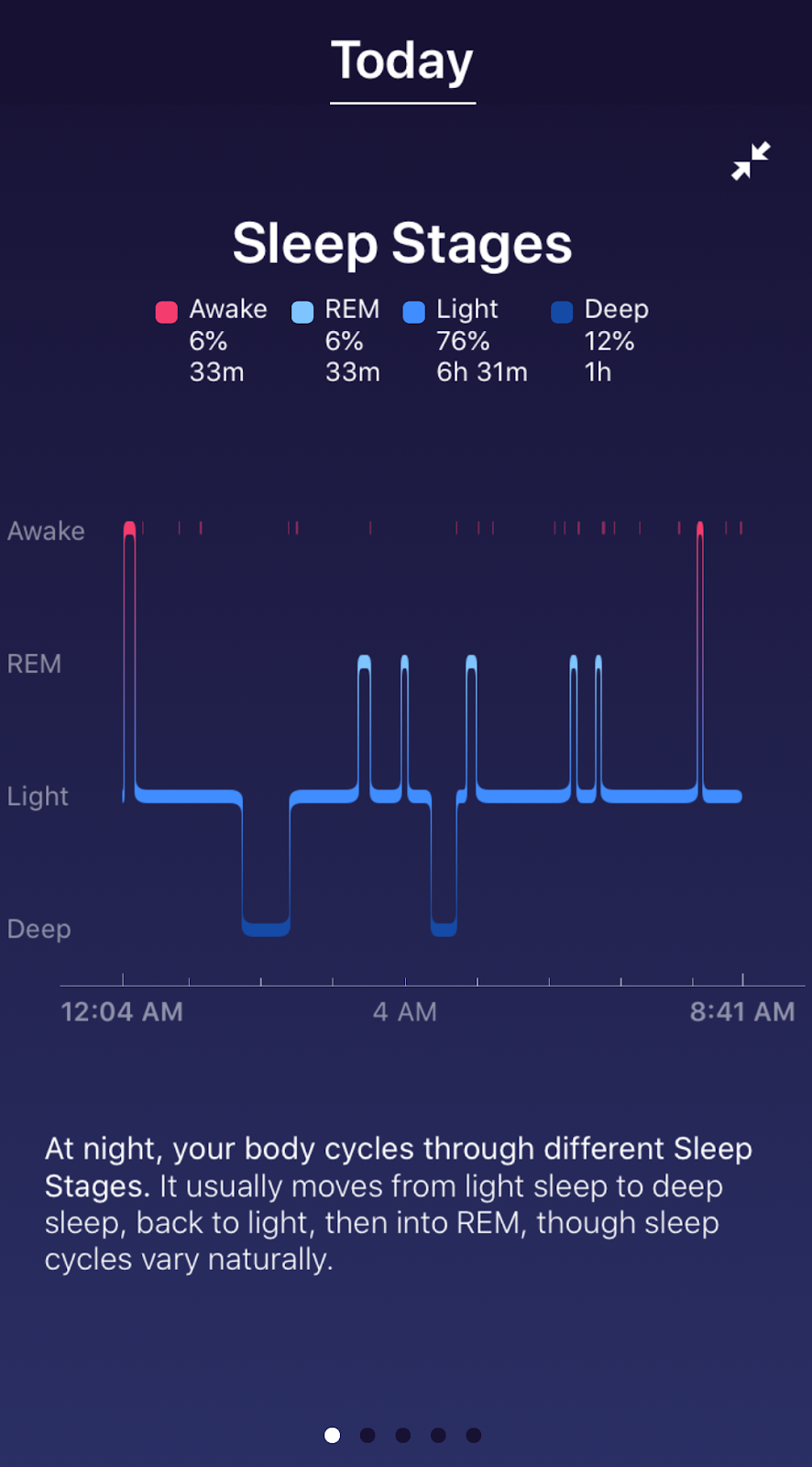
Here's the sleeping report from the Fitbit Versa.


And for the same night, here's the report from the Wyze Band.


Here's the comparison of the sleeping reports.


The Wyze Band doesn't fare as well on sleeping as on walking.

Sunday, May 17, 2020

Chillin' With an iPhone - Part 3

In my earlier post about MapMyWalk on my iPhone, I mentioned that I would revisit why the "red line is so crooked."

It's related to the observation I made in my post about managing photos on my iPhone. In that post I said that non-Apple apps tend to not run passively in the background even if you enable Background App Refresh.

Here is a recent result from MapMyWalk on my iPhone.


I think that's what happening with MapMyWalk. It looks like iOS isn't letting MapMyWalk access the GPS for location continuously. This results in the waypoints appearing irregular and the red line being crooked.

For comparison, here's the display from MayMyWalk on an Android device.


There is significantly less deviation on Android. The little discontinuity in the middle is where I crossed the street for an oncoming car.

This also has the effect that MapMyWalk's statistics are reported incorrectly on iOS. The distance and pace will be slightly off.

Generally this isn't really a problem with MapMyWalk.

But the same phenomenon can be observed with Google Maps. Often when you open Google Maps on an iPhone, the location will show as the last location where you used Google Maps. Then in a couple of seconds, the location will be updated to the current location.

I use Google Maps Timeline feature. Overall Google Maps Timeline on iOS has a lot less granularity than on Android and often will completely miss segments of travel. Even when it does record the travel the resolution isn't sufficient to identify the business visited. Google Maps Timeline on Android does an incredible job of this.

Neither of these examples disqualify location services on iOS. The upside is that the iOS battery usage is significantly lower than Android.

In an admittedly unscientific attempt to compare, I went back to the last 30 days of my iPhone 6S compared to the next 30 days of my Essential PH-1. The iPhone 6S milliamps/hour averaged 55.63 compared to 69.03 on the Essential PH-1.

It's a trade-off. 

Sunday, May 10, 2020

Quiet, Listen

That's the sound of Intel going down the drain. My previous post in August 2019 discussed Samsung's Galaxy Book S running Windows 10 with Qualcomm's Snapdragon 7nm chip.

But hey, Intel has announced new systems as well in May 2020.
Intel’s 10th generation desktop CPUs have arrived - still on 14nm
Sad. I really can't think of anything positive to say about that.

Maybe other chip manufacturers have not progressed either.

Nope, not so much.
Early TSMC 5nm Test Chip Yields 80%, HVM Coming in H1 2020
(HVM stands for High Volume Manufacturing.)

Well, maybe they don't have any customers lined up.

Wrong!
TSMC already sampling Apple's 5 nm A14 Bionic SoCs for 2020 iPhones

It's a death watch now.

Sunday, May 03, 2020

Don't Read Forbes

At least not for your Windows news!


There seems to be a sector of the news media coming up with bad news about Windows Updates. See my earlier article on Windows 10 Updates.

My Google News feed came up with the following article:
Google Just Gave Millions Of Users A Reason To Quit Windows 10 (archive.is)
Note that while it was updated on 04/26/20, it was originally published on 04/23/20.

It rambles around talking about a Chromium sandbox feature that even Firefox uses.

Then it buries the lead with:
The good news is [Google's Project Zero] alerted Microsoft to the problem and the company issued a patch (CVE-2020-0981) to fix it. 
It fails to note that the patches (archive.is) were issued 9 days before the article was written!

Get your Windows news elsewhere.

Addendum: Don't read Express.co.uk either. They posted a similar article on May 3, 2020 with the headline "Windows 10 users face nightmare choice between losing their files or breaking Google Chrome".

Perhaps fortunately this story will no longer load. You can see it at the Way Back Machine or archive.is.

Sunday, April 26, 2020

Contactless Payments Revisited

Do you see this symbol at check-outs?


Do you know what it means? Does it work all the time?

It means that the check-out terminal hardware supports contactless payments. It doesn't mean that the merchant supports contactless payments.

I covered contactless payments a couple of years ago but there has been a lot of progress since then.

Contactless payments come in two main forms - a smartphone app or contactless technology embedded directly into the card.

The smartphone technology is known as Apple Pay, Google Pay or Samsung Pay (not covered by this article). Of course, Apple can't make it simple. On an iPhone the app that manages it is Wallet. Here is how to do it on your iPhone and here is how to do it on your Android phone.

All platforms will walk you through adding your credit cards to their app. But you may find that not all of your cards are supported on all platforms. For example, my primary credit card is supported by both Apple and Google. However, my bank's debit card is supported only by Apple.

After you add your card to the app, you'll probably have to interact with the issuer to confirm that you really want to add the card to the smartphone. Generally, that's an easy text message or automated phone call.

To use your iPhone with Face ID, double-click the side button, glance at your iPhone to unlock it, then hold the top of your iPhone close to the check-out terminal for a few seconds. When you’re done paying, a blue check mark will appear on the screen.

To use your iPhone with Touch ID, rest (don't press) your finger on Touch ID to unlock your phone, then hold the top of your iPhone close to the check-out terminal for a few seconds. When you’re done paying, a blue check mark will appear on the screen.

To use your Android phone to pay, unlock your phone, then hold the back of your phone close to the check-out terminal for a few seconds. When you’re done paying, a blue check mark will appear on the screen.

Recently, U.S. card issuers have begun offering contactless cards. If your card is capable, it will have this symbol on it.

If your card is equipped with contactless technology simply hold it near the card reader to complete your transaction. However, my experience is that 100% of the check-out terminals that have this symbol DON'T actually support contactless cards. That should change over time.

Contactless cards are sill rolling out in the U.S. Only 1 of the 3 cards that I primarily use support contactless.

There are reference articles here (archive.is) and here (archive.is).

Sunday, April 19, 2020

Chillin' With an iPhone - Part 2

On my Essential PH-1, I used a combination of apps to track my daily walks. I used Runkeeper to get a nice map of my route and Pedometer to count steps.

This time, I looked harder for an app that consolidated those functions. I came across MapMyWalk from Under Armour.

Here's its output at the end of a walk.

Pretty good.

I wish it would audibly give 2 decimals of the distance as you're walking. It only gives tenths of a mile. And give complete step counts. It only gives hundreds of steps.

I'll talk about why that red line is so crooked later.

MapMyWalk is also available on Android.

Sunday, April 12, 2020

Chillin' With an iPhone - Part 1

I've recently moved from Android to iOS, again. I wanted to share my current experiences.

Over the years I've posted several times about managing photos from a smartphone. The last time I was using iOS, I used Air Transfer to move photos from the iPhone. I fully expected to use it again this time but I haven't.

First I'm going to share my workflow and then speak to the nuances.

At the end of each day, I launch Google Photos and wait until the icon at the top right has a green check-mark.
That means all of my photos are backed up to Google Photos. I can easily triage them there.

Then I visit my iOS Camera Roll. I select and delete all the photos that I don't want to archive, e.g. screenshots, receipts, etc. Remember that they really aren't deleted, just moved to the Trash folder for 30 days.

Then I launch the OneDrive app and wait until it says "Up to date". Here (archive.is) is Microsoft's instructions on how to setup OneDrive for Camera Roll. Make sure to turn on "Include Videos".

This puts the photos my OneDrive Camera Roll in full resolution. This is where OneDrive is smoother than Air Transfer. I don't have to open a web page on a browser to make this happen. Even better, the files created have the timestamp of when the photo was saved in the filename. The downside is that this timestamp is relative to UTC. Still that is better than using a timestamp of when the file was transferred.

Two side issues: 1) You may want to turn off auto-replication of OneDrive's Camera Roll folder. Otherwise all the pictures will get copied to all of your instances of OneDrive. 2) You also may want to turn off HEIF so you get only JPG. You can do this on the iPhone by going to Settings / Camera / Formats / Most Compatible. Or you could add HEIF support to Windows.
From the OneDrive Camera Roll, I move the photos to my archive location.

Then I go back to the iOS Camera Roll and select and delete all the photos. You may not want to do this.

The non-Apple apps tend to not run passively in the background even if you enable Background App Refresh.
Sometimes they do, sometimes they don't.

I've got a couple of more topics to cover: MapMyWalk, Maps, and battery usage.

Sunday, April 05, 2020

Broadband Data Usage

I've been tracking my broadband data usage for years. Here's my chart.


While there are several stories/posts in this chart, the last entry (March 2020) is today's focus.

The blue stack represents the difference between my router's reported WAN data and Comcast's reported WAN data. When the blue stack is below the y-axis that indicates that Comcast didn't report as much WAN data as my router did. The long period with significant differences was a problem in my router's firmware (now fixed). Since then my router and Comcast have tracked pretty well.

Until last month (March 2020).

When I went to check my data usage on my Comcast account page, this is what I saw.


Not only was March 2020 significantly low, the first couple of days in April 2020 were zero.

And it stayed that way for several days. Then I figured it out.

With so many people working from home due to the COVID-19 situation, several ISPs have suspended their broadband data caps.

Here's Comcast's statement (archive.is) on March 13, 2020:
Pausing Our Data Plan: With so many people working and educating from home, we want our customers to access the internet without thinking about data plans. While the vast majority of our customers do not come close to using 1TB of data in a month, we are pausing our data plans for 60 days giving all customers Unlimited data for no additional charge.
It looks like what Comcast has done is to simply stop collecting broadband data usage.

This lets Comcast "pause" their data caps day by day without having to play with the billing system on the back end. Maybe they'll leave the cap off.