Monday, October 08, 2007

ThinkVantage Active Protection System

I just built a new (to me) ThinkPad T42. I installed all the IBM Lenovo software.

Included in this is the ThinkVantage Active Protection System. I kinda knew what this was so I downloaded and installed the software.

Active Protection System uses a motion sensor on the motherboard and parks the hard drive's heads when it detects certain levels of motion.

Tonight when I went to Control Panel to update Java, I saw the ThinkVantage Active Protection System icon. With nothing else to do while Java updated, I fired this up. Here's what it looked like.

But it's realtime! As the laptop rested on my lap, it moved ever so slightly as I typed. The image of the laptop in the moved with it! Too cool.

You know what I had to do next. Yep, shake it!

IBM's description is here and there's a good independent article on it here.

Pretty nice stuff. Try that on your Dell.

Monday, September 24, 2007

TV Wiring Diagram

For all of you wondering how I have my SageTV box, a VCR/DVD, and a cable converter hooked up, here goes.


Input from the cable is split 4 ways. Leg 1 goes to VCR/DVD Antenna In. Leg 2 goes to the SageTV Antenna In. Leg 3 goes to the cable converter Antenna In. And finally, Leg 4 goes to the TV Antenna In.

The SageTV box also takes a Line In from the cable converter's Line Out. This uses the Left and Right audio outputs and an S-video output. The SageTV also outputs Line Out that goes into the TV Line 3 In.

The cable converter's ins and outs have been previously described except that the Left and Right audio outputs and Composite video are split and also go to the VCR/DVD Line 1 In. Originally, this was done so that I could record on the VCR from the cable converter which is no longer necessary.

The VCR/DVD Line Out goes into the TV's Line 1 In.

Yeah, it's a mess behind that entertainment center.

Sunday, September 23, 2007

Drobo

Last Fall when we went to Sun for an executive briefing, I fell in love with their Sun Fire X4500 ("Thumper"). I joked that I wanted one for home.

Now Data Robotics has an equivalent for the home market. The underlying technology is obviously different than Sun's Thumper but the result is similar.

It's a 4-bay SATA enclosure with USB 2.0 attachment. You just stick in a couple of drives and it figures out the best way to protect as much storage as possible. There's a good illustration of how it uses a mixture of RAID and mirroring in George Ou's blog post below.

If you need more space, add another drive or just pull out the smallest drive and stick in a larger one. Oh, don't worry about moving your data off before you do this. Just yank it out with the Drobo running.

With 2 400GB drives, I get 371GB protected. If I add another 400GB drive, I go to 743GB! Don't you love RAID? (Ok, pseudo-RAID)

Here's a couple of blog posts that give a lot more details.
It's worth a brief discussion of the related software. Data Robotics provides a Drobo Dashboard. You'd think it was not required as the Drobo presents to the operating system as a USB drive. However, currently there is a required firmware update for the Drobo that can only be installed via the Drobo Dashboard. So I installed the Dashboard.

But, it is a .NET 2.0 application. While the Drobo Dashboard was a 17MB download, the .NET Framework was a 23MB download. And now I have 3 Windows security patches to apply!

Monday, September 10, 2007

Google Street View

When I was driving down Poplar Pike last Thursday just after lunch, I saw this little Mini backing out of this driveway. It backed out onto Poplar Pike and proceeded East in front of me. It had blinking lights so I just assumed it was a mail carrier. As we stopped at Hacks Cross Road, I realized it had lettering across the back saying "Survey Vehicle" and a funky looking gadget on top. I had spotted a camera car for Google Street View!

He turned South and paused right on the railroad tracks. I can only presume he was trying to get a comprehensive shot of the grade crossing.

He went on South on Hacks Cross Road and turned East onto Ridgetown Lane.

So when the Google Street View for Memphis is available, remember you heard it here first. And look for the silver Camry on Poplar Pike near Hacks Cross Road!

Monday, September 03, 2007

doPDF

One of my many quests is for a lightweight, free, PDF creator. I know there're tons of them around but they all seem to either require ghostscript or put a watermark on the output.

The other day, I came across doPDF. I saved it away for a rainy day.

Well, that day came around today. It's a quick download and install. It works well too.

But...

I archive copies of my phone bill (around 30 pages and no, I don't have an iPhone). The copy created with doPDF was 745KB and the copy created with Adobe Acrobat 6.0 was 93KB. doPDF was set at 300 dpi and Acrobat at 600 dpi.

Hmmm.

doPDF worked fine but 8 times bigger is really too much.

Saturday, August 25, 2007

Western Digital My Book 500GB

I've been using IDE drives in USB/Firewire enclosures for add-on storage, a 200GB and a 250 GB. I had filled up the 250GB and switched to the 200GB. But I didn't want to eat up all my UPS power with both of them running so I turned off the 250GB. The downside is that then I couldn't tell what I had on the 250GB. Duh!

One of my RSS feeds came up with "Western Digital 500GB 7200 RPM USB 2.0 External Hard Drive - My Book Essential Edition for a low $114.75 - 10% off using Paypal = $103.27 free shipping."

Not bad. And it's quiet as a mouse.

Tuesday, August 07, 2007

Globat e-mail, Part 3

I resell web hosting and e-mail from an account at Globat. I've written about them several times (Cheap Web Hosting, Globat e-mail, Globat e-mail, Part 2, and Globat Support). Overall, these have been satisfactory in the end.

A couple of weeks ago, my customer called me complaining about spam. I looked around on Globat and found that they have a facility called GloSpamShield. It looked like a pretty good system so I tried to order it. I got several different stories but in the end they added it to my account for $29.95. So far, so good.

Then I went to my control panel to enable it. It wouldn't enable on any of my accounts. To make a long story a little shorter, an escalation to Lou Rio got Luis Banda on it and he got all but one enabled. That one NEVER got enabled. That problem might have been a sign I should have heeded.

The default level is "Medium" and is the recommended starting point. At that level, my customer didn't see any difference in spam so I bumped it to "Medium - High." Then pretty much everything got blocked. So I turned on "Held E-mails." It worked very differently on different accounts. Some would have lots of held e-mails and some would have none. There was no rhyme nor reason.

After a number of tickets with Globat support, I gave up and went to turn off GloSpamShield. It wouldn't turn off! At this point, Luis Banda quit responding. I had to contact billing and request a credit for GloSpamShield which they promptly gave AND turned off the feature. I guess money talks.

Whew. I thought I was done but I had just started.

My customer called me fuming! He sent an e-mail to a bank to meet a deadline and it was rejected by Globat as being "unsolicited bulk e-mail." This guy sends less than 10 e-mails a week.

A panic call to Globat revealed that this domain had been blacklisted. They agreed to whitelist it immediately but could never explain why it had been blacklisted.

This e-mail rejection and promised whitelisting has happened 3 times so far. Each time, I have been assured that the domain was whitelisted and that they would get me an explanation. None has been forthcoming.

Today, I think I figured it out. In attempting to rescue this customer, I created new e-mail accounts at another ISP and forwarded the Globat e-mail accounts to them. Remember that these are virgin e-mail accounts. Never been seen or used. Oh, and the account names aren't subject to dictionary attacks.

Within 48 hours, these new mailboxes are now getting bounced e-mails saying that they have sent virus infested e-mail. The only way that spammers could have gotten these e-mail accounts is to have hacked into Globat's mail servers' forwarding information.

And I'm still not getting any response from Globat support.

Friday, July 27, 2007

ThinkPad T42

The screen on my ThinkPad T20 got too pink and the 256MB of RAM just didn't cut it. I came across a T42 on RetroBox and went for it. It's 1.7GHz and 1GB or RAM. Much better.

The first question was go to Vista or not? Sure, why not?

I installed Vista Home Premium using the clean install from an upgrade DVD. Worked like a charm and quick, taking about an hour and a half.

But...

Vista didn't find a video driver. No problem, I thought. Windows Update will fix that. Nope. No driver there. No problem, I thought. It was an ATI Mobility Radeon 7500 so off I went to the ATI site. Nope. No driver there. No problem, I thought. Off to ThinkWiki. Nope. No driver there. Problem.

I finally found a post on Microsoft's TechNet forum that gave a bizarre workaround but it worked. Kinda.

This gave me most of the expected features and controls for the video adapter but, alas, no Aero. Seems that the 7500 doesn't have Pixel Shading 2! So close, yet so far.

Onward.

I ran through much of my normal install process and went to connect to my server where my printers are. No go. Vista said the print spooler wasn't running on the XP system. But it was. Fiddle, fiddle, and suddenly without explanation they worked.

In summary, that's how the whole experience went. What was expected to work didn't. Sometimes there was a fix or workaround and sometimes there wasn't.

Just to get a sense, go to Lenovo's "Drivers and software" page and note the dearth of support for Vista. Missing are items like Audio (worked), Trusted Platform Module (TPM), Intel SpeedStep Applet, Intel Chipset, Presentation Director, LCD/Monitor, and of course ATI Radeon/FireGL. Some of these could be included in the Vista base code.

That got me to thinking about what Alex Rublowsky of Microsoft had told me in an Executive Briefing in Redmond November 3, 2005 - "When Vista ships, 3 year old systems will run it." Not even close. And this T42 is an enterprise class system built in August 2004.

In the end, I punted and went back to XP Pro. Felt like an old pair of shoes.

Tuesday, July 24, 2007

Site Meter

I've used Site Meter for a long time on a variety of web pages including this blog. It's always been a solid set of statistics and very dependable.

This spring, when I went to check my statistics on this blog, I got some odd results. The problem has since been corrected. I quickly hit PrtSc and captured the erroneous output.

Being the nice guy that I am, I e-mailed it to Site Meter. 2 days later I got a reply.

Dear Ben,

Thank you very much for sending this through.

We attempted a launch of the new sitemeter site on Tuesday. Unfortunately we encountered problems and had to revert back to the old site.

This information was useful as we tried and diagnose the problem.

I have upgraded you to a Free lifetime paid account for taking the time to send this along.

Sincerely,

The Sitemeter Team
Now, I wasn't familiar with the "paid" Site Meter account so here's the difference.

Above is the "free" service.

Above is the "Plus" service.

Pretty nice guys.

Friday, July 06, 2007

Gallery2

I have photos scattered ALL over. My dream is to get these all in one place with the best of all presentations. The ultimate would be a lot like Google's Picasa Web Albums but with just a few more bells and whistles - things like the ability to store full resolution images.

My web host (Globat) gives me 100GB of web space so it seemed like the logical thing to do was to put the photos there. Now all I needed was some software to run there.

I searched high and low and found Gallery2 from Menalto. This is a SourceForge project, natch. There's a site that lets you play with all the themes for Gallery2.

Well, it seemed like a good idea.

Gallery2 has a nice php installer. You just upload it to your web site and run it. (Oh, don't forget to set the permissions.) It will actually copy the Gallery2 files to your web server, unpack them, and take you step-by-step through the install. Only one call to Globat to get the MySQL database setup. (Good support, by the way.)

So far, so good. But it was early.

The Gallery2 upload process(es), while a diverse collection, weren't nearly as smooth as my benchmark Picasa Web.

The results of the upload were pretty good. It created thumbnails and 640x480 images at the same time. Well, almost. One image of the 24 that I uploaded as a trial didn't get a thumbnail so it loaded the 4MB picture every time you went to the album page.

Some of the pictures needed to be rotated so I went into Edit Photo and rotated one. That's when I got the (first) server error. And the thumbnail went away, permanently.

It went downhill from there. The forums had lots of suggestions including recompiling the image toolkit. I don't recall having to do this with Picasa Web.

At this point, Gallery2 is pretty well hosed. Me too.

Saturday, June 30, 2007

Draggable Google Maps

This has been blogged everywhere but I felt like it warranted my following up on since I had blogged on the issue previously.

As I said earlier, one of the capabilities I was looking for was "the ability to set specific waypoints along the way thereby sending the route along something other than the shortest/quickest route."

maps.ask.com let you set waypoints but you would know that Google would do it slicker.

With the new extension to Google's directions, you just grab a segment and drag it to where you want it to run. It recalculates the route including timings and distances.

Of course, it's all done in Ajax so it drives my 600MHz 256MB ThinkPad into the ground. Looks like it's time for an upgrade.

Wonder why it took Google so long to catch up with ask.com?

Friday, June 22, 2007

Verizon BlackBerry 8830

My company has cellular agreements with Cingular (AT&T) and Verizon. Those with Verizon phones who travel internationally have had to take a second GSM phone with them. Verizon recently introduced the BlackBerry 8830 which has both a CDMA radio and a GSM radio.

When I traveled to Ireland recently, I took one of the evaluation units with me. It still had a sticker on it that said "Property of Research in Motion." I stopped by the local Verizon store to get them to show me how to work the GPS (more later) and they had never seen one!

Oh, on GPS. In spite of the indication from the BlackBerry 8830's web page that it has GPS (expand Features), the Verizon site doesn't mention it and Verizon's Customer Service said it didn't. I sure wish I had GPS in Ireland!

The Verizon BlackBerry 8830 worked fine in Ireland. I switched my Lotus Notes e-mail over to it from my Treo 650 running BlackBerry Connect. Each night, I would fire up the 8830 and let it download my e-mail. Verizon has a roaming agreement with Vodafone and that's the only network I observed the 8830 connecting to. I didn't try to get it to connect to other GSM networks.

One thing I particularly wanted to test was the dialing strings required in that GSM uses the "+" followed by the country code followed by the local number. Consequently, I have all the phone numbers in my Treo specified as "+CAAALLL-LLLL." On the 8830, I just put the 10-digit local number. I was worried that the 8830 would be confused by the "+" when in CDMA mode although I never tried it.

My findings were that the 8830 realized it was in GSM mode and inserted "+C" (where "C" seemed to default to "1") so the call was placed properly. This was just what you would want the 8830 to do.

Incoming calls worked fine also. One one occasion, I had problems placing calls in that I got "Call Forwarding - Conditional" and the call failed. After retrying it a couple of times it always went through. Changing the dialing string to explicitly include "+1" or "0011" didn't matter.

I still prefer my Treo 650 to the BlackBerry 8830. The keyboard feels too "smooth." There isn't enough tactile feel to the keys. You can't easily tell when you move from key to key. Also, the "pearl" roller-ball is sluggish when the device is busy otherwise, e.g. downloading e-mail. The roller-ball doesn't have any feedback when it is clicked.

The BlackBerry operating system and GUI are obviously different from the Treo 650 and my experience is probably more indicative of this than any real problems with the BlackBerry. It's been almost 2 years since I've used a BlackBerry 7290.

Sunday, April 15, 2007

Excel 2007 Default Template (Updated)

This is an update to a former post of the same title.

Remember at the end of my first post on Word 2007, I promised some information on Excel 2007. This is it.

I had the same kind of issue with Excel 2007 that I'd had with Word 2007. That is the default formatting uses the Calibri font that users without Office 2007 probably won't have.

Fortunately, it's easier to solve in Excel than in Word.

Just click on the Office button, click on "Excel Options" near the bottom right and choose "Popular."

Go down to the "When creating new workbooks" section and find the "Use this font" drop-down box. Change this to Arial and click Ok.

Restart Excel and you're done.

Many thanks to Helen Bradley for setting me straight.

Sunday, April 08, 2007

PCs for Seniors

In the spirit of my previous post on DVDs for Seniors, this blog post inspired me to write this post.

One problem I've had to overcome is that they kept moving the icons all over the desktop. I found a program called IconLock written in 1999 by PC Magazine. The article is still available. You can download it here.

While the article says "IconLock runs under Windows 95, Windows 98, and Windows NT 4," I've found that it runs fine under Windows XP. Do be sure that you exercise all the desktop and Start menu items that they'll need to use as you can't completely lock it down or they won't be able to launch items on the desktop or even from the Start menu.

One other tip. I setup a Blogger blog that I set as the homepage on their Internet Explorer. With that I can add links to their homepage from anywhere and all they have to do is close and reopen Internet Explorer and the new link will be right there in front of them!

As I mentioned earlier, I use LogMeIn for remote control. Works perfectly and the price is right!

Sunday, March 25, 2007

HD, SD

I've been wrestling with the HD vs. SD TV issue for some time now. I really have my TV situation pretty well worked out. I use the cable-ready tuner in my old 27" Sony Wega. I feed the Scientific Atlanta 2000 digital channels through my Sony DVD/VCR (I kinda like Sony) so I can watch them on the TV or record them on the Sage TV system. The Sage system can even change channels on the SA box via a USB-UIRT.

But I still look at HD TVs. Recently, PC Connection had the Astar MP-32HB for $399.99 after rebate with free shipping. I couldn't resist that.

Delivery was QUICK, literally the next day not counting the weekend. I'm not a big HD expert, but the picture looks good to me. I feed it via HDMI from Comcast Scientific Atlanta 8300HD DVR. My plan was to replace my old 27" tube with it. It all worked but the vertical dimension is about 1" LESS than the 27". And from across the living room, the HD detail doesn't knock your socks off. In the end, I'm moving it to my bedroom and waiting until I can save up more for a bigger HD.

Wednesday, March 07, 2007

More on Word 2007

I'm still using Office 2007 at work. The new UI is really growing on me and I find it easier to do things than in Office 2003. And I've been using Office since the early 1990s.

But (you knew that was coming), I keep finding little things that are left out of Word 2007.

The first was that Word 2007 no longer supports some early Word format files. Gimme a break. How much code could that have been? And it seems that they're even a little embarrassed about it. When you try to open one, you get a pop-up that says that that file type is blocked by policy.

If you follow the link at the bottom, it takes you to a KnowledgeBase article that way down the page mentions that Word 2007 no longer supports Word 1.0 and Word 2.0 files.

Then today, I realized that Word 2007 no longer supports AutoFormat in the menu system. If you don't know what that is, follow the following steps.

I copied and pasted into Word 2003 some text with carriage returns at the end of each line.
Then I went to the menu bar and selected Format.

I selected AutoFormat and got this dialog.

I just clicked on OK and voila!
I couldn't figure how to do that in Word 2007.

Microsoft even has a page in their Office Online site entitled "Where is the AutoFormat feature?" Their answer is "The AutoFormat feature, which was part of Microsoft Office 2003, is not included in the 2007 Microsoft Office system." I'm going to include a screen shot since Microsoft has been known to change pages that I quote from time to time. (I really don't think they're singling me out.)

But read that page all the way to the end. "In Word, you can add AutoFormat to the Quick Access Toolbar." Then they show you how to do that. I guess they couldn't find a place on the ribbon to add that feature.

One last rant. Look at the screen shots in this earlier post. Notice that there's no Help search field in the menu bar. There is now a blank space where the search field used to be. Go figure.

Next, Excel 2007!

PS. I forgot this one. It really isn't just Word 2007 but that's where you'll use it most. Office 2007 has an add-in that will let you create PDFs. You can download it here.

Sunday, February 25, 2007

Vista System

Ok, I've teased you enough with my post about Aero. Here's the story...

I found a Compaq SR2150NX at Staples for $250 after rebates and jumped on it. Sorry, but it's way more than that now.

This is a 3.3GHz, 512MB system. It has a 120MB hard drive and a LightScribe DVD burner and came with Vista Home Basic. That'd never do.

I ordered Vista Home Premium upgrade from Academic Superstore for $69.95 and 1GB of RAM from LD Technology for $61.99.

In my usual manner, I put the memory in before I ever powered it up. I used a paper clip to open the DVD drive and inserted the Vista Home Premium DVD and did the initial boot from that. I deleted the boot partition and recreated it. Then I used the technique described by Marc Liron to do a clean install of the upgrade DVD. Worked like a champ.

With the added 1GB of memory, I had 1.5GB total and the on-board video card had 128MB of RAM so I have Aero!

I ordered a 2GB USB drive from ZipZoomfly for $4.95 after rebate thinking it'd do ReadyBoost but it won't. The A-Data folks won't respond to my inquiries but for $5...

I am waiting for Active Virus Shield to release a Vista version and trying to figure what to do about Tivoli Continuous Data Protection which won't release it's Vista version until April.

I installed the Office 2007 that I got at the Microsoft Launch event so I've got both of the new UIs.

Tuesday, February 13, 2007

Globat Support

I use Globat.com hosting for my domain (desotonet.com). As you might expect, I tend to hold service organizations to a high standard. Back in 2005, I had problems with Globat (here and here) but in the end, they fixed my problem, probably quicker than I thought as I was having trouble testing it.

This problem in 2005 was when they restructured their e-mail servers. Before and since then, their service has been very good. They do tend to pester you with e-mail offering to upgrade you "automatically" if you don't opt out and I don't like that but if you do decline, they honor that. Their pricing is good especially for the first year then they try to upsell you. What I've found is that if you call and whine, they'll cut you a deal.

Anyway, this isn't about their pricing.

I use FavoriteSync to share my Internet Explorer favorites among several PCs. FavoriteSync will let you use their server to host your favorites for $6 per year but since I had my own web server, I just use it.

About 2 weeks ago, I began getting errors from the FavoriteSync application on my PCs. The error wasn't very clear but it referenced a Windows error "12030." A Google search suggested that this was something on the remote host denying the upload.

It seemed to come and go but I couldn't make any real progress at shooting it. I e-mailed FavoriteSync's support but never heard a word from them. I finally broke down and contacted Globat via chat.

Amazingly they took the information and contacted their Level 2 while I was on the chat with them. They promised me it would be fixed within 24 hours. Yeah, right.

I dutifully captured the chat log expecting I'd need to rub their nose in it in the near future but...

That was a week ago and I haven't had the problem since.

Thanks, Globat!

Friday, February 09, 2007

Take That Paul Thurrott

We've been playing with Office 2007 at work. I think once I get used to the new UI some of the features will be great. But the UI is going to take some time.

In one of Paul Thurrott's articles on Office 2007, he said "the ribbon doesn't really take up that much more onscreen real estate than does a standard set of menus and toolbars in an equivalent Office 2003 application..." I didn't believe that for an instant.

I don't use an external monitor on my laptop so I'm running on a 1024x768 screen. I've worked to minimize the space that my menu bar takes on Word 2003. Here's what mine looks like:

Count 'em. 77 pixels and I probably counted one or two extra.

Now here's Word 2007:

141 pixels. Waaaay too big for me. That's almost 20% of the screen height.

But all is not lost. Double click on one of the tabs and the ribbon will kinda autohide until you single click on a tab to reveal it. Esc will make it hide again. (Paul did mention this.)

The other issue I've had is compatibility with pre-Word 2007 users. Microsoft has changed the default style and default font. To minimize the grief for non-Word 2007 users, go to Change Styles and then Style Set and change to "Office 2003." This fixes the line spacing problem. Then go to Change Styles and then Fonts and set to "Office Classic." This gets you back to Times New Roman. If you leave it as Calibri, it will look nice to you but comes over to pre-Word 2007 users as a substitute non-TrueType font. Finally go to Change Styles and click on "Set as Default."

Now click on the Office logo and find Word Options down at the bottom. Click on Save and set "Save files in this format" to "Word 97-2003 Document."

Now go enjoy!

Sunday, February 04, 2007

Mio DigiWalker C310x GPS

I've been watching for GPSs for a while. The trigger for me to finally buy one is an upcoming trip to Ireland. DealsPlus had an entry recently for a Mio DigiWalker C310x GPS from Frys for $198 (by the way, the price is still good as I write this).

Of course, I Googled it and found that there was a very active user community. Interestingly, it is a WinCE platform and can be unlocked as simply as holding down 2 of its buttons and resetting it!

It came in just a day before a friend was making a trip to Microsoft so I loaned it to him to get some real world experience. As expected, it was useful to navigate around in the rainy Northwest but unexpectedly he found that it did a really good job of knowing where subtleties like on-ramps were.

It's taken a couple of days to learn my way around the menus. They're not entirely intuitive.

With all the talk on the forums about hacking and skinning, I haven't found that I'm unhappy enough with the out of the box experience to make it work hacking. (I know that's hard to believe!)

People are complaining about the age of the U.S. maps (2005), I haven't had any problems with them so far. There are rumors of a $50 map update in the Spring of 2007. But, what I haven't found is European maps for the C310x.

Thursday, January 18, 2007

Windows Desktop Search

One of the guys at work the other day was showing me Vista's new search capability. Then he mentioned that most of this was available for XP with Windows Desktop Search (WDS). So I went to Microsoft and found it here. Even as big a Google fan that I am, I was always cautious of Google's Desktop Search so I had avoided it. I'm not sure why I "trust" Microsoft's search more than Google's but that's what I did that day.

Anyway, I downloaded it and began playing with it.

From the Windows Desktop Search home page...

Windows Desktop Search helps increase the productivity of information workers by enabling them to quickly and easily find what they are looking for.

  • Windows Desktop Search helps users quickly find and retrieve e-mail messages, documents, and many other file types located on their PC and corporate network.
  • Windows Desktop Search provides a familiar, integrated, and convenient search experience for Windows users.
  • Search index does not create privacy issues or device performance concerns.
  • Windows Desktop Search integrates with other Microsoft Search technologies.
What really caught my eye was...
  • Quickly search e-mail (Outlook and Outlook Express) to find the message you are looking for. With the optional Lotus Notes add-in find your Lotus Notes e-mail messages.
That add-in is here. Now, that's cool. Google's doesn't do that.

If that's not enough, here's the next bullet...
  • Supports search for a wide range of document formats (even when included as attachments)...
That's right. It indexes attachments to e-mails!

There's a separate setup for the Notes add-in. You have to have a local replica of your mail database. Then in the setup you browse to it and select it. It will take a while before you start getting search hits from Notes, maybe even the next day. This is due to WDS initially populating its index.

I have installed WDS twice as the upgrade required an uninstall and reinstall including the Notes add-in. Both times I've observed that the Notes add-in "finds" all the .nsf files and indexes all of them. A day or so after you install the Notes add-in, go back to the Notes add-in's setup and uncheck all the .nsf files except your mail replica.

WDS seems pretty aggressive at continually reindexing even when not much has changed. The good news is that it is also sensitive to your use of the system so it will back off indexing when you start using the system.

There's a toolbar option that puts the search field down next to your system tray. This is really neat as it begins searching as you type. But I'm protective of space in my taskbar so I chose to disable this. With this disabled, you invoke WDS by clicking on an icon in the system tray.

You can subset the search by document type, not just by the file suffix but by the logical type, e.g. presentation, document, etc. For most file types, you get a preview window.

WDS is so comprehensive that it quickly changes the way that you organize files. It really no longer matters where you put a file. Just put it pretty much anywhere and it'll be found instantly when you look for it.

Thursday, January 11, 2007

USB SIM Card Reader/Writer - Part II

Way back when I had worried about backing up my phone's SIM card. Here's my blog entry on it. I put it on my 2005 Christmas list and Santa came through.

I played with it and played with it. It is a little odd in that it is actually a serial port device. To get it to connect via USB, you have to install a USB to serial port driver. This makes your computer see a new COMx port (in my case COM3) but you actually plug it into a USB port.

When I did all the installation stuff, the application kept saying that it got an error when connecting to the reader. I was suspicious of the USB to serial port driver.

After I reformatted my ThinkPad recently, I decided to try it again. I set a restore point and reinstalled it. Same thing. I restored to the new restore point and this time, I let Windows find the drivers on its own. It churned and churned but finally found them. Then I installed the application and fired it up.

I still got an error connecting. Hmmm. I wonder if I have the SIM card in the reader correctly? I flipped it around and tried again. It worked. Damn, I could have done that a year ago.

Anyway, it worked great. Here's a screen shot.

Not only can you read and rewrite (I haven't tested this yet) the SIM card, but you can export the data to a file on your PC.

Saturday, December 30, 2006

U3

If you've been reading this blog for a while, you know I have a quest for an easy to use password tool. For a program/database, I've settled on KeePass from SourceForge. Then the challenge was how to make KeePass easy to use. I found a Hagiwara USB drive that faked being a CD-ROM drive. But, the honeymoon didn't last long. I gave an update here.

Then one night while working my RSS feeds on Bloglines, I came across a bargain from Dell. They had a 1 GB SanDisk Micro Cruzer U3 for $9 with free shipping. I bought 2!

I jumped on it because of the size and only realized that it was U3 after I had ordered it.

When it arrived, I started playing with the U3 capability. It is very similar to the capability of the Hagiwara but was "closed" (more on that later). Even with this "closed" architecture, it seemed like it was hackable in that all the control information was on the writable side in XML files.

A session with Google turned up loads of information. Here're several sources:

http://newmw.wordpress.com/2006/08/16/create-your-own-u3-applications/
http://www.elitenews.org/2006/05/installing-programs-on-u3-smart-drive.html
http://www.u3community.com/
http://www.eure.ca/
http://www.everythingusb.com/forums/forumdisplay.php?s=&forumid=142
http://usb.smithtech.us/u3/
But let me just net it out. I used the Shortcut Creator 4U3 from SmithTech above and it worked like a charm.

Actually, once I saw how easy it really was, I've built more just by hand. It seems to me like the U3 folks just make it look complicated.

Now briefly on the "hackable" angle of U3. Obviously there has to be a way to write to the CD-ROM side of the U3 drive. John Smith (and certainly others) has figured this out. Smith has AutoLauncher 4U3 that will let you run whatever you want via the CD-ROM's autorun.inf.

So far, I've found SanDisk's LaunchPad satisfactory.

Tuesday, December 26, 2006

Trusted Zone

I listen to Leo Laporte and Steve Gibson on the Security Now podcast. Sometimes (?) Steve Gibson is a little over the top but he certainly makes you think. In one episode, they talked about Steve's technique to use Internet Explorer more safely. Leo wrote this up here.

The net of this is to set your Internet Explorer Options so that the Internet Zone (Internet) is set to high security. This stops ActiveX, Java, and Javascript. Then add the sites you trust to use these capabilities to the Trusted Zone.

This sounds well and good but the impact has been pretty disruptive. For example, not running Javascript defeats Maxthon's Super Drag Drop.

But broader than this, I have found that these capabilities are required for a satisfactory experience at so many sites that you end up adding more and more sites to the Trusted Zone.

Here's a list that I started keeping as I had to add and then gave up on:

http://www.nytimes.com/ref/travel/20061210_wheretogo_map.html
http://www.sunbelt-software.com/documents/sunbelt_kerio_personal_firewall_user_guide.pdf (won't load or save)
https://www.yugma.com/index.php (won't load the Flash)
http://www.circuitcity.com
http://circuitcity.shoplocal.com
Oh, on the yugma.com, you have to add https separately from http. You can wildcard second level domains, e.g. http://*.shoplocal.com.

It's been an interesting experiment but I don't think I'm going to stick with it.

Sunday, December 17, 2006

Kerio Personal Firewall

I always try to keep a couple of things to "play" with. Currently, I'm running Sunbelt Kerio Personal Firewall on my X20. It reminds me of ZoneAlarm but less resource intensive. I admit it's been a while since I've used ZoneAlarm but I suspect it hasn't gotten smaller.

Kerio has 2 modes: a free mode and a full mode. I'm running the free mode, natch. In the free mode, you get all the features except Host-based Intrusion Prevention and Content Filtering. There are a couple of more full mode features related to administration. Host-based Intrusion Prevention (HIPS) will prevent buffer overflows and code execution from running on your system. I've lived without that so far. For Content Filtering, I use the capabilities of Maxthon.

Every now and then Kerio nags at you about "running restricted version" but a single click dismisses the dialog.

One thing that Kerio does that is similar to ZoneAlarm is it has the concept of a "Trusted (network) area." This is normally set to the address space that is presented to your NIC, in my case 192.168.0.0/255.255.255.0. You can tell Kerio that all access to this trusted area is Ok and minimize some of the prompts. I hadn't done that just so I could see what all was going on with the intention of eventually enabling that address space. However, once when I was on vacation, the hotel had a wireless network and they too were using 192.168.0.0/255.255.255.0!

So before I turn that on as "trusted" in Kerio, I want to readdress my home router to a different, unusual address space.

There are a bunch of screen shots on the Sunbelt page referenced above and a users' guide here.

Saturday, December 09, 2006

PortableApps.com

Recently, I was at work and looking for a copy of CamStudio. When I Googled it, I came across portableapps.com. PortableApps has a portable copy of CamStudio here. It's not in their index but I found it in the beta testing section.

So I nosed around PortableApps some and they have a nice collection of applications packaged to install and run on a USB drive. Examples are Firefox, 7-Zip, gaim, etc. If you don't find what you want, look around in the beta testing section mentioned above. I found a portable skype there.

Tuesday, November 28, 2006

Undelete Plus

A friend went through a situation some months ago where his My Documents got deleted by a LAN administrator. He searched for something to "undelete" these files. I don't remember what he found but his experience set me off on a quest for something "just in case."

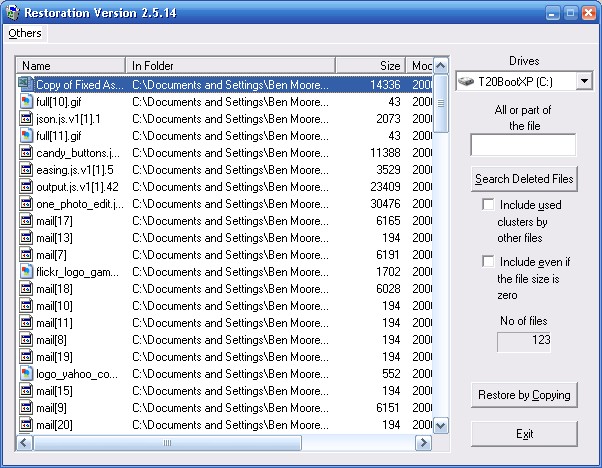
I found Restoration from Brian Kato. This is available here. It seems like there are newer versions available but none of the crumbs lead back to the author.

Anyway, Restoration works pretty good. Here's a screen shot:

Then today, I ran across Undelete Plus while reading lifehacker.

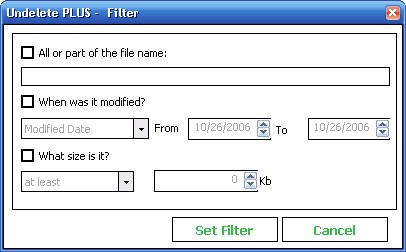
It works well also but has an easier UI. Here's a screen shot:

The big difference from Restoration is that panel on the left side. With a single click, you can subset by the file type, the folder where the file is located, or the drive. In this example, I had deleted an Excel file. By just clicking on the "MS Excel WorkSheet" in the left panel, Undelete Plus displayed the file I was looking for.

Obviously, this is a trivial example. If your real life is more complicated, there is a powerful filter capability.

Remember that undeleting files is not guaranteed. Your mileage may vary.

Sunday, November 19, 2006

Christmas Wish List 2006

Uniden TCX440 Cordless Color Handset 5.8GHz

This is another extension for our new phone system.

I got our current ones from Staples but they are out of stock right now. I'd recommend looking on eBay. Find one that has "Buy It Now." It should be less than $50 with shipping.


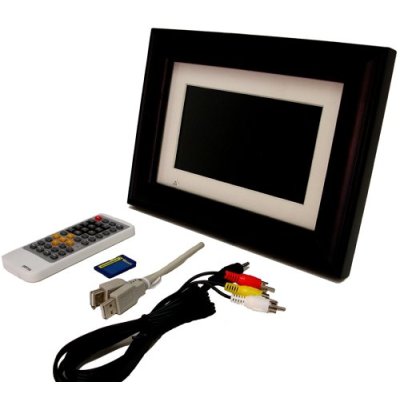
Pandigital 7" Digital Photo Frame

This is a digital photo frame like we gave Hanley when he got his Masters.

OfficeDepot has it on sale for $89.99 after a $10 rebate.


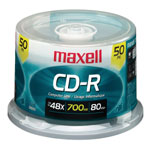
Maxell CD-R Spindle, Pack Of 50

I can always use blank CDs.

OfficeDepot has them on sale for $5.99.


Seidio Stereo Adapter

I know I've asked for and received one of these before but my new car has a place where I can plug my Treo into the radio. This will let me use my Treo to play my podcasts while I drive.

You can order it here.


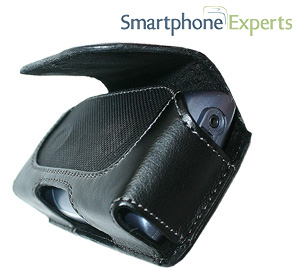
Smartphone Experts P6 Pouch Case

This is a horizontal case for my Treo.

You can order it here.


Exilim EX-Z1000 Digital Camera

This is the latest model of the same camera that I have but with more megapixels and anti-shake.

You can order it here for $279.96 with free shipping.


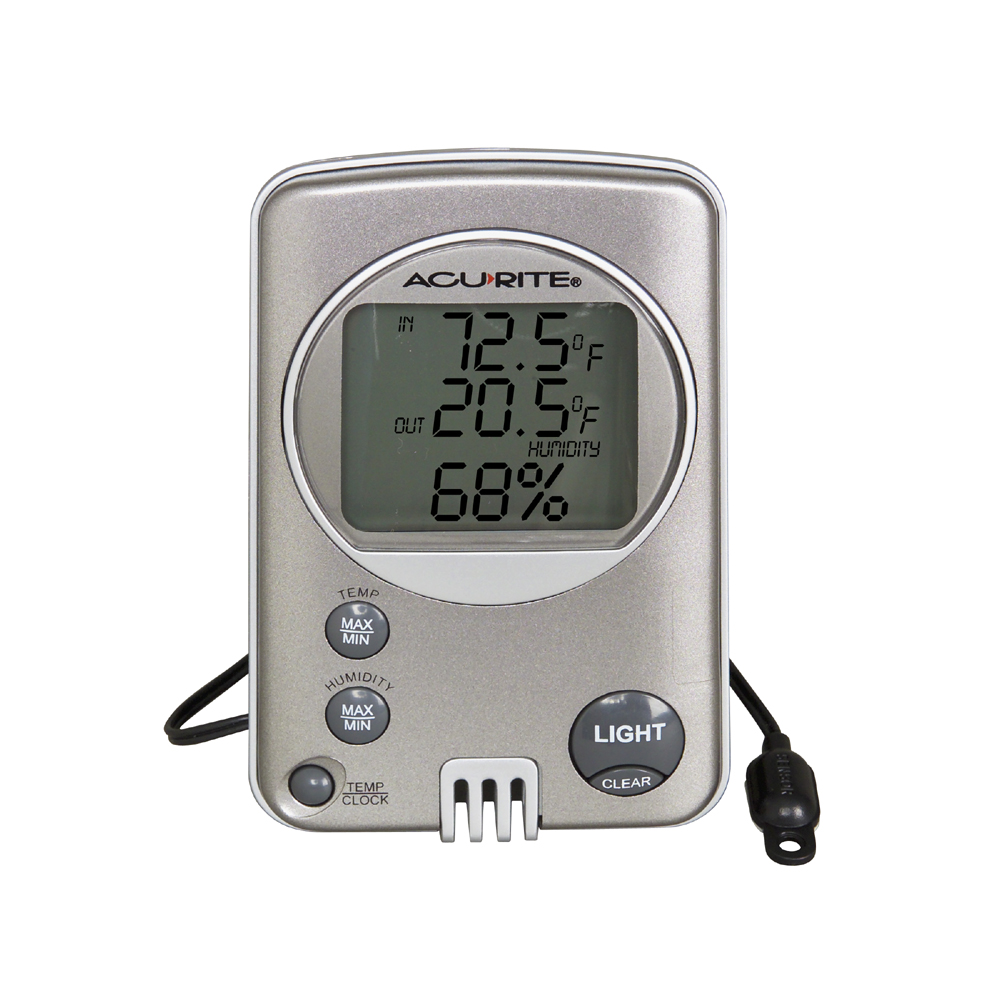
ACU-RITE Digital Thermometer with Humidity Gauge

This is an indoor-outdoor thermometer. I know we have one now but it is wireless and I have trouble keeping it working.

I found this at Lowe's for $12.97.


Update 12/25/06: Thanks Santa!

Monday, November 06, 2006

Browser Share II

Last June, I posted about the changes in the browser share on my blog. I looked again last week at the mix. I was surprised to find that Internet Explorer (all versions) had dropped from 59% to below 48%. Kind of makes you wonder if IE7 isn't too late.

Firefox has dropped 3% points (10% relative). I wonder if that's not where the IE7 growth came from.

Since both IE and Firefox declined, the usage had to go somewhere. It went to Opera and Safari, together up from 3% to 20%. That's odd.

PPTX

I went to the HP Technology Forum last month. As usual, it was excellent. They just posted the presentations to their web site and I went out and downloaded the decks for the sessions I went to and was interested in.

One of them was a .pptx file. I guessed what that was (an xml file from Office 2007) and being curious, I doubled clicked on it to see what would happen. To my surprise, PowerPoint 2003 immediately opened it (or tried to). Seems that PowerPoint 2003 has a file association for .pptx files.

As expected, PowerPoint 2003 couldn't open it. Unexpectedly, I got an interesting pop-up.

Of course, I clicked on "Yes."

This took me to the 2007 Microsoft Office system preview site where I was offered a "Microsoft Office Compatibility Pack for Word, Excel, and PowerPoint 2007 File Formats." Sure, I'll bite.

I expected some kind of viewer but again I got the unexpected. When I downloaded and installed it, I then had the ability to "Open, edit, save, and create files in the robust file formats new to the 2007 Microsoft Office system in Microsoft Office 2000, Office XP, and Office 2003."

Read that closely. With this update, you can "open, edit, save, and create" Office 2007 formats in "Office 2000, Office XP, and Office 2003."

Try it yourself.

Sunday, October 22, 2006

Untouched By Human Hands

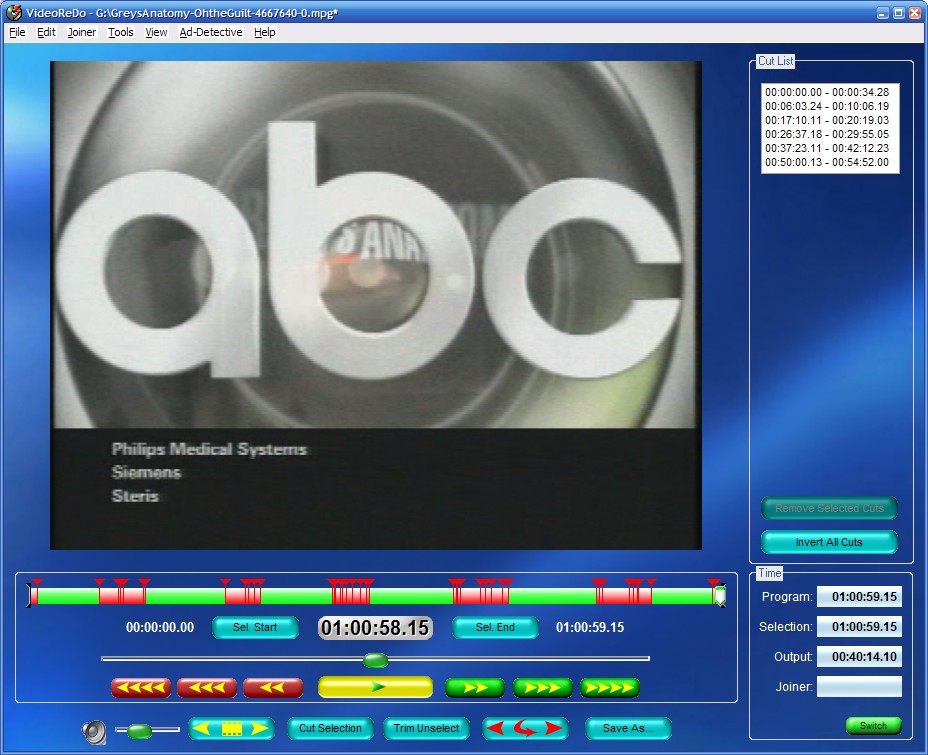
I've written about VideoReDo before. It's still one of the few software programs that I've laid out my money for and well worth it. Recently, they pushed a new update for VideoReDo Plus v2.5. The new Ad-Detective feature automatically marks commercials for deletion. You still need to review its choices but it's pretty good.

Here's a screen shot of a recent scan I did.

Friday, October 13, 2006

Damn Spam Part II

I think I've turned the corner on my recent rant on spam. Somewhere I ran across a post that said that they had blocked this new "image" spam from their Gmail by using a filter to look for "multipart/related" in the message.

I went over to K9, right-clicked on an e-mail in the "Recent Emails" tab, and went down to Blacklist/Header... and entered "multipart/related".

This works pretty good. This morning, I got 29 spams and 25 of them were caught by this Blacklist entry.

Wednesday, October 11, 2006

How To Safely Store And Manage Passwords Part III

Back in February 2006, I described what I'd done for password security using KeePass in this post.

Since then, I've made a couple of more improvements. First, it was a hassle carrying around the 128MB Hagiwara USB key. It had too little storage to use for everything so I ended up with it being a second USB key in my pocket. I copied the KeePass directory over to my 512MB USB key and created a _KeePass.bat file in the root directory to run KeePass. This has been working fine.

In the last post, I mentioned that I was using a plugin to backup the database. DB Backup is the one I'm using. DB Backup lets you specify a place to put the backup copy of the database and how many copies to keep. It also lets you run a program AFTER the backup which is key as you'll see in a minute.

However, unless you put the backup copy back on the USB key, you have to write it to the PC's hard drive, e.g. c:\. This isn't a big deal since the database is strongly encrypted but it's messy in that you leave files scattered around and if you lose your USB key and have to go back to the backup you have to think a little to figure out where you backed up last.

I wanted to ftp the backup file up to my web site. I tried some things that didn't work and finally e-mailed the author. He replied promptly but said noone else had done this and offered a couple of suggestions.

I played with this and I've figured it out.

It takes 2 files in the directory where keepass.exe runs from. Here are the 2 files. Comments/explanations are in <>s. Remove them from the actual files.

keepassftp.bat

<begin file>
ftp.exe -s:keepassftp.txt <this is references the second file>
del c:\Backup_of_Database.kdb-0 <this is optional>
<end file>

keepassftp.txt

<begin file>
open hhhhhhhh.com <name of the ftp host>
uuuuuuuu <user-id for ftp>
pppppppp <password for ftp>
type binary
cd httpdocs <directory to put the backup file in - for second level directory, repeat on separate line>
delete Backup_of_Database.kdb-3
rename Backup_of_Database.kdb-2 Backup_of_Database.kdb-3
rename Backup_of_Database.kdb-1 Backup_of_Database.kdb-2
rename Backup_of_Database.kdb-0 Backup_of_Database.kdb-1
put c:\Backup_of_Database.kdb-0 Backup_of_Database.kdb-0
quit
<end file>

Then in KeePass, go to Tools/DB Backup plugin/Set Backup Destinations. In "Destinations" put "c:\" (without the quotes) and click "Add." Then check "Additional program to be launched..." and put "keepassftp.bat" (without the quotes) in the input field. I also check "Show Window."

Note that this puts the ftp user-id and password in clear text in the directory where keepass.exe runs from. However, the backup of the database is strongly encrypted.

Saturday, October 07, 2006

Monstor Drive

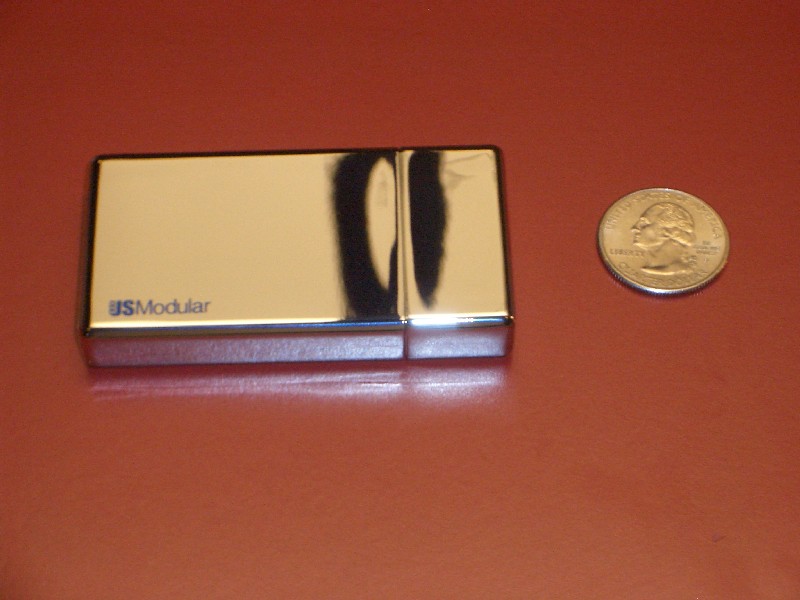
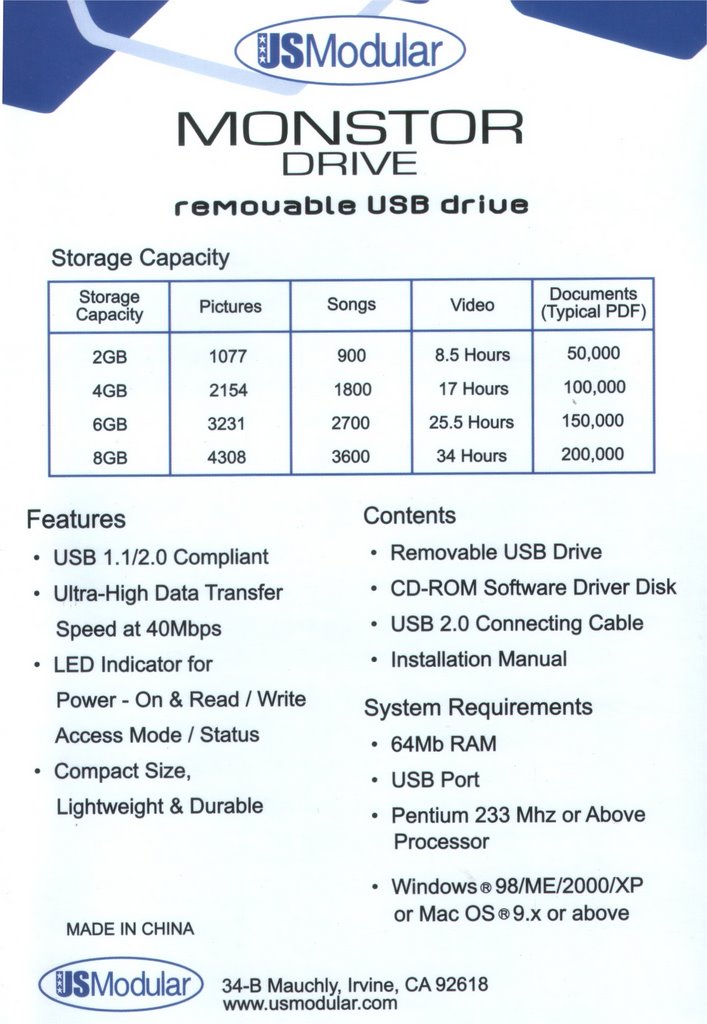
I will be traveling soon and am expecting to take more photos than will fit on my SD cards. I'll have my work laptop with me but wanted a backup for my photos while traveling. I'd looked at bigger (4GB) SD cards but came across this. It was $70 after rebates so I jumped on it. Here's the manufacturer's page.

The pictures on these pages don't do the drive justice. Here's the one I took.

Here're the specifications from the back of the package.

Friday, September 22, 2006

Now Hear This

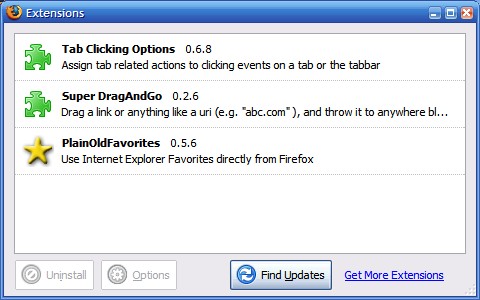
Just read this. I'm now running Firefox.

These extensions seem to overcome all the problems I had before.

Thursday, September 21, 2006

Linux Desktop - Part 1

I was at the HP Technology Forum in Houston this week. One session I was really looking forward to was "GNU/Linux As a General Purpose Enterprise Desktop: A Unique Approach."

I was hoping for some revelation. I was disappointed.

Lemme back up some first.

Earlier this month, I got this idea of playing with Linux. I had seen a guy at work running Ubuntu and I kept seeing it on digg so what the hey.

I had an old ThinkPad 600E. I figured it was so old and ThinkPads were so popular that that should be easy. A quick Google search showed something different.

It seems there is a problem with the ThinkPad's sound card. There're a gillion threads out there but here's a typical one. You don't have to read the whole thing. There is no happy ending.

So I put this idea on ice.

But, come on. SOMEBODY had to be able to get this to work. So a couple of days later, I started again.

I went to ubuntu.com. The ThinkPad 600E seemed to fit the minimum specs, e.g. 128MB. So I downloaded it and burned a CD.

I had read threads similar to this that talked about setting the "simple boot flag." I did that.

Then I booted the CD. Nice pretty screen and menu. I chose the "run the live CD" choice and ... nothing. I got a progress bar but it hung. Repeat and same results.

Back to the forums and there was some discussion of specifying some overrides on the boot command line. So reboot. Where is the boot command line? Back to the forums. Other people are asking the same question. No response other than what to specify.

There is an irc channel for support so I fired up my irc identity on gaim. Me and 600+ of my closest friends were in a chat room. In spite of that, I got my answer. All I had to do is hit ESC at the menu. Couldn't find that anywhere.

Didn't help. Still wouldn't boot. Finally one thread suggested that if you only had 192MB that you had to use the "alternate" iso. Funny, I thought 192 was greater than 128 but what did I know?

Another download. Another CD.

This time it booted - after it got an error message that it couldn't find the kernel that was specified in the boot command. That is inexcusable to me since I just took all the defaults.

It did come up and installed with a non-graphic install process. It even found and used my old IBM EtherJet card. When it finished and rebooted, it came up to a nice graphic interface. Slower than Christmas!

It downloaded several patches and installed them with just a click. That was nice and the first thing that had impressed me.

So off to fix the sound card.

I had to add a blacklist for what Ubuntu thought the sound card was. I found the equivalent of Windows Explorer and navigated to where the file should be. But the folder I needed wasn't there and the "new folder" choice was grayed out. It seems I wasn't root. None of the threads had mentioned root.

I tried to login as root. First, it said I couldn't login as root from the graphic interface. So I dropped to a shell and tried. But wait, what is the password? The install had never asked me for a root password.

BTTF (back to the forums). Surprise, I wasn't the only one asking that. No one seemed to know what the root password defaulted to. They all just suggested sudo-ing and changing the password. For the non-l337 of us, "sudo" means SuperUserDO. Seems to pretty well bypass any security.

Back into the shell to log in as root. But now I can't get back to the GUI where I knew how to navigate around.

I gave up.

Not really. Now I have some Fedora disks to try.

And I never got around to telling my experience at the Linux for the enterprise session. Later.

Friday, September 01, 2006

I'm Still Searching

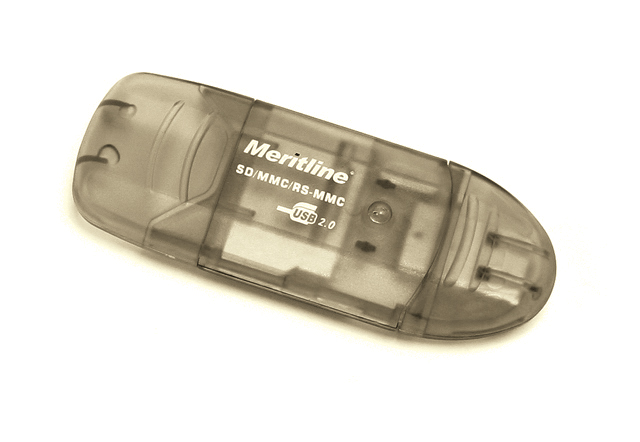
...for an SD card reader that I can keep in my pocket. You'll remember my last attempt at this with the I-Rock IR8200. Recently I came across another one from Meritline.

It was $4.95 with free shipping when I found it.

It came in today. I guess I'm expecting too much given the size of an SD card. While it's much sleeker and lighter than the I-Rock, it's really not much smaller and it doesn't have any kind of loop for keyring attachment.

Here's how they line up:

BlackBerry Connect for Cingular Treo 650


Finally, Palm and Cingular released BlackBerry Connect (BBC) for the Treo 650. I saw it in engadget yesterday. I pinged our IT guy about what version of BlackBerry Enterprise Server (BES) we have and it is v4.0 with SP2. That is enough for BlackBerry Connect.

So on the way in this morning, I dialed 611 to ask them about how much the BlackBerry Connect was. That was a trip. They finally connected me to the BlackBerry support group who actually knew what was going on. I had PDA Connect Unlimited for $39.99. BlackBerry Connect Unlimited is $44.99. I went ahead and had them convert me to that.

Then I stopped by the BES guy at work and told him I was going to do it today. He set me up an account on the BES and off I went.

The page that engadget linked to (http://www.palm.com/us/software/blackberryconnect/) was pretty good and the "Download" link took you to another page (http://www.palm.com/us/software/blackberryconnect/getitnow.html) that told you specifically what you needed.

I clicked on "Download BlackBerry Connect" and got hit with an odd question. Had "I purchased my Treo 650 smartphone on or before June 3, 2006." First I clicked that I had and was taken to a page to buy the software for $9.99. Well, you know how I feel about buying software so I backed up and clicked on the other link.

On that page, I was asked for my Treo 650 serial #. I entered it and the download began. So far, so good. So you don't have to jump ahead, it continued being good.

The download completed. I unzipped it and ran the .exe. It told me what it was going to do. It installed the BlackBerry Connect Desktop and updated the Versamail and Calendar applications on the Treo 650. It told me it would require 2 soft resets and 2 HotSyncs of the Treo 650 and it did. I didn't have to reboot the laptop.

During the second HotSync, it started asking questions about my Lotus Notes account. Unlike ExtendConnect's OneBridge that wanted the Sametime password, BBC wanted my real Notes password. I had to override the assumed BES to point to the one that my account was on but the BES guy had told me which one to specify.

Once the install finished, I couldn't immediately see anything different on the Treo 650. In retrospect, that was an indicator of how well integrated BBC is with the Treo 650. I finally just went to Versamail and the title said "BBC" but the screen was blank. My heart dropped. Just before I really panicked, the inbasket began populating!

Backing up for just a second, there is no separate application on the Treo 650 to manage the BBC. All of the settings I have found are in the menus for Versamail. Oh, some are set on the BlackBerry Connect Desktop, just like with a RIM BlackBerry, e.g. the signature.

After I had worn myself out playing with it, I thought I'd better try my POP3 account in Versamail. You guessed it. It didn't work. The network wouldn't connect. I called up the Enterprise Support at Cingular. They could immediately tell what was wrong. They had to fix something on their end. They had me turn off the phone, wait 30 seconds, and turn it back on. That got it.

The support page is here. That page includes the BlackBerry Connect Setup Guide, the BlackBerry Connect User Guide, and the Datasheet.

It worked great all day. There are a couple of wish list items but I'm not so certain that I just haven't figured them out yet. After all, I've only had it working 6 hours so far.
  • The alerts for the push e-mail are based on the Treo 650's Prefs, Sounds & Alerts, General, Application: System. If you set this to "Off," you only get a visible alert, i.e. the blinking asterisk. If you set this to "On," then the Treo 650 beeps every time you do ANYTHING. I confirmed this with Palm today.
  • You can't "File" e-mails from the BBC to your Notes server account, for example to move mail to a "Spam" folder.
  • You can't set a schedule for synchronizing like with a RIM BlackBerry or the ExtendConnect OneBridge application. This is going to be a nuisance over weekends.
If you have any ideas on these items let me know. If I make any progress, I'll post again.